The Smell of Molten Projects in the Morning

Ed Nisley's Blog: Shop notes, electronics, firmware, machinery, 3D printing, laser cuttery, and curiosities. Contents: 100% human thinking, 0% AI slop.

Category: Administrivia

Overhead

  • How Big Is Your Blog, Ed?

    So the good folks in the wordpress.com support infrastructure have been manually exporting my blog and sending me a link to the ZIP file, pursuant to the still unresolved failure-while-exporting issue. A bit of back-and-forth around the latest backup / export produced an interesting data point:

    The message about the export file not being found is simply an indicator that the huge export could not finish compiling before a more general time limit was reached — in this case because your site is easily in the top .1% for size. I will pass your suggestion for improved exporting along.

    I’m sure that’s among the freebie blogs on wordpress.com, but I never thought of myself as a member of the 0.1% club.

    Huh. Snuck up on me while I wasn’t paying attention. If I could do that with money, I’d be on to something.

    I’ve never participated in their post-a-day challenges, because that’s what I do around here. Should you find something interesting, every now and again, that’s a bonus.

    Back to the workbench…


  • Spam Volume

    Here’s what happened when I shut down comments on posts older than a few days:

    Softsolder Daily Spam Catch - 2014-04 to 2014-06
    Softsolder Daily Spam Catch – 2014-04 to 2014-06

    Apparently the spammers’ scripts can’t keep up with a short window and most comments happen in a few days, so this seems like a workable compromise. I know for a fact that spammers also employ humans to type comments, but that model doesn’t scale well at all.

    Akismet disposes of most spam automatically, but presents me with a list of comments that it can’t classify. That list amounts to 10% of the daily catch, meaning I had to process that much junk every day just to keep up. I don’t know why Akismet can’t classify total gibberish as obvious spam and automatically delete it, but that’s how Akismet works.

    As mentioned in the sidebar, send me a note to comment on an older post.

    Now you know …

  • Writing Too Much

    Being that type of guy, I make a local backup of this blog, using the Export function that normally serves to migrate blogs from WordPress.com to a self-hosted WordPress site. WordPress handles the disaster-recovery backup just fine, but cloud-based Internet companies have a tendency to just vanish without too much warning (Everpix and Code Spaces come to mind), so having my blog’s verbiage where I can touch it gives me a warm, fuzzy feeling.

    Anyhow, the most recent export failed completely, whereupon I filed a support request:

    My irregular backup involves exporting my blog, which has worked up to this evening, and tucking it away. Alas, it dies with the cryptic message This webpage is not found

    Clicking More reveals:

    No webpage was found for the web address: [... huge URL snipped...]

    Error code: ERR_FILE_NOT_FOUND

    [… snippage …]

    Can you get Export working again?

    The response included the usual reboot-that-sucker advice:

    […] If you have problems next time you export your site, try clearing your browser cache and cookies and redoing the export. […]

    But shaking the dice never really works:

    OK, I’ve done that with three different browsers: Chromium, Firefox, and Pale Moon.

    I’ve run Firefox in Safe Mode with all add-ons disabled, flushed everything, and the export function fails the same way.

    The file name you gave me does not resemble the file name / URL / whatever presented to my browser.

    That suggests the hole is not in this end of the boat.

    Which forced a bump to Level 2:

    […] I’ve been discussing this with our developers and it seems the problem is that your export file it too large. We are hoping to fix this so that it won’t be an issue for you in the future but for the time being, you will have to export date-ranged posts. […]

    I realise this isn’t ideal but it’s just a temporary workaround until this becomes a working feature in the not-too-distant future. I don’t have a date of completion at this stage.

    Translation: “It’s like that and that’s the way it is.” When there’s no “date of completion”, that means the project is not on their calendar, which means they’ll never get around to doing it. A later conversation suggests that maybe August is the target date; we shall see.

    So, how big is your blog, Ed?

    The most recent backup export XML file weighed in at 28 MB, which doesn’t seem all that large by contemporary standards. Bear in mind that the file doesn’t include any of the 4300 images that occupy just under 1 GB (of the 3 GB one gets without buying a “media upgrade”).

    It turns out size doesn’t matter:

    It’s not the size of the file that is causing problems but rather the number of posts and media files. There are over 2000 posts and over 4000 media files.

    I cannot imagine that those limits are held in 11 or 12 bit binary fields, but that would explain everything.

    Apparently, the WordPress designers never expected anybody to produce one post a day, every day since late 2009. I’m certain I’m not the most prolific blogger on wordpress.com, but perhaps I’m the only one who’s ever tried to export the results …

  • Hall Effect LED Current Control: Crisp Gate Drive Shaping

    Because the current control loop closes through the Arduino loop(), the code’s path length limits the bandwidth. Worse, the PWM filter imposes a delay while the DC value catches up with the new duty cycle. Here’s what that looks like:

    LoopStatus ILED 50 mA div - 200 50 150 25 mA
    LoopStatus ILED 50 mA div – 200 50 150 25 mA

    The setpoint current for this pulse is 200 mA, ramping upward from 50 mA. It should have started from 25 mA, but the loop really wasn’t under control here.

    The top trace goes low during the drain current measurement, which occurs just before the code nudges the gate drive by 1 PWM count to reduce the error between the setpoint and the measurement. A delay(1) after each PWM change, plus the inherent delay due to all the program statements, produces an update every 1.7 ms, more or less.

    Even at that low rate, the current overshoots by 50 mA before the loop can tamp it down again. The current varies by 200 mA for 7 PWM counts, call it 30 mA per count at the high end, so overshooting by 50 mA comes with the territory. There’s just not a lot of resolution available.

    The program reads each pulse duration and amplitude from an array-of-structs, so it’s a simple matter of software to save the gate drive voltage at the end of each pulse and restore it when that pulse comes around on the guitar again:

    	if (millis() >= (EventStart + (unsigned long)Events[EventIndex].duration)) {
    		Events[EventIndex].drive_a = VGateDriveA;						// save drive voltages
    		Events[EventIndex].drive_b = VGateDriveB;
    
            if (++EventIndex > MAX_EVENT_INDEX)								// step to next event
    		    EventIndex = 0;
    
    		VGateDriveA = Events[EventIndex].drive_a;						// restore previous drives
    		VGateDriveB = Events[EventIndex].drive_b;
    
    		SetPWMVoltage(PIN_SET_VGATE_A,VGateDriveA);
    		SetPWMVoltage(PIN_SET_VGATE_B,VGateDriveB);
    
    		delay(PWM_Settle);
    
    		digitalWrite(PIN_ENABLE_A,Events[EventIndex].en_a);				// enable gates for new state
    		digitalWrite(PIN_ENABLE_B,Events[EventIndex].en_b);
    
            NeedHallNull = !(Events[EventIndex].en_a || Events[EventIndex].en_b);	// null sensor if all off
    
    		EventStart = millis();                                          // record start time
    	}
    

    … which produces this happy result, with a different time scale to show all four pulses in the array:

    I Sense Amp  ILED 50 mA div - 200 100 150 50 mA
    I Sense Amp ILED 50 mA div – 200 100 150 50 mA

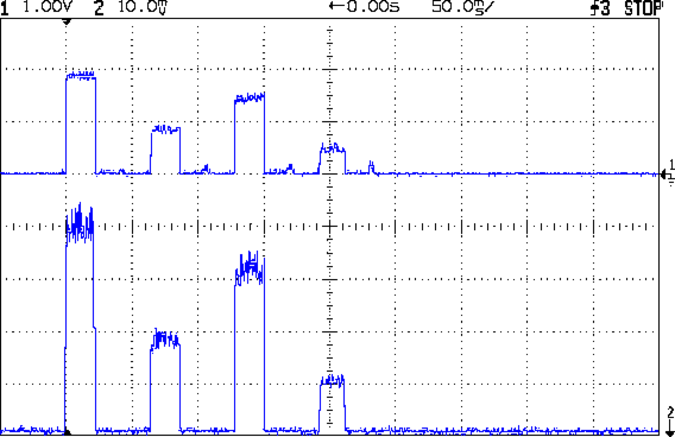
    The top trace shows the current amp output that goes into the Arduino analog input and the bottom trace shows the MOSFET drain current. Notice those nice, crisp edges with a nearly complete lack of current adjustment.

    The small bumps in the amp output just after the LED turns off happen while the the code nulls the Hall effect sensor offset. Whenever the LEDs turn off, the code nulls the sensor, which is probably excessive; it really doesn’t have much else to do, so why not?

    This trickery doesn’t improve the loop bandwidth at all, because the code must still drag the current to meet each setpoint, but now that happens only when the pulse first appears. After a few blinks, the current stabilizes at the setpoint and the loop need handle only slight variations due to temperature or battery voltage changes.

    Speaking of voltages:

    VDS ILED 50 mA div - 200 100 150 50 mA
    VDS ILED 50 mA div – 200 100 150 50 mA

    The top trace now shows the MOSFET drain voltage and the bottom still has the LED current. There’s only 650 mV of difference at the drain for currents of 50 mA and 200 mA through the LEDs, with about 1 V of headroom remaining at 200 mA.

    The power supply delivers 7.4 V to the anode end of the LEDs, so they drop 6.3 V @ 200 mA and 5.7 V @ 50 mA. Some informal knob twiddling suggests that the MOSFET loses control authority at about 6.5 V, so, given that there’s not much energy in the battery below 7.0 V anyway, the program could limit the  maximum current to 50 mA when the battery hits 7 V, regain 650 mV of headroom, and run at reduced brightness (and perhaps a different blink pattern) until the battery drops to 6.5 V, at which point the lights go out.

    There’s more improvement to be had in the code, but those pulses look much better.

    (If you’re keeping track, as I generally don’t, this is Post Number 2048: love those round numbers!)

  • Business Proposal

    This must be the season for scams, as WordPress recently forwarded this message through the Contact form:

    My name is Mary. I was just reading Personal 3D Printing: 2014 Status Report – I’m doing some private research on 3D printing and the article is great! I loved images! Great sense of humor and amazing taste in choosing images! :D

    But that is not the only reason why I’m writing.

    I’m actually writing on behalf of San Francisco Circuits, a PCB solutions provider in Northern California. I came across your site, read some interesting stuff and thought I’d come to you directly and ask if you’re interested in guest posting on Softsolder.com?

    We have writers on staff that write articles on circuit design, fabrication, assembly, and everything else PCB related.

    Let me know if you are interested!

    Thanks!

    You may recall that post:

    • The images came from stock photographs
    • It had nothing to do with PCB fabrication

    In fact, very little of what you read here has to do with PCB fabrication. Yes, I home-brew PCBs, but that’s about as non-mainstream as you can get.

    Some interesting bits of metadata:

    • San Francisco Circuits actually exists
    • The reply-to domain is in Australia: go8.com.au
    • The message came from a Croatian IP address: 212.92.194.119

    The go8 domain has a placeholder web page. The Petrovic Family Trust probably runs an email server that we’re not privy to; I’d lay long odds they’re blissfully unaware of her account.

    SF Circuits probably doesn’t know anything about her, either, and I’m absolutely certain those “staff” writers she touts know exactly squat about “everything else PCB related”.

    Should I ask her for writing samples or pointers to their work elsewhere on the Intertubes? How much would they pay to write posts for me? If I had nothing better to do, I’d string her along for a while…

    In fact, given how this spam stuff works, I suspect “Mary” isn’t her name and she’s not even female, but I’m never going to know the rest of the story.

    One point in her favor, though: she has figured out how to get paid for doing stuff on the Intertubes.

  • Firefox Accounts: Total FAIL

    So I’m in the process of installing Xubuntu 14.04LTS on a box and get to the point where I’m ready to install various daemons and utilities, then tweak their settings, so it’s time to have the new Firefox inhale all my settings from the Firefox on my 13.10 desktop, which will let me find all my blog posts with that information. This used to be a simple matter of going into the new Firefox’s Preferences, getting a one-time pairing code, typing it into the other desktop, and away it went, synchronizing the two installations.

    But, no.

    While I wasn’t watching, Firefox crept up to Version 29 and, at some point, Mozilla introduced Firefox Accounts. Why would they do that? Here’s a hint:

    Firefox Accounts is a consumer account system which provides access to services run by Mozilla, such as Firefox Marketplace and the next version of Firefox Sync.

    Firefox Marketplace? Say no more: money changes everything!

    Oh, and the “next version of Firefox Sync” is totally incompatible with the “old version” used by all existing Firefox installations.

    But it gets worse (emphasis mine):

    What if I don’t want to update to the new Sync?

    • While the old version of Sync will continue to work, the latest version of Firefox doesn’t support adding new devices to the old version of Sync. This means that you won’t be able to sync with a new device.
    • Mozilla will continue to host the old version of Sync for a limited time to allow for migration to Firefox Accounts.

    In order to sync the 14.10 Firefox, I must upgrade the 13.10 Firefox, but after I do that, none of the other boxes will be able to sync with either of them. I haven’t checked whether Firefox Version 29 is offered for the 10.04LTS installation that’s running on the LinuxCNC boxes.

    My 13.10 desktop has endured many, many, many automatic Firefox upgrades during their recent version incrementing mania and, for whatever reason, it doesn’t offer “New Sync” as an option, despite being at the same Version 29 as the 14.04 installation. This is likely a problem with some Firefox extension or another, but I disabled them to no avail.

    When all else fails, you always create a new profile by starting the Firefox Profile Manager:

    firefox -profilemanager

    That works as expected; the new and completely bare profile let me create a new Firefox Account, which entails the usual to-ing and fro-ing with emailed one-time authorizations and suchlike. OK, now I can use the shiny new Firefox Marketplace, should I so desire. Be still, my heart!

    So, we progress.

    But my original intent was to get all the setup data into the 14.04 Firefox, so (on the 13.10 Firefox) I followed the directions about transferring the old settings into the new profile, which involves tediously hand-copying a bunch of files from one cryptic directory to another. This is a brutally user-hostile operation that only geeks should endure; there is absolutely no automation to be found.

    Having a new profile, albeit without any of the old extensions, I attempt to sync my settings, only to discover that the new Firefox Sync will not synchronize my stored passwords, which was pretty much the whole point of this exercise.

    Turns out that’s deliberate:

    Firefox Sync will not synchronize your passwords if a master password is set. If you would like to continue synchronizing your passwords, try removing your master password before synchronizing.

    Now, why would I have a master password? Because, long ago, the good folks at Mozilla highly recommended it (emphasis mine):

    It takes only fifteen seconds for a prying user sitting at your computer to see the list of all the passwords you have told Firefox or Thunderbird to save. The list is shown plain as day. It can include webmail and forum passwords or email server passwords. Using a Master Password is highly recommended, to prevent such prying users from seeing the list. By setting a Master Password, anyone using your profile will be prompted to enter the master password when access to your stored passwords is needed.

    So, the new Firefox Sync requires a Firefox Account that doesn’t do anything I need done and, in order to sync my 13.10 settings into the 14.04 box, I must have a new Firefox Account and make both Firefox installations less secure.

    I think it’s possible to remove the master password, sync the stored passwords, then restore the master password. When you remove the password, you get a confirmation message:

    You have deleted your Master Password. Your stored web and email passwords, form data, and private keys will not be protected.

    Firefox allegedly uses the Gnome keyring to get a master password protecting the whole Firefox session, but displaying all the stored passwords is just a few clicks away after that; needless to say, Firefox on 13.10 doesn’t use the keyring. Given that Chromium on Xubuntu 13.10 does not use the Gnome keyring, it’s entirely unprotected. Maybe the 14.04 box will use the keyring for both browsers?

    What the hell do those people smoke? I want some of that, right here, right now!

    Verily, money changes everything…

  • Blog Summary: 2013

    I should give up on the tech and write about, oh, kittens…

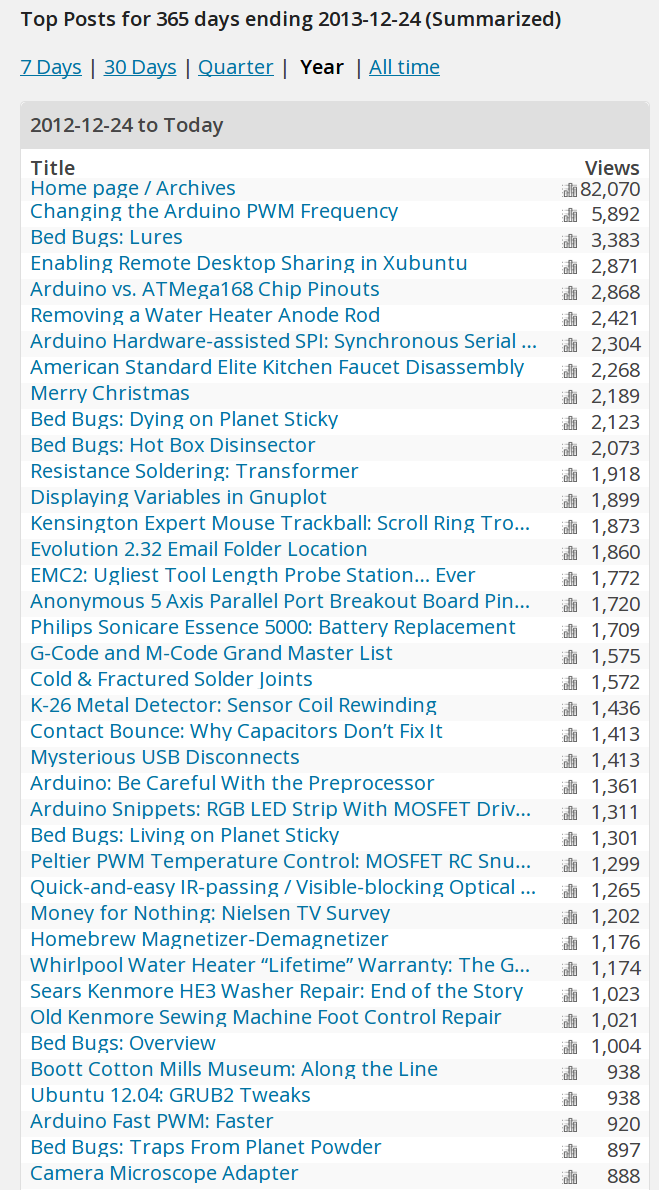
    Blog summary - YE 2013
    Blog summary – YE 2013

    If I knew anything about the Raspberry Pi’s PWM, writing about it might displace that Arduino PWM post from the top spot…

    And, once again, the fifth most popular post documents my struggle to remove a water heater anode rod. That says something, but I’m not sure what.

    The Christmas post from 2011 featuring the snow-covered pine tree evidently comes up near the top of everybody’s image search; I wonder how many homebrew Christmas cards feature it?

    Onward, into the new year…