Ed Nisley's Blog: Shop notes, electronics, firmware, machinery, 3D printing, laser cuttery, and curiosities. Contents: 100% human thinking, 0% AI slop.
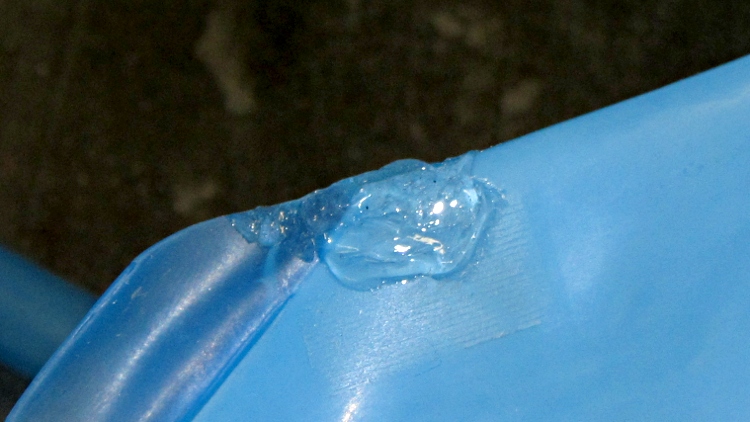
So the hydration pack I’ve been using for a few years started piddling all over the floor, whereupon some debugging revealed a pinhole leak where the large thermally sealed flange meets the bag side. Nothing, but nothing adheres to the polyethylene (or some such) bag material, but a blob of acrylic caulk (armored with a layer of electrical tape, not shown) may suffice for a while.
Hydration pack leak repair blob
I did the same thing to the other side as a prophylactic measure…
I was really, really tempted to pocket a key, just in case it might come in handy elsewhere… but I’d have to stand on the toilet and that’s just gross.
Locked access panel – with keys
Back in the day, I was third-chair lockpick in my college dorm and those piddly little locks weren’t all that difficult even then.
Combine two of those mounts with one of those couplers, add two NEMA 17 steppers (the one on the right is that one), slide a baseplate underneath, sprinkle with various screws, and shazam you get a stepper motor dynamometer:
Stepper Dynamometer
The baseplate puts the mounts 65 mm apart on the 10-32 screw centers, which is entirely a function of the coupler length, and is easy with manual CNC on the Sherline.
Changing the motors is straightforward: loosen coupler setscrew, remove base screws, slide motor away from coupler, remove mount screws. Won’t happen that often, methinks.
The general idea is to drive one stepper with a known current, apply a known resistive load to the other motor’s windings, and then plot torque vs. speed. It won’t be quite that simple, of course, but should produce some interesting data.
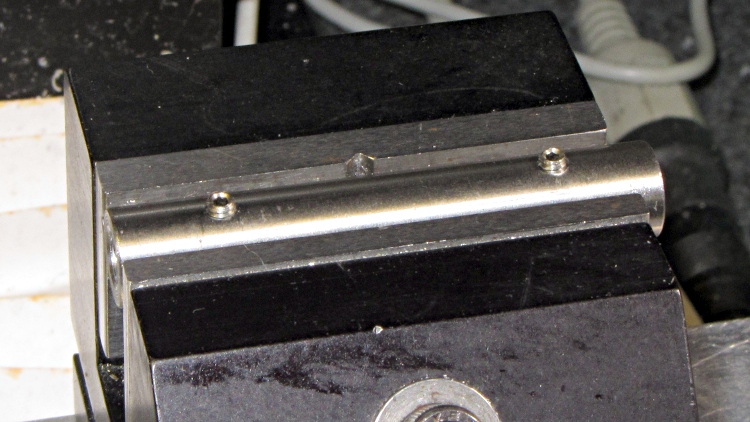
This simple cylinder connects two NEMA 17 stepper motors together:
Stepper Shaft Coupler
It’s quick-and-dirty:
Cut 2+ inches of 0.375 drill rod, face both ends
Drill #8 = 0.199 inch = 5.06 mm (because #9 = 0.196 inch = 4.98 mm is a bit too snug)
Cross-drill #41 in the Sherline (because #43 makes for stiff tapping)
Tap 4-40 for the setscrews
File off rough edges, run #8 drill through the bore to clean out tapping chips &c
Now, you probably don’t want to do this in real life, because you want a coupler with a bit of compliance to soak up the inevitable misalignment and dampen the mechanical resonances.
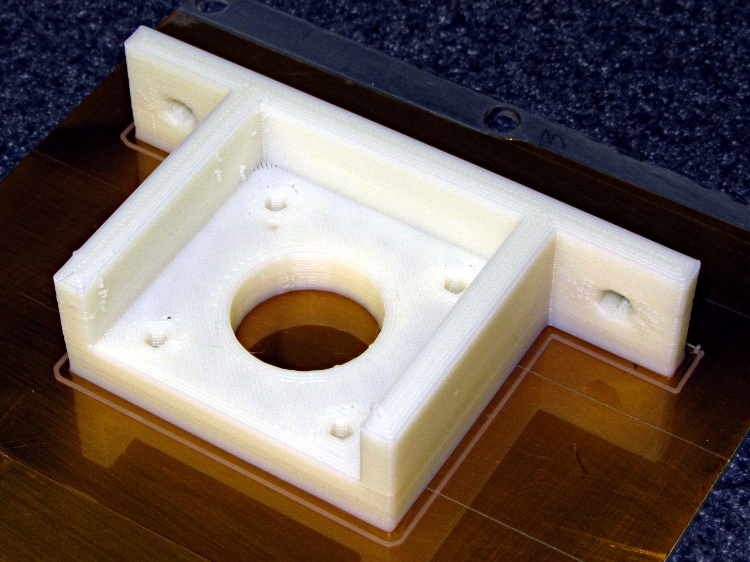
This mount will hold a NEMA 17 stepper firmly in place so I can attach things to the shaft:
NEMA 17 Mount on build plate
The baseplate holes fit 10-32 screws, which work in the plastic sheet that will go below this thing, and the motor mount plate holes fits 3 mm bolts for the motors. Washers under the heads, of course. Build with three additional shells, three solid layers, and 0.25 fill for useful rigidity; the flanges came out completely solid.
Somewhat to my surprise, this didn’t show any signs of delamination due to the rather low 190 °C extrusion temperature. The flanges aren’t all that massive, though, so perhaps trouble still lies await.
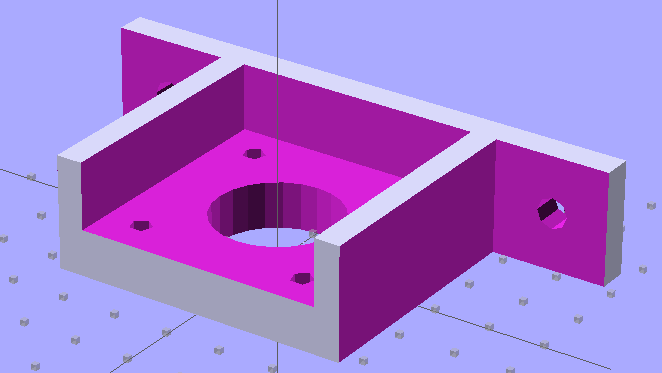
The OpenSCAD solid model uses subtractive construction, for reasons that I’ll go into later:
NEMA 17 Stepper Mount – solid model
The OpenSCAD source code:
// NEMA 17 stepper mount for dynamometer
// Ed Nisley KE4ZNU August 2011

include </home/ed/Thing-O-Matic/lib/MCAD/units.scad>

//-- Layout Control

Layout = "Build";				// Build Show

//-- Extrusion parameters

ThreadThick = 0.33;
ThreadWT = 2.0;
ThreadWidth = ThreadThick * ThreadWT;

HoleWindage = 0.3;			// enlarge hole dia by this amount

function IntegerMultiple(Size,Unit) = Unit * ceil(Size / Unit);

//-- Useful sizes

Tap10_32 = 0.159 * inch;
Clear10_32 = 0.190 * inch;
Head10_32 = 0.373 * inch;
Head10_32Thick = 0.110 * inch;
Nut10_32Dia = 0.433 * inch;
Nut10_32Thick = 0.130 * inch;

NEMA17_ShaftDia = 5.0;
NEMA17_ShaftLength = 24.0;
NEMA17_PilotDia = 0.866 * inch;
NEMA17_PilotLength = 0.080 * inch;
NEMA17_BCD = 1.725 * inch;
NEMA17_BoltDia = 3.5;
NEMA17_BoltOC = 1.220 * inch;

//-- Mount Sizes

MountWidth = IntegerMultiple(NEMA17_BCD,ThreadWidth);		// use BCD for motor clearance
MountThick = IntegerMultiple(8.0,ThreadThick);				// for stiffness

MountBoltDia = 3.0;

StandThick = IntegerMultiple(5.0,ThreadWidth);				// baseplate

StrutThick = IntegerMultiple(4.0,ThreadWidth);				// sides holding motor mount

UprightLength = MountWidth + 2*StrutThick;

StandBoltHead = IntegerMultiple(Head10_32,5);				// bolt head rounded up
StandBoltOC = IntegerMultiple(UprightLength + 2*StandBoltHead,5);

StandLength = StandBoltOC + 2*StandBoltHead;
StandWidth = IntegerMultiple(2*StandBoltHead,ThreadThick);

StandBoltClear = (StandLength - UprightLength)/2;			// flat around bolt head

MotorRecess = StandWidth - MountThick;

echo(str("Stand Base: ",StandLength," x ",StandWidth," x ",StandThick));
echo(str("Stand Bolt OC: ",StandBoltOC));
echo(str("Strut Thick: ",StrutThick));

//-- Convenience values

Protrusion = 0.1;		// make holes look good and joints intersect properly

BuildOffset = 3 * ThreadWidth;

//----------------------
// Useful routines

module PolyCyl(Dia,Height,ForceSides=0) {			// based on nophead's polyholes

  Sides = (ForceSides != 0) ? ForceSides : (ceil(Dia) + 2);

  FixDia = Dia / cos(180/Sides);

  cylinder(r=(FixDia + HoleWindage)/2,
           h=Height,
	   $fn=Sides);
}

module ShowPegGrid(Space = 10.0,Size = 1.0) {

  Range = floor(50 / Space);

	for (x=[-Range:Range])
	  for (y=[-Range:Range])
		translate([x*Space,y*Space,Size/2])
		  %cube(Size,center=true);

}

//----------------------
// Combined stand and mounting plate

module Combined() {

  difference() {
	translate([StandThick/2,0,StandWidth/2])
	  cube([(MountWidth + StandThick),StandLength,StandWidth],center=true);
	translate([-Protrusion/2,0,StandWidth - (MotorRecess - Protrusion)/2])
	  cube([(MountWidth + Protrusion),MountWidth,(MotorRecess + Protrusion)],center=true);
	translate([0,0,-Protrusion])				// pilot hole
	  PolyCyl(NEMA17_PilotDia,(MountThick + 2*Protrusion));
	for (x=[-1,1])								// motor bolt holes
	  for (y=[-1,1])
		translate([x*NEMA17_BoltOC/2,y*NEMA17_BoltOC/2,-Protrusion])
		  PolyCyl(MountBoltDia,(MountThick + 2*Protrusion));
	for (y=[-1,1])								// cutouts over bolts
	  translate([-Protrusion/2,
				y*((StandLength - StandBoltClear)/2 + Protrusion),
				StandWidth/2])
		cube([(MountWidth + Protrusion),
			 (StandBoltClear + Protrusion),
			 (StandWidth + 2*Protrusion)],center=true);
	for (y=[-1,1])								// stand bolt holes
	  translate([(MountWidth/2 - Protrusion),y*StandBoltOC/2,StandWidth/2])
		rotate([0,90,0])
		  PolyCyl(Clear10_32,StandThick + 2*Protrusion,8);

  }

}

//----------------------
// Lash everything together

ShowPegGrid();

if (Layout == "Build") {
  translate([0,0,0])
	Combined();
}

if (Layout == "Show") {
  translate([-StandWidth/2,0,(StandThick + MountWidth/2)])
	rotate([0,90,0])
	  Combined();
}
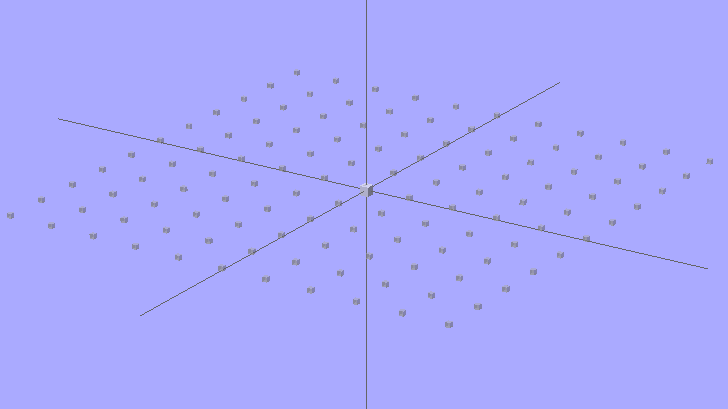
It looks about the same as before, only now it’s transparent gray. The 2-unit cube in the middle marks the “your object goes there” spot; the % prefix on the grid cubes causes OpenSCAD to ignore them.
OpenSCAD Build Surface Grid – revised
The OpenSCAD source code:
module ShowPegGrid(Space = 10.0,Size = 1.0) {

Range = floor(50 / Space);

for (x=[-Range:Range])
for (y=[-Range:Range])
translate([x*Space,y*Space,Size/2])
%cube(Size,center=true);

}

ShowPegGrid();
cube(2,center=true);
Unlike most folks, it seems, I’m a big fan of automatic wiping at the start of each print. It’s particularly important with the Z-min platform height switch, because a little ABS snot on the end of the nozzle changes the initial layer thickness in a bad way: additional height at the switch reduces the first layer thickness.
The problem is that the default wiper position at the right front corner of the platform requires a cutout in the build plates and the wiper gets in the way of the first several layers of very large objects.
I’m thinking of moving the wiper to the center rear of the platform, sticking out beyond the plates. There’s a convenient hole in the HBP platform for a mounting bracket, it won’t hit either of the Z axis rods at either end of the X axis travel, and maybe it’ll be low enough to stay out of the way.
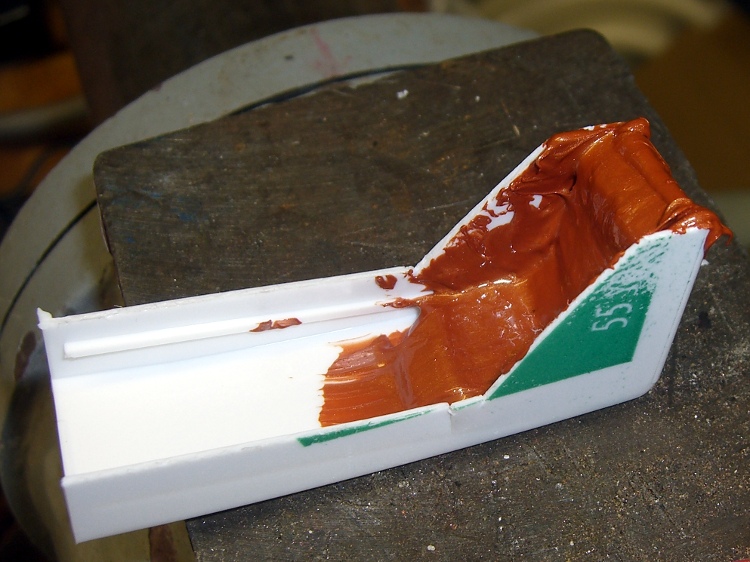
In the nature of a prototype, I smoothed a layer of Permatex copper-loaded silicone gasket compound into the corner of an old dental floss container to get a more-or-less right-angled shape:
Silicone-copper wiper – curing
That’s much thicker than the usual gasket that you’re supposed to make from this stuff, so I let it cure for a few days before popping it out, then another few days to get into that big lump in the corner. As expected, it doesn’t stick to polyethylene at all.
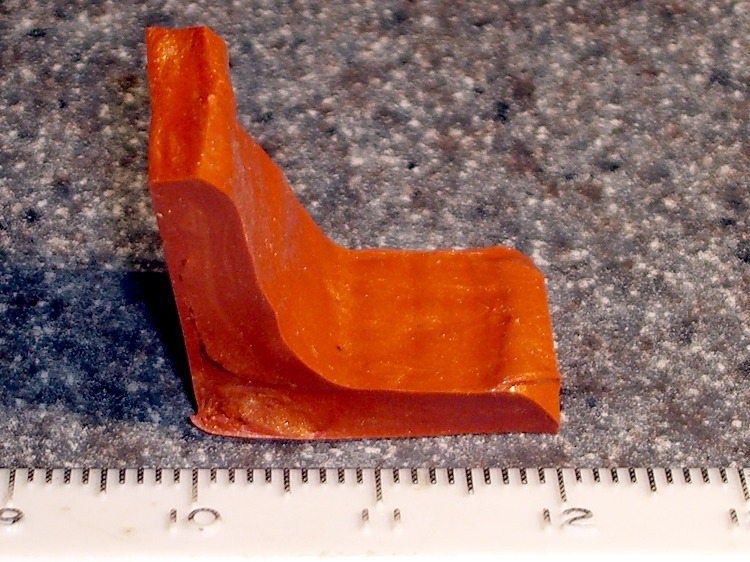
After trimming, it looks more like a wiper blade, albeit with Orc Engineering artistic sensibilities:
Trimmed wiper
It’s fairly soft stuff, which is what you want in a gasket, so it’ll require support on the bottom and back. Right now, I’m not sure which is which, which is why I troweled the stuff into the mold with one thick side and one thin side.
A simple bent-metal bracket should do the trick, with a screw in a hole punched through the wiper blade mounting the whole affair to the HBP plywood. Of course, it’d be even better with a printed bracket.
The silicone’s temperature rating goes up to 700 C for intermittent use, which sounds about right for this application.


 The Smell of Molten Projects in the Morning