Ed Nisley's Blog: Shop notes, electronics, firmware, machinery, 3D printing, laser cuttery, and curiosities. Contents: 100% human thinking, 0% AI slop.
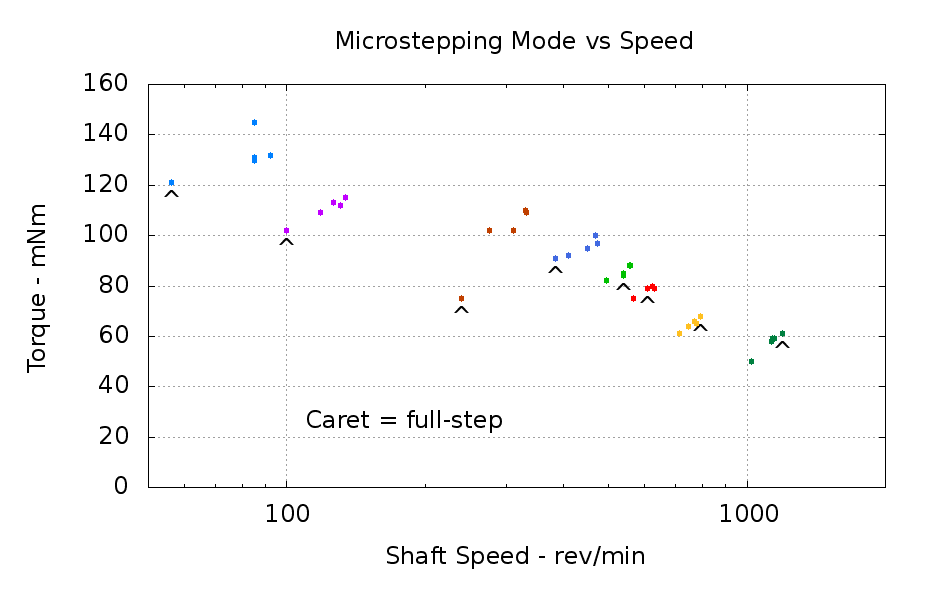
Conventional wisdom has it that stepper motor torque decreases as the number of microsteps per full step increases. One reasonably careful measurement trumps a kilo-opinion, so here’s a chart (clicky for bigger) of measurements to mull over:
Microstepping Mode vs Speed – 17PM-J034
Each group of like-colored dots marks the results for full, 1/2, 1/4, 1/8, and 1/16 microstepping with the same load resistance. The caret marks the full-step data point within each group. The load resistances range from a dead short (about 1 Ω due to winding resistance) on the left to 50 Ω on the right.
While I’ll grant the existence of the occasional data-collection error, it’s pretty obvious that:
Torque is reasonably constant regardless of microstepping mode
Full-step mode doesn’t produce more torque and, indeed, produces considerably less under heavy loads
Now, one can argue that the A4988 doesn’t operate in real full-step mode, because it energizes both windings at 1/√2 of the maximum current setting for each full step rather than energizing a single winding at the maximum current. That may be true, but conventional wisdom seems to not bother with such details when opining about torque, either…
As nearly as I can tell, 1/8 microstepping gives as much torque as you’re likely to get from the motor, while having reasonably smooth motion that avoids exciting mechanical resonances.
That chart (or one remarkably like it) will appear in an upcoming Circuit Cellar column. The tonnage of data supporting those dots suggests building an automated dynamometer would be a Good Idea …
The three pregnant does we’ve seen this season produced two pairs of twins and one set of triplets. That’s just for the does crossing our yard; we’ve seen many others around the area. The fawns are, of course, insufferably cute, but the deer have eaten everything growing on the forest floor, eaten all the tree leaves within reach, and are now working on vegetation that deer don’t normally eat.
Such as, for example, Mary’s long-suffering kiwi plants by the garden and various distasteful flowers in front of the house.
One doe maimed her starboard foreleg in an automobile collision; she was hobbling around for about a week before vanishing. Fawns, who don’t come out of the oven knowing that automobiles make fearsome predators, tend to die young; three of the seven have died on the road within walking distance of the house in the last two months.
Dead fawn at Deer Crossing sign
We recently heard a sharp bang! bang! out front, shortly followed by a police car accelerating along the road. It turns out the officer dispatched this fawn with two shots below the left ear; I think they carry a special .22 caliber gun for this very purpose. No, the fawn wasn’t standing around waiting to be shot; it had just starred in Yet Another car-on-deer collision.
This, according to the local deer huggers, is a much more desirable outcome than harvesting surplus deer and eating them. I haven’t noticed any deer huggers volunteering to pay for damages; that seems to be an externality to them.
A billboard up the road demonstrates their total lack of comprehension: a pastoral scene showing a buck (with a full rack) nuzzling a fawn. Pop quiz: who wrote that book? Bonus: how much interest do actual bucks display in their offspring at any time?
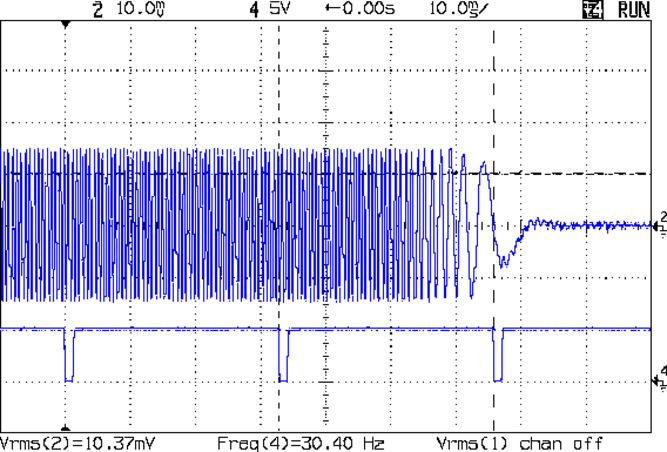
Just to see what happened, I reversed the stepper dynamometer and drove the larger (480-ish mN·m) stepper in 1/8 step mode while recording the short-circuit current from the smaller (anonymous) stepper. Slowly cranking the step frequency upward produced this trace when the stepper stalled:
48 mm motor – pullout – 30 rps
The bottom trace shows 30.4 rev/s = 191 rad/s = 1824 rev/min: a pretty good speed for a loaded stepper! The rotor began slowing just before the last sync pulse, but hadn’t lost any appreciable speed.
The current scale is 0.5 A/div (set on the Tek probe amp), which makes the winding current (500 mA/div × 10.4 mVpk / 10 mV/div) = 520 mApk. The scope’s computed rms value includes the waveform after the stall, which isn’t helpful.
The small stepper has a 2.1 Ω winding resistance, so a short-circuit load dissipates (0.52 A)2 × 2.1 Ω = 567 mWpk in each winding. The rms equivalent is half of that, so the total rms power is about half a watt, essentially all internal to the motor.
The pull-out torque depends on the peak torque load, not the rms and not the sum of the two windings, so it’s 0.6 W / (191 rad/s) = 3 mN·m, which doesn’t sound a lot for a 480 mN·m motor until you consider the screaming 6000 full step/s speed: pretty much off-scale high on most of the torque-vs-speed graphs you’ll see. Not much torque left out at that end of the curve, indeed.
In order to stall the motor at lower speeds, the load stepper must generate enough voltage into the load resistor (here, the winding resistance) to push the power/speed ratio (the torque!) above the drive motor’s ability. That implies the load stepper must always be larger than the drive stepper, which means I must conjure up a bracket for that NEMA 23 motor that’s been holding down a stack of papers on my desk…
Incidentally, the voltage required to produce that load current is 0.52 mA × 2.1 Ω = 1.1 V. The 0.58 v/(rev/s) open-circuit generator constant for the smaller motor predicts 0.58 v/rev/s × 30.4 rev/s = 17.7 V. Obviously, you can’t get from the open-circuit unloaded generator constant to the short-circuit loaded voltage… Lenz’s Law gets in the way.
Having acquired a bunch of cheap batteries from the usual eBay suppliers for my new Canon SX230HS pocket camera, it’d be nice to measure their actual (and undoubtedly pathetic) capacity, which implies the need for a holder to make firm contact with the terminals. Sounds like a 3D printer might come in handy for that, doesn’t it?
The first step: measure the dimensions of actual batteries:
NB-5L Battery Dimensions
The terminals lie on what looks to be hard 1/8 inch centers, which must be pure coincidence. They’re recessed anywhere from 0.75 mm to 1.0 mm, depending on who made the thing, into the battery’s endplate.
The Canon charger has three spring-loaded bent-wire contacts, arranged so the (-) terminal touches first as the battery slides into the holder, then (+), and finally the thermistor (T), with about 0.5 mm between each pair. That spring loading provides enough force to hold the battery in the charger.
FWIW, the thermistor is 7.5 kΩ w.r.t. (-) at room temperature.
The plan so far: use three big old gold-plated terminal pins as contacts, with flexible wires to a PowerPole connector that matches the battery tester. Cross-drill the pins to fit music wire lever springs, because the contact spacing is smaller than the smallest coil springs in the Big Box o’ Little Springs. I only need two terminals, so maybe I can force-fit a pair of small coil springs in there, which would be nice.
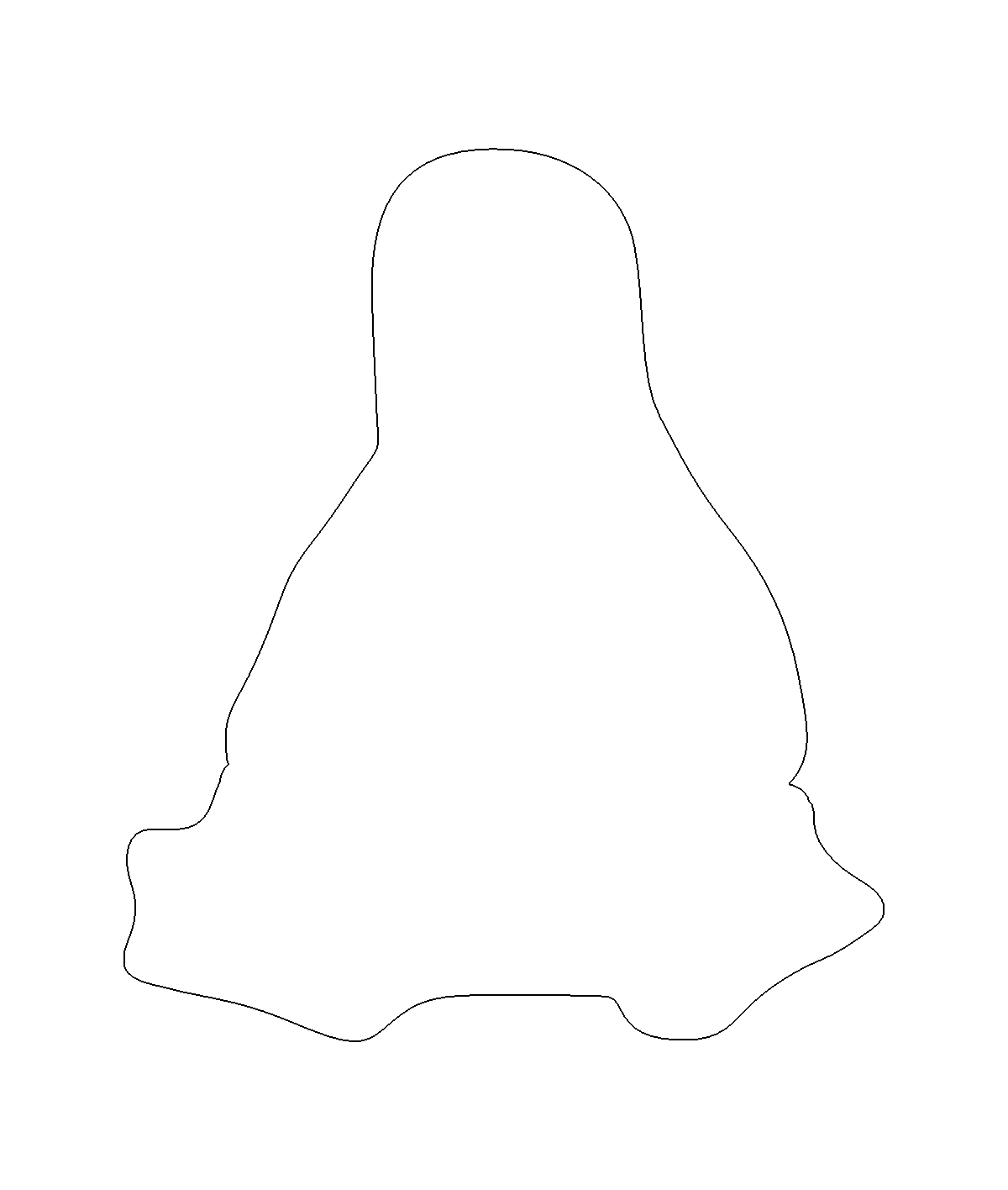
For Tux pix, one should start with Larry Ewing’s drawings; I used the EPS version to get a scalable vector drawing. Run it through The GIMP, close the outline at the flippers, fill with black, save as PNG. Then import into Inkscape, trace the outline, and something like this pops out:
Tux Outline
The reason for using Inkscape is that OpenSCAD imports a very limited subset of all possible DXF files and, while Inkscape can (with some care) produce a DXF format that OpenSCAD can import, somehow the shape lacked interior fill. Sean took a slightly different approach with the same tools and managed to create a useful DXF file that produced this chunk o’ bits:
Tux Slab – solid model
The DXF import still didn’t work dependably, so I exported the Tux Slab from OpenSCAD to an STL file; if you want to extrude a solid Tux, that’s probably the way to go. Importing the STL in the next steps worked fine.
The Parametric Cookie Cutter by nateoostendorp creates thin cutter walls by subtracting a linear dimension from the X- and Y-axis extents of the shape. Unfortunately, Tux has crazy flipper feet that didn’t respond well to that; the walls developed gaps at the inflection points from self-intersections.
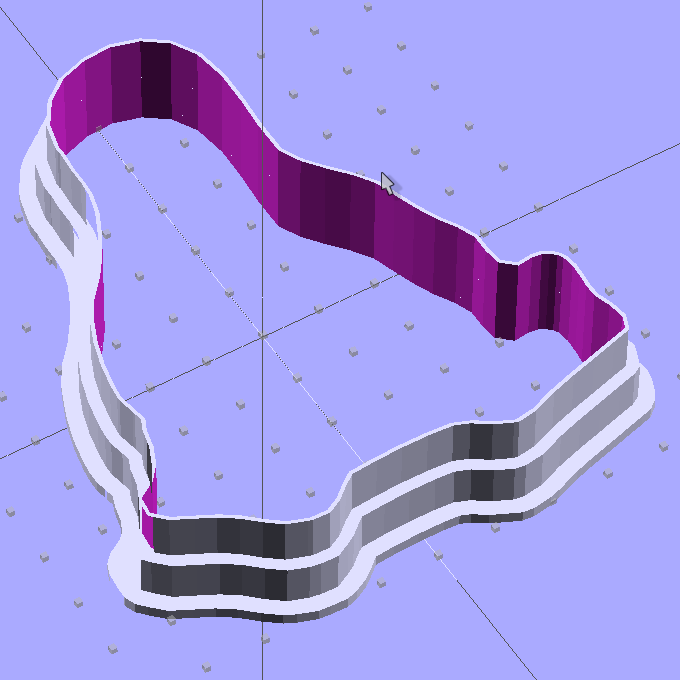
So I started from scratch with a Minkowski sum, which in this case amounts to rubbing a cylinder all over the Tux shape, then intersecting the resulting mega-penguin-post with a slab of the appropriate thickness sitting on the Z=0 plane. The Minkowski enlarges the XY outline by the cylinder’s radius and the Z thickness by twice the cylinder’s height, which I picked to be grossly excessive. Three Minkowskis produce the lip, wall, and tip of the cutter, which then stack up with a Tux-shaped hole subtracted from their midst:
Tux Cookie Cutter – solid model
The thicknesses and heights all derive directly from the extrusion parameters used to print the thing, because there’s not much room for roundoff. The middle section (the wall) is four threads wide, but Skeinforge divides the interior pair of threads into shorter sections with breakpoints at each sharp corner. The cutter section (the lip) is one thread wide, because I couldn’t get a good result with two threads.
The OpenSCAD preview has trouble with the Minkowski result and produces weird rendering glitches, but the CGAL model comes through fine. Note that Tux now has the opposite chirality, a gross oversight that became obvious only after the third cutter emerged from the Basement Laboratory. Here’s the second cutter:
Tux Cutter – reversed
Each cutter takes about 35 minutes to build, so I boiled the highlights down into a thrilling 6 minute movie.
The OpenSCAD source code, into which you can substitute your very own STL shape file:
// Tux cookie cutter using Minkowski sum
// Ed Nisley KE4ZNU - Sept 2011

//- Extrusion parameters - must match reality!

ThreadThick = 0.33;
ThreadWidth = 2.0 * ThreadThick;

function IntegerMultiple(Size,Unit) = Unit * ceil(Size / Unit);

MaxSize = 110;				// larger than any possible dimension ...

//- Cookie cutter parameters

Size = 100;

TipHeight = IntegerMultiple(8,ThreadThick);
TipThick = 1*ThreadWidth;

WallHeight = IntegerMultiple(7,ThreadThick);
WallThick = 4*ThreadWidth;

LipHeight = IntegerMultiple(1.5,ThreadWidth);
LipThick = IntegerMultiple(5,ThreadWidth);

//- Wrapper for the shape of your choice

module Shape(Size) {
  Tux(Size);
}

//- A solid slab of Tux goodness in simple STL format
// Choose magic values to:
//		center it in XY
//		reversed across Y axis (prints with handle on bottom)
//		bottom on Z=0
//		make it MaxSize from head to feet

module Tux(Scale) {
  STLscale = 250;
  scale(Scale/STLscale)
	translate([105,-145,0])
	  scale([-1,1,24])
		import_stl(
		  file = "/mnt/bulkdata/Project Files/Thing-O-Matic/Tux Cookie Cutter/Tux Plate.stl",
		  convexity=5);
}

//- Given a Shape(), return enlarged slab of given thickness

module EnlargeSlab(Scale, WallThick, SlabThick) {

	intersection() {
	  translate([0,0,SlabThick/2])
		cube([MaxSize,MaxSize,SlabThick],center=true);
	  minkowski() {
		Shape(Scale);
		cylinder(r=WallThick,h=MaxSize);
	  }
	}

}

//- Put peg grid on build surface

module ShowPegGrid(Space = 10.0,Size = 1.0) {

  Range = floor(50 / Space);

	for (x=[-Range:Range])
	  for (y=[-Range:Range])
		translate([x*Space,y*Space,Size/2])
		  %cube(Size,center=true);

}

//- Build it

ShowPegGrid();

//cube(5);

difference() {
  union() {
	translate([0,0,(WallHeight + LipHeight)])
	  EnlargeSlab(Size,TipThick,TipHeight);
	translate([0,0,LipHeight])
	  EnlargeSlab(Size,WallThick,WallHeight);
	EnlargeSlab(Size,LipThick,LipHeight);
  }
  Shape(Size);					// punch out cookie hole
}
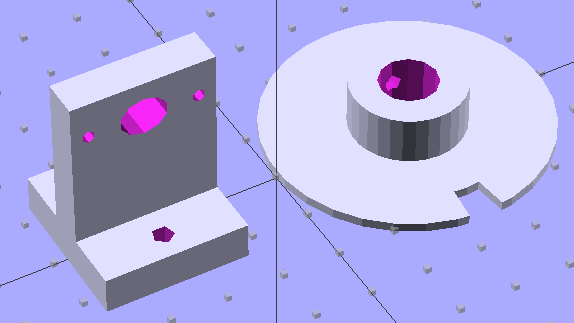
The wheel fits the shaft with a 4-40 setscrew to hold it in place. The post has 4-40 mounting holes for one of those optical switches, plus a big hole for the wiring. The solid models look about like you’d expect:
Wheel and post solid model
I located the post’s holes on the baseplate with a spindly pair of transfer punches, after transferring the wheel’s centerline by eyeballometric guesstimation:
Locating holes with transfer punches
Then aligned the baseplate on the Sherline, located the holes, and drilled ’em with manual CNC to get the proper spacing:
Drilling opto switch post holes
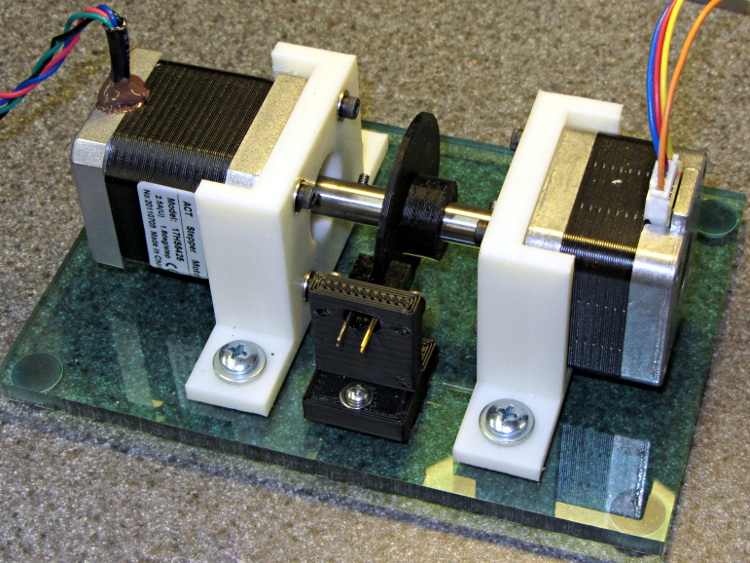
And then it went together quite smoothly:
Dyno with sync wheel
What’s really nice about 3D printing is you can build stuff like this without too much fuss & bother: figure out the solid model, walk gingerly through the software minefield, and (usually) assemble the parts later that day.
A bit of wiring to power the LED and pull up the phototransistor should do the trick.
The OpenSCAD code, including a few tweaks that rationalize spacings and sizes and suchlike:
My first pass at the NEMA 17 motor mount bracket used additive modeling, glomming together several blocks made from cube primitives:
The motor mounting plate, less five holes
Two side struts to stiffen the motor plate
The baseplate, minus two mounting holes
Makes perfect sense to me; perhaps I’m an additive kind of guy. That produced an OpenSCAD model with positive surfaces for the various parts and negative surfaces inside the holes:
NEMA 17 Mount – additive model
Compile that through CGAL, export as STL, inhale into RepG 25, and you (well, I) get what looks to be a fine object in the preview pane:
NEMA 17 RepG preview – additive
Then run it through Skeinforge 40, which emits a flurry of messages along these lines:
[19:11:08] Warning, the triangle mesh slice intersects itself in getLoopsFromCorrectMesh in triangle_mesh.
[19:11:08] Something will still be printed, but there is no guarantee that it will be the correct shape.
[19:11:08] Once the gcode is saved, you should check over the layer with a z of:
[19:11:09] 0.165
The usual searching suggested that sometimes Skeinforge has problems with coincident surfaces, such as between the motor mount plate and the struts and the base, or coincident edges where two blocks abut. Judging from the messages, the problem ran all the way to the top of the struts. Oddly, Skeinview didn’t show any problems, so the G-Code was (presumably) OK.
Error messages tend to make me twitchy, though. I modified the OpenSCAD code to extend the struts 0.1 mm inside the base and ran that model through the software stack, which produced not a single complaint about anything, anywhere.
Success!
However, painful experience has caused me to review the G-Code for every single object with the Skeinlayer plugin, which, right on cue, revealed this interesting anomaly:
NEMA 17 Mount – Skeinview – Bad gcode
That happened for every layer in the square motor mount plate: the lower right corner is fine, the upper left seems to be the negative of the actual solid model. The holes are filled, the plate is empty. The Skirt outline ignores the smaller holes, goes around the large one, and continues on its merry way.
I putzed around for a while and discovered that the failure seems acutely sensitive to the side strut thickness. Yeah, like that makes any sense.
Any variations along those lines that I tried generated either:
A flurry of mesh error messages, with seemingly good G-Code
No error messages whatsoever, with totally bogus G-Code
Running the STL files through netfabb Cloud Service produced the same diagnostic for both:
Number of holes: 3
Number of shells: 2
Mesh is not manifold and oriented.
 We unfortunately have not yet enough experience with the occuring server loads, that we can securely enable shell merging at the moment.
However, the repaired STL files produce correct G-Code: evidently OpenSCAD spits out bogus STL data. The fact that RepG/SF treats the two files differently suggests improved diagnostics would be in order, but that’s in the nature of fine tuning.
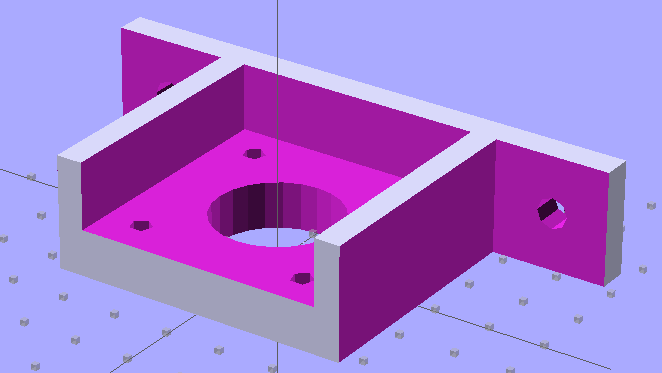
So I junked the additive model and went subtractive, chewing the recesses out of one huge block:
NEMA 17 Stepper Mount – solid model
That worked:
Number of holes: 0
Number of shells: 1
Mesh is manifold and oriented.
I like processes that don’t emit error messages or result in mysterious failures, although it’s not obvious that subtractive modeling will always produce correct results. Heck, I’m not sure I can think in terms of negative volumes all that well.
The OpenSCAD code for the additive model, with a highlight on the conditional that will trigger the two errors:
OpenSCAD depends on CGAL for all the 3D heavy lifting, which puts any STL export problems further upstream. I suppose I could open Yet Another RepG ticket to get better diagnostics, but the others haven’t gotten much attention so far and I suppose it’s not really their problem anyway.









 The Smell of Molten Projects in the Morning