The Smell of Molten Projects in the Morning

Ed Nisley's Blog: Shop notes, electronics, firmware, machinery, 3D printing, laser cuttery, and curiosities. Contents: 100% human thinking, 0% AI slop.

Author: Ed

  • KG-UV3D GPS+Voice: Box

    The previous iteration of GPS+voice interface boxes came from the Sherline CNC mill, with a considerable amount of huffing & puffing. I got the Thing-O-Matic to simplify that process…

    The general idea is to build a box that clips onto the radio in place of the standard battery pack. External power comes into the box and goes directly to the radio’s battery contacts; this will pose a problem with the Wouxun KG-UV3D, because it wants 7.2 V rather than the stepped-up 9 V from the Li-Ion packs I’ve been using. I think a three-wire power cord is in order: +9 V for the interface, +7.2 V for the radio, and common.

    The box also interfaces with the radio’s mic and speaker jacks. Last time around, I made a gluing fixture to keep the plugs in alignment while the epoxy cured around the plugs in the plate, but maybe I can simplify that with 3D printing. Plastic will be better in one respect: the shells of the two plugs must be electrically isolated.

    This first-pass (*) approximation shows the three tabs on the pack that engage the radio’s base:
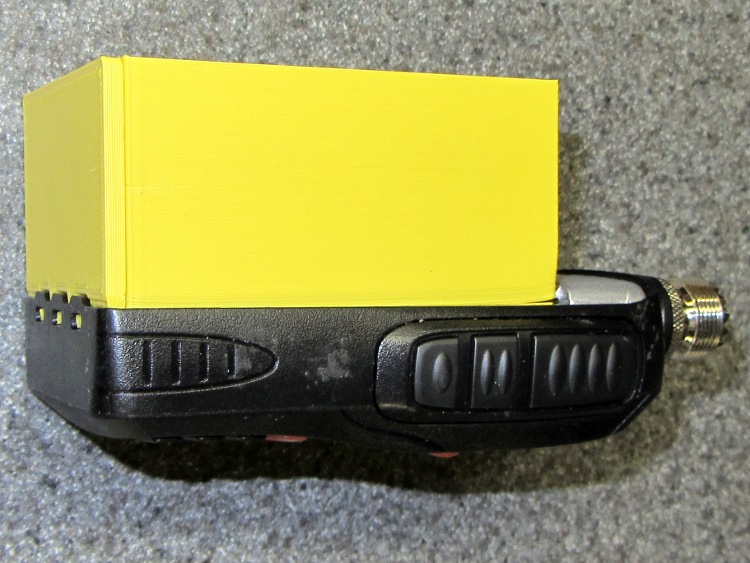
    KG-UV3D Interface Box prototype - right side
    KG-UV3D Interface Box prototype – right side

    A detail of those tabs, as seen from the bottom:
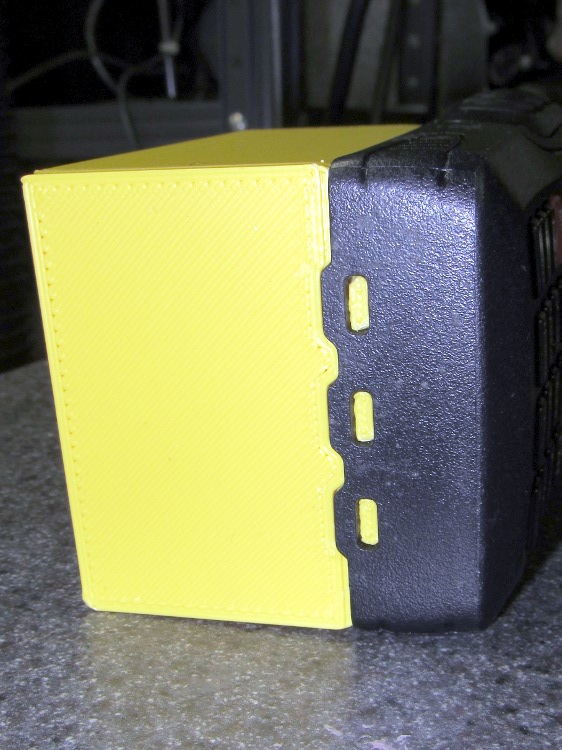
    KG-UV3D Interface Box prototype - end tabs
    KG-UV3D Interface Box prototype – end tabs

    The ICOM IC-Z1A battery pack had a set of slip-in alignment features that held the pack on the radio, so two strips of tape sufficed to hold the interface box in place. Each Wouxun battery pack includes a spring-loaded latching mechanism that engages a pair of ramped tabs on the radio body that hold the pack against the spring-loaded battery contacts. That means I must come up with an actual latch of some sort to oppose the contact springs, but I haven’t figured that out yet.

    The solid model, with the plug mounting plate floating beside it, looks like this:

    Case Solid Model - Tab End View - Fit
    Case Solid Model – Tab End View – Fit

    Tomorrow, the solid modeling…

    * It’s actually the third printing of the bottom plate with the three tabs and the base plate with the battery contacts. That’s how I figured out the 0. 5% shrinkage thing.

    [Update: The sketch with the dimensions emerged from beneath a pile o’ stuff…]
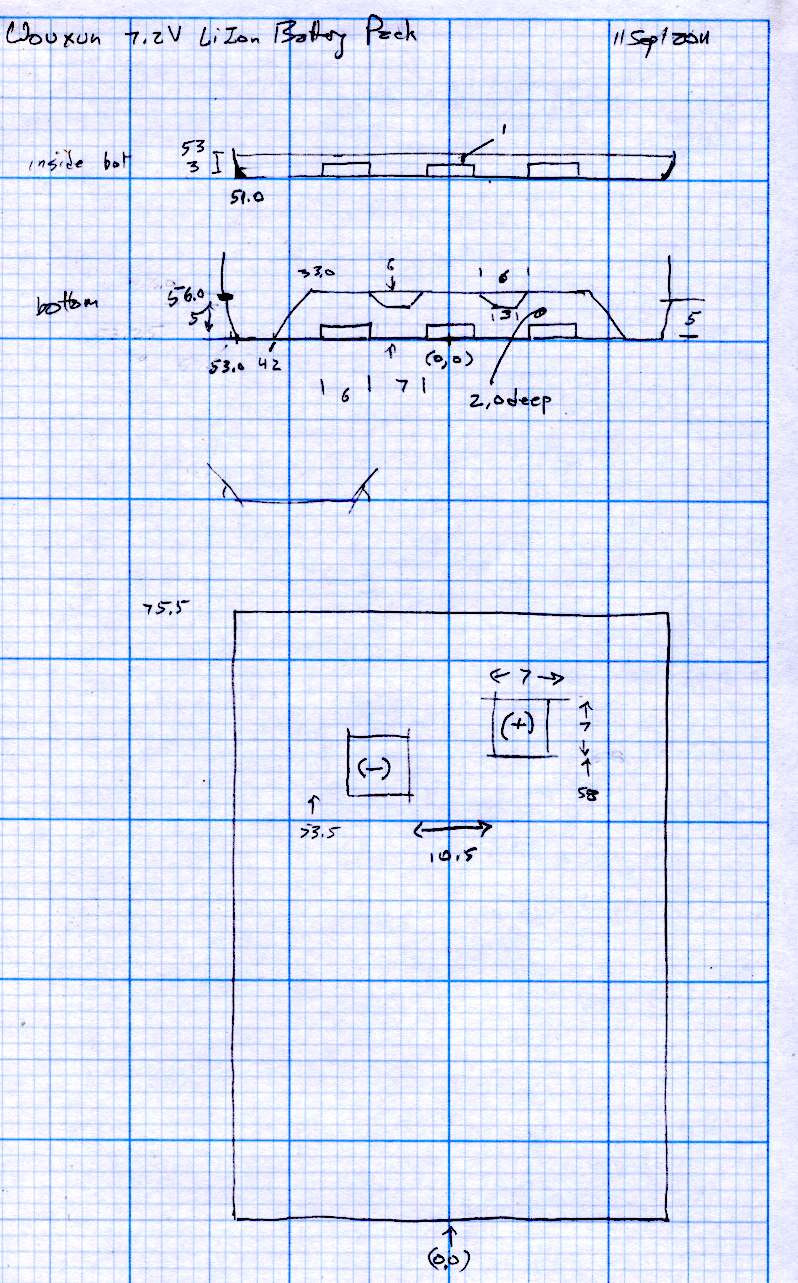
    Wouxun KG-UV3D Battery Pack Dimensions
    Wouxun KG-UV3D Battery Pack Dimensions


  • GPS+Voice Interface for Wouxun KG-UV3D: Circuit Hackage

    Having had my old ICOM IC-Z1A HT stop working, most likely due to the innards finally shaking loose, I replaced it with a Wouxun KG-UV3D dual-band radio. Unfortunately, the interface box I designed to connect the Byonics TinyTrak 3+ GPS modem, the helmet earbud/mic, and the external battery pack to the Z-1A doesn’t work with the Wouxun. It’s all different:

    • Mechanical interface to the radio
    • Battery voltage
    • Power control
    • Mic level
    • PTT interface

    I modified the interface box from my bike thusly:

    GPS-HT Interface Circuit Mods for Wouxun
    GPS-HT Interface Circuit Mods for Wouxun

    Because the KG-UV3D uses the Kenwood HT interface with a single ground for mic, speaker, and PTT functions, there’s no need for galvanic isolation; all the optoisolators & the audio transformer will Go Away when I rebuild it.

    The plug connections:

    Wouxun KG-UV3D Mic & Speaker Jacks
    Tip Ring Shell
    3.5 mm +5 V Mic audio PTT
    2.5 mm Speaker audio Buttons Ground

    One distressing change: the IC-Z1A mic power was 3.5 V behind 400 Ω = 6 mA into an optoisolator LED, but the KG-UV3D puts 5 V behind 50 kΩ = 100 µA into a dead short. I think the voltage will suffice to drive a logic-gate MOSFET to switch the power through a PNP transistor, but, for the moment, I hotwired OK1 and “control” the interface power by unplugging the external battery. The radio runs from its own snap-on Li-Ion pack.

    The PTT now has a separate logic wire and is no longer multiplexed as a DC current on the audio line. The hack on OK2 was the easiest way to make that happen on the existing board, but the TT3 PTT Out line can  probably drive the PTT directly.

    I’m not happy with the audio levels; the KG-UV3D requires more mic gain (which change doesn’t appear in the mods) and more TT3 output. Having tediously calibrated the TT3 for the IC-Z1A, I’m not looking forward to doing that again. I still like using an analog multiplexer to switch the audio signal, though, because it doesn’t mix the machine noise with the voice transmissions.

    Bungied GPS Interface Box
    Bungied GPS Interface Box

    There being no way to mount the box on the radio and no way to control the interface power if I did, I simply lashed it to the side of the pack holding the radio behind the seat. Obviously, that can’t last forever…

    I think the KG-UV3D stuffs more RFI into the mic circuit, because that box is now in the only position that doesn’t result in weird voice audio dropouts. Given the precarious nature of the thing, though, I must look again after getting it in a box on the radio.

    Earth to amateur radio manufacturers: seen from out here, it’d be perfectly OK to standardize some of this stuff!

  • Thing-O-Matic: Small Features

    Strainer - knob perimeter thread
    Strainer – knob perimeter thread

    It seems most of the stuff I build with my Thing-O-Matic involves small features and thin sections that bump hard against the minimum possible sizes. I’ve found that forcing critical solid model dimensions to be integer multiples of the the extrusion width or thickness stabilizes the whole idea→model→G-Code→object chain by encouraging Skeinforge to make the choices I prefer.

    Or perhaps I’m just constraining my choices to make Skeinforge happiest. One can view reality in many ways…

    Anyhow, my OpenSCAD programs tend to have these lines up near the top:

    ThreadThick = 0.33;
    ThreadWidth = 2.0 * ThreadThick;
    
    function IntegerMultiple(Size,Unit) = Unit * ceil(Size / Unit);
    

    The ThreadThick parameter matches the Skeinforge thread thickness parameter(s) and the 2.0 matches the w/t setting(s). Those correspond quite closely to the actual printed results, as tediously verified through many measurements. Throughout the rest of the OpenSCAD program, I compute the dimensions of key features using those sizes as building blocks.

    The IntegerMultiple function returns the next higher multiple of the basic Unit that’s greater-than-or-equal-to the desired Size. Feeding in the thread thickness or width as the Unit ensures that the result will be an integer multiple of the smallest-possible dimension and won’t be smaller. The integer limit happens automagically, because the printer can’t lay down anything else, but a less-than-possible size can cause features to (unpredictably, in my experience) vanish without warning. This way your model reflects the printed reality and Skeinforge seems more likely to produce a predictable result.

    So the parameter controlling the thickness of a flat sheet might look like:

    PlateThick = IntegerMultiple(2.0,ThreadThick);
    

    Given ThreadThick = 0.33, the sheet will be 7 layers thick = 2.31 mm. If the sheet must not exceed 2.0 mm, however, then you need a similar function with floor(), which may eradicate very small features.

    This trick seems most useful for thin wall sections, because the wall width directly affects the fill:

    • Less  than 1 thread width can’t be built
    • Exactly 1 thread width is the thinnest possible wall
    • Widths between 1 and 2 thread widths may be either, depending on surrounding features
    • Exactly 2 thread widths produces a nice wall
    • Widths between 2 and 3 thread widths can’t fill properly
    • Exactly 3 thread widths fills perfectly
    • Over 3 thread widths generally fill properly

    So making the rim around a recessed lid become an integral number of thread widths, with a minimum width of 1.0 mm, looks like this:

    LidMargin = IntegerMultiple(1.0,ThreadWidth);
    

    With a 0.66 mm thread width, the nominal wall is 1.5 threads wide and could print as either 1 or 2 threads, depending on other factors. Rather than leave the results to chance, I force the solid model wall to be exactly 2 threads wide to make the printed result come out at 1.32 mm. Because I don’t care exactly how wide the lid margin is, as long as it’s at least one thread, that’s fine with me.

    Generally, the values come from computations based on other dimensions, so quantizing the results keeps the printed result stable over small variations of those inputs.

    If I ever get around to changing the nozzle to from 0.5 mm to 0.4 mm, I’ll probably change the thread dimensions to 0.25 mm x 0.5 mm (keeping the same 2.0 w/t ratio). A 1.0 mm wall would then still be exactly 2 threads wide and come out looking exactly the same, but with a total width of 1.00 mm.

    That’s the intent, anyway.

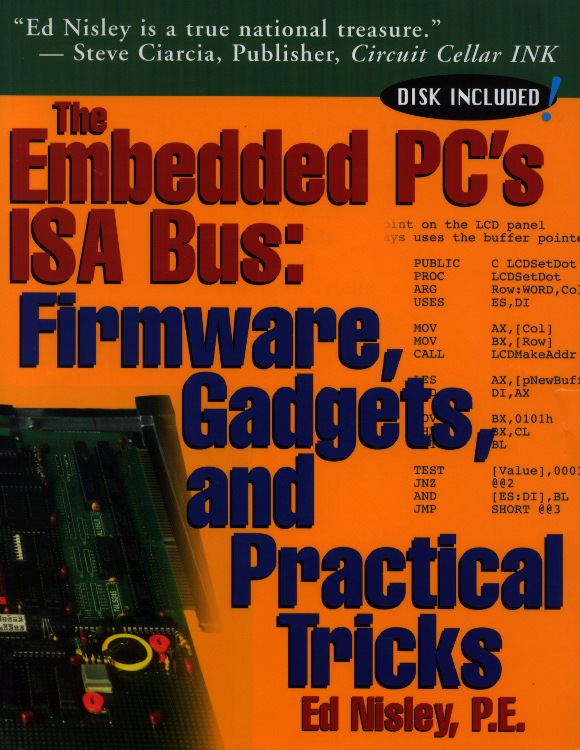
  • The Embedded PC’s ISA Bus: Firmware, Gadgets, and Practical Tricks — Unleashed

    ISA Bus Book - Front Cover
    ISA Bus Book – Front Cover

    A long time ago, in a universe far away, I wrote a book that (barely) catapulted me into the ranks of the thousandaires. Time passes, companies get sold / fail / merge / get bought, and eventually the final owners decided to remainder the book; the last royalty check I recall was for $2.88.

    Anyhow, now that it’s discontinued and just as dead as the ISA bus, I own the copyright again and can do this:

    They’re both ZIP files, disguised as ODT files so WordPress will handle them. Just rename them to get rid of the ODT extension, unzip, and you’re good to go. Note, however, that I do retain the copyright, so if you (intend to) make money off them, be sure to tell me how that works for you.

    The big ZIP has the original pages laid out for printing, crop marks and all, so this is not as wonderful a deal as it might first appear. The little ZIP has the files from the diskette, which was unreadable right from the start.

    Words cannot begin to describe how ugly that front cover really is, but Steve’s encomium still makes me smile.

    The text and layout is firmly locked inside Adobe Framemaker files, where it may sleep soundly forever. The only way I can imagine to get it back into editable form would be to install Windows 98 in a VM, install Framemaker, load up the original files, and export them into some non-proprietary format. Yeah, like that would work, even if I had the motivation.

    If you prefer a dead-tree version, they’re dirt cheap from the usual used-book sources. Search for ISBN 1-57398-017-X (yes, X) and you’ll get pretty close.

    Or, seeing as how I just touched the carton of books I’ve been toting all these years, send me $25 (I’m easy to find; if all else fails, look up my amateur callsign in the FCC database) and get an autographed copy direct from the source. Who knows? It might be worth something some day…

    The back cover has some useful info:

    ISA Bus Book - Back Cover
    ISA Bus Book – Back Cover
  • 3D Printing Presentation for Long Island LUG

    Helmet mirror mount - 3D model - Fit layout
    Helmet mirror mount – 3D model – Fit layout

    The folks at the Long Island LUG asked me to give my DIY 3D Printing & the Makerbot Thing-O-Matic presentation, which will happen 11 October at 8 pm. Details & directions at lilug.org.

    Should you happen to be in the area that evening, drop in and pick up a tchotchke!

  • Kensington Trackball: Scroll Ring Tweakage

    Of late, something in the pile of input devices attached to my main PC has been feeding occasional bursts of upward scroll commands, to the extent that editing long documents (something I do quite a bit of, oddly enough) was becoming difficult. By process of elimination, the culprit turned out to be the Kensington trackball to the left of the keyboard: unplugging it eliminated the problem.

    Having had problems with that thing before and having gotten considerable feedback from other folks, I had a general idea of how to proceed: putz with the IR emitter-detector pair, but not very much. A side view of the pair with the trackball cup and scroll ring removed:

    Scroll ring IR emitter-detector quadrature pair
    Scroll ring IR emitter-detector quadrature pair

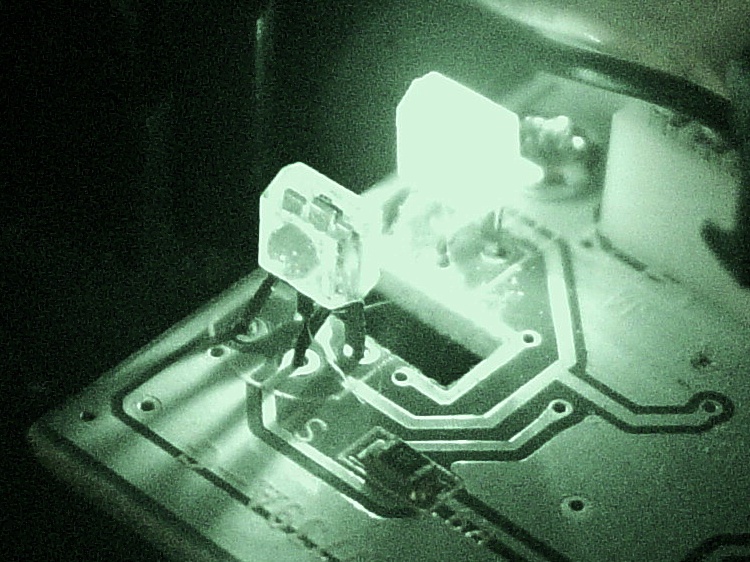
    Now, what’s weird about that setup is that the detector lens seems to be pointing in the wrong direction: away from the emitter’s lens. You know it’s the detector because it’s tinted: there’s no point in filtering the emitter’s output (although I have seen gray-tinted IR LEDs, which I think is just to mark them as different from visible LEDs). Here’s proof: a pure IR picture from my Sony DSC-F717 in Nightshot (a.k.a. IR) mode through a Hoya R72 visible-block filter:

    Quadrature pair in pure IR
    Quadrature pair in pure IR

    Some possibilities for why the detector is backwards:

    • It’s an assembly screwup (unlikely, but possible)
    • That’s not a lens, it’s a locating tab (different on emitter & detector?)
    • The backside uses the metal conductors as slits to enhance the signal (my favorite)

    Here’s a grossly image-enhanced blowup of the detector from that picture:

    Quadrature IR detector in pure IR - detail
    Quadrature IR detector in pure IR – detail

    The case becomes transparent in pure IR, so you can see the metal lead frame inside. I think they’re using the gaps between the leads to enhance the contrast of the scroll ring edges passing through the beam: absolutely no IR except when a gap aligns with a scroll ring opening.

    [Update: read the comments for a different interpretation; I’m probably wrong.]

    That would also explain why the pair seems so sensitive to alignment: there’s very little IR hitting the detector, because the IR illumination passes through the transparent-to-IR case and vanishes out the far side, with only a tiny bit reflected to the sensor!

    Anyhow, I pushed the pair minutely toward each other, just enough to feel the leads bend, and put everything back together. So far it seems to be working perfectly, but it’s done that before …

    [Comment: Jack found a different solution that might produce better results:

    Just got the Problem with my Scroll ring and thanks to your blog i digged a bit deeper.

    here is the Solution for my Problem:

    I checked this while connected and i found that bending worked only for a short time, so i gave a closer look to the contacts.

    all are soldered from below BUT two contacts are on the upper side.
    normaly solder should flow into but here it was as simple as just resolder the receiver with enough solder an its now working again. (btw a realigned the magnet to get a better response)

    Thanks
    Jack

    ps. the size of the cuts in the metall from the scroll ring differ, a shame for that price..

    It’s certainly worth trying, particularly when your Expert Mouse trackball isn’t working…

    Update: Nine years in the future, a real fix appears!

  • Monthly Aphorism: On Money

    • Money changes everything

    As evidence, read any of the myriad stories about folks receiving a huge slug of windfall cash that subsequently destroys their life. You won’t find many success stories, although that may be a sampling problem.

    My buddy Aitch observes that a corporate implosion often occurs just after completion of a shiny new headquarters building in a far-off location. That construction marks the revenue peak, not necessarily the point where profit margins stabilize.

    And, of course, carpet-bombing a company with C-notes doesn’t guarantee future success, as witness recent developments in the solar power field.

    But the lure of easy money can be exceedingly hard to resist…

        Oh Lord! Let me prove
        Winning a Powerball game
        Would not change me. Much.

    Government-run gambling boils down to a regressive tax on folks who weren’t paying attention during the probability and statistics part of math class. The fact that (some part of) the “profits” go into school budgets  demonstrates that irony remains an integral part of the modern world.