The Smell of Molten Projects in the Morning

Ed Nisley's Blog: Shop notes, electronics, firmware, machinery, 3D printing, laser cuttery, and curiosities. Contents: 100% human thinking, 0% AI slop.

Author: Ed

  • Comment Spam: Industrial Sabotoge?

    A new trend in the comment spam load that you don’t see involves a concerted attempt to post irrelevant comments with links to obviously junk websites. The URLs vary, but each site’s links cross-connect it with its peers in weird ways that recycle the few real pages of content (such as it is). However, every page of every website included a specific company’s contact information at the bottom, which is truly weird; usually junk websites have no identifying marks.

    Generally I ignore such crap, but after discarding several dozen such comments over the course of a week, I called the company’s phone number and, amazingly, spoke to an actual person. It’s impossible to determine honesty over the phone, but he certainly sounded like a real human who’s busy running a small company and who has no idea what’s going down.

    Perhaps his internet marketing company has gone mad?

    Perhaps unsurprisingly, that series of spam comments stopped immediately after I hung up the phone. I’ll never know the end of the story, even though we all know the motivation: money changes everything.

    The last time this sort of thing happened, I also talked to a pleasant voice who observed that it could well be an unscrupulous competitor (or a hired “internet marketing” company) trying to smear their good name. There’s no way to confirm or deny such a claim, of course.

    For what it’s worth, Akismet reports these statistics since Day Zero of this blog, back in December 2008:

    • 42,143 total spam
    • 1,982 total ham
    • 225 missed spam
    • 10 false positives
    • 99.47% accuracy rate

    It’s currently killing over 150 spam comments every day, leaving only a dozen or so for me to flush. The lure of easy money seems irresistible, so there’s no hope of a letup.

  • Acceleration Doodles

    The SJFW firmware applies acceleration limiting to motion along all four axes, so I did some doodling to come up with reasonable starting values, based on various measurements and estimates.

    Some useful background, with lots more tucked away in odd corners around here:

    Relevant equations for uniform linear acceleration a, velocity v, distance x, time t:

    • v2 – v02 = 2·a·x
    • x = (1/2)·a·t2

    X and Y Axes

    Current values with low-resistance / low-inductance steppers:

    • Decent printing at 30 mm/s = 1800 mm/min
    • Not-so-good printing at 60 mm/s = 3600 mm/min
    • Point-to-point non-printing motion at 100 mm/s

    Given that the (beefed up) XY motors can accelerate their respective stages to 100 mm/s without acceleration, assume they can reach a top speed of 200 to maybe 250 mm/s within 1 mm of travel. That’s half of the belt pitch and seems like an overestimate of the actual distance.

    • (250 mm/s)2 = 2·a·(1 mm) → a = 31000 mm/s2
    • (200 mm/s)2 = 2·a·(1 mm) → a = 20000 mm/s2

    The 1 kg Y axis probably can’t accelerate as fast as the 0.4 kg X, despite having a bigger motor.

    Z Axis

    Currently traverses at 17 mm/s = 1000 mm/min, OK at 25 mm/s, fails at 33 mm/s = 2000 mm/min. That’s with the original high-resistance / high-inductance MBI stepper without acceleration limiting.

    Typical motion will be 0.25 mm, which is 15 ms at 17 mm/s: it’s not a performance limitation.

    It’s a 4-start leadscrew that moves 8 mm/rev, so 0.25 mm = 0.031 rev. At 1/8 stepping = 1600 step/rev, that’s 50 steps. Allow 20 steps = 0.1 mm for acceleration to top speed:

    • (33 mm/s)2 = 2·a·(0.1 mm) → a = 5400 mm/s2
    • (17 mm/s)2 = 2·a·(0.1 mm) → a = 1400 mm/s2

    E Axis

    Currently runs at about 2 rev/min = 0.033 rev/s with a 9.6 mm effective drive diameter = 1 mm/s for the incoming filament. Reversal runs at 15 to 25 rev/min for about 100 ms, figure 20 rev/min = 0.33 rev/s = 10 mm/s, without acceleration limiting. The extruder has 7:51 geardown, so the motor runs at 14.6 rev/min and reverses at 146 rev/min = 2.4 rev/s = 500 step/s, none of which seems particularly challenging even in 1/1 step mode (due to using a defunct MBI stepper driver).

    That reversal speed tends to leave blobs at the end of threads, but it’s not clear the motor is up to much more acceleration. It’s a relatively small stepper, so a larger one with with more current may be needed for enough torque for faster reversal action.

    Allowing 0.1 mm to reach full speed:

    • (1 mm/s)2 = 2·a·(0.1 mm) → a = 5 mm/s2
    • (10 mm/s)2 = 2·a·(0.1 mm) → a = 500 mm/s2

    None of these numbers should be cast in stone!

    The original doodles:

    TOM286 Calibration Doodles
    TOM286 Calibration Doodles
  • Thing-O-Matic: Software Shuffling

    Having installed the 0.4 mm nozzle, being desirous of turning on Skeinforge’s Dimension plugin, and being therefore faced with recalibrating everything, I figured I might as well update all the software to the current versions before commencing. While this adventure turned out well in the end, it required fitting together a large number of moving parts; this is an overview / core dump of how I picked the pieces.

    Note: I’ve certainly gotten something wrong in this mess, perhaps drastically so. Let me know, but consider the entire assembly before suggesting a different part.

    ReplicatorG is the default Thing-O-Matic printer interface and consists of two parts: the Java-based Arduino-IDE-oid program on the PC and the firmware inside the printer (which is, itself, in two parts divided: Motherboard and Extruder Controller). Their mutual interfaces have become sufficiently tangled that they must upgrade in lockstep, as no versions have backwards or forwards compatibility.

    RepG 29 bundles Skeinforge 35 as its default STL-to-G-Code converter, with 40 and 41 as experimental (i.e., largely unsupported) options. Skeinforge 35 is now ten full clicks behind the current version, came out on 6 November 2010, and has a number of fairly well-known problems. Although I understand the need for upstream stability, SF35 long ago fell off the thick edge of the wedge and even SF41 is 8 months old.

    I have been using RepG with SF40 for much of the last year, having figured out the parameters essentially from scratch to suit my admittedly oddball configuration & preferences. Regressing to SF35 lacks appeal and, frankly, going just one click up to slightly less obsolescent SF41 isn’t in the cards, either. I have no particular aversion to using bone-stock Skeinforge, fetching the most current version as needed, and controlling the update process myself.

    RepG manages Skeinforge profiles that collect its myriad parameters into named groups that can be selected for a particular build. RepG also includes a Print-O-Matic function that pre-sets / computes key SF parameters based on desired extrusion parameters within a given profile, but (apparently) only for SF35. Given that I want a single printer configuration that produces known-good results, putzing around with multiple profiles isn’t of interest and I’m unwilling to use an obsolete version of Skeinforge to sidestep them.

    FWIW, I eventually figured out that having one master set of start.gcode, end.gcode, and alterations.csv files with symlinks from the profiles helps keeps the clutter under control, which is particularly important given the complexity of my homing routine. RepG doesn’t create symlinks in new profiles, but after you’re used to it, you just create a profile, blow away the copies, and install the symlinks.

    So RepG really doesn’t provide what the B-school gurus called a compelling value proposition for my use case. The STL models I cook up using OpenSCAD emerge properly scaled, properly located, properly oriented, and ready to build. All I need is a way to convert those STL models to G-Code, then send G-Code to the printer. Everything else RepG does simply gets in the way.

    The dealbreaker, however, was having RepG 28 occasionally freeze up solid, to the extent of requiring a killall java in a console window to dispose of the corpse. RepG 29 misbehaved the same way and both failed on two different machines with two different versions of Ubuntu. The hole may have been in my end of the boat, but I didn’t devote much time to diagnosing / reporting the problem, given the attention given to the last batch of tickets I opened.

    Freed from the confines of RepG, Skeinforge turns out to be not nearly so intimidating as one might be led to believe. Admittedly, a bit of option pruning helps, but after that you’re left with knobs controlling those things that need controlling.

    Slic3r seems to be the up-and-coming alternative G-Code generator. The key problem, at least for the objects I create, is the lack of an equivalent to the Skeinforge Cool setting that enforces a minimum time for each layer. Printing exactly one of those caliper repair parts at 15 seconds per layer worked perfectly: no fans, no slumping, no hysteria. One could, I suppose, slow the motion throughout the entire object to make the top come out right, but that’s not appropriate for large parts with small towers. Slic3r is under heavy development, so who knows what the New Year will bring?

    Incidentally, my experience with those earlier caliper parts explains why I’m unwilling to regress Skeinforge just to use RepG.

    Kliment’s Printrun wins, hands down, as the RepRap UI that does what I need and very little else. The pronterface GUI presents a reasonably clean, single window printer interface. Even better, from my perspective, is the pronsole command-line interface; I generally do everything except actually print while sitting upstairs in the Comfy Chair, so being able to drive the printer with a command-line interface through a simple SSH session (shared keys, an oddball port, no root logins) is wonderful.

    The pronterface G-Code preview pane has its origin at the lower-left corner, presumably from its RepRap lineage, while RepG puts (0,0) at the build platform’s dead center. Centering the origin avoids baking the platform dimensions into the G-Code and greatly simplifies the overall alignment, but the mismatch is not insuperable: I can ignore the preview and the printer will be perfectly happy.

    However, MBI firmware expects to receive a binary version of the G-Code file, known as S3G and documented there, from the PC through the UI. As nearly as I can tell, nobody else does it that way and none of the other UIs do S3G translation / compilation. Not using RepG means ditching the MBI firmware inside the printer in order to use any other UI.

    The current state-of-the-art open-source 3D printing firmware seems to be the Marlin branch of the Sprinter family tree. Its main appeal, at least for me, is motion control with acceleration limiting, which should resolve most of the problems with the MBI stock firmware and greatly enhance the printer’s performance & print quality. For more details on that topic, search herein for acceleration. Alas, Marlin runs on “single processor electronics” controllers, categorically excluding MBI’s Motherboard + Extruder Controller configuration.

    While I could junk the entire contents of the Thing-O-Matic’s electronics bay and pop in a RepRap RAMPS 1.4,  Generation 6, or Generation 7 electronics package just to use Marlin, that bears a strong resemblance to bad craziness, even by my relaxed standards (although, should another MBI stepper driver board go toes-up, it’ll make considerable economic sense). That comparison of various electronics packages may be helpful. The temperature sense hardware for most of those boards uses thermistors, which means tearing apart the Thermal Core to replace a thermocouple that delivers perfectly accurate results with a thermistor requiring fiddly calibration, which I’d be willing to do, but …

    As it turns out, ScribbleJ’s SJFW firmware runs on both RepRap and MBI electronics, includes acceleration limiting, features automagic endstop position settings for both min & max positions, and seems reasonably stable. It has some quirks (no G0 rapid motion, no G28 homing, weird G-Code parsing assumptions / failures), but on the whole it does what’s needed.

    So the software stack, from the top down, consists of:

    • OpenSCAD
    • Skeinforge
    • Printrun UI — pronsole / pronterface
    • SJFW Motherboard firmware
    • Bone-stock MBI Extruder Controller firmware

    Everything requires configuration / tweaking before plastic starts oozing out of the nozzle. Then I can begin retuning the printing process.

    The overall workflow looks like this:

    • Edit/save OpenSCAD program in external editor on right-hand portrait monitor
    • Watch/examine OpenSCAD 3D rendering on left-hand landscape monitor, iterate
    • Export to STL on file server
    • Convert to G-Code using Skeinforge on PC at printer via SSH
    • Examine proposed G-Code paths with Skeinlayer (set to auto-display), iterate
    • Load/print with pronsole / pronterface via SSH/VNC
    • Trot downstairs to watch the show

    For the relatively simple models I build, CPU load generally isn’t a big deal. I’ll move the Skeinforge config from ~/.skeinforge to the server and add symlinks to it from both PCs, so as to run SF from either PC with the same settings and eliminate synchronization hassles.

    I’ll be writing up my scattered notes over the next week or so…

  • Merry Christmas

    Happy Holidays to one & all!

    Snow-covered pine tree
    Snow-covered pine tree

    That’s the great tree in our neighbor’s front yard, taken on the crystal-clear morning following Snowtober, carefully framed and cropped to exclude all the snapped branches and downed trees surrounding it. Beauty is where you find it…

    [Update: Starting in early December 2012, this post had plenty of hits based on search terms similar to “pine tree”, “pictures of snow covered trees”, and suchlike. If you arrived here by search engine: welcome! Do, please, note the Creative Commons copyright terms described there. If you want the high-resolution image, that link also has the contact form. Thanks…]

  • Sony NP-FS11 Batteries: After the Aftermarket

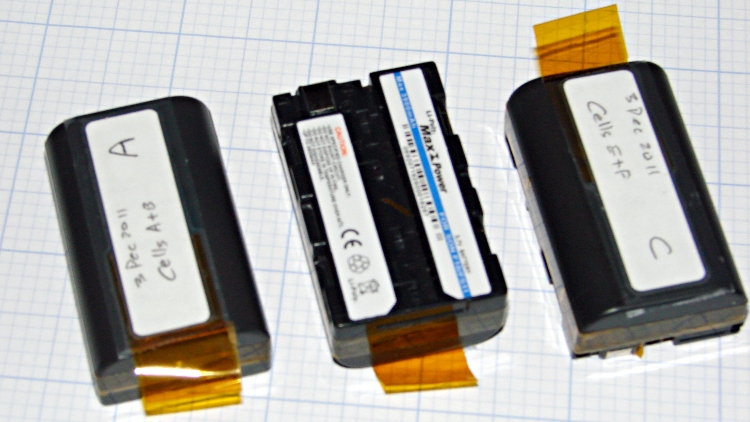
    The batteries I rebuilt for our much-beloved Sony DSC-F505V camera back in early 2010 have faded away with constant use. Having already sawed the cases open, rebuilding three of them didn’t pose much of a challenge; this time I added a short tab of Kapton tape to help extract them from the camera socket.

    Rebuilt NP-FS11 batteries
    Rebuilt NP-FS11 batteries

    Three batteries seems to be about the minimax for ordinary use:

    • One in the camera
    • One in the carrying case
    • One in the charger

    You (well, we) can’t keep track of more than three: it always seems one battery gets overused and another gets lost in the dark. We’ll see how three works in practice; there’s a set of six more raw cells lying in wait.

    The new batteries produced these results on their first two charge-discharge cycles:

    Sony NP-FS11 2011 Packs - First Charges
    Sony NP-FS11 2011 Packs – First Charges

    One battery didn’t come up to speed on the first charge, but after that they’re all pretty close.

  • Ativa Cordless Phone Batteries

    These were cheap-after-rebate phones with 2/3 AA NiCd cells that lasted nigh onto five years. We rarely talk on the phone and even more rarely use these, so they’re on the dreaded continuous trickle charge and low usage cycle that kills rechargeable batteries. Of course, they’ve been sitting there for five years…

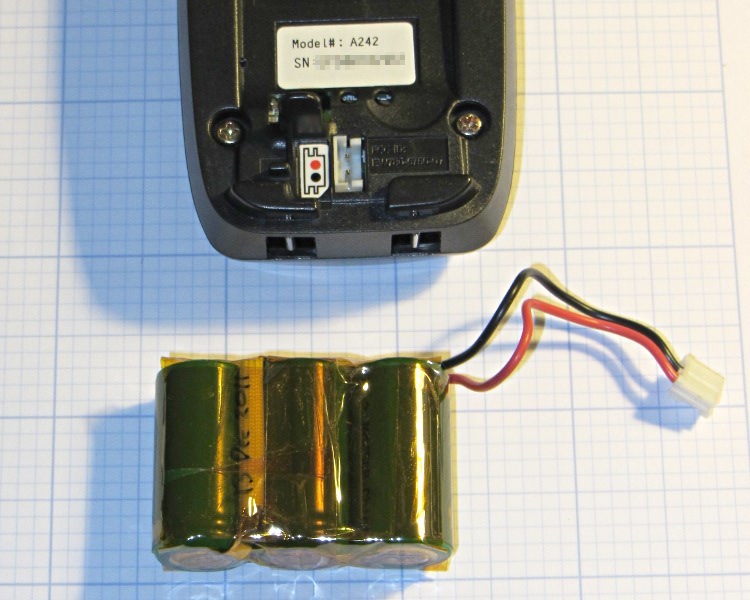
    The rebuild was no big deal, although I had to replace the original 360 mAh NiCd cells with 650 mAh NiMH cells (with tabs) because that’s what’s available nowadays. The trickle rate will be even lower relative to the capacity, of course, which may or may not be a Bad Thing.

    The packs contained a simple fuse consisting of a thinned section of the usual nickel strap connecting two cells, covered with a fiberglass sleeve under the shrink overwrap. For lack of anything smarter, I harvested the fuse and soldered it in the new pack. although the risk of a catastrophic short seems fairly low:

    NiCd pack with thin-wire fuse
    NiCd pack with thin-wire fuse

    The final result looks about as you’d expect, complete with obligatory Kapton tape wrap:

    Ativa phone - rebuilt battery
    Ativa phone – rebuilt battery

    The old pack is kaput and new pack delivers pretty nearly its rated capacity at an arbitrary 550 mA discharge (which is, admittedly, a bit stiff for the old pack):

    Ativa phone battery tests
    Ativa phone battery tests

    That takes care of one phone… the other one’s probably in the same condition, so I have enough cells to rebuild it, too.

  • Skeinforge: Simplified Plugin Selection Page

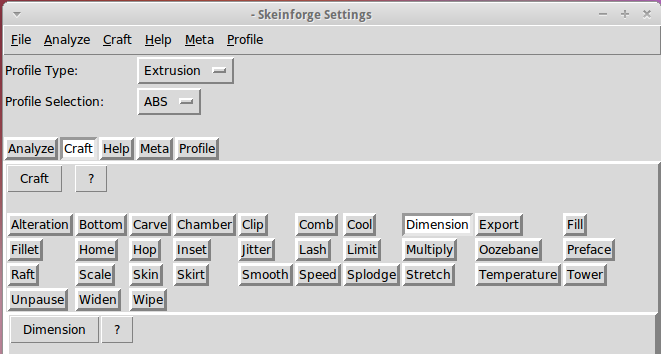
    The Skeinforge Craft window presents a formidable array of buttons, one for each possible plugin:

    Skeinforge standard
    Skeinforge standard

    I’ve disabled many of those plugins because, for example, limiting Z-axis speed isn’t relevant on my printer. If you’re sure you won’t use some of the plugins, remove them by editing /where-it's-installed/skeinforge_application/skeinforge_plugins/profile_plugins/extrusion.py thusly…

    In getCraftSequence(), located at about the midpoint of that file, duplicate the line that lists the plugins and add an octothorpe (OK, a hash) to make one line a Python comment, then remove the plugins you don’t care about from the other line:

    def getCraftSequence():
    	'Get the extrusion craft sequence.'
    #	return 'carve scale bottom preface widen inset fill multiply speed temperature raft skirt chamber tower jitter clip smooth stretch skin comb cool hop wipe oozebane splodge home lash fillet limit unpause dimension alteration export'.split()
    	return 'carve scale preface inset fill multiply speed temperature raft skirt jitter clip smooth skin cool dimension alteration export'.split()
    

    This being Python, do not change the indentation. If you get overenthusiastic and toss something useful overboard or just pine for the Good Old Days, swap the octothorpe to your modified line to restore the original plugin assortment.

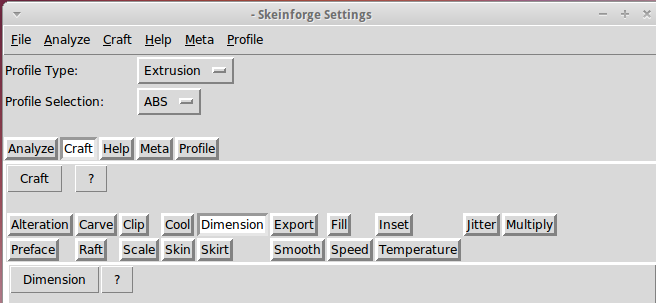
    Save the result and you’ll see only the useful buttons:

    Skeinforge simplified
    Skeinforge simplified

    There, now, wasn’t that easy?