This is probably a browser compatibility issue:

Let’s refresh the page to see if a better combination comes up:

I took that to mean I’m not sufficiently human to post a comment…
The Smell of Molten Projects in the Morning
Ed Nisley's Blog: Shop notes, electronics, firmware, machinery, 3D printing, laser cuttery, and curiosities. Contents: 100% human thinking, 0% AI slop.
This is probably a browser compatibility issue:
Let’s refresh the page to see if a better combination comes up:
I took that to mean I’m not sufficiently human to post a comment…
While changing to black filament, I measured the force required to pull the (natural PLA) filament through the translucent guide tube arching over the M2’s chassis from the spool to the extruder:

A strike-anywhere kitchen match (bet you can’t buy those any more!) provided more than enough heat to bend the end of the filament into a loop suitable for the pull scale:
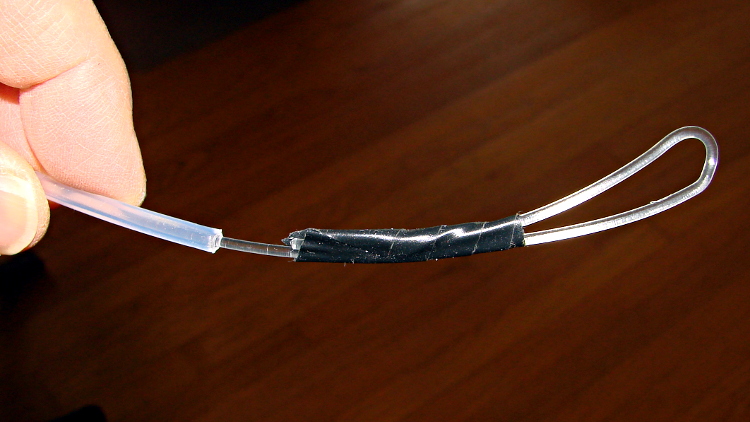
The results:
The force increases slightly while tugging filament off the spool, as the spool does not rotate freely on the printed arm jutting out from the frame, but those numbers are in the right ballpark.
The effective diameter of the extruder drive gear is about 11.5 mm, so overcoming the tube friction requires somewhere between 10 and 40 mN·m of torque. That’s applied at the one point in the whole system most likely to show the result of uneven loading, because it directly affects the pressure of the molten plastic behind the nozzle.
That’s considerable motivation to get rid of the filament guide tube…
I use Kliment’s Pronterface for printer control: simplicity with enough knobs.
The .pronsolerc file:
set port /dev/ttyACM0
set baudrate 115200
set build_dimensions 200x240x195-100-120+0
set temperature_abs 200
set last_bed_temperature 70.0
set last_temperature 155.0
set xy_feedrate 30000
set z_feedrate 2500
set e_feedrate 300
set last_file_path /mnt/bulkdata/Project Files/Thing-O-Matic/Calibration
set temperature_pla 165
set preview_grid_step1 10
set preview_grid_step2 20.0
set preview_extrusion_width 0.4
set bedtemp_pla 70
Line 3 sizes the preview and offsets the XY=0 origin to the center of the plot.
The 200 mm X axis dimension is slightly larger than the actual 195 mm buildable area on the platform, but if the object gets that close to the maximum size, this isn’t the place to discover it.
The 240 mm Y axis dimension is slightly shorter than the actual 250 mm buildable area and slightly larger than the distance between the snouts of the bulldog clips holding the glass plate to the heater. In this case, the object can slightly exceed the preview size if it fits between the clips.
Lines 12 and 13 produce a relatively coarse grid that’s both meaningful and easy on the eyes, with the XY dimensions in Line 3 producing a major grid line crossing at the origin where it should be:

The overhang quality is on the low side of OK, but that’s without any particular configuration tweaking:

A few strands didn’t quite anchor to the far side of the overhang opening and hang down inside:
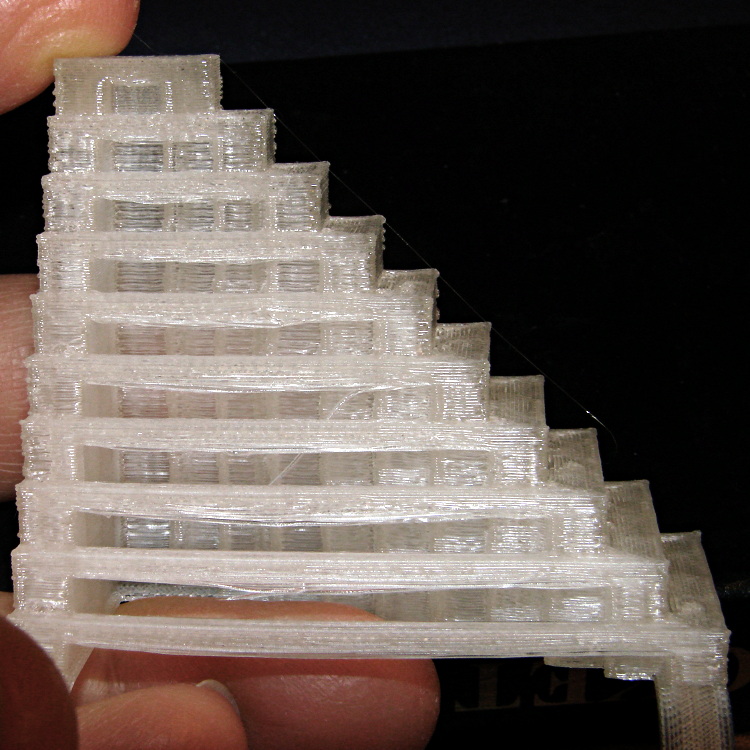
Curiously, the slab on the other side transitioned from the usual 0.10 honeycomb fill to completely solid about half way up:
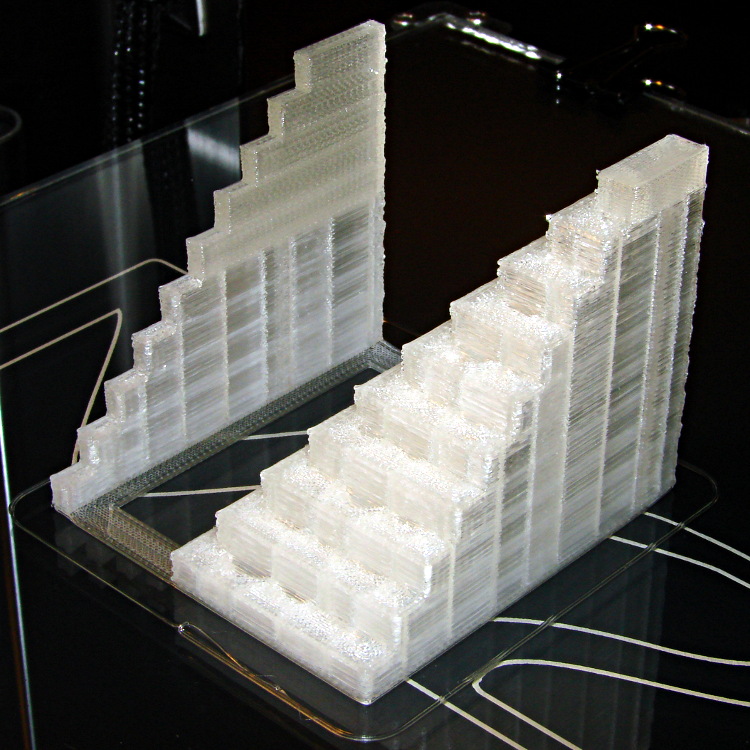
As with all the other objects, there’s no stringing or oozing. Looks good to me!
The slic3r configuration, which doesn’t show the bridge speed of 100 mm/s:
; generated by Slic3r 0.9.8 on 2013-04-08 at 19:55:09

; layer_height = 0.25
; perimeters = 1
; top_solid_layers = 3
; bottom_solid_layers = 3
; fill_density = 0.10
; perimeter_speed = 100
; infill_speed = 200
; travel_speed = 500
; scale = 1
; nozzle_diameter = 0.35
; filament_diameter = 1.70
; extrusion_multiplier = 0.9
; perimeters extrusion width = 0.40mm
; infill extrusion width = 0.40mm
; first layer extrusion width = 0.39mm
The OpenSCAD source came directly from Starno’s object on Thingiverse.
Despite the profusion of surface-finish and print quality test objects, I really care about the dimensions of a 3D printed object, because I tend to build widgets rather than art objects. These two objects, from walter’s Hole and Column Test Print, produce calibrated holes and columns from 0.20 mm to 10.00 mm in diameter, incrementing by 0.20 mm, that should slip neatly together:
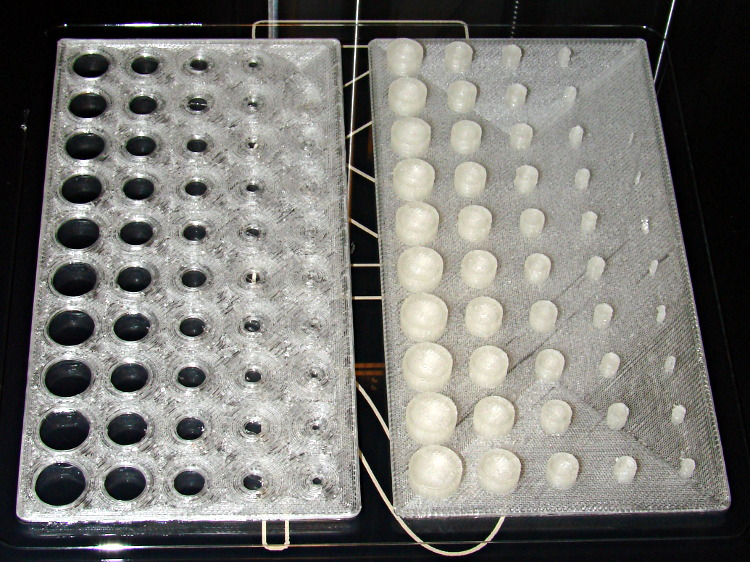
Of course, they didn’t, but they came surprisingly close for a first attempt.
The 0.20 and 0.40 posts simply aren’t there, because they’re too small to print with a 0.35 mm diameter nozzle. The 0.60 through 1.40 mm posts were present, albeit fugly, and posts larger than that looked increasingly better.
Although all the holes were present, in the sense that you could see a disturbance in the top and bottom infill pattern, the first visibly open hole appeared at the 0.80 mm spot… and it was immeasurably small. Some holes had misplaced perimeter strands stretching across the openings, which is probably due to excessive speed from my fiddling around with the numbers.
Measuring them with a digital caliper, with no effort at finding the best orientation, then slapping the data into a Libreoffice spreadsheet, produces an interesting graph:
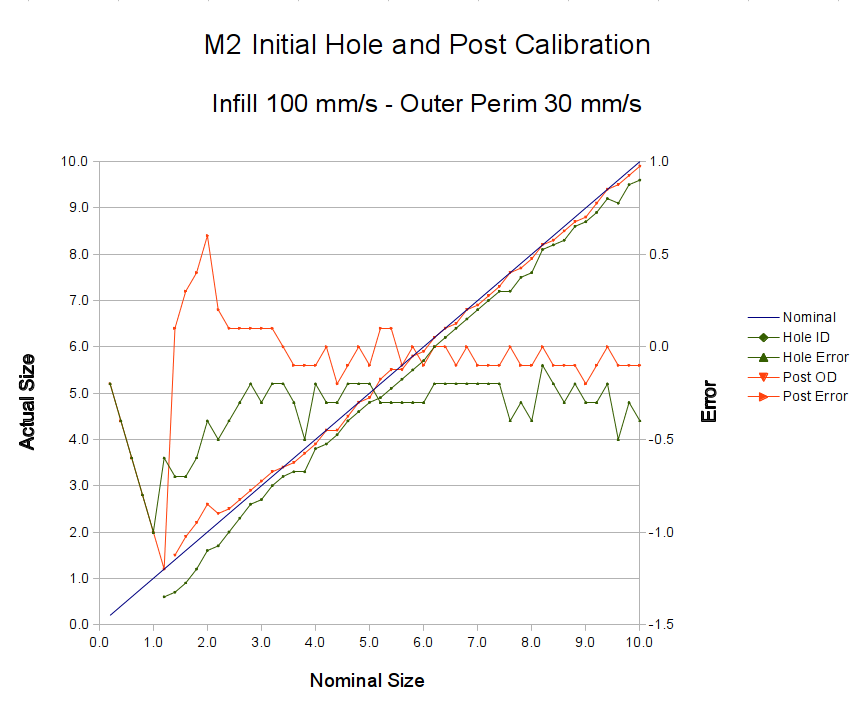
Above about 3 mm diameter: posts are 0.1 mm too small and holes are 0.3 mm too small. Around 2 mm, posts are too big and holes are way too small. What’s important: above maybe 2.5 mm, the error is essentially constant and does not scale with diameter, so a simple Finagle Constant (or two) can solve (most of) the problem.
Some experiments involving slic3r’s small-perimeter speed seem in order; it was 25 mm/s for these pieces.
More care in measurement would produce better answers, but the real question is whether you can produce holes and columns with known sizes; the answer (as expected) remains “with some care”. That’s not surprising; I expect to have an M2 + PLA version of the small hole diameter Finagle Constant that I’ve been using with Skeinforge + Thing-O-Matic; the correction will certainly fall in the same ballpark.
The slic3r configuration:
; generated by Slic3r 0.9.8 on 2013-04-01 at 16:20:49

; layer_height = 0.25
; perimeters = 1
; top_solid_layers = 3
; bottom_solid_layers = 3
; fill_density = 0.10
; perimeter_speed = 100
; infill_speed = 300
; travel_speed = 500
; scale = 1
; nozzle_diameter = 0.35
; filament_diameter = 1.70
; extrusion_multiplier = 0.9
; perimeters extrusion width = 0.40mm
; infill extrusion width = 0.40mm
; first layer extrusion width = 0.39mm
The source code comes from the Thingiverse customizer as bare G-Code, so there’s not much point in reproducing it here.
This object from whpthomas’s collection exercises the deprime operation in Sailfish, but it seemed like it’d be useful to verify the Marlin settings in the M2:

From the other side:
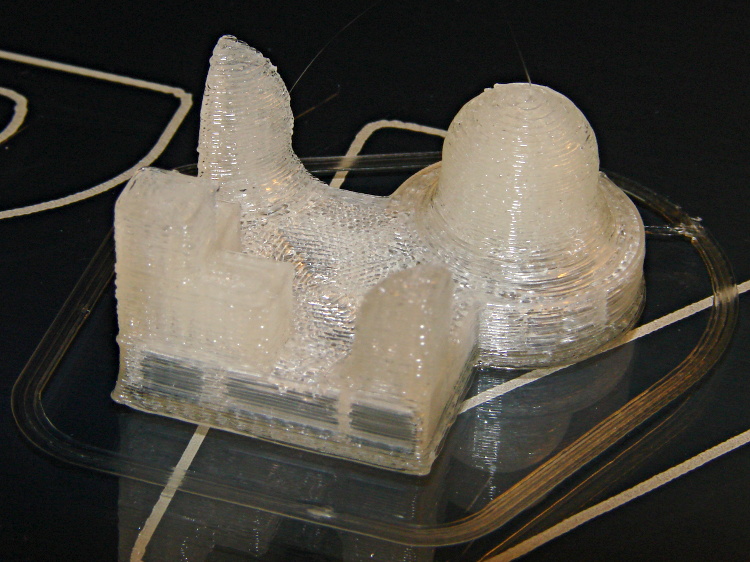
Yes, that was rather anticlimactic. No ooze, no stringing, no surface finish blemishes, just the finished object on the build platform’s glass sheet.
I like that!
The slight bumps on the sharp corner edges seem to be due to the crazy-high perimeter and infill speeds I’ve been playing with, although (I think) those are also where layer changes occurred. The first layer height came out a bit short, so there’s a small flange around the object’s bottom edge; I was figuring out how to get a precise level across the entire surface and stabilize the Z-min switch operation.
The slic3r configuration:
; generated by Slic3r 0.9.8 on 2013-03-29 at 20:51:15

; layer_height = 0.25
; perimeters = 1
; top_solid_layers = 3
; bottom_solid_layers = 3
; fill_density = 0.10
; perimeter_speed = 100
; infill_speed = 300
; travel_speed = 500
; scale = 1
; nozzle_diameter = 0.35
; filament_diameter = 1.70
; extrusion_multiplier = 0.9
; perimeters extrusion width = 0.40mm
; infill extrusion width = 0.40mm
; first layer extrusion width = 0.39mm
No source code, as it’s directly from the STL on Thingiverse; I have no idea which modeling program he used.
To set the background, here’s what the Thing-O-Matic and Skeinforge did to the Pink Panther Woman nearly two years ago:

On the other side:
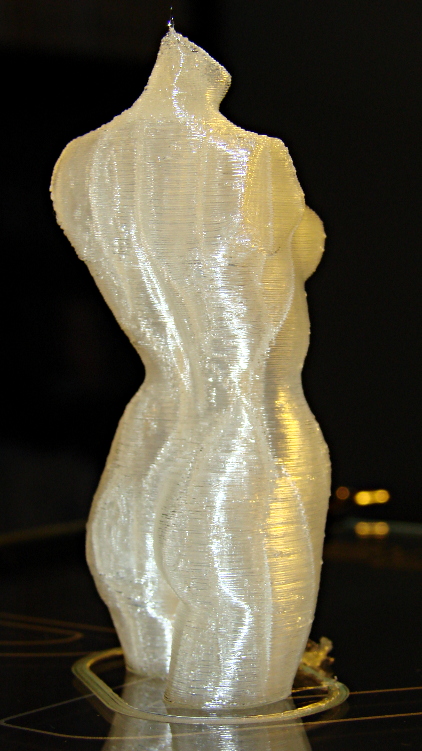
The M2 and slic3r produced this, with the conspicuous vertical bars coming from the 0.10 infill:
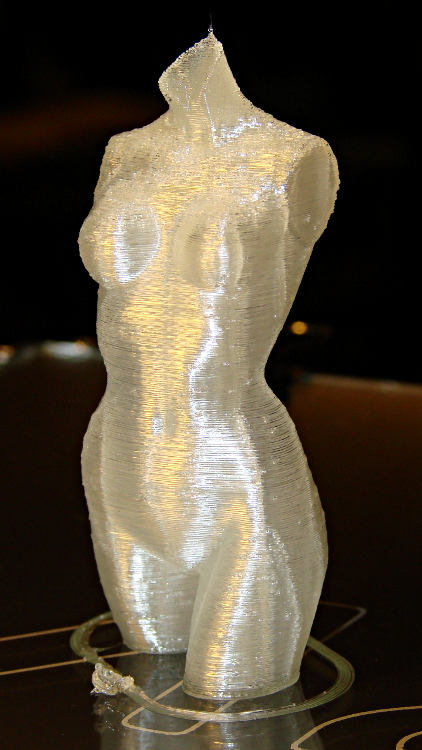
From the rear:
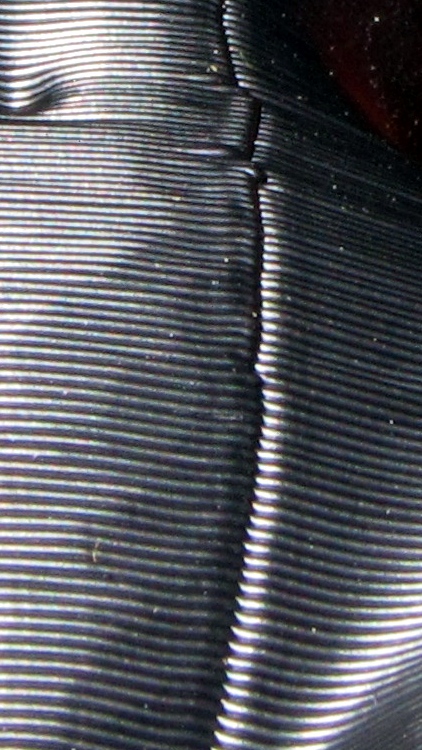
A detail of the left hip shows that slic3r distributes the reversal zits, rather than lining them up in neat columns, and the M2 does a much better job of not depositing blobs at reversals:
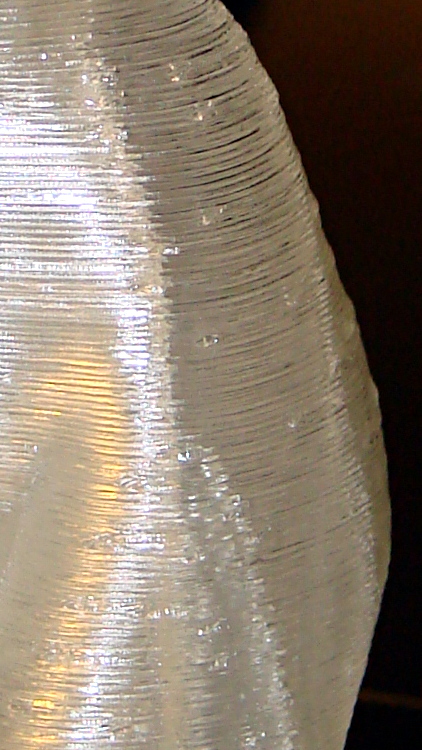
I picked 1.0 mm retraction at either 100 or 300 mm/s, pretty much out of thin air, but even some fine tuning can’t improve that very much. The zits are recessed, so the retraction may be slightly too enthusiastic.
The slic3r configuration:
; generated by Slic3r 0.9.8 on 2013-03-29 at 19:38:15

; layer_height = 0.25
; perimeters = 1
; top_solid_layers = 3
; bottom_solid_layers = 3
; fill_density = 0.10
; perimeter_speed = 100
; infill_speed = 300
; travel_speed = 500
; scale = 1
; nozzle_diameter = 0.35
; filament_diameter = 1.70
; extrusion_multiplier = 0.9
; perimeters extrusion width = 0.40mm
; infill extrusion width = 0.40mm
; first layer extrusion width = 0.39mm
No source, as it’s direct from the STL on Thingiverse.
 The Smell of Molten Projects in the Morning