The Smell of Molten Projects in the Morning

Ed Nisley's Blog: Shop notes, electronics, firmware, machinery, 3D printing, laser cuttery, and curiosities. Contents: 100% human thinking, 0% AI slop.

Author: Ed

  • HP 7475A Plotter: Refilling Disposable Liquid Ink Pens

    A while back, Keith Ward sent a Big Box o’ Plotter Pens that:

    • Should suffice for the rest of the plotter’s life… if not mine
    • Obliterate any need for my Sakura pen adapters

    After a bit of sorting, I had a quartet of “disposable” liquid ink pens with contents ranging from desiccated to gummy. With nothing to lose (and having already cut a clearance slot in the plotter case), I drilled a small hole in the top of each reservoir, squirted some inkjet printer ink into the void, and taped the hole closed.

    Surprisingly, a little liquid love restored all but the black pen to working condition, if not perfect heath:

    HP7475A disposable liquid pen - refilled
    HP7475A disposable liquid pen – refilled

    I think the blurred white disk floating in the reservoir sealed the end where you jam the tip in place to activate the pen. The blob of dark gunk shows the reservoir didn’t start with yellow ink, but I had nothing to lose.

    The top pen in this picture is another style / brand with a smaller reservoir:
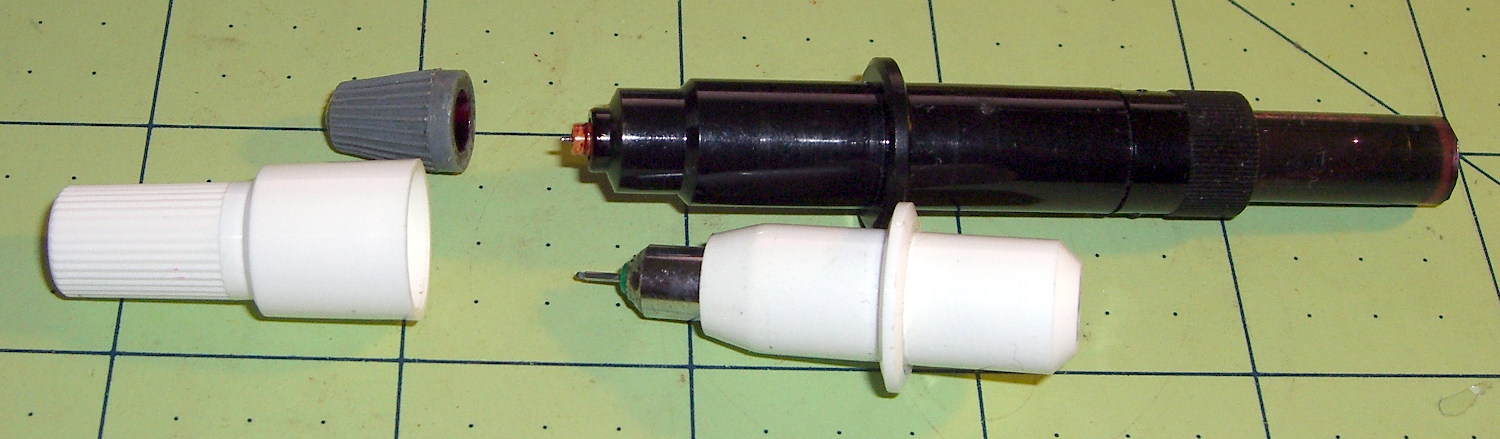
    HP7475A pens - disposable liquid  and ceramic tip
    HP7475A pens – disposable liquid and ceramic tip

    The white pen in the foreground has a 0.3 mm ceramic tip, contains its original green ink, and works as well as it ever did; it might be refillable, too.

    The liquid-ink pens have a serpentine vent in the tip. This is a Genuine New-Old-Stock pen in a four-pen case labeled HP 5061-7566:

    HP7475A disposable liquid pen - new
    HP7475A disposable liquid pen – new

    The serpentine path connects the exterior vent opening (facing you) to a tiny hole (on the other side of the blue shaft) into the ink chamber. As it turns out, a new hole drilled in the reservoir admits enough air to drain the (freshly refilled) liquid ink through the serpentine path all over the workbench. Having some experience with refilling inkjet cartridges, I deployed a towel decorated with colorful splotches in anticipation of such an unexpected event, although my fingers looked considerably more cheerful than usual for a few days.

    The black pen never worked quite right, but the other three did fine. The ceramic pen is at the top:
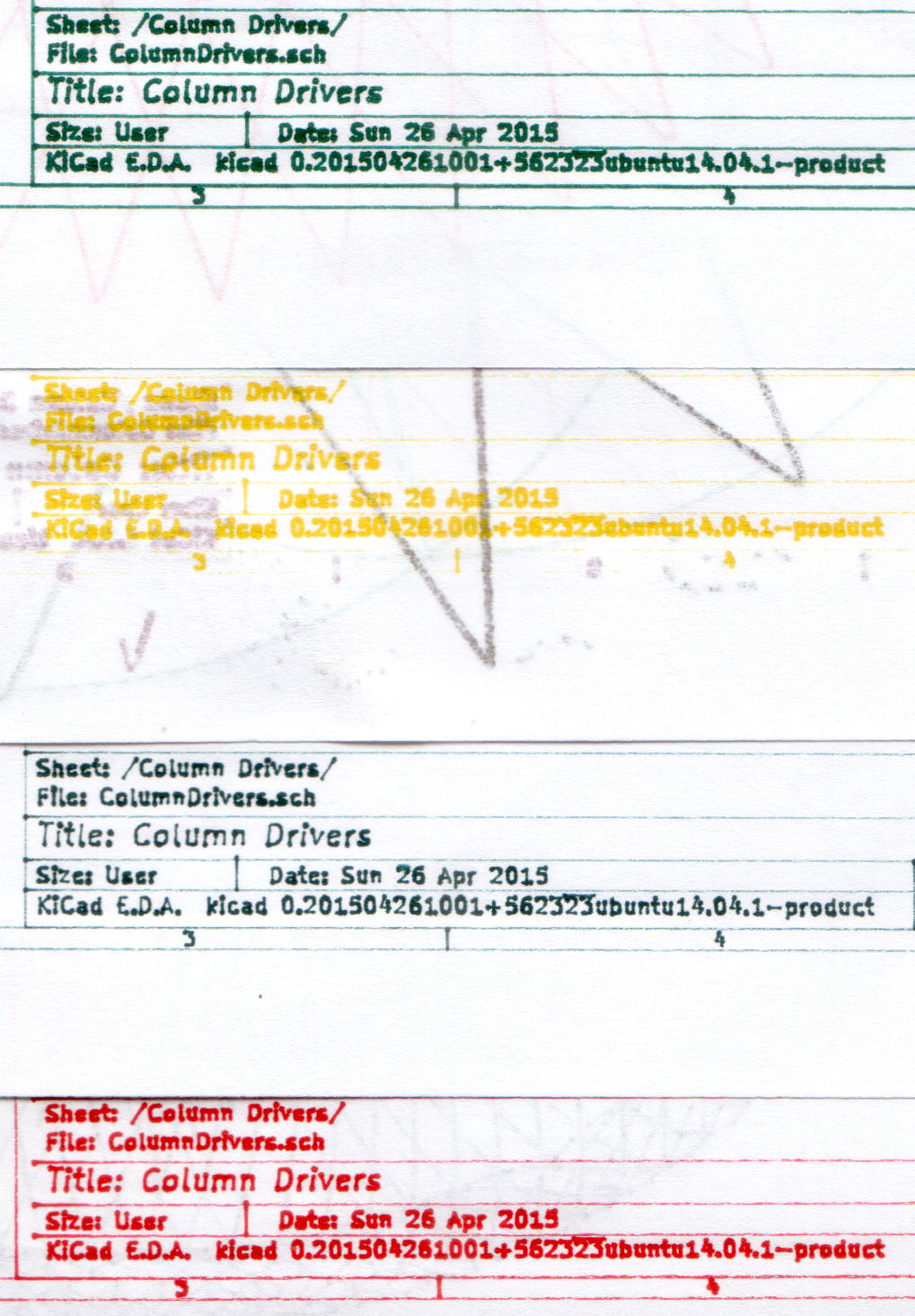
    HP7475A - KBR to YCM Refilled disposable pens - G ceramic pen
    HP7475A – KBR to YCM Refilled disposable pens – G ceramic pen

    Protip: the blown contrast and rear-surface bleedthrough behind the yellow ink should tell you it isn’t visible in normal room light. I must mix yellow with another color if I ever refill that pen that again.

    KiCad uses only one pen for the entire schematic, even when you select “plot in color”, suggesting nobody has sent the “plotter” output stream to an actual plotter in a long, long time.

    Despite the charm of watching the plotter crank out an entire schematic page, it’s not a compelling enough user experience to replace an inkjet printer. For an art project, one might be seeking an entirely different user experience and the answer might be different, too.

    Selah.

  • Extract-copying A Video Clip

    The magic incantation to extract a few seconds of video from a longer clip and set the output file to use the same codecs:

    avconv -ss 00:00:01 -i /mnt/video/2015-05-30/08420001.AVI -codec copy -t 5 08420001-clip.avi
    

    The parameter order matters: the -ss must come before the -i input file name and the -t must come after it. Otherwise, avconv will copy the entire file before extracting the clip, which can be tedious.

    The Fly6 camera produced a video file containing ten minutes of variations on this theme:

    Fly6 - 0842001.AVI - Video compression failure
    Fly6 – 0842001.AVI – Video compression failure

    The top of the image looked pretty good, but then the decompression stalls and smears a single, slowly degenerating, line down the rest of the frame. The other files from that trip looked just fine.

    As it turned out, extracting a few seconds with avconv or binary-copying the first few megabytes with dd produced playable copies: the original file tripped vlc’s decompression, but the source data was in the file and the copies worked.

    Soooo, I could recover the video. Not that it was particularly important, but knowing how might matter some day.

    Video is weird.

    The Cycliq tech support folks recommend regularly formatting the MicroSD card using the Official SD Association Program (Windows-only, of course), not erasing any video files, and generally letting the camera handle the card. This whole affair seems remarkably fragile.

  • Garden Hose Valve Knobs: One Wrench To Rule Them

    A sampling of the various Y connectors and manifolds that water Mary’s gardens:

    Those little handles don’t turn nearly as easily as they should and some require far more finger pressure than Mary can exert. Lubrication being unavailing, the solution is to apply torque through a wrench, rather than fingertips, but fiddling around to match the proper wrench with the valve in hand isn’t acceptable.

    The first pass at a Universal Wrench:

    Hose Valve Knob - with measurements
    Hose Valve Knob – with measurements

    The embossed sheet (the back of my Geek Scratch Paper) carried the knob shapes & dimensions from the garden to the desk, where I measured & laid out the wrench:

    Hose Connector Knob - Build layout
    Hose Connector Knob – Build layout

    I filched the knob design from the OXO Can Opener Handle, made it somewhat taller, and applied a scale() operation to mash it into an ellipse aligned with the wrench slot. That huge hexagonal socket in the middle bridged just fine, even though the threads came out as distinct cylinders:

    Hose Connector Knob - bridge layer - Slic3r preview
    Hose Connector Knob – bridge layer – Slic3r preview

    Adding one thread width of clearance around the stem to form the socket produced a slip fit, with a dollop of fast-cure epoxy holding the pieces together.

    The wrench fits the largest valve knob with enough clearance to eliminate fiddling. A cylinder punched into the middle of the slot accommodates those teardrop handles:

    Hose Connector Knob - Show layout - bottom view
    Hose Connector Knob – Show layout – bottom view

    It’s oversized for the smallest “knob”, a vicious triangular stalk that’s murder on the fingers (and not shown here), but fits well enough that, should we deploy any of those, she’ll be ready.

    The stem diameter can’t be any larger, because the knobs on Valve 1 don’t allow any clearance. It could be more circular, but I doubt that buys anything. The open ends of the slot won’t let mulch pack into the recesses.

    I expect a wrench jaw will eventually snap off as the layers delaminate. In that case I’ll either sink a pair of steel pins into each jaw or, more likely, combine the handle & stem into one object, split the whole affair across the jaws, print the two halves, and glue them together so that the threads run in the proper direction to meet the stress.

    Be that as it may, as of right now this is The Best Thing I’ve Ever Built

    The OpenSCAD source code:

    // Hose connector knob
    // Ed Nisley KE4ZNU - June 2015
    
    Layout = "Build";				// Show Build Knob Stem
    
    //- Extrusion parameters - must match reality!
    
    ThreadThick = 0.25;
    ThreadWidth = 0.40;
    
    function IntegerMultiple(Size,Unit) = Unit * ceil(Size / Unit);
    
    Protrusion = 0.1;
    
    HoleWindage = 0.2;
    
    //------
    // Dimensions
    
    StemOD = 30.0;					// max OD for valve-to-valve clearance
    
    BossOD = 16.0;					// single-ended handle boss
    
    SlotWidth = 13.0;
    SlotHeight = 10.0;
    
    StemInset = 10.0;
    StemLength = StemInset + SlotHeight + 25.0;
    StemSides = 2*4;
    
    KnobOD1 = 70;						// maximum dia without chamfer
    KnobOD2 = 60;						// top dia
    
    KnobSides = 4*4;
    
    DomeHeight = 12;					// dome shape above lobes
    
    KnobHeight = DomeHeight + 2*SlotHeight;
    
    DomeOD = KnobOD2 + (KnobOD1 - KnobOD2)*(DomeHeight/KnobHeight);
    
    DomeArcRad = (pow(KnobHeight,2) + pow(DomeOD,2)/4) / (2*DomeHeight);
    
    //- Adjust hole diameter to make the size come out right
    
    module PolyCyl(Dia,Height,ForceSides=0) {			// based on nophead's polyholes
    
      Sides = (ForceSides != 0) ? ForceSides : (ceil(Dia) + 2);
    
      FixDia = Dia / cos(180/Sides);
    
      cylinder(r=(FixDia + HoleWindage)/2,h=Height,$fn=Sides);
    }
    
    //-- Stem for valve handles
    
    module Stem() {
    
    	difference() {
    		rotate(0*180/StemSides)
    			cylinder(d=StemOD,h=StemLength,$fn=StemSides);
    		translate([0,0,SlotHeight/2 - Protrusion/2])
    			cube([2*StemOD,SlotWidth,(SlotHeight + Protrusion)],center=true);
    		translate([0,0,-Protrusion])
    			cylinder(d=BossOD,h=SlotHeight,$fn=2*StemSides);
    	}
    
    }
    
    //-- Hand-friendly knob
    
    module KnobCap() {
    	difference() {
    		scale([1.0,0.75,1.0])
    		intersection() {
    			translate([0,0,(KnobHeight-DomeArcRad)])
    				rotate(180/KnobSides)
    					sphere(r=DomeArcRad,$fa=180/KnobSides);
    				rotate(180/KnobSides)
    					cylinder(r1=KnobOD1/2,r2=KnobOD2/2,h=KnobHeight,$fn=KnobSides);
    				rotate(180/KnobSides)
    					cylinder(r1=KnobOD2/2,r2=KnobOD1/2,h=KnobHeight,$fn=KnobSides);
    		}
    		translate([0,0,-Protrusion])
    			rotate(0*180/StemSides)
    				cylinder(d=(StemOD + 2*ThreadWidth),h=(StemInset + Protrusion),$fn=StemSides);
    	}
    }
    
    //- Build it
    
    if (Layout == "Knob")
    	KnobCap();
    
    if (Layout == "Stem")
    	Stem();
    
    if (Layout == "Build") {
    	translate([-KnobOD1/2,0,0])
    		KnobCap();
    	translate([StemOD/2,0,StemLength])
    		rotate([180,0,0])
    			Stem();
    }
    
    if (Layout == "Show") {
    	translate([0,0,0])
    		Stem();
    	translate([0,0,StemLength - StemInset])
    		KnobCap();
    }
    
  • Fly6 Video Compression: Blur to Sharpen?

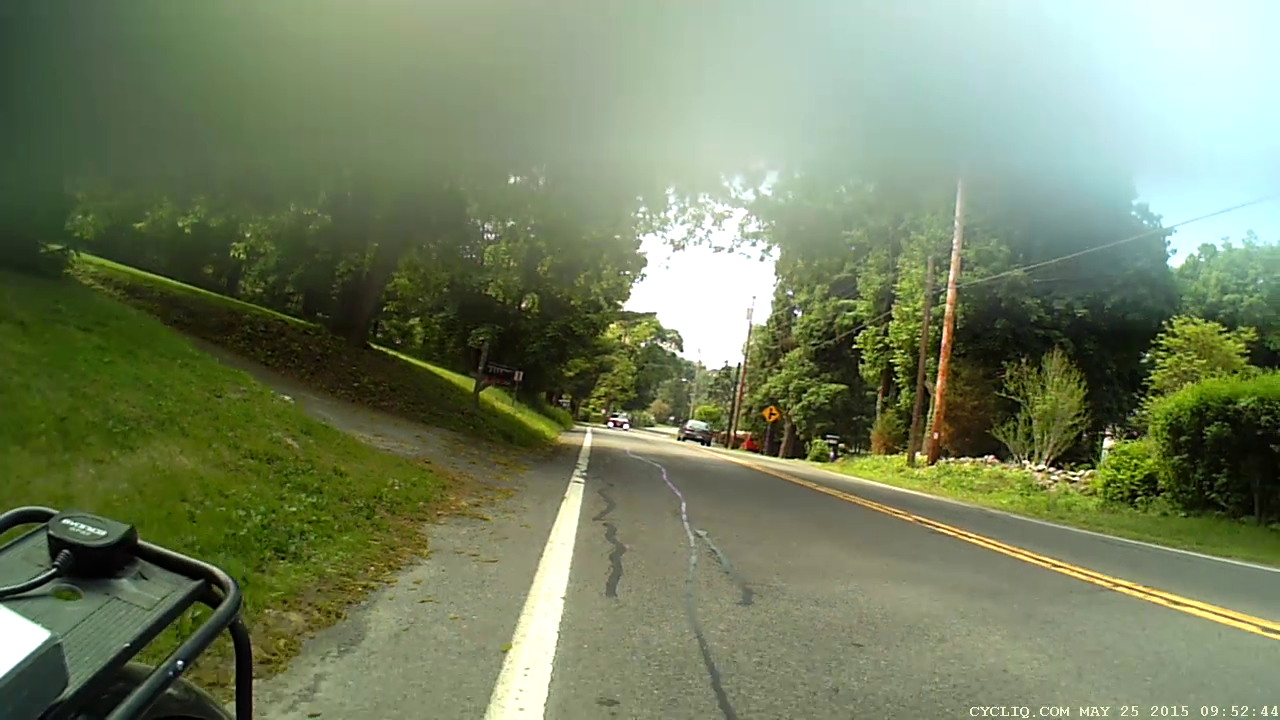
    So I stuck a snippet of ordinary “transparent” (it’s actually translucent) adhesive tape across the top of the Cycliq Fly6 camera lens:

    Cycliq Fly6 Camera - blur tape
    Cycliq Fly6 Camera – blur tape

    That smoothly blurs the top third of the frame:

    Fly6 - Tape-blurred frame
    Fly6 – Tape-blurred frame

    The motivation for using translucent tape: it should maintain roughly the same brightness and color balance across the whole image. Opaque tape would burn out the remaining image as the camera desperately tries to maintain an average gray level.

    Fast-forwarding VLC with the video stopped forces it to display the inter-frame compression blocks spanning several seconds of video:

    Fly6 - Forced compression artifacts
    Fly6 – Forced compression artifacts

    The upper third of the frame has big, simple blocks that pegged the files at a uniform 475 MB per ten minute file, somewhat lower than the un-blurred 500 to 700 MB. So the compression definitely isn’t working nearly as hard.

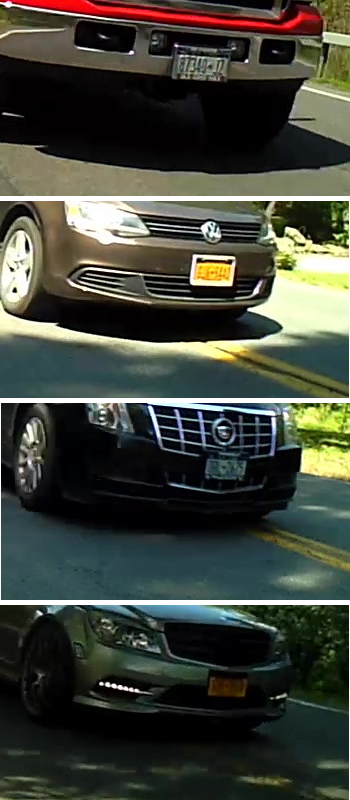
    I hoped that simplifying the uninteresting part of the image would leave more bits for license plates and other interesting details, which might be the case. New York has two main licence plate color schemes (the obsolete high-contrast blue-on-white and the current low-contrast blue-on-orange “Empire Gold”) and both the Fly6 and the Sony AS30V cameras do much better with white plates in full sun.

    Some samples at full size:

    Fly6 - License Plates
    Fly6 – License Plates

    Those were chosen based on:

    • Similar range / angle: just over the center line
    • Same-size crop box: 350 x 197
    • Sun vs. shade

    I think those are somewhat sharper than the plates from un-blurred frames, but it’s not like the camera suddenly woke up smarter and started paying attention to the important stuff.

    Time for more riding, minus the tape…

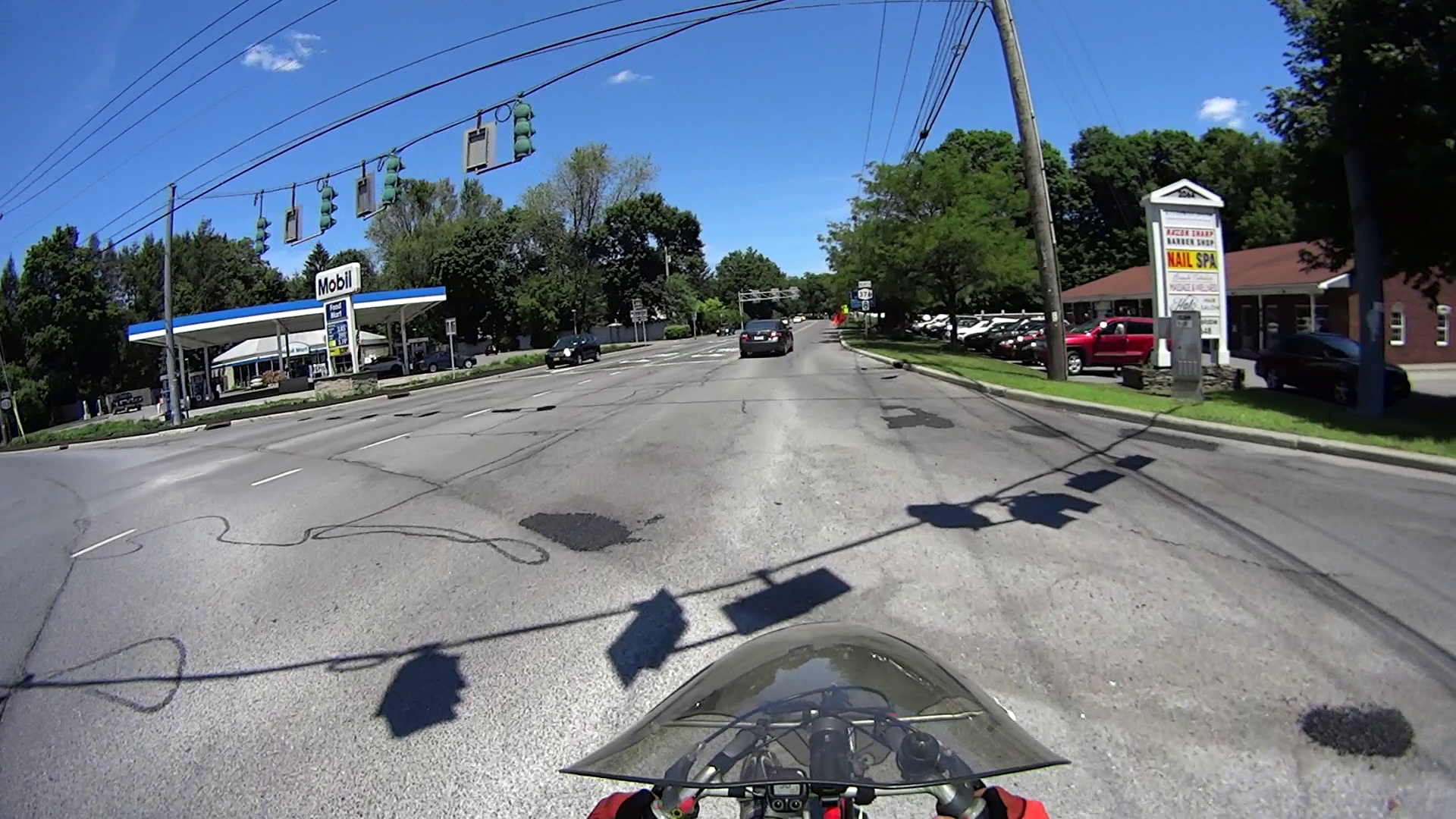
  • Road Conditions: Rt 376 at Red Oaks Mill

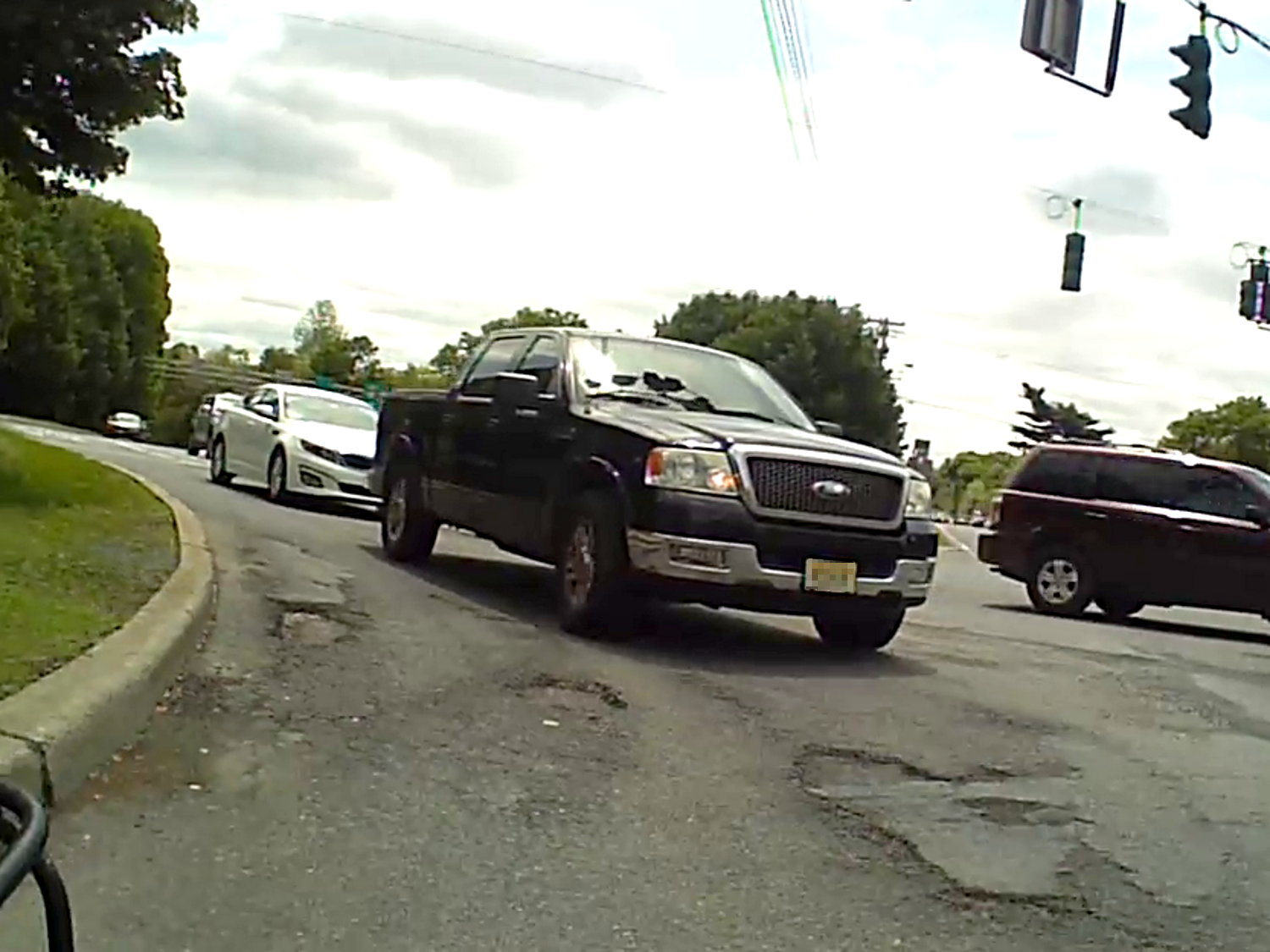
    These potholes have been growing despite the cold-patch:

    Potholes - Red Oaks Mill intersection
    Potholes – Red Oaks Mill intersection

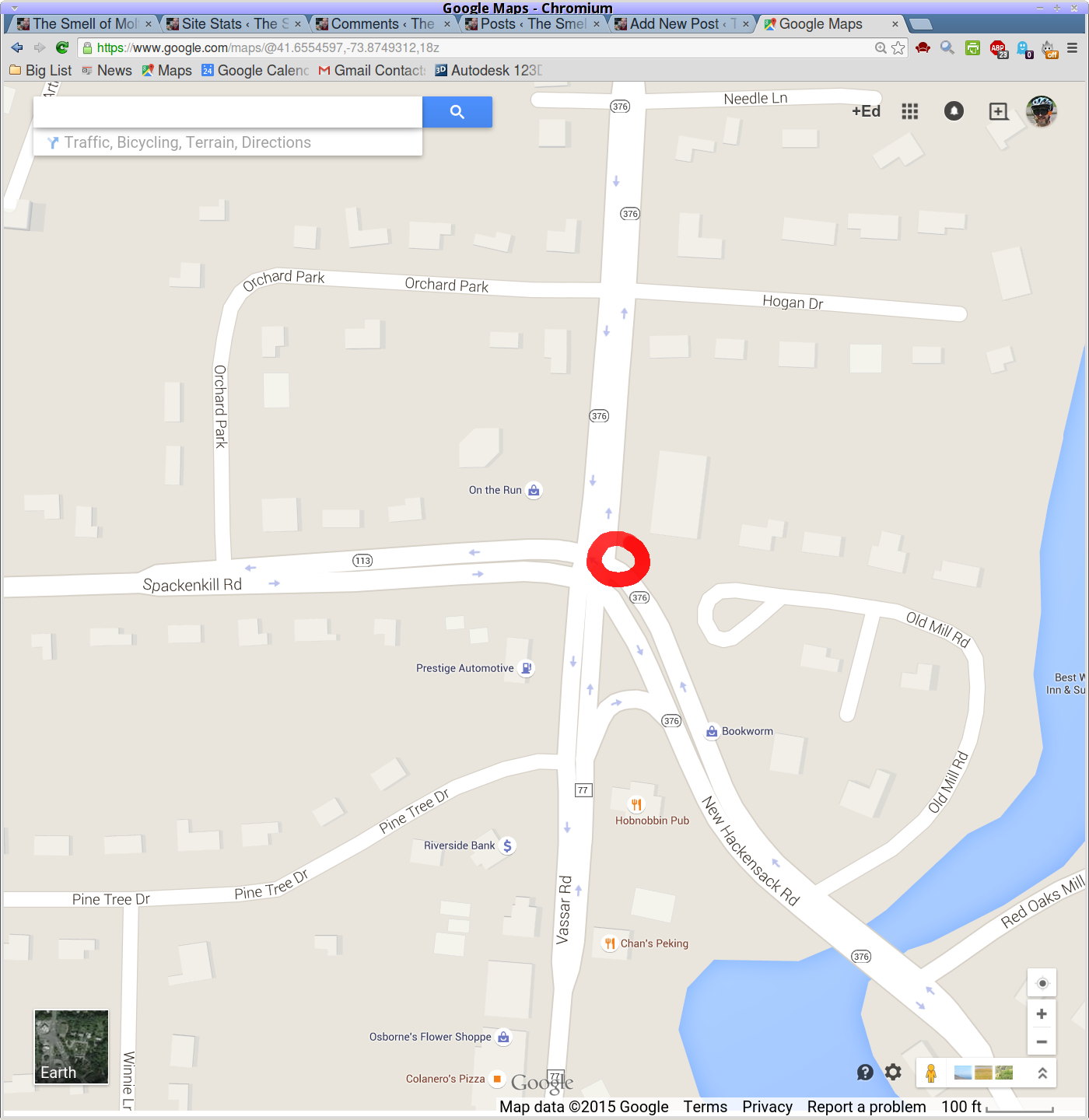
    This is the northeast corner of the Red Oaks Mill intersection:

    Potholes - Red Oaks Mill intersection - map
    Potholes – Red Oaks Mill intersection – map

    Taken with the Fly6 rear camera, cropped to 4:3.

    A few days after I wrote that up, NYSDOT filled the potholes:

    Potholes Repaired - Red Oaks Mill intersection
    Potholes Repaired – Red Oaks Mill intersection

    Now I can measure how long a filled pothole remains filled.

    Taken with the HDR-AS30V helmet camera, uncropped.

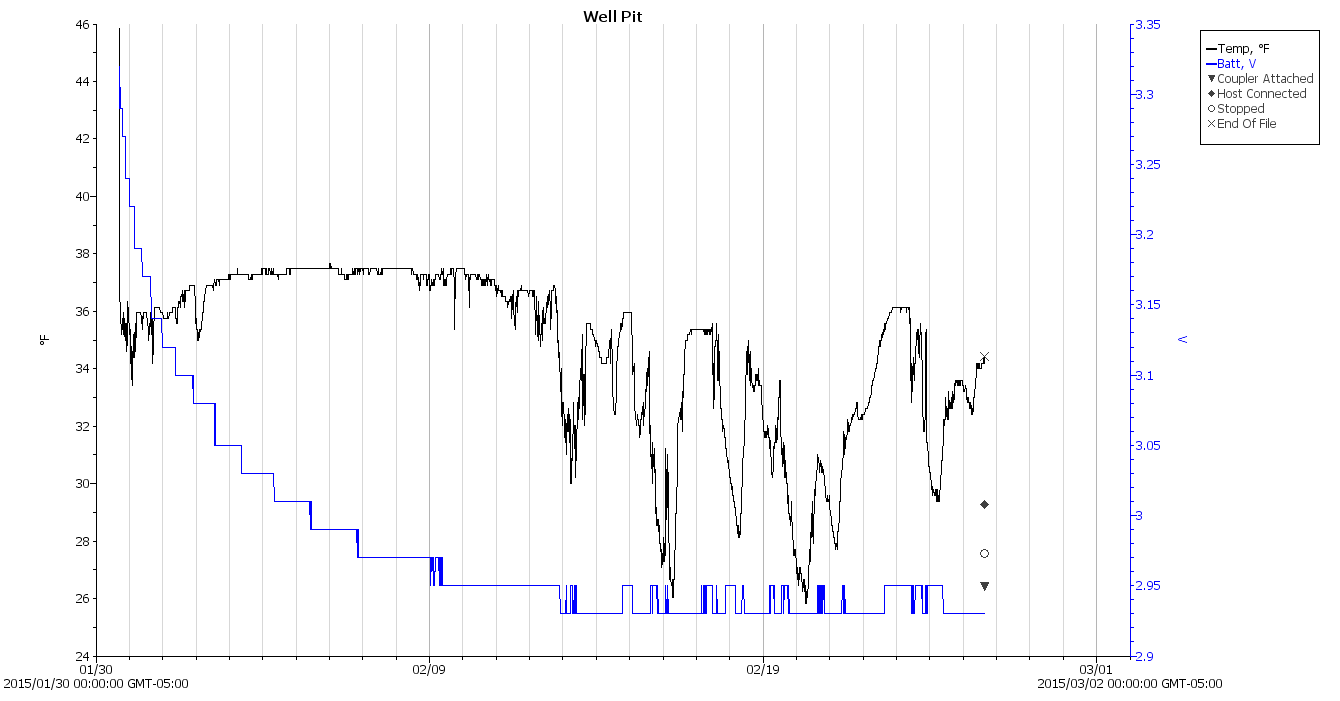
  • Monthly Science: Well Pit Temperature

    With more data, those February lows really stand out:

    Well Pit Air Temperature - 2014-10 to 2015-05-31
    Well Pit Air Temperature – 2014-10 to 2015-05-31

    The February daily record shows more detail:

    Well Pit - 2015-02-25
    Well Pit – 2015-02-25

    I’d say the air temperature in the pit got close to freezing, but surely a stream of cold air falling through the vent hole would wash over the logger and depress the results.

    Should I get powerfully motivated, I’ll strap the logger onto one of the pipes, wrap insulation around it, and have it take data from early December through late March in one session; lifting the concrete slab requires enough effort that I’m not going to do it, ah, lightly during the snow season.


  • Screen Rot

    Spotted this at the local credit union branch:

    Credit Union signature pad - LCD screen rot
    Credit Union signature pad – LCD screen rot

    There’s no obvious mechanical damage at the center of the orange blotch, so it must be something internal to the LCD panel going bad. The fading along the left edge might be part of the same QC glitch.

    Confidence-inspiring, this is not, even though it has nothing to do with the credit union itself…