Spotted this in a restaurant near Lowell, MA on our road trip:

Somehow, it’s very hard to coordinate sinks, supports, and plumbing these days…
The Smell of Molten Projects in the Morning
Ed Nisley's Blog: Shop notes, electronics, firmware, machinery, 3D printing, laser cuttery, and curiosities. Contents: 100% human thinking, 0% AI slop.
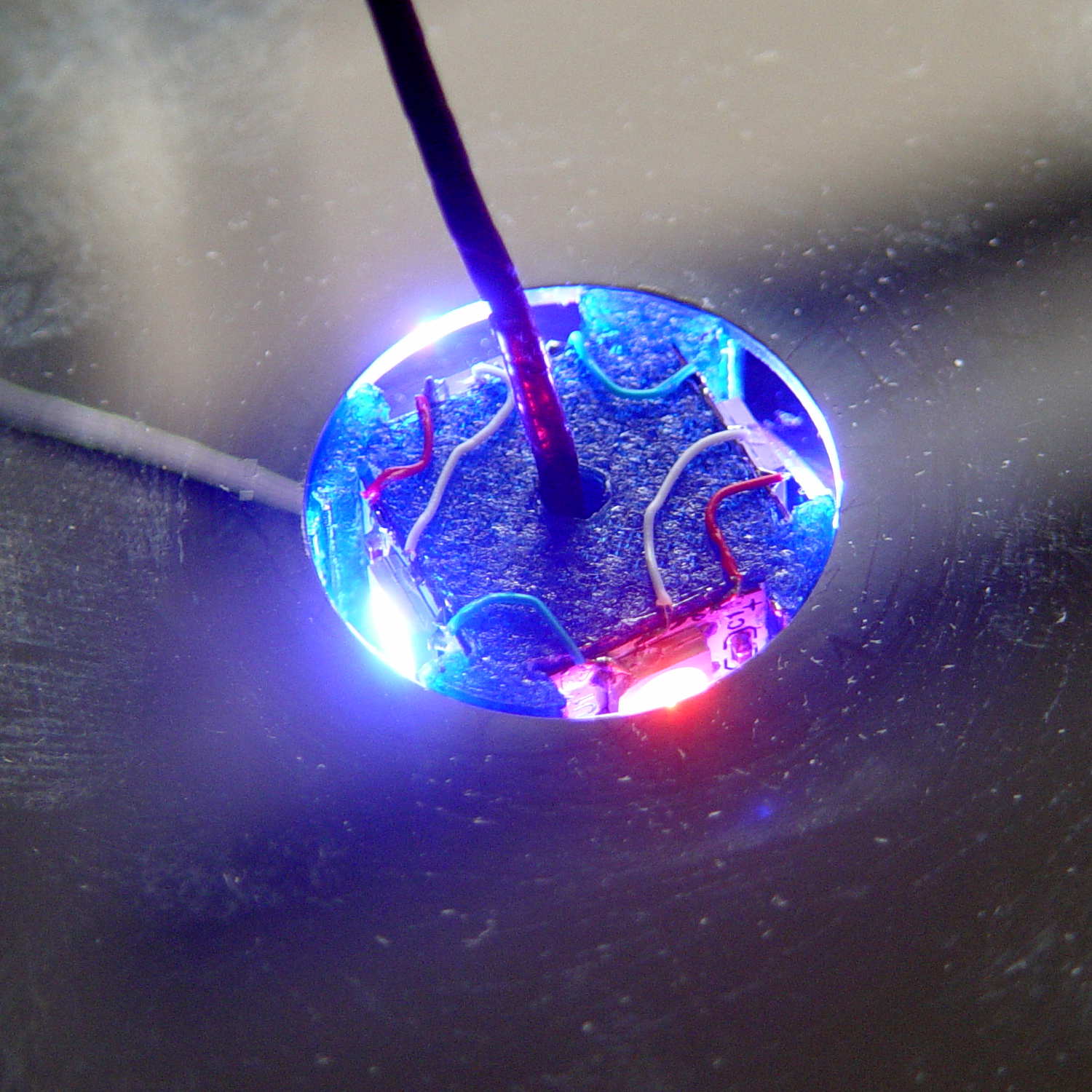
Disassembling the (unglued!) platter stack simplified wiring the the Neopixels:

Orienting the strips in alternate directions kept the white data connections between adjacent strips on the top and bottom level. If they sat in the same direction, the data wires would run from top to bottom.
Each Neopixel draw 60 mA max, so each side of the pillar can draw 180 mA and lighting up all four sides in full-throttle white draws a bit over 720 mA. That’s more than those little Wire-Wrap wires should be forced to carry, but the tiny Neopixel solder pads aren’t good for much more than that. The revised column model has wiring channels behind both strip ends to provide access to the slightly larger pads on the rear surface; the fact that all the end pads get cut in half doesn’t help matters.
The red and blue power wires connect adjacent strips, with two opposite strips wired in parallel at the bottom of the column. There’s a 100 µF cap across the incoming power leads: as much capacitor as would fit in the somewhat undersized base.
A knockoff Arduino Pro Mini sits inline between a 5.2 VDC wall wart and the Mood Light with three connections: VCC, GND, and D6. It’s flapping around in mid-air with no protection whatsoever, so I’ll let your imagination draw that picture. I want to hide it in the base, along with a power jack, as part of the fine tuning.
Anyhow, restacking the platters produced this pleasant effect:

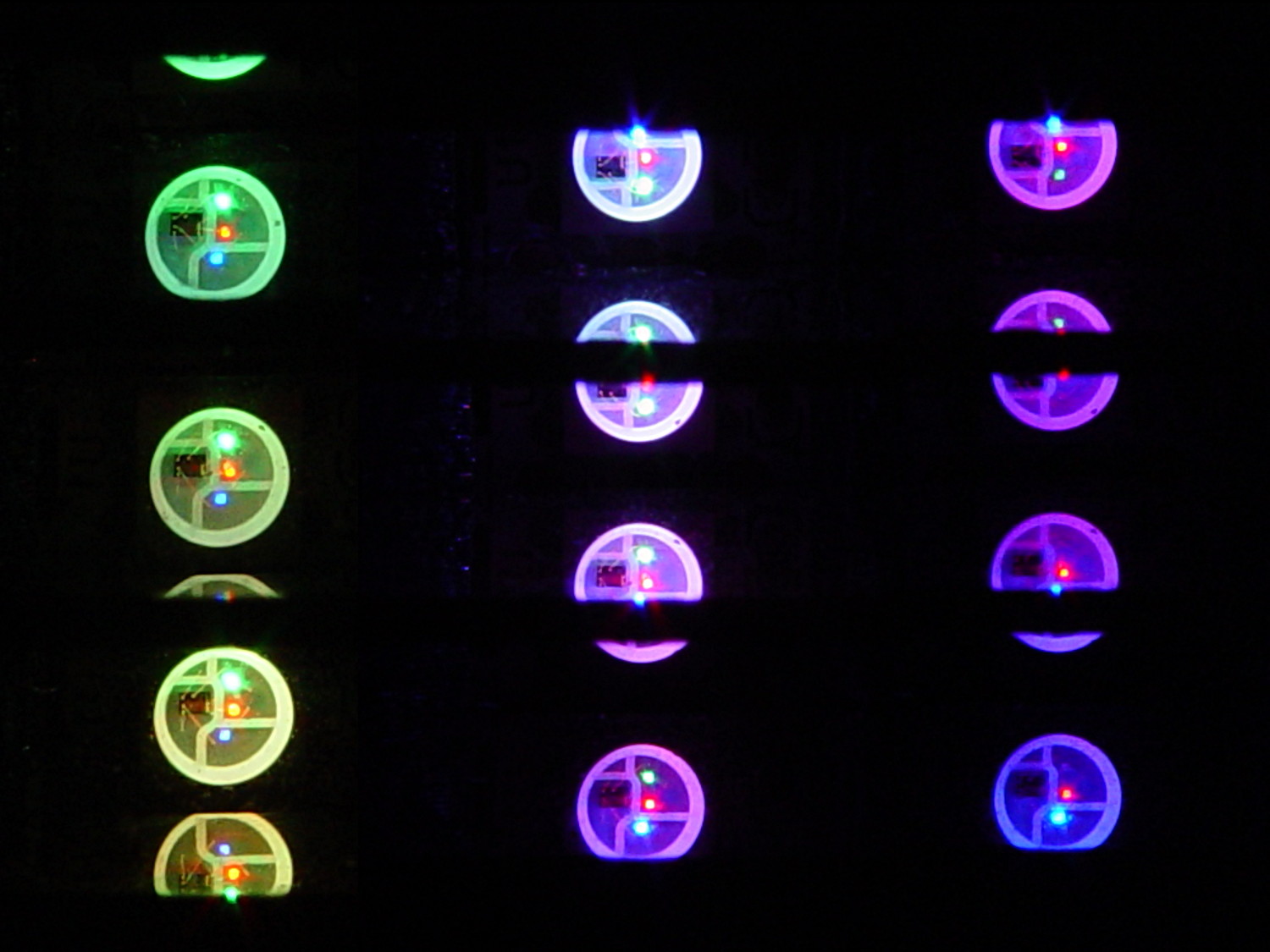
You’re seeing each LEDs both directly and through a reflection in the platter below it. Despite having handled the platters for a few days, the reflection’s clarity surprised me; the multiple reflections required to bounce the LED image to the edge of the platter work perfectly:

Running the original firmware (which, as noted in the comments, will eventually fall off its rails), the colors change slowly enough to be always the same while you’re watching and always different after you look away:

The platters stack sufficiently parallel to each other that the LED images still have the right spacing after multiple reflections. It’s not quite an infinite house of mirrors.
With the LEDs running at half intensity (PWM limited to 128/255), the stack lights up a dark living room just fine. At full throttle, it’d probably be too bright…
All in all, it looks suprisingly good!
Harvesting a stack of hard drive platters and discovering that four Neopixel strips could stand vertically inside the central hole suggested this overall structure:

The model includes a parameter for the number of strips, but not everything respects that. I’m not sure I’ll ever make a three-LED column and five strips won’t fit, so it probably doesn’t matter.
The central pillar holds everything together:

The Neopixel strips slide into those slots, which turned out to be too small to actually print, because the molten plastic pretty much squeezed the slots closed. Some deft pull saw action enlarged them enough to pass the strips, at the cost of tedious hand-fitting and considerable hidden ugliness. Printing the slots slightly larger bangs against the (lack of) printer resolution, because there’s not much wiggle room between the tiny slots and the outer diameter of the column:

The three alignment pin holes along each edge sit 6.944 mm on center, which is what you get when you divide the nominal 1 meter strip length by 144 Neopixels. I’m using knockoff Neopixels from halfway around the planet, but they’re probably pretty close to the real thing (also from halfway around the planet, I’m sure).
All those parts laid out on the platform, along with a fourth set of spacers in case I drop one:

And they print in cyan PETG just like you’d expect:

The round base (on the right) prints bottom-side-up, with bridging from the rim to the central pillar, and came out looking just fine. The top doesn’t have the central post and the pillar doesn’t have the top recess shown in the model: those tweaks will appear in the next iteration.
Each tiny triangular spacer gets an alignment pin glued into its inner surface, then four of them get glued to the pillar. This crash test dummy pillar worked out the dimensions, so it’s squat and ugly:

It’s clamped to a glass plate (smooth side up!) to force the spacers onto on a plane, with the other clamps smashing them against the pillar. All the other spacers get glued in situ atop each platter as it’s installed, which is a definite downside.
Installing the Neopixels before assembling the platters seemed to be the right way to go:

After that, just stack ’em up:

I dry-assembled the upper two spacer sets, so I could pull it apart in case that seemed necessary. Turned out to be a good idea.
And then screw the lid on top to see what it looks like:

That top screw should be a pan-head or something similarly smooth, rather than a random PC case screw. The sacrificial hard drives provided a bunch of Torx screws that would surely look better; most are far too small.
I thought a taller stack would be appropriate, but I kinda like the short, squat aspect ratio.
Now for some wiring…
The OpenSCAD source code:
// Hard Drive Platter Mood Light
// Ed Nisley KE4ZNU November 2015
Layout = "Show"; // Build Show Pixel LEDString Platters Pillar Spacers TopCap Base
ShowDisks = 2; // number of disks in Show layout
//- Extrusion parameters must match reality!
ThreadThick = 0.20;
ThreadWidth = 0.40;
HoleWindage = 0.2;
Protrusion = 0.1; // make holes end cleanly
inch = 25.4;
function IntegerMultiple(Size,Unit) = Unit * ceil(Size / Unit);
//----------------------
// Dimensions
ID = 0;
OD = 1;
LENGTH = 2;
Platter = [25.0,95.0,1.27]; // hard drive platters
LEDStringCount = 3; // number of LEDs on each strip (Show mode looks odd for less than 3)
LEDStripCount = 4; // number of strips (verify locating pin holes & suchlike)
WireSpace = 1.0; // allowance for wiring along strip ends
BaseSize = [40,14,3.0]; // overall base plate outside engine controller slot
Pixel = [13.0, 1000 / 144, 0.5]; // smallest indivisible unit of LED strip
PixelMargin = [1.0, 1.0, 2.0]; // LED and circuitry atop the strip
BeamAngle = 120; // LED viewing angle
BeamShape = [
[0,0],
[Platter[OD]*cos(BeamAngle/2),-Platter[OD]*sin(BeamAngle/2)],
[Platter[OD]*cos(BeamAngle/2), Platter[OD]*sin(BeamAngle/2)]
];
PillarSides = 12*4;
PillarCore = Platter[ID] - 2*(Pixel[2] + PixelMargin[2] + 2.0); // LED channel distance across pillar centerline
PillarLength = LEDStringCount*Pixel[1] + Platter[LENGTH];
echo(str("Pillar core size: ",PillarCore));
echo(str(" ... length:"),PillarLength);
Cap = [Platter[ID] + 4.0,Platter[ID] + 4.0 + 10*2*ThreadWidth,2*WireSpace + 6*ThreadThick]; // cap over top of pillar
CapSides = 16;
Base = [Platter[ID] + 10.0,0.5*Platter[OD],8.0];
BaseSides = 16;
Screw = [2.0,3.0,20.0]; // screws used to secure cap & pillar
Spacer = [Platter[ID],(Platter[ID] + 2*8),(Pixel[1] - Platter[LENGTH])];
echo(str("Spacer OD: ",Spacer[OD]));
echo(str(" ... thick:",Spacer[LENGTH]));
LEDStripProfile = [
[0,0],
[Pixel[0]/2,0],
[Pixel[0]/2,Pixel[2]],
[(Pixel[0]/2 - PixelMargin[0]),Pixel[2]],
[(Pixel[0]/2 - PixelMargin[0]),(Pixel[2] + PixelMargin[2])],
[-(Pixel[0]/2 - PixelMargin[0]),(Pixel[2] + PixelMargin[2])],
[-(Pixel[0]/2 - PixelMargin[0]),Pixel[2]],
[-Pixel[0]/2,Pixel[2]],
[-Pixel[0]/2,0]
];
//----------------------
// Useful routines
module PolyCyl(Dia,Height,ForceSides=0) { // based on nophead's polyholes
Sides = (ForceSides != 0) ? ForceSides : (ceil(Dia) + 2);
FixDia = Dia / cos(180/Sides);
cylinder(r=(FixDia + HoleWindage)/2,
h=Height,
$fn=Sides);
}
//- Locating pin hole with glue recess
// Default length is two pin diameters on each side of the split
PinOD = 1.70;
module LocatingPin(Dia=PinOD,Len=0.0) {
PinLen = (Len != 0.0) ? Len : (4*Dia);
translate([0,0,-ThreadThick])
PolyCyl((Dia + 2*ThreadWidth),2*ThreadThick,4);
translate([0,0,-2*ThreadThick])
PolyCyl((Dia + 1*ThreadWidth),4*ThreadThick,4);
translate([0,0,-(PinLen/2 + ThreadThick)])
PolyCyl(Dia,(PinLen + 2*ThreadThick),4);
}
//----------------------
// Pieces
//-- LED strips
module OnePixel() {
render()
rotate([-90,0,0]) rotate(180) // align result the way you'd expect from the dimensions
difference() {
linear_extrude(height=Pixel[1],convexity=3)
polygon(points=LEDStripProfile);
translate([-Pixel[0]/2,Pixel[2],-PixelMargin[0]])
cube([Pixel[0],2*PixelMargin[2],2*PixelMargin[0]]);
translate([-Pixel[0]/2,Pixel[2],Pixel[1]-PixelMargin[0]])
cube([Pixel[0],2*PixelMargin[2],2*PixelMargin[0]]);
}
}
module LEDString(n = LEDStringCount) {
for (i=[0:n-1])
translate([0,i*Pixel[1]])
// resize([0,Pixel[1] + 2*Protrusion,0])
OnePixel();
}
//-- Stack of hard drive platters
module Platters(n = LEDStringCount + 1) {
color("gold",0.4)
for (i=[0:n-1]) {
translate([0,0,i*Pixel[1]])
difference() {
cylinder(d=Platter[OD],h=Platter[LENGTH],center=false,$fn=PillarSides);
cylinder(d=Platter[ID],h=3*Platter[LENGTH],center=true,$fn=PillarSides);
}
}
}
//-- Pillar holding the LED strips
module Pillar() {
difflen = PillarLength + 2*Protrusion;
// render(convexity=5)
difference() {
linear_extrude(height=PillarLength,convexity=4)
difference() {
rotate(180/(12*4))
circle(d=Platter[ID] - 1*ThreadWidth,$fn=PillarSides);
for (i=[0:LEDStripCount-1]) // clearance for LED beamwidth, may not actually cut surface
rotate(i*360/LEDStripCount)
translate([PillarCore/2,0,0])
polygon(points=BeamShape);
for (i=[0:LEDStripCount-1]) // LED front clearance
rotate(i*360/LEDStripCount)
translate([(PillarCore/2 + Pixel[2]),(Pixel[0] - 2*PixelMargin[0])/2])
rotate(-90)
square([Pixel[0] - 2*PixelMargin[0],Platter[ID]]);
}
for (i=[0:LEDStripCount-1]) // LED strip slots
rotate(i*360/LEDStripCount)
translate([PillarCore/2,0,-Protrusion])
linear_extrude(height=difflen,convexity=2)
rotate(-90)
polygon(points=LEDStripProfile);
for (i=[0,90]) // wiring recess on top surface
rotate(i)
translate([0,0,(PillarLength - (WireSpace/2 - Protrusion))])
cube([(PillarCore + 2*Protrusion),Pixel[0] - 2*PixelMargin[0],WireSpace],center=true);
for (i=[0:LEDStripCount-1]) // wiring recess on bottom surface
rotate(i*90)
translate([PillarCore/2 - (WireSpace - Protrusion)/2,0,WireSpace/2 - Protrusion])
cube([WireSpace + Protrusion,Pixel[0] - 2*PixelMargin[0],WireSpace],center=true);
for (j=[0:LEDStringCount-1]) // platter spacer alignment pins
for (i=[0:LEDStripCount-1])
rotate(i*360/LEDStripCount + 180/LEDStripCount)
translate([(Platter[ID] - 1*ThreadWidth)/2,0,(j*Pixel[1] + Pixel[1]/2 + Platter[LENGTH]/2)])
rotate([0,90,0])
rotate(45)
LocatingPin();
translate([0,0,-Protrusion]) // central screw hole
rotate(180/4)
PolyCyl(Screw[ID],difflen,4);
if (false)
for (i=[-1,1]) // vertical wire channels
rotate(i*360/LEDStripCount + 180/LEDStripCount)
translate([PillarCore/2 - 2.0,0,-Protrusion])
PolyCyl(2.0,difflen,4);
for (i=[-1,1]) // locating pins
rotate(i*360/LEDStripCount - 180/LEDStripCount)
translate([PillarCore/2 - 2.0,0,0])
LocatingPin();
}
}
//-- Spacers to separate platters
module Spacers() {
difference() {
linear_extrude(height=Spacer[LENGTH],convexity=4)
difference() {
rotate(180/PillarSides)
circle(d=Spacer[OD],$fn=PillarSides);
for (i=[0:LEDStripCount-1]) // clearance for LED beamwidth, may not actually cut surface
rotate(i*360/LEDStripCount)
translate([PillarCore/2,0,0])
polygon(points=BeamShape);
for (i=[0:LEDStripCount-1]) // LED front clearance
rotate(i*360/LEDStripCount)
translate([(PillarCore/2 + Pixel[2]),(Pixel[0] - 2*PixelMargin[0])/2])
rotate(-90)
square([Pixel[0] - 2*PixelMargin[0],Platter[ID]]);
rotate(180/PillarSides)
circle(d=Spacer[ID],$fn=PillarSides); // central pillar fits in the hole
}
for (i=[0:LEDStripCount-1])
rotate(i*360/LEDStripCount + 180/LEDStripCount)
translate([Platter[ID]/2,0,(Pixel[1] - Platter[LENGTH])/2])
rotate([0,90,0])
rotate(45)
LocatingPin();
}
}
//-- Cap over top of pillar
module TopCap() {
difference() {
cylinder(d1=(Cap[OD] + Cap[ID])/2,d2=Cap[OD],h=Cap[LENGTH],$fn=CapSides); // outer lid
translate([0,0,-Protrusion])
PolyCyl(Screw[ID],Cap[LENGTH] + WireSpace + Protrusion,4); // screw hole
translate([0,0,Cap[LENGTH] - 2*WireSpace])
difference() {
cylinder(d=Cap[ID],h=2*Cap[LENGTH],$fn=CapSides); // cutout
cylinder(d=2*Screw[OD],h=Cap[LENGTH],$fn=CapSides); // boss
}
translate([0,0,Cap[LENGTH] - ThreadThick])
cylinder(d=Cap[ID]/2,h=ThreadThick + Protrusion,$fn=CapSides); // recess boss
}
}
//-- Base below pillar
module Base() {
SideWidth = 0.5*Base[OD]*sin(180/BaseSides); // close enough
difference() {
union() {
difference() {
cylinder(d=Base[OD],h=Base[LENGTH],$fn=BaseSides); // outer base
translate([0,0,6*ThreadThick]) // main cutout
cylinder(d=Base[ID],h=Base[LENGTH],$fn=BaseSides);
translate([-SideWidth/2,0,6*ThreadThick]) // cable port
cube([SideWidth,Base[OD],Base[LENGTH]]);
}
translate([0,0,Base[LENGTH]/2]) // pillar support is recessed below rim
cube([PillarCore,PillarCore,Base[LENGTH] - ThreadThick],center=true);
}
for (i=[0:LEDStripCount-1]) // wiring recesses
rotate(i*90)
translate([PillarCore/2 - (WireSpace - Protrusion)/2,0,Base[LENGTH] - WireSpace/2])
cube([WireSpace + Protrusion,PillarCore - 4*WireSpace,WireSpace],center=true);
translate([0,0,-Protrusion])
PolyCyl(Screw[ID],2*Base[LENGTH],4); // screw hole
translate([0,0,-Protrusion]) // screw head recess
PolyCyl(8.5,5.0 + Protrusion,$fn=6);
for (i=[-1,1]) // locating pins
rotate(i*360/LEDStripCount - 180/LEDStripCount)
translate([PillarCore/2 - 2.0,0,Base[LENGTH] - ThreadThick])
LocatingPin();
}
}
//----------------------
// Build it
if (Layout == "Pixel")
OnePixel();
if (Layout == "LEDString")
LEDString(LEDStringCount);
if (Layout == "Platters")
Platters(LEDStringCount + 1);
if (Layout == "Pillar")
Pillar(LEDStringCount);
if (Layout == "TopCap")
TopCap();
if (Layout == "Base")
Base();
if (Layout == "Spacers")
Spacers();
if (Layout == "Show") {
Pillar();
for (i=[0:LEDStripCount-1]) // LED strips
rotate(i*360/LEDStripCount)
translate([PillarCore/2,0,Platter[LENGTH]/2])
rotate([90,0,90])
color("lightblue") LEDString();
if (true)
for (j=[0:max(1,ShowDisks - 2)]) // spacers
translate([0,0,(j*Pixel[1] + Platter[LENGTH])])
color("cyan") Spacers();
for (j=[0:max(2,ShowDisks - 2)]) // spacer alignment pins
for (i=[0:LEDStripCount-1])
rotate(i*360/LEDStripCount + 180/LEDStripCount)
translate([(Platter[ID] - 1*ThreadWidth)/2,0,(j*Pixel[1] + Pixel[1]/2 + Platter[LENGTH]/2)])
rotate([0,90,0])
rotate(45)
color("Yellow",0.25) LocatingPin(Len=4);
translate([0,0,PillarLength + 3*Cap[LENGTH]])
rotate([180,0,0])
TopCap();
translate([0,0,-3*Base[LENGTH]])
Base();
if (ShowDisks > 0)
Platters(ShowDisks);
}
// Ad-hoc build layout
if (Layout == "Build") {
Pillar();
translate([0,Cap[OD],0])
TopCap();
translate([0,-Base[OD],Base[LENGTH]])
rotate([0,180,0])
Base();
Ybase = Spacer[OD] * (LEDStringCount%2 ? (LEDStringCount - 1) : (LEDStringCount - 2)) / 4;
for (i=[0:LEDStringCount]) // build one extra set of spacers!
translate([(i%2 ? 1 : -1)*(Spacer[OD] + Base[OD])/2, // alternate X sides to shrink Y space
(i%2 ? i-1 : i)*Spacer[OD]/2 - Ybase, // same Y for even-odd pairs in X
0])
Spacers();
}
The original doodles showing this might work, along with some ideas that wouldn’t:


Adafruit’s Neopixels are RGB LEDs with a built-in current-limiting 400 Hz PWM controller and a serial data link. Successive Neopixels aren’t synchronized, so their PWM cycles can produce serious current spikes.
Lighting up just the red LED in two Neopixels at PWM 16/255 produces this current waveform (at 10 mA/div):

Each red LED draws about 20 mA, so when the two Neopixel PWM cycles coincide, you get a nasty 40 mA spike. When they don’t coincide, you get a pair of 20 mA pulses. Those pulses walk with respect to each other at a pretty good clip; the oscillators aren’t trimmed to precision.
Lighting up three Neopixels with PWM 16/255 on the red does exactly what you’d expect. The horizontal scale is now 100 µs/div, making the PWM pulses five times wider:

The narrow spike comes from the brief shining instant when all three Neopixels were on at the same time. Now you have three PWM pulses, each with slightly different periods.
Remember that these are PWM 16/255 pulses. When they’re at full brightness, PWM 255/255, there’s only a brief downtime between pulses that last nearly 2.5 ms and they’ll overlap like crazy.
Obviously, the more Neopixels and the lower the average PWM setting, the more the average current will tend toward the, uh, average. However, it will have brutal spikes, so the correct way to size the power supply is to multiply the number of Neopixels in the string by the maximum possible 60 mA/Neopixel… which gets really big, really fast.
A 1 meter strip of 144 knockoff Neopixels from the usual eBay supplier will draw 144 x 60 mA = 8.6 A when all the pulses coincide. Worse, the supply must be able to cope with full-scale transients and all the fractions in between. A husky filter cap would be your friend, but you need one with a low ESR and very high capacity to support the transients.
No wonder people have trouble with their Neopixel strings; you really shouldn’t (try to) run more than one or two directly from an Arduino’s on-board regulator…
The hot chocolate recipe on the back of the cocoa container tastes like bland liquid candy.
This tastes the way hot cocoa should:
What’s going on:
Sipping a cup in the afternoon banishes the urge to power-nosh anything else until suppertime…
* Update: non-alkalized / non-Dutch-process cocoa doesn’t blend well. Mix up the mud, let it set for 15 minutes, blend again, pause for 5 minutes, then proceed. Wonderfully smooth with no powder bombs.
Well, that didn’t take long:

The two dim LEDs to the left are actually very faintly lit, so I think the dark one has failed nearly open.
When I installed those nine central LEDs, I didn’t notice that the bag (from the usual eBay source, IIRC) contained two different types of white LEDs. The difference shows up clearly under UV that lights up the yellow phosphor:

By random chance, each of the three groups has one non-fluorescing LED. If I can extricate them from their epoxy tomb, maybe I can figure out which one failed.
Rather than replace those, I’ll try a new-fangled chip-on-board light source, even though that might require a current limiter and maybe a heatsink. Obviously, this is getting out of hand, but maybe the same folks who can’t make a white LED can make a functional COB assembly for a buck… [sigh]
The Poughkeepsie Bridge always looks good in its necklace lights:

Each catenary carries a string of lights that produces a slight double-exposure effect. It’s not your eyes, there really are two closely spaced lights.
The moon hadn’t yet risen, so the southern sky got completely dark. That makes for an easy-to-assemble south-facing panorama with Poughkeepsie on the left:

There’s also a north panorama from a previous moonwalk.
The fireworks launched from a barge in the middle of the Hudson River to eliminate the hassle of flaming debris falling on bystanders:

A stiff south wind blew the smoke over the Walkway, far to our right; everybody in that section got a good introduction to fireworks chemistry.
A good time was had by all!