The Smell of Molten Projects in the Morning

Ed Nisley's Blog: Shop notes, electronics, firmware, machinery, 3D printing, laser cuttery, and curiosities. Contents: 100% human thinking, 0% AI slop.

Author: Ed

  • Rabbit Head

    Although we don’t think of this as a particularly tough neighborhood, this is the second severed head we’ve encountered in the last few years during our routine walks:

    Rabbit Head
    Rabbit Head

    We doubt a predator would do such a tidy job of parting the head from the body, then discarding it. The eyes surely went to a bird, though…

    It was across the Mighty Wappinger Creek, near the far end of Romca Rd. The Red Oaks Mill Civic Association is long gone and their building burned to the ground a few decades ago, but their name lives on.

  • Making and Mounting SD Card Backup Images

    The process of creating, configuring, and backing up a Raspberry Pi goes a little something like this:

    unzip /mnt/diskimages/ISOs/Raspberry\ Pi/2016-11-25-raspbian-jessie-lite.zip
    sudo dcfldd statusinterval=16 bs=4M if=2016-11-25-raspbian-jessie-lite.img of=/dev/sdb
    ... Micro SD card to Pi, boot, perform various configuration tweaks ...
    ... card back to PC ...
    sudo dcfldd statusinterval=16 bs=4M if=/dev/sdb of=Streamer5-2017-01-02.img
    zip -1 Streamer5-2017-01-02.zip Streamer5-2017-01-02.img
    rsync -ahuv --progress Streamer5-2017-01-02.zip /mnt/diskimages/ISOs/Raspberry\ Pi/
    

    The ZIP operation crushes an 8 GB image down to 1.6 GB, obviously depending on most of the image being filled with binary zeros or foxes or something trivial like that. You could work around that with fsarchiver, at the cost of handling each partition separately.

    You can pipe the incoming image through GZIP when you don’t need the image right away:

    sudo dcfldd statusinterval=16 bs=4M if=/dev/sdb | gzip -1c > Streamer5-2017-01-02.gz
    

    There’s an obvious gotcha when you try to write an image to a (slightly) smaller card than the one it came from. Writing a smaller image on a larger card works just fine.

    With a raw image in hand, you must know the disk partition offsets within the image to mount them in loopback mode:

    fdisk -l Streamer5-2017-01-02.img
    Disk Streamer5-2017-01-02.img: 7.4 GiB, 7892631552 bytes, 15415296 sectors
    Units: sectors of 1 * 512 = 512 bytes
    Sector size (logical/physical): 512 bytes / 512 bytes
    I/O size (minimum/optimal): 512 bytes / 512 bytes
    Disklabel type: dos
    Disk identifier: 0xc280d360
    
    Device                    Boot  Start      End  Sectors  Size Id Type
    Streamer5-2017-01-02.img1        8192   137215   129024   63M  c W95 FAT32 (LBA)
    Streamer5-2017-01-02.img2      137216 15415295 15278080  7.3G 83 Linux
    

    Knowing the offsets, the mounts go like this:

    sudo mount -o loop,offset=$(( 8192*512 )) Streamer5-2017-01-02.img /mnt/loop/
    ... snippage ...
    sudo mount -o loop,offset=$(( 137216*512 )) Streamer5-2017-01-02.img /mnt/loop/
    

    Because a Jessie Lite system will fit neatly into a 2 GB SD Card, you can trim the disk image to eliminate most of the unused space:

    sudo losetup -f
    /dev/loop0
    
    sudo losetup /dev/loop0 Streamer5-2017-01-02.img
    
    sudo partprobe /dev/loop0
    
    sudo gparted /dev/loop0
    ... resize ext4 partition from 7 GB to 1.8 GB
    
    sudo losetup -d /dev/loop0
    
    fdisk -l Streamer5-2017-01-02.img
    Disk Streamer5-2017-01-02.img: 7.4 GiB, 7892631552 bytes, 15415296 sectors
    Units: sectors of 1 * 512 = 512 bytes
    Sector size (logical/physical): 512 bytes / 512 bytes
    I/O size (minimum/optimal): 512 bytes / 512 bytes
    Disklabel type: dos
    Disk identifier: 0xc280d360
    
    Device                    Boot  Start     End Sectors  Size Id Type
    Streamer5-2017-01-02.img1        8192  137215  129024   63M  c W95 FAT32 (LBA)
    Streamer5-2017-01-02.img2      137216 3833855 3696640  1.8G 83 Linux
    
    truncate --size=$(( (3833855+1)*512 )) Streamer5-2017-01-02.img
    ... or, if you don't care about an exact fit, use ...
    truncate --size=2G Streamer5-2017-01-02.img
    

    The partition and filesystem will plump up to fill the SD Card during the first boot on the Raspberry Pi.

    There exist automagic utilities for all that, but practicing simple stuff helps keep it all fresh…

  • Xubuntu 16.04 LTS Bringup

    Notes on updating my desktop Optiplex 980 from Xubuntu 14.04 LTS to 16.04 LTS, after being unable to compile OpenSCAD, Slic3r, and GNU Radio from source. Blowing three days on reconfiguration & tweakage after a clean install is the price one pays to get rid of a few years of cruft; the old version remains bootable and lootable on another partition, Just In Case.

    Install:

    • nfs-common
    • xfce4-goodies
    • xubuntu-restricted-extras
    • hp2xx
    • xsane, xscanimage
    • kate (which hauls in a big hunk of wayland, alas)
    • digikam
    • chromium-browser
    • devilspie2
    • dropbox (from site)
    • remmina

    Apply:

    The hacks required to ensure NFS mounts happen before signing in seem to be obsolete. Given that systemd now controls everything, I have NFI how to proceed if that’s not the case.

    The Xubuntu load progress display looks like it’s scaled up from 640×480.

    There seems no way to disable on-screen notifications without deep hackery; some of the collateral damage involves the death of the volume control applet in the indicator panel thingy, so I didn’t try very hard.

    The aforementioned volume control now fires up the Pulseaudio control dialog. That display explained why the audio came out of the 980’s crappy internal speaker, but switching it to the HDMI output produced only silence. After blowing away ~/.config/pulse and rebooting that sucker, it’s all good: Linux audio remains a slow-motion train wreck.

    The initial sign-on dialog appears on the portrait monitor, minus rotation, because the dialog box follows the mouse pointer: the initial mouse position sits one pixel beyond the landscape monitor. Blind-type the password, whack Enter, and it’s all good.

    FWIW, I’ve installed the XFCE flavor of Mint Linux on the laptops, but that’s basically Xubuntu with (some of) the ugly sanded off and really doesn’t buy much for somebody who pays no attention to eyecandy.

  • Raspberry Pi Streaming Radio Player: Yet Another Cheap Wireless Keypad

    One might think, just from looking, that this black wireless USB numeric keypad:

    BonyTek Wireless USB Numeric Keypad
    BonyTek Wireless USB Numeric Keypad

    Was identical to the white keypads I already used on the streaming media players:

    Wireless Keypad - colored labels
    Wireless Keypad – colored labels

    One would, of course, be wrong.

    They both claim to be manufactured by “Creative Labs” with a 0x062a vendor ID, but with different model IDs:

    • White = 0x4101 “Wireless Keyboard/Mouse”
    • Black = 0x4182

    Astonishingly, that model ID appears nowhere in Google’s search results, yet it actually works when plugged into my desktop PC.

    The new model ID requires Yet Another Udev Rule in /etc/udev/rules.d/Streamer.rules:

    ATTRS{idVendor}=="062a", ATTRS{idProduct}=="4182", ENV{ID_INPUT_KEYBOARD}=="1", SYMLINK+="input/keypad"
    

    No big deal by now …

  • Raspberry Pi Streaming Radio Player: Ignoring a Missing Volume Knob

    The Dell AC511 USB SoundBars have volume control knobs, which this udev rule turns into the /dev/input/volume device:

    ATTRS{name}=="Dell Dell AC511 USB SoundBar", SYMLINK+="input/volume"
    

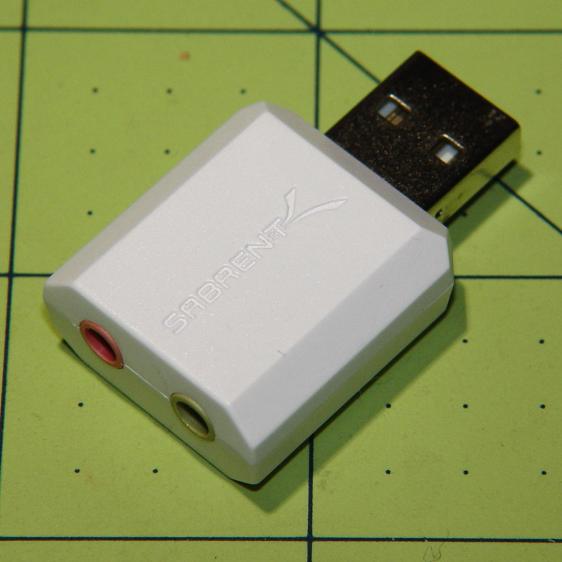
    I recently wanted to use an ordinary USB “sound card” that did not, of course, have a volume knob:

    Sabrent USB Audio Adapter
    Sabrent USB Audio Adapter

    This hack skips the configuration that makes the knob’s events visible to the Python program:

    import os.path
    
    ... snippage ...
    
    # if volume control knob exists, then set up its events
    
    VolumeDevice = '/dev/input/volume'
    
    vp = select.poll()
    if os.path.exists(VolumeDevice):
      v = InputDevice(VolumeDevice)
      v.grab()
      vp.register(v.fileno(),select.POLLIN + select.POLLPRI + select.POLLERR)
    

    It turns out that if you never register a device with the event polling interface, then the interface never reports any events and the rest of the code remains blissfully undisturbed: the non-existent knob doesn’t do anything, while the volume control buttons on the keypad continue to function as usual.

    The end result of this fiddling puts a Raspberry Pi 2 Model B to work as a streaming player on my Electronics Workbench, untethering the laptop from those powered speakers:

    RPi 2 Streaming Player - USB sound gadget
    RPi 2 Streaming Player – USB sound gadget

    It’s a shame that USB audio gadget is so big, because it crowds out standard USB plugs to the side.

    The most satisfactory LED configuration for a translucent case with an external WiFi adapter seems to be:

    dtparam=pwr_led_trigger=cpu0
    dtparam=act_led_trigger=mmc0
    

    The rest of the code remains unchanged as shown in that GitHub Gist.

    Bomb the bass!

  • ATX Lithium Ion 18650 Cell Capacity

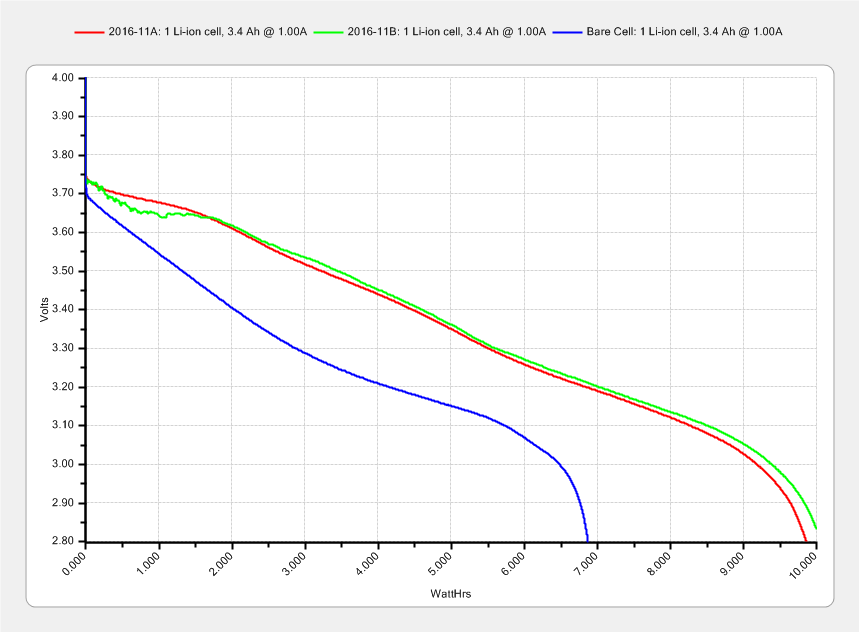
    The 2016-11A and 2016-11B cells produced the overlapping red and green curves, with the gritty section due to crappy battery pack connections:

    Li-Ion 18650 cells - ATX prot - bare - Ah scale - 2016-12-17
    Li-Ion 18650 cells – ATX prot – bare – Ah scale – 2016-12-17

    The lower curve comes from an old unprotected cell harvested from a defunct media player and retrieved from the to-be-recycled pile.

    I picked 1 A as a reasonable value for their intended use in flashlights and maybe a helmet camera. Unlike some other cells in the recent past, these deliver 3.0 A·h, reasonably close to their rated 3.4 A·h capacity at a (presumably) lower current.

    Replotting the voltage vs. energy delivered doesn’t show any surprises:

    Li-Ion 18650 cells - ATX prot - bare - Wh scale - 2016-12-17
    Li-Ion 18650 cells – ATX prot – bare – Wh scale – 2016-12-17

    The voltage declines more-or-less linearly, without the relatively flat discharge curve for smaller cells, which explains why the J5 V2 flashlight becomes seriously dim after a few hours. On the upside, that allows a reasonably accurate state-of-charge display.

    Assuming the Sony HDR-AS30V camera burns 0.1 W·h/min while recording (which is a fancy way of saying it dissipates 6 W), then it should run for (10 W·h)/(0.1W·h/min) = 100 min from one of these cells fitted as an outrigger. The best of the NP-BX1 cells for the camera delivers something like 90 minutes from a measured capacity of 4 A·h at 500 mA; I don’t know what to make of those numbers. Perhaps the camera runs the NP-BX1 cells below the 2.8 V cutoff I’ve been assuming?

  • Blog Summary: 2016

    Page views for 2016:

    Blog Page Views: 2016
    Blog Page Views: 2016

    That works out to a bit under 1000 page views/day of purely organic traffic.

    As always, way more people than I’d expect come here with plumbing problems. On the upside, much of the bedbug saga has fallen off the trailing edge of the wedge; life is good!