The Smell of Molten Projects in the Morning

Ed Nisley's Blog: Shop notes, electronics, firmware, machinery, 3D printing, laser cuttery, and curiosities. Contents: 100% human thinking, 0% AI slop.

Author: Ed

  • LED Filaments: Whoops

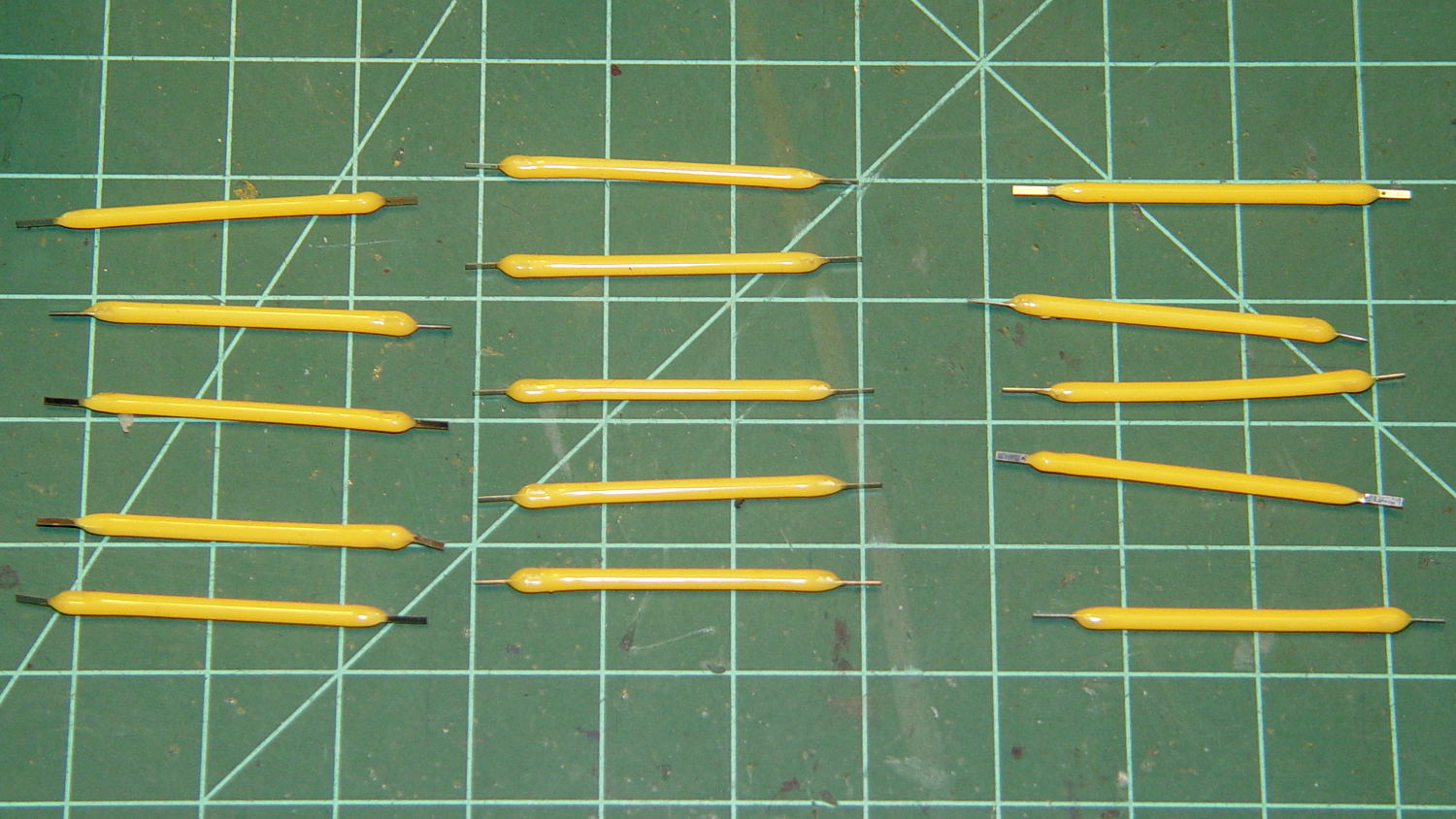
    Five bucks delivered three sets of five warm-white LED filaments from halfway around the planet:

    LED Filaments - 3x5 sets
    LED Filaments – 3×5 sets

    Unfortunately, the “Top Rated Plus” eBay seller just popped three ziplock baggies into an unpadded envelope and tossed it in the mail:

    Unpadded LED Filament Envelope
    Unpadded LED Filament Envelope

    Which had pretty much the result you’d expect on the glass substrates within:

    Broken LED Filament 1
    Broken LED Filament 1

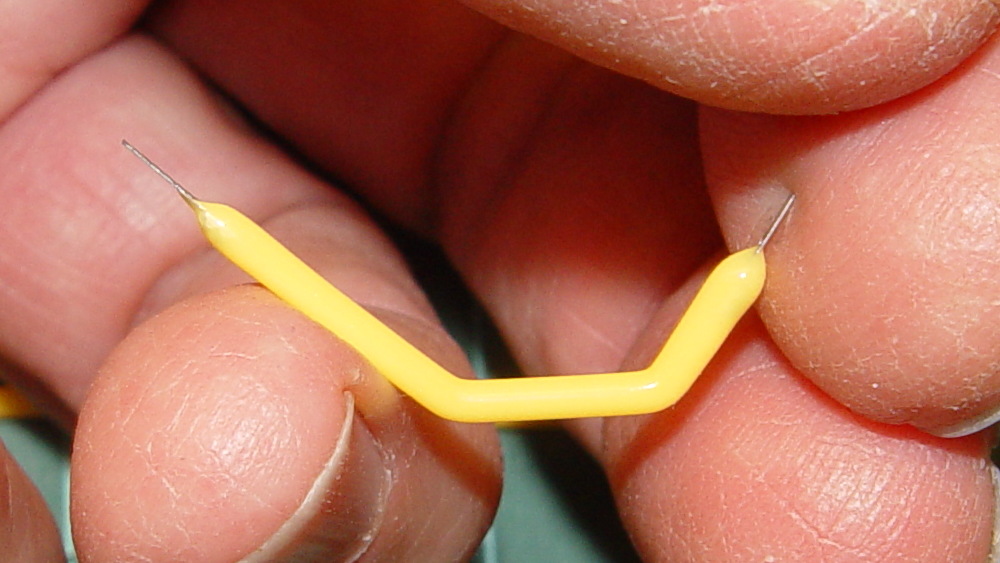
    Turns out every single filament had at least one break:

    Broken LED Filament 3
    Broken LED Filament 3

    Indeed, some seemed just as flexy as the silicone cylinder surrounding the pulverized substrate.

    I reported this to the seller, with photographs, and got a classic response:

    can you use?

    No, I cannot imagine a use for broken LED filaments.

    The seller proposed shipping replacements that would might arrive just after the eBay feedback window closed. I proposed refunding the five bucks. The seller ignored that and sent the replacements in an untracked package “as it is an economical shipping, we have to reduce our loss, so is it ok?”.

    No, it’s not, but he / she / it didn’t actually intend that as a question.

    Were the filaments intact, they’d pass 15 mA with 50 to 60 V applied in one direction or the other, for 1 W average dissipation. That’s probably too high for prolonged use in air (spendy bulbs with similar LEDs have argon / krypton fill for better heat transfer), but I can surely throttle them back a bit.

    Perhaps the replacements will arrive before the feedback window closes?

    I did order another batch from a different seller that might arrive intact before then. We shall see…

  • Raspberry Pi CPU Temperature Watcher

    Having just put a headless Raspberry Pi in the attic, the chip temperature is of some interest. Doing this in an SSH session comes in handy:

    watch 'echo "scale=1 ; d = $(cat /sys/class/thermal/thermal_zone0/temp) / 1000 ; print d , \" °C\n\" " | bc'
    # blank line to ensure the underscore displays correctly
    

    Raspbian doesn’t have the bc calculator by default, so do that first.

    For whatever it’s worth, the Pi starts out at 10 °C and warms over 60 °C under heavy load:

    Every 2.0s: echo "scale=1 ; d = $(cat /sys/class/thermal/thermal_zone0/temp) / 1000 ; print d , \" °...  Sat Jan 14 19:58:59 2017
    
    61.7 °C
    

    It ticks along in the mid 30s under light load.

    You can run all that in one tab of a terminal window through VNC. If you’ve got that much GUI goin’ on, just add a thermal monitor in the panel and be done with it.

  • Pot Lid Repair

    For reasons not relevant here, we (temporarily) have a set of pots with glass lids. One of lids had a remarkable amount of crud between the glass and the trim ring under the knob, which turned out to be corrosion falling off the screw. Trying to remove the screw produced the expected result:

    CKC Pot Lid - broken screw in handle
    CKC Pot Lid – broken screw in handle

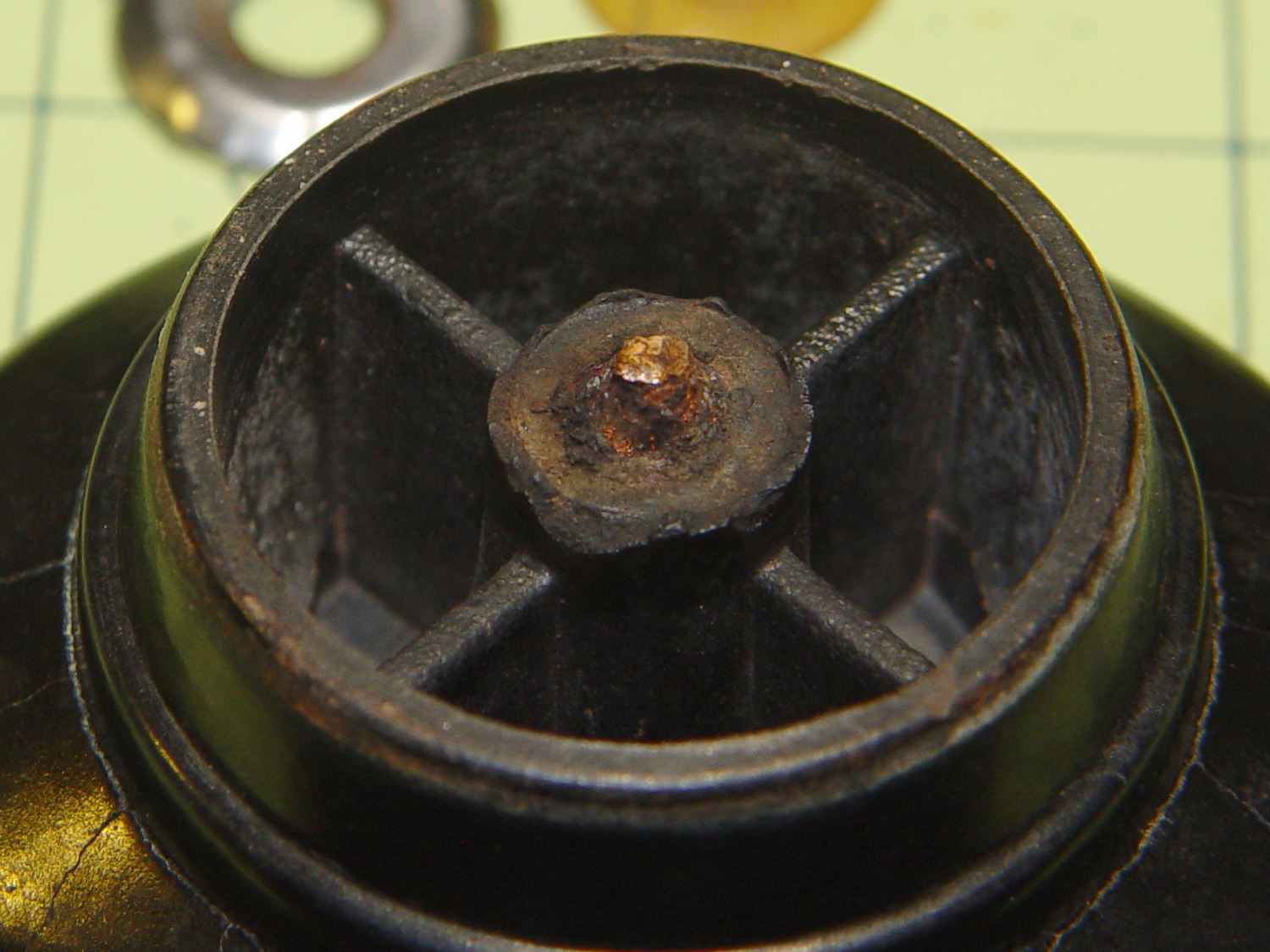
    For whatever reason, they used an ordinary, not stainless, steel screw:

    CKC Pot Lid - corroded screw
    CKC Pot Lid – corroded screw

    I figured I could mill the stub flat, drill out the remainder, install a new insert, and be done with it. The knob has a convex surface and, even though this looked stupid, I tried clamping it atop a wood pad:

    CKC Pot Lid - precarious clamping
    CKC Pot Lid – precarious clamping

    Two gentle cutter passes convinced me it was, in fact, a lethally stupid setup.

    Soooo, I poured some ShapeLock pellets into a defunct (and very small) loaf pan, melted them in near-boiling water, and pressed the knob into the middle, atop some stretchy film to prevent gluing the knob in place:

    CKC Pot Lid - ShapeLock bedding
    CKC Pot Lid – ShapeLock bedding

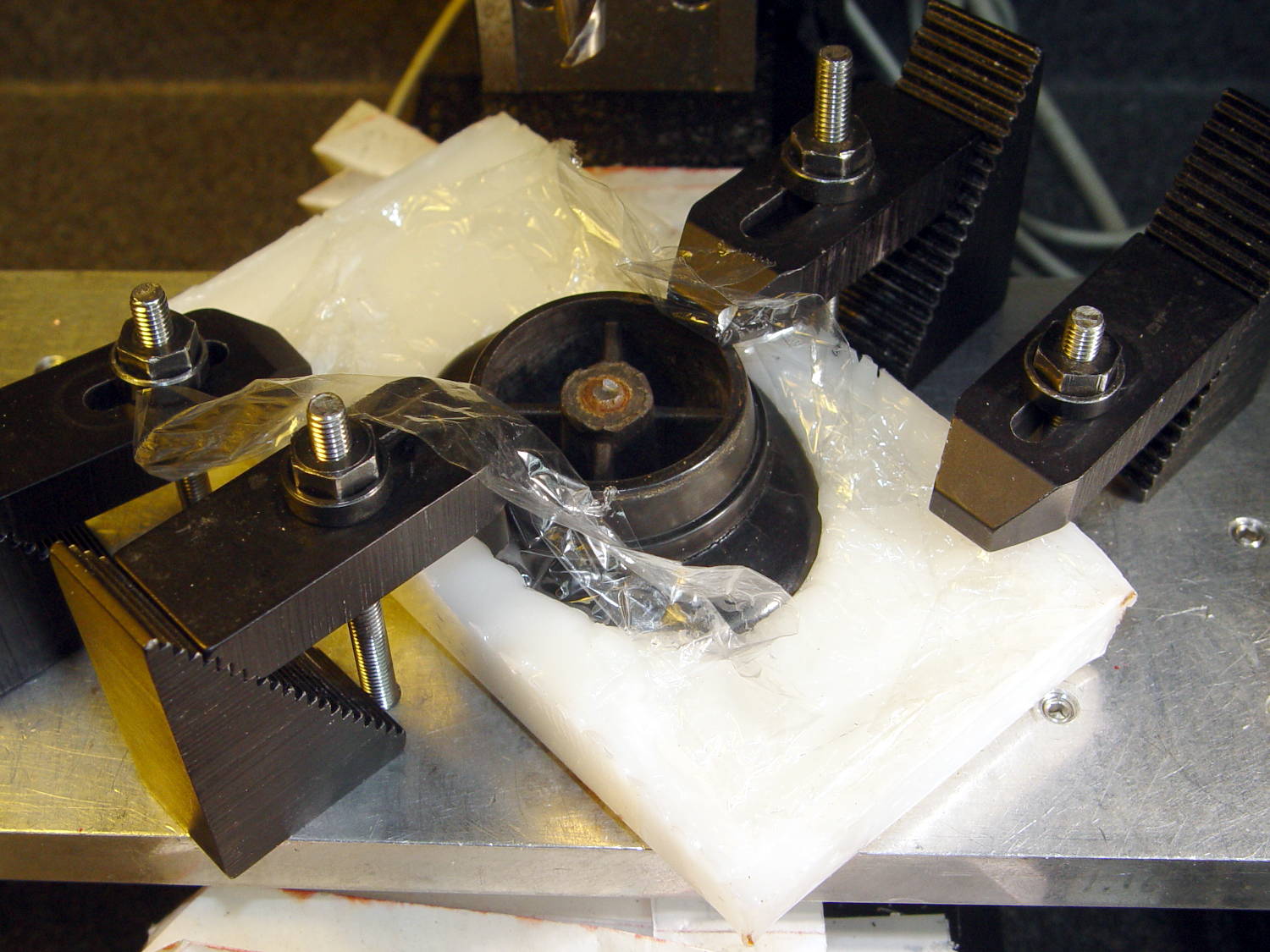
    That’s eyeballometrically level, which is good enough, and the knob sits mechanically locked into the room-temperature plastic slab. Clamping everything down again makes for a much more secure operation:

    CKC Pot Lid - clamped ShapeLock fixture
    CKC Pot Lid – clamped ShapeLock fixture

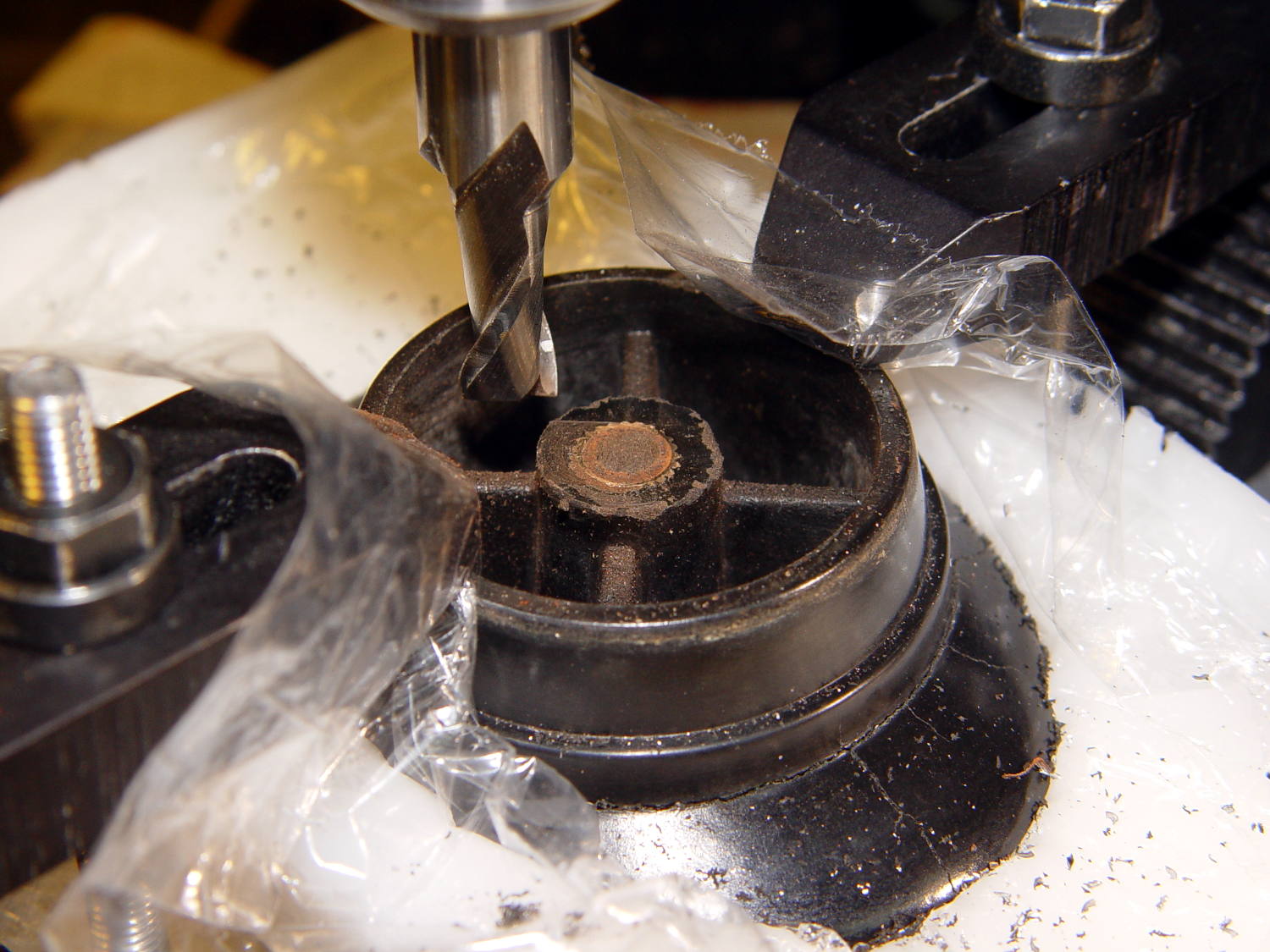
    A few minutes of manual milling exposes the original brass insert molded into the knob, with the steel screw firmly corroded in the middle:

    CKC Pot Lid - screw stub milled flat
    CKC Pot Lid – screw stub milled flat

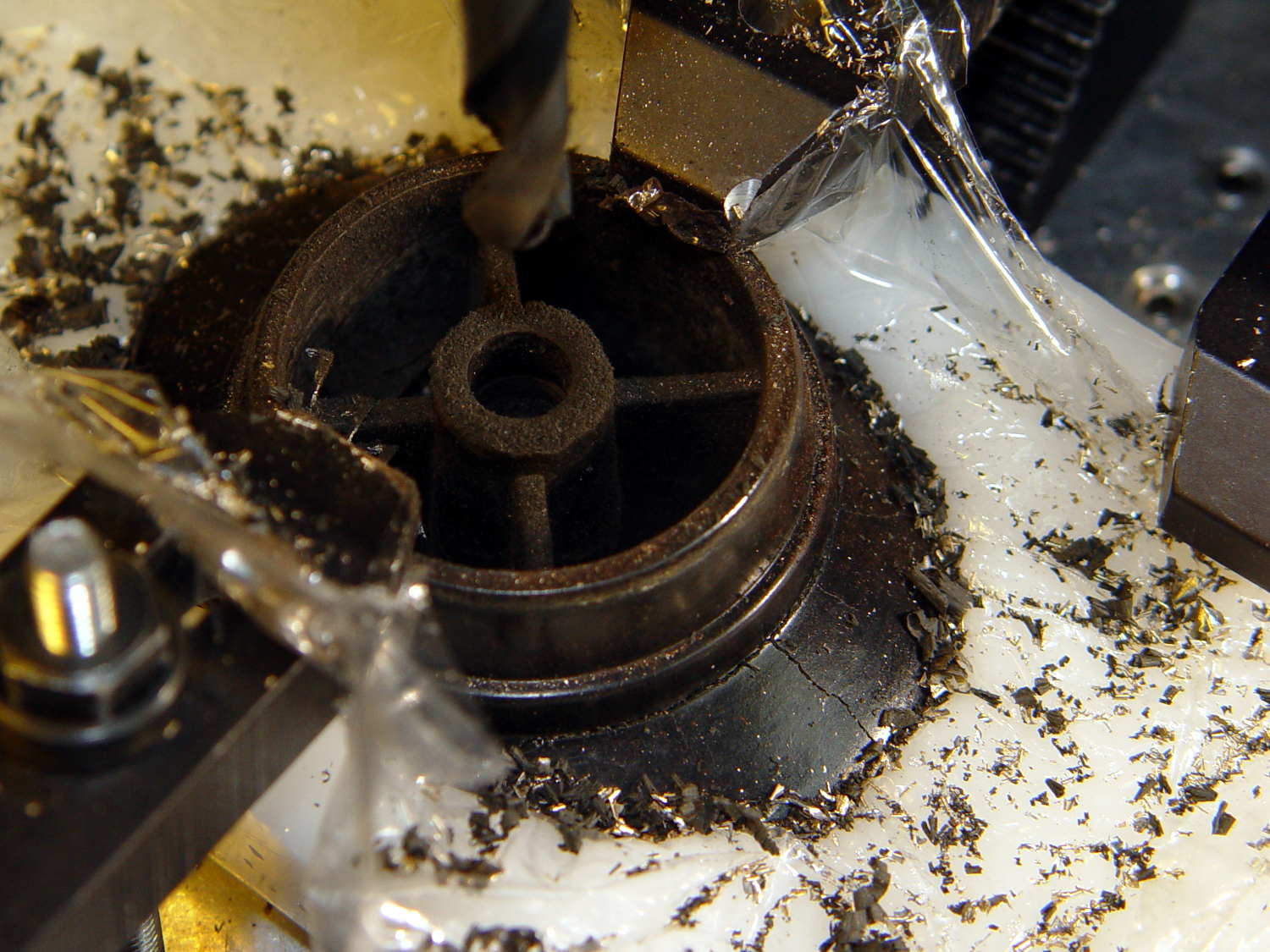
    Center-drill, drill small-medium-large, and eventually the entire insert vanishes in  a maelstrom of chips and dust:

    CKC Pot Lid - OEM insert removed
    CKC Pot Lid – OEM insert removed

    Run a 10-32 stud into an insert, grab in drill chuck, dab JB Kwik around the knurls, press in place while everything’s still aligned in the Sherline, pause for curing, re-melt the ShapeLock, and the insert looks like it grew there:

    CKC Pot Lid - new insert installed
    CKC Pot Lid – new insert installed

    Wonder to tell, a 1 inch 10-32 screw fit perfectly through the pot lid into the knob, with a dab of low-strength Loctite securing it. Reassemble everything in reverse order, and it’s all good:

    CKC Pot Lid - repaired knob
    CKC Pot Lid – repaired knob

    Well, apart from those cracks. I decided I will not borrow trouble from the future: we’ll let those problems surface on their own and, if I’m still in the loop, I can fix them.

  • Raspberry Pi vs. Avahi

    It turns out that the various Avahi daemons performing the magick between whatever.local names and dotted-quad 192.168.1.101 addresses for Raspberry Pi descend into gibbering madness when confronted with:

    • One name corresponding to multiple IP addresses
    • One IP address used for multiple MAC addresses
    • Multiple names for one IP address
    • Multiple names for one MAC address
    • Multiple IP addresses for one MAC address
    • Multiple MAC addresses for one IP address
    • Any and all combinations of the above at various times

    The least of the confusion involved an incorrect IP address linked to a familiar name pulled from deep history by a baffled daemon doing the best it can with what it thinks it knows. Despite what I concluded, rather early in the process, there’s no real error, other than my performing what amounted to a self-inflicted fast-flux nameserver attack.

    Anyhow, I devoted the better part of an afternoon to sorting out the mess, which involved labeling all the streaming radio players with their MAC addresses and rebooting them one-by-one to allow all the daemons time to recognize the current situation:

    Raspberry Pi 3 - WiFi MAC address
    Raspberry Pi 3 – WiFi MAC address

    That label corresponds to the Pi 3’s on-board WiFi adapter.

    For Pi 2 boxen, the MAC address travels with the WiFi adapter jammed into a USB port:

    SunFounder WiFi Adapter - MAC address
    SunFounder WiFi Adapter – MAC address

    I didn’t label the (unused) Ethernet jacks, figuring I’d solve that problem after it trips me up.

  • Raspberry Pi Streaming Radio Player: Room Customization

    Sometimes you (well, I) want a bit of late-night music, which is now one button press away. However, I initially set things up so the Raspberry Pi’s startup code executed a Python script on a network share from the file server in the basement, which shuts down around midnight after the daily backup.

    Keeping a local copy meant having to update that copy whenever I tweak the code, a nuisance not to be tolerated. This Bash (or whatever) code in /etc/rc.local figures out if the server is up and, if so, updates the local copy from the server. If the server isn’t up, then it just runs with what it has:

    #!/bin/sh
    # was !/bin/sh -e
    
    ... snippage ...
    
    server=192.168.1.4
    
    ping -c 1 $server
    if [ $? -eq 0 ]
    then
      mount -o ro ${server}:/mnt/bulkdata/Project\ Files/Streaming\ Media\ Player/Firmware/ /mnt/part
      rsync -auv /mnt/part/Streamer.py /home/pi
      umount /mnt/part
    fi
    
    sudo -u pi sh -c 'python /home/pi/Streamer.py any' &
    

    N.B.: you must remove the -e from the shebang, because otherwise the script jams to a stop when the ping fails. Took me a while to figure that out, yup.

    Use raspi-config to force the startup sequence to wait until the network is available. Turns out that the DHCP process can stall for half a minute, so fixed timeouts don’t work.

    Hardcoding the server IP address eliminates a whole bunch of mysterious failures apparently due to whatever handles the translation from mollusk.local to the dotted quad. Maybe that’s not really a problem, but I’ll run with it.

    Now the streamers fetch the Latest and Greatest version whenever they’re on during the day and run their local copy, with the room parameter telling it where it lives.

    Life is good!

  • Raspberry Pi Streaming Radio Player: Command Line Parsing

    Some experience suggested different default stations & volume settings for the streamers in various rooms, so the Python code now parses its command line to determine how to configure itself:

    import argparse as args
    
    cmdline = args.ArgumentParser(description='Streaming Radio Player',epilog='KE4ZNU - http://softsolder.com')
    cmdline.add_argument('Loc',help='Location: BR1 BR2 ...',default='any',nargs='?')
    args = cmdline.parse_args()
    

    I should definitely pick a different variable name to avoid the obvious clash.

    With that in hand, the customization takes very effort:

    CurrentKC = 'KEY_KP7'
    MuteDelay = 8.5         # delay before non-music track; varies with buffering
    UnMuteDelay = 7.5       # delay after non-music track
    MixerVol = '15'         # mixer gain
    
    Location = vars(args)['Loc'].upper()
    print 'Player location: ',Location
    logging.info('Player setup for: ' + Location)
    
    if Location == 'BR1':
      CurrentKC = 'KEY_KPDOT'
      MixerVol = '10'
    elif Location == 'BR2':
      MuteDelay = 6.0
      UnMuteDelay = 8.0
    MixerVol = '5'
    

    The Location = vars() idiom returns a dictionary of all the variables and their values, of which there’s only one at the moment. The rest of the line extracts the value and normalizes it to uppercase.

    Now we can poke the button and get appropriate music without having to think very hard.

    Life is good!

    The Python source code, which remains in dire need of refactoring, as a GitHub Gist:

    from evdev import InputDevice,ecodes,KeyEvent
    import subprocess32 as subp
    import select
    import re
    import sys
    import time
    import logging
    import os.path
    import argparse as args
    cmdline = args.ArgumentParser(description='Streaming Radio Player',epilog='KE4ZNU – http://softsolder.com')
    cmdline.add_argument('Loc',help='Location: BR1 BR2 …',default='any',nargs='?')
    args = cmdline.parse_args()
    Media = {'KEY_KP7' : ['Classical',False,['mplayer','–quiet','-playlist','http://stream2137.init7.net/listen.pls'%5D%5D,
    'KEY_KP8' : ['Jazz',False,['mplayer','–quiet','-playlist','http://stream2138.init7.net/listen.pls'%5D%5D,
    'KEY_KP9' : ['WMHT',False,['mplayer','–quiet','http://wmht.streamguys1.com/wmht1'%5D%5D,
    'KEY_KP4' : ['Classic 1000',True,['mplayer','–quiet','-playlist','http://listen.radionomy.com/1000classicalhits.m3u'%5D%5D,
    'KEY_KP5' : ['DCNY 911',False,['mplayer','–quiet','-playlist','http://www.broadcastify.com/scripts/playlists/1/12305/-5857889408.m3u'%5D%5D,
    'KEY_KP6' : ['WAMC',False,['mplayer','–quiet','http://pubint.ic.llnwd.net/stream/pubint_wamc'%5D%5D,
    'KEY_KP1' : ['60s',True,['mplayer','–quiet','-playlist','http://listen.radionomy.com/all60sallthetime-keepfreemusiccom.m3u'%5D%5D,
    'KEY_KP2' : ['50-70s',True,['mplayer','–quiet','-playlist','http://listen.radionomy.com/golden-50-70s-hits.m3u'%5D%5D,
    'KEY_KP3' : ['Soft Rock',True,['mplayer','–quiet','-playlist','http://listen.radionomy.com/softrockradio.m3u'%5D%5D,
    'KEY_KP0' : ['Zen',True,['mplayer','–quiet','-playlist','http://listen.radionomy.com/zen-for-you.m3u'%5D%5D,
    'KEY_KPDOT' : ['Ambient',False,['mplayer','–quiet','http://185.32.125.42:7331/maschinengeist.org.mp3'%5D%5D
    }
    Controls = {'KEY_KPSLASH' : '//////',
    'KEY_KPASTERISK' : '******',
    'KEY_KPENTER' : ' ',
    'KEY_KPMINUS' : '<',
    'KEY_KPPLUS' : '>',
    'KEY_VOLUMEUP' : '*',
    'KEY_VOLUMEDOWN' : '/'
    }
    MuteStrings = ["TargetSpot","[Unknown]","Advert:","+++","—","SRR","Srr","ZEN FOR","Intro of","Jingle – ","*bumper*"]
    Muted = False # keep track of muted state
    MixerChannel = 'PCM' # which amixer thing to use
    logging.basicConfig(format='%(asctime)s %(levelname)s: %(message)s',filename='/tmp/Streamer.log',level=logging.INFO)
    logger = logging.getLogger()
    # Set up defaults based on where we are
    CurrentKC = 'KEY_KP7'
    MuteDelay = 8.5 # delay before non-music track; varies with buffering
    UnMuteDelay = 7.5 # delay after non-music track
    MixerVol = '15' # mixer gain
    Location = vars(args)['Loc'].upper()
    print 'Player location: ',Location
    logging.info('Player setup for: ' + Location)
    if Location == 'BR1':
    CurrentKC = 'KEY_KPDOT'
    MixerVol = '10'
    elif Location == 'BR2':
    MuteDelay = 6.0
    UnMuteDelay = 8.0
    MixerVol = '5'
    # set up event inputs and polling objects
    # This requires some udev magic to create the symlinks
    k = InputDevice('/dev/input/keypad')
    k.grab()
    kp = select.poll()
    kp.register(k.fileno(),select.POLLIN + select.POLLPRI + select.POLLERR)
    # if volume control knob exists, then set up its events
    VolumeDevice = '/dev/input/volume'
    vp = select.poll()
    if os.path.exists(VolumeDevice):
    v = InputDevice(VolumeDevice)
    v.grab()
    vp.register(v.fileno(),select.POLLIN + select.POLLPRI + select.POLLERR)
    # set up file for output tracing
    lw = open('/tmp/mp.log','w') # mplayer piped output
    # set the mixer output low enough that the initial stream won't wake the dead
    subp.call(['amixer','sset',MixerChannel,MixerVol])
    # Start the player with the default stream, set up for polling
    print 'Starting mplayer on',Media[CurrentKC][0],' -> ',Media[CurrentKC][-1][-1]
    logging.info('Starting mplayer on %s -> %s',Media[CurrentKC][0],Media[CurrentKC][-1][-1])
    p = subp.Popen(Media[CurrentKC][-1],
    stdin=subp.PIPE,stdout=subp.PIPE,stderr=subp.STDOUT)
    pp = select.poll() # this may be valid for other invocations, but is not pretty
    pp.register(p.stdout.fileno(),select.POLLIN + select.POLLPRI + select.POLLERR)
    print ' … running'
    #——————–
    #— Play the streams
    while True:
    # pluck next line from mplayer and decode it
    if [] != pp.poll(10):
    text = p.stdout.readline()
    if 'ICY Info: ' in text: # these lines may contain track names
    lw.write(text)
    lw.flush()
    trkinfo = text.split(';') # also splits at semicolon embedded in track name
    # logging.info('Raw split line: %s', trkinfo)
    for ln in trkinfo:
    if 'StreamTitle' in ln: # this part probably contains the track name
    NeedMute = False # assume a listenable track
    trkhit = re.search(r"StreamTitle='(.*)'",ln) # extract title if possible
    if trkhit: # regex returned valid result?
    TrackName = trkhit.group(1) # get string between two quotes
    else:
    print ' … regex failed for line: ', ln
    logging.info('Regex failed for line: [' + ln + ']')
    TrackName = "Invalid StreamTitle format"
    print 'Track name: [', TrackName, ']'
    logging.info('Track name: [%s]', TrackName)
    if Media[CurrentKC][1] and ( (len(TrackName) == 0) or any(m in TrackName for m in MuteStrings) ) :
    NeedMute = True
    if NeedMute:
    print ' … muting:',
    if Media[CurrentKC][1] and not Muted:
    time.sleep(MuteDelay) # brute-force assumption about buffer leadtime
    subp.call(['amixer','-q','sset',MixerChannel,'mute'])
    Muted = True
    print 'done'
    logging.info('Track muted')
    else:
    print ' … unmuting:',
    if Muted:
    if Media[CurrentKC][1]:
    time.sleep(UnMuteDelay) # another brute-force timing assumption
    Muted = False
    subp.call(['amixer','-q','sset',MixerChannel,'unmute'])
    print 'done'
    logging.info('Track unmuted')
    elif 'Exiting.' in text: # mplayer just imploded
    lw.write(text)
    lw.flush()
    print 'Got EOF / stream cutoff: []',text,']'
    logging.info('EOF or stream cutoff')
    print ' … killing dead mplayer'
    pp.unregister(p.stdout.fileno())
    p.terminate() # p.kill()
    p.wait()
    # print ' … flushing pipes'
    # lw.truncate(0)
    print ' … discarding keys'
    while [] != kp.poll(0):
    kev = k.read
    time.sleep(10)
    print ' … restarting mplayer: ',Media[CurrentKC][0]
    logging.info('Restarting mplayer')
    p = subp.Popen(Media[CurrentKC][-1],
    stdin=subp.PIPE,stdout=subp.PIPE,stderr=subp.STDOUT)
    pp.register(p.stdout.fileno(),select.POLLIN + select.POLLPRI + select.POLLERR)
    print ' … running'
    logging.info(' … running')
    # accept pending events from volume control knob
    if [] != vp.poll(10):
    vev = v.read()
    lw.write('Volume')
    lw.flush()
    for e in vev:
    if e.type == ecodes.EV_KEY:
    kc = KeyEvent(e).keycode
    # print 'Volume kc: ',kc
    if kc in Controls:
    print 'Vol Control: ',kc
    try:
    p.stdin.write(Controls[kc])
    except Exception as e:
    print "Can't send control: ",e
    print ' … restarting player: ',Media[CurrentKC][0]
    logging.info('Error sending volume, restarting player: ' + str(e))
    try:
    pp.unregister(p.stdout.fileno())
    except Exception as e:
    print 'Trouble unregistering stdout: ',e
    logging.info('Cannot unregister stdout: ' + str(e))
    time.sleep(2)
    p = subp.Popen(Media[CurrentKC][-1],
    stdin=subp.PIPE,stdout=subp.PIPE,stderr=subp.STDOUT)
    pp.register(p.stdout.fileno(),select.POLLIN + select.POLLPRI + select.POLLERR)
    print ' … running'
    logging.info(' … running')
    # accept pending events from keypad
    if [] != kp.poll(10):
    kev = k.read()
    lw.write("Keypad")
    lw.flush()
    for e in kev:
    if e.type == ecodes.EV_KEY:
    kc = KeyEvent(e).keycode
    if kc == 'KEY_NUMLOCK': # discard these, as we don't care
    continue
    # print 'Got: ',kc
    if (kc == 'KEY_BACKSPACE') and (KeyEvent(e).keystate == KeyEvent.key_hold):
    if True:
    print 'Backspace = shutdown!'
    p.kill()
    logging.shutdown()
    q = subp.call(['sudo','shutdown','-P','now'])
    q.wait()
    time.sleep(5)
    print "Oddly, we did not die…"
    else:
    print 'BS = bail from main!'
    logging.shutdown()
    sys.exit(0)
    break
    if KeyEvent(e).keystate != KeyEvent.key_down: # discard key up & other rubbish
    continue
    if kc in Controls:
    print 'Control:', kc
    logging.info('Control: ' + kc)
    try:
    p.stdin.write(Controls[kc])
    except Exception as e:
    print "Can't send control: ",e
    print ' … restarting player: ',Media[CurrentKC][0]
    logging.info('Error sending controls, restarting player: ' + str(e))
    try:
    pp.unregister(p.stdout.fileno())
    except Exception as e:
    print 'Trouble unregistering stdout: ',e
    logging.info('Cannot unregister stdout: ' + str(e))
    p.terminate() # p.kill()
    p.wait()
    time.sleep(2)
    p = subp.Popen(Media[CurrentKC][-1],
    stdin=subp.PIPE,stdout=subp.PIPE,stderr=subp.STDOUT)
    pp.register(p.stdout.fileno(),select.POLLIN + select.POLLPRI + select.POLLERR)
    print ' … running'
    logging.info(' … running')
    if kc in Media:
    print 'Switching stream to ',Media[kc][0],' -> ',Media[kc][-1][-1]
    logging.info('Switching stream: ' + Media[kc][0] + ' -> ' + Media[kc][-1][-1])
    CurrentKC = kc
    print ' … halting player'
    try:
    pp.unregister(p.stdout.fileno())
    except Exception as e:
    print 'Trouble unregistering stdout: ',e
    logging.info('Cannot unregister stdout: ' + str(e))
    try:
    p.communicate(input='q')
    except Exception as e:
    print 'Perhaps mplayer already died? ',e
    logging.info('Already died? ' + str(e))
    try:
    p.terminate() # p.kill()
    p.wait()
    except Exception as e:
    print 'Trouble with terminate or wait: ',e
    logging.info('Trouble with terminate or wait: ' + str(e))
    time.sleep(2)
    print ' … restarting player: ',Media[CurrentKC][0]
    p = subp.Popen(Media[CurrentKC][-1],
    stdin=subp.PIPE,stdout=subp.PIPE,stderr=subp.STDOUT)
    pp.register(p.stdout.fileno(),select.POLLIN + select.POLLPRI + select.POLLERR)
    print ' … running'
    logging.info(' … running')
    print 'Out of loop!'
    logging.shutdown()
    view raw Streamer.py hosted with ❤ by GitHub
  • Kenmore 158 Sewing Machine: Another Foot Pedal Rebuild

    The pedal on Mary’s most recent Kenmore 158 lost its low-speed control, which meant I must add a few more graphite / carbon disks to the stacks:

    Kenmore 158 - carbon disks
    Kenmore 158 – carbon disks

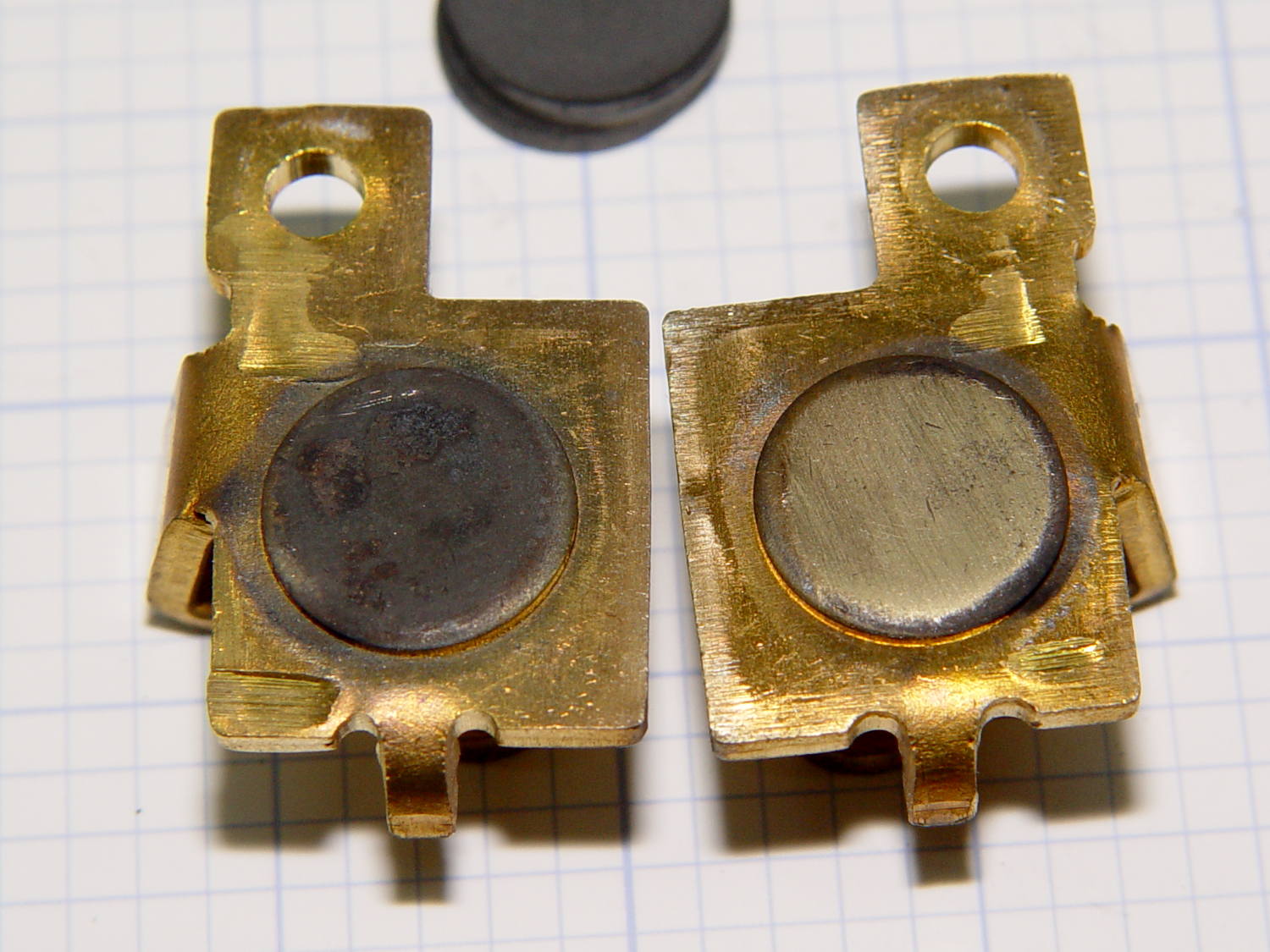
    The contacts needed a bit of attention, too:

    Kenmore 158 - carbon contact plates - detail
    Kenmore 158 – carbon contact plates – detail

    Contrary to what I found in the previous rheostats, these stacks end with a double-thick graphite disk backed up by a disk of brass shimstock, all of which needed cleaning, too. No broken disks, none severely eroded, no debris, just a general shortening of the stacks; I think the disks gradually turn into carbon dioxide.

    Each stack has 42 graphite disks that average 0.79 mm thick, the double-thick disks measure 1.5 mm, and the brass shims are 0.30 mm = 12 mil. The punched contacts on those brass plates stand 0.95 mm proud of the surface.

    With the big graphite plugs in place, the ceramic housing had 37 mm deep holes for the disk stacks. Subtracting the 0.95 mm contact leaves about 36 mm and, seeing as how the stacks add up to just under 36 mm overall, there’s barely room for one additional disk. I added one to each stack, buttoned the pedal up, and it works perfectly again.

    Good thing I have a bag of those disks from the crash test dummy machine!