The Smell of Molten Projects in the Morning

Ed Nisley's Blog: Shop notes, electronics, firmware, machinery, 3D printing, laser cuttery, and curiosities. Contents: 100% human thinking, 0% AI slop.

Author: Ed

  • Raspberry Pi Yard Camera

    The yard camera I mentioned a few days ago consists of a Raspberry Pi 3 with an Official V2 Pi Camera peering through two layers of 1955-era window glass into our back yard:

    Back Yard Camera setup - 2017-03-13
    Back Yard Camera setup – 2017-03-13

    Yes, that’s black duct tape holding it to the window pane. The extension cord draped across the floor gotta go, too.

    This being a made-in-haste lashup, I used the streamEye MJPEG HTTP streamer, started from /etc/rc.local in the usual way:

    logger -s Starting camera streamer
    sudo -u pi sh -c '/home/pi/yardcam.sh' &
    logger -s Camera running
    

    The yardcam.sh script feeds one moderate-quality frame to the streamer every second:

    /home/pi/streameye/extras/raspimjpeg.py -w 1280 -h 720 -r 1 -q 80 | streameye
    

    MJPEG has a lot to dislike as a streaming video format. In particular, without any hint of inter-frame compression, the network usage gets way too high for any reasonable frame rate.

    But it got the camera up & running in time for the March snowfall:

    Fun in Snow - 2017-03-15
    Fun in Snow – 2017-03-15

    In a nod to IoT security, the Raspberry Pi’s wireless interface sits behind the router’s firewall on our guest network, with no access to the devices on our main network. The router passes a one-port peephole from the Internet to the Pi, which protects all the other services from unwarranted attention.

    The router maintains a dynamic DNS record with a (not particularly) mnemonic URL, which seems better than an ever-changing dotted-quad IP address.

    Because the router doesn’t support hairpin connections from the main network to the guest network, I can’t monitor the video from my desktop through the outwardly visible URL. Instead, I must fire up a laptop, connect to the guest network, then connect directly to the camera at camera.local.

    You do not have a Need To Know for the URL; I’m sure it’ll appear on Shodan. I plan to take it down when the snow melts.

  • Kitchen Sink Faucet Deck Sealing

    I had to replace the faucet on a kitchen sink (not our own, for reasons not relevant here) after the steel nuts & washers holding the base to the sink deck rotted completely away. Why faucet manufacturers used plain steel in that location remains a mystery; I’m sure it has something to do with cost reduction and damn the consequences after a few years.

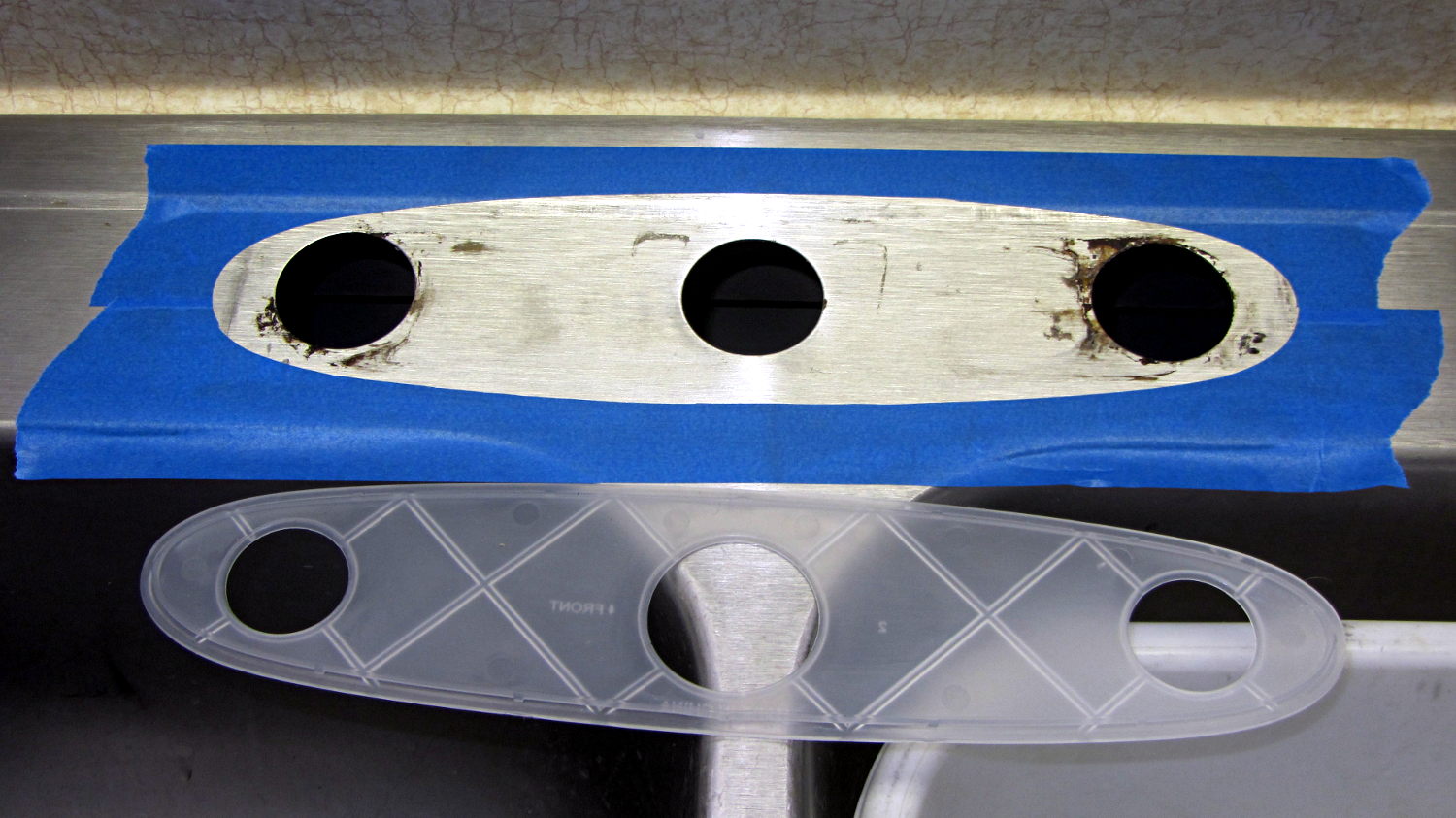
    Of course, the new faucet didn’t sit quite flat on the sink deck, due to the raised rim around the perimeter. Installing it like that would prevent the (hard plastic) gasket from sealing against the deck, with the inevitable water leak below the sink; we started this project by scrapping a water-soaked shelf under the sink due to the previous faucet’s wrecked seal. Sliding the oval base forward enough to clear the rim would expose the two holes on each side, with similar results.

    You can see the problem if you squint hard enough:

    Kitchen Sink Faucet - gasket mask
    Kitchen Sink Faucet – gasket mask

    I decided raising the back of the base by maybe two millimeters wouldn’t be particularly visible, particularly if I filled the space with silicone snot (almost) matching the gasket to provide a solid foundation.

    The blue tape masks the sink surface around the gasket to prevent silicone mishaps and simplify cleanup. I held the gasket in place, traced around it with new Xacto knife blade, and peeled the inside out just like I knew what I was doing.

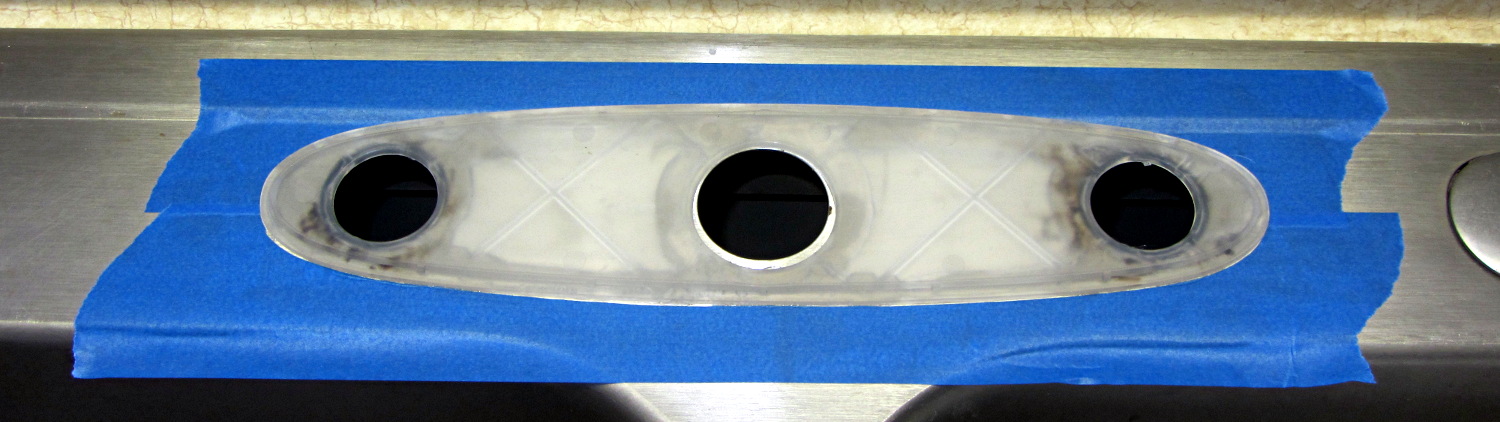
    Generous beads of snot around all the holes and across the back will provide a firm base and a good seal:

    Kitchen Sink Faucet - gasket in place
    Kitchen Sink Faucet – gasket in place

    With that in place, I aligned the faucet over the gasket, gently tightened the nuts holding the base to the deck, and waited a day for the silicone to start curing before completing the plumbing. It’ll take a while to finish, due to the limited area exposed around the edges.

    The water lines now have shutoff ball valves, which the next person to work on it will surely appreciate.

  • Check Your Zero

    A recent OpenSCAD mailing list discussion started with an observation that the dimensions of printed parts were wildly different from the numeric values used in the OpenSCAD program that created the STL. Various folks suggested possible errors, examined the source and STL files to no avail, and were generally baffled.

    Finally, a photo conclusively demonstrating the problem arrived:

    Caliper - digital vs. analog scale
    Caliper – digital vs. analog scale

    Note the difference between the digital readout and the analog scale printed on the body.

    Turns out it’s his first digital caliper: he simply didn’t realize you must close the jaws and press the ZERO button before making any measurements.

    We’ve all been that guy. Right?

    FWIW, our Larval Engineer can probably still hear me intoning “Check your zero” every time she picks up a caliper or turns on a multimeter. Perhaps she’ll think fondly of me, some day. [grin]

  • Raspberry Pi Streaming Radio Player: OLED Display

    With the OLED wired up to the Raspberry Pi, the LUMA.OLED driver makes it surprisingly easy to slap text on the screen, at least after some obligatory fumbling around:

    RPi OLED Display - Plenitude
    RPi OLED Display – Plenitude

    Connect the hardware, install the driver, then the setup goes like this:

    import textwrap
    
    from luma.oled.device import sh1106
    from luma.core.serial import spi
    from luma.core.render import canvas
    from PIL import ImageFont
    
    … snippage …
    
    font1 = ImageFont.truetype('/usr/share/fonts/truetype/dejavu/DejaVuSansMono.ttf',14)
    font2 = ImageFont.truetype('/usr/share/fonts/truetype/dejavu/DejaVuSans.ttf',11)
    
    wrapper = textwrap.TextWrapper(width=128//font2.getsize('n')[0])
    
    StatLine = 0
    DataLine = 17           # allow for weird ascenders and accent marks
    LineSpace = 16
    
    Contrast = 255          # OLED brightness setting
    
    serial = spi(device=0,port=0)
    device = sh1106(serial)
    device.contrast(Contrast)
    

    The Python Imaging Library below the LUMA driver supports Truetype fonts that look much better than the default fonts. For these tiny displays, DejaVu Sans comes close enough to being a single-stroke (“stick”) font and, being proportional, packs more text into a fixed horizontal space.

    The textwrap library chops a string into lines of a specified length, which works great with a fixed-width font and not so well with a proportional font. I set the line length based on the width of a mid-size lowercase letter and hope for the best. In round numbers, each 128 pixel line can hold 20-ish characters of the size-11 (which might be the height in pixels) font.

    It also understands hyphens and similar line-ending punctuation:

    Felix Mendelssohn-
    Bartholdy - Piano
    Concerto No.01 in
    

    It turns out whatever library routine blits characters into the bitmap has an off-by-one error that overwrites the leftmost column with the pixel columns that should be just off-screen on the right; it may also overwrite the topmost row with the bottommost row+1. I poked around a bit, couldn’t find the actual code amid the layers of inherited classes and methods and suchlike, and gave up: each line starts in pixel column 1, not 0. With textwrap generally leaving the rightmost character in each line blank, the picket-fence error (almost) always overwrites the first column with dark pixels.

    Display coordinates start at (0,0) in the upper left corner, but apparently the character origin corresponds to the box around an uppercase letter, with ascenders and diacritical marks extending (at least) one pixel above that. The blue area in these displays starts at (0,16), but having the ascenders poke into the yellow section is really, really conspicuous, so DataLine Finagles the text down by one pixel. The value of Linespace avoids collisions between descenders and ascenders in successive lines that you (well, I) wouldn’t expect with a spacing equal to the font height.

    The display has a variable brightness setting, called “contrast” by the datasheet and driver, that determines the overall LED current (perhaps according to an exponential relationship, because an α appears in the tables). I tweak the value in Contrast based on where the streamer lives, with 1 being perfectly suitable for a dark room and 255 for ordinary lighting.

    The LUMA package includes a scrolling terminal emulator. With maybe four lines, tops, on that display (in a reasonable font, anyhow), what’s the point?

    Instead, I homebrewed a panel with manual positioning:

    def ShowStatus(L1=None,L2=None,L3='None'):
      with canvas(device) as screen:
        screen.text((1,StatLine),Media[CurrentKC][0][0:11],
                 font=font1,fill='white')
        screen.text((127-(4*font1.getsize('M')[0] + 2),StatLine),'Mute' if Muted else ' ',
                 font=font1,fill='white')
    
        screen.text((1,DataLine),L1,
                 font=font2,fill='white')
        screen.text((1,DataLine + 1*LineSpace),L2,
                 font=font2,fill='white')
        screen.text((1,DataLine + 2*LineSpace),L3,
                 font=font2,fill='white')
    

    Yeah, those are global variables in the first line; feel free to object-orient it as you like.

    The LUMA driver hands you a blank screen inside the with … as …: context, whereupon you may draw as you see fit and the driver squirts the bitmap to the display at the end of the context. There’s apparently a way to set up a permanent canvas and update it at will, but this works well enough for now.

    That means you (well, I) must mange those three lines by hand:

    ShowStatus('Startup in ' + Location,
               'Mixer: ' + MixerChannel + ' = ' + MixerVol,
               'Contrast: ' + str(Contrast))
    

    Chopping the track info string into lines goes like this:

    if TrackName:
      info = wrapper.wrap(TrackName)
      ShowStatus(info[0],
                 info[1] if len(info) > 1 else '',
                 info[2] if len(info) > 2 else '')
    else:
      ShowStatus('No track info','','')
    

    Something along the way ruins Unicode characters from the track info, converting them into unrelated (and generally accented) characters. They work fine when shipped through the logging interface, so it may be due to a font incompatibility or, more likely, my not bothering to work around Python 2’s string vs. byte stream weirdness. Using Python 3 would be a Good Idea, but I’m unsure all the various & sundry libraries are compatible and unwilling to find out using programming as an experimental science.

    The Python source code as a GitHub Gist:

    from evdev import InputDevice,ecodes,KeyEvent
    import subprocess32 as subp
    import select
    import re
    import sys
    import time
    import logging
    import logging.handlers
    import os.path
    import argparse as args
    import textwrap
    from luma.oled.device import sh1106
    from luma.core.serial import spi
    from luma.core.render import canvas
    from PIL import ImageFont
    # URL must be last entry in command line list
    Media = {'KEY_KP7' : ['Classical',False,['mplayer','-playlist','http://stream2137.init7.net/listen.pls'%5D%5D,
    'KEY_KP8' : ['Jazz',False,['mplayer','-playlist','http://stream2138.init7.net/listen.pls'%5D%5D,
    'KEY_KP9' : ['WMHT',False,['mplayer','http://wmht.streamguys1.com/wmht1'%5D%5D,
    'KEY_KP4' : ['Classic 1k',True,['mplayer','-playlist','http://listen.radionomy.com/1000classicalhits.m3u'%5D%5D,
    'KEY_KP5' : ['Love',True,['mplayer','-playlist','/home/pi/Playlists/LoveRadio.m3u']],
    'KEY_KP6' : ['WAMC',False,['mplayer','-playlist','http://playerservices.streamtheworld.com/pls/WAMCFM.pls'%5D%5D,
    'KEY_KP1' : ['60s',True,['mplayer','-playlist','http://listen.radionomy.com/all60sallthetime-keepfreemusiccom.m3u'%5D%5D,
    'KEY_KP2' : ['50-70s',True,['mplayer','-playlist','http://listen.radionomy.com/golden-50-70s-hits.m3u'%5D%5D,
    'KEY_KP3' : ['Soft Rock',True,['mplayer','-playlist','http://listen.radionomy.com/softrockradio.m3u'%5D%5D,
    'KEY_KP0' : ['Zen',False,['mplayer','http://iradio.iceca.st:80/zenradio'%5D%5D,
    'KEY_KPDOT' : ['Ambient',False,['mplayer','http://185.32.125.42:7331/maschinengeist.org.mp3'%5D%5D,
    'KEY_KPMINUS' : ['Relaxation',True,['mplayer','-playlist','/home/pi/Playlists/Frequences-relaxation.m3u']],
    'KEY_KPPLUS' : ['Plenitude',True,['mplayer','-playlist','/home/pi/Playlists/Radio-PLENITUDE.m3u']]
    }
    # these keycode will be fed directly into mplayer
    Controls = {'KEY_KPSLASH' : '//////',
    'KEY_KPASTERISK' : '******',
    'KEY_VOLUMEUP' : '*',
    'KEY_VOLUMEDOWN' : '/'
    }
    # stream title keywords that trigger muting
    MuteStrings = ['TargetSpot', # common Radionomy insert
    'Intro of','Jingle','*bumper*', # Radio-PLENITUDE
    '[Unknown]','Advert:','+++','—','SRR','Srr', # softrockradio
    'PEACE LK1','PEACE J1'] # Frequences-relaxation
    # Set up default configuration
    CurrentKC = 'KEY_KP7' # default stream source
    MuteDelay = 6.5 # delay before non-music track; varies with buffering
    UnMuteDelay = 9.0 # delay after non-music track
    MixerChannel = 'PCM' # default amixer output control
    MixerVol = '30' # mixer gain
    RestartDelay = 10 # delay after stream failure
    Contrast = 255 # OLED brightness setting
    # Set up command line parsing
    cmdline = args.ArgumentParser(description='Streaming Radio Player',epilog='KE4ZNU – http://softsolder.com')
    cmdline.add_argument('Loc',help='Location: BR1 BR2 …',default='any',nargs='?')
    args = cmdline.parse_args()
    # Set up logging
    LogFN = '/home/pi/Streamer.log'
    LogFmt = logging.Formatter('%(asctime)s %(levelname)s: %(message)s')
    LogHandler = logging.handlers.RotatingFileHandler(LogFN,backupCount=9)
    LogHandler.setFormatter(LogFmt)
    logger = logging.getLogger('StreamLog')
    logger.addHandler(LogHandler)
    logger.setLevel(logging.INFO)
    # Tweak config based on where we are
    Location = vars(args)['Loc'].upper()
    logger.info('Player setup for: ' + Location)
    if Location == 'BR1':
    CurrentKC = 'KEY_KPDOT'
    MixerVol = '5'
    Contrast = 1
    elif Location == 'BR2':
    MuteDelay = 4.5
    UnMuteDelay = 8.5
    MixerVol = '5'
    Contrast = 1
    elif Location == 'LR':
    MixerVol = '40'
    CurrentKC = 'KEY_KPPLUS'
    # set up event inputs and polling objects
    # This requires some udev magic to create the symlinks
    k = InputDevice('/dev/input/keypad')
    k.grab()
    kp = select.poll()
    kp.register(k.fileno(),select.POLLIN + select.POLLPRI + select.POLLERR)
    # if volume control knob exists, then set up its events
    VolumeDevice = '/dev/input/volume'
    vp = select.poll()
    if os.path.exists(VolumeDevice):
    logger.info('Volume control device: %s',VolumeDevice)
    v = InputDevice(VolumeDevice)
    v.grab()
    vp.register(v.fileno(),select.POLLIN + select.POLLPRI + select.POLLERR)
    # set up file for mplayer output tracing
    lw = open('/home/pi/mp.log','w') # mplayer piped output
    # set the mixer output low enough that the initial audio won't wake the dead
    subp.call(['amixer','-q','sset',MixerChannel,MixerVol])
    if Media[CurrentKC][1]:
    subp.call(['amixer','-q','sset',MixerChannel,'mute'])
    Muted = True # squelch anything before valid track name
    logger.info('Audio muted at startup')
    else:
    subp.call(['amixer','-q','sset',MixerChannel,'unmute'])
    Muted = False # allow early audio
    logger.info('Audio unmuted at startup')
    # Set up OLED display
    font1 = ImageFont.truetype('/usr/share/fonts/truetype/dejavu/DejaVuSansMono.ttf',14)
    font2 = ImageFont.truetype('/usr/share/fonts/truetype/dejavu/DejaVuSans.ttf',11)
    wrapper = textwrap.TextWrapper(width=128//font2.getsize('n')[0])
    StatLine = 0
    DataLine = 17 # allow one line for weird ascenders and accent marks
    LineSpace = 16
    serial = spi(device=0,port=0)
    device = sh1106(serial)
    device.contrast(Contrast)
    def ShowStatus(L1=None,L2=None,L3='None'):
    with canvas(device) as screen:
    screen.text((1,StatLine),Media[CurrentKC][0][0:11],
    font=font1,fill='white')
    screen.text((127-(4*font1.getsize('M')[0] + 2),StatLine),'Mute' if Muted else ' ',
    font=font1,fill='white')
    screen.text((1,DataLine),L1,
    font=font2,fill='white')
    screen.text((1,DataLine + 1*LineSpace),L2,
    font=font2,fill='white')
    screen.text((1,DataLine + 2*LineSpace),L3,
    font=font2,fill='white')
    ShowStatus('Startup in ' + Location,
    'Mixer: ' + MixerChannel + ' = ' + MixerVol,
    'Contrast: ' + str(Contrast))
    # Start the player with the default stream, set up for polling
    logger.info('Starting mplayer on %s -> %s',Media[CurrentKC][0],Media[CurrentKC][-1][-1])
    p = subp.Popen(Media[CurrentKC][-1],
    stdin=subp.PIPE,stdout=subp.PIPE,stderr=subp.STDOUT)
    pp = select.poll() # this may be valid for other invocations, but is not pretty
    pp.register(p.stdout.fileno(),select.POLLIN + select.POLLPRI + select.POLLERR)
    #——————–
    #— Play the streams
    while True:
    # pluck next line from mplayer and decode it
    if [] != pp.poll(10):
    text = p.stdout.readline()
    if 'Error: ' in text: # something horrible went wrong
    lw.write(text)
    lw.flush()
    logger.info('Unsolvable problem! ' + text)
    logger.info('Exiting')
    LogHandler.doRollover()
    logging.shutdown()
    sys.exit('Exit streamer on mplayer error –' + text)
    if 'ICY Info: ' in text: # these lines may contain track names
    lw.write(text)
    lw.flush()
    trkinfo = text.split(';') # also splits at semicolon embedded in track name
    # logger.info('Raw split line: %s', trkinfo)
    for ln in trkinfo:
    if 'StreamTitle' in ln: # this part probably contains the track name
    NeedMute = False # assume a listenable track
    trkhit = re.search(r"StreamTitle='(.*)'",ln) # extract title if possible
    if trkhit: # regex returned valid result?
    TrackName = trkhit.group(1) # get string between two quotes
    else:
    logger.info('Regex failed for line: [' + ln + ']')
    TrackName = 'Invalid StreamTitle format!'
    logger.info('Track name: [%s]', TrackName)
    if Media[CurrentKC][1] and ( (len(TrackName) == 0) or any(m in TrackName for m in MuteStrings) ) :
    NeedMute = True
    if NeedMute:
    if Media[CurrentKC][1] and not Muted:
    time.sleep(MuteDelay) # brute-force assumption about buffer leadtime
    subp.call(['amixer','-q','sset',MixerChannel,'mute'])
    Muted = True
    logger.info('Track muted')
    else:
    if Muted:
    if Media[CurrentKC][1]:
    time.sleep(UnMuteDelay) # another brute-force timing assumption
    subp.call(['amixer','-q','sset',MixerChannel,'unmute'])
    Muted = False
    logger.info('Track unmuted')
    if TrackName:
    info = wrapper.wrap(TrackName)
    ShowStatus(info[0],
    info[1] if len(info) > 1 else '',
    info[2] if len(info) > 2 else '')
    else:
    ShowStatus('No track info','','')
    elif 'Exiting.' in text: # mplayer just imploded
    lw.write(text)
    lw.flush()
    logger.info('EOF or stream cutoff: [' + text + ']')
    ShowStatus('Killing dead Mplayer','','')
    pp.unregister(p.stdout.fileno())
    p.terminate() # p.kill()
    p.wait()
    logger.info('Discarding keys')
    while [] != kp.poll(0):
    kev = k.read
    time.sleep(RestartDelay)
    logger.info('Restarting mplayer')
    ShowStatus('Restarting Mplayer','','')
    p = subp.Popen(Media[CurrentKC][-1],
    stdin=subp.PIPE,stdout=subp.PIPE,stderr=subp.STDOUT)
    pp.register(p.stdout.fileno(),select.POLLIN + select.POLLPRI + select.POLLERR)
    logger.info(' … running')
    ShowStatus('Mplayer running','','')
    # accept pending events from volume control knob
    if [] != vp.poll(10):
    vev = v.read()
    lw.write('Volume')
    lw.flush()
    for e in vev:
    if e.type == ecodes.EV_KEY:
    kc = KeyEvent(e).keycode
    if kc in Controls:
    try:
    p.stdin.write(Controls[kc])
    except Exception as e:
    logger.info('Error sending volume, restarting player: ' + str(e))
    try:
    pp.unregister(p.stdout.fileno())
    except Exception as e:
    logger.info('Cannot unregister stdout: ' + str(e))
    ShowStatus('Vol error','Restarting',' Mplayer')
    time.sleep(RestartDelay)
    p = subp.Popen(Media[CurrentKC][-1],
    stdin=subp.PIPE,stdout=subp.PIPE,stderr=subp.STDOUT)
    pp.register(p.stdout.fileno(),select.POLLIN + select.POLLPRI + select.POLLERR)
    logger.info(' … running')
    # accept pending events from keypad
    if [] != kp.poll(10):
    kev = k.read()
    lw.write('Keypad')
    lw.flush()
    for e in kev:
    if e.type == ecodes.EV_KEY:
    kc = KeyEvent(e).keycode
    if kc == 'KEY_NUMLOCK': # discard these, as we don't care
    continue
    if (kc == 'KEY_BACKSPACE') and (KeyEvent(e).keystate == KeyEvent.key_hold):
    if True:
    logger.info('Shutting down')
    LogHandler.doRollover()
    logging.shutdown()
    p.kill()
    q = subp.call(['sudo','shutdown','-P','now'])
    q.wait()
    time.sleep(5)
    else:
    logger.info('Exiting from main')
    LogHandler.doRollover()
    logging.shutdown()
    sys.exit('Exit on command')
    break
    if KeyEvent(e).keystate != KeyEvent.key_down: # now OK to discard key up & hold
    continue
    if kc == 'KEY_KPENTER': # toggle muted state
    if Muted:
    logger.info('Forcing unmute')
    subp.call(['amixer','-q','sset',MixerChannel,'unmute'])
    Muted = False
    else:
    logger.info('Forcing mute')
    subp.call(['amixer','-q','sset',MixerChannel,'mute'])
    Muted = True
    continue
    if kc in Controls:
    logger.info('Control: ' + kc)
    try:
    p.stdin.write(Controls[kc])
    except Exception as e:
    logger.info('Error sending controls, restarting player: ' + str(e))
    ShowStatus('Ctl error','Restarting',' Mplayer')
    try:
    pp.unregister(p.stdout.fileno())
    except Exception as e:
    logger.info('Cannot unregister stdout: ' + str(e))
    p.terminate() # p.kill()
    p.wait()
    time.sleep(RestartDelay)
    p = subp.Popen(Media[CurrentKC][-1],
    stdin=subp.PIPE,stdout=subp.PIPE,stderr=subp.STDOUT)
    pp.register(p.stdout.fileno(),select.POLLIN + select.POLLPRI + select.POLLERR)
    logger.info(' … running')
    ShowStatus('Mplayer',' running','')
    if kc in Media:
    logger.info('Switching stream: ' + Media[kc][0] + ' -> ' + Media[kc][-1][-1])
    oldname = Media[CurrentKC][0]
    CurrentKC = kc
    ShowStatus('Switching from',oldname,'Halt Mplayer')
    try:
    pp.unregister(p.stdout.fileno())
    except Exception as e:
    logger.info('Cannot unregister stdout: ' + str(e))
    try:
    p.communicate(input='q')
    except Exception as e:
    logger.info('Mplayer already dead? ' + str(e))
    try:
    p.terminate() # p.kill()
    p.wait()
    except Exception as e:
    logger.info('Trouble with terminate or wait: ' + str(e))
    if Media[CurrentKC][1]:
    subp.call(['amixer','-q','sset',MixerChannel,'mute'])
    Muted = True
    logger.info('Audio muted for restart')
    else:
    subp.call(['amixer','-q','sset',MixerChannel,'unmute'])
    Muted = False
    logger.info('Audio unmuted for restart')
    time.sleep(RestartDelay)
    logger.info('Restarting Mplayer')
    p = subp.Popen(Media[CurrentKC][-1],
    stdin=subp.PIPE,stdout=subp.PIPE,stderr=subp.STDOUT)
    pp.register(p.stdout.fileno(),select.POLLIN + select.POLLPRI + select.POLLERR)
    logger.info(' … running')
    ShowStatus('Started Mplayer','','')
  • Raspberry Pi: OLED Display

    These cute displays have barely enough dots for the job:

    RPi OLED Display - Classical
    RPi OLED Display – Classical

    That’s a 0.96 inch = 24.4 mm OLED display, measured diagonally, with a breathtaking 8192 = 128×64 dots. It’s a binary display: on or off pixels, nothing in between. This is not a color display: what you see is what it does, with a two-pixel void between the yellow and blue sections.

    The void is a physical separation that does not affect the display addressing: the yellow section has 16 rows, the blue section has 48. It’s your responsibility to keep things where they belong; a character descender from the yellow section will appear in the blue section.

    They’re three bucks each, shipped halfway around the planet: search eBay / Amazon for oled 128x64 yellow. The all-blue and all-white versions do not have the two-pixel void. I have some white 1.3 inch versions on the way for those applications requiring 35% more visibility.

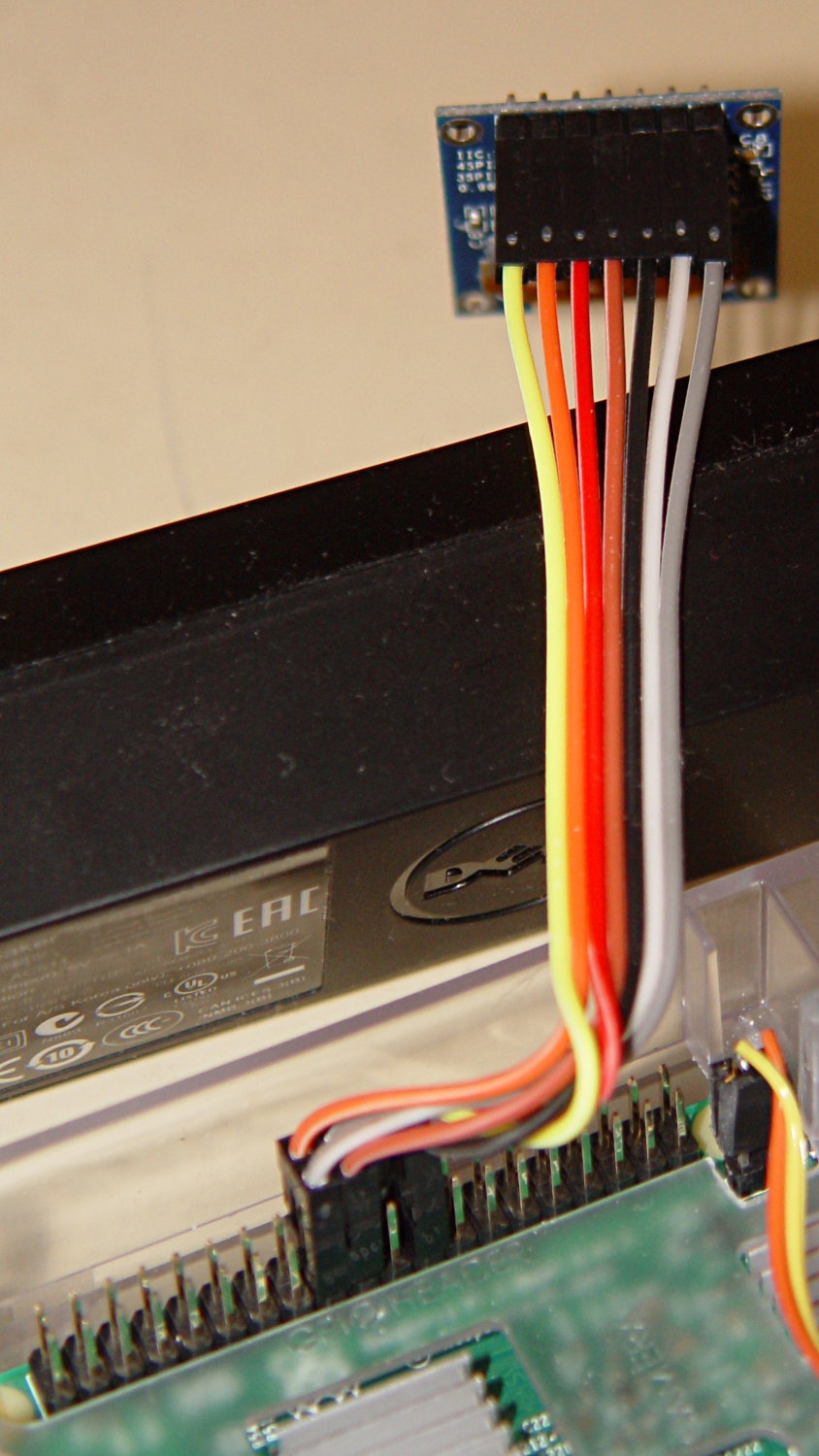
    The SPI interface uses all seven wires, peeled from a premade 100 mm 40-pin cable with female pin connectors:

    RPi OLED Display - Wiring
    RPi OLED Display – Wiring

    Other OLED versions have a four-wire I2C interface. The boards have option jumpers on the back, but the pin header along the edge will have 7 holes for SPI or 4 holes for I2C .

    Caveat emptor for online buyers: the item picture(s) may not match the title or the description text. The low-end sellers carrying beach balls, cookware, MOSFETs, cheap consumer electronics, and OLEDs do not understand the tech on a small board that’s Just Another SKU among thousands.

    For cables, search eBay or Amazon for ribbon dupont "female to female" 10cm. Amazon has sets of male-female, male-male, and female-female jumpers for ten bucks in various lengths. The insulation seems rather stiff and I may be forced to build better cables with fine wire inside PET braid.

    The SPI interface soaks up a tidy block of pins on the RPi’s big header:

    RPi OLED Display - RPi connector detail
    RPi OLED Display – RPi connector detail

    The LUMA-OLED Python driver doc gives a useful summary of those connections, herewith extracted for future reference:

    • 17 VCC – 3.3 V works for sure, 5 V might not
    • 18 DC – Data/Command
    • 19 D1 (“dee one”) – Data to display = MOSI
    • 20 GND
    • 21 not used, that’s the pin in the midst of the block
    • 22 RST – Reset
    • 23 D0 (“dee zero”) – clock to display = SCLK
    • 24 CS – Chip Select = CE0 (“cee ee zero”)

    Pin 1 is in front on the left end of that picture, closest to the MicroSD card slot, and proceeds 1-2, 3-4, and so forth along the length of the connector: odds toward the CPU, evens toward the PCB edge.

    The LUMA-OLD maintainter must have OLED boards with a slightly different SPI pinout than mine: VCC and GND are interchanged. Caveat emptor!

    Obviously, it’s desperately in need of a cute little case, which is in the nature of fine tuning.


  • Monthly Image: Turkey Vulture Sunning

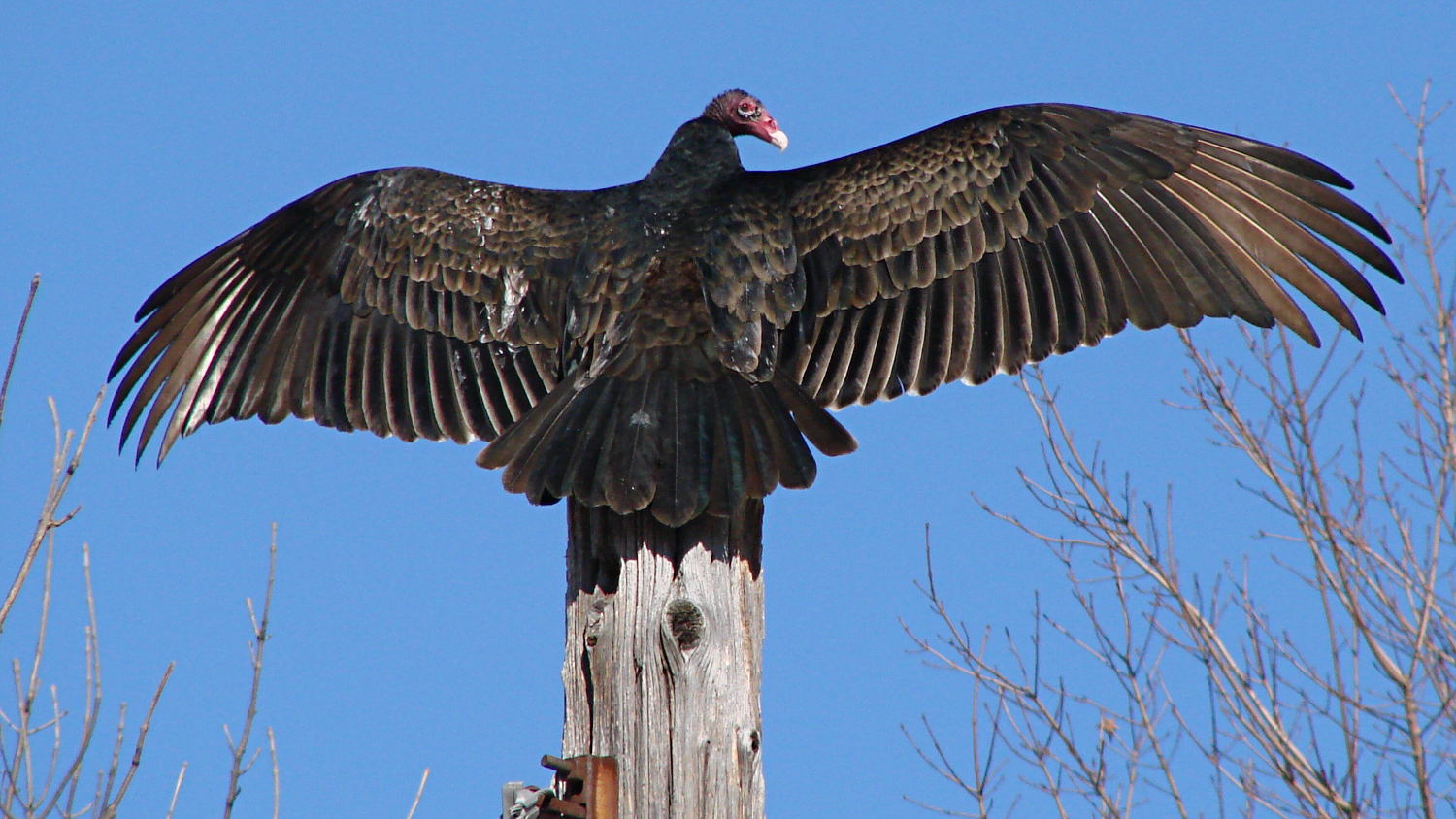
    This must feel soooo good:

    Turkey Vulture atop utility pole - alert
    Turkey Vulture atop utility pole – alert

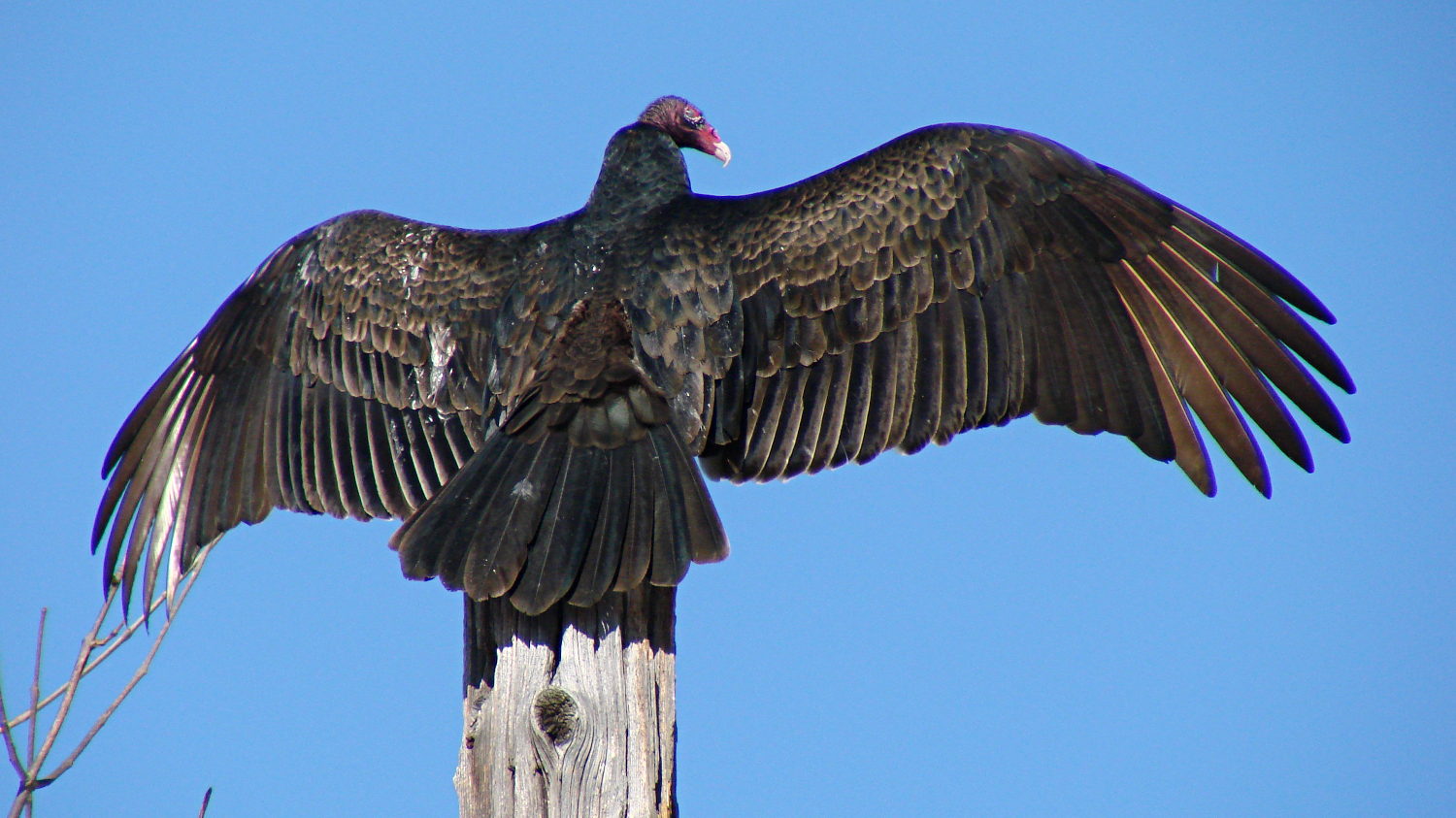
    Just close your eyes and soak up the warmth of the sun:

    Turkey Vulture atop utility pole - snoozing
    Turkey Vulture atop utility pole – snoozing

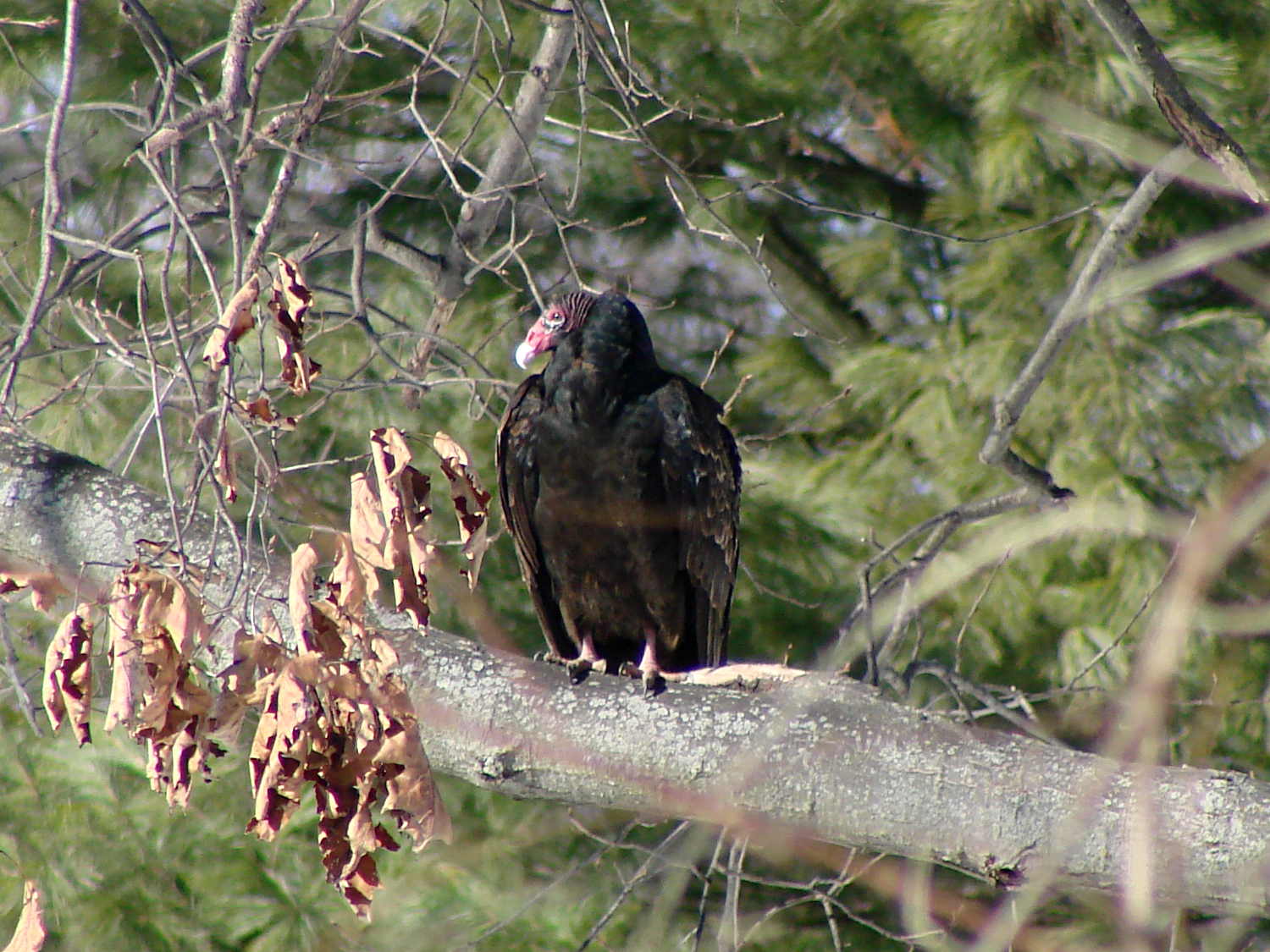
    Turkey vultures look imposing, even with all that flight hardware tucked away:

    Turkey Vulture on branch
    Turkey Vulture on branch

    However, I think this is a low-status bird, because those splashes on the left wing look a lot like bird crap…

    Taken with the DSC-H5, zoomed all the way tight with the 1.7× teleadapter, handheld on a lovely sunny day.

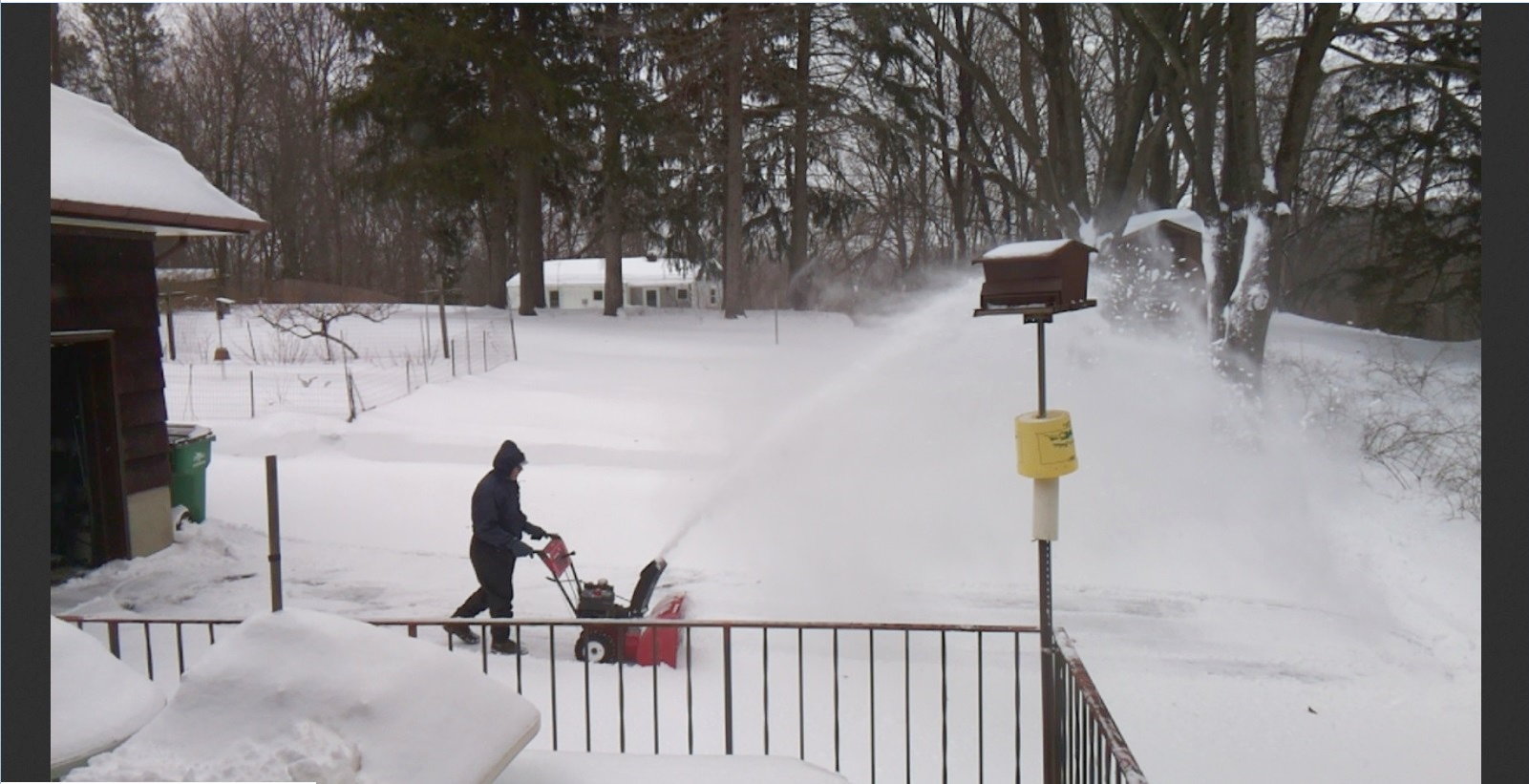
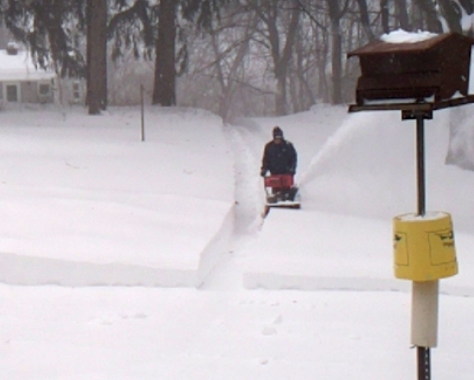
    Update: Because I write these posts a few days in advance of their appearance, I didn’t know yesterday’s weather would look like this:

    Driveway clearing - 2017-03-14
    Driveway clearing – 2017-03-14

    That’s a screenshot from a Raspberry Pi streaming camera I set up so a friend in North Carolina could gloat.

    I suppose the vultures huddle in a tree, as do the turkeys, and await better flying conditions.

    Enjoy the sun while it shines!

  • SK2812 RGBW LED: Test Fixture

    [Edit: The SK2812 in the title and elsewhere should be SK6812. If I change the title, then all the other links break. So it goes.]

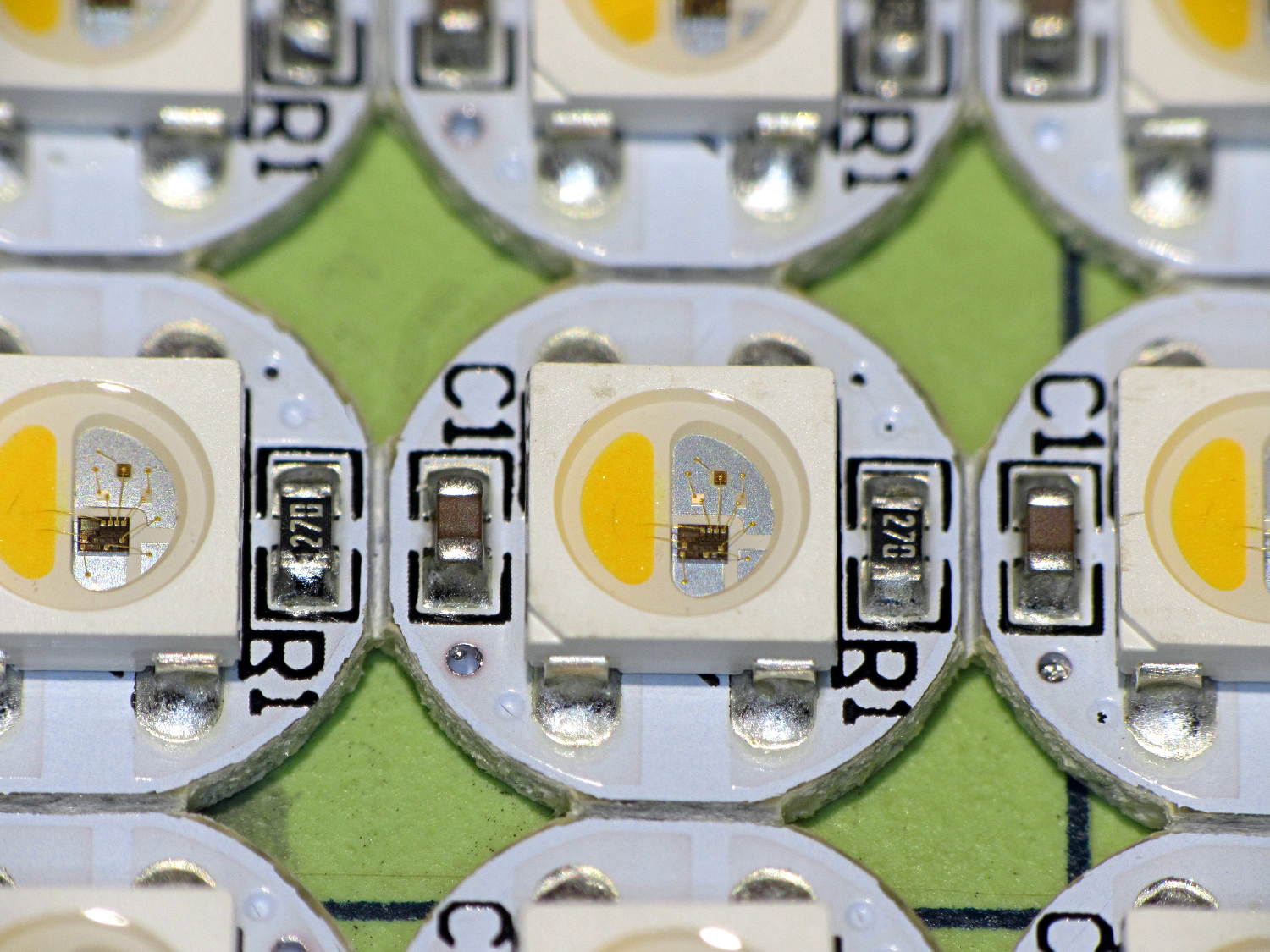
    An envelope of RGBW LEDs, allegedly with SK6812 controllers, arrived from halfway around the planet:

    SK2812RGBW LEDs - as received
    SK2812RGBW LEDs – as received

    The yellow phosphor sauce poured atop the blue LED on the left that makes it glow white leaves the upper loop of two wire bonds sticking out, but I can’t fault ’em for that. The overall build quality looks better than the ill-fated WS2812 LEDs, although it’s hard to tell by looking.

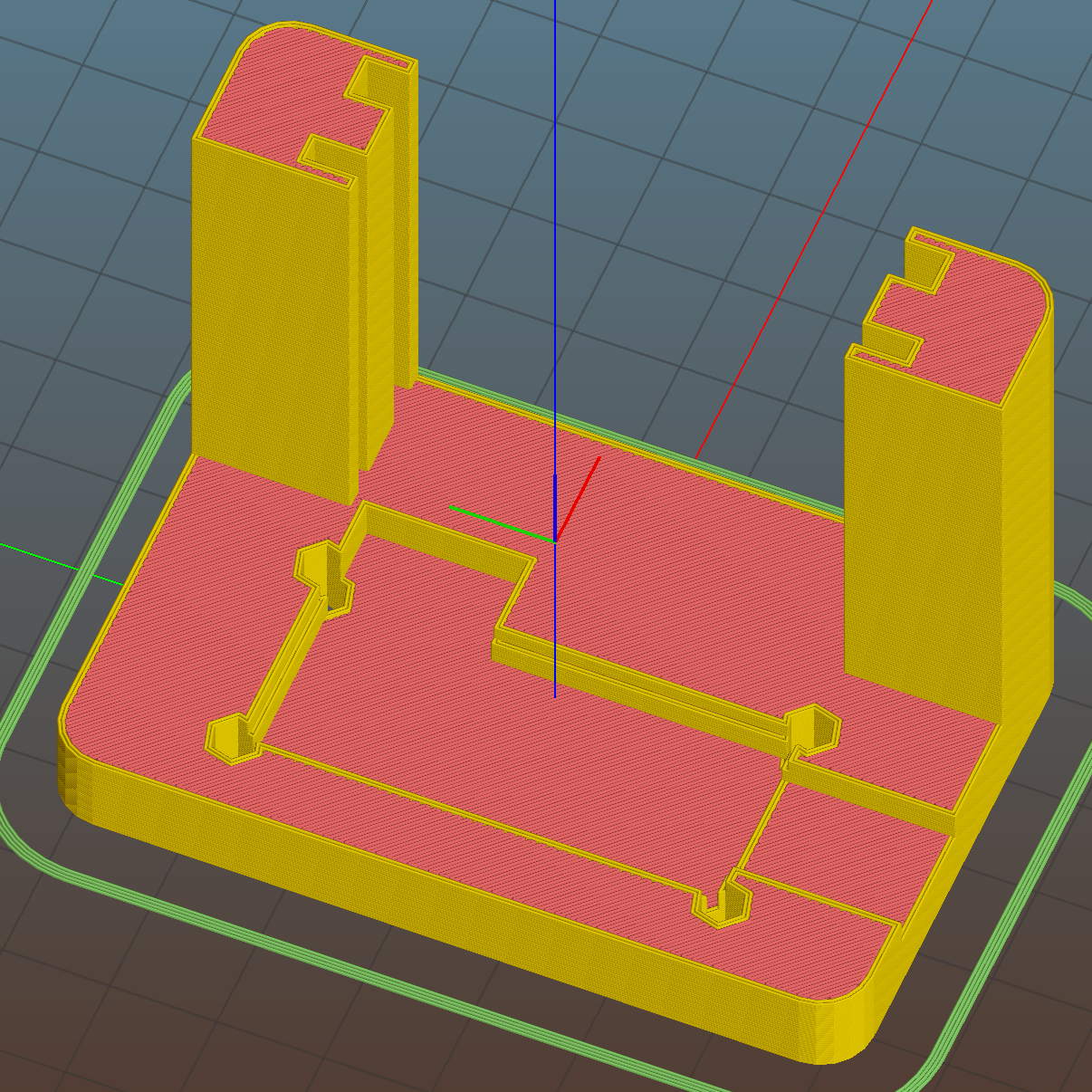
    I conjured a test stand from the vasty digital deep by tweaking the WS2812 mount:

    SK6812 LED Array Test Fixture - Slic3r preview
    SK6812 LED Array Test Fixture – Slic3r preview

    Wiring up a 5×5 panel went as before:

    SK2812RGBW test fixture - rear
    SK2812RGBW test fixture – rear

    The array test code adds another pixel channel and runs another raised sine wave with another random period, accomplished without much hackage.

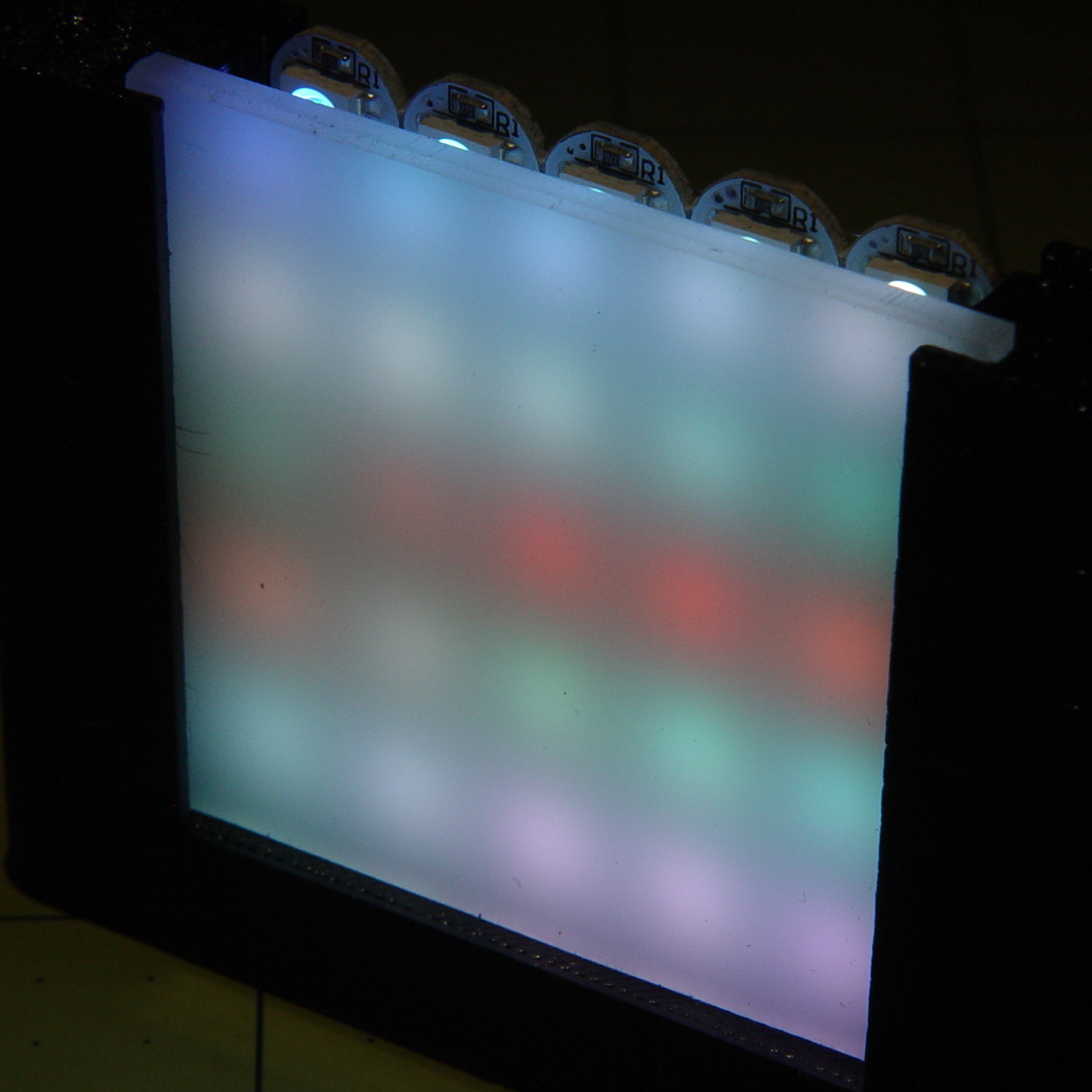
    With the warm-white LED at full throttle (MaxPWM = 255), the panel tends toward the pallid end of HSV space:

    SK2812RGBW test fixture - front - W PWM255
    SK2812RGBW test fixture – front – W PWM255

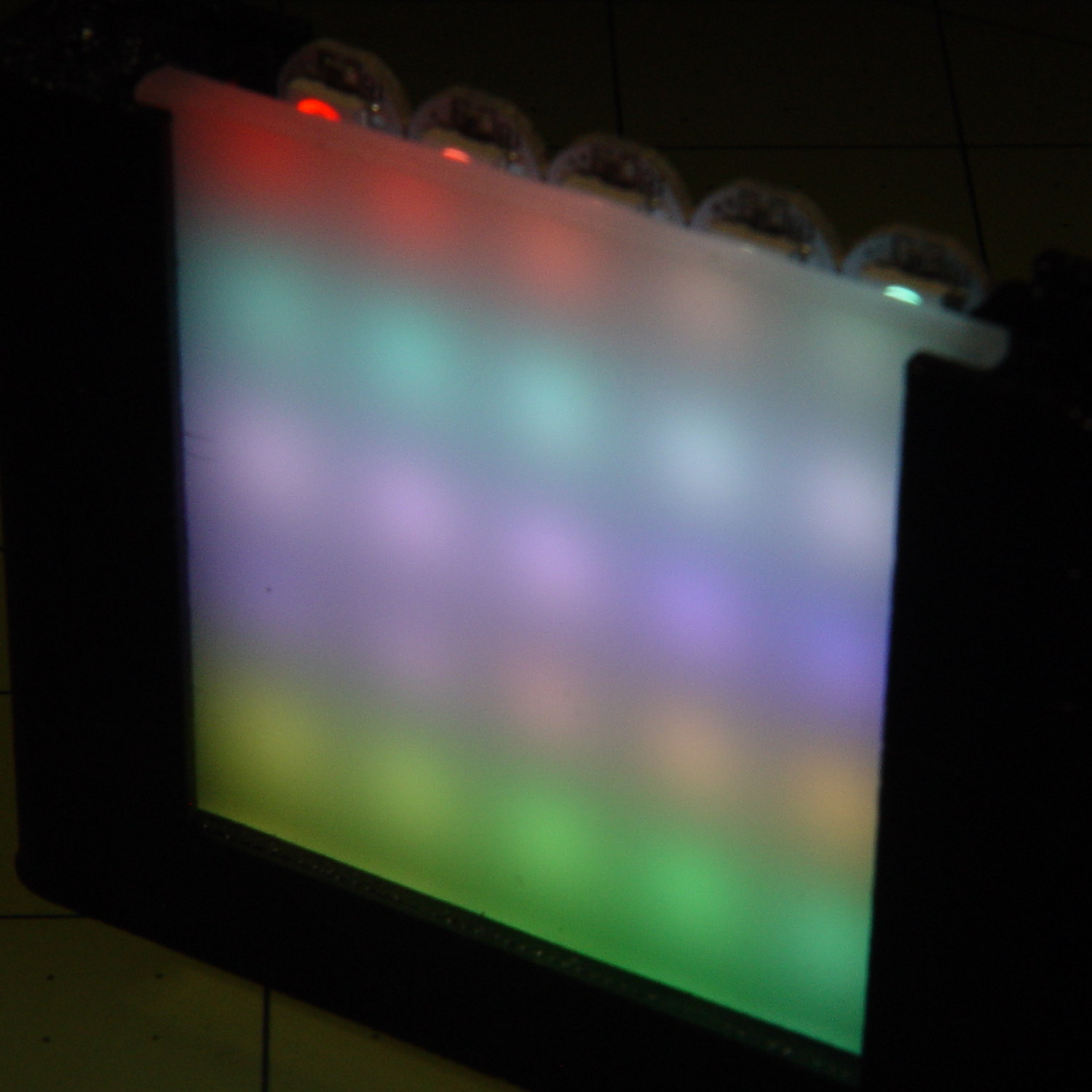
    Dialing the white MaxPWM back to 32 crisps things a bit:

    SK2812RGBW test fixture - front - W PWM32
    SK2812RGBW test fixture – front – W PWM32

    Of course, the RGBW data stream isn’t compatible with the RGB data stream, so vacuum tubes with SK6812 chips require a slightly different driver and I can’t mix the two chips on a single tube.

    The Arduino source code as a GitHub Gist:

    // SK6812 RGBW LED array exerciser
    // Ed Nisley – KE4ANU – February 2017
    #include <Adafruit_NeoPixel.h>
    //———-
    // Pin assignments
    const byte PIN_NEO = A3; // DO – data out to first Neopixel
    const byte PIN_HEARTBEAT = 13; // DO – Arduino LED
    //———-
    // Constants
    #define UPDATEINTERVAL 20ul
    const unsigned long UpdateMS = UPDATEINTERVAL – 1ul; // update LEDs only this many ms apart minus loop() overhead
    // number of steps per cycle, before applying prime factors
    #define RESOLUTION 100
    // phase difference between LEDs for slowest color
    #define BASEPHASE (PI/16.0)
    // LEDs in each row
    #define NUMCOLS 5
    // number of rows
    #define NUMROWS 5
    #define NUMPIXELS (NUMCOLS * NUMROWS)
    #define PINDEX(row,col) (row*NUMCOLS + col)
    //———-
    // Globals
    // instantiate the Neopixel buffer array
    Adafruit_NeoPixel strip = Adafruit_NeoPixel(NUMPIXELS, PIN_NEO, NEO_GRBW + NEO_KHZ800);
    uint32_t FullWhite = strip.Color(255,255,255,255);
    uint32_t FullOff = strip.Color(0,0,0,0);
    struct pixcolor_t {
    byte Prime;
    unsigned int NumSteps;
    unsigned int Step;
    float StepSize;
    float TubePhase;
    byte MaxPWM;
    };
    // colors in each LED
    enum pixcolors {RED, GREEN, BLUE, WHITE, PIXELSIZE};
    struct pixcolor_t Pixels[PIXELSIZE]; // all the data for each pixel color intensity
    unsigned long MillisNow;
    unsigned long MillisThen;
    //– Figure PWM based on current state
    byte StepColor(byte Color, float Phi) {
    byte Value;
    Value = (Pixels[Color].MaxPWM / 2.0) * (1.0 + sin(Pixels[Color].Step * Pixels[Color].StepSize + Phi));
    // Value = (Value) ? Value : Pixels[Color].MaxPWM; // flash at dimmest points
    // printf("C: %d Phi: %d Value: %d\r\n",Color,(int)(Phi*180.0/PI),Value);
    return Value;
    }
    //– Helper routine for printf()
    int s_putc(char c, FILE *t) {
    Serial.write(c);
    }
    //——————
    // Set the mood
    void setup() {
    pinMode(PIN_HEARTBEAT,OUTPUT);
    digitalWrite(PIN_HEARTBEAT,LOW); // show we arrived
    Serial.begin(57600);
    fdevopen(&s_putc,0); // set up serial output for printf()
    printf("WS2812 / SK6812 array exerciser\r\nEd Nisley – KE4ZNU – February 2017\r\n");
    /// set up Neopixels
    strip.begin();
    strip.show();
    // lamp test: run a brilliant white dot along the length of the strip
    printf("Lamp test: walking white\r\n");
    strip.setPixelColor(0,FullWhite);
    strip.show();
    delay(250);
    for (int i=1; i<NUMPIXELS; i++) {
    digitalWrite(PIN_HEARTBEAT,HIGH);
    strip.setPixelColor(i-1,FullOff);
    strip.setPixelColor(i,FullWhite);
    strip.show();
    digitalWrite(PIN_HEARTBEAT,LOW);
    delay(250);
    }
    strip.setPixelColor(NUMPIXELS – 1,FullOff);
    strip.show();
    delay(250);
    // fill the array, row by row
    printf(" … fill\r\n");
    for (int i=NUMROWS-1; i>=0; i–) { // for each row
    digitalWrite(PIN_HEARTBEAT,HIGH);
    for (int j=NUMCOLS-1; j>=0 ; j–) {
    strip.setPixelColor(PINDEX(i,j),FullWhite);
    strip.show();
    delay(100);
    }
    digitalWrite(PIN_HEARTBEAT,LOW);
    }
    // clear to black, column by column
    printf(" … clear\r\n");
    for (int j=NUMCOLS-1; j>=0; j–) { // for each column
    digitalWrite(PIN_HEARTBEAT,HIGH);
    for (int i=NUMROWS-1; i>=0; i–) {
    strip.setPixelColor(PINDEX(i,j),FullOff);
    strip.show();
    delay(100);
    }
    digitalWrite(PIN_HEARTBEAT,LOW);
    }
    delay(1000);
    // set up the color generators
    MillisNow = MillisThen = millis();
    printf("First random number: %ld\r\n",random(10));
    Pixels[RED].Prime = 3;
    Pixels[GREEN].Prime = 5;
    Pixels[BLUE].Prime = 7;
    Pixels[WHITE].Prime = 11;
    printf("Primes: (%d,%d,%d,%d)\r\n",
    Pixels[RED].Prime,Pixels[GREEN].Prime,Pixels[BLUE].Prime,Pixels[WHITE].Prime);
    unsigned int PixelSteps = (unsigned int) ((BASEPHASE / TWO_PI) *
    RESOLUTION * (unsigned int) max(max(max(Pixels[RED].Prime,Pixels[GREEN].Prime),Pixels[BLUE].Prime),Pixels[WHITE].Prime));
    printf("Pixel phase offset: %d deg = %d steps\r\n",(int)(BASEPHASE*(360.0/TWO_PI)),PixelSteps);
    Pixels[RED].MaxPWM = 255;
    Pixels[GREEN].MaxPWM = 255;
    Pixels[BLUE].MaxPWM = 255;
    Pixels[WHITE].MaxPWM = 32;
    for (byte c=0; c < PIXELSIZE; c++) {
    Pixels[c].NumSteps = RESOLUTION * (unsigned int) Pixels[c].Prime;
    Pixels[c].Step = (3*Pixels[c].NumSteps)/4;
    Pixels[c].StepSize = TWO_PI / Pixels[c].NumSteps; // in radians per step
    Pixels[c].TubePhase = PixelSteps * Pixels[c].StepSize; // radians per tube
    printf("c: %d Steps: %5d Init: %5d",c,Pixels[c].NumSteps,Pixels[c].Step);
    printf(" PWM: %3d Phi %3d deg\r\n",Pixels[c].MaxPWM,(int)(Pixels[c].TubePhase*(360.0/TWO_PI)));
    }
    }
    //——————
    // Run the mood
    void loop() {
    MillisNow = millis();
    if ((MillisNow – MillisThen) > UpdateMS) {
    digitalWrite(PIN_HEARTBEAT,HIGH);
    unsigned int AllSteps = 0;
    for (byte c=0; c < PIXELSIZE; c++) { // step to next increment in each color
    if (++Pixels[c].Step >= Pixels[c].NumSteps) {
    Pixels[c].Step = 0;
    printf("Color %d steps %5d at %8ld delta %ld ms\r\n",c,Pixels[c].NumSteps,MillisNow,(MillisNow – MillisThen));
    }
    AllSteps += Pixels[c].Step; // will be zero only when all wrap at once
    }
    if (0 == AllSteps) {
    printf("Grand cycle at: %ld\r\n",MillisNow);
    }
    for (int k=0; k < NUMPIXELS; k++) { // for each pixel
    byte Value[PIXELSIZE];
    for (byte c=0; c < PIXELSIZE; c++) { // … for each color
    Value[c] = StepColor(c,-k*Pixels[c].TubePhase); // figure new PWM value
    // Value[c] = (c == RED && Value[c] == 0) ? Pixels[c].MaxPWM : Value[c]; // flash highlight for tracking
    }
    uint32_t UniColor = strip.Color(Value[RED],Value[GREEN],Value[BLUE],Value[WHITE]);
    strip.setPixelColor(k,UniColor);
    }
    strip.show();
    MillisThen = MillisNow;
    digitalWrite(PIN_HEARTBEAT,LOW);
    }
    }