The Smell of Molten Projects in the Morning

Ed Nisley's Blog: Shop notes, electronics, firmware, machinery, 3D printing, laser cuttery, and curiosities. Contents: 100% human thinking, 0% AI slop.

Author: Ed

  • Squidwrench Electronics Workshop: Session 5

    Topics for today’s Squidwrench Electronics Workshop: Session 5 in a continuing series.

    Having discussed transistors as current-controlled current sources, we can now select one as a victim use one as a switch, then add capacitors to learn about exponential charging, and introduce the oscilloscope as a vital tool.

    NPN Switch - protoboard
    NPN Switch – protoboard

    So, we proceed:

    Transistors as switches

    Review graphical parameters

    • saturation voltage for high Ic
    • cutoff voltage for near-zero Ic
    • resistive load line: VR = Vcc – Vc
    • power dissipation hyperbola (at all Vc)
    • secondary breakdown limit (at higher Vc)

    Something like this, only drawn much larger and with actual numbers:

    Transistor characteristics - saturation and cutoff - load line
    Transistor characteristics – saturation and cutoff – load line

    Reminder of linear vs. log scales converting hyperbolas into straight lines.

    NPN transistor as “to ground” switch

    • where to measure device voltages?
    • passing mention of flyback diodes
    • IB needed for saturation?
    • Darlington transistors: beta multiplier, VBE adder

    For example:
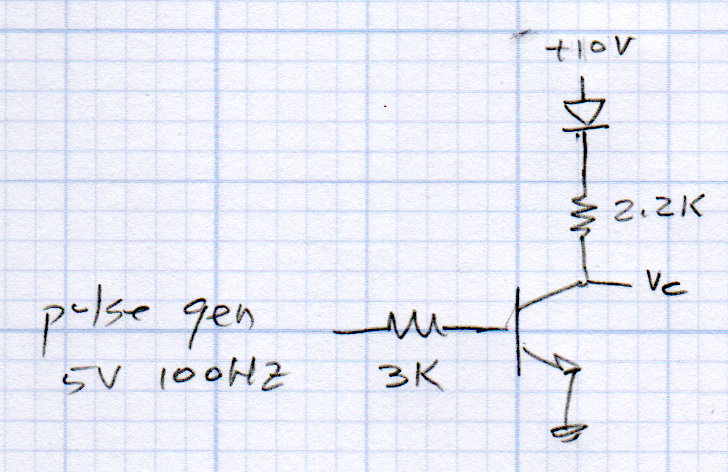
    NPN switch - LED
    NPN switch – LED

    Without the LED, you get nice square waves:

    NPN - 100 Hz - 2.2k - no cap - Vc
    NPN – 100 Hz – 2.2k – no cap – Vc

    An ancient green LED reduces Vc by a little over a volt:

    NPN - 100 Hz - 2.2k green LED - no cap - Vc
    NPN – 100 Hz – 2.2k green LED – no cap – Vc

    Discuss PNP transistor as “from supply” switch

    • why VCC must not exceed controller VDD
    • kill microcontroller and logic gates

    Wire up pulse gen to transistor

    • function generator for base drive voltage
    • collector resistor (then LED) as output
    • how do you know what it’s doing?
    • add oscilloscope to show voltages
    • explanation of scope functions!

    Capacitor as charge-storage devices

    Useful ideas and equations

    • C = Q/V
    • so C = ΔQ/ΔV
    • therefore i = C * Δv/Δt
    • energy = 1/2 * C * V²

    Charging capacitor from a voltage source through a resistor

    • Exponential waveform: e^t/τ
    • time constant τ=RC
    • show 3τ = 5%
    • and 5τ < 1%

    Add cap to transistor switch with R to soften discharge path

    • charge vs discharge paths
    • calculate time constants
    • wire it up
    • verify with oscilloscope

    The circuit will look like this:
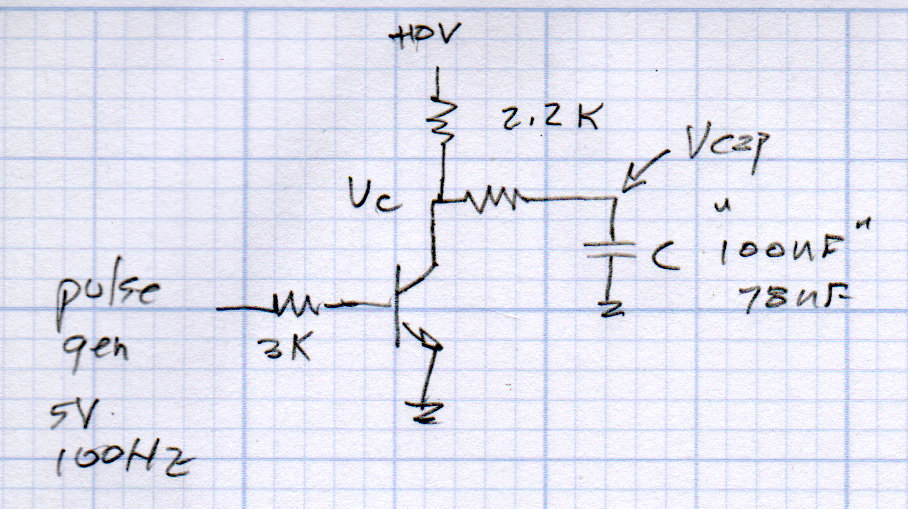
    NPN switch - Cap charge-discharge
    NPN switch – Cap charge-discharge

    Discussion of parts tolerance: 100 nF caps are really 78 nF

    With one cap:
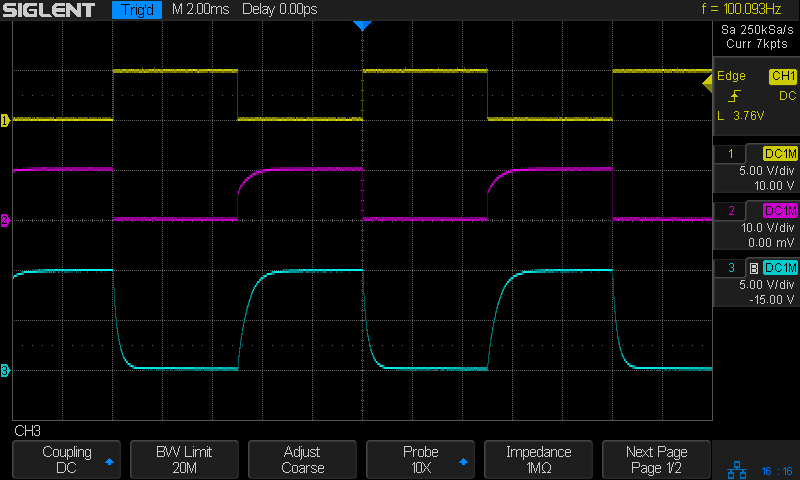
    NPN - 100 Hz - 2.2k 2.2k 78nF - Vc Vcap
    NPN – 100 Hz – 2.2k 2.2k 78nF – Vc Vcap

    Add another cap for twice the time constant:
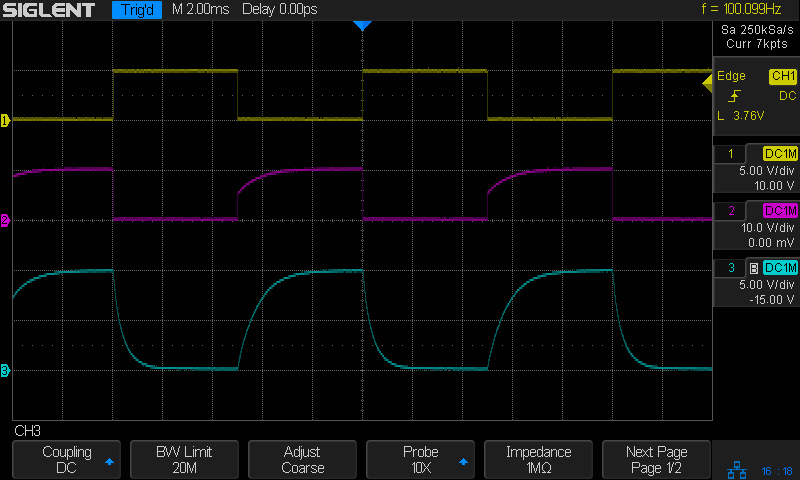
    NPN - 100 Hz - 2.2k 2.2k 2x78nF - Vc Vcap
    NPN – 100 Hz – 2.2k 2.2k 2x78nF – Vc Vcap

    Let the scope calculate 10-90% rise time:
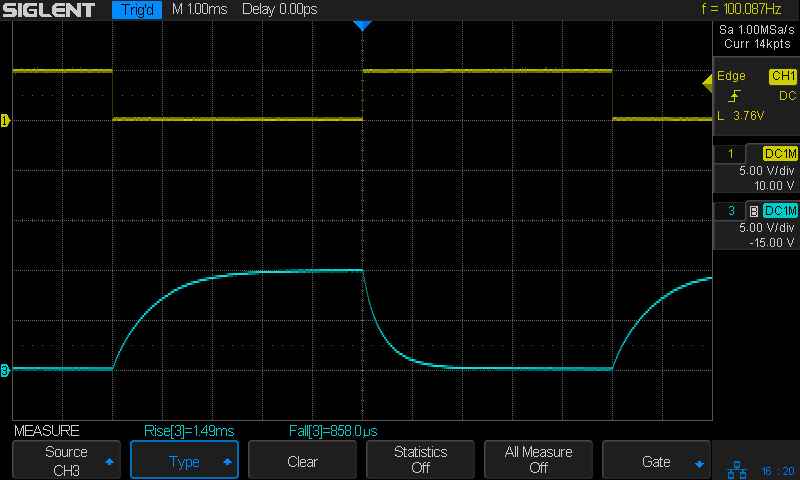
    NPN - 100 Hz - 2.2k 2.2k 2x78nF - Vc Vcap - rise fall times
    NPN – 100 Hz – 2.2k 2.2k 2x78nF – Vc Vcap – rise fall times

    Useful relations:

    • rise time = 2.2 τ (compare with calculations!)
    • rise time = 0.34/BW

    Do it on hard mode with the old Tek scope for pedagogic purposes.

    That should soak up the better part of four hours!
     

  • Amazon Product Puzzlement

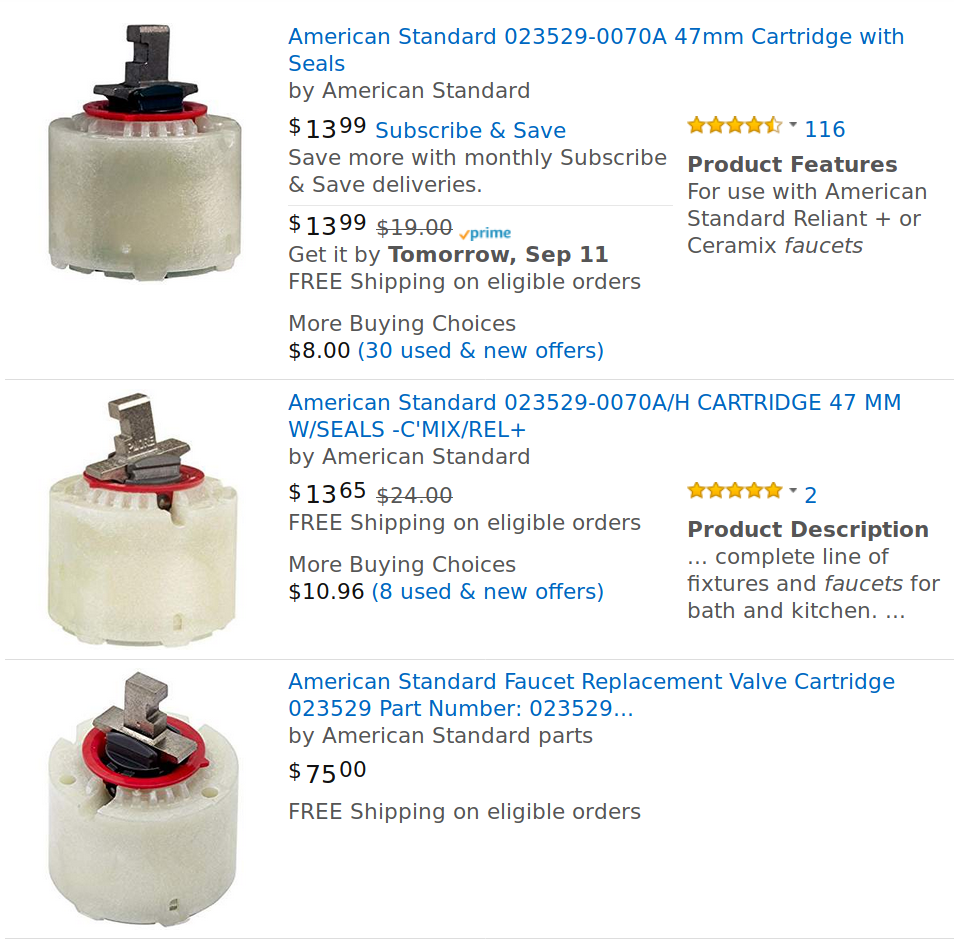
    Amazon’s top three offerings for American Standard 023529-0070A:

    Amazon - American Standard Faucet Valves
    Amazon – American Standard Faucet Valves

    They’re all “by American Standard”, but you must check each item to discover where it’s coming from:

    • “Ships from and sold by Amazon.com”
    • “Ships from and sold by Gatzies
    • Ships from and sold by moneyworldstore

    Although I’ve done my fair share of repairs to this faucet, I don’t need a cartridge every month and, in any event, signing up for Subscribe & Save doesn’t promise much in the way of savings.

    The second listing has the best price by a small margin. I’m content to pay half a buck more to have Amazon handle the entire transaction, rather than deal with some random Amazon Marketplace vendor.

    The third listing seems to be a bizarre algorithmically priced corner case, a no-stock placeholder, or a money-laundering scheme. Judging from the pricing of other “moneyworldstore” offerings, their business model doesn’t include retail sales.

    So much weirdness from one simple item …

  • LibreOffice 5.3+ vs. Adobe Type 1 Fonts

    LibreOffice from 5.3 onward (Xubuntu 18.04 uses LO 6.0) no longer supports Adobe Type 1 fonts, which comes as a surprise to those of us who actually bought fonts, back in the day, and have been using them ever since. Apparently, Windows dropped Type 1 font support some time ago.

    Based on some hints, I set up the Adobe Font Development Kit for OpenType. It’s a Python thing, preferably running in a virtual environment to avoid screwing up the rest of one’s system with bizarre dependencies. It seems one (“I”) must not update pip using pip after installing python-pip using apt-get; recovering from that mess was good for another hour of flailing.

    The default AFDKO installation spat out an error message about ufolib (I am not making this up) being at 2.1.1, instead of the required 2.3.1. In for a penny, in for a pound, I updated ADFKO with the “prerelease” option:

    pip install -U afdko --pre
    

    Which fetched ufolib 2.3.1, apparently from wherever Python keeps its prerelease stash. I have NFC what’s going on with any of this.

    An Adobe blog post on the AFDKO tx tool suggested it can convert Type 1 fonts to CFF (a.k.a. Adobe Type 2) fonts and some poking around suggested CFF also figures in OTF fonts.

    tx -cff -n -N -A awb_____.pfb
    --- Filename: awb_____.pfb
    --- FontName: ACaslon-Bold
    tx: --- awb_____.pfb
    tx: (cfw) unhinted
    tx: (cfw) unhinted
    tx: (cfw) unhinted
    tx: (cfw) unhinted
    tx: (cfw) unhinted
    tx: (cfw) There are 222 additional reports of 'unhinted'.
    

    The -A option replaces the bizarre Adobe 8.3 file names with actual font information:

    awrg____.pfb ⇒ ACaslon-Bold.cff
    awbi____.pfb ⇒ ACaslon-BoldItalic.cff
    awi_____.pfb ⇒ ACaslon-Italic.cff
    awrg____.pfb ⇒ ACaslon-Regular.cff
    awsb____.pfb ⇒ ACaslon-Semibold.cff
    awsbi___.pfb ⇒ ACaslon-SemiboldItalic.cff
    

    Regrettably, CFF files don’t actually work as fonts, at least as far as LibreOffice 6.0 (or whatever it uses as a font engine) is concerned.

    Although it’s possible to convert fonts locally with fontforge, doing it one-by-one is tedious and the learning curve for its Python scripting feature seems rather steep. I fired the most vital fonts at Convertio, an online converter running fontforge in the background, got a matching pile of OTF fonts, and installed them in /usr/share/fonts/custom/type1 to indicate their heritage.

    Whereupon LO rammed into a problem I’d had before. The solution this time required sorting the various Caslon and American Typewriter fonts into different “font families” and forcing the TTF names to match their new families. The difference between Medium and Regular seems to have Gone Away.

    I should just use Comic Sans and be done with it …

  • SANE Scanner vs. Xubuntu 18.04

    I recently bumped the desktop PC with the scanner from an old Mint to Xubuntu 18.04, which killed a day with all the system and UI tweakage.

    The old guides for setting up a networked SANE scanner became inoperative with systemd ruling the configurations, so, after some flailing around, I found a newer guide referencing a guide for USB scanners and pointing to a deeper guide for network sharing in the age of systemd.

    The USB guide points out the existence of Access Control Lists for the various device files, which I didn’t know was a thing. AFAICT, you must still be in the scanner group for remote access to happen.

    I lost track of the changes during all the flailing around, but it definitely didn’t Just Work.

    I’m sure all this will change before I must do it again.

  • Fireball Island Figures

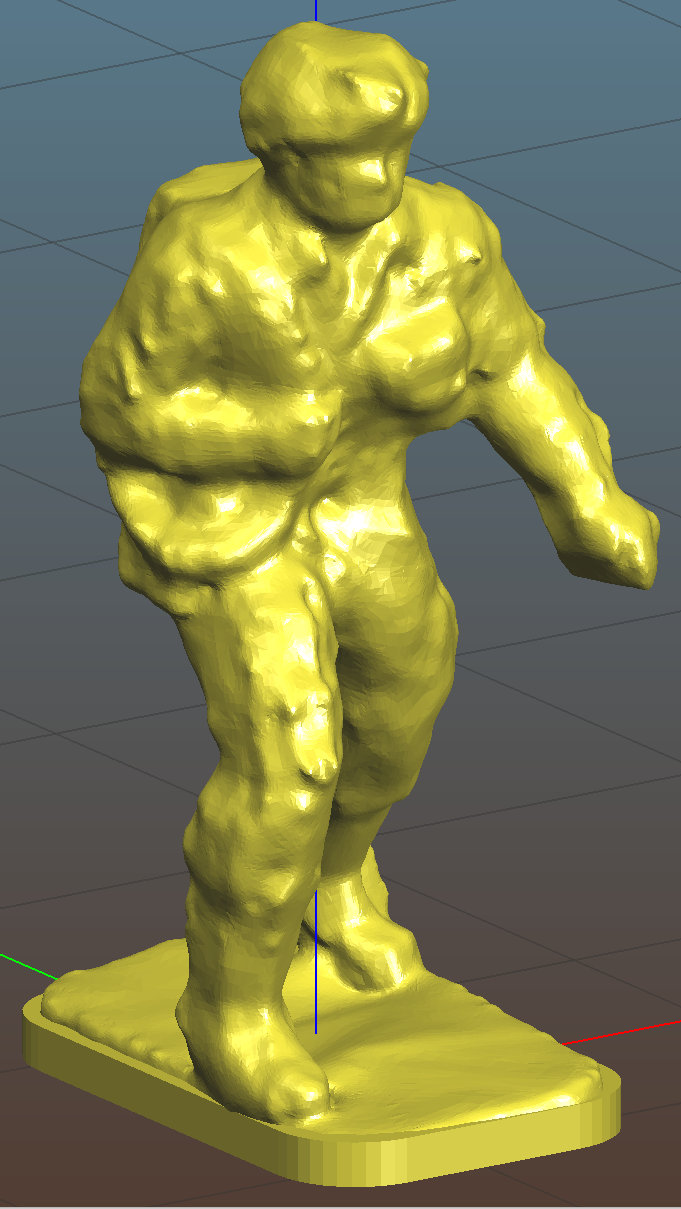
    A cousin asked if my 3D printer could replace some figures gone missing from their old Fireball Island game board, a classic apparently coming out in a new & improved version.

    Fortunately, solid models exist on Thingiverse:

    Fireball Island figure - Thingiverse 536867
    Fireball Island figure – Thingiverse 536867

    Unfortunately, the left arm requires support, which Slic3r supplies with great exuberance:

    Fireball Island figure - Slic3r support
    Fireball Island figure – Slic3r support

    The vast tower on the figure’s right side (our left) seemed completely unnecessary, not to mention I have no enthusiasm for the peril inherent in chopping away so much plastic, so I replaced it with a simple in-model pillar:

    Figure Support Mods
    Figure Support Mods

    The pillar leans from an adhesion-enhancing lily pad and ends one layer below the left hand, with all dimensions and angles chosen on the fly to make the answer come out right.

    Works like a champ:

    Fireball Island Figures - orange - on platform
    Fireball Island Figures – orange – on platform

    The dark band down the middle comes from the Pixel’s shutter.

    They emerged with some PETG hair, the removal of which I left as an end-user experience.

    I mailed a small box containing figures printed in my (limited!) palette of four colors, some spares Just In Case™, and a few QC rejects showing the necessity of lily pads.

    Game on!

    The OpenSCAD source code as a GitHub Gist:

    // Adding support under Fireball Island figure arm
    import("/mnt/bulkdata/Project Files/Thing-O-Matic/Fireball Island/Fireball Island figure – 100k.stl", convexity=5);
    translate([6.5,-4.0,0]) {
    intersection(){
    translate([-10/2,-10/2,0])
    cube([10,10,11.6],center=false);
    rotate([0,-5.0,0])
    rotate(180/6)
    cylinder(d=4.0,h=30,$fn=6,center=true);
    }
    translate([8/4,0,0])
    rotate(180/6)
    cylinder(d=8,h=0.2,$fn=6);
    }
  • Streaming Radio Player: I2C Display

    Although I2C on the Raspberry Pi fails with devices using clock stretching, cheap I2C OLED displays seem to work well enough to not generate any problems search-able with the obvious keywords:

    RPi I2C OLED
    RPi I2C OLED

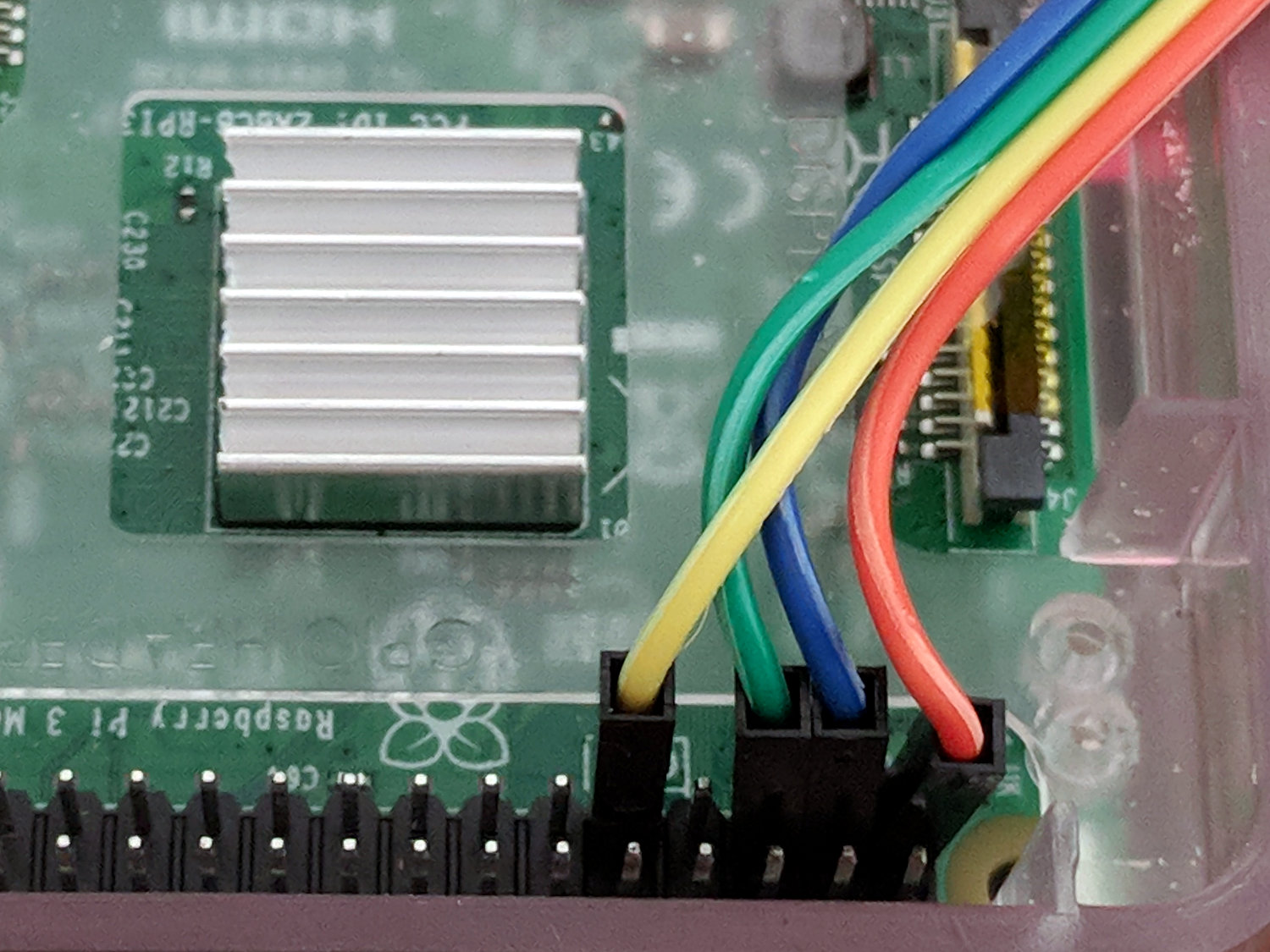
    Given a picture of the header pinout, the wiring is trivially easy:

    RPi I2C OLED - RPi header detail
    RPi I2C OLED – RPi header detail

    Using yellow for the ground hurts a bit, but that’s what I get for peeling the SPI cable down to four wires. The pin directly adjacent to the green wire is also ground, should that be easier to reach.

    Tweaking the Luma driver to use I2C doesn’t require much:

    #from luma.core.interface.serial import spi
    from luma.core.interface.serial import i2c
    
    ... snippage ...
    
    # reduce SPI bus from default 8 MHz to (maybe) avoid OLED failure-to-start
    #serial = spi(device=0,port=0,bus_speed_hz=1000000)
    
    # use I2C bus to avoid SPI timing spec failure
    serial = i2c(port=1,address=(0x78 >> 1))     # PCB label = 0x78, low bit = R/W
    

    The OLED PCB lists the I2C address with the R/W bit

    And then It Just Works, with one gotcha. Although the Python program shuts itself and the system down, the wall wart continues to supply power and, because the I2C bus doesn’t include a Reset line, the OLED display doesn’t know the RPi has gone away. So you must issue a command to turn it off before shutting down:

    device.cleanup()        # ideally, switches to low-power mode
    rc = subp.call(['sudo','shutdown','-P','now'])
    

    Now, to discover what works … oddly … with these displays.

  • Excavator Family

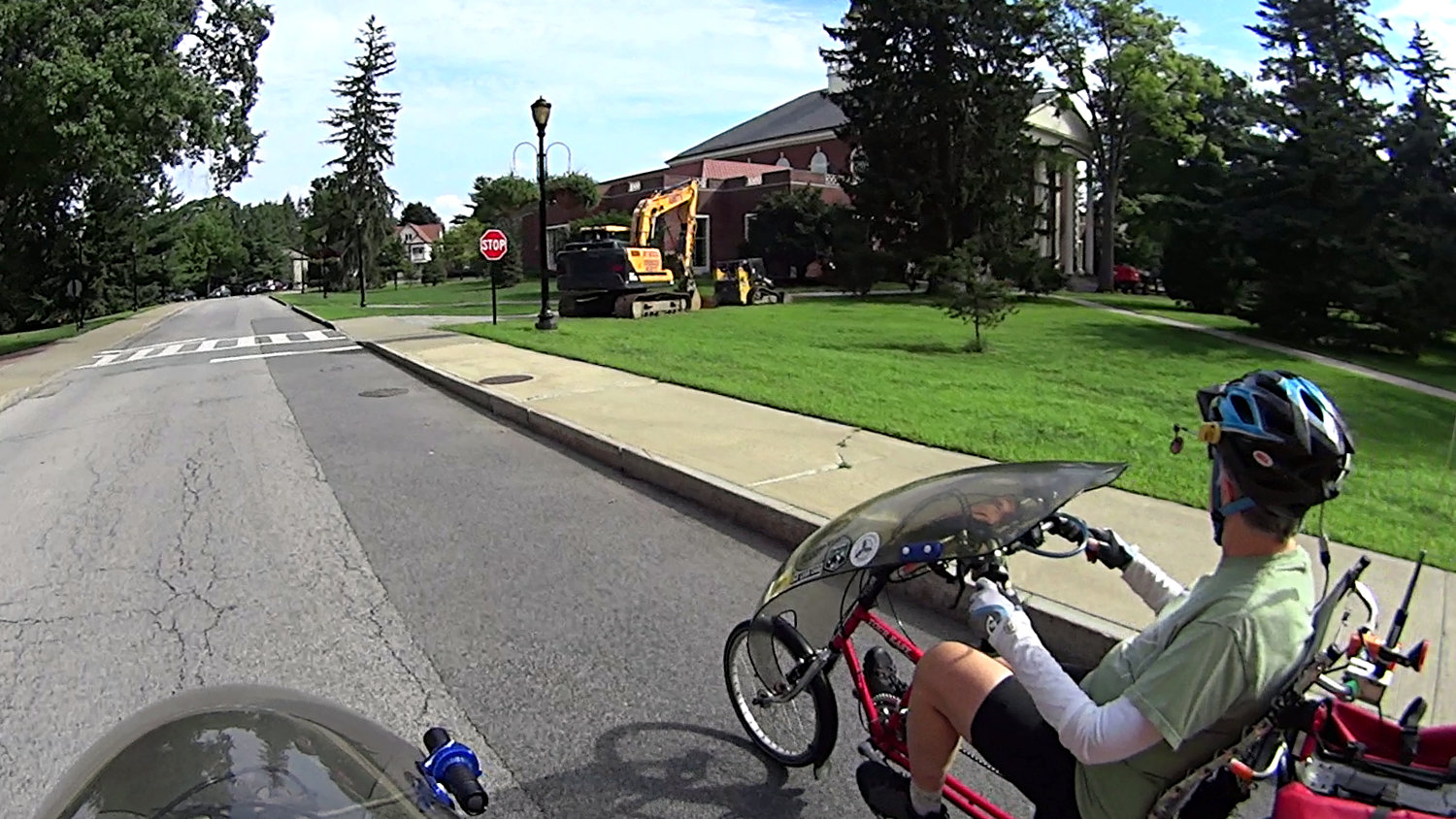
    We’re accustomed to seeing geese with goslings and turkeys with chicks around this time of year, but we didn’t realize excavators have a similar breeding season (clicky for more dots):

    Excavator Family - Vassar College
    Excavator Family – Vassar College

    The adult seems very protective …

    Spotted on the Vassar College campus, in front of the dining hall.