For whatever reason, the Thunar file browser in XFCE does not automagically show thumbnails for webp images. Some searching produced a recipe, although the displayed webp.xml file needs the last two lines to close the tags:
<?xml version="1.0" encoding="UTF-8"?>
<mime-info xmlns="http://www.freedesktop.org/standards/shared-mime-info">
    <mime-type type="image/webp">
        <comment>WebP file</comment>
        <icon name="image"/>
        <glob-deleteall/>
        <glob pattern="*.webp"/>
    </mime-type>
</mime-info>
The magic copy-to-clipboard button includes those tags, so I suppose it’s another case of being careful what you believe on the Intertubes.
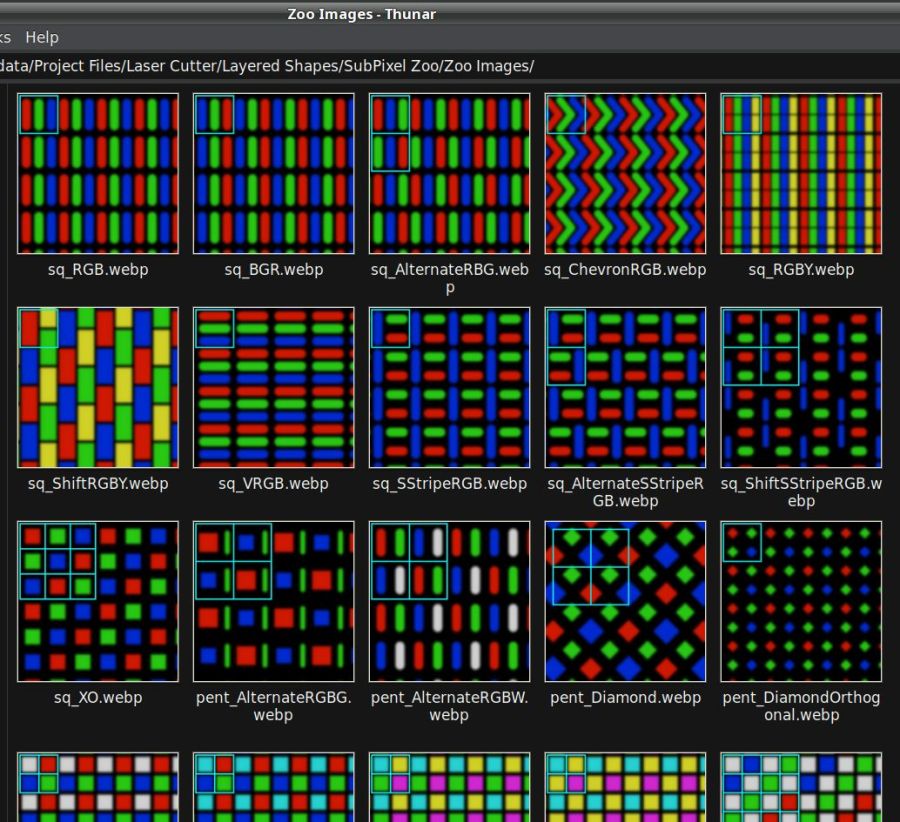
Going through the steps displayed images of the Subpixel Zoo:
They’ll turn into layered paper patterns:

 The Smell of Molten Projects in the Morning
Comments
4 responses to “Thunar WEBP Thumbnails”
It’s actually much more fun than that, or diabolical if you prefer. There’s some fancy code display that cuts it off if it exceeds some line limit. To make it more fun, the “view more” is somehow invisible, but it is clickable in the bottom left of the code block.
The evidence suggests nobody understands how all this stuff works, including the folks making it work.
For example: one banking website treats my desktop Firefox as a mobile device and Mary’s desktop Firefox as … a desktop, despite the two setups being as alike as I can make them. Must be a configuration setting, I suppose.
[…] Experimenting with little squares showed the Y axis has a definite wobble: […]
[…] the patterns might make interesting layered “art”. After fetching the *.webp images and figuring out how to persuade Thunar to display them, the next step was converting them into paths suitable for laser […]