Clearing the clutter off the top of the laser put the monitors up on mounts clamped to its wings, which required an adapter between the monitor and the mount’s standard VESA bracket:

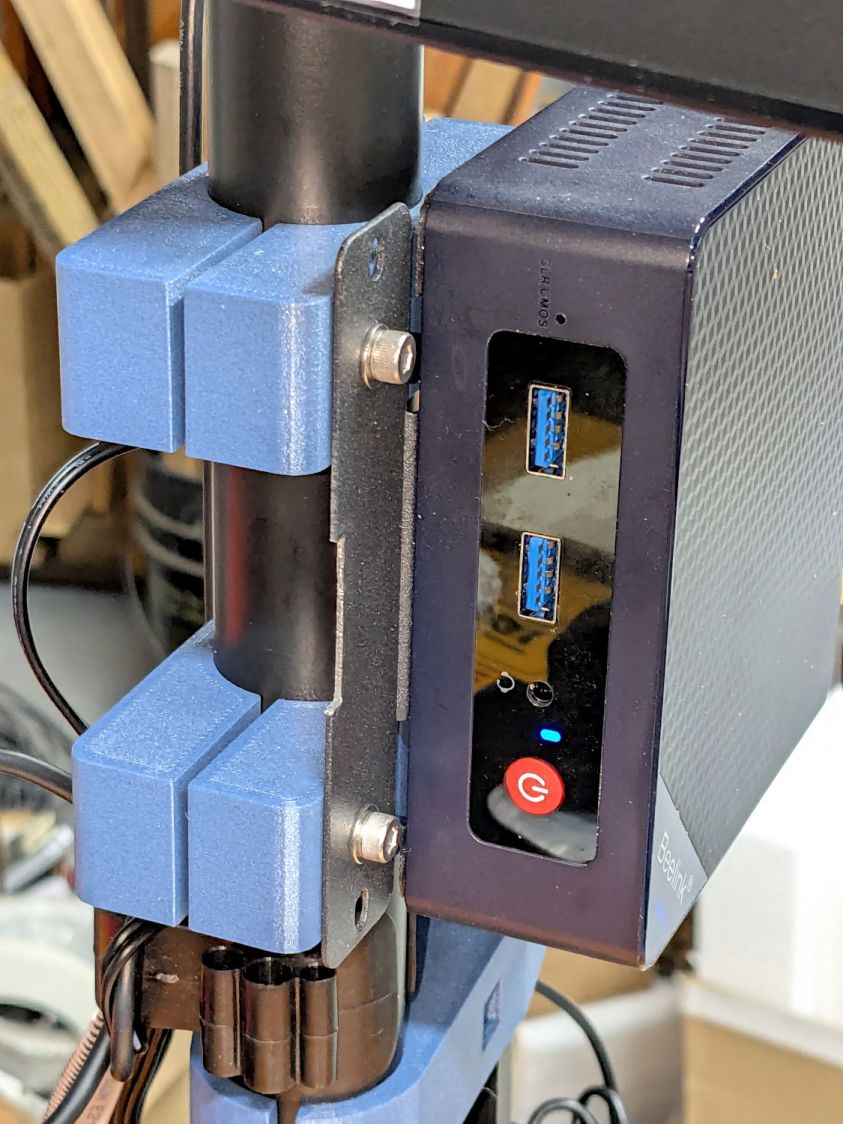
The Beelink PC has an adapter plate intended to put it on that VESA bracket, too, but a quick test showed the power button pointed downward in an inaccessible spot. I eventually realized the Beelink would fit neatly on the monitor mount’s pole:
The view from the other side:
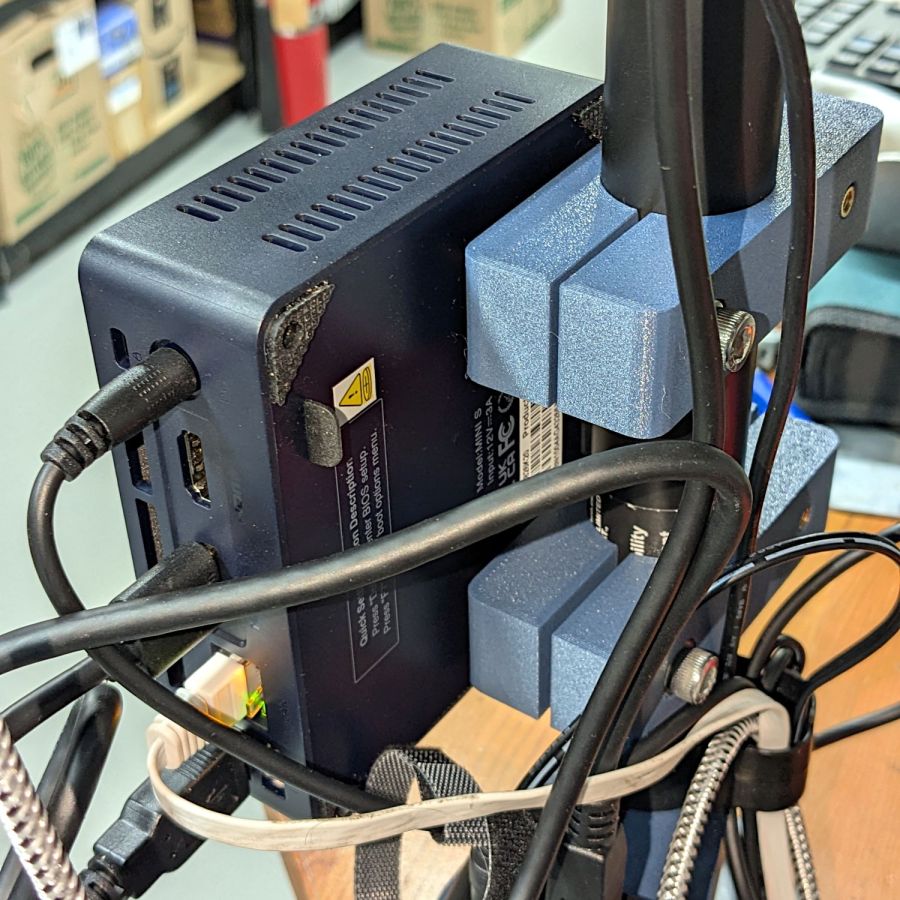
The clamps have recesses for an M6 square nut and an M4 brass insert:

Which is better seen in a cross-section:

The M6 screw uses the same hex wrench as the rest of the monitor mount and the M4 screw fits the VESA bracket. Sometimes, you just gotta go with the flow.
Pondering those pictures will show why the nut and insert must be on opposite sides. I came that close to building one to throw away.
The OpenSCAD source code extrudes the overall shape upward, then punches the screw holes & fittings horizontally:
// Monitor Pole Beelink clamp
// Ed Nisley - KE4ZNU
// 2025-01-23

include <BOSL2/std.scad>

/* [Hidden] */

ID = 0;
OD = 1;
LENGTH = 2;

Protrusion = 0.1;

PoleOD = 30.3;

WallThick = 5.0;

Kerf = 3.0;                     // clamping space
Clearance = 2*0.2;              // space around objects

Screw = [6.0,10.0,6.0];         // M6 SHCS, LENGTH = head
Washer = [6.0,12.0,1.5];        // M6 washer
Nut = [6.0,10.0,5.0];           // M6 square nut

Insert = [4.0,5.8,10.0];        // M4 insert

ScrewSpace = Washer[OD];        // pole edge to screw center spacing

Block = [4*ScrewSpace + PoleOD + 2*WallThick,PoleOD + 2*WallThick,2*Washer[OD]];       // Z = clamp thickness

//----------
// Build it

        difference() {
            linear_extrude(height=Block.z,convexity=5)
                difference() {
                    rect([Block.x,Block.y],rounding=WallThick);
                    circle(d=PoleOD + Clearance);
                    square([2*Block.x,Kerf],center=true);
                }
            up(Block.z/2) {
                right(PoleOD/2 + ScrewSpace){
                    xrot(90)
                        cylinder(d=Washer[ID] + Clearance,h=2*Block.y,center=true,$fn=6);
                    fwd(Block.y/2 - Washer[LENGTH])
                        xrot(90) zrot(180/12)
                            cylinder(d=Washer[OD] + Clearance,h=Block.y,center=false,$fn=12);
                    back(Block.y/2)
                        xrot(90)
                            cube([Nut[OD],Nut[OD],2*Nut[LENGTH]],center=true);
                }
                left(PoleOD/2 + ScrewSpace) {
                    xrot(-90)
                        cylinder(d=Insert[ID] + Clearance,h=2*Block.y,center=true,$fn=6);
                    fwd(Block.y/2 - 1.25*Insert[LENGTH])
                        xrot(90)
                            cylinder(d=Insert[OD] + Clearance,h=Block.y,center=false,$fn=6);
                }
            }
        }
It’s done in PETG-CF, which looks surprisingly good in a chonky sort of way. I’ll find out how well it withstands moderate clamping forces.
 The Smell of Molten Projects in the Morning
Comments
One response to “Monitor Mount: Beelink Clamp”
[…] Along with the Beelink PC, putting the Anker USB hub on the monitor mount pole helped tidy the cables just a little bit: […]