Contrary to what I thought a while ago, the least awful way to continue running LightBurn after Linux support goes away is to stand up a dedicated Windows 11 box:

Lest it become lost in the clutter:
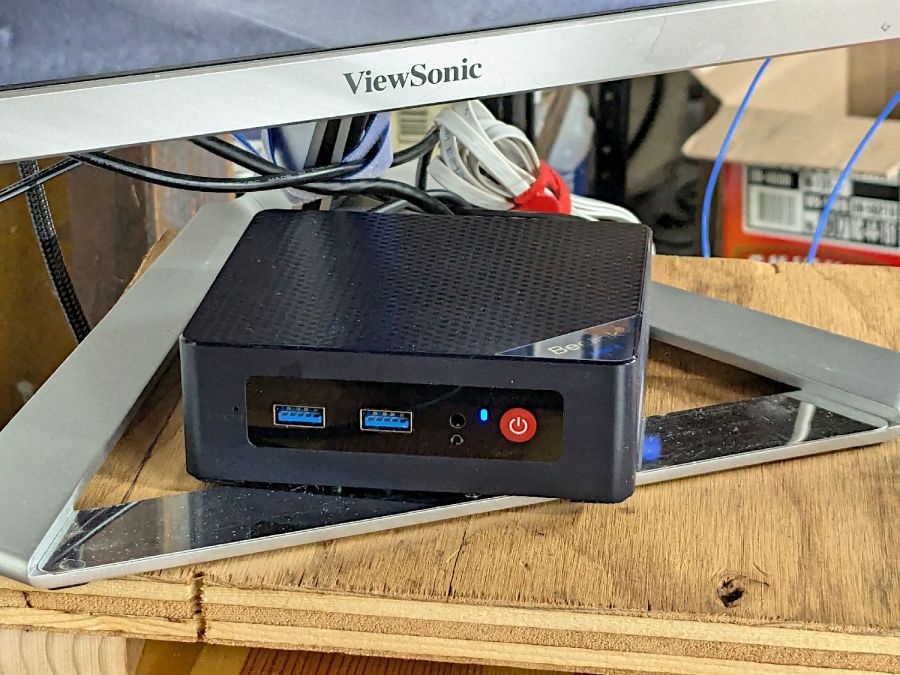
It’s a BeeLink Mini S12 (whatever that means) and squats near the low end of PC performance these days. I chose it based on reports from folks at Squidwrench having used similar units for various purposes without much pain, plus motivation from one of those weird Amazon “coupons” knocking the price down; it now sells for about that same price without the coupon.
It’s advertised as coming with Windows 11, but my advisors recommended a clean installation to get rid of crapware and possible pre-installed malware. I decided to start with the as-delivered system, then use the same product key to blow away the default installation.
The box / packaging did not include a Microsoft Windows Product Key and going through the first boot setup process produced this disconcerting result:

More disconcerting: Windows Defender (Microsoft’s antivirus scanner / system integrity checker) was inactive and could not be installed from the MS “Store”. While not conclusive proof of pre-installed malware, the situation certainly seemed suspicious.
The seller sent a key that seemed to be for Windows 10:

Having been assured this would also validate a Win 11 installation, I did a clean installation using a USB flash drive produced by the MS installer, was never asked for a key, and eventually got to this point:

Despite the missing OEM key and the footnote, everything seems just ducky:

I assume a clean installation blows away any malware resident on the “hard drive” (an M.2 solid state drive, of course), including rootkits and boot sector malware. My threat model does not include malware in the BIOS / UEFI firmware, which may be overoptimistic.
I declined all the optional MS products, refused various MS subscriptions, and generally tried to kill off a myriad invasive / advertising / “customized for you” features along the way. A casual search will produce many helpful guides for that process; I expect the details will change as MS continues to extract information from us. I set up a non-Administrator account for myself specifically to run LightBurn.
With that accomplished, I gave it a static IP address, created network shares to various directories on the “file server” (an ancient off-lease Dell Optiplex) holding the files I previously used with Linux LightBurn, installed Window LightBurn, got its preferences sorted out / restored from backup, and things eventually worked pretty much as intended.
Not shown in the picture:
- A trackball set up for my left hand
- A 75% keyboard
- The USB camera in the laser’s lid for LightBurn’s use.
This setup is intended for layout tweaking and laser control, not for protracted design work while standing in what’s now a 57 °F = 14 °C basement.
For what it’s worth, I must run the laser’s water chiller for half an hour to raise the cooling water to the normal 20 °C operating range; it has a water-cooled pump serving as a little heater.
The next step involved enabling Remote Desktop Protocol access so I can access the Windows box from my Comfy Chair at my usual battle station upstairs. More on that tomorrow …
 The Smell of Molten Projects in the Morning
Comments
One response to “Windows 11 for the Linux Guy: Hardware”
[…] Windows 11 and LightBurn running on a little PC perched atop the laser in the […]