Up to this point I’ve been making mirror alignment targets entirely on the laser cutter to ensure accurate alignment:
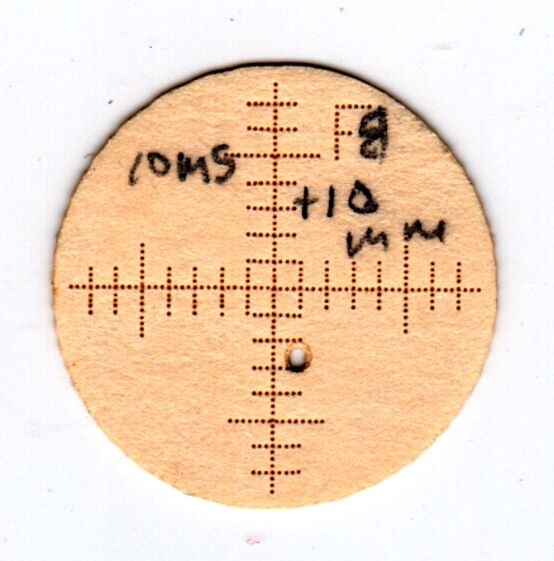
While that works fine, using Dot Mode takes basically forever to chew its way through any nontrivial number of targets.
Now that I have more familiarity with LightBurn’s Print-and-Cut feature, I tried printing the graticules, aligning the sheet, then laser-cutting just the perimeters:

The smaller targets fit neatly into the hole perpendicular to the beam:

The larger ones sit flush on the mirrors at 45° to the beam, so stretching the horizontal scale by 1.414 = √2 makes each tick mark correspond to 1 mm of perpendicular beam offset.
All of which worked surprisingly well, with some caveats.
The first gotcha: ordinary consumer-grade inkjet printers do not have CNC accuracy. The corner targets are on 150 mm horizontal centers and 240 mm vertical centers in the LightBurn layout, but my Epson ET-3830 printer put them on 150×241.3 mm centers. This isn’t unexpected, particularly for laser printers, but it means you must use LightBurn’s scaled version of the P-n-Cut alignment.
I used the upper-right and lower-left targets for the P-n-Cut alignment step, confirming the positioning with a laser pulse putting a tiny hole in the paper:

The lines are 0.5 mm wide and the inner circle is 2 mm in diameter, so my alignment at the upper right is as good as it’s gonna get and the lower left is off by maybe 0.3 mm. While it may be possible to be more accurate, I think half a millimeter is a reasonable error budget for targeting accuracy.
The laser-perforated circles should overlay the inner printed circles after LightBurn applies the P-n-C corrections. That they obviously do not indicates the effect of the small target errors. In any event, the maximum error seems to be 1 mm, which gives you an idea of just how precise P-n-C might be.
The perimeter laser cuts are off by about the same amount & direction as the dotted circle in the adjacent target:
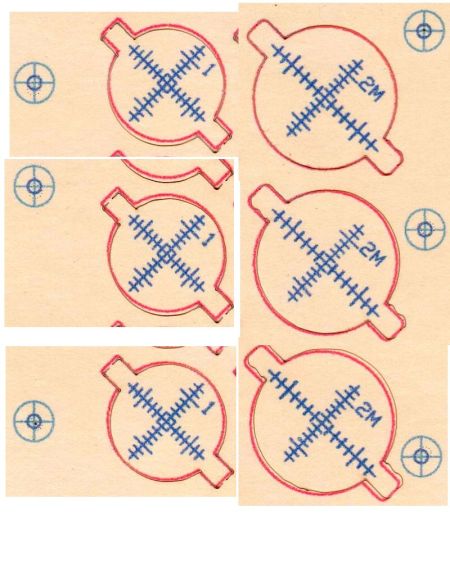
Overall, errors around 1 mm seem possible with careful attention to detail, but expecting anything better than a few millimeters is probably unreasonable, particularly for layouts larger than a Letter size page.
Works for me, though!
The LightBurn SVG layout as a GitHub Gist:
 The Smell of Molten Projects in the Morning


Comments
4 responses to “Laser Cutter: Print-and-Cut Alignment Accuracy”
What resolution camera are you using, and how repeatable is its positioning? I sprung for the LB 4K 85 degree camera and put it in the front of the lid (making sure it is not in the way of the laser head when all the way forward). When using the camera I’m careful to open the lid gently like I did when I calibrated the camera. The calibration procedure is about what is expected, but it could be so much better.
Turns out Print-and-Cut doesn’t neet the camera at all: position the laser (pointer) by jogging to the target, click that target in the LightBurn layout, repeat for the other target, and you’re done.
That said, the camera accuracy seems to be on the order of a few millimeters in the far corners where the distortion correction does the most work. That’s close enough for me to drag shapes into position, then fine-tune with Click-to-move and framing when I’m crowding up against an edge. If I were in production, it’d be hideously too slow, but I ain’t.
I think LightBurn runs the camera at 1920×1080, which makes each pixel half a millimeter on a side before correction. Doubling the resolution probably wouldn’t make much difference, as most of the errors seem to come from lens and perspective corrections.
Oh, of course. It’s been a while since I used print-and-cut. It makes sense that it uses the red dot laser. I’m looking over your posts about air assist since I would like to add that next to our laser. Thanks for them!
[…] The acceleration may be a little too high, as seen on some recent beam alignment targets: […]