Some geometry review and a bit of fiddling with LightBurn produced regularized patterns suitable for laser cuttery:

A key trick: circumscribe the figure with a circle on a tool layer, then group the whole mess together, so that the center of the circle coincides with the desired center of the figure. In particular, the geometric center of an equilateral triangle is not at the center of its vertical extent:
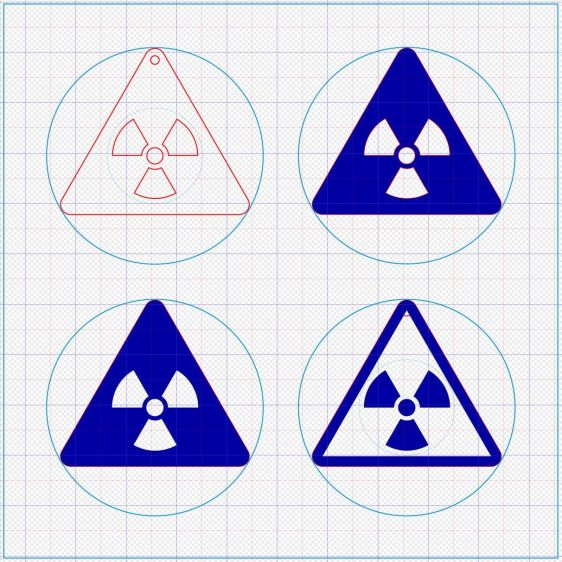
The dark blue layer engraves the surface, the red layer cuts through 3 mm acrylic, and the light blue layer is the tooling.
I like the edge-lit ones, although the simplicity of laser-cut clear acrylic is hard to beat:
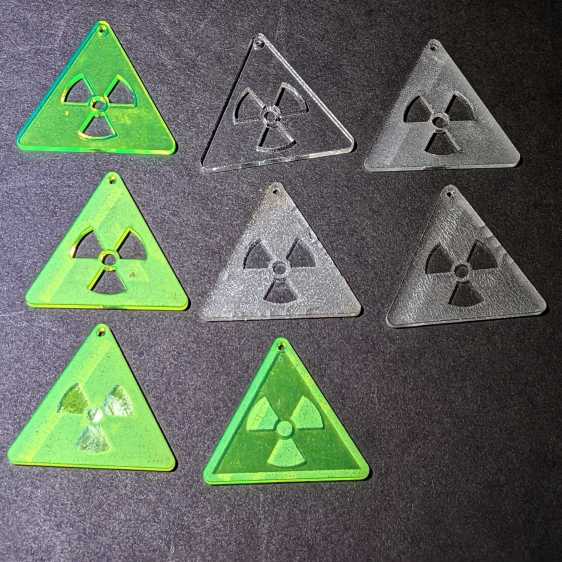
Wearing them in a place flooded with UV radiation would set you apart:

The careful observer will note stress cracking in the two clear earrings in the middle row. Those came from the vintage paper-covered acrylic sheet and I used alcohol to clean off the not-quite-vaporized glue just to see if isopropyl alcohol would behave differently than denatured alcohol. Nope, the cracks appear instantly.
Peeling the paper and engraving the bare surface produced the clear-frosted earring in the upper right, with the radiation symbol cut out of the sheet. Engraving without surface protection tends to deposit vaporized acrylic dust everywhere, so it would require hand cleaning without the cutouts.
The cutouts get 0.1 mm inward offsets to slightly increase the wall thickness around that central circle.
One combination I didn’t try: engrave the triangle perimeter for emphasis and cut out the symbol for contrast with edge-lit acrylic.
Dropping other symbols into place should be straightforward, with the center of the circumcircle as the snap target.
The LightBurn SVG layout as a GitHub Gist:
 The Smell of Molten Projects in the Morning

Comments
One response to “Danger Zone Earrings: MVP”
[…] With the geometry set up, cutting earrings with surface coatings is just a matter of tweaking a few settings: […]