The reason I didn’t see the yellow low-overheat LED blink on when the Thermal Core ran away was that I’m usually upstairs except when actually printing.
My modus operandi involves sitting at my upstairs desk, fiddling with an OpenSCAD solid model until I like it, then exporting the STL file. This PC has larger screens, better graphics hardware, a fast CPU, a Comfy Chair, and ready access to the kitchen.
The Thing-O-Matic lives in the Basement Laboratory, connected to a dual-core Atom D520 PC running Ubuntu 10.04 LTS with ReplicatorG to control the printer. That PC dual-boots into the RTAI-patched kernel that runs EMC2 for the Sherline mill and is firmly cabled to the Sherline driver box. That PC’s monitor is up on the wall, the chair is a modified lab stool, and the miniature keyboard is barely suited for hunt-and-poke controls. Not a good place to sit and type.
That PC also has a USB webcam showing an interior view of the printer. I run XawTV, a minimal video capture program, to put that view on the PC’s desktop. I could set it up as a webserver camera, but that seems like too much work.
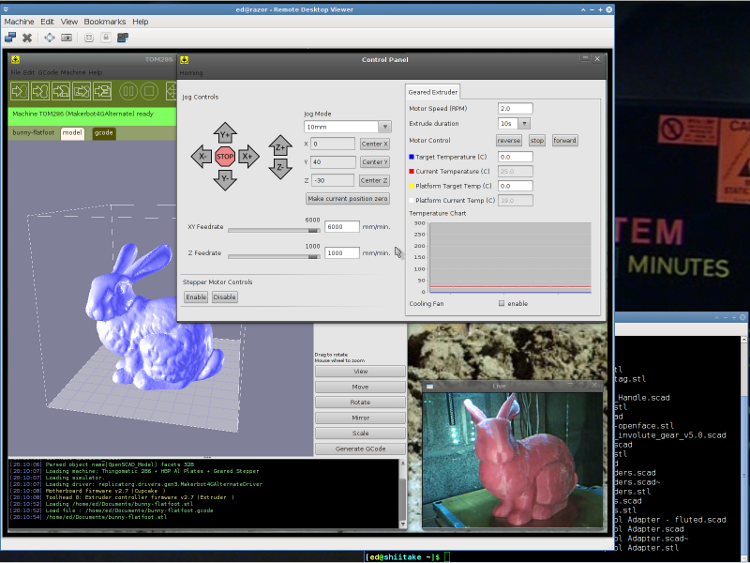
I use the Ubuntu desktop-sharing program to view / control the downstairs programs in a window on my (larger) upstairs monitor, so I can fiddle with RepG from the Comfy Chair. There’s a moderate lag due to stuffing the GUI through the network, but it’s tolerable for small changes & tweaks. The webcam view occupies one corner of the screen.
This is a staged reenactment showing the remote “downstairs” desktop in the left, with the “upstairs” desktop visible to the right:
All the files live on our simpleminded server, which sits in the Basement Laboratory’s Computer Wing, and the PCs mount NFS shares from the server. I do all the bulk text editing & file fiddling from the Comfy Chair.
So I save the STL file from the upstairs PC, flip to the window showing the downstairs machine’s desktop, copy the STL to a local drive to avoid lag during operation, run RepG to open the STL and slice it into G-Code, fire the Thing-O-Matic, and trot downstairs to watch the proceedings.
As a rule, I don’t run the printer unattended, but now it looks like it’s a Bad Idea to run the heaters without being nearby. You knew that already, right?
 The Smell of Molten Projects in the Morning
Comments
4 responses to “Thing-O-Matic: Work Flow”
Very cool. My Toshiba server died. My wireless tablet died. Both have no CD-drives. My router died. My IP phone router gave up after three years. My external HD was – duh – reformatted by my kid thinking it was his jump drive. My wireless home phone batteries have just died. I’d just asked you a couple days ago about power supplies because we apparently killed our first attempt. Ha, Ha Ha… all from the funny farm. I know it is pretty cool with your all powerful setup. I too had it almost – once. ;-)
No biscuit for him, eh? Lot of that going around these days. [sigh]
When it all works, it’s great. What’s really annoying is when my ladies say something like “The printer isn’t working!” and it takes me all morning to figure out which one of the compu-elves woke up dead.
Oh – I’ll pass to you some glory. Get a $99 plug computer since you can do Linux. And insert permanently into the bot and you have the full computer station/machine/design center combination with wireless(?) in one box.
That’s pretty much what the Sherline looks like (admittedly, without the wireless part) running EMC2. From the outside, “the Sherline CNC mill” includes the EMC2 controller, which is basically the Atom D520 box. It’s a bit pokey for heavy duty CAD programs, but it eats G-Code and spits out parts just fine.
I had a rant on that general subject there and a bit further down the thread. That’s what I want in a 3D printer!