Ed Nisley's Blog: Shop notes, electronics, firmware, machinery, 3D printing, laser cuttery, and curiosities. Contents: 100% human thinking, 0% AI slop.
Tag: Thing-O-Matic
Using and tweaking a Makerbot Thing-O-Matic 3D printer
Of late, the Thing-O-Matic has been producing very nice results with one annoyance: zits at the end of threads that seem to be caused by the Skeinforge Reversal plugin. That may be unjustly tarring it, so I’ve been running parameter variations while cranking out tchotchkes for an upcoming presentation.
The bottom and top have my standard 25 rev/min, 125 ms Reversal settings and don’t look all that bad. The middle two have Oozebane turned on: lower = 1.0 and upper = 0.25.
Fairly obviously, 1 mm of Oozebane early start produces dangling strands and the corresponding 1 mm of early shutdown leaves just less than 1 mm of gap. Not useful.
Reducing Oozebane to 0.25 mm produces results only slightly worse than no Oozebane at all.
The rest of the thinly documented Oozebane parameter space doesn’t seem helpful. I think it was intended more for DC motor extruders than steppers, although it didn’t seem useful even then.
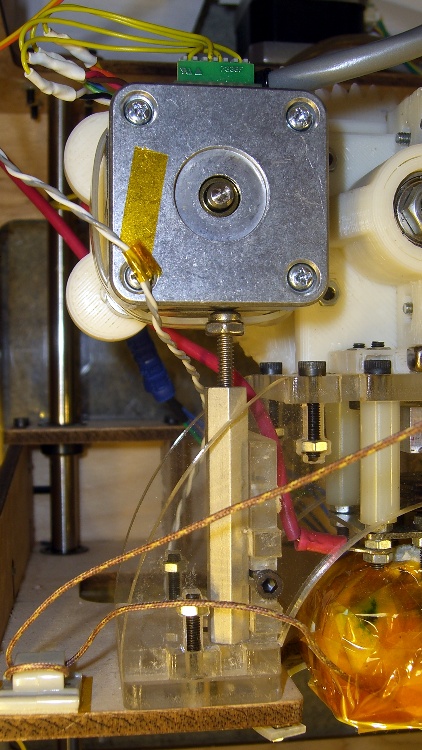
In the process of tracking down the source of those Reversal zits, I noticed the motor mount flexed slightly as it reversed. That could produce a bit of backlash, so I added a quick-and-dirty support strut under the motor.
It’s a threaded standoff with a screw in one end. The nut (secured with a dab of Loctite) lets a wrench do the height adjustment. It just stands there, held in place by compression loading.
Unfortunately, it really didn’t have much of an effect on the problem, about which I’ll say more in a bit.
Stepper extruder design has advanced during the last half year, so I may print up the latest iteration of Greg’s Extruder. There’s also a beefy NEMA 17 on its way around the curve of the planet that might suffice as a direct-drive extruder motor along the lines of the MBI MK6 StepStruder motor, but with lower winding resistance for better performance.
Three spools of filament just arrived and needed a home; up to this point, I’ve been using the Lazy Susan Filament Spool for loose bundles atop the Thing-O-Matic. Until I use the last of the loose filament, which could take a while, I figured I could tack the spools to the floor joists.
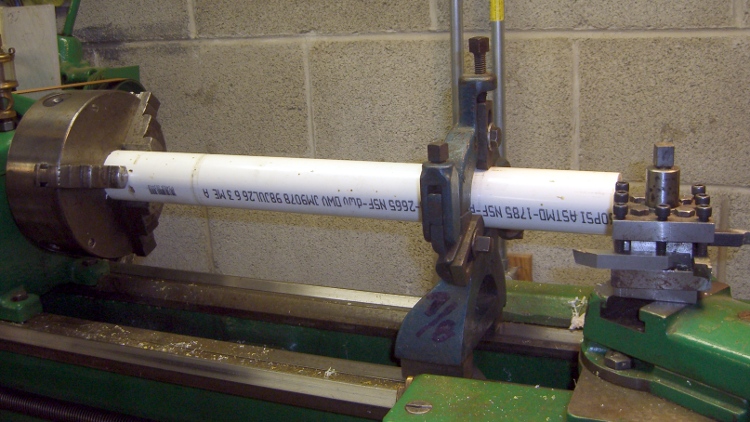
It turns out 1-1/2 inch PVC drain pipe fits perfectly through the spool bore, so I squared up the ends of a chunk long enough to span the floor joists at a convenient distance from the printer. That steady rest doesn’t see a lot of use, but when I need it, I need it bad:
Turning spool axle
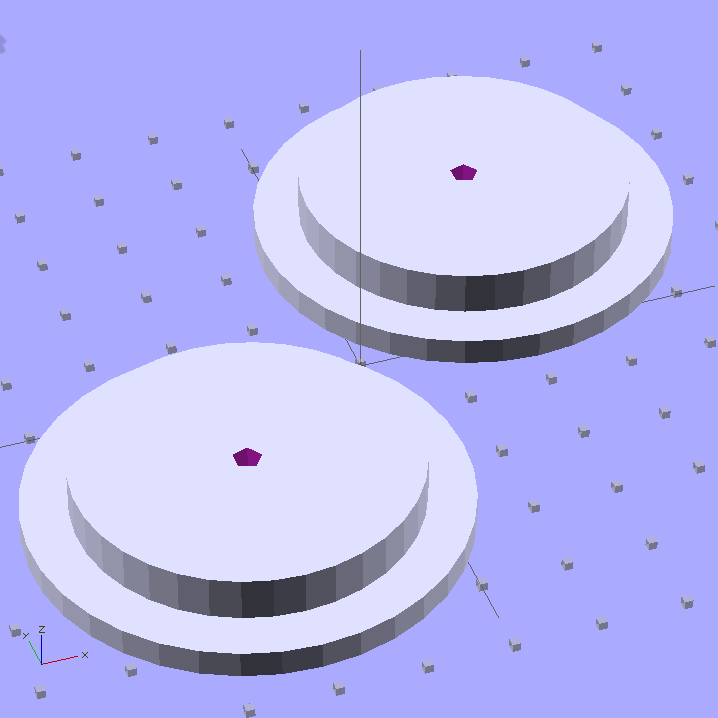
The endplate solid model looks about like you’d expect:
Filament spool axle endplates
I could turn those things from two chunks of plate, but this is much neater; a 3D printer makes short work of custom-sized parts.
The two pegs of yellow filament keep the axle endplate from turning on the central screw (and, inevitably, unscrewing themselves); add glue in the blind holes and trim to fit with a flush-cutting nipper. The aluminum brackets come from a pile I’ve been using for years: as almost always, the holes were in exactly the right places.
Filament spool axle endplate
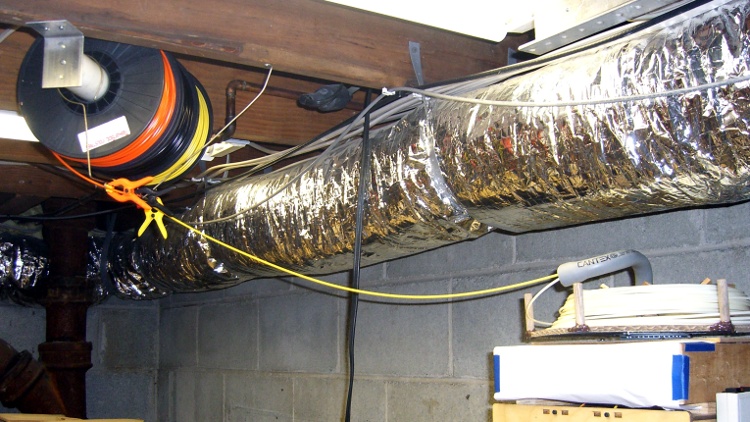
With all that in hand, up it went:
Overhead filament spools
I bent some coat hanger wire into a guide bar with three eyelets for the filaments, plus another chunk to hold the guide in position. Three small (color coordinated!) clamps prevent the unused filament from unwinding.
I’m not completely happy with this arrangement, because there’s not enough control over the filament energy: the coil around each spool wants to expand into a tangle exactly the size and shape of the Basement Laboratory and there’s not a lot preventing that. I think a variation on tbuser’s Spool Guard theme might be in order: let the filament expand within a tightly enclosed space around each spool.
The OpenSCAD source code:
// Filament spool shaft adapter
// Ed Nisley KE4ZNU July 2011

include </home/ed/Thing-O-Matic/lib/MCAD/units.scad>

Layout = "Show";					// Show or Build

//-- Extrusion parameters

ThreadThick = 0.33;
ThreadWT = 2.0;
ThreadWidth = ThreadThick * ThreadWT;

HoleWindage = 0.1;			// enlarge hole dia by this amount
Protrusion = ThreadThick;

//-- End Plate dimensions

PlateOD = 51.0;
PlateThick = ThreadThick * ceil(3.0 / ThreadThick);

AxleID = 40.0;
AxleThick = ThreadThick * ceil(5.0 / ThreadThick);

HoleSpacing = 0.75 * inch;

StubDepth = ThreadThick * ceil(2.5 / ThreadThick);
StubDia = 3.0;

ScrewDepth = PlateThick + AxleThick;

PrintOffset = 0.8*PlateOD/2;			// fraction of dia to offset objects for printing

Tap6_32 = 0.1065 * inch;
Clear6_32 = 0.1495 * inch;
Head6_32 = 0.270 * inch;
Head6_32Thick = 0.097 * inch;
Nut6_32Dia = 0.361 * inch;		// across points
Nut6_32Thick = 0.114 * inch;

//----------------------
// Useful routines

module PolyCyl(Dia,Height,ForceSides=0) {			// based on nophead's polyholes

  Sides = (ForceSides != 0) ? ForceSides : (ceil(Dia) + 2);

  FixDia = Dia / cos(180/Sides);

  cylinder(r=(FixDia + HoleWindage)/2,
           h=Height,
	   $fn=Sides);
}

PegSize = 1.0;

module ShowPegGrid(Size) {
	for (x=[-5:5])
	  for (y=[-5:5])
		translate([x*10,y*10,Size/2])
		  %cube(Size,center=true);

}

//----------------------
// Single endplate

module AxleEndPlate() {

  difference() {
	union() {
	  cylinder(r=PlateOD/2,h=PlateThick,$fa=10);
	  translate([0,0,PlateThick])
		cylinder(r=AxleID/2,h=AxleThick,$fa=10);
	}

	translate([0,0,-Protrusion])
	  PolyCyl(Tap6_32,ScrewDepth + 2*Protrusion);

	for(y=[-HoleSpacing,HoleSpacing])
	  translate([0,y,-Protrusion])
		PolyCyl(StubDia,StubDepth + Protrusion);

  }

}

//----------------------
// Lash it together

if (Layout == "Show")
	ShowPegGrid(PegSize);

translate([-PrintOffset,-PrintOffset,0]) AxleEndPlate();

translate([PrintOffset,PrintOffset,0]) AxleEndPlate();
The aluminum build platform plates remain both flat and level, but the outline and test extrusions are consistently thin by 0.05 to 0.10 mm in the right rear corner and thick by about the same amount in the right front. That means the rear corner is too high and the front corner is too low, but the whole left side is flat to within my ability to measure it.
The effect is significant, because I’m laying down the first layer at 10 mm/s with a layer thickness of 0.33 mm; the first layer looks exactly like all the other layers in the object. With the middle of the plate at 0.33 mm below the nozzle, the fill can be cramped at 0.23 mm and sparse at 0.43 mm. The long-term Z-min switch repeatability seems to be no better than 0.05 mm, so when the midline goes below 0.30 mm, the higher rear corner really crowds the plastic.
Given that the left side is level front-to-back, the only way a flat plate can appear non-flat is if the X and Y axis rods aren’t quite parallel: the stage rolls or yaws as it moves.
That could indicate a bent rod, but the last time I rolled those rods on a surface plate, they’re perfectly straight. Maybe something horrible has happened, but any stress capable of bending one of those rods will wreck the printer in passing.
Alas, a static platform adjustment can’t fix a dynamic motion, but tweaking the rods to be (more) parallel could reduce the problem. I tried visualizing the possible causes and cures, then decided to stop thinking so much, just change something, then measure the results.
Why my head exploded:
The thickness varies from front-to-back, so the Y axis rods are non-parallel, which should affect both the left and right sides. But the left side is perfectly level and the right side is not.
The thickness varies from left-to-right, so the X axis rods are non-parallel, which should affect both the front and back sides. But they vary oppositely: the front tilts down to the right and the back tilts up to the right. The midline from left to right, however, is level to within my ability to measure it.
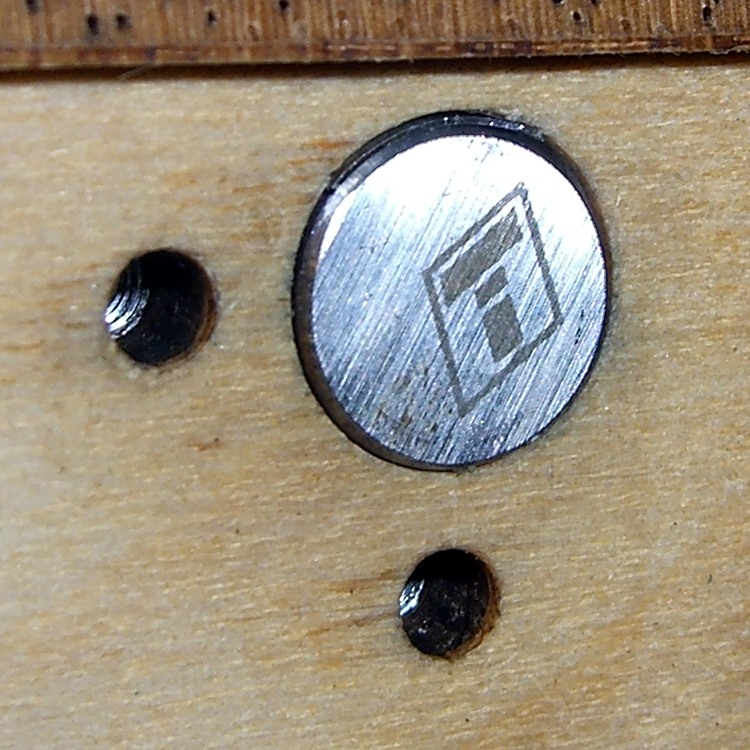
I had shimmed the rear X axis rod quite some time ago, so I decided to try a simple adjustment: move the shim from top to bottom. The picture shows the 0.4 mm shim in its original location at the top of the rod; the edge is barely visible. For lack of anything smarter, I moved the shim to the bottom of the rod to push the end upward.
Shazam! The results of a test extrusion in units of 0.01 mm:
39
35
40
35
40
33
36
[Update: Typo in the rear-left was 49, should be 39. Drat!]
Which says it’s give-or-take 0.05 mm around the middle, with the rear-left corner now a tad low; bear in mind that 0.05 mm is about the limit of my measurement ability. It’s off to a good start, anyway, and we’ll see how it fares over the next few weeks.
Methinks if you’re serious about this 3D printing thing, you need a printer with real axis alignment adjustments and enough stability to make them meaningful. Nophead uses custom code that tweaks the G-Code’s Z-axis coordinates on the fly based on an initial three-point probe, which is a wonderful solution that’s not in the cards for RepG. EMC2 could incorporate that in the kinematics module, but at the moment it does just XY leadscrew mapping. It’s simpler, albeit more expensive on a per-machine basis, to get the mechanical alignment right the first time.
Some upcoming presentations on 3D printing need a way to show what’s going on inside the box. I’ve had various webcams affixed to various parts of the Thing-O-Matic, but nothing worked quite right: the camera was either in the wrong spot, at the wrong angle, or just flat-out in the way.
The helmet mirror project produced a trio of three-draw telescoping shafts that looked promising, so I drilled suitable holes in two chunks of scrap make-from plastic and produced a pole mount for a Logitech camera without doing a bit of machining. The camera wants to clamp onto a notebook and works fine atop a block of acrylic, with the cable secured to the base of the pole to prevent the whole thing from falling over at the slightest tug.
I briefly considered printing a nice clip to hold the cable to the pole, then came to my senses and used a cable tie. After all, that’s what they’re for, right?
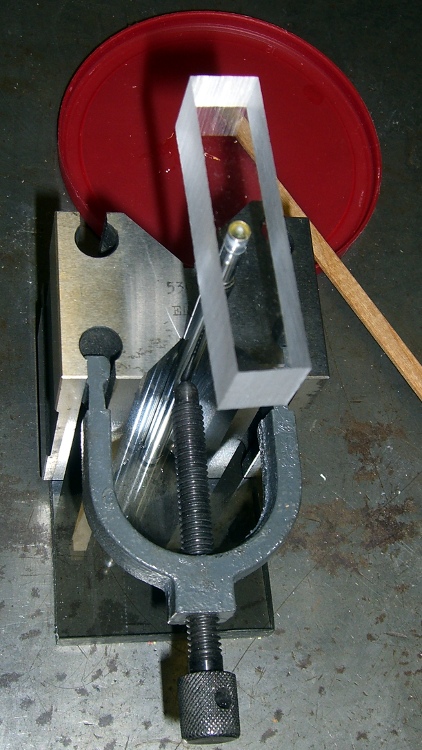
A dot of clear epoxy in each hole prevents the blocks from rotating on the shafts; they’re sufficiently un-round to give it a decent grip. I clamped the pole in a V-block to keep it perpendicular to the base while the epoxy cured:
Webcam pole – clamping
The white LEDs under the Z-stage produce far too much glare and reflect in the Kapton tape; a switch to knock ’em off for video viewing seems in order.
(If anybody else is keeping track, this is Post 1000. Although we humans love numbers with plenty of zeroes, Post 10000 will pose a challenge…)
After printing the Barbie Pistol, I discovered that moving the Z stage to anything less than the absolute maximum was a Bad Idea, so I changed end.gcode to simply home the Z axis to the top. That worked fine in RepG 24, but after printing a few things with RepG 25, I discovered that the Z axis now has uncommanded motion after that homing step: a G0 F4000 X0 causes the Z stage to drop by anywhere from a few millimeters to half the total travel.
Of course, the uncommanded Z motion depends on something imponderable, but it’s consistent for any given setup. This chunk of G-Code causes about 10 mm of downward Z motion:
G21 (set units to mm)
G90 (set positioning to absolute)
(- coarse home axes -)
G162 Z F1000 (home Z to get nozzle out of danger zone)
G161 Y F4000 (retract Y to get X out of front opening)
G161 X F4000 (now safe to home X)
M132 X Y Z A B (fetch home offsets from EEPROM)
G0 F4000 X0 Y0 Z30 (pause at center to build confidence)
(- draw square)
G0 F4000 X-45 Y-45 Z10 (to front left corner)
G1 Y45 F4000
G1 X45
G1 Y-45
G1 X-45 (return to front left)
(- move to eject position)
G162 Z F1500 (home Z to get nozzle away from object)
(G0 F4000 Z113) (this would work fine)
G0 F4000 X0 (center X axis)
G0 F4000 Y40 (move Y stage forward)
As nearly as I can tell, homing an axis trashes its coordinate value, so the only thing you can do next is set the axis coordinate value with G92 or M132. Given that those values are now stored in EEPROM, maybe it’s be a good idea to simply use them, without requiring another command after each homing command?
You’d want home offset values for both the maximum and minimum limits, to accommodate printers with limits on both ends of the axis, rather than the single offset now stored. The two homing commands (G161 and G162) could pick the appropriate offset, if a valid one was stored, and leave the coordinate unchanged (but not trashed!) otherwise.
It would be handy, while doing the fast / coarse home stuff, to switch to G91 relative positioning mode and back off the switches by 2 mm by using a simple G0 X2 Y2 Z-2 that doesn’t depend on knowing the exact coordinates of the endpoint, but it seems relative positioning doesn’t work for any but the most trivial cases.
After some fiddling, this short routine produces a very fast, very long, fully coordinated XY move to some position in the +X +Y direction at the G1 X2 F100 command after the G91 command sets relative motions; it should move 2 mm away from the X switch. When the machine arrives at the new (unexpected) position, it then does the expected slow 2 mm Y and Z moves:
G21 (set units to mm)
G90 (set positioning to absolute)
(- coarse home axes)
G162 Z F1000 (home Z to get nozzle out of danger zone)
G161 Y F4000 (retract Y to get X out of front opening)
G161 X F4000 (now safe to home X)
(- back off switches)
G91
G1 X2 F100
G1 Y2 F100
G1 Z-2 F100
G90
I gave up and used an absolute move with hardcoded XYZ coordinates that should be pretty close to the stored values.



 The Smell of Molten Projects in the Morning