Ed Nisley's Blog: Shop notes, electronics, firmware, machinery, 3D printing, laser cuttery, and curiosities. Contents: 100% human thinking, 0% AI slop.
Tag: Thing-O-Matic
Using and tweaking a Makerbot Thing-O-Matic 3D printer
The Retraction speed in the Skeinforge Dimension plugin sets the E axis speed while it’s inhaling molten filament at the end of each thread and exhaling it at the start of the next thread. For a Retraction speed of 60 mm/s = 3600 mm/min and a Retraction Distance of 2 mm, the G-Code at the very start of the Skirt thread looks like this:
G1 F3600.0
G1 E2.0
So far, so good; that, I can understand. The extruder spins at a pretty good clip, but only while moving 2 mm of filament.
The Dimension plugin doc explains the settings for its parameters, but isn’t forthcoming on the subject of what to use for the Flow rate in the Speed plugin. The Speed plugin doc doesn’t help much; it seems the Flow rate uses either PWM or mm/s, depending on something imponderable. Per that discussion, you should apparently set both Feed and Flow to the same value (in mm/s), which I have done. Given that G-Code has only one speed setting for coordinated motion, that seems reasonable.
For a Feed speed of 60 mm/s = 3600 mm/s (which may seem aggressive, but that’s what acceleration limiting enables), the G-Code at the start of the second layer looks like this:
However, that seems to mean the extruder rams filament into the hot end at 3600 mm/min = 60 mm/s, which simply isn’t what’s going on. The pinch wheel / gear / whatever turns at maybe 2 rev/min, which corresponds to about 60 mm/min: roughly 1/60 the speed indicated by the F3600.0 parameter.
The SJFW M201 parameter was set to E60, which should set 60 mm/min as the minimum speed. But Skeinforge doesn’t know anything about the firmware’s internal minimum (or maximum!) speed limits.
So I tried a few manual variations with the extruder heated up, feeding in commands like G1 E10 Fnn, with various nn values for the F speed, while measuring the elapsed time. If F sets the extruder speed in mm/min, then the time to extrude 10 mm of filament should vary inversely with the speed. Some results:
F240 → 10 s
F360 → 10 s
F400 → 11 s
F450 → 1 s
F480 → 1 s
Huh. Now that, I do not understand.
Setting M201 E120, which should double the minimum speed, produces these reasonable results:
F1 → 10 s
F2 → 7 s
F3 → 6 s
F4 → 3 s
F5 → stalls because the extruder can’t maintain that pace
The first line seems to indicate that extruding 10 mm of filament at 1 mm/min requires 10 seconds, which is off by a neat factor of 1/60. The ratio of the lines is more-or-less right, as long as you allow more measurement windage than seems appropriate and ignore the gross overall speed mismatch. The difference between the two sequences is not the ratio of the two M201 settings, however.
I have the extruder set to accelerate at 250 mm/s2, which implies it can reach 120 mm/min = 2 mm/s in 0.008 mm, which is basically instantly. Relevant equation: x = v2/2a.
Given the incoming filament diameter and the outgoing extrusion thread dimensions, Skeinforge knows their cross-sectional areas. Multiplying the extrusion thread’s cross-section area by the Pythagorean XY distance for a segment gives the extrusion volume, dividing that by the filament cross-section area gives the incoming filament length, and dividing that by the Filament Packing Density fudges the answer to come out right.
From the coordinates in the first two lines of G-Code we have:
XY distance = 7.27 mm
extrusion distance = 0.15 mm
Given the corresponding extrusion settings:
0.25 mm layer height and 0.50 mm width = 0.125 mm2
2.89 mm filament dia = 6.56 mm2
FPD=0.95
The incoming distance works out to (0.125 * 7.27 / 6.56) / 0.95 = 0.15 mm, which is dead on the G-Code value. So I understand the volume part, at least.
At the Feed rate of 60 mm/s, the extruder covers the XY distance in 7.27 / 60 = 0.12 s. The extruder must consume 0.15 mm of filament in that same time, which works out to 0.15 / 0.12 = 1.2 mm/s = 72 mm/min.
Obviously, the extruder filament drive is not running at the F3600.0 value set by the G-Code, nor is it running at 1/60 that speed.
I have not the foggiest idea what’s going on in there, but … it seems to work. Equally obviously, because Skeinforge doesn’t know which firmware I’m using, all the firmware usable with Dimension behaves the same way.
One possibility: perhaps the E axis (definitely not XY and probably not Z) runs in something resembling EMC2’s inverse time mode, wherein the firmware adjusts the speed to complete the move in a fixed time. In this case, the firmware knows both the distance (given by Skeinforge in the E parameter) and the time for the XY move (found by dividing that XY Pythagorean distance by the F parameter), so it can compute the speed required to make the extruder poot out the right amount of plastic in that time, presumably while imposing (trapezoidal?) acceleration limiting along the way.
That might also account for the weird behavior with M201 E60 shown above: perhaps the firmware uses a stale time left over from the most recent XY motion to compute the speed for a move involving only the E axis. I suppose I could puzzle through the source; it’s rather daunting.
Anybody have any clues or pointers to the obvious doc I’ve overlooked?
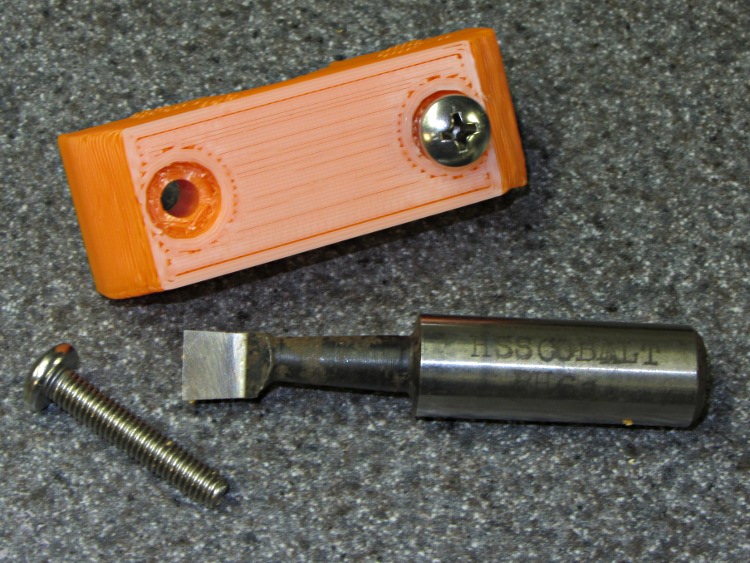
Having used screwdrivers and other improvised tools to clean out various 3D printed recesses, it finally penetrated my thick consciousness that a boring bar is exactly the right hammer for the job:
Cleaning screw head recesses with a boring bar
In normal use, a boring bar’s head cuts mainly on its end surface, with the side cleaning up the hole’s periphery. Those edges remove droopy threads and Reversal zittage around a hole’s interior; an end mill works better to make the recess uniformly deeper.
I have a few sets of these things, with larger & smaller cutting ends and longer & shorter shanks, that I occasionally use for lathe boring and rarely for mill boring (in the manual mill, not the Sherline!). The smallest head in the collection is maybe 4 mm across, so there’s a definite lower limit on the size of the hole they’ll clear.
Hand-held while cutting plastic? They’ll last forever!
Having not yet gotten around to building better taillights for our bikes, we picked up some Planet Bike Superflash lights on sale. I don’t like single-LED lights, because the optics produce a concentrated beam (which is how they get such high lumen ratings) that’s essentially invisible anywhere off-axis; a taillight that requires careful alignment for maximum effect is a Bad Thing. But, eh, they were on sale…
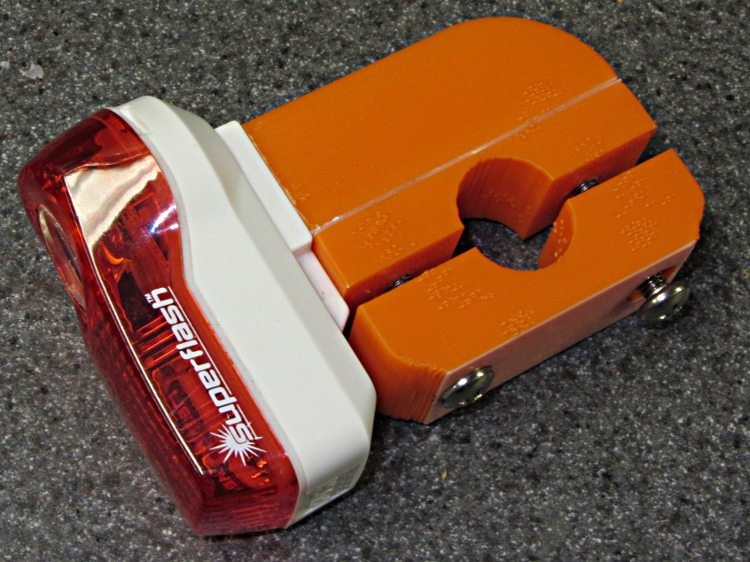
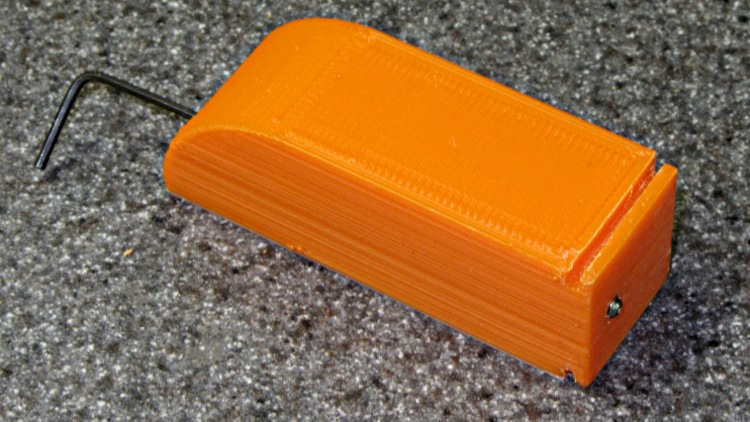
The graceful OEM seatpost mount, done in engineering plastic with smooth curves and something of a reputation for fragility, doesn’t work on a recumbent, so I build a butt-ugly mount that should last forever. It clamps firmly around a length of grippy silicone tape on the top seat frame rail:
Superflash on Tour Easy
The reviews also complain that normal road vibrations transmitted through the somewhat whippy OEM mount pop the case apart, depositing the lens and electronics on the road behind you. Hence the black tape across the case joint.
Here’s the whole affair on the bench:
Superflash on mount
The weird color line comes from white plastic left in the extruder that covers the bottom layer or two of each part. I’m not fussy about the first pass of any new gadget, because I know I’ll build at least one more to get everything right.
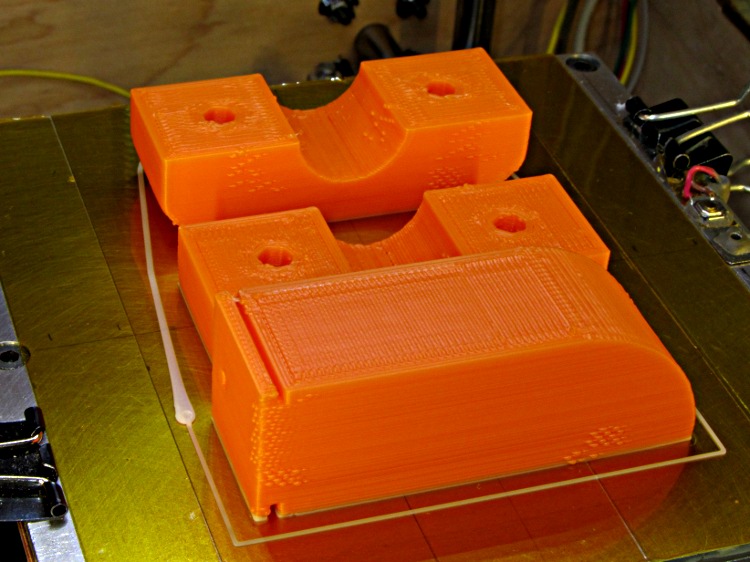
This is the first build arrangement; note the huge white teardrop blob at the start of the Skirt outline on the left. Obviously I didn’t have the initial retraction under control:
Superflash mount on build platform
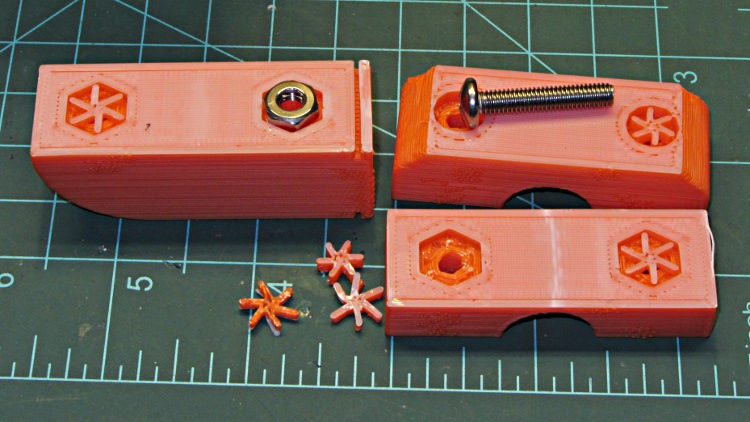
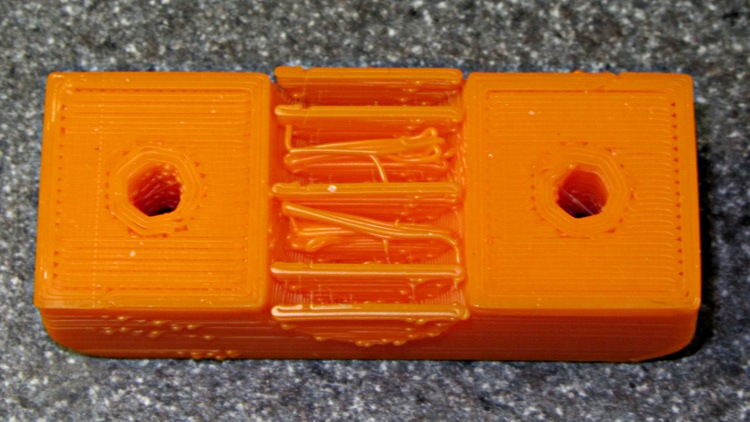
The screw recesses built over the plate and got cute little support spiders to keep their interiors from sagging:
Superflash mount – bolt support
After doing it that way, I flipped the top piece over so it builds with the screw head recesses upward to get a better finish on those nice curves. That means the arch needs support, which almost worked, although some of the fins fell over:
Superflash mount – failed arch support
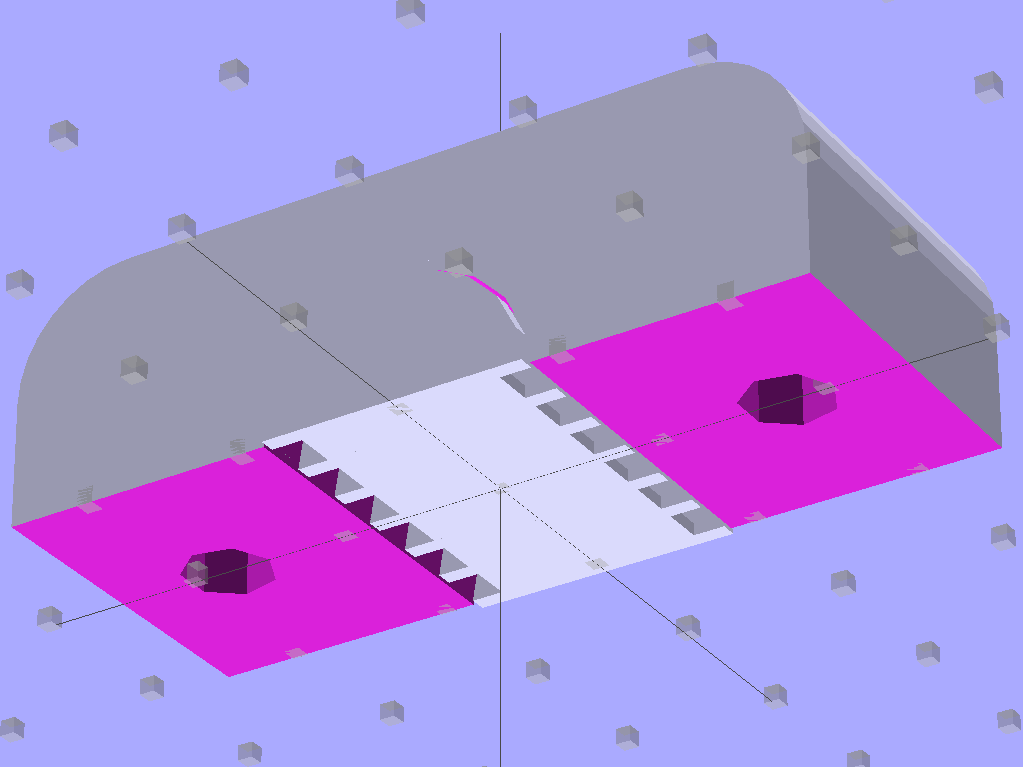
The solid model now adds a two-layer-thick flat plate joining the fins that should hold them firmly to the build plate.
Clamp Support – Solid Model
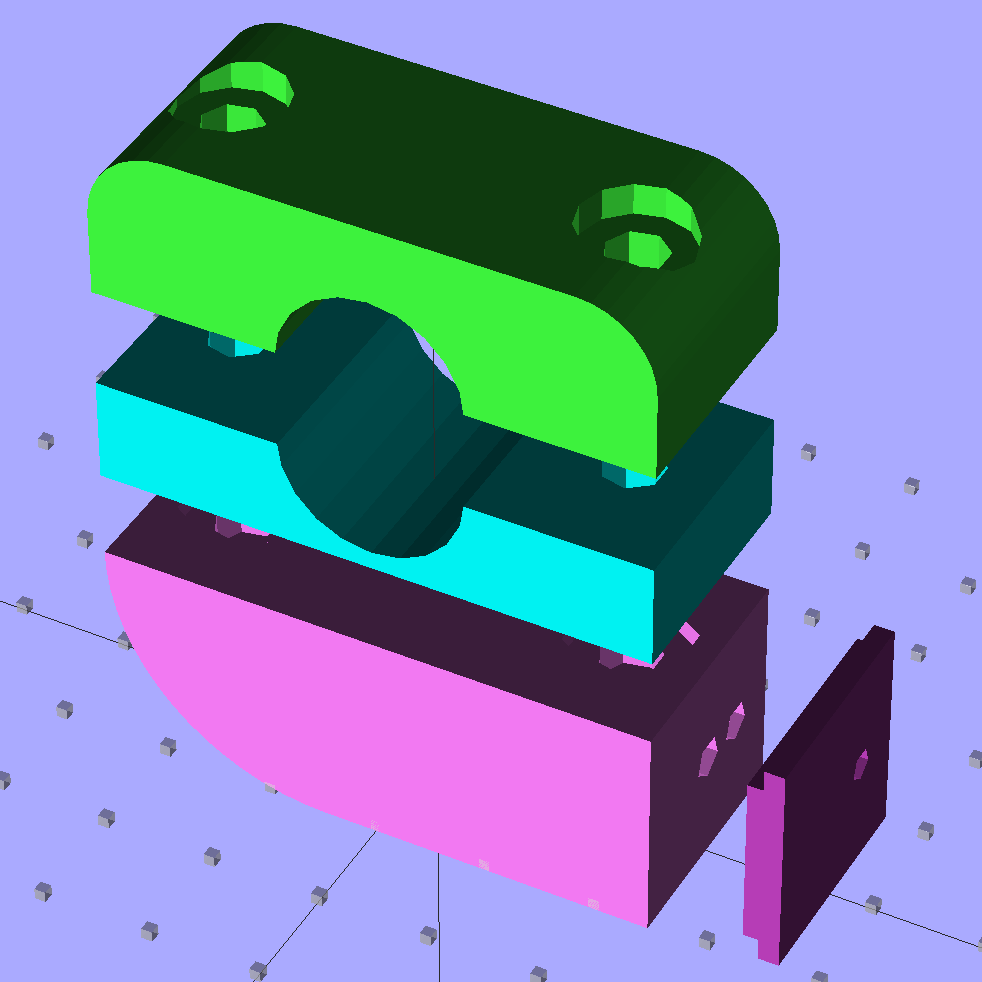
I also added an option to build the flash mounting shoe separately:
Superflash mount – solid model
That gives better control over the flange thickness, which turns out to be critical parameter requiring a bit of adjustment with a file in the first version. Of course, the shoe needs an alignment pin and another assembly step to glue it in place:
Superflash mount – gluing shoe
A 4-40 setscrew jams into the latch recess in the Superflash case, thus preventing it from walking off the shoe. You don’t need any particular pressure here, just enough protrusion to engage the case:
Superflash mount – setscrew
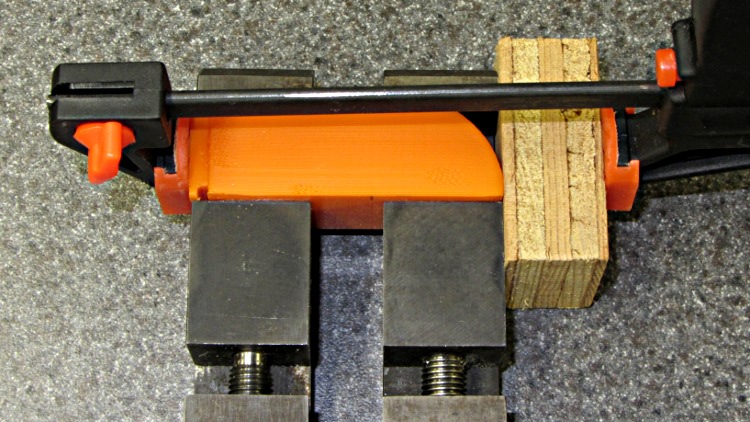
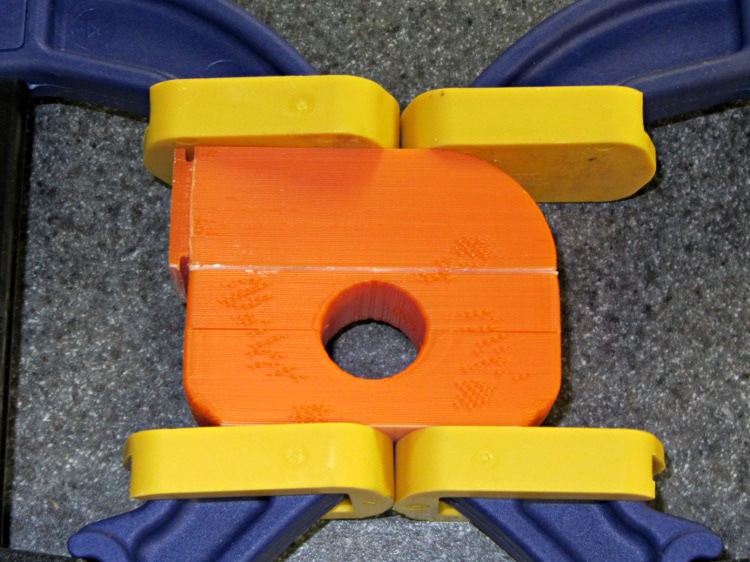
The first pass at hex nut recesses were exactly cos(30) too large, as I forgot my Useful Sizes file has the across-the-points diameter, so I added a dab of epoxy to each recess before gluing the halves together with solvent:
Superflash mount – glue clamping
And then it’s all good.
The OpenSCAD source code:
// Planet Bike Superflash mount for Tour Easy seatback
// Ed Nisley KE4ZNU - Dec 2011

Layout = "Show";            // Assembly: Show
                            // Parts: Clamp Base Shoe Mount
                            // Build Plate: Build

SeparateShoe = true;        // true = print mounting shoe separately
                            // false = join shoe to Mount block

Support = true;             // true = include support

Gap = 8;                    // between "Show" objects

include </home/ed/Thing-O-Matic/lib/MCAD/units.scad>
include </home/ed/Thing-O-Matic/Useful Sizes.scad>
include </home/ed/Thing-O-Matic/lib/visibone_colors.scad>

//-------
//- Extrusion parameters must match reality!
//  Print with +1 shells, 3 solid layers, 0.2 infill

ThreadThick = 0.25;
ThreadWidth = 2.0 * ThreadThick;

HoleFinagle = 0.1;
HoleFudge = 1.00;

function HoleAdjust(Diameter) = HoleFudge*Diameter + HoleFinagle;

Protrusion = 0.1;           // make holes end cleanly

function IntegerMultiple(Size,Unit) = Unit * ceil(Size / Unit);
function IntegerMultipleMin(Size,Unit) = Unit * floor(Size / Unit);

//-------
// Dimensions

BarDia = (5/8) * inch;              // seat back rail diameter
BarRad = BarDia/2;

TapeThick = 0.3;                    // grippy tape around bar

HoleDia = BarDia + 2*TapeThick;     // total hole dia
HoleRad = HoleDia/2;
HoleSides = 4*5;

echo("Bar hole dia: ",HoleDia);

TightSpace = 1.0;                   // space for tightening screws

PlateWidth = 20.0;                  // mounting plate across flanges
PlateLength = 20.0;                 //  ... parallel to flanges
PlateThick = IntegerMultipleMin(1.96,ThreadThick);          //  ... thickness
FlangeThick = IntegerMultiple(1.40,ThreadThick);            // lamp flange thickness
FlangeWidth = 2.0;                  //  ... width

ShoeThick = PlateThick + FlangeThick;    // dingus protruding from main block
ShoeOffset = 1.0;                   // offset due to end wall

echo("Shoe thickness: ",ShoeThick," = ",PlateThick," + ",FlangeThick);

LockOffset = -5.0;                  // offset of locking setscrew

TopRoundRad = 1.5*Head10_32/2;      // tidy rounding on top edge of clamp
echo("Top rounding radius: ",TopRoundRad);

NutDia = Nut10_32Dia*cos(30);       // adjust from across-points to across-flats dia
NutPart = IntegerMultiple(0.5*Nut10_32Thick,ThreadThick);  // part of nut in each half

BoltOffset = HoleRad + max(Head10_32,NutDia);
BoltClear = Clear10_32;
BoltHeadDia = Head10_32;
BoltHeadThick = Head10_32Thick;

MountWidth = PlateLength + ShoeOffset;         // side-to-side
MountLength = HoleDia + 3.5*max(BoltHeadDia,NutDia);

ClampHeight = TopRoundRad + HoleRad;            // includes gap/2 for simplicity
BaseHeight = NutPart + HoleRad;                 //  ... likewise
MountHeight = PlateWidth;

echo("Mount width: ",MountWidth," length: ",MountLength);
echo("Height of clamp: ",ClampHeight," base: ",BaseHeight," mount: ",MountHeight);
echo(" total: ",ClampHeight+BaseHeight+MountHeight);

AlignPegDia = 2.9;                  // shoe alignment peg
AlignPegLength = ShoeThick;

echo("Alignment peg length: ",AlignPegLength);

//-------

module PolyCyl(Dia,Height,ForceSides=0) {           // based on nophead's polyholes

  Sides = (ForceSides != 0) ? ForceSides : (ceil(Dia) + 2);

  FixDia = Dia / cos(180/Sides);

  cylinder(r=HoleAdjust(FixDia)/2,h=Height,$fn=Sides);
}

module ShowPegGrid(Space = 10.0,Size = 1.0) {

  Range = floor(50 / Space);

    for (x=[-Range:Range])
      for (y=[-Range:Range])
        translate([x*Space,y*Space,Size/2])
          %cube(Size,center=true);
}

//-------
// Upper clamp half

module Clamp() {

  difference() {
    translate([0,0,-TightSpace/2]) {
      difference() {
        translate([0,0,ClampHeight/2]) {
          intersection() {
            translate([0,0,-TopRoundRad])
              minkowski() {
                cube([(MountLength - 2*TopRoundRad),
                      (MountWidth - 2*Protrusion),
                      ClampHeight],center=true);
                rotate([90,0,0])
                  cylinder(r=TopRoundRad,h=Protrusion,$fn=4*8);

              }
            cube([MountLength,MountWidth,ClampHeight],center=true);
          }
        }
        translate([0,(MountWidth/2 + Protrusion)])
          rotate([90,0,0])
            PolyCyl(HoleDia,(MountWidth + 2*Protrusion),HoleSides);
        for (Index=[-1,1])
          translate([(Index*BoltOffset),0,0]) {
            translate([0,0,-Protrusion])
              PolyCyl(BoltClear,(ClampHeight + Protrusion));
            translate([0,0,(ClampHeight - BoltHeadThick)])
              PolyCyl(BoltHeadDia,(BoltHeadThick + Protrusion));
          }
      }

    }
    translate([0,0,-TightSpace/2])
      cube([(MountLength + 2*Protrusion),
           (MountWidth + 2*Protrusion),
           TightSpace],center=true);
  }

    if (Support)                    // choose support to suit printing orientation
      union() {
        translate([0,0,1.5*ThreadThick])
          cube([0.75*HoleDia,(MountWidth + 2*ThreadWidth),3*ThreadThick],center=true);
        intersection() {
          for (Index=[-3:3])
            translate([0,Index*(MountWidth/6),-TightSpace/2])
              rotate([90,0,0])
                cylinder(r=(HoleRad - 0.25*ThreadThick),
                        h=2*ThreadWidth,center=true,$fn=HoleSides);
          translate([-HoleRad,-MountWidth,0])
            cube([HoleDia,2*MountWidth,HoleRad]);
        }
      }
}

//-------
// Lower clamp half = base

module Base() {

  difference() {
    translate([0,0,-TightSpace/2])
      difference() {
        translate([0,0,BaseHeight/2])
          cube([MountLength,MountWidth,BaseHeight],center=true);
        translate([0,(MountWidth/2 + Protrusion)])
          rotate([90,0,0])
            PolyCyl(HoleDia,(MountWidth + 2*Protrusion),HoleSides);
        for (Index=[-1,1])
          translate([(Index*BoltOffset),0,0]) {
            translate([0,0,-Protrusion])
              PolyCyl(BoltClear,(BaseHeight + Protrusion));
            translate([0,0,(BaseHeight - NutPart)])
              rotate(30)
                PolyCyl(NutDia,(NutPart + Protrusion),6);
//              cylinder(r=NutDia/2,h=(NutPart + Protrusion),$fn=6);
          }
      }
    translate([0,0,-TightSpace/2])
      cube([(MountLength + 2*Protrusion),
           (MountWidth + 2*Protrusion),
           TightSpace],center=true);

  }

  if (Support)
    for (Index=[-1,1])                  // support inside nut openings
      translate([(Index*BoltOffset),
                0,
                (BaseHeight - (NutPart - ThreadThick) - TightSpace/2)]) {
        translate([0,0,0])
          for (Seg=[0:5]) {
            rotate(30 + 360*Seg/6)
              cube([NutDia/2,2*ThreadWidth,NutPart - ThreadThick],center=false);
          }
      }

}

//-------
// Superflash mounting shoe
// Offset by -ShoeOffset/2 in Y to align on Mount (half of total offset on each side)

module Shoe() {

    difference() {
      translate([-ShoeThick/2,-ShoeOffset/2,PlateWidth/2])
        if (SeparateShoe)
          cube([ShoeThick,PlateLength,PlateWidth],center=true);
        else
          cube([(ShoeThick + Protrusion),PlateLength,PlateWidth],center=true);

      translate([-(FlangeThick - Protrusion),
                -(PlateLength/2 + ShoeOffset/2 + Protrusion),
                (MountHeight - FlangeWidth)])
        cube([FlangeThick,(PlateLength + 2*Protrusion),(FlangeWidth + Protrusion)]);

      translate([-(FlangeThick - Protrusion),
                -(PlateLength/2 + ShoeOffset/2 + Protrusion),
                -Protrusion])
        cube([FlangeThick,(PlateLength + 2*Protrusion),(FlangeWidth + Protrusion)]);

      translate([-(ShoeThick + Protrusion),LockOffset,MountHeight/2])
        rotate([0,90,0])
          rotate(0)                 // align to match Mount hole orientation
            PolyCyl(Tap4_40,(ShoeThick + 2*Protrusion));

      if (SeparateShoe)
        translate([-(ShoeThick - AlignPegLength/2),0,MountHeight/2])
          rotate([0,90,0])
            PolyCyl(AlignPegDia,AlignPegLength);
    }
}

//-------
// Bottom block for Superflash mount

module Mount() {

  translate([0,0,MountHeight/2])
    union() {
      difference() {
        union() {
          translate([-MountLength/4,0,0])
            cube([MountLength/2,MountWidth,MountHeight],center=true);
          translate([((MountLength/2 - MountHeight)/2 + Protrusion),0,0])
            cube([(MountLength/2 - MountHeight + 2*Protrusion),
                 MountWidth,
                 MountHeight],center=true);
          translate([(MountLength/2 - MountHeight),0,0])
            intersection() {
              translate([MountLength/4,0,0])
                cube([MountLength/2,MountWidth,MountHeight],center=true);
              translate([0,0,MountHeight/2])
                rotate([90,0,0])
                  cylinder(r=MountHeight,h=MountWidth,center=true,$fn=4*16);
            }
        }

        translate([-(MountLength/2 + Protrusion),LockOffset,0])
          rotate([0,90,0])
            rotate(0)       // align through hole sides with point upward
              PolyCyl(Clear4_40,(MountLength + 2*Protrusion));

        for (Index=[-1,1])
          translate([(Index*BoltOffset),0,0]) {
            translate([0,0,BaseHeight/2])
              PolyCyl(BoltClear,(BaseHeight/2 + Protrusion));
            translate([0,0,(BaseHeight - NutPart)])
              rotate(30)
                PolyCyl(NutDia,(NutPart + Protrusion),6);
          }

        if (SeparateShoe)
          translate([-(MountLength/2 + AlignPegLength/2),0,0])
            rotate([0,90,0])
              PolyCyl(AlignPegDia,AlignPegLength);
      }

      if (Support)
        for (Index=[-1,1])            // support inside nut openings
          translate([(Index*BoltOffset),0,(MountHeight/2 - (NutPart - ThreadThick))]) {
            translate([0,0,0])
              for (Seg=[0:5]) {
                rotate(30 + 360*Seg/6)
                  cube([NutDia/2,
                      2*ThreadWidth,
                      (NutPart - ThreadThick)],center=false);
              }
          }

      if (!SeparateShoe)
        translate([-MountLength/2,0,-MountHeight/2])
          Shoe();
    }
}

//-------

ShowPegGrid();

if (Layout == "Clamp")
  Clamp();

if (Layout == "Base")
  Base();

if (Layout == "Shoe")
  Shoe();

if (Layout == "Mount")
  Mount();

if (Layout == "Show") {
  translate([0,0,(BaseHeight + MountHeight + Gap)]) {
    translate([0,0,TightSpace/2 + Gap])
      color(MFG) Clamp();
    translate([0,0,-TightSpace/2])
      rotate([180,0,0])
        color(DHC) Base();
  }
  translate([0,0,0])
    color(LDM) render(convexity=3) Mount();

  if (SeparateShoe)
    translate([-(MountLength/2 + Gap),0,0])
      color(DDM) Shoe();
}

if (Layout == "Build") {
  translate([-15,30,(BaseHeight - TightSpace/2)]) rotate([180,0,0])
    Base();
  translate([-15,00,0]) rotate([0,0,0])
    Clamp();
  if (SeparateShoe)
    translate([20,30,ShoeThick]) rotate([0,-90,180])
      Shoe();
  if (SeparateShoe)
    translate([-15,-30,MountHeight]) rotate([180,0,180])
      Mount();
  else
    translate([-15,-40,MountWidth/2]) rotate([90,0,180])
      Mount();

}
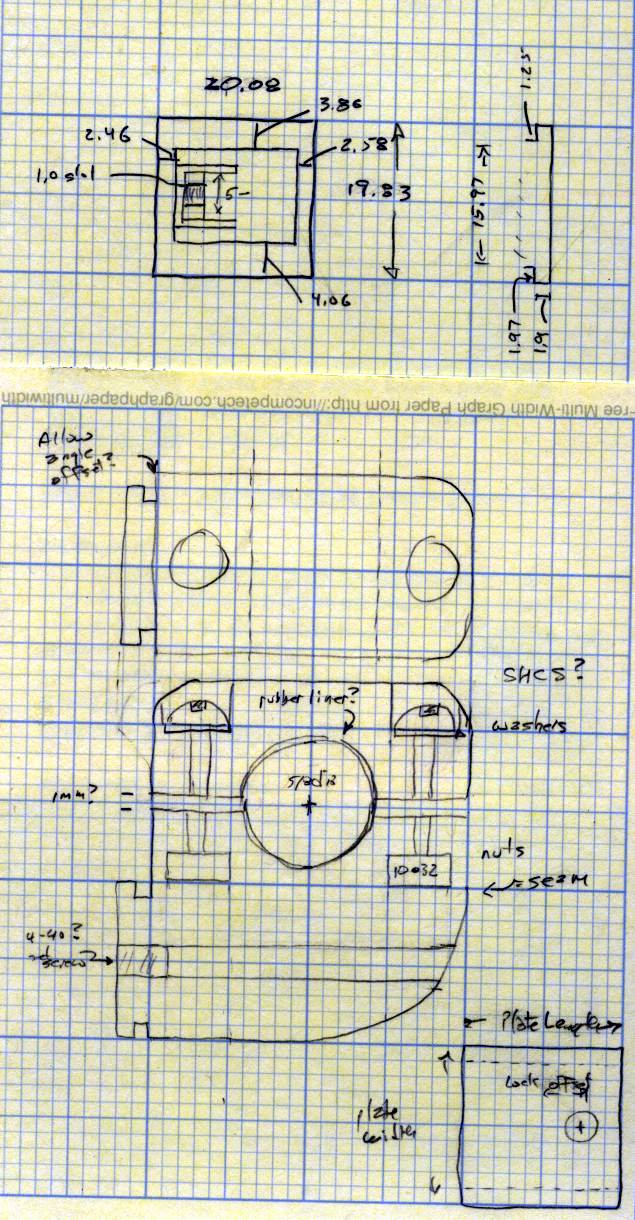
The original doodles, done on a retina-burning yellow scratchpad:
SJFW supports the Dimension plugin with the E extruder axis and doesn’t implement the older M101/M103/M108/M113 direct extruder commands. So I rewrote start.gcode to take advantage of that, compensate for Z-axis backlash, and clean up a few other nits; an older version (for MBI firmware) is there. The new files are at the bottom of this post.
The M351 disables dry-run mode, which I often engage while manually tweaking things: running the whole start.gcode file without heating helps get all the coordinates just right.
Coarse homing sets the axis positions to zero, rather than their real values, to simplify the fine homing process. I could switch into G91 relative motion to back off the switches, but this is easier. The fine homing now runs dead slow through the 2 mm backoff distance and produces very consistent results.
The first wipe gets rid of any residual snot before touching off on the Z-minimum platform switch, although I generally pick it off with a tweezer as the extruder heats.
Unlike the MBI firmware, SJFW’s G92 can set each axis independently, which means the Z-min touchoff need not simultaneously reset the XY position. Note that the G92 distance gets smaller to raise the Z=0.0 position: a thinner switch means a smaller distance to the platform, so when you make the value smaller (for a constant switch height) the nozzle doesn’t travel as far downward to Z=0.0.
I’d hoped to use SJFW’s M220/M221 commands to auto-set the home positions (including Z-min!), but they don’t quite work for this “in development” version. At least, feeding the appropriate commands directly through pronsole produces error messages indicating that the home positions aren’t set after a single-axis move, so I’ll continue using G92 for a while.
I ram 10 mm of filament into the extruder with the nozzle positioned in front of the wiper blade, which generally does not poot out a giant tangle of thread because the previous print ended with a retraction that leaves the extruder depressurized. The point here is to squirt out at least some thread to get the extruder pressure close to normal, then do a retraction and wipe to prevent drooling on the way to the start of the Skirt outline.
The Z axis has about 0.2 mm of backlash, which I compensate in two places. The mechanical Z=0.0 position works out to be 0.2 mm above the platform with the Z axis descending, so I made the G92 value slightly too small. The next two Z motions after the G92 descend to Z=0.0 in the left rear corner, then ascend to Z=0.2 to take up the mechanical backlash without causing any mechanical motion. After that, the nozzle is exactly (kinda-sorta) 0.2 mm above the platform and that matches the firmware’s notion of where it is. All successive Z motions (including to the first layer at Z=0.25) will be upward, so the backlash stays compensated and every layer comes out just about exactly correct.
The last G92 presets the E axis position so that the first anti-reversal at the start of the Skirt thread doesn’t produce a giant blob. This is totally empirical; I think my manual reversal after priming doesn’t result in exactly the same extruder pressure as Skeinforge’s reversals.
SJFW doesn’t implement the G0 rapid-motion command at all (which, for me, is better than implementing it wrong), so all the motion commands use G1 with an appropriate F feedrate parameter.
However, extruder speed control using a G1 F before the G1 E doesn’t produce consistent results. I think the extruder normally runs in inverse-time mode, where the speed makes the E distance come out right for the prevailing XY speed. All I know for sure is that changing the F parameter doesn’t work the way it should: it does not set the subsequent filament speed in any predictable way.
The new start.gcode file:
;---- start.gcode begins ----
; TOM 286 - Al plates + Geared extruder + Zmin platform sense
; Ed Nisley - KE4ZNU - Dec 2011
; SJFW 1.11 without G0 and G28/G16x homing
; Not yet -> Requires M220/M221 endstop positions
; See TOM286-sjfw.gcode for EEPROM setup
;
; Set initial conditions
G21                 ; set units to mm
G90                 ; set positioning to absolute
;----------
; Dry run?
M351 P0             ; P0 = normal P1 = no heat
;----------
; Begin heating
M104 S200           ; extruder head
M140 S110           ; HBP
;----------
; Coarse home axes
; Set zero at limits for convenience
G1 Z999 F1500       ; home Z to get nozzle out of danger zone
G92 Z0
G1 Y-999 F4000      ; retract Y to get X out of front opening
G92 Y0
G1 X-999 F4000      ; now safe to home X
G92 X0
;----------
; Fine home axes
; Set actual offsets!
G1 X2 Y2 Z-2 F5000  ; back off switches
G1 Z999 F50
G92 Z116.3
G1 Y-999 F50
G92 Y-58.5
G1 X-999 F50
G92 X-53.5
;----------
; Initial nozzle wipe to clear snot for Z touchoff
G1 X0 Y0 Z3.0 F1500     ; pause at center to build confidence
G4 P1000
G1 Z10                  ; ensure clearance
G1 X39 Y-58.0 F10000    ; move to front, avoid wiper blade
G1 X55                  ; to wipe station
G1 Z6.0                 ; to wipe level
M116                    ; wait for temperature settling
G1 Y-45 F500            ; slowly wipe nozzle
;-----------------------------------------------
; Z platform height touchoff
; Make sure the XY position is actually over the switch!
; Home Z downward to platform switch
; Compensate for 0.05 mm backlash in G92: make it 0.05 too low
G1 X55.5 Y8.2 Z3.0 F6000     ; get over build platform switch
G1 Z0 F50                    ; home downward very slowly
G92 Z1.35                    ; set Z-min switch height
G1 Z6.0 F1000                ; back off switch to wipe level
;-----------------------------------------------
; Prime extruder to stabilize initial pressure
G1 X55 Y-45 F6000   ; set up for wipe from rear
G1 Y-58.0 F500      ; wipe to front
G91                 ; use incremental motion for extrusion
G1 F4               ; set slow rate
G1 E10              ; extrude enough to get good pressure
G1 F4000            ; set for fast retract
G1 E-2.0            ; retract
G90                 ; back to absolute motion
G1 Y-45 F1000       ; wipe nozzle to rear
;----------
; Set up for Skirt start in left rear corner
; Compensate for Z backlash: move upward from zero point
G1 X-50 Y55 Z0.0 F10000     ; left rear corner -- kiss platform
G1 Z0.2 F1500       ; take up Z backlash to less than thread height
G92 E1.5            ; preset to avoid huge un-Reversal blob
;G1 X0 Y0
;---- start.gcode ends ----
The matching end.gcode on the other end of the file simply retracts a bit more filament, then positions the stage front-and-center for easy build plate removal:
;---- end.gcode starts ----
; TOM 286 - Al plates + Geared extruder
; Ed Nisley - KE4ZNU - Dec 2011
; SJFW 1.11 without G0 and G28/G16x homing
; Not yet -> Requires M220/M221 endstop positions
; See TOM286-sjfw.gcode for EEPROM setup
;- inhale filament blob
G91
G1 E-5 F900
G90
;- turn off heaters
M104 S0         ; extruder head
M140 S0         ; HBP
;- move to eject position
G1 Z999 F1000   ; home Z to get nozzle away from object
G92 Z117.2      ; reset Z
G1 X0 F6000     ; center X axis
G1 Y35          ; move Y stage forward
;---- end.gcode ends ----
The replace.csv file that squashes commands that SJFW doesn’t implement:
M101	;-- M101 no Extruder Forward
M103	;-- M103 no All Extruders Off
M108	;-- M108 no Extruder Speed
M113	;-- M113 no Extruder PWM
Starting with acceleration and speed values based on those initial estimates, I hand-fed G-Code moves directly into the printer via pronsole while bouncing among these choices:
Increase acceleration until motor stalls
Decrease acceleration until motor starts
Increase velocity until motor stalls
Decrease velocity until motor runs
The X axis runs fine at 333 mm/s = 20 m/min with 20 m/s2 acceleration; that little motor isn’t an impediment at all. As expected, the Y axis can’t accelerate that hard; it eventually started at 10 m/s2 to run at 250 mm/s = 15 m/min. I set X = 15 m/s2 and Y = 5 m/s2, with different maximum speeds.
With those values in place, the printer can run the Smooth Axis Test at 250 mm/s, which is breathtaking and surprisingly noise-free: acceleration control eliminates the jarring start-stop motion. I modified Jackson’s G-Code to remove position testing, which uses codes that SJFW doesn’t implement.
It’s worth mentioning I haven’t adjusted the motor currents at all.
The Z axis can run at 2000 mm/min = 33 mm/s with acceleration around 1500 mm/s2. I backed that off to 1500 mm/min = 25 mm/s with 1000 mm/s2 acceleration. It’s noticeably faster than before, but that really doesn’t make much difference; there’s no point in replacing the stock MBI high-resistance / high-inductance motor.
The E axis seems to require setting its speed with a separate G1 Exxx command (which is how Skeinforge does it) to get consistent results, although I confess to not taking good notes. I disconnected the filament drive to run the motor / gears without a load, got a workable speed & acceleration combination, reconnected the drive, fired up the hot end, and squirted filament all over the place to get actual numbers. It turns out that the little stepper on the extruder can actually ram a few millimeters of filament into the hot end at 4000 mm/min = 66 mm/s, but with acceleration down at 250 mm/s2. That’s dramatically peppier than the previous pace, which should reduce the Reversal Zittage problem.
The resulting SJFW config file, with many unchanged default entries, will not work on a stock Thing-O-Matic:
; TOM286 with Z-min switch
M402                            ; Write this config to EEPROM
M309 P1 S0                      ; Endstops
M300 X28 Y25 Z22 E15            ; STEP pins
M301 X27 Y24 Z17 E14            ; DIR pins
M302 X26 Y23 Z16 E3             ; ENABLE pins
M304 X12 Y10 Z8                 ; MIN pins
M305 Z7                         ; MAX pins
M307 X1 Y1 Z0 E1                ; Axis Inversion
M308 X0 Y0 Z0 E0                ; Disable After Move
M200 X47.06985 Y47.06985 Z200  E48.30 ; Steps per MM
M201 X1200     Y1200     Z1000 E60    ; Start Speed mm/min
M202 X20000    Y15000    Z1500 E4000  ; Max speed mm/min
M203 X1800     Y1800     Z1500 E90    ; Avg speed mm/min
M206 X15000    Y5000     Z1000 E250   ; Acceleration mm/s^2
;M220 X-52.5    Y-58.5    Z1.50        ; Home - min
;M221                     Z117.2       ; Home - max
; LCD setup as per sjfw page on reprap wiki.
M250 P47     ;set LCD RS pin
M251 P43     ;set LCD RW pin
M252 P41     ;set LCD E pin
M253 S4 P39  ;set LCD Data 4 pin
M253 S5 P37  ;set LCD Data 5 pin
M253 S6 P35  ;set LCD Data 6 pin
M253 S7 P33  ;set LCD Data 7 pin - always set last of all LCD pins OR ELSE!
M255 S2 P48  ;set Keypad Col 3 pin
M255 S1 P46  ;set Keypad Col 2 pin
M254 S3 P42  ;set Keypad Row 4 pin
M254 S2 P40  ;set Keypad Row 3 pin
M254 S1 P38  ;set Keypad Row 2 pin
M254 S0 P36  ;set Keypad Row 1 pin
M255 S3 P34  ;set Keypad Col 4 pin
M255 S0 P44  ;set Keypad Col 1 pin - always set last of all Keypad pins OR ELSE!
M104 S0                          ; Turn off hotend heat (Important with EC!)
M140 S0                          ; Turn off platform heat (Important with EC!)
M350 P1                          ; Enable lookahead
;M211 P5000                       ; Report temperatures every 5 seconds
M84                              ; Disable all Motors
M400                             ; End EEPROM write
I haven’t connected an LCD or keyboard to the thing; for me, printing is fire-and-forget.
The SJFW firmware applies acceleration limiting to motion along all four axes, so I did some doodling to come up with reasonable starting values, based on various measurements and estimates.
Some useful background, with lots more tucked away in odd corners around here:
Relevant equations for uniform linear acceleration a, velocity v, distance x, time t:
v2 – v02 = 2·a·x
x = (1/2)·a·t2
X and Y Axes
Current values with low-resistance / low-inductance steppers:
Decent printing at 30 mm/s = 1800 mm/min
Not-so-good printing at 60 mm/s = 3600 mm/min
Point-to-point non-printing motion at 100 mm/s
Given that the (beefed up) XY motors can accelerate their respective stages to 100 mm/s without acceleration, assume they can reach a top speed of 200 to maybe 250 mm/s within 1 mm of travel. That’s half of the belt pitch and seems like an overestimate of the actual distance.
(250 mm/s)2 = 2·a·(1 mm) → a = 31000 mm/s2
(200 mm/s)2 = 2·a·(1 mm) → a = 20000 mm/s2
The 1 kg Y axis probably can’t accelerate as fast as the 0.4 kg X, despite having a bigger motor.
Z Axis
Currently traverses at 17 mm/s = 1000 mm/min, OK at 25 mm/s, fails at 33 mm/s = 2000 mm/min. That’s with the original high-resistance / high-inductance MBI stepper without acceleration limiting.
Typical motion will be 0.25 mm, which is 15 ms at 17 mm/s: it’s not a performance limitation.
It’s a 4-start leadscrew that moves 8 mm/rev, so 0.25 mm = 0.031 rev. At 1/8 stepping = 1600 step/rev, that’s 50 steps. Allow 20 steps = 0.1 mm for acceleration to top speed:
(33 mm/s)2 = 2·a·(0.1 mm) → a = 5400 mm/s2
(17 mm/s)2 = 2·a·(0.1 mm) → a = 1400 mm/s2
E Axis
Currently runs at about 2 rev/min = 0.033 rev/s with a 9.6 mm effective drive diameter = 1 mm/s for the incoming filament. Reversal runs at 15 to 25 rev/min for about 100 ms, figure 20 rev/min = 0.33 rev/s = 10 mm/s, without acceleration limiting. The extruder has 7:51 geardown, so the motor runs at 14.6 rev/min and reverses at 146 rev/min = 2.4 rev/s = 500 step/s, none of which seems particularly challenging even in 1/1 step mode (due to using a defunct MBI stepper driver).
That reversal speed tends to leave blobs at the end of threads, but it’s not clear the motor is up to much more acceleration. It’s a relatively small stepper, so a larger one with with more current may be needed for enough torque for faster reversal action.
Having installed the 0.4 mm nozzle, being desirous of turning on Skeinforge’s Dimension plugin, and being therefore faced with recalibrating everything, I figured I might as well update all the software to the current versions before commencing. While this adventure turned out well in the end, it required fitting together a large number of moving parts; this is an overview / core dump of how I picked the pieces.
Note: I’ve certainly gotten something wrong in this mess, perhaps drastically so. Let me know, but consider the entire assembly before suggesting a different part.
ReplicatorG is the default Thing-O-Matic printer interface and consists of two parts: the Java-based Arduino-IDE-oid program on the PC and the firmware inside the printer (which is, itself, in two parts divided: Motherboard and Extruder Controller). Their mutual interfaces have become sufficiently tangled that they must upgrade in lockstep, as no versions have backwards or forwards compatibility.
RepG 29 bundles Skeinforge 35 as its default STL-to-G-Code converter, with 40 and 41 as experimental (i.e., largely unsupported) options. Skeinforge 35 is now ten full clicks behind the current version, came out on 6 November 2010, and has a number of fairly well-known problems. Although I understand the need for upstream stability, SF35 long ago fell off the thick edge of the wedge and even SF41 is 8 months old.
I have been using RepG with SF40 for much of the last year, having figured out the parameters essentially from scratch to suit my admittedly oddball configuration & preferences. Regressing to SF35 lacks appeal and, frankly, going just one click up to slightly less obsolescent SF41 isn’t in the cards, either. I have no particular aversion to using bone-stock Skeinforge, fetching the most current version as needed, and controlling the update process myself.
RepG manages Skeinforge profiles that collect its myriad parameters into named groups that can be selected for a particular build. RepG also includes a Print-O-Matic function that pre-sets / computes key SF parameters based on desired extrusion parameters within a given profile, but (apparently) only for SF35. Given that I want a single printer configuration that produces known-good results, putzing around with multiple profiles isn’t of interest and I’m unwilling to use an obsolete version of Skeinforge to sidestep them.
FWIW, I eventually figured out that having one master set of start.gcode, end.gcode, and alterations.csv files with symlinks from the profiles helps keeps the clutter under control, which is particularly important given the complexity of my homing routine. RepG doesn’t create symlinks in new profiles, but after you’re used to it, you just create a profile, blow away the copies, and install the symlinks.
So RepG really doesn’t provide what the B-school gurus called a compelling value proposition for my use case. The STL models I cook up using OpenSCAD emerge properly scaled, properly located, properly oriented, and ready to build. All I need is a way to convert those STL models to G-Code, then send G-Code to the printer. Everything else RepG does simply gets in the way.
The dealbreaker, however, was having RepG 28 occasionally freeze up solid, to the extent of requiring a killall java in a console window to dispose of the corpse. RepG 29 misbehaved the same way and both failed on two different machines with two different versions of Ubuntu. The hole may have been in my end of the boat, but I didn’t devote much time to diagnosing / reporting the problem, given the attention given to the last batch of tickets I opened.
Freed from the confines of RepG, Skeinforge turns out to be not nearly so intimidating as one might be led to believe. Admittedly, a bit of option pruning helps, but after that you’re left with knobs controlling those things that need controlling.
Slic3r seems to be the up-and-coming alternative G-Code generator. The key problem, at least for the objects I create, is the lack of an equivalent to the Skeinforge Cool setting that enforces a minimum time for each layer. Printing exactly one of those caliper repair parts at 15 seconds per layer worked perfectly: no fans, no slumping, no hysteria. One could, I suppose, slow the motion throughout the entire object to make the top come out right, but that’s not appropriate for large parts with small towers. Slic3r is under heavy development, so who knows what the New Year will bring?
Incidentally, my experience with those earlier caliper parts explains why I’m unwilling to regress Skeinforge just to use RepG.
Kliment’s Printrun wins, hands down, as the RepRap UI that does what I need and very little else. The pronterface GUI presents a reasonably clean, single window printer interface. Even better, from my perspective, is the pronsole command-line interface; I generally do everything except actually print while sitting upstairs in the Comfy Chair, so being able to drive the printer with a command-line interface through a simple SSH session (shared keys, an oddball port, no root logins) is wonderful.
The pronterface G-Code preview pane has its origin at the lower-left corner, presumably from its RepRap lineage, while RepG puts (0,0) at the build platform’s dead center. Centering the origin avoids baking the platform dimensions into the G-Code and greatly simplifies the overall alignment, but the mismatch is not insuperable: I can ignore the preview and the printer will be perfectly happy.
However, MBI firmware expects to receive a binary version of the G-Code file, known as S3G and documented there, from the PC through the UI. As nearly as I can tell, nobody else does it that way and none of the other UIs do S3G translation / compilation. Not using RepG means ditching the MBI firmware inside the printer in order to use any other UI.
The current state-of-the-art open-source 3D printing firmware seems to be the Marlin branch of the Sprinter family tree. Its main appeal, at least for me, is motion control with acceleration limiting, which should resolve most of the problems with the MBI stock firmware and greatly enhance the printer’s performance & print quality. For more details on that topic, search herein for acceleration. Alas, Marlin runs on “single processor electronics” controllers, categorically excluding MBI’s Motherboard + Extruder Controller configuration.
While I could junk the entire contents of the Thing-O-Matic’s electronics bay and pop in a RepRap RAMPS 1.4, Generation 6, or Generation 7 electronics package just to use Marlin, that bears a strong resemblance to bad craziness, even by my relaxed standards (although, should another MBI stepper driver board go toes-up, it’ll make considerable economic sense). That comparison of various electronics packages may be helpful. The temperature sense hardware for most of those boards uses thermistors, which means tearing apart the Thermal Core to replace a thermocouple that delivers perfectly accurate results with a thermistor requiring fiddly calibration, which I’d be willing to do, but …
As it turns out, ScribbleJ’s SJFW firmware runs on both RepRap and MBI electronics, includes acceleration limiting, features automagic endstop position settings for both min & max positions, and seems reasonably stable. It has some quirks (no G0 rapid motion, no G28 homing, weird G-Code parsing assumptions / failures), but on the whole it does what’s needed.
So the software stack, from the top down, consists of:
OpenSCAD
Skeinforge
Printrun UI — pronsole / pronterface
SJFW Motherboard firmware
Bone-stock MBI Extruder Controller firmware
Everything requires configuration / tweaking before plastic starts oozing out of the nozzle. Then I can begin retuning the printing process.
The overall workflow looks like this:
Edit/save OpenSCAD program in external editor on right-hand portrait monitor
Watch/examine OpenSCAD 3D rendering on left-hand landscape monitor, iterate
Export to STL on file server
Convert to G-Code using Skeinforge on PC at printer via SSH
Examine proposed G-Code paths with Skeinlayer (set to auto-display), iterate
Load/print with pronsole / pronterface via SSH/VNC
Trot downstairs to watch the show
For the relatively simple models I build, CPU load generally isn’t a big deal. I’ll move the Skeinforge config from ~/.skeinforge to the server and add symlinks to it from both PCs, so as to run SF from either PC with the same settings and eliminate synchronization hassles.
I’ll be writing up my scattered notes over the next week or so…


 The Smell of Molten Projects in the Morning