The Smell of Molten Projects in the Morning

Ed Nisley's Blog: Shop notes, electronics, firmware, machinery, 3D printing, laser cuttery, and curiosities. Contents: 100% human thinking, 0% AI slop.

Tag: Sherline

Sherline CNC mill

  • Sony DSC-H1 Shutter Button Repair: Putting It Together

    The story so far: Damage Assessment and Button Milling.

    Some key distances:

    • Bezel bottom 3.3 mm thick, excluding depression on bottom surface
    • Screw head sticks out of depression 0.9 mm

    Some deft work on the bezel installed in the camera, using the blunt end of a transfer punch, a pin vise, and a calculator reveals these protrusions:

    • 1.4 mm does not trigger anything
    • 2.1 mm triggers the half-pushed focus action
    • 2.4 mm reliably triggers the shutter

    So the new stem can stick out about 1.4 mm when the button is released and must not stick out more than 2.4 mm with the button fully depressed: a whopping 1 mm of travel!

    Eyeballing the shutter release on my DSC-H5, that seems to be about right. I think it has more travel between “released” and “half pressed” than those measurements indicate, but it’s close. And sloppy, too: the H5’s button has a lot of side-to-side wobble, indicating that the stem is not a close fit in the bezel hole.

    The screw head is 3 mm dia after being turned down and that’s about the right size for the nut that will adjust the travel distance, as it must fit into the recess in the bezel. The nut sets the protrusion when the shutter button is released: 1.4 mm.

    The distance from the shutter button’s bottom to the bezel sets the travel from “released” to “click”: 1 mm, more or less. They’re held apart by the spring, so that’s the default state.

    Circular Milling the Nut
    Circular Milling the Nut

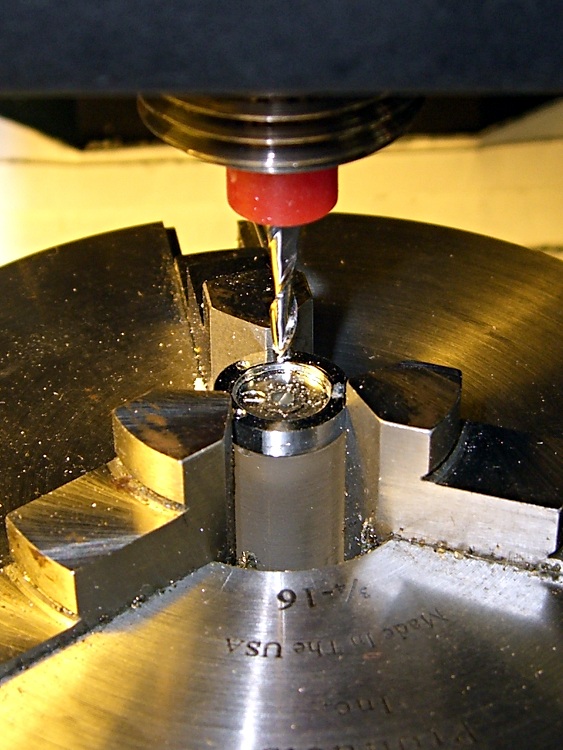
    I re-centered the 3-jaw chuck under the spindle, put a 1-72 nut on the turned-down screw, and applied some gentle manual CNC to convert the nut from a hex to a disk. The trick is to approach the nut from the right side (the +X side) and go clockwise around it (climb milling), so that the cutting force tends to jam the nut against the screw head. Do it the other way and the nut will zip downward away from the cutter

    Surprisingly, I got that right the first time.

    Using a 2 mm end mill and figuring a 2.9 mm final diameter, the radius of the circle to move the end mill around the nut is:
    R = (2.9 + 2.0) / 2
    So the G-code for one pass looks like:

    #<R>=[[2.9+2.0]/2]
    G1 X#<R> F150
    G2 I[0-#<R>]
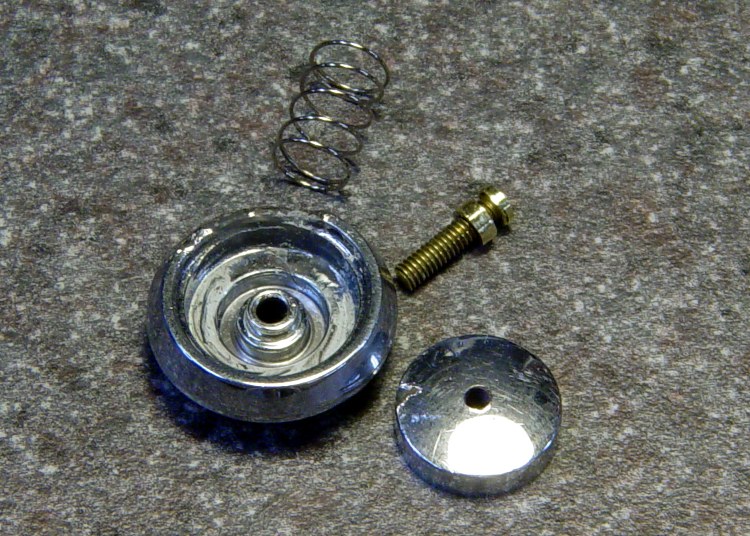
    
    Shutter Button Parts
    Shutter Button Parts

    Now, given the fragility of that setup, you don’t cut it all at once. You start from a diameter of maybe 4 mm and go down by 0.2 mm until you hit 3.0, then make a final pass at 2.9 mm. EMC2’s AXIS MDI mode makes this easy enough: type in the commands for a pass at 4.0 mm, then click on the previous command, change 4.0 to 3.8, and then just clickety-click.

    Spindle far too slow at 3000 RPM, feed at 150 mm/min seemed fine. Sissy cuts worked out OK.

    After the first few passes, my dim consciousness became aware of the fact that this is how I should have turned down the screw head…
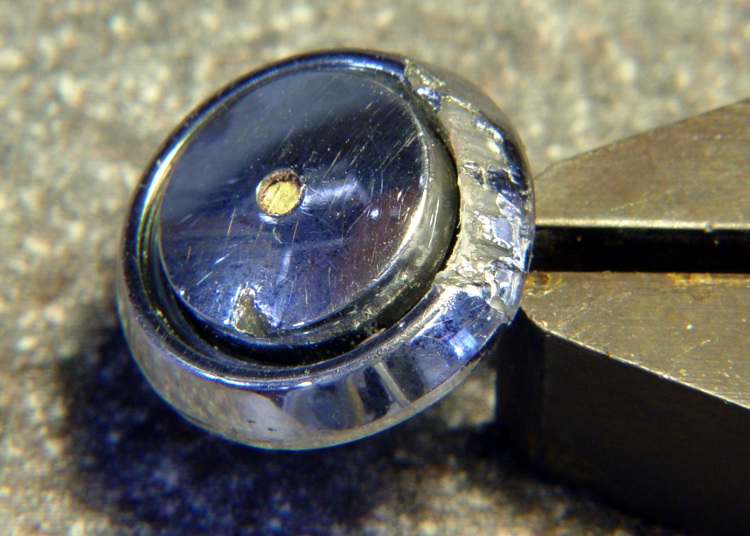
    Button Assembly - Top
    Button Assembly – Top

    I cleaned up the bezel by putting it in an ultrasonic cleaner to shake the crud off, put it on a warm firewall router overnight to dry it out, then slobbered some Plastruct solvent adhesive into the cracks and clamped it for another night. The bezel was slightly out-of-round from the damage, so I hand-trimmed the bent plastic using a “high speed cutter” (#193, basically an end mill) in a Dremel flexible shaft at about 1/3 max speed until the shutter button bottomed out smoothly within the inner recess. Not a bit of CNC to be seen: hand held all the way.

    Button Assembly - Bottom
    Button Assembly – Bottom

    Then loosen the nut a bit, poke the screw through the bezel, put the spring on, and screw the shutter button in place. Adjust the nut so the screw head is 1.4 – 1.5 mm from the bottom of the bezel with the nut resting in the recess.
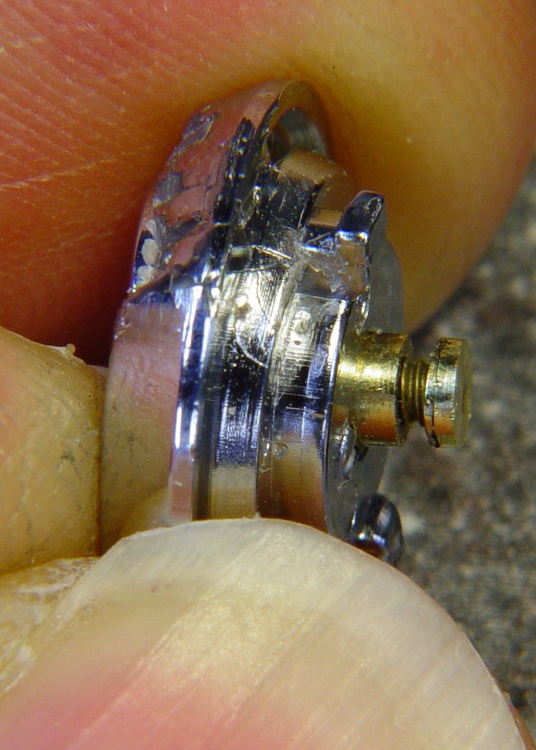
    Button Assembly - Pressed
    Button Assembly – Pressed

    Twiddle the shutter button until the screw head protrudes 2.4 mm from the bezel with the button pressed down.

    That’s measured with the hole-depth tang of a caliper, sitting atop the screw head. I don’t believe there’s 0.1 mm accuracy in the measurements, but they’re close enough. I did file off a few mold flash bumps from the shutter button & bezel during this adventure.

    Mark the screw threads above the button, unscrew it, chop the screw off with a stout diagonal cutter (it’s brass and not very thick, it’s OK), file the end flat, clean up the threads.

    The trick seems to be that the button must rest just below the inner ring of the bezel, so that it bottoms out smoothly when pressed. If it’s above the ring, then one side will hang up. The ring depth thus seems to limit the maximum travel, although I can’t say whether this is the way it’s supposed to work or not.

    I iterated & filed until the screw was flush with the top of the button with it screwed down to the proper position. It helped to figure out that one turn of the shutter button on the screw changed the “pressed” protrusion by 1/72″ = 0.35 mm.

    Urge some low-strength Loctite under the nut and into the shutter button’s hole, reassemble everything, and you’re done.
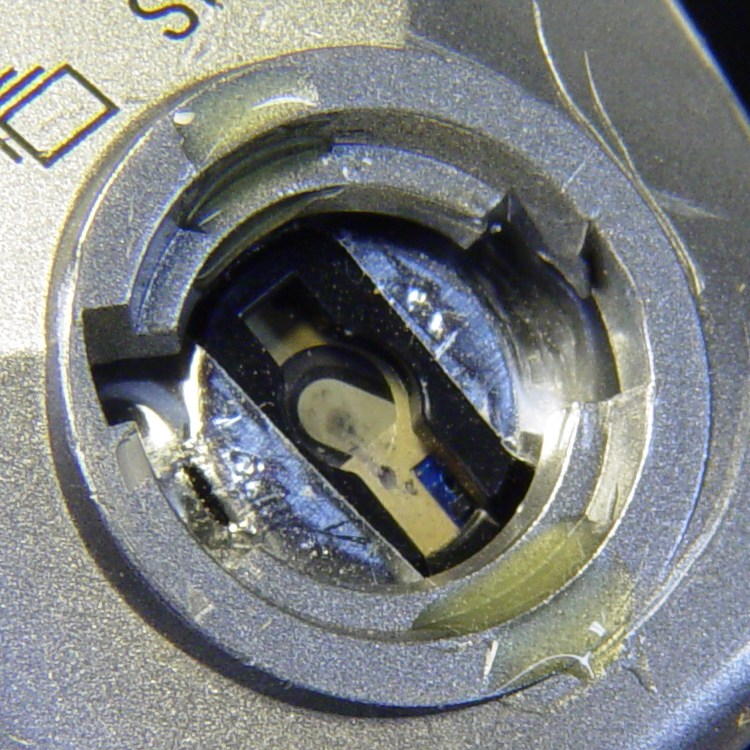
    Urethane Adhesive on Body Socket
    Urethane Adhesive on Body Socket

    The fall bent the bezel tabs so they no longer latch firmly in the camera body. I put two dabs of urethane adhesive on the socket in the body. The adhesive expands (foams!) as it cures; I hope it will lock the bezel in place while still allowing it to be removed if needed.

    I dabbed off most of the adhesive you see in the picture before installing the bezel; it’s not as awful as it looks!

    The final result has slightly less travel than the (undamaged, original) shutter button in my DSC-H5, but it works perfectly: half-press to focus, full press to trigger the shutter.

    Repaired Shutter Button
    Repaired Shutter Button
  • Sony DSC-H1 Shutter Button Repair: Rebuilding the Button

    Having figured out what to do, I started with the button, which is chromed plastic, nothing too fancy, and not at all hard to machine.

    Laser Aligning to the Button Stem
    Laser Aligning to the Button Stem

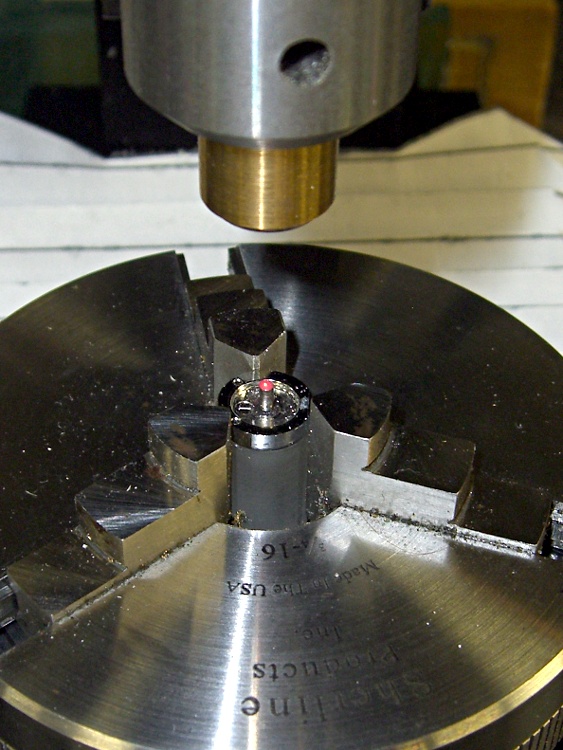
    A small post turned from an acrylic rod (the gray cylinder) supports the button in the Sherline 3-jaw chuck attached to the mill table; that was the only way to keep it reasonably level. Laser alignment got eyeballometrically close to the middle; it looks a bit off to the right, but the end result was OK.

    Removing the Broken Stem
    Removing the Broken Stem

    A 2 mm end-cutting bit chewed off the stem in short order; I set the jog speed to about 100 mm/min and just jogged down until the cutter was flush with the button. Spindle at 4000 rpm, for lack of anything smarter.

    I decided to go with a 1-72 brass machine screw, which is slightly larger (1.75 mm) than the original 1.5 mm button stem. That means I must drill out the bezel hole, as well, but the 1.5 mm diameter of the next-smaller 0-80 screws in my assortment was a sloppy fit.

    A touch of manual CNC for the drilling, #53 with the spindle at 3000 rpm, Z touched off at the button’s surface:

    G81 Z-4 R3 F150

    The spindle was slow enough and the feed fast enough to keep from melting the button without applying any coolant.

    I tapped the hole 1-72 by simply screwing the tap in with my fingers…

    Chuck-in-chuck For Head Shaping
    Chuck-in-chuck For Head Shaping

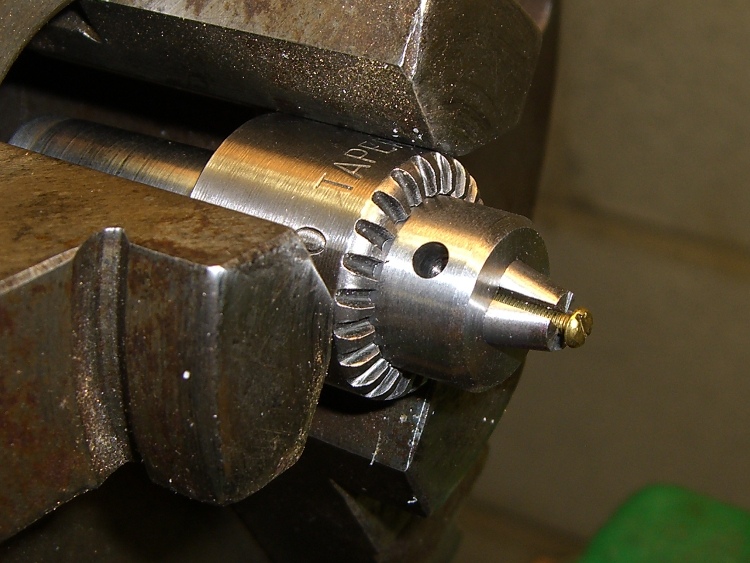
    The 3-jaw lathe chuck doesn’t grip a 1-72 screw (no surprise there), so I grabbed the screw in the Sherline’s smallest drill chuck and poked that in the lathe. This doesn’t make for great concentricity, but it was close enough. The right way, as my buddy Eks reminds me, is to slit a nested bunch of brass tubing and use them as collets, but … next time, fer shure.

    Button With Reshaped Screw Head
    Button With Reshaped Screw Head

    Anyhow, here’s what the button & screw look like so far. The backside of the screw head looks like it needs some cleanup; there’s nothing like taking a picture to reveal that sort of thing.

    The pencil lead is 0.5 mm and the grid in the background has 1 mm squares, just to give you an idea of the scale.

  • Slitting Copper Sheet

    Slitting Copper Jaws
    Slitting Copper Jaws

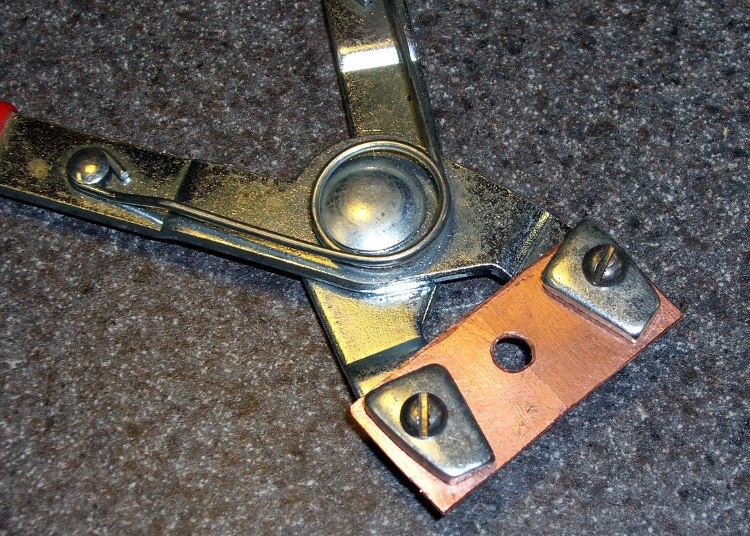
    I’m kludging up a clamp to grab AA cells around their positive terminal so that I can resistance-weld nickel strips to that button. The general idea is that the current passes through the strip, through the button, and out the side to the clamp, rather than trying to heat the button through the strip from the top.

    Trial Fitting the Jaws
    Trial Fitting the Jaws

    A snap-ring pliers has pretty nearly all the right attributes, so I’m making up a set of copper jaws with a hole in the middle to grab the terminal. Basically, I whacked off a ring from a copper pipe, hacksawed it lengthwise, hammered it flat (work-hardening it in the process), and drilled some holes.

    Then I grabbed it in the Sherline vise and set up a teeny 4-mil slitting saw. A bit of manual CNC ran the saw past the copper and, after a while, the top half just fell over dead with a perfectly shiny cut right down the middle!

    Slitting Success
    Slitting Success

    Useful things to remember for the next time around:

    • Cut only 0.2 mm into the copper per pass
    • 100 mm/min feed is fine
    • 4000 rpm is fast enough
    • A drop of cutting lube is a bunch on this scale

    This worked out a whole lot better than I expected…

  • Keeping the Screws in Sherline Hold-Down Clamps

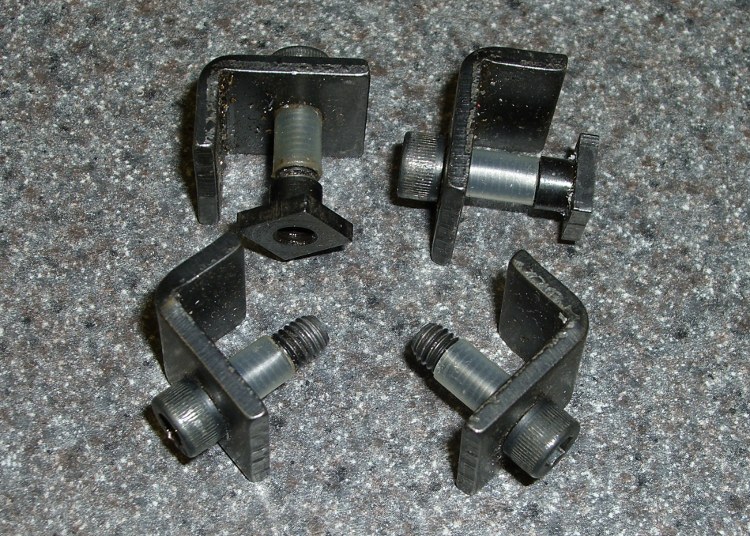
    A small improvement: add a snippet of heat stink shrink tubing to the screw in the L-shaped hold-down clamps and the screw won’t go walkabout in your tooling widget case.

    Make it the same length as the distance from the clamp to the surface and it’ll remind you how far to screw on the T-nut when you swap the clamps from tooling plate to milling machine table.

    The Sherline Mill Vise (PN 3551) comes with a set of clamps. They’re also available separately as the 4-Jaw Hold-Down Set (PN 3058).

  • Recumbent Bicycle Amateur Radio Antenna Mount

    Homebrew antenna mount
    Homebrew antenna mount
    Finished mount top view
    Finished mount top view

    Having had both of our commercial antenna mounts fail, I decided to make something that could survive a direct hit. It turns out that the new mounts are utterly rigid, which means the next failure point will be either the antenna mast or its base structure. We’ve occasionally dropped the bikes and when the antenna hits something on the way down, the mount is not the thing that bends…

    Incidentally, the Nashbar 5-LED blinky white light aimed rearward seems to push motorists over another few feet to the left. Nobody quite knows what we are from a distance, but they do notice that something is up ahead. That’s just about as good as it gets; we tend to not ride in the wee hours of the morning when bike lights just give drunks an aiming point.

    Rough-cut stock
    Rough-cut stock

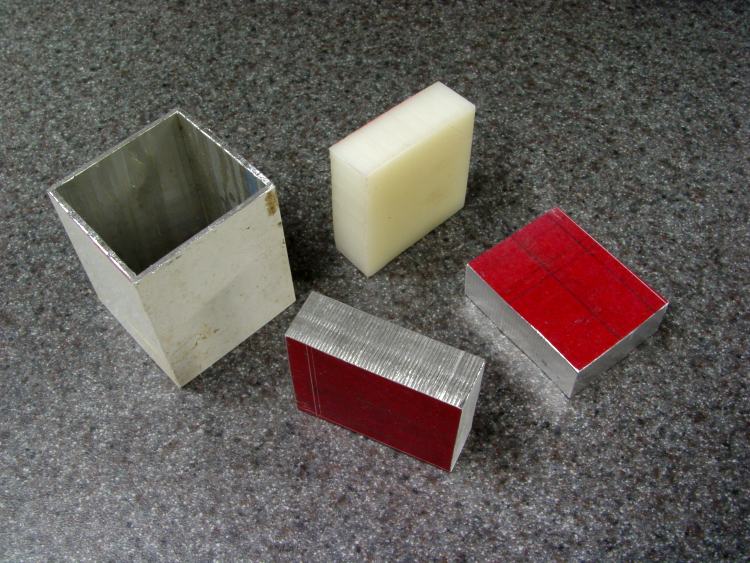
    The overall structure is a 2-inch square aluminum extrusion, with a hole in the top that matches the right-angle SO-239 base connector salvaged from the Diamond mount and a 1/2″ nylon stiffener plate in the middle. A pair of relentlessly square circumferential clamps attach it firmly to the top seatback rail. A coaxial cable pigtail ensures that the antenna base makes good electrical contact with the seat. I’m not convinced the bike makes a good counterpoise, so we’re now using dual-band antennas that are half-wave on VHF.

    Stainless-steel hardware holds everything together, as I’m sick and tired of rust.

    Drilling box beam
    Drilling box beam

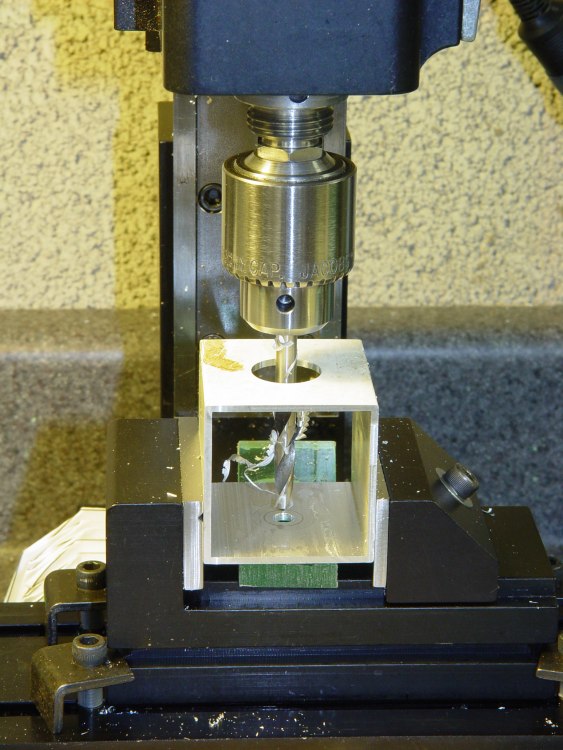
    Not having a huge drill, I helix-milled the SO-239 hole, then reached down through the box to drill the hole for the plastic block retainer screw. Flip the box in the vise, drill four holes for the clamps (I love manual CNC for that sort of thing), manually deburr the holes, and it’s done.

    The block of plastic is a tight slip fit inside the box extrusion, with slightly rounded corners to suit. I milled the slot across the top to a slip fit around the SO-239 connector.

    The two clamps were the most intricate part of the project and got the most benefit from CNC.

    Helix-milling the seat-bar clamp
    Helix-milling the seat-bar clamp

    The clamp hole must have exactly the same diameter as the seat top tube. I helix-milled the hole to an ordinary 5/8″; I have trouble drilling holes that large precisely in the right spot with the proper final diameter. Milling takes longer, but the results are much better.

    Helix-mill the other block while you have the position set up, then flip and reclamp to drill the pair of holes that match the box extrusion. Drill 10-32 clearance (#9) all the way through.

    Flycutting Clamp Slit
    Flycutting the Clamp Slit

    Bandsaw the blocks in half, paying some attention to getting the cut exactly along the midline, then flycut the cut edge to make it nice & shiny & even. That should result in 1 or 2 mm of slit between the blocks when they’re clamped around the seat rail.

    Finished seat-bar clamps
    Finished seat-bar clamps

    Break those relentlessly sharp edges & corners with a file.

    I finagled the dimensions so a 1-1/2″ socket-head cap screw would have just enough reach to fill a nut, with washers under the screw and nut. Your mileage may vary; I’ve gotten reasonably good at cutting screws to length.

    Normally, you tap one side of each clamp for the screws, but in this situation I didn’t see much point in doing that: the box must attach firmly to the clamps and I was going to need some nuts in there anyway.

    Finished parts
    Finished parts

    With all those parts in hand, assembly is straightforward. Secure the SO-239 with its own thin nut, screw the plastic block in place, hold the clamps around the seat bar, poke the cap screws through, dab some Loctite on the threads, install nuts, and tighten everything. That all goes much easier with four hands!

    The grounding braid fits into a huge solderless connector that must have been made with this application in mind. It originally fit a 1/2″ lug, but with enough meat that I could gingerly file it out to 5/8″ to fit the SO-239 inside the aluminum extrusion. I’ve had those connectors for years without knowing what they were for!

    I eventually came up with a simpler and even more ruthlessly rugged mount that’ll appear in my column in the Autumn 2009 Digital Machinist. More on that later… [Update: There]

  • Plug Alignment for ICOM IC-Z1A Radio

    Plugs and jack alignment plates
    Plugs and jack alignment plates

    As I mentioned there, I originally connected my bicycle-mobile amateur radio gadget to the ICOM IC-Z1A radio using separate mic and speaker plugs. That seemed like a good idea, but bicycles vibrate a lot and the plugs apply enough leverage to the jacks inside the radio to pry them right off the PCB. That requires a protracted repair session that I never wanted to do again.

    The solution is to mount both plugs rigidly on the radio so that they simply can’t move. I dithered for a while and finally decided that function trumps good looks on this project, particularly given that our radios spend their entire lives inside a bag behind the bike seats.

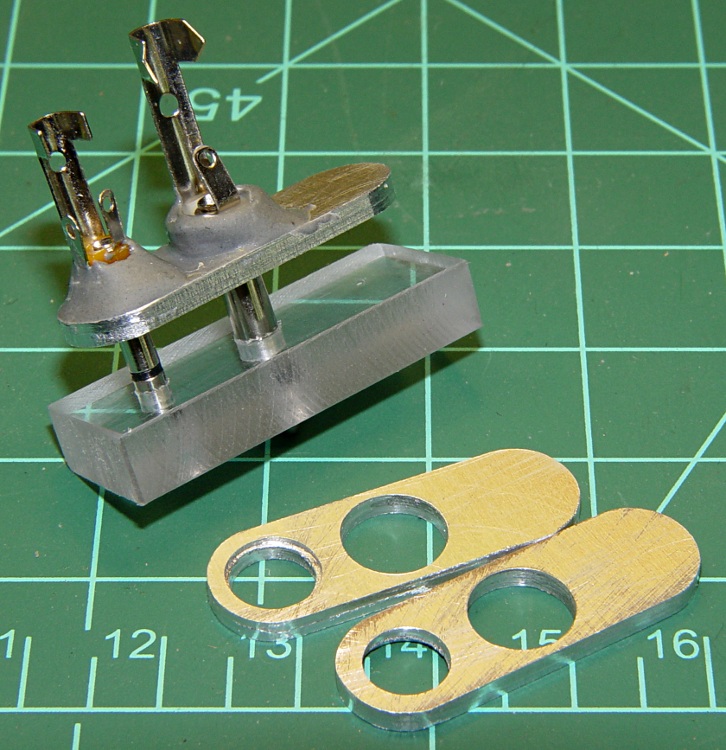
    The top picture shows the small aluminum plates I made to align the plugs to the HT jacks, along with a plastic gluing fixture to hold the plugs parallel while the epoxy cures. If you just jam the plugs into the radio without an alignment fixture, you will glue the plugs together in such a way that they cannot be removed: the radio does not hold the shafts exactly parallel!

    Plug stabilization - What Not To Do
    Plug stabilization – What Not To Do

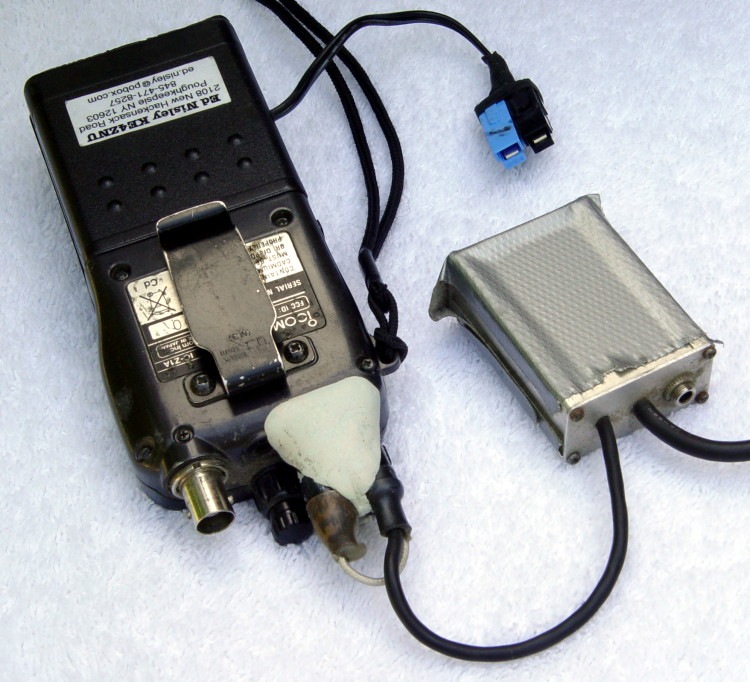
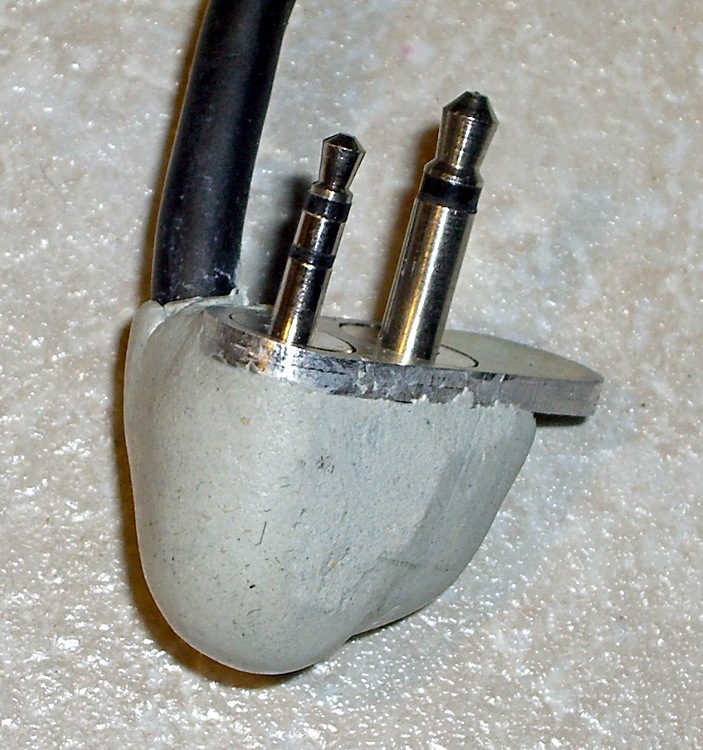
    How do I know? Well, I tried doing exactly that by simply epoxying the existing plugs into place, applying enough epoxy putty to stabilize the plugs against the radio. Looks reasonable, but when it came time to take them out (and you will want to take them out, trust me) they are firmly and permanently embedded. I had to carve them apart to get them out.

    The mic, speaker, and coaxial power jacks are 10 mm on center. The 2.5 mm mic plug has a small shoulder that required a matching recess in the plate, while the 3.5 mm speaker plug is basically a cylinder. I don’t use the coaxial power jack, having hacked an alkaline battery pack with Anderson Powerpoles. The plate’s external contour matches the flat area atop the radio around the jacks.

    You could lay out and drill close-enough holes by hand, use a step drill to make the shoulder recess, and then let the epoxy do the final alignment. However, you want the center-to-center distance exactly spot-on correct, as the plugs won’t mate properly otherwise. I turned it into a CNC project for my Sherline mill, of course, but that’s just because I have one.

    HT Plugs in gluing fixture
    HT Plugs in gluing fixture

    This picture shows two plugs epoxied into the plate. While the epoxy cures, the plate rests atop the fixture with the two plugs vertical and their shell flanges flush against it. I applied the epoxy with a toothpick and worked it into the gap between the threads and the plate.

    The end result will be a pair of plugs that exactly match the radio’s jacks in a plate that sits firmly atop the radio’s case. You should find that the plugs snap firmly into place and the entire assembly is absolutely rigid.

    Caveat: don’t use an aluminum plate if your radio depends on separate electrical connections for the mic and speaker plug shells. The IC-Z1A has isolated shells, but remains happy when they’re connected. My Kenwood TH-F6A HT uses the shells for entirely different functions and will not work with them shorted together.

    With the epoxy cured, wire the connections as usual. I had a small cable with enough tiny wires to put the mic conductors in their own shielded pair, but that’s likely overkill.

    Finished plugs with epoxy blob
    Finished plugs with epoxy blob

    You could machine a nice enclosure, but I simply molded an epoxy putty turd around the connections, shells, and cable. The trick is to wait until it’s nearly cured, plug it into the radio, then shave off whatever gets in the way of the knobs, antenna plug, and other appurtenances.

    It may not look elegant, but it works great!

  • Avid Rollamajig Repair

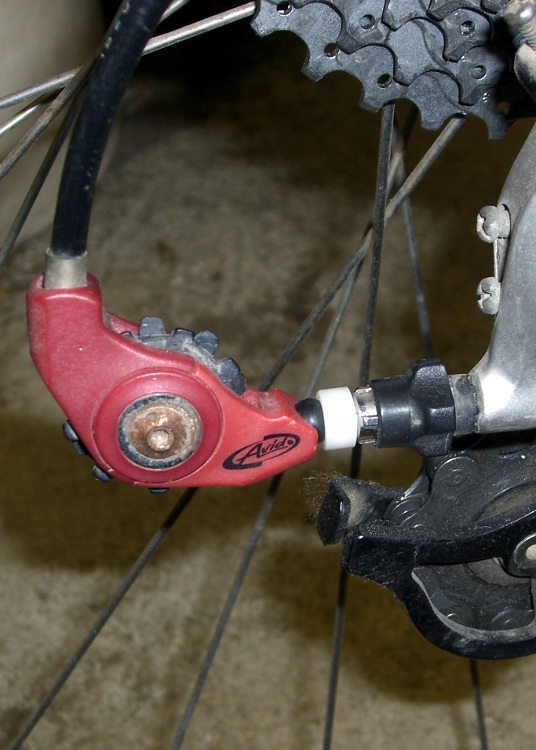
    Avid Rollamajig with new ball socket
    Avid Rollamajig with new ball socket

    Mary’s shifter cable broke at the rear derailleur, causing the Avid Rollamajig to undergo spontaneous auto-disassembly. The only part we couldn’t find was the socket between the ball and the derailleur’s adjusting thimble.

    Good news: my parts heap had the Rollamajig from my bike, which I’d replaced because the most recent derailleur has an integrated gadget that serves much the same purpose.

    Bad news: the socket had a chunk broken out of it and I didn’t want to put a broken part on Mary’s bike.

    Good news: at least I could measure the dimensions to build a new socket.

    Bad news: it needs a spherical socket for what measures out to be a 6.8 mm (0.268 inch) plastic ball and that’s not one of the three ball-end mills I have in the tooling cabinet.

    Good news: this isn’t a really critical high-speed / high-stress rotating joint. Pretty good will be close enough.

    Sherline chuck in lathe chuck
    Sherline chuck in lathe chuck

    Turning the part was a quick lathe job on a random hunk of what’s probably nylon.

    Bad news: the nylon was a rectangular cutoff from a slab and the three-jaw chuck on my lathe has been firmly stuck for the last year. It’s resisted all the non-Armageddeon-scale techniques; I fear I must machine the damn thing off.

    So I…

    • mounted the nylon in the Sherline 4-jaw chuck
    • grabbed that teeny little chuck in the lathe’s much bigger 3-jaw
    • converted one end of the square hunk into a cylinder
    • removed the small chuck
    • mounted the cylinder end in the 3-jaw
    • completed the mission
    Offset roughing mill
    Offset roughing mill

    Lacking the appropriate ball-end mill, I offset a ball-end roughing mill in the tailstock chuck so the near side was at the right radius from the lathe axis, then poked it into the end of the socket-to-be.

    Which, of course, produced a not-quite-spherical dent that was a bit too shallow, so I chucked up a too-small ball mill (on the centerline) and carved out the bottom of the socket. The result was a more-or-less spherical socket of about the right depth, pretty much.

    The right way to do this, and what I was going to do before I came to my senses, was turn the part on the lathe, drill the axial cable hole, then chuck it up on the Sherline CNC mill. Getting a spherical socket of exactly the right radius and depth using a too-small ball-end mill is then a simple matter of G-Code. Maybe I should write that up for my Digital Machinist column…

    Yeah, you could use a ball-turning attachment, if you should happen to have one. Sue me.

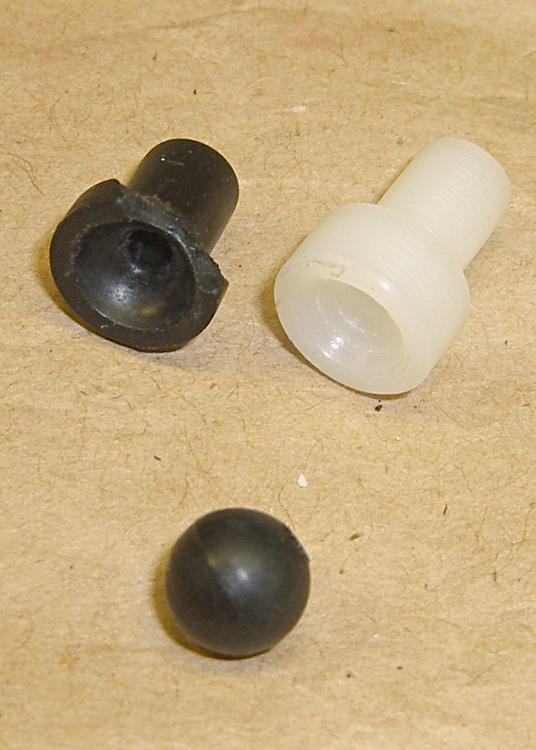
    Broken and new sockets
    Broken and new sockets

    Anyhow, it all worked out OK. The new socket is slightly longer than the old one, as it’s made to fit the derailleur thimble at hand. The end around the socket is slightly thicker, too, as it seemed more meat would add more durability where it was most needed.

    The Rollamajig seems to be discontinued, although some of the smaller online sources still offer it. Building one looks like a straightforward shop project to me.

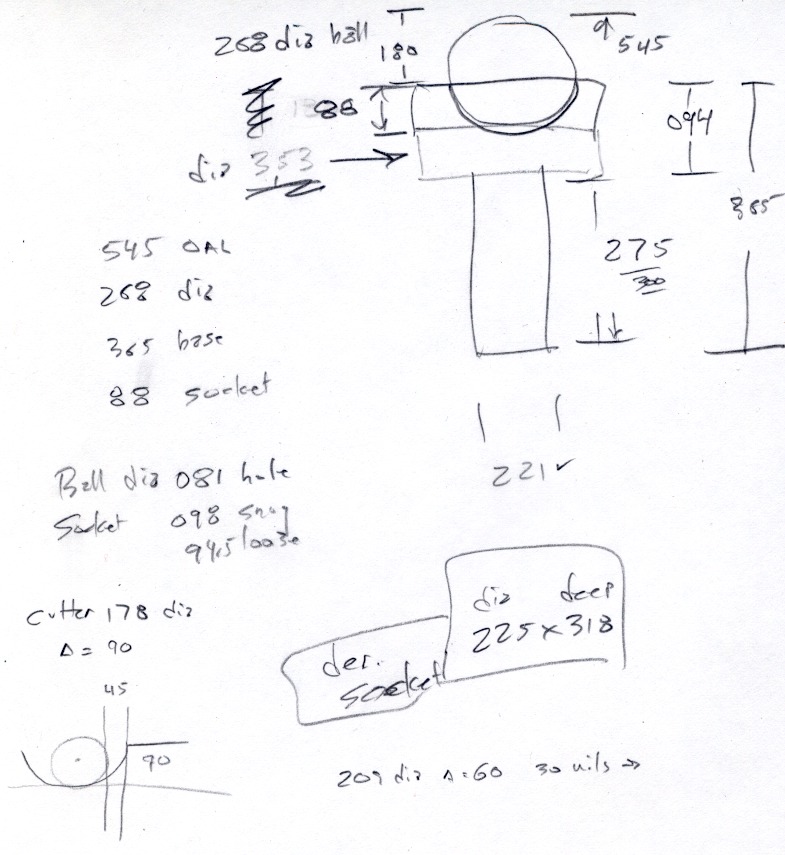
    Ball socket dimensions
    Ball socket dimensions

    The sketch has dimensions in inches, because I was doing this on the lathe. Our daughter measured it in metric and came out with much the same answers, so it’s all good.