The Smell of Molten Projects in the Morning

Ed Nisley's Blog: Shop notes, electronics, firmware, machinery, 3D printing, laser cuttery, and curiosities. Contents: 100% human thinking, 0% AI slop.

Tag: Sherline

Sherline CNC mill

  • Sherline CNC Mill: Limited Headroom Thereof

    Cramped Headroom
    Cramped Headroom

    I had to drill a 1/4-inch hole in the Totally Featureless Clock’s case for the antenna jack. Fortunately, I have a 1/4-inch collet, because there was nowhere near enough room for the Jacobs chuck in there.

    Removing the tooling plate wouldn’t help: the chuck setup needed another inch!

    In truth, the headroom is rarely the limiting factor. Another inch or two of throat distance and maybe that much more Y travel would be nicer, while we’re at it.

    Ah, well, it’s all a matter of tradeoffs. If the mill were much bigger, I’d just want to make bigger projects, right?

  • IRQ Troubles on Razor

    The Dell Dimension 4560, a.k.a. razor, that controls my Sherline CNC mill woke up without network support. That’s a showstopper, because all the G-Code files live on the server across the basement.

    All my boxes have a network function dipstick test: the desktop background is an image on that same file server. When the NFS share wakes up dead, then the screen shows the default Ubuntu background: brown = down! (At least in Ubuntu 8.04 LTS, which is what EMC2 is built on right now.)

    Checklist…

    • NFS share isn’t mounted
    • … and can’t be mounted
    • ifconfig shows eth0 up & active
    • can’t ping the server
    • can’t ping razor from the server
    • Link lights on network switch nailed to floor joist overhead are green
    • Link light on NIC on back panel
    • Activity lights on switch & NIC blink occasionally (??)
    • Swapping ports on the switch = no change
    • Laptop works fine plugged into switch = switch OK

    So whatever is busted, is busted in the 4560. Drat!

    (Should have checked cable between switch and NIC. Sometimes you get a data failure without affecting the link & activity lights. Weird, but stuff happens.)

    Looking in dmesg shows that a bogus IRQ 11 occurred during startup:

    [   44.439932] irq 11: nobody cared (try booting with the  irqpoll" option)
    ... time passes ...
    ... bad IRQ log dump gibberish ...
    [   44.440440] Disabling IRQ #11
    

    Fairly obviously, after that point nothing about the NIC or anything else on IRQ 11 will work: the hardware setup may be OK, you can write to it and read from it, but no actual data gets through.

    A reboot didn’t cure the problem. Reboots in Linux rarely solve a problem; you’ve got to actually find the root cause and fix it, rather than shake the dice to see if a better combination comes up.

    Anyhow.

    Restarted to get into Dell’s attenuated BIOS configuration routine, changed the NIC to IRQ 3 (just because it was first on the list), saved, restarted, and everything works. The bogus interrupt is gone, the NIC is running, NFS shares are OK.

    It absolutely beats me. But at least this is written down so the next time it happens, I’ll remember what I did.

    Oh, yeah. The Sherline CNC mill uses stepping motors and uses cutters, so it’s a Steppin’ Razor, of course, and is therefore named razor. I suppose I could have called it molly, but that’d be a stretch.

  • Useful, Albeit Incorrect, Sherline Wrench Sizes

    My Sherline mill has inch sized fittings, but a couple of metric wrenches from the junk box reduced the workbench clutter …

    Double open 10 + 11 mm:

    • 10 mm = 10-32 nuts for step clamps (really 3/8 inch)
    • 11 mm = small drawbar bolt (really 7/16 inch)

    Combination 13 mm:

    • 13 mm = large drawbar bolt (really 1/2 inch)

    Now, I know full well that applying metric wrenches to inch fittings is a terrible idea, but y’know what? At the torque levels appropriate to Sherline fittings, they work just fine.

    One of these days, I’ll be at a garage sale offering some double wrenches in the correct inch sizes …

  • HT GPS + Audio: Battery Pack Contacts the CNC Way

    Flattening the screw head
    Flattening the screw head

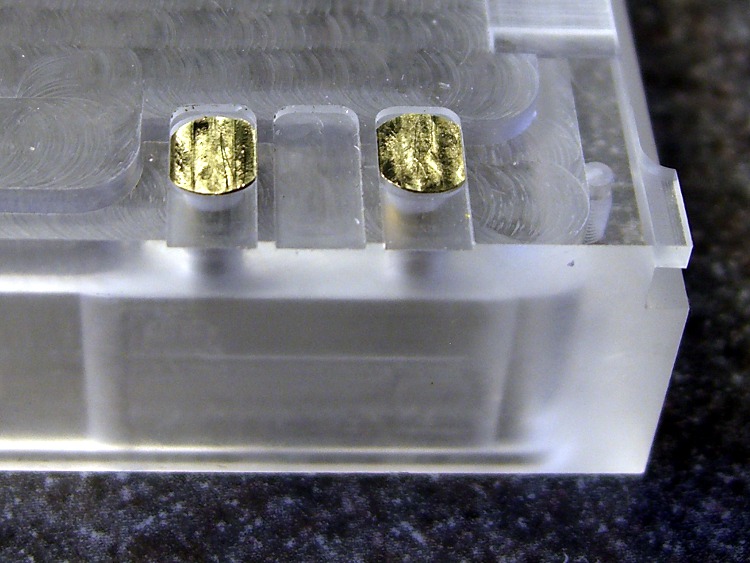
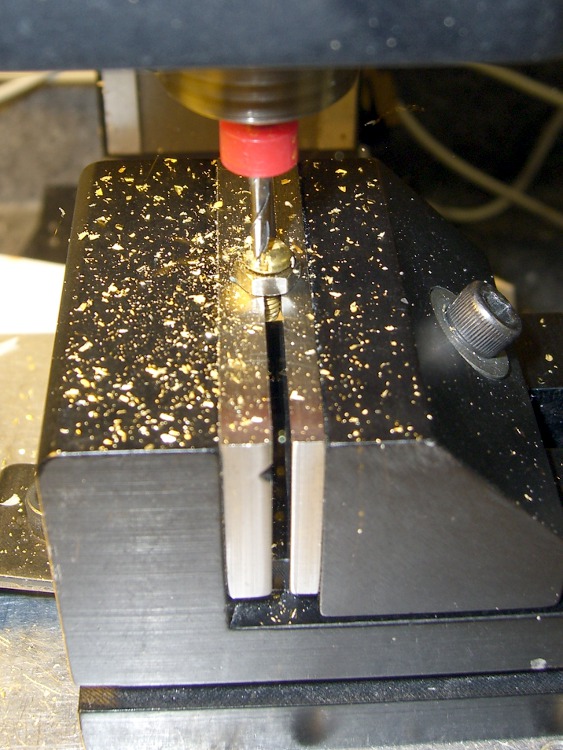
    Faced with the daunting prospect of converting half a dozen 4-40 brass screws into battery contacts by hand filing, I did what I should have done in the first place: turn it into a CNC project.

    It’s quick-n-easy:

    • mill the head flat and 0.5 mm thick
    • shave off the sides

    I grabbed the screw in the Sherline vise, touched off XY on the head (close enough to being concentric for this purpose), and touched off Z on the nut supporting the screw. For the next few, I’ll eyeball the Z touchoff at the bottom of the head, rather than the nut, because the heads don’t quite sit flush on the nut.

    They dropped right into place, without any filing or fiddling! Well, the second one did. I had to tweak the dimensions slightly to make the answer come out right. But that’s one of the advantage of hammering out simple G-Code like this: change two lines and wham you’re done.

    Contacts in place
    Contacts in place

    The heads show some tool marks, but that’ll just make the silver solder stick better. Right?

    Herewith, the G-Code…

    (ICOM IC-Z1A battery pack shell)
    (Battery pack contacts)
    (Ed Nisley - KE4ZNU - June 2010)
    (Vise clamping on threads, XY orgin on central axis, Z=0 at *bottom* of screw head)
    (Tool table used just for Axis previews and to activate "manual" changer via M6)
    (Tool change @ G30 position above length probe)
    
    (-- Global dimensions & locations)
    
    #<_Traverse_Z> =        5.0
    #<_Cutting_Z> =            0.0
    
    (-- Get started ...)
    
    G40 G49 G54 G80 G90 G92.1 G94 G97 G98        (reset many things)
    
    M5
    (msg,Verify XY=0 on screw axis)
    M0
    
    (msg,Verify tool touched off at Z=0 on *bottom* of head)
    M0
    
    (debug,Verify vise clearance around head)
    M0
    
    #<Contact_Width> =        4.1            (X axis metallic contact - minus a smidge)
    #<Contact_Head_Dia> =    5.5            (recess for 4-40 head)
    #<Contact_Head_Radius> = [#<Contact_Head_Dia> / 2]
    
    #<Contact_Head_Depth> =    0.7            (recess depth - plus  smidge)
    
    #<Mill_Dia> =            1.98            (end mill diameter)
    #<Tool_Num> =            20
    #<Mill_Radius> =        [#<Mill_Dia> / 2]
    #<Mill_RPM> =            5000
    #<Mill_Feed> =             50
    
    (debug,Verify #<Mill_Dia> mm end mill)
    M0
    
    (debug,Set spindle to #<Mill_RPM>)
    M0
    
    F#<Mill_Feed>
    
    (--- Flatten the head)
    
    G0 Z#<_Traverse_Z>
    
    #<X_Step> = [0.5 * #<Mill_Dia>]
    #<X_Limit> = [3 * #<Mill_Radius>]
    #<Y_Limit> = [#<Contact_Head_Radius> + #<Mill_Radius>]
    
    #<X_Coord> = [0 - #<X_Limit>]
    
    G0 X#<X_Coord> Y[0 - #<Y_Limit>]
    G0 Z#<Contact_Head_Depth>
    
    O<Head_Trim> DO
    
    G1 Y#<Y_Limit>
    #<X_Coord> = [#<X_Coord> + #<X_Step>]
    G1 X#<X_Coord>
    G1 Y[0 - #<Y_Limit>]
    #<X_Coord> = [#<X_Coord> + #<X_Step>]
    G1 X#<X_Coord>
    
    O<Head_Trim> WHILE [#<X_Coord> LT [3 * #<Mill_Radius>]]
    
    G0 Z#<_Traverse_Z>
    
    (--- Trim the sides)
    
    #<Arc_Radius> = [#<Contact_Head_Radius>]
    #<Half_Width> = [#<Contact_Width> / 2]
    #<Angle> = ACOS [#<Half_Width> / #<Arc_Radius>]
    #<Half_Height> = [#<Arc_Radius> * SIN [#<Angle>]]
    
    G0 Z#<_Traverse_Z>
    
    G0 X[0 - #<Half_Width>] Y[0 - #<Contact_Head_Radius> - 3 * #<Mill_Dia>]
    G0 Z#<_Cutting_Z>
    
    G41.1 D#<Mill_Dia>
    G1 X[0 - #<Half_Width>] Y[0 - #<Half_Height>]
    
    G1 Y#<Half_Height>
    G2 X#<Half_Width> I[#<Half_Width>] J[-#<Half_Height>]
    G1 Y[0 - #<Half_Height>]
    G2 X[0 - #<Half_Width>] I[-#<Half_Width>] J[#<Half_Height>]
    G1 Y#<Half_Height>
    
    G0 Z#<_Traverse_Z>
    
    G40
    
    G30                    (back to tool change position)
    
    (msg,Done!)
    M2
    
  • Zire 71 Button Protector

    Zire 71 button protector
    Zire 71 button protector

    I carry around an ancient Zire 71, from the time before PDAs merged with phones and PCs to become fashionable objects of desire.

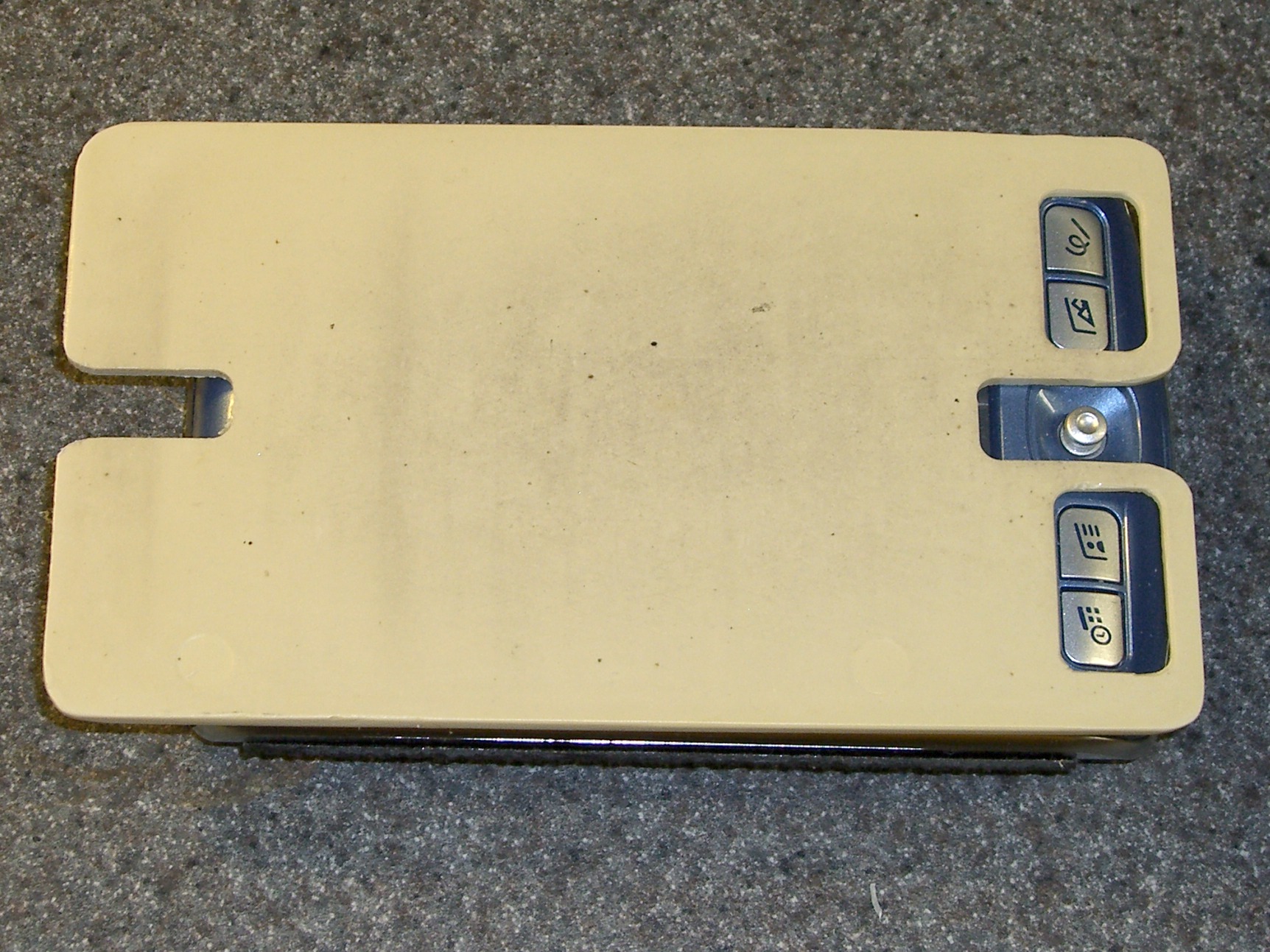
    Anyway, it turns out that the buttons on the front are remarkably easy to squash in your pocket: the poor thing spends a lot of time turning itself on and off. I machined a plate with two holes for the four buttons and a lengthwise recess with two notches for the joystick selector. The whole affair slides into the pouch Mary made for it and works fine.

    I tweaked the thing a bit when I got a replacement Zire a few months ago; the grippy tape I put on the sides seemed to be just large enough to force the joystick against the protector while sliding it into the pouch. Now that’s not a problem.

    Zire 71 protector in place
    Zire 71 protector in place

    This is in the nature of documentation, just in case I need something like this ever again. I found these pix while looking for something else …

  • HT GPS + Audio: Case Dimensions

    Having obtained eyeballometric measurements from the case, the next step was to doodle some shapes on graph paper and pencil in the dimensions. My motivation for not using CAD is simple: it’s easier (for me, at least) to doodle using a pencil.

    The outside of the case had pretty much the same features.

    Pack Layout - External
    Pack Layout – External

    The inside, of course, bore no resemblance to the battery pack; the shoulder and whatnot will support the circuit board.

    Pack Layout - Internal
    Pack Layout – Internal

    The original battle plan was to build the case in at least two layers, simply because it had to be so deep the Sherline couldn’t reach to the bottom with any rational end mill. It would probably make more sense to glue up four sides on a machined bottom, but that requires actual skill.

    This became the Front layer, with Front and Rear faces. The Rear layer attaches to the back of this one. In this picture, the Front layer is on the bottom, taped to the radio.

    ICOM IC-Z1A with GPS+Audio Interface
    ICOM IC-Z1A with GPS+Audio Interface

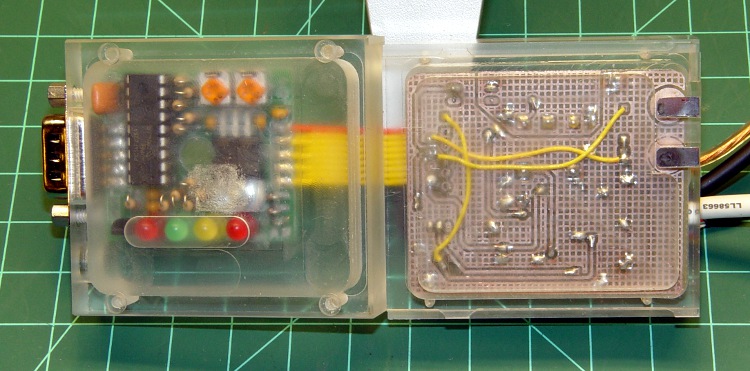
    The two layers peeled apart, with the Front layer to the right. You can barely see the internal shoulder and external tabs.

    Interface - top and bottom surfaces
    Interface – top and bottom surfaces
  • HT GPS + Audio: Modified Plug Alignment Plates

    As described there, I made a fixture and a small plate to hold 2.5 mm and 3.5 mm plugs in the proper alignment for the mic & speaker jacks on our ICOM IC-Z1A HTs. Knowing I was going to rebuild the interface boxes, I made several spare plates and tucked them into a small bag against future need.

    Jack Plates - Oblique
    Jack Plates – Oblique

    Time passes.

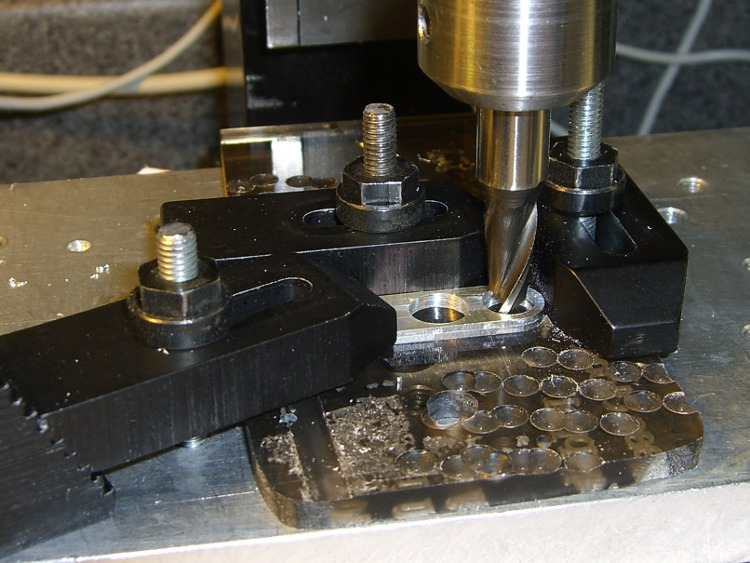
    Come to find out that the new gratuitously gold-plated 2.5 mm plugs in my stash have a slightly thicker front plate that doesn’t quite fit into the recess I milled in the plates for the old nickel-plated plugs. So I set up a little nest in on the Sherline’s table, snuggled each plate into the corner, and poked a 9/32-inch end mill 1 mm down into the plate. The net change was a 0.5 mm deeper recess. Sheesh.

    Milling the plug plate recess
    Milling the plug plate recess

    I’d originally create the recess with helical milling, but I recently uncovered a stash of shiny-new end mills in a box: 9/32 is 7.31 mm, just about exactly what you want for a 7-mm dia plug front plate surrounded by a blob of fast-curing epoxy.

    Plugs epoxied into plate
    Plugs epoxied into plate

    This epoxy just holds the plugs in the right position for wiring and initial testing. After the cable checks out, I’ll smoosh a blob of epoxy putty around the whole thing as before.