The Smell of Molten Projects in the Morning

Ed Nisley's Blog: Shop notes, electronics, firmware, machinery, 3D printing, laser cuttery, and curiosities. Contents: 100% human thinking, 0% AI slop.

Tag: RPi

Raspberry Pi

  • Raspberry Pi vs. Music via NFS

    Every now & again, streaming music from distant servers fails, for no reason I can determine. In that situation, it would be nice to have a local source and, as mplayer works just fine when aimed at an MP3 file, I tried to set up a USB stick on the ASUS router.

    That requires getting their version of SAMBA working with the Raspbian Lite installed on the streaming players. After screwing around for far too long, I finally admitted defeat, popped the USB stick into the Raspberry Pi running the APRS iGate in the attic stairwell, and configured it as an NFS server.

    To slightly complicate the discussion, there’s also a file server in the basement which turns itself off after its nightly backup. The local music files must be available when it’s off, so the always-up iGate machine gets the job.

    On the NFS server:

    Install rpcbind and nfs-common, both of which should already be included in stock Raspbian Lite, and nfs-kernel-server, which isn’t. There were problems with earlier Raspbian versions involving the startup order which should be history by now; this post may remind me what’s needed in the event the iGate NFS server wakes up dead after the next power blink.

    Set up /etc/exports to share the mount point:

    /mnt/music	*(ro,async,insecure,no_subtree_check)
    # blank line so you can see the underscores in the previous one
    

    Plug in the USB stick, mount, copy various music directories from the file server’s pile o’ music to the stick’s root directory.

    Create a playlist from the directory entries and maybe edit it a bit:

    ls -1 /mnt/part/The_Music_Directory > playlist.tmp
    sed 's/this/that/' < playlist.tmp > playlist.txt
    rm playlist.tmp
    

    Tuck the playlist into the Playlists directory on the basement file server, from whence the streamer’s /etc/rc.local will copy the file to its local directory during the next boot.

    On every streamer, create the /mnt/music mountpoint and edit /etc/rc.local to mount the directory:

    nfs_music=192.168.1.110
    <<< snippage >>>
    mount -v -o ro $nfs_music:/mnt/music /mnt/music
    # blank line so you can see the underscores in the previous one 

    In the Python streaming program on the file server, associate the new “station” with a button:

             'KEY_KP8'   : ['Newname',False,['mplayer','-shuffle','-playlist','/home/pi/Playlists/playlist.txt']],
    

    The startup script also fetches the latest copy of the Python program whenever the file server is up, so the new version should Just Work.

    I set the numeric keypad button associated with that program as the fallback in case of stream failures, so when the Interwebs go down, we still have music. Life is good …

  • Raspberry Pi: White OLED Display

    The white OLED displays measure 1.3 inches diagonally:

    RPi OLED Display - white on black
    RPi OLED Display – white on black

    They’re plug-compatible with their 0.96 inch blue and yellow-blue siblings.

    All of them are absurdly cute and surprisingly readable at close range, at least if you’re as nearsighted as I am.

    Some preliminary fiddling suggests a Primary Red filter will make the white displays more dark-room friendly than the yellow-blue ones. Setting the “contrast” to 1 (rather than the default 255) doesn’t (seem to) make much difference, surely attributable to human vision’s logarithmic brightness sensitivity.

    I must conjure some sort of case atop a bendy wire mount for E-Z visibility.

  • Crystal Parameter Measurement Musings

    In order to probe a crystal’s response with decent resolution, I need a gadget to step a decent-quality sine wave by 0.01 Hz across the 10-to-100 kHz range and a logarithmic front end with a decent dynamic range. That’s prompted by looking at crystal responses through the SA’s 30 Hz resolution bandwidth:

    Quartz Resonator 32.765 kHz - 34.6 pF
    Quartz Resonator 32.765 kHz – 34.6 pF

    Mashing a cheap AD9850/AD9851 DDS board against an Arduino Pro Mini, adding a knob, and topping with a small display might be useful. A Raspberry Pi could dump the response data directly into a file via WiFi, which may be more complication that seems warranted.

    The DDS boards come with absurdly high-speed clock generators of dubious stability; a slower clock might be better. A local 10 MHz oscillator, calibrated against the 10 MHz output of the HP 3801 GPS stabilized receiver would be useful. If the local oscillator is stable enough, a calibration adjustment might suffice: dial for 10 MHz out, then zero-beat with the GPS reference, so that the indicated frequency would be dead on to a fraction of 1 Hz.

    The HP 8591 spectrum analyzer has a better-quality RF front end than I can possibly build (or imagine!), but, at these low frequencies, a simple RF peak detector and log amp based on the ADL5303 or ADL5306 should get close enough. One can get AD8302 / AD8310 chips on boards from the usual low-budget suppliers; a fully connectorized AD8310 board may be a good starting point, as it’s not much more than the single-connector version.

    With frequencies from 10 kHz to 100 kHz coming from a local oscillator, one might argue for a synchronous detector, formerly known as a lock-in amplifier. A Tayloe Detector might be a quick-and-dirty way to sweep a tracking-filter-and-detector over the frequency range. Because it’s a tracking generator, the filter bandwidth need not be very tight.

    At some point, of course, you just digitize the incoming signal and apply DSP, but the whole point of this is to poke around in the analog domain. This must not turn into an elaborate software project, too.


  • Raspberry Pi Slowdown

    At first, the yard camera worked fine, but a few days later the stream of JPEG images would unpredictably stall. I connect to it through a public-key SSH session and, sometimes, the login would stall for tens of seconds and, with a session set up, various exciting operation like, say, htop would unpredictably stall; if I waited long enough, they’d complete normally.

    This seemed familiar:

    Samsung 16 GB Evo MicroSD card
    Samsung 16 GB Evo MicroSD card

    It’s a known-good card from a reputable supplier, not that that means much these days. The camera flash highlights the gritty silkscreen (?) texture of the orange overlay, but the production value seems high enough to pass muster.

    Popping the card in my desktop PC showed:

    • It remains functional, at least to the extent of being mount-able and write-able
    • 3probe --time-ops /dev/sdb showed it still held 16 GB
    • fsck -fv /dev/sdb[12] shows no problems
    • Both partitions looked good

    So I shrank the main partition to 7.5 GB, copied the image to the desktop PC’s SSD, fired up the Token Windows Laptop, ran the Official SD Card Formatter, and discovered that it thought the card had only 63 MB (yes, MB) available. That’s the size of the FAT boot partition, so I returned the card to the desktop PC, unleashed gparted on it, blew away the partitions, reformatted the whole thing to one 16 GB FAT32 partition, and stuck it back in the laptop, whereupon the Official Formatter agreed it had every byte it should.

    A format-with-overwrite then proceeded apace; the card doesn’t support format-with-erase.

    Back in the desktop, I copied the saved image back onto the card which, en passant, blew away the just-created FAT format and restored the Raspbian partition structure. The 8 GB of that copy proceeded at an average 12.1 MB/s. I did not watch the transfer closely enough to notice any protracted delays.

    Back in the Pi, the card booted and ran perfectly, sending an image every second to the laptop (now running its usual Mint Linux) on the guest network:

    Turkey flock in driveway - 2017-03-21
    Turkey flock in driveway – 2017-03-21

    SSH sessions now work perfectly, too, and commands no longer jam.

    So it seems a good-quality MicroSD card can experience protracted delays while writing data, to the extent of tens of seconds, stalling the Pi in mid-operation without producing data errors or any other symptoms.

    It’s not clear the Official Formatter does anything that simply copying the image back to the card wouldn’t also accomplish, although overwriting the entire 16 GB extent of the card exercises all the cells and forces the card controller to re/de/un/allocate bad blocks. If, indeed, the blocks are bad, rather than just achingly slow.

    Moral of the story: Don’t use MicroSD cards as mass storage devices, at least not for industrial applications that require consistent performance.

  • Raspberry Pi Yard Camera

    The yard camera I mentioned a few days ago consists of a Raspberry Pi 3 with an Official V2 Pi Camera peering through two layers of 1955-era window glass into our back yard:

    Back Yard Camera setup - 2017-03-13
    Back Yard Camera setup – 2017-03-13

    Yes, that’s black duct tape holding it to the window pane. The extension cord draped across the floor gotta go, too.

    This being a made-in-haste lashup, I used the streamEye MJPEG HTTP streamer, started from /etc/rc.local in the usual way:

    logger -s Starting camera streamer
    sudo -u pi sh -c '/home/pi/yardcam.sh' &
    logger -s Camera running
    

    The yardcam.sh script feeds one moderate-quality frame to the streamer every second:

    /home/pi/streameye/extras/raspimjpeg.py -w 1280 -h 720 -r 1 -q 80 | streameye
    

    MJPEG has a lot to dislike as a streaming video format. In particular, without any hint of inter-frame compression, the network usage gets way too high for any reasonable frame rate.

    But it got the camera up & running in time for the March snowfall:

    Fun in Snow - 2017-03-15
    Fun in Snow – 2017-03-15

    In a nod to IoT security, the Raspberry Pi’s wireless interface sits behind the router’s firewall on our guest network, with no access to the devices on our main network. The router passes a one-port peephole from the Internet to the Pi, which protects all the other services from unwarranted attention.

    The router maintains a dynamic DNS record with a (not particularly) mnemonic URL, which seems better than an ever-changing dotted-quad IP address.

    Because the router doesn’t support hairpin connections from the main network to the guest network, I can’t monitor the video from my desktop through the outwardly visible URL. Instead, I must fire up a laptop, connect to the guest network, then connect directly to the camera at camera.local.

    You do not have a Need To Know for the URL; I’m sure it’ll appear on Shodan. I plan to take it down when the snow melts.

  • Raspberry Pi Streaming Radio Player: OLED Display

    With the OLED wired up to the Raspberry Pi, the LUMA.OLED driver makes it surprisingly easy to slap text on the screen, at least after some obligatory fumbling around:

    RPi OLED Display - Plenitude
    RPi OLED Display – Plenitude

    Connect the hardware, install the driver, then the setup goes like this:

    import textwrap
    
    from luma.oled.device import sh1106
    from luma.core.serial import spi
    from luma.core.render import canvas
    from PIL import ImageFont
    
    … snippage …
    
    font1 = ImageFont.truetype('/usr/share/fonts/truetype/dejavu/DejaVuSansMono.ttf',14)
    font2 = ImageFont.truetype('/usr/share/fonts/truetype/dejavu/DejaVuSans.ttf',11)
    
    wrapper = textwrap.TextWrapper(width=128//font2.getsize('n')[0])
    
    StatLine = 0
    DataLine = 17           # allow for weird ascenders and accent marks
    LineSpace = 16
    
    Contrast = 255          # OLED brightness setting
    
    serial = spi(device=0,port=0)
    device = sh1106(serial)
    device.contrast(Contrast)
    

    The Python Imaging Library below the LUMA driver supports Truetype fonts that look much better than the default fonts. For these tiny displays, DejaVu Sans comes close enough to being a single-stroke (“stick”) font and, being proportional, packs more text into a fixed horizontal space.

    The textwrap library chops a string into lines of a specified length, which works great with a fixed-width font and not so well with a proportional font. I set the line length based on the width of a mid-size lowercase letter and hope for the best. In round numbers, each 128 pixel line can hold 20-ish characters of the size-11 (which might be the height in pixels) font.

    It also understands hyphens and similar line-ending punctuation:

    Felix Mendelssohn-
    Bartholdy - Piano
    Concerto No.01 in
    

    It turns out whatever library routine blits characters into the bitmap has an off-by-one error that overwrites the leftmost column with the pixel columns that should be just off-screen on the right; it may also overwrite the topmost row with the bottommost row+1. I poked around a bit, couldn’t find the actual code amid the layers of inherited classes and methods and suchlike, and gave up: each line starts in pixel column 1, not 0. With textwrap generally leaving the rightmost character in each line blank, the picket-fence error (almost) always overwrites the first column with dark pixels.

    Display coordinates start at (0,0) in the upper left corner, but apparently the character origin corresponds to the box around an uppercase letter, with ascenders and diacritical marks extending (at least) one pixel above that. The blue area in these displays starts at (0,16), but having the ascenders poke into the yellow section is really, really conspicuous, so DataLine Finagles the text down by one pixel. The value of Linespace avoids collisions between descenders and ascenders in successive lines that you (well, I) wouldn’t expect with a spacing equal to the font height.

    The display has a variable brightness setting, called “contrast” by the datasheet and driver, that determines the overall LED current (perhaps according to an exponential relationship, because an α appears in the tables). I tweak the value in Contrast based on where the streamer lives, with 1 being perfectly suitable for a dark room and 255 for ordinary lighting.

    The LUMA package includes a scrolling terminal emulator. With maybe four lines, tops, on that display (in a reasonable font, anyhow), what’s the point?

    Instead, I homebrewed a panel with manual positioning:

    def ShowStatus(L1=None,L2=None,L3='None'):
      with canvas(device) as screen:
        screen.text((1,StatLine),Media[CurrentKC][0][0:11],
                 font=font1,fill='white')
        screen.text((127-(4*font1.getsize('M')[0] + 2),StatLine),'Mute' if Muted else ' ',
                 font=font1,fill='white')
    
        screen.text((1,DataLine),L1,
                 font=font2,fill='white')
        screen.text((1,DataLine + 1*LineSpace),L2,
                 font=font2,fill='white')
        screen.text((1,DataLine + 2*LineSpace),L3,
                 font=font2,fill='white')
    

    Yeah, those are global variables in the first line; feel free to object-orient it as you like.

    The LUMA driver hands you a blank screen inside the with … as …: context, whereupon you may draw as you see fit and the driver squirts the bitmap to the display at the end of the context. There’s apparently a way to set up a permanent canvas and update it at will, but this works well enough for now.

    That means you (well, I) must mange those three lines by hand:

    ShowStatus('Startup in ' + Location,
               'Mixer: ' + MixerChannel + ' = ' + MixerVol,
               'Contrast: ' + str(Contrast))
    

    Chopping the track info string into lines goes like this:

    if TrackName:
      info = wrapper.wrap(TrackName)
      ShowStatus(info[0],
                 info[1] if len(info) > 1 else '',
                 info[2] if len(info) > 2 else '')
    else:
      ShowStatus('No track info','','')
    

    Something along the way ruins Unicode characters from the track info, converting them into unrelated (and generally accented) characters. They work fine when shipped through the logging interface, so it may be due to a font incompatibility or, more likely, my not bothering to work around Python 2’s string vs. byte stream weirdness. Using Python 3 would be a Good Idea, but I’m unsure all the various & sundry libraries are compatible and unwilling to find out using programming as an experimental science.

    The Python source code as a GitHub Gist:

    from evdev import InputDevice,ecodes,KeyEvent
    import subprocess32 as subp
    import select
    import re
    import sys
    import time
    import logging
    import logging.handlers
    import os.path
    import argparse as args
    import textwrap
    from luma.oled.device import sh1106
    from luma.core.serial import spi
    from luma.core.render import canvas
    from PIL import ImageFont
    # URL must be last entry in command line list
    Media = {'KEY_KP7' : ['Classical',False,['mplayer','-playlist','http://stream2137.init7.net/listen.pls'%5D%5D,
    'KEY_KP8' : ['Jazz',False,['mplayer','-playlist','http://stream2138.init7.net/listen.pls'%5D%5D,
    'KEY_KP9' : ['WMHT',False,['mplayer','http://wmht.streamguys1.com/wmht1'%5D%5D,
    'KEY_KP4' : ['Classic 1k',True,['mplayer','-playlist','http://listen.radionomy.com/1000classicalhits.m3u'%5D%5D,
    'KEY_KP5' : ['Love',True,['mplayer','-playlist','/home/pi/Playlists/LoveRadio.m3u']],
    'KEY_KP6' : ['WAMC',False,['mplayer','-playlist','http://playerservices.streamtheworld.com/pls/WAMCFM.pls'%5D%5D,
    'KEY_KP1' : ['60s',True,['mplayer','-playlist','http://listen.radionomy.com/all60sallthetime-keepfreemusiccom.m3u'%5D%5D,
    'KEY_KP2' : ['50-70s',True,['mplayer','-playlist','http://listen.radionomy.com/golden-50-70s-hits.m3u'%5D%5D,
    'KEY_KP3' : ['Soft Rock',True,['mplayer','-playlist','http://listen.radionomy.com/softrockradio.m3u'%5D%5D,
    'KEY_KP0' : ['Zen',False,['mplayer','http://iradio.iceca.st:80/zenradio'%5D%5D,
    'KEY_KPDOT' : ['Ambient',False,['mplayer','http://185.32.125.42:7331/maschinengeist.org.mp3'%5D%5D,
    'KEY_KPMINUS' : ['Relaxation',True,['mplayer','-playlist','/home/pi/Playlists/Frequences-relaxation.m3u']],
    'KEY_KPPLUS' : ['Plenitude',True,['mplayer','-playlist','/home/pi/Playlists/Radio-PLENITUDE.m3u']]
    }
    # these keycode will be fed directly into mplayer
    Controls = {'KEY_KPSLASH' : '//////',
    'KEY_KPASTERISK' : '******',
    'KEY_VOLUMEUP' : '*',
    'KEY_VOLUMEDOWN' : '/'
    }
    # stream title keywords that trigger muting
    MuteStrings = ['TargetSpot', # common Radionomy insert
    'Intro of','Jingle','*bumper*', # Radio-PLENITUDE
    '[Unknown]','Advert:','+++','—','SRR','Srr', # softrockradio
    'PEACE LK1','PEACE J1'] # Frequences-relaxation
    # Set up default configuration
    CurrentKC = 'KEY_KP7' # default stream source
    MuteDelay = 6.5 # delay before non-music track; varies with buffering
    UnMuteDelay = 9.0 # delay after non-music track
    MixerChannel = 'PCM' # default amixer output control
    MixerVol = '30' # mixer gain
    RestartDelay = 10 # delay after stream failure
    Contrast = 255 # OLED brightness setting
    # Set up command line parsing
    cmdline = args.ArgumentParser(description='Streaming Radio Player',epilog='KE4ZNU – http://softsolder.com&#39;)
    cmdline.add_argument('Loc',help='Location: BR1 BR2 …',default='any',nargs='?')
    args = cmdline.parse_args()
    # Set up logging
    LogFN = '/home/pi/Streamer.log'
    LogFmt = logging.Formatter('%(asctime)s %(levelname)s: %(message)s')
    LogHandler = logging.handlers.RotatingFileHandler(LogFN,backupCount=9)
    LogHandler.setFormatter(LogFmt)
    logger = logging.getLogger('StreamLog')
    logger.addHandler(LogHandler)
    logger.setLevel(logging.INFO)
    # Tweak config based on where we are
    Location = vars(args)['Loc'].upper()
    logger.info('Player setup for: ' + Location)
    if Location == 'BR1':
    CurrentKC = 'KEY_KPDOT'
    MixerVol = '5'
    Contrast = 1
    elif Location == 'BR2':
    MuteDelay = 4.5
    UnMuteDelay = 8.5
    MixerVol = '5'
    Contrast = 1
    elif Location == 'LR':
    MixerVol = '40'
    CurrentKC = 'KEY_KPPLUS'
    # set up event inputs and polling objects
    # This requires some udev magic to create the symlinks
    k = InputDevice('/dev/input/keypad')
    k.grab()
    kp = select.poll()
    kp.register(k.fileno(),select.POLLIN + select.POLLPRI + select.POLLERR)
    # if volume control knob exists, then set up its events
    VolumeDevice = '/dev/input/volume'
    vp = select.poll()
    if os.path.exists(VolumeDevice):
    logger.info('Volume control device: %s',VolumeDevice)
    v = InputDevice(VolumeDevice)
    v.grab()
    vp.register(v.fileno(),select.POLLIN + select.POLLPRI + select.POLLERR)
    # set up file for mplayer output tracing
    lw = open('/home/pi/mp.log','w') # mplayer piped output
    # set the mixer output low enough that the initial audio won't wake the dead
    subp.call(['amixer','-q','sset',MixerChannel,MixerVol])
    if Media[CurrentKC][1]:
    subp.call(['amixer','-q','sset',MixerChannel,'mute'])
    Muted = True # squelch anything before valid track name
    logger.info('Audio muted at startup')
    else:
    subp.call(['amixer','-q','sset',MixerChannel,'unmute'])
    Muted = False # allow early audio
    logger.info('Audio unmuted at startup')
    # Set up OLED display
    font1 = ImageFont.truetype('/usr/share/fonts/truetype/dejavu/DejaVuSansMono.ttf',14)
    font2 = ImageFont.truetype('/usr/share/fonts/truetype/dejavu/DejaVuSans.ttf',11)
    wrapper = textwrap.TextWrapper(width=128//font2.getsize('n')[0])
    StatLine = 0
    DataLine = 17 # allow one line for weird ascenders and accent marks
    LineSpace = 16
    serial = spi(device=0,port=0)
    device = sh1106(serial)
    device.contrast(Contrast)
    def ShowStatus(L1=None,L2=None,L3='None'):
    with canvas(device) as screen:
    screen.text((1,StatLine),Media[CurrentKC][0][0:11],
    font=font1,fill='white')
    screen.text((127-(4*font1.getsize('M')[0] + 2),StatLine),'Mute' if Muted else ' ',
    font=font1,fill='white')
    screen.text((1,DataLine),L1,
    font=font2,fill='white')
    screen.text((1,DataLine + 1*LineSpace),L2,
    font=font2,fill='white')
    screen.text((1,DataLine + 2*LineSpace),L3,
    font=font2,fill='white')
    ShowStatus('Startup in ' + Location,
    'Mixer: ' + MixerChannel + ' = ' + MixerVol,
    'Contrast: ' + str(Contrast))
    # Start the player with the default stream, set up for polling
    logger.info('Starting mplayer on %s -> %s',Media[CurrentKC][0],Media[CurrentKC][-1][-1])
    p = subp.Popen(Media[CurrentKC][-1],
    stdin=subp.PIPE,stdout=subp.PIPE,stderr=subp.STDOUT)
    pp = select.poll() # this may be valid for other invocations, but is not pretty
    pp.register(p.stdout.fileno(),select.POLLIN + select.POLLPRI + select.POLLERR)
    #——————–
    #— Play the streams
    while True:
    # pluck next line from mplayer and decode it
    if [] != pp.poll(10):
    text = p.stdout.readline()
    if 'Error: ' in text: # something horrible went wrong
    lw.write(text)
    lw.flush()
    logger.info('Unsolvable problem! ' + text)
    logger.info('Exiting')
    LogHandler.doRollover()
    logging.shutdown()
    sys.exit('Exit streamer on mplayer error –' + text)
    if 'ICY Info: ' in text: # these lines may contain track names
    lw.write(text)
    lw.flush()
    trkinfo = text.split(';') # also splits at semicolon embedded in track name
    # logger.info('Raw split line: %s', trkinfo)
    for ln in trkinfo:
    if 'StreamTitle' in ln: # this part probably contains the track name
    NeedMute = False # assume a listenable track
    trkhit = re.search(r"StreamTitle='(.*)'",ln) # extract title if possible
    if trkhit: # regex returned valid result?
    TrackName = trkhit.group(1) # get string between two quotes
    else:
    logger.info('Regex failed for line: [' + ln + ']')
    TrackName = 'Invalid StreamTitle format!'
    logger.info('Track name: [%s]', TrackName)
    if Media[CurrentKC][1] and ( (len(TrackName) == 0) or any(m in TrackName for m in MuteStrings) ) :
    NeedMute = True
    if NeedMute:
    if Media[CurrentKC][1] and not Muted:
    time.sleep(MuteDelay) # brute-force assumption about buffer leadtime
    subp.call(['amixer','-q','sset',MixerChannel,'mute'])
    Muted = True
    logger.info('Track muted')
    else:
    if Muted:
    if Media[CurrentKC][1]:
    time.sleep(UnMuteDelay) # another brute-force timing assumption
    subp.call(['amixer','-q','sset',MixerChannel,'unmute'])
    Muted = False
    logger.info('Track unmuted')
    if TrackName:
    info = wrapper.wrap(TrackName)
    ShowStatus(info[0],
    info[1] if len(info) > 1 else '',
    info[2] if len(info) > 2 else '')
    else:
    ShowStatus('No track info','','')
    elif 'Exiting.' in text: # mplayer just imploded
    lw.write(text)
    lw.flush()
    logger.info('EOF or stream cutoff: [' + text + ']')
    ShowStatus('Killing dead Mplayer','','')
    pp.unregister(p.stdout.fileno())
    p.terminate() # p.kill()
    p.wait()
    logger.info('Discarding keys')
    while [] != kp.poll(0):
    kev = k.read
    time.sleep(RestartDelay)
    logger.info('Restarting mplayer')
    ShowStatus('Restarting Mplayer','','')
    p = subp.Popen(Media[CurrentKC][-1],
    stdin=subp.PIPE,stdout=subp.PIPE,stderr=subp.STDOUT)
    pp.register(p.stdout.fileno(),select.POLLIN + select.POLLPRI + select.POLLERR)
    logger.info(' … running')
    ShowStatus('Mplayer running','','')
    # accept pending events from volume control knob
    if [] != vp.poll(10):
    vev = v.read()
    lw.write('Volume')
    lw.flush()
    for e in vev:
    if e.type == ecodes.EV_KEY:
    kc = KeyEvent(e).keycode
    if kc in Controls:
    try:
    p.stdin.write(Controls[kc])
    except Exception as e:
    logger.info('Error sending volume, restarting player: ' + str(e))
    try:
    pp.unregister(p.stdout.fileno())
    except Exception as e:
    logger.info('Cannot unregister stdout: ' + str(e))
    ShowStatus('Vol error','Restarting',' Mplayer')
    time.sleep(RestartDelay)
    p = subp.Popen(Media[CurrentKC][-1],
    stdin=subp.PIPE,stdout=subp.PIPE,stderr=subp.STDOUT)
    pp.register(p.stdout.fileno(),select.POLLIN + select.POLLPRI + select.POLLERR)
    logger.info(' … running')
    # accept pending events from keypad
    if [] != kp.poll(10):
    kev = k.read()
    lw.write('Keypad')
    lw.flush()
    for e in kev:
    if e.type == ecodes.EV_KEY:
    kc = KeyEvent(e).keycode
    if kc == 'KEY_NUMLOCK': # discard these, as we don't care
    continue
    if (kc == 'KEY_BACKSPACE') and (KeyEvent(e).keystate == KeyEvent.key_hold):
    if True:
    logger.info('Shutting down')
    LogHandler.doRollover()
    logging.shutdown()
    p.kill()
    q = subp.call(['sudo','shutdown','-P','now'])
    q.wait()
    time.sleep(5)
    else:
    logger.info('Exiting from main')
    LogHandler.doRollover()
    logging.shutdown()
    sys.exit('Exit on command')
    break
    if KeyEvent(e).keystate != KeyEvent.key_down: # now OK to discard key up & hold
    continue
    if kc == 'KEY_KPENTER': # toggle muted state
    if Muted:
    logger.info('Forcing unmute')
    subp.call(['amixer','-q','sset',MixerChannel,'unmute'])
    Muted = False
    else:
    logger.info('Forcing mute')
    subp.call(['amixer','-q','sset',MixerChannel,'mute'])
    Muted = True
    continue
    if kc in Controls:
    logger.info('Control: ' + kc)
    try:
    p.stdin.write(Controls[kc])
    except Exception as e:
    logger.info('Error sending controls, restarting player: ' + str(e))
    ShowStatus('Ctl error','Restarting',' Mplayer')
    try:
    pp.unregister(p.stdout.fileno())
    except Exception as e:
    logger.info('Cannot unregister stdout: ' + str(e))
    p.terminate() # p.kill()
    p.wait()
    time.sleep(RestartDelay)
    p = subp.Popen(Media[CurrentKC][-1],
    stdin=subp.PIPE,stdout=subp.PIPE,stderr=subp.STDOUT)
    pp.register(p.stdout.fileno(),select.POLLIN + select.POLLPRI + select.POLLERR)
    logger.info(' … running')
    ShowStatus('Mplayer',' running','')
    if kc in Media:
    logger.info('Switching stream: ' + Media[kc][0] + ' -> ' + Media[kc][-1][-1])
    oldname = Media[CurrentKC][0]
    CurrentKC = kc
    ShowStatus('Switching from',oldname,'Halt Mplayer')
    try:
    pp.unregister(p.stdout.fileno())
    except Exception as e:
    logger.info('Cannot unregister stdout: ' + str(e))
    try:
    p.communicate(input='q')
    except Exception as e:
    logger.info('Mplayer already dead? ' + str(e))
    try:
    p.terminate() # p.kill()
    p.wait()
    except Exception as e:
    logger.info('Trouble with terminate or wait: ' + str(e))
    if Media[CurrentKC][1]:
    subp.call(['amixer','-q','sset',MixerChannel,'mute'])
    Muted = True
    logger.info('Audio muted for restart')
    else:
    subp.call(['amixer','-q','sset',MixerChannel,'unmute'])
    Muted = False
    logger.info('Audio unmuted for restart')
    time.sleep(RestartDelay)
    logger.info('Restarting Mplayer')
    p = subp.Popen(Media[CurrentKC][-1],
    stdin=subp.PIPE,stdout=subp.PIPE,stderr=subp.STDOUT)
    pp.register(p.stdout.fileno(),select.POLLIN + select.POLLPRI + select.POLLERR)
    logger.info(' … running')
    ShowStatus('Started Mplayer','','')
  • Raspberry Pi: OLED Display

    These cute displays have barely enough dots for the job:

    RPi OLED Display - Classical
    RPi OLED Display – Classical

    That’s a 0.96 inch = 24.4 mm OLED display, measured diagonally, with a breathtaking 8192 = 128×64 dots. It’s a binary display: on or off pixels, nothing in between. This is not a color display: what you see is what it does, with a two-pixel void between the yellow and blue sections.

    The void is a physical separation that does not affect the display addressing: the yellow section has 16 rows, the blue section has 48. It’s your responsibility to keep things where they belong; a character descender from the yellow section will appear in the blue section.

    They’re three bucks each, shipped halfway around the planet: search eBay / Amazon for oled 128x64 yellow. The all-blue and all-white versions do not have the two-pixel void. I have some white 1.3 inch versions on the way for those applications requiring 35% more visibility.

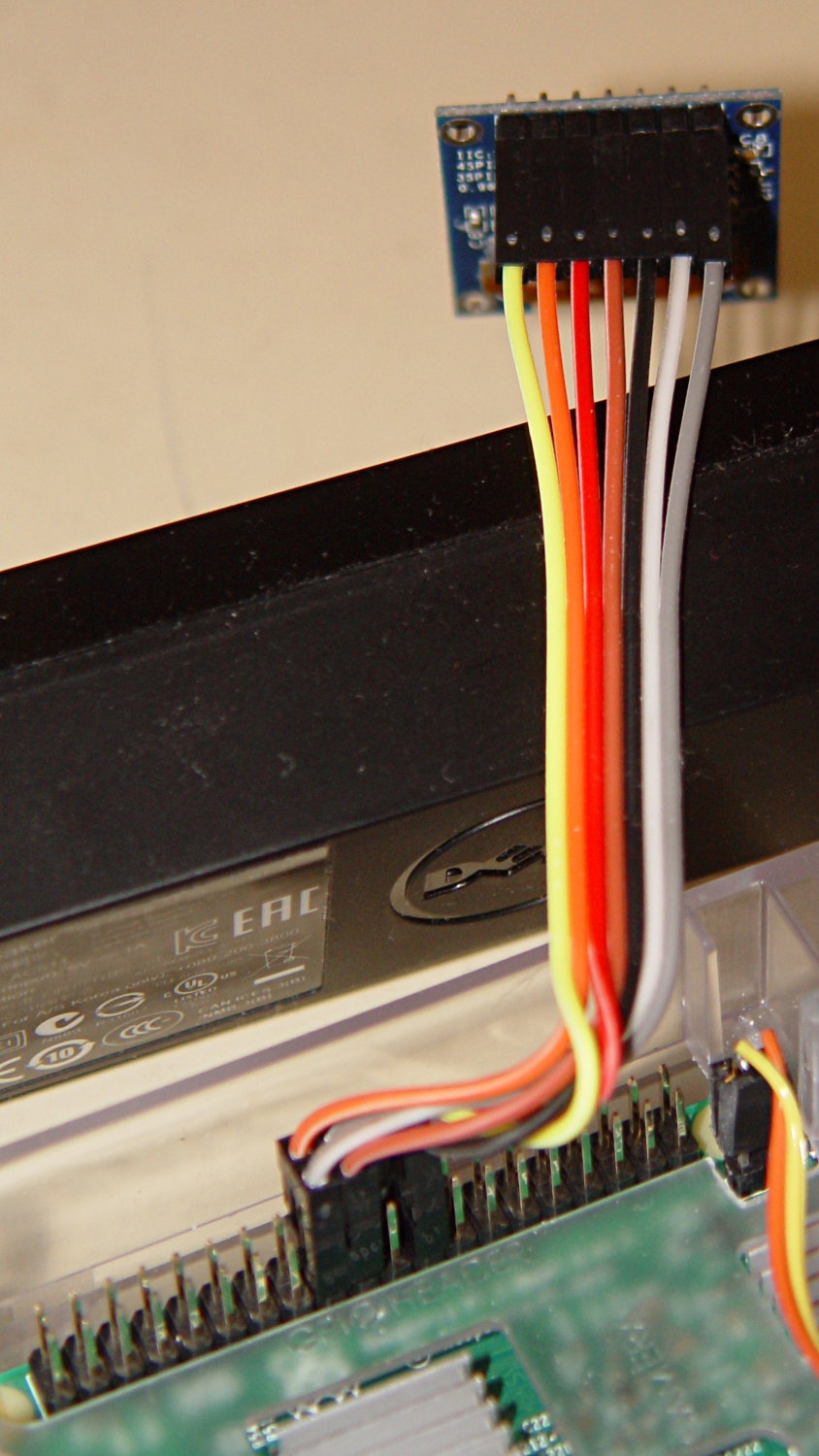
    The SPI interface uses all seven wires, peeled from a premade 100 mm 40-pin cable with female pin connectors:

    RPi OLED Display - Wiring
    RPi OLED Display – Wiring

    Other OLED versions have a four-wire I2C interface. The boards have option jumpers on the back, but the pin header along the edge will have 7 holes for SPI or 4 holes for I2C .

    Caveat emptor for online buyers: the item picture(s) may not match the title or the description text. The low-end sellers carrying beach balls, cookware, MOSFETs, cheap consumer electronics, and OLEDs do not understand the tech on a small board that’s Just Another SKU among thousands.

    For cables, search eBay or Amazon for ribbon dupont "female to female" 10cm. Amazon has sets of male-female, male-male, and female-female jumpers for ten bucks in various lengths. The insulation seems rather stiff and I may be forced to build better cables with fine wire inside PET braid.

    The SPI interface soaks up a tidy block of pins on the RPi’s big header:

    RPi OLED Display - RPi connector detail
    RPi OLED Display – RPi connector detail

    The LUMA-OLED Python driver doc gives a useful summary of those connections, herewith extracted for future reference:

    • 17 VCC – 3.3 V works for sure, 5 V might not
    • 18 DC – Data/Command
    • 19 D1 (“dee one”) – Data to display = MOSI
    • 20 GND
    • 21 not used, that’s the pin in the midst of the block
    • 22 RST – Reset
    • 23 D0 (“dee zero”) – clock to display = SCLK
    • 24 CS – Chip Select = CE0 (“cee ee zero”)

    Pin 1 is in front on the left end of that picture, closest to the MicroSD card slot, and proceeds 1-2, 3-4, and so forth along the length of the connector: odds toward the CPU, evens toward the PCB edge.

    The LUMA-OLD maintainter must have OLED boards with a slightly different SPI pinout than mine: VCC and GND are interchanged. Caveat emptor!

    Obviously, it’s desperately in need of a cute little case, which is in the nature of fine tuning.