The Smell of Molten Projects in the Morning

Ed Nisley's Blog: Shop notes, electronics, firmware, machinery, 3D printing, laser cuttery, and curiosities. Contents: 100% human thinking, 0% AI slop.

Tag: RPi

Raspberry Pi

  • Samsung EVO Plus 32 GB MicroSD Cards: Verification

    A pair of known-good MicroSD cards arrived direct from Samsung at a surprisingly slight premium over the junk available on Amazon:

    Samsung EVO Plus MicroSD - 32 GB
    Samsung EVO Plus MicroSD – 32 GB

    f3probe reported they’re OK, which is no surprise:

    sudo f3probe --time-ops /dev/sdc
    F3 probe 6.0
    Copyright (C) 2010 Digirati Internet LTDA.
    This is free software; see the source for copying conditions.
    
    WARNING: Probing normally takes from a few seconds to 15 minutes, but
             it can take longer. Please be patient.
    
    Probe finished, recovering blocks... Done
    
    Good news: The device `/dev/sdc' is the real thing
    
    Device geometry:
    	         *Usable* size: 29.81 GB (62521344 blocks)
    	        Announced size: 29.81 GB (62521344 blocks)
    	                Module: 32.00 GB (2^35 Bytes)
    	Approximate cache size: 0.00 Byte (0 blocks), need-reset=no
    	   Physical block size: 512.00 Byte (2^9 Bytes)
    
    Probe time: 2'04"
     Operation: total time / count = avg time
          Read: 51.79s / 4197134 = 12us
         Write: 1'10" / 4192321 = 16us
         Reset: 1.41s / 1 = 1.41s
    

    These will go into Raspberry Pi projects, where their huge capacity won’t produce any benefit. It seems one can’t get known-good, small cards these days.

    I don’t see much point in buying known-crap counterfeits on Amazon, given their commingled-storage problem as pointed out by their helpful FBA advice:

    Use the manufacturer barcode to track inventory

    By default, your seller account is set to use the manufacturer barcode to track your eligible inventory throughout the Amazon fulfillment process. You can change this default barcode preference at any time. You have the option to change your barcode preference for each offer you create. You can also change your barcode preference for a product when you change a listing from Fulfilled by Merchant to Fulfilled by Amazon.

    Important: Items in your inventory that are identified and tracked using manufacturer barcodes are commingled with items of the same products from other sellers who also use manufacturer barcodes for those items.

    If you choose to use manufacturer barcodes, when customers purchase a product from you, Amazon can send the item that is closest to them, even if you didn’t send it to the fulfillment center. When that happens, you get the credit for the sale, and we transfer an item from your inventory to the seller whose inventory was used to fulfill the order. In addition, if you use the manufacturer barcode, you don’t have to apply an Amazon barcode to each item yourself.

    Even though inventory tracked using the manufacturer barcode is commingled within the network, the source of the inventory is tracked by our fulfillment systems and is taken into consideration if inventory problems arise.
  • WWVB Reception: 60 kHz Tuning Fork Resonator Filter

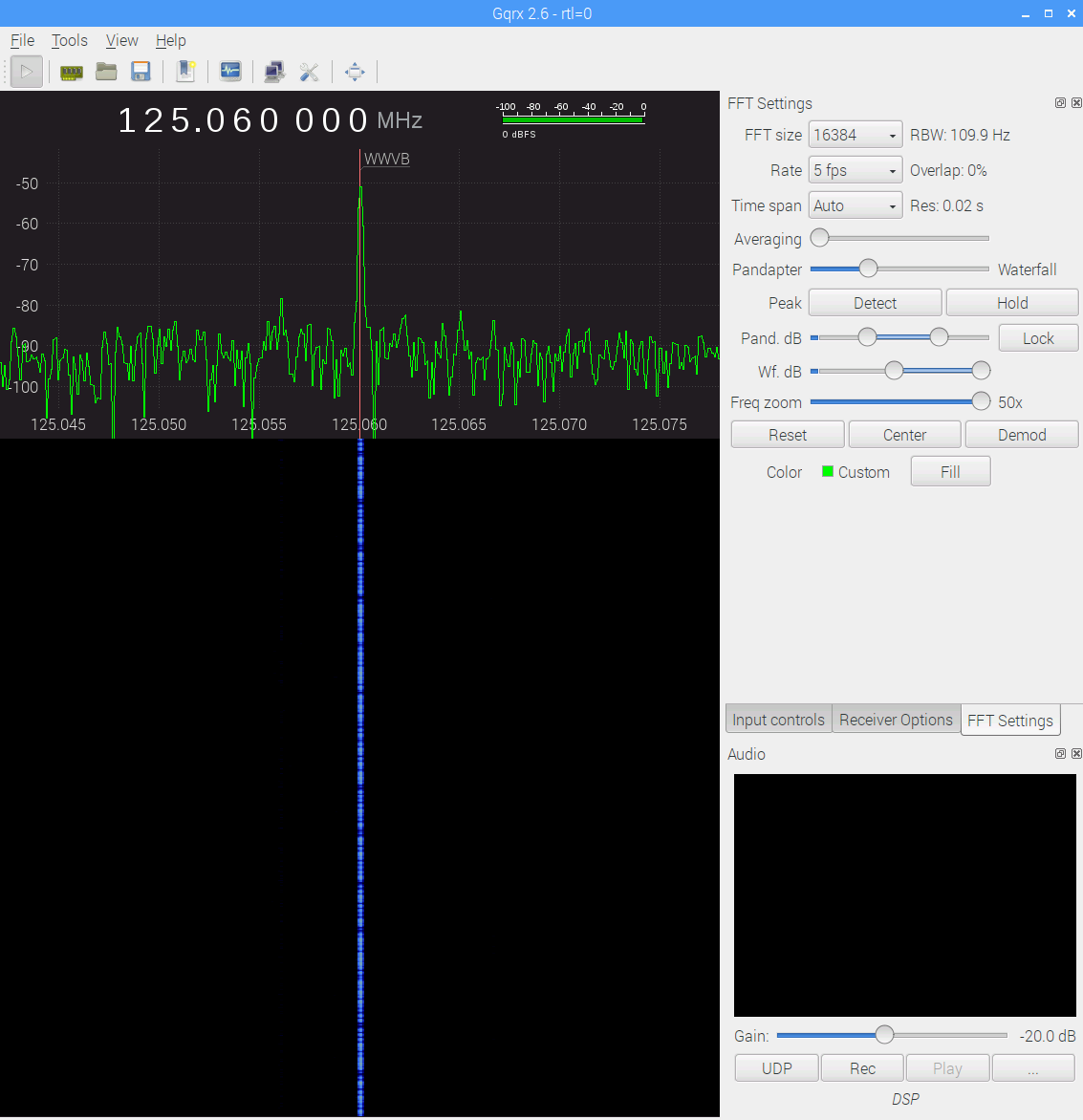
    Some early morning data from the WWVB preamp with the 60 kHz tuning fork resonator filter in full effect (clicky for more dots):

    WWVB - xtal filter - waterfall 5 fps RBW 109.9 Hz Res 0.02 s - gqrx window - 20171116_103542
    WWVB – xtal filter – waterfall 5 fps RBW 109.9 Hz Res 0.02 s – gqrx window – 20171116_103542

    The dotted line comes from WWVB’s 1 Hz PWM (-ish) modulation: yeah, it works!

    The filter cuts out the extraneous RF around the WWVB signal, as compared with a previous waterfall and some truly ugly hash:

    WWVB - 24 hr reception AGC - 2017-01-16 to 17 - cropped
    WWVB – 24 hr reception AGC – 2017-01-16 to 17 – cropped

    Well, not quite all the hash. Enabling the SDR’s hardware AGC and zooming out a bit reveals some strong birdies:

    WWVB - xtal filter - waterfall - hardware AGC - 2017-11-16 0612 EST
    WWVB – xtal filter – waterfall – hardware AGC – 2017-11-16 0612 EST

    The big spike over on the left at 125.000 MHz comes from the Ham-It-Up local oscillator. A series of harmonics starting suspiciously close to 125.032768 kHz produces the one at 125.066 MHz, just to the right of the WWVB signal, which leads me to suspect a rogue RTC in the attic.

    There is, in fact, a free running “Test Signal Source” on the Ham-It-Up board:

    Ham-It-Up Test Signal source - schematic
    Ham-It-Up Test Signal source – schematic

    Although I have nary a clue about that bad boy’s frequency, measuring it and cutting the inverter’s power trace / grounding the cap may be in order.

    The SDR’s AGC contributes about 30 dB of gain, compresses the hottest signals at -25 dB, and raises those harmonics out of the grass, so it’s not an unalloyed benefit. Manually cranking on 10 dB seems better:

    WWVB - xtal filter - waterfall - 10 dB hardware preamp - 2017-11-16 0630 EST
    WWVB – xtal filter – waterfall – 10 dB hardware preamp – 2017-11-16 0630 EST

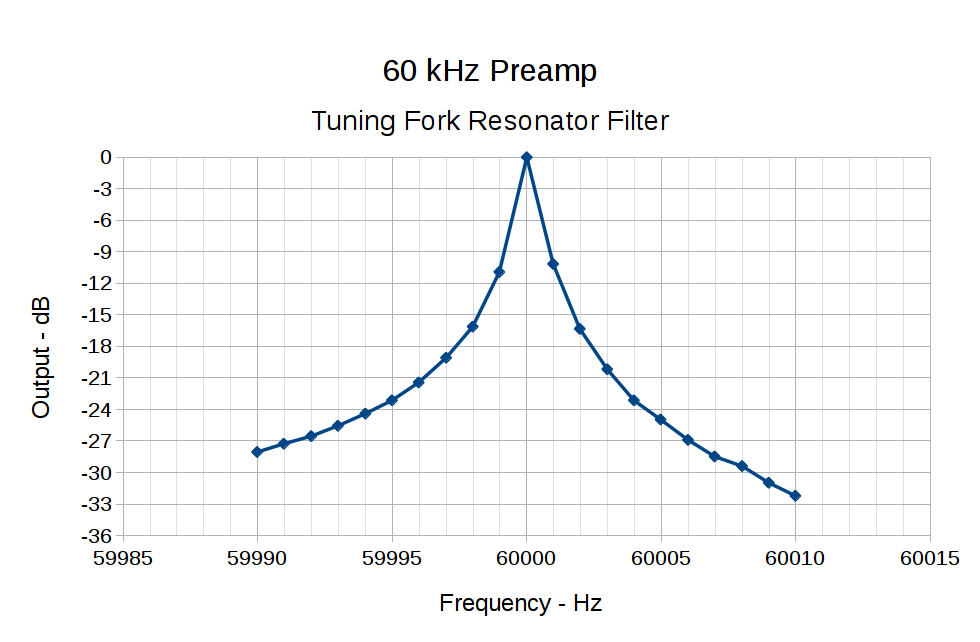
    The bump in the middle shows the WWVB preamp’s 2 kHz bandwidth around the 60 kHz filter output, so the receiver isn’t horribly compressed. The carrier rises 30 dB over that lump, in reasonable agreement with the manual measurements over a much narrower bandwidth:

    60 kHz Preamp - Bandwidth - 1 Hz steps
    60 kHz Preamp – Bandwidth – 1 Hz steps

    With all that in mind, a bit of careful tweaking produces a nice picture:

    WWVB - xtal filter - waterfall - 10 dB hardware preamp - 2017-11-16 0713 EST
    WWVB – xtal filter – waterfall – 10 dB hardware preamp – 2017-11-16 0713 EST

    I love it when a plan comes together …

  • Raspberry Pi USB vs. Arduino

    Plugging an Arduino with GRBL into a USB port on a Raspberry Pi 3 with bCNC causes an immediate crash: the Arduino doesn’t power up and the Raspberry Pi stops responding. A hardware reset / power cycle with the Arduino plugged in doesn’t improve the situation, so it seems the Arduino draws more current from the USB port than the default setup will allow.

    Most likely, the Arduino’s 47 μF power supply caps draw too much current while charging, as the steady-state current seems to be around 40 mA:

    RPi vs Arduino - USB current
    RPi vs Arduino – USB current

    The solution / workaround requires a tweak to /boot/config.txt:

    #-- boost USB current for Arduino CNC
    
    max_usb_current=1
    
    # blank line above to reveal underscores
    

    Update: As mentioned in the comments, the max_usb_current option doesn’t apply to the Pi 3 you see in the picture and, thus, shouldn’t have changed anything. Your guess is as good as mine.

    I’d be more comfortable with a separate power supply plugged into the Arduino’s coaxial power jack, but that’s just me.

  • Two-Wheel Plotter

    While contemplating all the hocus-pocus and precision alignment involved in the DIY plotter project, it occurred to me you could conjure a plotter from a pair of steppers, two disks, a lifting mechanism, and not much else. The general idea resembles an Rθ plotter, with the paper glued to a turntable for the “theta” motion, but with the “radius” motion produced by pen(s) on another turntable:

    Rotary Plotter - geometry 4
    Rotary Plotter – geometry 4

    The big circle is the turntable with radius R1, which might be a touch over 4.5 inches to fit an 8.5 inch octagon cut from ordinary Letter paper. The arc with radius R2 over on the right shows the pen path from the turntable’s center to its perimeter, centered at (R1/2,-R1) for convenience.

    The grid paper represents the overall Cartesian grid containing the XY points you’d like to plot, like, for example, point Pxy in the upper right corner. The object of the game is to figure out how to rotate the turntable and pen holder to put Pxy directly under the pen at Ixy over near the right side, after which one might make a dot by lowering the pen. Drawing a continuous figure requires making very small motions between closely spaced points, using something like Bresenham’s line algorithm to generate the incremental coordinates or, for parametric curves like the SuperFormula, choosing a small parameter step size.

    After flailing around for a while, I realized this requires finding the intersections of two circles after some coordinate transformations.

    The offset between the two centers is (ΔX,ΔY) and the distance is R2 = sqrt(ΔX² + ΔY²).  The angle between the +X axis and the pen wheel is α = atan2(ΔY,ΔX), which will be negative for this layout.

    Start by transforming Pxy to polar coordinates PRθ, which produces the circle containing both Pxy and Ixy. A pen positioned at radius R from the center of the turntable will trace that circle and Ixy sits at the intersection of that circle with the pen rotating around its wheel.

    The small rectangle with sides a and b has R as its diagonal, which means a² + b² = R² and the pointy angle γ = atan a/b.

    The large triangle below that has base (R2 – a), height b, and hypotenuse R2, so (R2 – a)² + b² = R2².

    Some plug-and-chug action produces a quadratic equation that you can solve for a as shown, solve for b using the first equation, find γ from atan a/b, then subtract γ from θ to get β, the angle spearing point Ixy. You can convert Rβ back to the original grid coordinates with the usual x = R cos β and y = R sin β.

    Rotate the turntable by (θ – β) to put Pxy on the arc of the pen at Ixy.

    The angle δ lies between the center-to-center line and Ixy. Knowing all the sides of that triangle, find δ = arccos (R2 – a) / R2 and turn the pen wheel by δ to put the pen at Ixy.

    Lower the pen to make a dot.

    Done!

    Some marginal thinking …

    I’m sure there’s a fancy way to do this with, surely, matrices or quaternions, but I can handle trig.

    You could drive the steppers with a Marlin / RAMPS controller mapping between angles and linear G-Code coordinates, perhaps by choosing suitable steps-per-unit values to make the degrees (or some convenient decimal multiple / fraction thereof) correspond directly to linear distances.

    You could generate points from an equation in, say, Python on a Raspberry Pi, apply all the transformations, convert the angles to G-Code, and fire them at a Marlin controller over USB.

    Applying 16:1 microstepping to a stock 200 step/rev motor gives 0.113°/step, so at a 5 inch radius each step covers 0.01 inch. However, not all microsteps are moved equally and I expect the absolute per-step accuracy would be somewhere between OK and marginal. Most likely, given the application, even marginal accuracy wouldn’t matter in the least.

    The pen wheel uses only 60-ish degrees of the motor’s rotation, but you could mount four-ish pens around a complete wheel, apply suitable pen lift-and-lower action and get multicolor plots.

    You could gear down the steppers to get more steps per turntable revolution and way more steps per pen arc, perhaps using cheap & readily available RepRap printer GT2 pulleys / belts / shafts / bearings from the usual eBay sellers. A 16 tooth motor pulley driving a 60 tooth turntable pulley would improve the resolution by a factor of 3.75: more microsteps per commanded motion should make the actual motion come out better.

    Tucking the paper atop the turntable and under the pen wheel could be a challenge. Perhaps mounting the whole pen assembly on a tilting plate would help?

    Make all the workings visible FTW!

    Some doodles leading up to the top diagram, complete with Bad Ideas and goofs …

    Centering the pen wheel at a corner makes R2 = R1 * sqrt(2), which seems attractive, but seems overly large in retrospect:

    Rotary Plotter - geometry 1
    Rotary Plotter – geometry 1

    Centering the pen wheel at (-R1,R1/2) with a radius of R1 obviously doesn’t work out, because the arc doesn’t reach the turntable pivot, so you can’t draw anything close to the center. At least I got to work out some step sizes.

    A first attempt at coordinate transformation went nowhere:

    Rotary Plotter - geometry 2
    Rotary Plotter – geometry 2

    After perusing the geometric / triangle solution, this came closer:

    Rotary Plotter - geometry 3
    Rotary Plotter – geometry 3
  • Streaming Radio Player: OLED SPI Speed Fix

    The OLED displays on the streaming radio players have SH1106 controllers supported by the Luma library, which works just fine. Digging into the source shows the default SH1106 setup (see the class spi() at the bottom) uses an 8 MHz clock:

        def __init__(self, spi=None, gpio=None, port=0, device=0,
                     bus_speed_hz=8000000, transfer_size=4096,
                     gpio_DC=24, gpio_RST=25):
    assert(bus_speed_hz in [mhz * 1000000 for mhz in [0.5, 1, 2, 4, 8, 16, 32]])
    

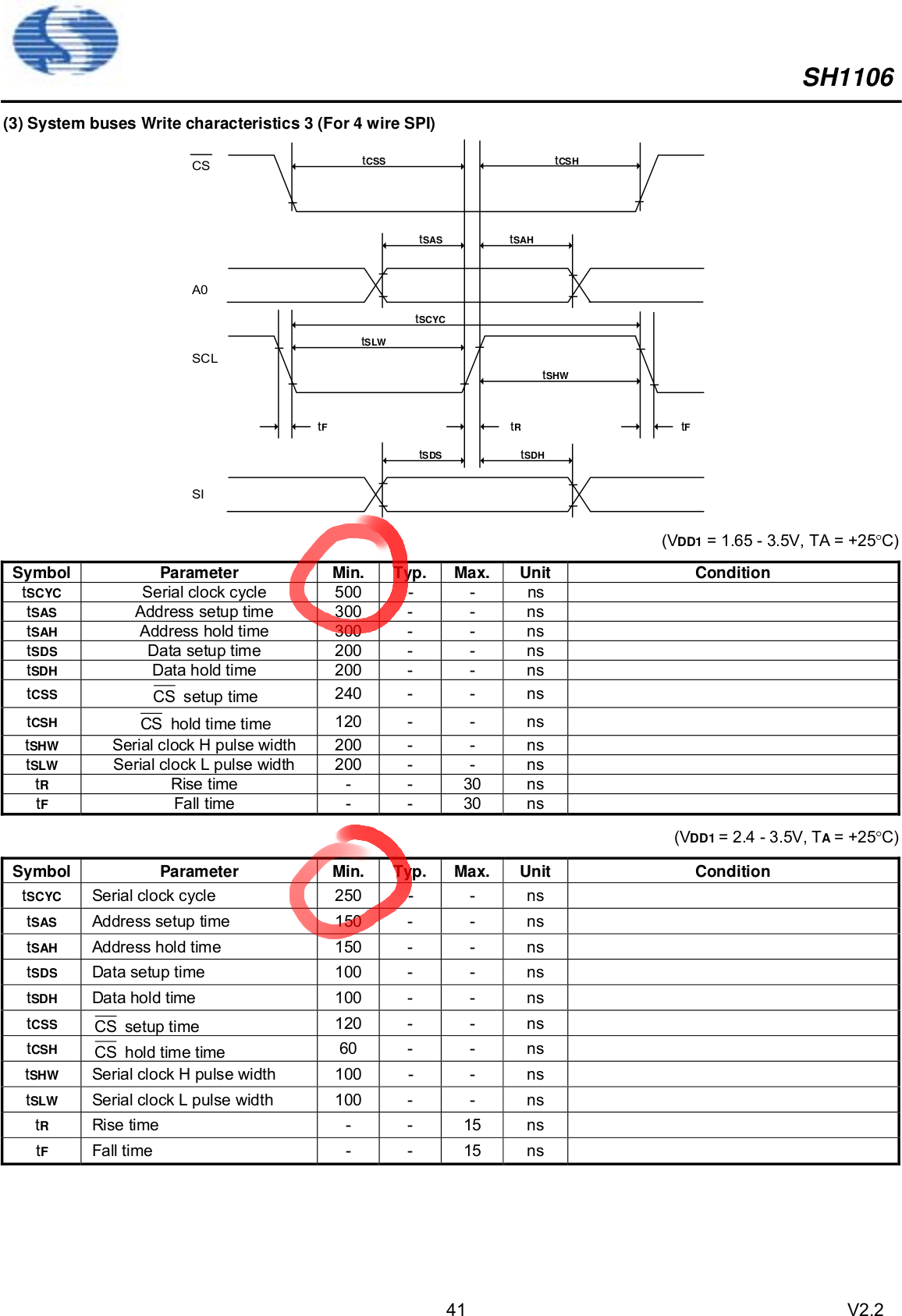
    Alas, the SH1106 doc suggests a maximum SPI clock of 2 to 4 MHz, the latter only with fair skies, a tailwind, and a stiff power supply:

    SH1106 OLED Controller - SPI timing
    SH1106 OLED Controller – SPI timing

    The display doesn’t get updated all that often, so there’s no point in rushing things:

    serial = spi(device=0,port=0,bus_speed_hz=1000000)
    device = sh1106(serial)
    

    They’ve been ticking along without mysterious blanking or mirroring for a bit over two weeks, so I’ll call it a fix.

  • Streaming Media Player: OLED Weirdness

    Of late, the OLED displays on two RPi 3 streaming players (the others are RPi 2) have occasionally gone blank, while the players continue to work fine. I checked the logs, swapped MicroSD cards, rebuilt the images, and generally screwed around, all to no avail. The SH1106 controller has a command containing a single bit to blank the display and, perhaps, an SPI data transfer error could shut it off.

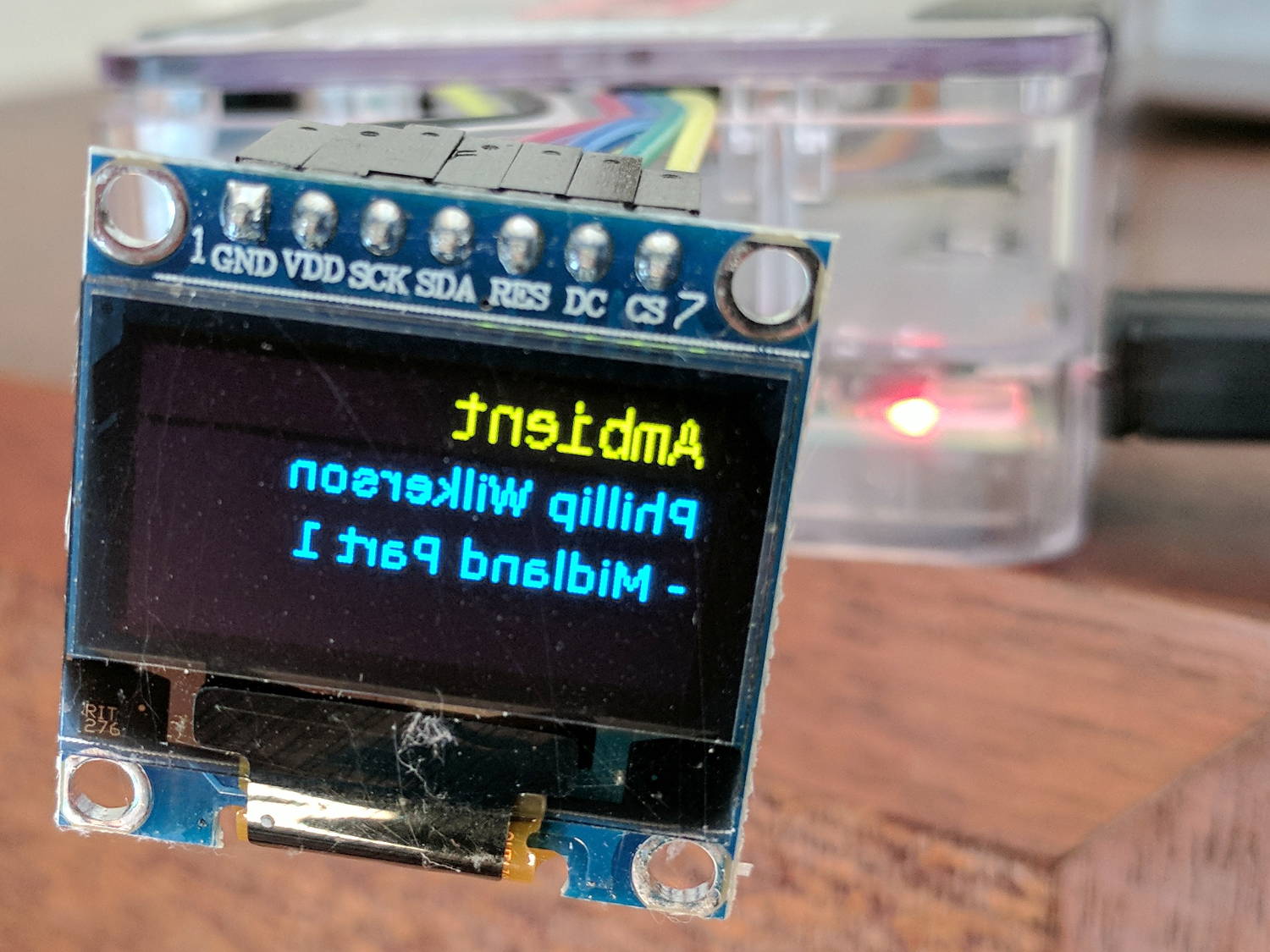
    This is much harder to explain:

    Mirror-image OLED display
    Mirror-image OLED display

    There’s a hardware command to flip the display top-to-bottom, not left-to-right. The Luma OLED driver can rotate the display in 90° increments, but AFAICT not reflect it.

    Yes, they’re networked, but, no, they’re not directly exposed to the Intertubes.

    Changing streams had no effect. Shutting down and rebooting restored normal operation.

    There’s been exactly one such failure so far, so I lack evidence.

    I have no clue what’s going on.

  • Sandisk Extreme Pro MicroSD Card: End of Life?

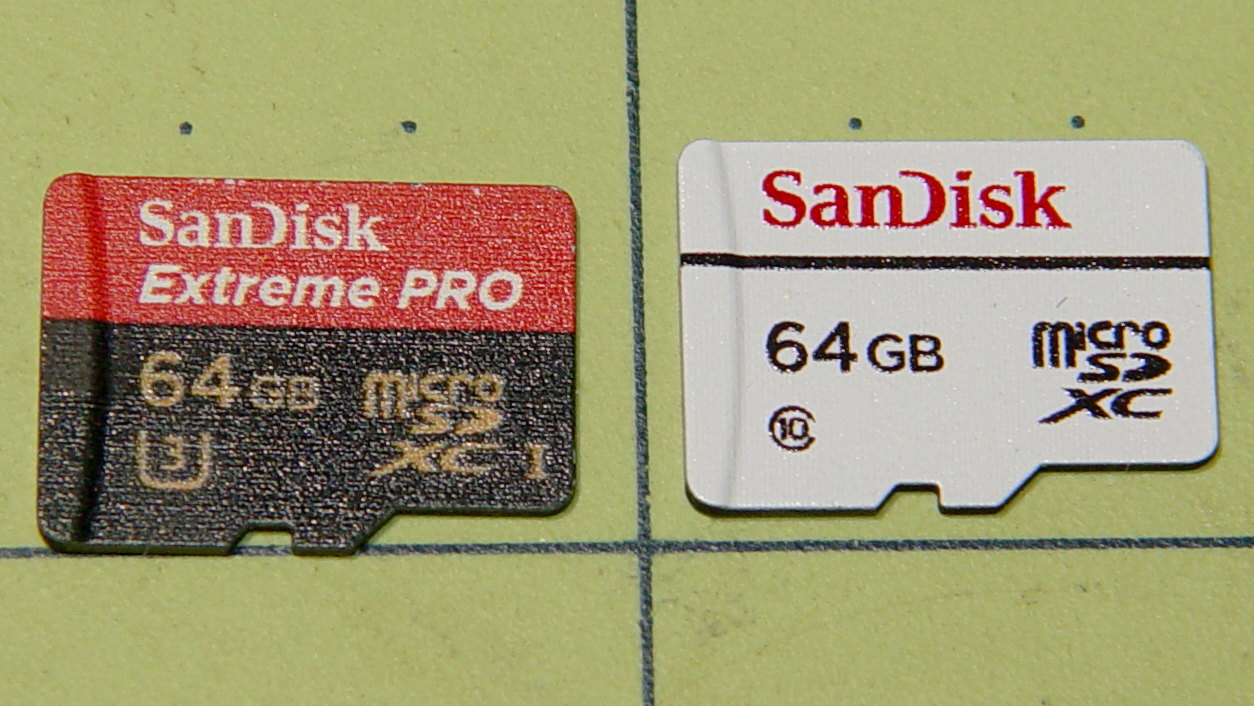
    The Sandisk Extreme Pro 64 GB MicroSD card in the Sony HDR-AS30V died on the road once more, got reformatted, worked OK for a while, then kicked out catastrophic I/O errors after being mounted, so I swapped in the High Endurance card:

    Sandisk - 64 GB MicroSDXC cards
    Sandisk – 64 GB MicroSDXC cards

    The Extreme Pro still passes the f3probe tests, so it’s not completely dead, but if I can’t trust it in the helmet camera, it’s dead to me.

    It survived 17 months of more-or-less continuous use, although we didn’t do nearly enough riding for three months early this year. Call it 14 months x five rides / week x 1 hour / ride = 300 hours of recording. Multiply by 4 GB / 22.75 minutes to get 3 TB of video, about 50 times its total capacity.

    The never-sufficiently-to-be-damned Sony cards failed after less than 1 TB and 15-ish times capacity, making the Sandisk Extreme Pro much better. However, it’s painfully obvious these cards work better for low-intensity still-image recording, rather than continuous HD video.

    Using them as Raspberry Pi “hard drives” surely falls somewhere between still cameras and video, although Octoprint’s video snapshots and streaming media must make ’em sweat.

    We’ll see how Sandisk’s High Endurance memory works in precisely the application it’s labeled for.