The Smell of Molten Projects in the Morning

Ed Nisley's Blog: Shop notes, electronics, firmware, machinery, 3D printing, laser cuttery, and curiosities. Contents: 100% human thinking, 0% AI slop.

Tag: Repairs

If it used to work, it can work again

  • Lamp Socket Adapter: Weld Failure

    Lamp Socket Adapter: Weld Failure

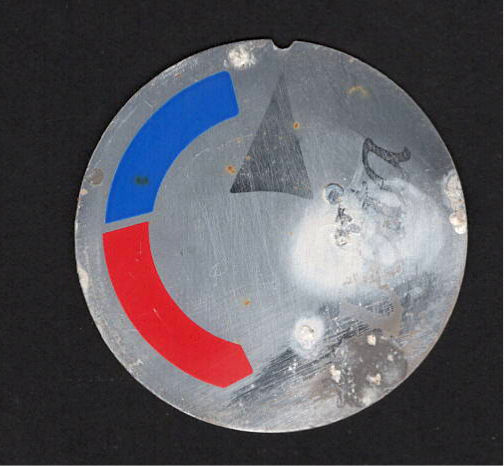
    The basement came with several LED bulbs screwed into old-school ceramic sockets with pull-chain switches. This adapter had an LED bulb in its socket and another LED fixture plugged into an outlet:

    Lamp socket adapter - failed weld
    Lamp socket adapter – failed weld

    The fixture began flickering some days ago, which I attributed to a problem with its power supply. When both the bulb and the fixture went dark, I had enough of a clue to locate the real cause.

    The scorched plastic near the discolored weld nugget on the threaded shell suggests something ran overly hot in there for a while.

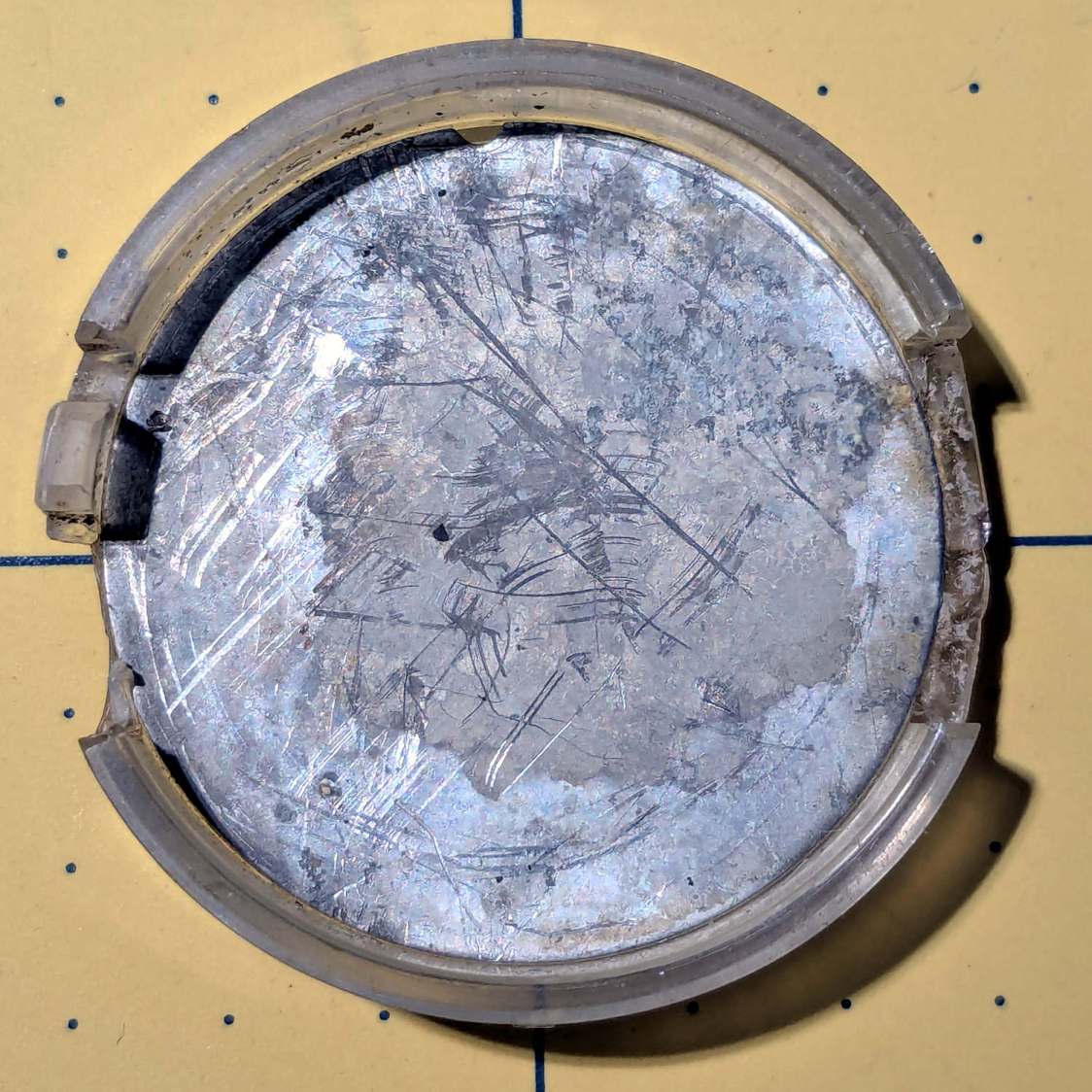
    Peeling the aluminum shell off reveals the problem:

    Lamp socket adapter - detail
    Lamp socket adapter – detail

    Looks to me like the weld started out weak and gradually fell apart as the socket heated / cooled in use, with increasing resistance producing more heat every time.

    The LED lamp + fixture added up to 100 W, so about 1 A is all it takes.

  • Cusinart Smart Stick Blender Motor Coupler

    Cusinart Smart Stick Blender Motor Coupler

    When our stick blender (Cusinart CSB-77, with an instruction manual dated 2011) failed, I dropped fifteen bucks on the shortest one we could find, which turned out to be inconveniently long for the shorter member of the user community. The old one recently emerged from the depths of the bench for triage; the failure was in the coupler between the motor and the blade shaft, but required complete disassembly before trying to repair it.

    Pry out two obvious plastic plugs, remove two screws holding the top of the handle together, pull the handle apart, and reveal a PCB with a discrete diode bridge and an open-frame switch:

    Stick blender coupler - PCB
    Stick blender coupler – PCB

    Fortunately, the wire colors matched my preconception. Unsolder the wires to get that side of the handle off.

    Un-bend the tab holding the metal shell to the plastic frame and pull it off, whereupon the frame halves unsnap to release the motor:

    Stick blender coupler - shell removed
    Stick blender coupler – shell removed

    The white nylon (?) coupler on the motor shaft pries off the splined motor shaft:

    Stick blender coupler - motor shaft splines
    Stick blender coupler – motor shaft splines

    That black ring inside the coupler should be on the blade shaft:

    Stick blender coupler - blade shaft
    Stick blender coupler – blade shaft

    It apparently got jammed in the coupler when the shaft’s drive dogs / splines (barely visible down inside) ripped up the coupler. I don’t know if that was a sudden failure or the end result of gradually accumulating damage, but the inside of the coupler was badly chewed up.

    Dismantling the blade unit requires prying three plastic clips back, one at a time, while pushing upward on the intricate black plastic fitting around the shaft:

    Stick blender coupler - blade housing clips
    Stick blender coupler – blade housing clips

    That let me ease a drop of oil down the shaft to what looks and feels like a plastic sleeve bearing near the blade end of the housing; oil should not be needed on a plastic bearing, but it definitely improved the bearing’s attitude. The snap ring securing the shaft is far enough away to prevent me from even trying to remove it, because I know there is no way I can reinstall it:

    Stick blender coupler - blade shaft snap ring
    Stick blender coupler – blade shaft snap ring

    Some Xacto knife action removed the shredded plastic to reveal the remains of four slots for the blade shaft’s two drive dogs / splines:

    Stick blender coupler - OEM coupler end view
    Stick blender coupler – OEM coupler end view

    Measuring All. The. Things. produced a reasonable solid model of the slots:

    Stick Blender drive coupler - splines - solid model
    Stick Blender drive coupler – splines – solid model

    Removing those from a model of the coupler defined the shape:

    Stick Blender drive coupler - PrusaSlicer
    Stick Blender drive coupler – PrusaSlicer

    As usual, having one in hand let me check the fit and, after a few tweaks, the next one was Just Right™.

    The other end of the coupler is a simple cylinder sized for a firm press fit on the motor shaft splines:

    Stick blender coupler - new coupler detail
    Stick blender coupler – new coupler detail

    My coupler is chunkier than the OEM coupler, because there was enough room in there and PETG-CF, being weaker than nylon, needs all the help it can get:

    Stick blender coupler - new coupler installed
    Stick blender coupler – new coupler installed

    It’s one of the few things I’ve printed with 100% infill. If when that plastic fails, I’ll try something else.

    Put the little rubber ring on the blade shaft and reassemble everything in reverse order:

    Stick blender coupler - mating ends
    Stick blender coupler – mating ends

    The blender works as well as it ever did, while the halves couple and uncouple the way they should, so we’ll declare victory and keep the new blender as a backup.

    The OpenSCAD source code as a GitHub Gist:

    // Stick Blender drive coupler
    // Ed Nisley – KE4ZNU
    // 2025-05-16
    include <BOSL2/std.scad>
    Layout = "Show"; // [Show,Build,Splines]
    /* [Hidden] */
    HoleWindage = 0.2;
    Protrusion = 0.1;
    NumSides = 3*3*4;
    ID = 0;
    OD = 1;
    LENGTH = 2;
    ShellOA = [5.0,14.0,28.0]; // ID=motor shaft
    MixerSocket = [6.6,0,17.2]; // passes rubber retainer
    Retainer = [3.0,6.5,5.5]; // ID=mixer shaft,OD=rubber ring
    RetainerRebate = [Retainer[ID],3.9,1.5]; // … fits under shaft lip
    DriveSocket = [6.7,8.8,12.0]; // OD=notch OD
    DriveNotch = [(DriveSocket[OD] – DriveSocket[ID])/2,1.5,DriveSocket[LENGTH]]; // … drive notch shape on +X
    DriveChamfer = -DriveNotch.y;
    $fn = NumSides;
    //———-
    // Define Shapes
    module Splines() {
    render()
    for (a = [0:90:270])
    zrot(a)
    right(DriveSocket[ID]/2 – Protrusion)
    cuboid(DriveNotch + [Protrusion,0,0],chamfer=DriveChamfer,edges=[TOP+FWD,TOP+BACK],anchor=LEFT+BOTTOM);
    }
    module Coupler() {
    difference() {
    tube(ShellOA[LENGTH],id=ShellOA[ID],od=ShellOA[OD],anchor=BOTTOM);
    up(ShellOA[LENGTH] – MixerSocket[LENGTH])
    cyl(Retainer[LENGTH],d=Retainer[OD],anchor=BOTTOM);
    up(ShellOA[LENGTH] + Protrusion)
    cyl(DriveSocket[LENGTH] + Protrusion,d=DriveSocket[ID],anchor=TOP);
    up(ShellOA[LENGTH] – DriveNotch[LENGTH] + Protrusion)
    Splines();
    }
    }
    //———-
    // Build things
    if (Layout == "Splines")
    Splines();
    if (Layout == "Show")
    Coupler();
    if (Layout == "Build")
    Coupler();

  • Whirlpool Clothes Dryer Thermal Switches

    Whirlpool Clothes Dryer Thermal Switches

    The venerable (circa 1993) Whirlpool clothes dryer (LER443AQ0) that Came With The House™ failed in action: the drum occasionally stopped turning (and, fortunately, heating) while the control timer continued ticking along. The symptoms suggested one of the many thermal switches / thermostats / fuses was bad, but because the problem was intermittent, the only practical alternative was replacing all the things.

    Which, it turns out, costs about ten bucks from the usual source. I remain unconvinced paying an order of magnitude more for what look to be identical parts will, in fact, bring either different parts or higher quality.

    The wiring diagram, which I consulted only after the fact, shows it was most likely the “Not Resettable” Thermal Fuse in series with the drum motor, because the other contestants are in series with the heater and the Operating Thermostat would trip when the blower stopped blowing:

    Whirlpool dryer - wiring diagram - detail
    Whirlpool dryer – wiring diagram – detail

    The fact that the Thermal Fuse should not “reset” after it trips seems worrisome, but failures are like that.

    All those parts are accessible only through the rear cover, but you should definitely vacuum out as much fuzz as possible before popping the cover (with vacuum in hand):

    Whirlpool dryer - heater duct top
    Whirlpool dryer – heater duct top

    Of course, all the old parts show fine continuity, because intermittent:

    Whirlpool dryer - thermal switches
    Whirlpool dryer – thermal switches

    With the new parts in place, the dryer has chugged through half a dozen loads without incident: so all’s well that ends well.

  • Auto Side Marker Bulb: FAIL

    Auto Side Marker Bulb: FAIL

    Six years ago I replaced the W5W incandescent front side marker bulbs in our 2015 Subaru Forester with amber LED bulbs:

    Side Marker bulbs - failed adhesive
    Side Marker bulbs – failed adhesive

    The adhesive holding the LED PCB to the aluminum “heatsink” has fossilized and the strip on the right is peeling off (with the left one not far behind), which likely accounted for its loss of light output and flickering.

    Tearing it apart reveals the LED layout and what looks like a bridge rectifier or a big resistor (to fool the CAN bus?) on a tiny PCB jammed inside the shell:

    Side Marker bulbs - rectifier
    Side Marker bulbs – rectifier

    The other side of the PCB could be a buck converter:

    Side Marker bulbs - buck converter
    Side Marker bulbs – buck converter

    In round numbers, we’ve driven 18000 miles at an average of maybe 40 mph over those years; call it 450 hours. However, the side marker lights aren’t on unless the headlights are on; we do very little night driving, which means those LED bulbs are the usual crap.

    I replaced both front bulbs with a different design sporting two LED chips and we’ll see how long those last.

  • Anker LC-40 Flashlight Switch Repair

    Anker LC-40 Flashlight Switch Repair

    The switch on the Anker LC-40 flashlight serving as a running light on my Tour Easy became slightly intermittent before I replaced it with a 1 W amber LED, but it was still good enough to become the troubleshooting flashlight in the tray next to the Prusa Mk 4 printer. Eventually, of course, it failed completely and Something Had To Be Done.

    Although I knew an exact replacement switch had to be available from the usual sources, I could not come up with a set of keywords capable of pulling them out of the chaff.

    That was not a problem, because the assortment of SMD switches I used to replace the handlebar control caps on Mary’s Handi-Quilter HQ Sixteen contained push-on / push-off switches that were almost the right size:

    Anker LC-40 Flashlight - switches and caps
    Anker LC-40 Flashlight – switches and caps

    Having recently convinced the MakerGear M2 3D printer to use TPU filament, all I had to do was produce a suitable cap to fit over the new switch in the flashlight’s tail:

    Anker LC-40 Flashlight Button - TPU PrusaSlicer
    Anker LC-40 Flashlight Button – TPU PrusaSlicer

    Which turned into a multi-dimensional search over cap geometry, TPU extrusion speeds & feeds, and various impossible-to-directly-measure sizes:

    Anker LC-40 Flashlight - TPU cap iterations
    Anker LC-40 Flashlight – TPU cap iterations

    The squarish block over on the left is PrusaSlicer’s version of a support structure wrapped around the first cap version; if human lives depended on it, I could surely extract the cap, but it would take a while.

    The remaining debris samples occured while discovering:

    • An extruder temperature of 230 °C, not 250 °C, works well
    • A conical shape of the lip around the open end to eliminate the support structure
    • TPU doesn’t bridge well, so the closed end must be down
    • Length of the central pillar to barely touch the switch stem when released
    • Cap length and wall thickness so the TPU shell can collapse enough to actuate and release the switch stem
    • And so on and so on and scooby dooby dooby

    Eventually I came up with a suitable combination:

    Anker LC-40 Flashlight - switch caps
    Anker LC-40 Flashlight – switch caps

    Because I expected this would be an easy job, I used snap ring pliers to unscrew and rescrew the threaded retaining ring holding the switch PCB in place. Because the pliers didn’t have a stable grip on the ring, the threads eventually became just a bit goobered.

    This was not a problem, because I have a(nother) 3D printer:

    Anker LC-40 Flashlight Retainer - show view
    Anker LC-40 Flashlight Retainer – show view

    The gray thing on the right is a simple pin wrench fitting both the original and the replacement retaining rings, so I can orient the rings properly while unscrewing & rescrewing:

    Anker LC-40 Flashlight - pin wrench in place
    Anker LC-40 Flashlight – pin wrench in place

    The threads have a 0.75 mm pitch and, while it’s possible to print screw threads, even a tedious 0.1 mm layer height would define each turn of the thread with only 7-½ layers.

    This was not a problem, because I have a mini-lathe:

    Anker LC-40 Flashlight - thread cutting
    Anker LC-40 Flashlight – thread cutting

    The yellow & green things on the left of those solid models are the fixture holding a retaining ring for threading and the washer applying pressure to keep the ring in place:

    Anker LC-40 Flashlight - lathe fixture - detail
    Anker LC-40 Flashlight – lathe fixture – detail

    The alert reader will note that washer lacks holes for the alignment pins I added after seeing the washer sit not quite concentric on the fixture. I could call it continuous product improvement, although I doubt I’ll print another one.

    Setting up the lathe involved finding the proper set of change gears, including the vital 42-50 stacked gear I made a while ago to print metric threads on a hard-inch lathe:

    Anker LC-40 Flashlight - lathe change gear train
    Anker LC-40 Flashlight – lathe change gear train

    Although you’re supposed to measure the thread spacing on a skim pass, I find it’s easier to just measure the carriage movement for one spindle rotation:

    Anker LC-40 Flashlight - lathe gear check
    Anker LC-40 Flashlight – lathe gear check

    A few passes produced a fine retaining ring:

    Anker LC-40 Flashlight - pin wrench - detail
    Anker LC-40 Flashlight – OEM vs lathe-cut threads

    Sporting much nicer looking threads than the goobered original:

    Anker LC-40 Flashlight - OEM vs lathe-cut threads
    Anker LC-40 Flashlight – OEM vs lathe-cut threads

    The original switch had a stabilizing ring around the body to prevent it from wobbling under the original rubber cap.

    This was not a problem, because I have a laser cutter:

    Anker LC-40 Flashlight - new switch in stabilizer
    Anker LC-40 Flashlight – new switch in stabilizer

    Those came from a scrap of fluorescent acrylic.

    The wave washer behind the acrylic stabilizer improves the contact between the PCB trace around the rim and the flashlight tailcap, with the current passing through the body to the “light engine” up front. The retaining ring provides enough pressure to compress the wave washer, which is why it’s so easily goobered without a close-fitting pin wrench.

    With everything assembled in reverse order, the flashlight worked pretty much as it did back when it was new:

    Anker LC-40 Flashlight - TPU cap installed
    Anker LC-40 Flashlight – TPU cap installed

    However, after describing this during a recent SquidWrench meeting, I discovered that adding “latching” to my keywords surfaced a bodacious assortment of flashlight switches, so (a few days later) I removed the not-quite-right switch and replaced it with an identical twin of the OEM switch requiring just a little lead forming to fit the PCB.

    Even better, using the 3D printed pin wrench to screw the original retaining ring into the flashlight’s aluminum threads a few times re-formed (unrelated to recent electrolytic capacitor reforming) its goobered threads well enough to fit and work perfectly again.

    So I have:

    • … reassembled the flashlight with more-or-less original components
    • … a repair tool kit ready when another LC-40 fails
    • … re-learned the lesson that any time spent making a fixture or a special tool is not deducted from one’s allotment

    And I loves me a happy ending or two!

    The OpenSCAD source code as a GitHub Gist:

    // Anker LC-40 flashlight switch retainer
    // Ed Nisley – KE4ZNU
    // 2025-05-05
    include <BOSL2/std.scad>
    Layout = "Show"; // [Show,Build,Retainer,Fixture,Washer,Wrench]
    Gap = 5; // [0:10]
    /* [Hidden] */
    HoleWindage = 0.2;
    Protrusion = 0.1;
    NumSides = 3*3*4;
    ID = 0;
    OD = 1;
    LENGTH = 2;
    $fn=3*3*4;
    Plate = [16.8,20.0,3.0]; // retainer plate, OD allows for lathe threading
    PlateRecessDepth = 1.6;
    PlateInnerThick = Plate[LENGTH] – PlateRecessDepth;
    ClearID = 11.0;
    PinOD = 3.0;
    PinOC = 12.0;
    WrenchLength = 25.0; // handle on wrench
    JawLength = 22.0; // lathe jaw
    ThreaderOverrun = 10.0; // stick-out for threading tool clearance
    ThreadAllowance = 2*1.0; // clearance for thread depth
    //———-
    // Define Shapes
    module Retainer() {
    difference() {
    tube(Plate[LENGTH],od=Plate[OD],id=ClearID,anchor=BOTTOM);
    up(Plate[LENGTH] + Protrusion)
    cyl(PlateRecessDepth + Protrusion,d=Plate[ID],anchor=TOP);
    down(Protrusion)
    hull()
    for (i = [-1,1])
    right(i*PinOC/2) down(Protrusion)
    cyl(Plate[LENGTH] + Protrusion,d=PinOD,anchor=BOTTOM);
    }
    }
    module Fixture() {
    difference() {
    regular_prism(6,h=JawLength,d=1.2*Plate[OD],anchor=BOTTOM) position(TOP) {
    cyl(PlateRecessDepth + ThreaderOverrun,d=Plate[ID],anchor=BOTTOM);
    cyl(Plate[LENGTH] + ThreaderOverrun,d=ClearID,anchor=BOTTOM);
    // hull()
    for (i = [-1,1])
    right(i*PinOC/2)
    cyl(Plate[LENGTH] + ThreaderOverrun + Plate[LENGTH]/2,d=PinOD,anchor=BOTTOM);
    cyl(ThreaderOverrun,d=Plate[OD] – ThreadAllowance,anchor=BOTTOM);
    }
    up(JawLength + ThreaderOverrun + Plate[LENGTH] + Protrusion) // M4 burly insert
    cyl(10.0 + 5,d=5.5,anchor=TOP);
    }
    }
    module Washer() {
    difference() {
    tube(Plate[LENGTH],od=Plate[OD] – ThreadAllowance,id=4.5,anchor=BOTTOM);
    down(Protrusion)
    for (i = [-1,1])
    right(i*PinOC/2)
    cyl(2*Plate[LENGTH],d=PinOD,anchor=BOTTOM);
    }
    }
    module Wrench() {
    difference() {
    union() {
    cyl(WrenchLength,d=Plate[ID],anchor=BOTTOM);
    for (i = [-1,1])
    right(i*PinOC/2)
    cyl(WrenchLength + Plate[LENGTH],d=PinOD,anchor=BOTTOM);
    }
    down(Protrusion)
    cyl(2*WrenchLength,d=ClearID – 2.0,anchor=BOTTOM);
    }
    }
    //———-
    // Build things
    if (Layout == "Retainer")
    Retainer();
    if (Layout == "Fixture")
    Fixture();
    if (Layout == "Washer")
    Washer();
    if (Layout == "Wrench")
    Wrench();
    if (Layout == "Show") {
    color("Gold")
    Fixture();
    up(JawLength + ThreaderOverrun + Gap)
    zflip(z=Plate[LENGTH]/2)
    Retainer();
    color("Green")
    up(JawLength + ThreaderOverrun + Plate[LENGTH] + 2*Gap)
    Washer();
    right(40) {
    zflip(z=Plate[LENGTH]/2)
    Retainer();
    color("Silver")
    up(Plate[LENGTH] + Gap)
    zflip(z=WrenchLength/2)
    Wrench();
    }
    }
    if (Layout == "Build") {
    Fixture();
    right(1.5*Plate[OD]) {
    Retainer();
    fwd(1.5*Plate[OD])
    Retainer();
    }
    left(1.5*Plate[OD])
    Washer();
    fwd(1.5*Plate[OD])
    Wrench();
    }

  • S-100 Bus Computer: Capacitor Reforming

    S-100 Bus Computer: Capacitor Reforming

    I volunteered to reform the hulking electrolytic capacitors in a long-unused S-100 Bus computer:

    S-100 Bus Cap Reforming - Codex 7200 Modem case
    S-100 Bus Cap Reforming – Codex 7200 Modem case

    Yes, it’s built into a recycled modem case. No, they don’t make modems like they used to, either. Regrettably, the five status indicators on the left were not set up as Der Blinkenlichten.

    The inside view:

    S-100 Bus Cap Reforming - inside view
    S-100 Bus Cap Reforming – inside view

    The multi-winding transformer in the back feeds bridge rectifiers (out of sight behind the caps) producing bulk DC:

    S-100 Bus Cap Reforming - bulk supply caps
    S-100 Bus Cap Reforming – bulk supply caps

    The gray cap is 52 mF = 52000 µF 15 V for the +5 V regulators supplying the TTL logic on each board.

    Two of the three blue caps (each 9 mF = 9000 µF 50 V) are for the +12 V and -12 V supplies. I think the third cap is a separate supply for a different purpose, but I did not trace out the wiring.

    The on-board regulators seem to use solid electrolyte caps that should still be in fine shape you should replace on principle, per ericlscott’s experience. You’d want to bring up each board separately while probing the voltages; the box of stuff accompanying the system has an extender card that should make probing easier.

    I hoped to boot the thing after restoring the caps, but a casual inspection showed wire corrosion:

    S-100 Bus backplane - jumper wire corrosion
    S-100 Bus backplane – jumper wire corrosion

    You’d want to pull the backplane out and replace those jumpers, as well as clean the bus contacts, before applying power.

    The system has two 8 inch floppy drives in a separate case with its own power supply:

    S-100 Bus floppy drives - overview
    S-100 Bus floppy drives – overview

    There was some corrosion in there, too:

    S-100 Bus Floppy Drive - optical sensor corrosion
    S-100 Bus Floppy Drive – optical sensor corrosion

    So I confined myself to reforming the caps and must let someone with more powerful motivation restore the rest of the system before trying to connect everything and booting CP/M.

    The general idea behind “reforming” an electrolytic capacitor is to regrow the oxide layer separating the anode and cathode electrodes, which involves passing a current of about 1 mA for as long as it takes to bring the terminal voltage up to the cap’s maximum rated voltage:

    S-100 Bus Cap Reforming - 52mF 15V
    S-100 Bus Cap Reforming – 52mF 15V

    That setup consists of an absurd number of PowerPole adapters putting the meter in series with a fuseholder repurposed to hold resistors to limit the current, with leads eventually ending up on the capacitor:

    S-100 Bus Cap Reforming - 52 mF 15 V cap connection
    S-100 Bus Cap Reforming – 52 mF 15 V cap connection

    The red dot is the overpressure vent, not a polarity marker.

    Apparently the Greek mu symbol wasn’t in the font available for the labels, as all the capacitors use m in its place: that capacitor is 52 mF = 52000 µF.

    The white plastic ejection handle belongs on the right end of the CPU board seen in the second picture, which was not plugged into its slot when I opened the case. I snapped the handle in place and plugged the board in just to keep it out of trouble. The case does not have board guide slots along the edges that would let the handle eject the board, but all that was definitely in the nature of fine tuning back then.

    I started with +15 V through a 16.9 kΩ resistor and swapped in 3.3 kΩ, 1 kΩ, and 220 Ω resistors as the cap voltage crept upward over the course of two days and eventually settled to a steady state:

    S-100 Bus Cap Reforming - 52mF 15V final voltage
    S-100 Bus Cap Reforming – 52mF 15V final voltage

    After discharging, the cap measured 59.5 mF with a 0.3 Ω ESR, which definitely seemed Good Enough.

    I reformed the three 9 mF 50 V caps at the same time by applying 50 V to three resistors captured on their screw terminals, changing the resistors as the voltages rose:

    S-100 Bus Cap Reforming - 50 V caps
    S-100 Bus Cap Reforming – 50 V caps

    Those three caps eventually measured (clockwise from upper right):

    • 9.66 mF, 1.0 Ω ESR
    • 9.76 mF, 2.6 Ω ESR
    • 10.46 mF, 3.4 Ω ESR

    The ESRs suggest they’re somewhat dried out, but I’d be tempted to run them anyway, because the on-board regulators should knock down the ripple.

    All of the reformed caps had leakage currents of a few hundred microamps. They’re not new capacitors and never will be, but they may be Good Enough.

    Getting the caps out of the diskette drive power supply required easing the entire supply frame / heatsink out of the case before unscrewing the capacitor clamps:

    S-100 Bus Cap Reforming - 16 mF 50V
    S-100 Bus Cap Reforming – 16 mF 50V

    That one eventually measured 22.1 mF with 0.14 Ω ESR. Its sibling, nominally 38 mF at 15 V, came in at 48.9 mF with 0.95 Ω ESR.

    The power supply PCB carries a handful of smaller aluminum electrolytic caps that are impossible to remove without unsoldering all the TO-3 transistor leads coming through the aluminum heatsink / frame, then completely dismantling the power supply:

    S-100 Bus floppy drives - power supply PCB
    S-100 Bus floppy drives – power supply PCB

    Although I reformed the big caps, I think a better plan would be to replace the whole thing with a contemporary switching supply. AFAICT it has 24 V and 5 V outputs; because we live in the future, dual-output switchers are cheap & readily available.

    And then I closed the cases to get them ready for the next part of their adventure …

  • Sandisk 64 GB High Endurance MicroSD Card: End of Life

    Sandisk 64 GB High Endurance MicroSD Card: End of Life

    After about 7.5 years (!) the 64 GB card in my Sony HDR-AS30V helmet camera breathed its last:

    SanDisk 64 GB MicroSD card - end of life
    SanDisk 64 GB MicroSD card – end of life

    Over the course of several rides I noticed many video files ended prematurely or would not play. I gave up attempting to reformat the card in overwrite mode using the Official SD Card formatter after four hours, which says the wear leveler in the card has no spare capacity.

    In round numbers, I ride 1700 miles a year at 12 mph, so the card recorded 1000 hours of 1920×1080 video at 60 frame/s, storing one 4.3 GB file every 22.75 minutes for a grand total of 12 TB of data.

    Although that’s 188 times the capacity of the card, it rarely held more than an hour or two of data at any one time, because I copy the camera video files to a 3 TB USB hard drive after each ride. I don’t know how the exFAT file system interacts with the card’s wear leveling, but overall it’s much better than the non-high-endurance cards I’d been using way back when.

    A new Sandisk 128 GB High Endurance card cost a third of what the 64 GB card did and, after setting the partition label to AS30V, it’s off to a good start:

    Street Lamp Pole - Rombout House Ln - 2025-05-07
    Street Lamp Pole – Rombout House Ln – 2025-05-07

    That’s the street lamp pole installed on the replaced base at the corner of Rt 376 and Rombout House Lane, with the barrels gradually being pushed closer and closer to the pole by turning traffic on the newly paved lane.

    That pole is not going to see the end of this year.

    Update: The barrels vanished this morning:

    Street Lamp Pole - Rombout House Ln - 2025-05-08
    Street Lamp Pole – Rombout House Ln – 2025-05-08

    Definitely the triumph of hope over experience.