Ed Nisley's Blog: Shop notes, electronics, firmware, machinery, 3D printing, laser cuttery, and curiosities. Contents: 100% human thinking, 0% AI slop.
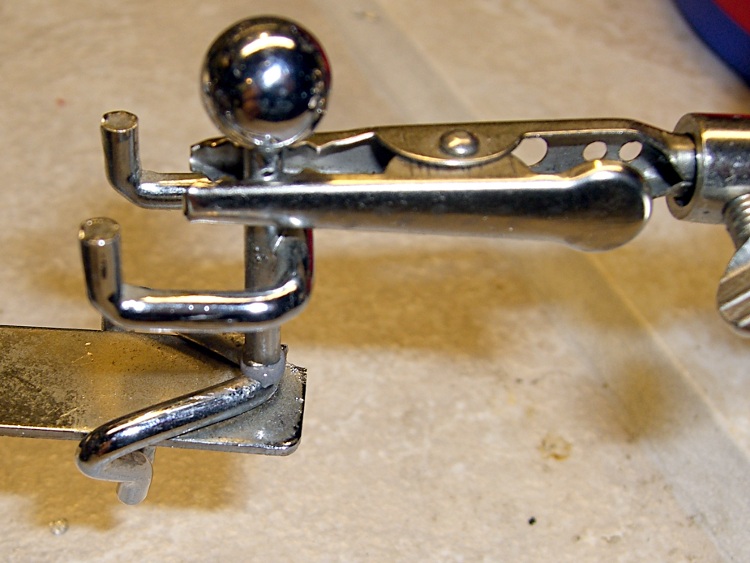
Sometimes I get to do an easy one. This dust collector came with the house and sits on the fireplace; one of the little guys fell off when Mary went on a cleaning frenzy. As nearly as I can tell, he had a bad butt weld (using the exact term) with marginal penetration.
A dot of JB Weld, an uncomfortable overnight stay on the workbench, and he’s as almost good as new. I briefly thought about resistance-soldering him together, but came to my senses: epoxy to the rescue!
The balance point is sufficiently delicate that the additional weight of the epoxy pulls his side down a bit. I’ll call it art and leave it at that, although I should build a little circuit with a proximity sensor and an electromagnet to keep the thing in motion.
See-saw tchotchke repaired
Yeah, that’s my Tau Beta Pi Bent in the background… along with the little glass bead I made in the Corning Museum of Glass a few summers ago.
The front tire (a Primo Comet blackwall) on Mary’s Tour Easy was flat when we rolled out of the garage a few days ago. While a flat isn’t pleasant at any time, it’s much nicer to find one at home, before the ride, rather than out on the road!
I figured the tire ate something sharp that managed to work its way through the tire liner and into the tube; that’s rare, but it sometimes happens. These two pix of the tread show why we use tire liners: sidewall-to-sidewall nicks, cuts, gouges, and gashes, despite the fact that the herringbone tread has plenty of life left in it. Click the pix to enlarge, if you dare…
Tire cuts 1
And another section; it’s like this all the way around the tire. I think this one is the better part of a year old, so it has maybe 2000 miles on it. It handled 200+ miles along the Pine Creek Gorge rail-trail this past summer, which was sharp crushed gravel, but most of the cuts came from roadside debris on our ordinary utility rides around home.
Tire cuts 2
As it turned out, the tire liner had prevented all those punctures from reaching the tube, while killing the tube all by itself. The sharp edge where the the two ends of the liner overlap had worried its way through the tube.
Abrasion from tire liner
The tire liner wasn’t a genuine fluorescent green Slime strip, but some translucent brown thing. The difference: Slime liners are thinner and don’t have nearly this much abrasive power.
Alas, I didn’t have a Slime liner in my stash (remedied with the most recent bike parts order), so I put the brown liner back in with a few layers of genuine Scotch electrical tape to build the end up a bit. There’s really no good way to feather the end without making it into a ragged knife edge.
New tire and tube, of course. I’m not that crazy!
With any luck, the liner and tape will behave for another few years, until the tire wears out, and then I’ll replace everything. Other than this event, flats aren’t a big part of our riding experience.
When I flipped this switch on, it started fizzing and emitting ozone-scented smoke while the lights it controlled flickered. This is not a nominal outcome. I toggled the switch a few times, but it continued to misbehave, so I installed a replacement switch and laid the old one out on the desk for an autopsy.
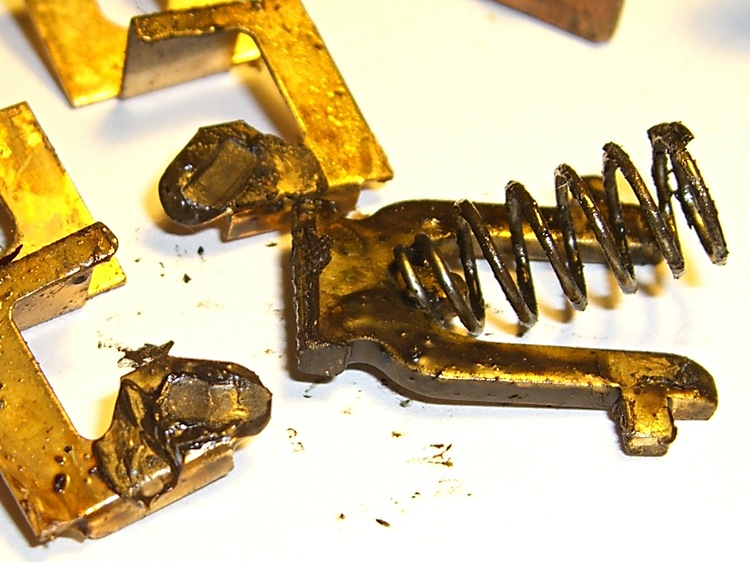
It’s an old-school mechanism, as suits the 1930-vintage structure it came from. The lyre-shaped arch with the spring swings back and forth on its tabs, which rest in the small recesses near the middle of the switch body. The peg on the toggle handle engages the spring, thus providing the over-center snap action.
The switch action takes place at the bottom of the arch, where those two very small tabs stick out. They wipe on the grubby-looking bottom tabs of the oddly shaped flat-brass doodads, the U-shaped ends of which surround the screws that clamp the copper wire to the switch.
I expected to find a scorched contact or perhaps an insect in the mechanism, but nothing seemed out of the ordinary. Apart, that is, from the layer of congealed grease covering everything inside. I suspect the grease was applied in the factory to help prevent contact corrosion, but the volatiles are long gone.
Switch Contacts
A closeup of the switch contacts shows (what I think is) the problem.
All the contact points are covered in grease, but the lyre-shaped gizmo looks like it’s been painted: its contact points were black and resisted cleaning by fingernail scraping.
As nearly as I can tell, all the current passed through a very few high spots that were wiped somewhat clean as the contacts closed. As those spots heated up, the grease melted and flowed over them, increasing the resistance and the heat.
The switch had been working for many decades, as the BX armored cable in the box had fabric-covered rubber (stiff rubber) insulation. I managed to install the replacement switch without breaking the insulation, but it was ugly in there.
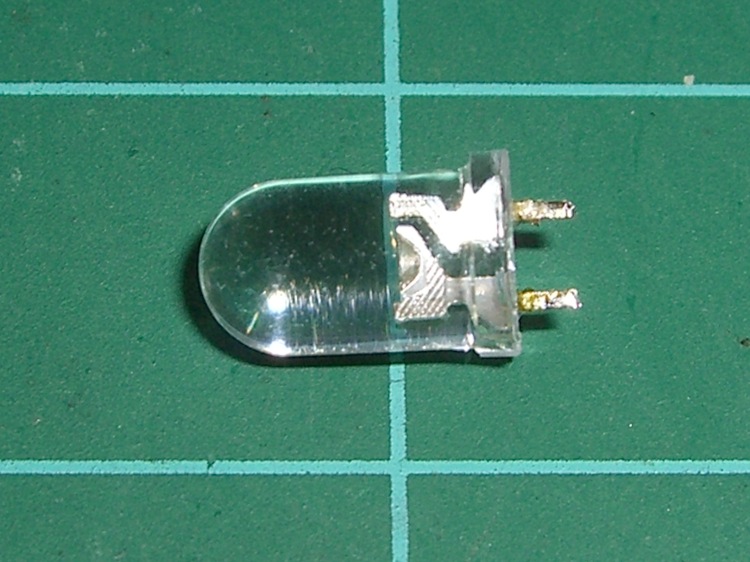
Doesn’t look like much, does it? It’s an ordinary blue LED that I used for the upper colon dot in a clock. Worked fine for a few dozen power-on hours, then it turned off a bit after 6:00 pm one day. Back on an hour later, more or less, then off again by the next morning, back on again, off again.
Might be a software error, as each colon LED is a separate TLC5916 display driver output. Might be a soldering problem, as my board doesn’t have plated-through holes. Might be (shudder) a burned-out transistor inside the TLC5916.
When it’s off, VCC appears on both sides, within a few tens of millivolts.
Resoldered the joints, after which it worked for a while. When it’s on, voltage measurements look normal: about 3.5 V drop across the diode and 1.5 V across the driver transistor.
No obvious code problems, but, then, code problems are never obvious.
Finally the thing stopped working for a few hours. I unsoldered it and there’s no continuity: it failed open. Peering deeply inside with a microscope shows nothing unusual: the flying gold wires look OK, the bonds look flat, and the chip has no burn marks.
Just a bad LED, I suppose. It’s surplus, of course, but that doesn’t mean much these days; there’s a lot of surplus going around.
Soldered in a replacement from the same batch and it’s all good.
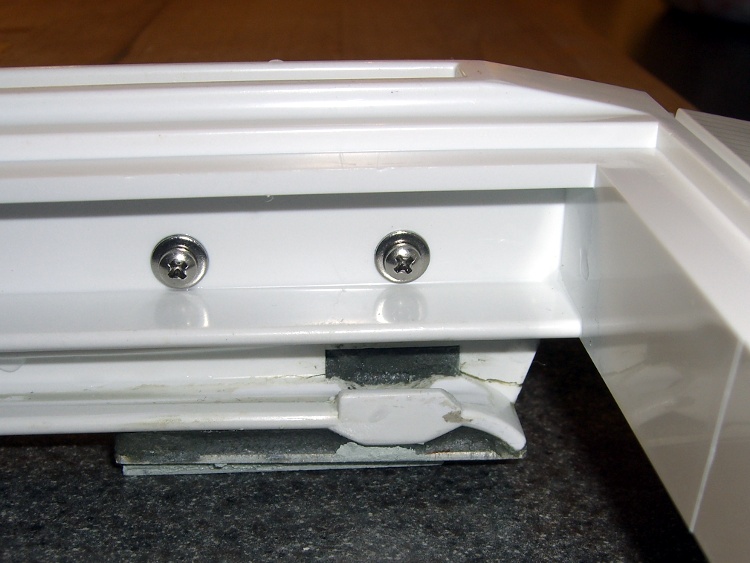
The bottom glass shelf in our Whirlpool refrigerator (the “Crisper Cover”) rests on an elaborate plastic structure that includes slides for the two Crisper drawers. Perhaps we store far more veggies than they anticipated, we’re rough on our toys, or the drawer slides came out a whole lot weaker than the designers expected. I’m betting on the latter, but whatever the cause, the two outside slides broke some years ago.
I don’t know what function the rectangular hole above the flattened part of the slide might serve, but it acted as a stress raiser that fractured the column toward the front. With that end broken loose, another crack propagated toward the rear, so the entire front end of the slide drooped when the drawer slid forward.
The minimum FRU (Field Replacement Unit) is the entire plastic shelf assembly, a giant plastic thing that fills the entire bottom of the refrigerator. You could, of course, buy a whole new shelf assembly, perhaps from www.appliancepartspros.com, but it’s no longer available. Back when it was, I recall it being something on the far side of $100, which made what you see here look downright attractive.
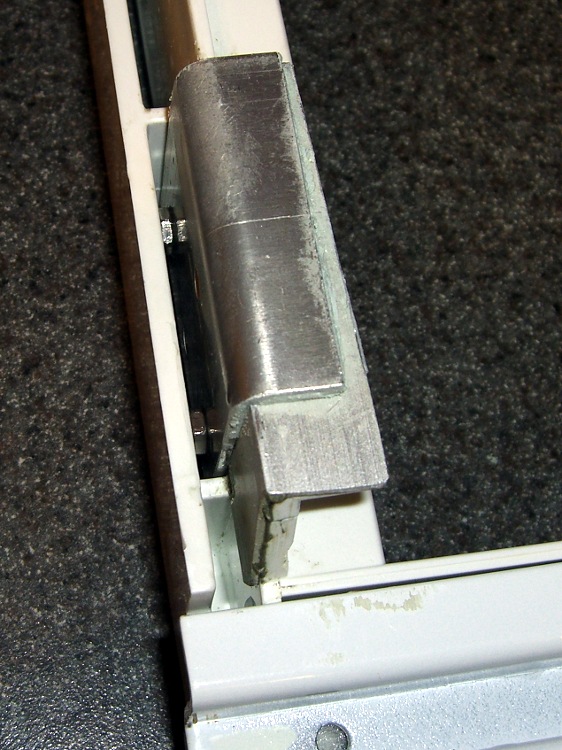
My first attempt at a repair was an aluminum bracket epoxied to the outside of the slide, filling the rectangular opening with JB Industro-Weld epoxy to encourage things to stay put. The plastic cannot be solvent-bonded with anything in my armory, so I depended on epoxy’s griptivity to lock the aluminum into the shelf. That worked for maybe five years for the right side (shown above) and is still working fine on the left side.
Refrigerator shelf bracket – bottom
The right-side bracket eventually broke loose, so I did what I should have done in the first place: screw the bracket to the shelf. Alas, my original bracket remained firmly bonded to the bottom part of the shelf and secured to the block of epoxy in the rectangular hole. Remember, the broken piece didn’t completely separate from the shelf.
So I cut another angle bracket to fit around the first, drilled holes in the shelf, transfer-punched the bracket, and match-drilled the holes. Some short(ened) stainless-steel screws and nuts held the new bracket in place and a few dabs of epoxy putty filled the gaps to make everything rigid.
That’s been working for the last few years. The refrigerator is going on 16 years with only one major repair (a jammed-open defrost switch), so I’ll call it good enough.
The surface-mount serial connector on an Arduino Pro board isn’t the most robust of devices; the FTDI USB interface and USB cable can apply far too much torque to those little pins. Even before the situation described yesterday, the pins were getting wobbly.
The connector shell is a big part of the problem, as it doesn’t mechanically lock the pins in place. Installing and removing the FTDI USB board pushes and pulls the pins against their pads, which means the adhesive bonding the pads must handle all that stress.
Eventually, the Reset and TX pin pads tore loose from the circuit board. At that point, they have no mechanical stability at all; you can bridge a solder blob from the pin to its trace, but the adhesive holding the copper pad in place has lost all strength.
The fix is straightforward, if ugly.
Repair the pin-to-pad/trace connections with something better than a solder blob. I used small snippets of component leads.
Apply denatured alcohol and scrub away all the solder flux around the pads.
Apply enough epoxy to the back of the connector to bond it, the pins, and the circuit board into one mechanically stable unit. I worked the epoxy between the pins and slightly under the connector shell with a small screwdriver and toothpick.
Even with this repair in place, the connector is not particularly robust. It’s much better than it was, so we’ll count it as a win.
This Arduino Pro has survived several projects, hence the hideous solder blobs here & there. I suppose I should just throw the poor thing away, but … that’s not my nature.
Our snowthrower rests the entire weight of the front end on a pair of skid shoes, which erode against the asphalt driveway. Replacements cost nigh onto eleven bucks each, which activates my cheapskate gene.
Worn OEM skid shoes
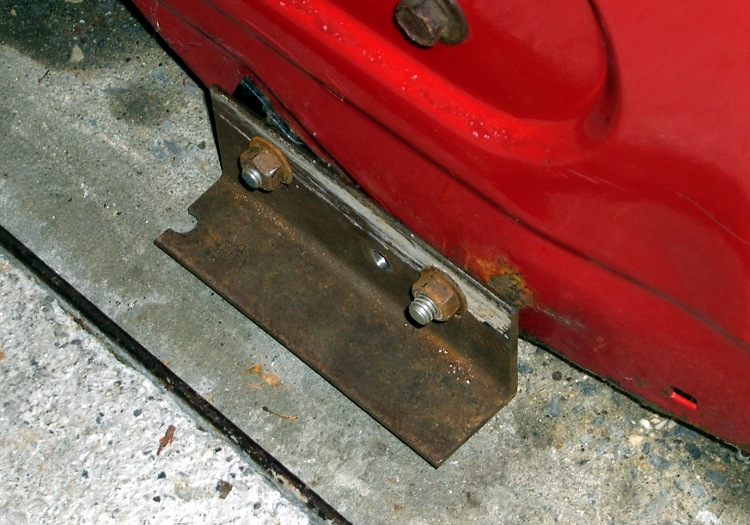
You can see from the markings that the slots are about twice as long as they need to be, so I figured I could replace them with some random angle iron. Might not last as long, but far less expensive.
Bedframe skid shoe
Having a nearly infinite supply of bedframe steel in the heap, I chopped off two suitable lengths, poked 3/8″ holes into the appropriate spots, then milled short slots to get some adjustability.
Bedframe steel is about the nastiest stuff you (well, I) can still machine: high carbon, fine blue-hot chips, and hard edges. It might actually be better-suited for skid shoes than the soft steel OEM parts.
They’re not pretty, but the driveway hasn’t complained yet.
The only real problem is that those sharp corners snag on the edges of what we loosely term “the lawn”. I should apply the smoke wrench, miter the corners, and bend the edges upward. If I’m going to all that trouble, I should also hitch up the buzz box and wave some hardfacing ‘trodes over the bottom.
But that’s in the nature of fine tuning and sounds a lot like work.