Ed Nisley's Blog: Shop notes, electronics, firmware, machinery, 3D printing, laser cuttery, and curiosities. Contents: 100% human thinking, 0% AI slop.
So I bought 530 bucks worth of new tires for the van; it’s ten years old with 66k on the clock. Picked the most suitable ones:
Near the top of the Consumer Reports list
Best constellation of features for our use
Available at the local tire shop
CR is essentially the only place that does actual across-the-board tests; you can disagree with their methodology, but it’s pretty much the only game in town.
I wound up at the local tire shop after bouncing off one of the online sources. In this case, tire + shipping + installation costs more online; the local shop was one of the online source’s installers.
So I went direct. They’re aboveboard: the balance + installation charge is the same no matter where the tires come from.
Had a 10:00 appointment and it took 90 minutes to get out of the shop. Not impressed.
The tire pressure monitor light came on halfway home. Well, OK, maybe it’s noticed the tires are bigger? But it’s a differential rotation counter, sooo… that’s not the problem.
Checked the pressure after letting the tires cool off for a few hours.
37 – Left rear
32 – Right rear
40 – Left front
34 – Right front
The pressure monitor was definitely doing its job!
Adjusted them all to 36 psi (hard, but we’ll see how it rides), reset the monitor, and it’s all good.
Factory trained and certified mechanics, my obscene-gerund deleted-noun.
Oh, and the lug nuts were evidently tightened by Andre the Giant… gotta break those suckers free before we do much more driving!
All eight cells were within 3 mV of each other, so I sorted them by voltage and picked two from the middle of the lineup. Shorting them together in parallel produced a few microamps of current, so they’re as well matched as seems reasonable.
Rather than attempt to solvent-bond the case back together, I wrapped a layer of Kapton tape around the whole thing. The case doesn’t have quite enough meat to bond, anyway, because the width of the slitting saw turned that much plastic into dust.
A bunch of cutouts along the bottom edge key it into the charger, so I cut out the tape over those sections. Despite what it looks like, the small metal tab between the two terminals (on the top) is not covered in tape; that’s the snazzy InfoLithium contact that tells the camera that this is a valid battery.
The camera reported the pack had about 15 minutes of life remaining, which makes sense given that the cells spent quite a while in transit. I ran it down to empty, put it in the charger, and it seems to be perfectly happy. I’ll do a capacity test after a round or two of picture-taking.
I doubt the tape will prove to be a permanent fix, but as far as the camera is concerned, that slick Kapton makes it go in and out like anything…
Went to roll the bike out of the garage and the rear tire was dead flat. You don’t even need to look at the tire, you just instantly know something’s wrong: the bike feels funny with a flat tire.
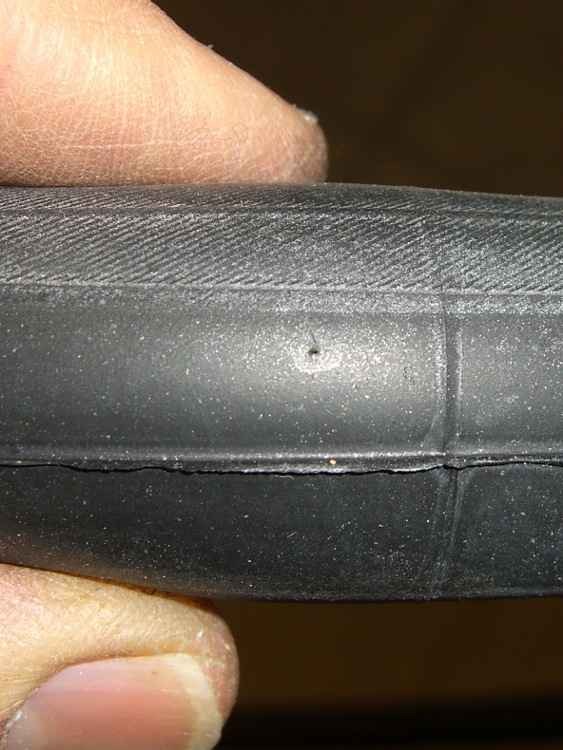
The picture shows the problem: a pinhole in the tube. Nothing penetrated the tire, nothing went wrong with the tire liner (you can see this was a few mm from the edge, so it’s not an abrasion flat), there are no problems anywhere. Just a tiny hole in the tube.
As nearly as I can tell, the tube simply failed at that point, without any external aggravation.
Popped in another tube and it’s all good, but … I guess it’s time to buy some new tubes: the new one came from a box dated May 90.
Finding a flat in the garage is much much better than finding a flat on the road.
So Mary was going to apply the long-disused Sears Craftsman electric hedge trimmer to the decorative grasses she’d planted on either side of the (equally disused) front entry, but when I deployed the thing it didn’t run. A quick walk through the debugging tree: GFI green, extension cord OK, so it must be the trimmer.
Off to the Basement Laboratory Repair Wing…
Two tricks to getting it apart, after removing all the obvious screws:
The handle comes out of the sockets after great persuasion
Remove two of the three hex-head-with-lockwasher screws on the bottom and the case pops apart. The third screw holds the motor plate into that half of the case.
The switch is, of course, not intended to be repairable, but that’s something of a motivator around here. It uses those awful poke-and-pray spring clamps, which you could, in principle, release with a small screwdriver, but I cut the wires on the motor side of the switch, leaving plenty of room to graft connectors onto them.
Next time, I’ll be able to release the wires more easily.
Congealed grease on switch contacts
A rivet holds the switch together, but attacking it with a drill removed enough of the head that I could whack the rest of the body out with a drift punch. A 2-56 machine screw fits neatly into the hole and there’s enough clearance on both sides for the screw head and a nut; hack the screw to length with a Dremel abrasive cutoff wheel.
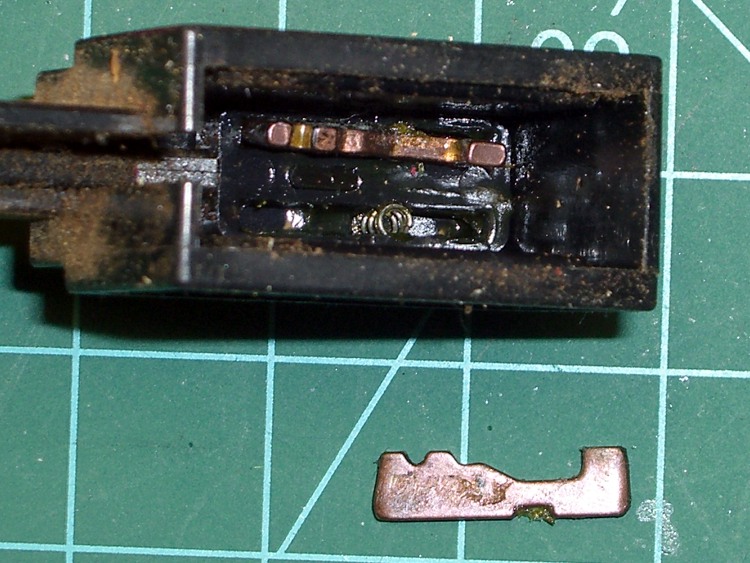
Notice that the switch trigger button visible from outside the case acts on a push rod that slides the movable contacts (in the top part in the picture) back-and-forth atop the copper contacts (with the wires). A pair of springs loads the movable contacts against the copper strips.
The problem turned out to be, as expected, congealed grease inside the switch. The black gunk on the right halves of the copper contacts was essentially solid; you can see that it formed a nice insulating layer. I cleaned that out, polished up the moving contacts, reassembled it, and … the switch still didn’t work.
At least I discovered that with an ohmmeter, before reassembling the entire trimmer!
Switch contact slider
The movable switch contacts have a small ramp, just about in the middle, that rides up on the black hump between the copper strips when the trigger button is released. That mechanically breaks the connection, but also allowed the grease to congeal in the air gap. The grease also formed a lump that prevented the movable contacts from pressing firmly against the copper strips, despite the springs.
I gnawed out that crud with a small screwdriver, dabbed on more contact oxidation prevention grease, buttoned it up again, and now the switch works perfectly again.
New switch wires
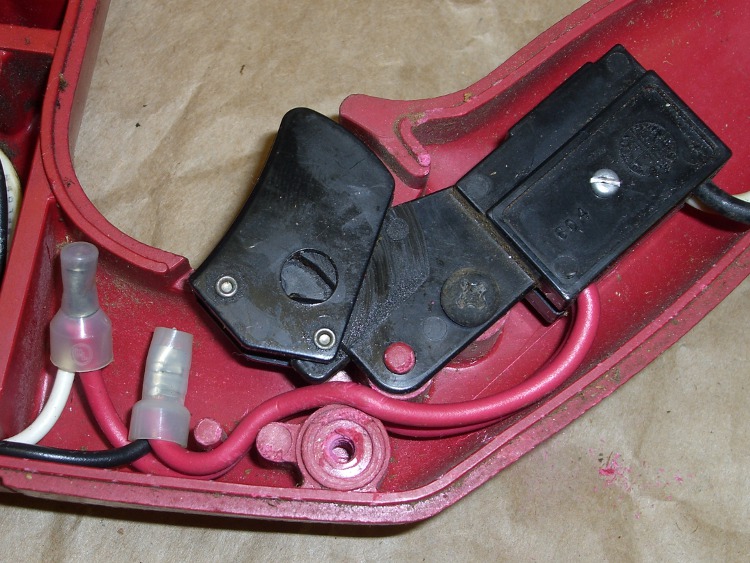
I spliced in somewhat longer lengths of hookup wire with butt-splice connectors I’ve had for years and it’s all good.
The post with the screw hole just below the wires matches another in the opposite half of the case; the post actually fits inside the ring you see here, so it doesn’t crunch the wire. However, the wire must be pushed in far enough to avoid interfering with the switch action rod.
I tote around an ancient Palm Zire 71, which suffices for my simple calendar & to-do lists. This is my second, as the first failed when the flexible cable connecting the guts to the charging / USB connector crapped out; turns out that the slide-to-open feature that reveals the crappy camera also stresses the flexy cable to the breaking point. Now I don’t do that any more.
The battery (well, it’s actually a single Li-Ion cell, but let’s not be pedantic) finally stopped taking a charge, so I did a full backup, tore the thing apart, and popped in a new battery. This being my second Zire 71, things went smoothly…
I got a stack of surplus Palm batteries some years ago, but they’re readily available from the usual suspects for prices ranging from $5 to $50. We’ll see how well mine survived their time in isolation.
The connectors don’t match, which means you just chop off them in mid-wire, then solder the old connector onto the new battery. A few dabs of Liquid Electrical Tape and it’s all good.
Some teardown instructions are there, with fairly small pix.
General reminders:
Stick the teeny little screws on a strip of tape
Watch out for the tiny plastic switch fin on the side
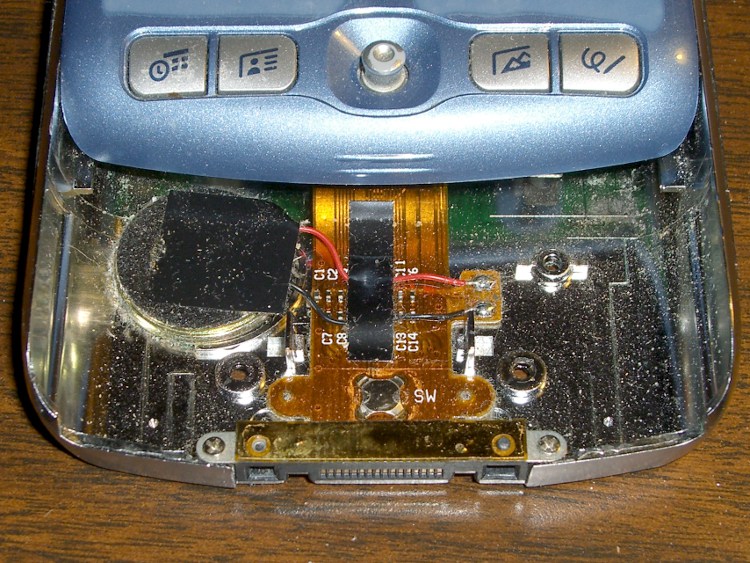
Torx T06 screws on either side of the camera
The silver shield around the shutter button snaps under the sides with more force than you expect
There’s a metal strip over the connector that can be taped back in place after the plastic posts snap off
Gently pry the flexy cable up off the base, using the tabs on either side
The speaker seems to be held in with snot
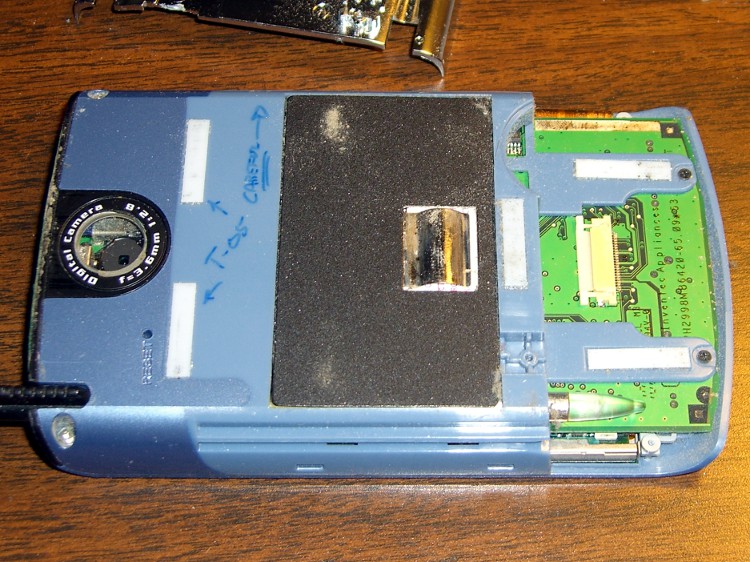
The battery shield is not soldered in place!
The battery adhesive comes off with a sloooowww pull
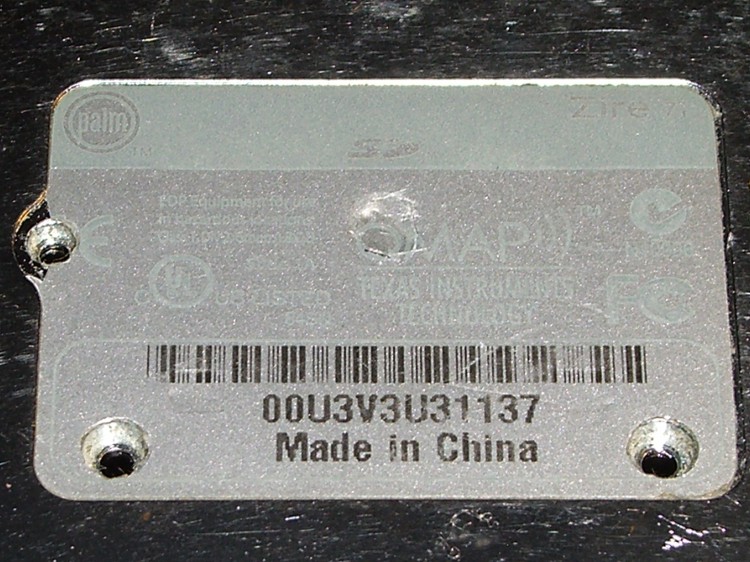
Screws under label
Components around shutter button
Back side
Although it may not be obvious, I replaced the crappy plastic window over the camera with a watch crystal. Much better picture quality, although much worse than my pocket camera.
Backup and restore with various pilot-link utilities:
The latch closing my tea ball consists of a nice stainless steel dingus held on by a grotty rivet of unknown provenance that I’ve repeatedly staked over the years. It finally came undone this morning, so I had a few minutes of Quality Shop Time right after breakfast.
My tiny-screw box (left over from the long-gone Leichtung Workshops) has some stainless 0-80 screws that I found somewhere, but only brass nuts. Ah, well, we used to use brass water fixtures and lead pipe, so an 0-80 nut in hot water isn’t going to kill me.
The ball rim has a recess for the rivet head, but the screw head was slightly larger. I braced the rim of the ball across the vise jaws and give the recess a few shots with a fat punch to enlarge it.
Stainless screw and brass nut
Then…
A dot of Loctite on the threads
Assemble everything
Take it apart to put the latch on the correct side of the rim
Reassemble
Attempt to close
Gently bend the rim to flatten it out
Close
Attempt to latch
Brace closed rim on vise opening with screw head up
A few shots with a drift punch to settle recess around screw head
Success!
It seems I ain’t worth a damn in the morning without a hot cuppa. The rituals must be preserved.
I tossed the ball in the dishwasher and opted for a tea bag today…
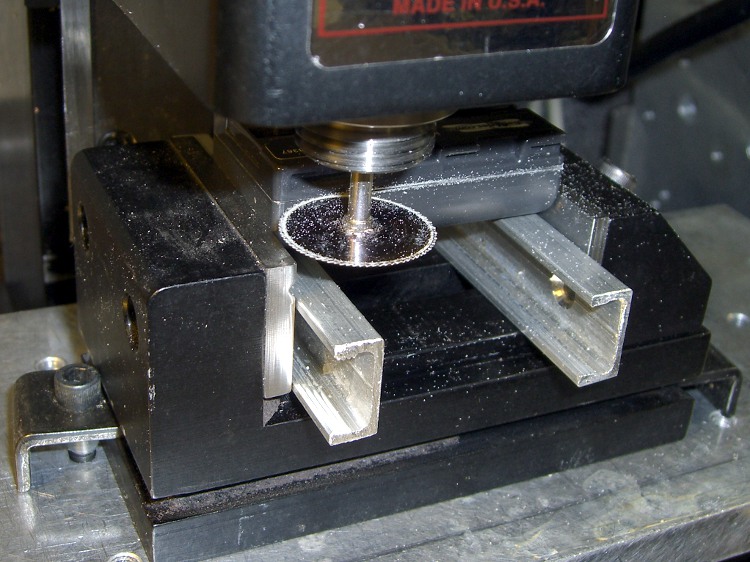
Just for curiosity’s sake, I applied a slitting saw to the oldest defunct generic NP-FS11 battery pack, cutting carefully along the bonded joint between the two parts.
No coolant, 1000 rpm, 200 mm/min, the saw is 22 mm diameter. Much slower than you’d use if you were in production, but I’m not.
First cut all the way around at 0.5 mm inside the case, then another pass at 1.0 mm. The second cut went ting as it passed the tabs at the base of the cells, so I knew the halves were released.
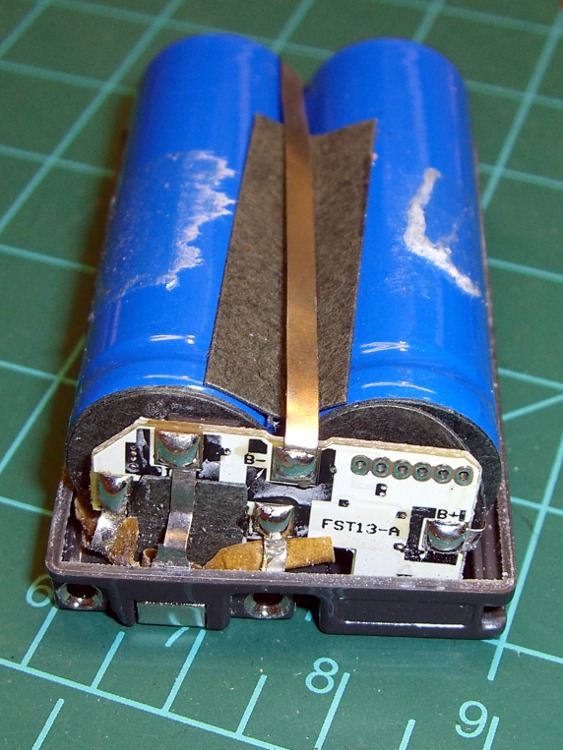
Inside we find a pair of 14430 Li-Ion cells, wired in parallel, with a little protection circuit board just jam-packed with teeny parts. One may reasonably assume the circuit controls over-charge and over-discharge, as well as current limiting.
Pack opened
So a reasonable (or, perhaps, amusing) thing to do would be to buy raw cells from a nominally reputable supplier, do a heart transplant, and see if that improves the situation.
Protection Circuit – Outboard
Photos of the protection PCB, showing the cell connections. Positive end of the cells is toward the PCB. I think there’s enough clearance in the camera’s battery compartment to allow a wrap of tape around the case in lieu of re-bonding the plastic together.