Ed Nisley's Blog: Shop notes, electronics, firmware, machinery, 3D printing, laser cuttery, and curiosities. Contents: 100% human thinking, 0% AI slop.
We have a bunch of Hobo Data Loggers recording various & sundry temperatures, humidities, and light levels around the house; as the saying goes, “If you observe something long enough, it turns into science.”
Normally the things run on single CR2032 lithium cells, which last for a good long time. However, Something Happened to the one that’s collecting groundwater temperatures at the water inlet pipe from the town supply: it started eating lithium cells like potato chips.
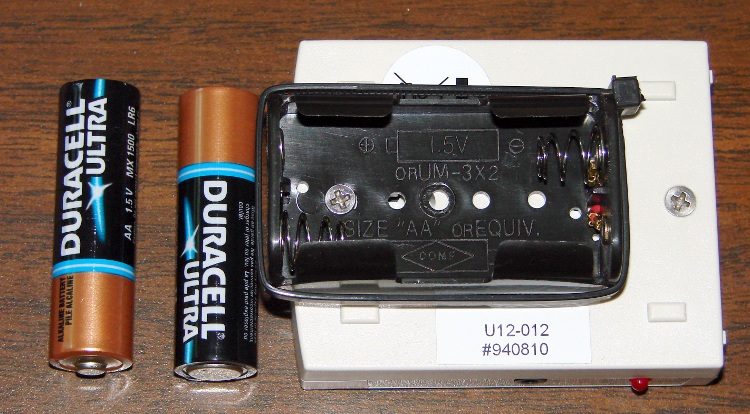
Hobo Battery Mod – Inside View
It was still producing good data, so I was loathe to toss it out. Instead, I figured all it needed was more battery, as a high current for a lithium cell doesn’t amount to much for an AA cell. A pair of alkaline AA cells produces just about exactly 3 V and the data logger can’t tell the difference.
So I opened the logger one last time, soldered the wires from a dual AA cell holder to the appropriate points on the circuit board, affixed the holder to the back with one of the case screws, and it’s been working fine ever since.
However, this seems like one more application where whatever plastic they thought would last doesn’t: the AA holders routinely split at the ends. Maybe the joint should be thicker, maybe it’s the wrong plastic for the job, but without the cable tie acting as a belly band one end of the holder splits off in a year or so. Bah!
Update: Maybe I got a batch of bad CR2032 cells, as the logger’s current seems to be just about right. Read the comments and then check the followup there.
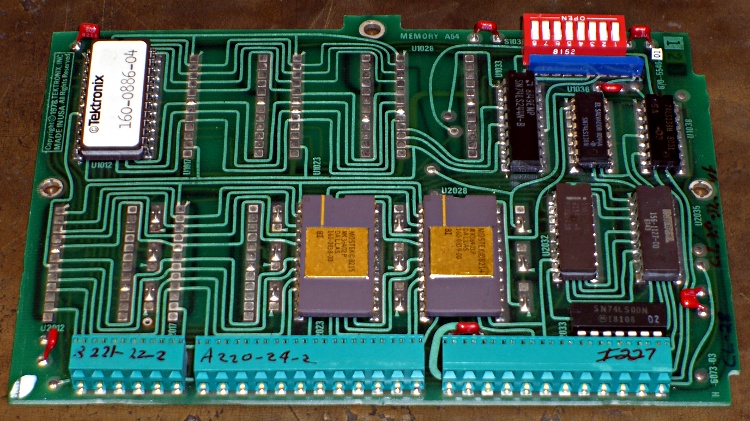
Having gotten my buddy Eks back on the air with new EPROMs for his Tek 492 spectrum analyzer, here are the Tek 492 ROM Images (← that’s the link to the file!) you’ll need to fix yours.
[Update: the comments for that post have pointers to other images and a clever hack to use a standard EPROM. If you’re not a stickler for perfection, that’s the way to go.]
They’re taken from a “known good” Tek 492, so they should work fine: the firmware verifies the checksum in each chip as part of the startup tests; if it’s happy, we’re happy.
Because WordPress doesn’t allow ZIP files, I tucked the HEX files into an OpenDocument file that also contains the pinouts and some interposer wiring hints & tips.
If you’re using the OpenOffice.org word processor, you’re good to go. Open the document and get all the instructions you need to extract the files and put them to good use.
If you’re not using OOo, then choose one of:
Install OpenOffice.org (it’s free software, so kwitcher bitchin’)
Futz with whatever Microsoft claims will import ODT files (if it doesn’t work, don’t blame me)
Just extract the HEX files and do whatever you want (if you know what you want)
The trick, explained in the document itself, is that ODT files are just ZIP files with a different file extension, so any unzip program will unpack them. You won’t see the HEX files in the document, you must apply unzip to the ODT file itself.
After unzipping, you’ll find three HEX files in the directory that originally held the ODT file, along with the collection of files that make up the OpenDocument document.
Oh, if you haven’t already figured it out, the DIP switch on your board is also bad. Saw the damn thing apart with a Dremel tool, pry off the debris, unsolder the pins, and install a new one. Just Do It.
Being cyclists, we were doing the resuable-water-bottle thing long before it became trendy, but now that we use hydration packs, we just tote bottles along when we’re driving or on some other sort of outing. Eventually the bottles wear out / get lost and we page a new one in from the essentially infinite stash in the bottle cupboard.
This one had a cap that simply couldn’t be pried open with bare hands, no how, no way. I eventually got it open by main force and the threat of high temperatures.
Turns out there were two problems: the aperture in the pull-up ring is a wee bit small on the sealing nub and the ridge on the screw cap is about two wee bits large for the recess in the ring.
The former succumbed to an O (letter Oh) drill, which I pulled & pushed through the hole by hand to enlarge the aperture from 0.320 to 0.332. It still seals reasonably well, although it’ll pee a thin stream under more pressure than you should apply to such a bottle, which means I put a slight scratch on the aperture.
The latter required gently shaving the ridge with a box cutter (gasp). It’s still rather stiff, but entirely workable. That doesn’t affect the seal, because the ring’s skirt is a snug fit against the screw cap.
Why not just throw the fool thing out? After all, it’s just a freebie water bottle…
We run on the “Use it up, wear it out, fix it once, wear it out again, then put it on the shelf because maybe you can use the parts for something” principle.
Now, that’s not the way things are done these days, but it works for us…
The front ball joint on the mirror on Mary’s helmet loosened enough that the mirror blew out of position every time we got up to a decent traveling speed. I’ve repaired these mirrors several times before; they’re plastic and tend to fracture / wear out / break at inconvenient moments.
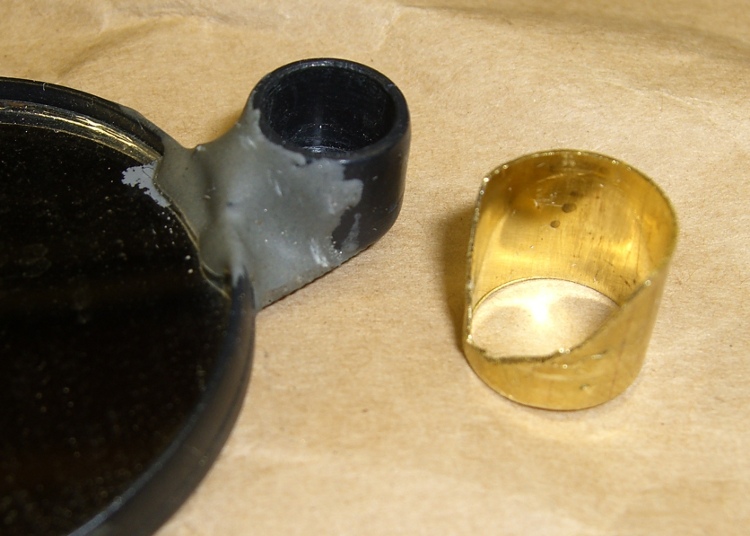
The first pic shows the mirror (the black surface is reflecting the dark floor joists overhead) with an old blob of epoxy that repaired a break in the outer socket. The socket originally had stylin’ curves joining it to the mirror, which proved to be weak spots that required epoxy fortification.
This time the socket split axially on the side away from the mirror, which released the pressure on the ball socket that seats into it. I found a chunk of brass tube that fit snugly over the socket, then carved some clearance for the existing epoxy blob. The key feature is that the tube remains a ring, rather than a C-shaped sheet. to maintain pressure around the socket.
Clamping the reinforcement ring
Here are the various bits, with the reinforcing ring clamped in place. I coated the socket exterior with JB Weld epoxy, slipped the ring in place, and tapped it down with a brass hammer to seat flush with the front face of the socket. That left gaps between the socket opening and the tube that I eased more epoxy into with an awl. A bit more epoxy around the exterior smoothed over that ragged edge.
The strut at the bottom of the picture ends in a ball joint held by a socket that slips into the mirror socket. The loose brass ring above the mirror is some shim stock that I added some years ago to take up slop between the ball socket and the mirror socket and tighten the ball joint. I suppose that pressure eventually split the outer socket, but so it goes.
Repaired mirror joint
The clamp squished the outer socket enough to snug it around the ball socket, so when I reassembled the mirror it was fine. To be sure, I dunked the ball in my lifetime supply of Brownell’s Powdered Rosin for a bit more non-slip stickiness.
I have a box full of defunct bike helmet mirrors, dating back to those old wire-frame square mirrors that clamped onto the original Bell helmets. The newer plastic ones just don’t last; we ride our bikes a lot and even fancy engineering plastic isn’t nearly durable enough. A few bits of metal here and there would dramatically improve the results!
I’m going to build some durable wire-frame mirrors, but … this will keep us on the road for a while. I suppose I should make a preemptive repair on my helmet mirror while I’m thinking of it…
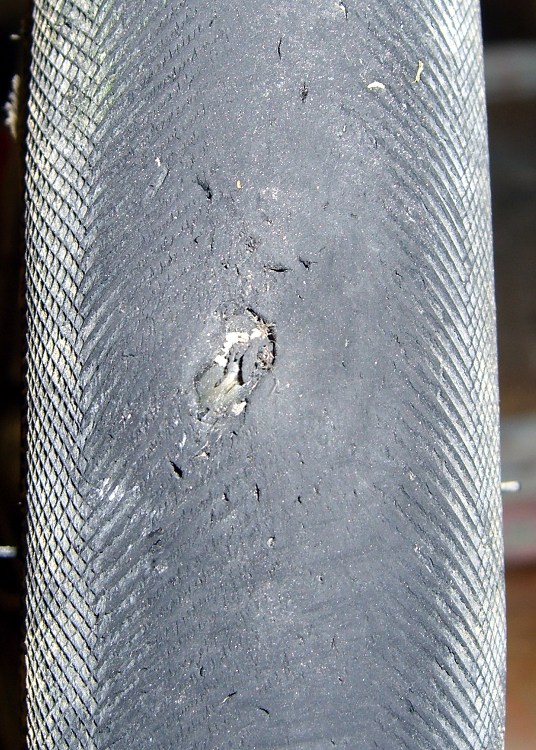
A glass chip gashed the front tire of my bike a while ago, but the slit didn’t cut the Kevlar belt underneath and I let it slide. The pre-ride check before our 50-mile day trip to Old Rhinebeck Aerodrome showed that things had gotten worse (the tire liner was peeking out through the belt), so I replaced the tire before we set out.
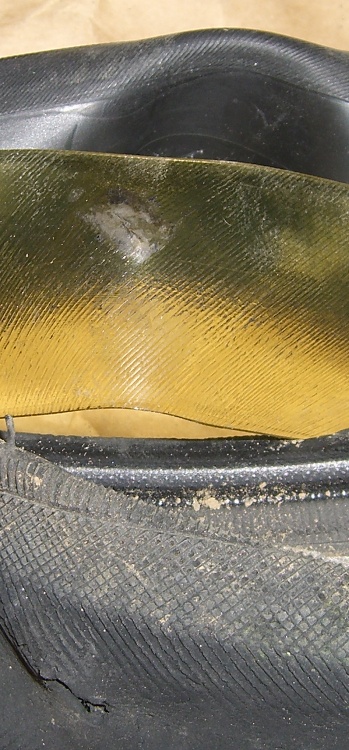
Tire liner abrasion
This pic shows that the tire liner was doing its job, although it was slightly abraded and had picked up some road grit. The tube had a barely visible mark.
I generally use fluorescent green Slime tire liners, but this one is a competing brand I picked up a while ago. Not much to choose between the two, although I think Slime liners have a better edge taper and tend to be more flexible.
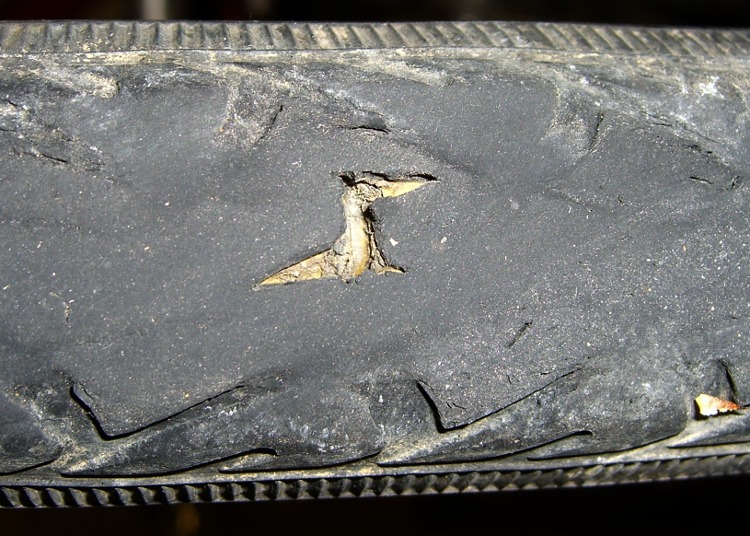
Notice the other nicks and gashes in the tire tread? We run Schwalbe Marathons on the rear and Primo Comets on the front, both have Kevlar belts. Flats are not a problem any more, even with plenty of sharp road debris; I replace the tires every two years or so when the tread wears smooth or a major gash worries even me. My rule of thumb: when I can see the liner, it’s time to replace the tire.
Tread gash – Schwalbe Marathon
There are riders who argue for very lightweight tires on the basis of performance: better acceleration and lower rolling resistance. I’m willing to trade all that off against not having to dismount a tire by the side of the road…
[Update: Plenty more posts on this general subject, with graphic illustrations of tire damage. Search for liner and you’ll find ’em.]
Usually I replace the blade on my ancient (cast iron!) 14-inch Delta band saw when I can no longer force it through the thing-to-be-cut, which means every few years, tops, unless I procrastinate. Having just stripped the teeth off a foot of blade, it was time for a replacement long before one was due…
The first step is whacking off 93″ of blade from the 100-foot coil I bought ever so many years ago, using a cold chisel on the vise’s anvil surface. If you’re fussy, wrap a piece of duct tape around the ends-to-be so they don’t fly away after the cut. Otherwise, just enjoy the twang and risk some ritual scarification.
Scarfing the blade ends
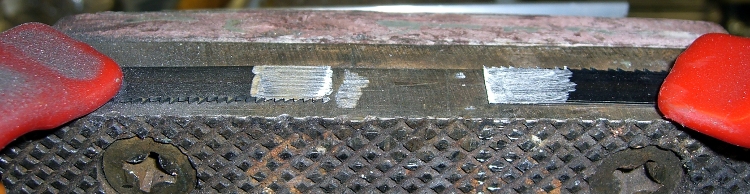
Clamp the blade to the top of the vise with a half-twist so opposite sides face up, then scarf both ends about halfway through, so the finished joint will be more-or-less the same thickness as the rest of the blade. Chuck up a grinding wheel / cylinder in your Dremel-tool-like gadget, go slow so as to not overheat the joint, and shower your workbench with steel dust.
To emphasize: note that the teeth face this way on one end and that way on the other! You might want to butt the ends together, but I’m not sure I could get the taper thin enough in the middle that way. You want to cut about halfway through the width of the teeth, too, because they must overlap in the finished joint.
Preparing solder foil
I use a homebrew resistance soldering gadget, but a honkin’ big soldering gun might work. In any event, solder foil works better than solder wire, so I put a snippet of Brownell’s Hi-Force 44 4% silver solder (far more expensive now than when I bought that 1-lb spool long ago) in a stainless-steel sleeve and massage it with a hammer. Crude, but effective: the point is to keep the solder clean, which doesn’t happen when you just whack it on the anvil.
Aligning and clamping blade ends
However you do the joint, you must align the blade ends so they’re collinear: you do not want a kink in the middle of the blade. This setup reflects my soldering gear: a graphite slab clamped to a brass plate caught in the vise, an aluminum channel for alignment, and a pair of battery clamps to hold the blade in place. I apply paste flux to both sides of the joint and poke the solder foil into the flux, too. If you squint, you can see the trimmed-to-fit solder foil lying atop the scarfed edge.
Resistance soldering
Slide the right side over the left, make sure the teeth on both ends overlay each other, clamp in place, check the alignment, and apply heat. This is a slightly staged shot showing the carbon gouging rod in position well after the joint has solidified. The key advantage of resistance soldering is having a footswitch so you can hold everything in position while the joint cools.
Thinning the joint
Clamp the finished blade to the vise and thin both sides to the width of the rest of the blade. If you’ve done a better job of scarfing than I usually do, this is just a matter of tapering the edge a bit. The pic shows the first surface I thinned, so there’s some flux hanging in the teeth. That’ll vanish as you cut if you don’t clear it off while thinning.
Finished joint – victim's view
The end result should look like this, as seen from the victim’s position in the bandsaw: no lumps, no bumps, nothing sticking out on either side.
The whole process takes about half an hour, what with clearing space on the workbench, setting up the soldering gear, deploying the Dremel tool, and cleaning up a bit afterward. That would be crazy in a production environment, which is why they have blade welders bolted to the side of the bandsaws, but it’s OK for something I do every few years.
I formerly used a propane torch and a fixture to align the pieces, but the resistance soldering unit eliminates the flame and delivers a much better result because it compresses the joint while the solder cools.
Side views, just for completeness…
Finished joint – left sideFinished joint – right side
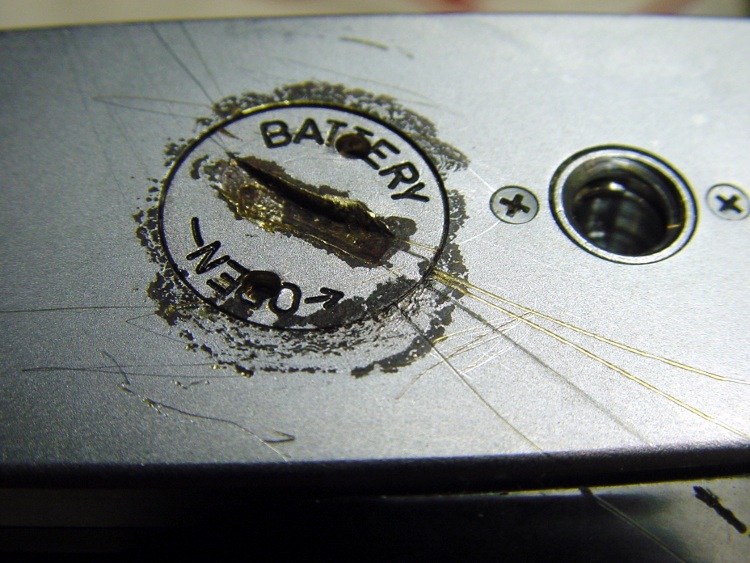
Some years ago a friend brought a favorite old camera that he’d just rediscovered. As you might expect, the exposure meter battery had long since died and its lid was rust-welded in place. Alas, he’d tried and failed to remove the lid by applying, mmmm, inappropriate tools to the coin slot.
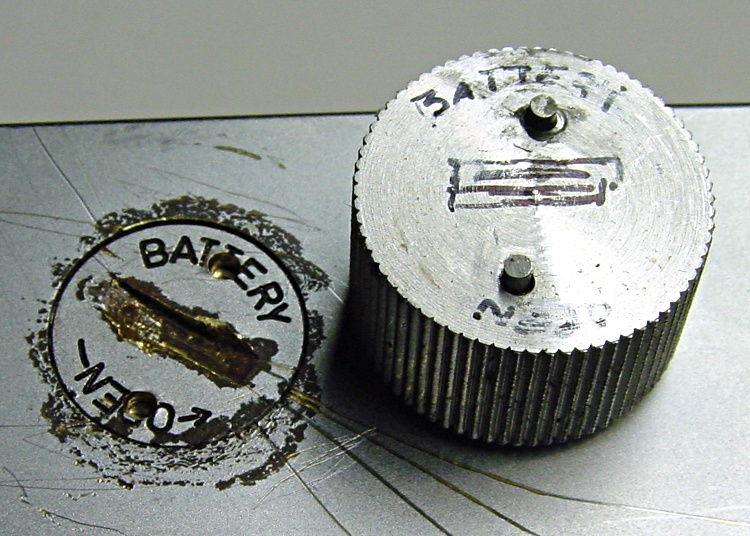
I proposed building a quick-and-dirty pin wrench from an aluminum knob, which requires a matching pair of holes in the lid. Given that the lid was already pretty well pooched, he had no objection.
IIRC, I laid a strip of masking tape over the lid, laid out the holes perpendicular to the slot, then drilled them out by eyeball. The trick is to avoid drilling into the battery; it’s likely all dried out by now, but there’s no reason to release any more of that glop than absolutely necessary.
Battery cover wrench
Then I turned the threaded boss off the bottom of the knob and drilled two slightly larger holes separated by the same distance. This would be ideal for manual CNC, but I didn’t have the Sherline at the time, difficult though that may be to imagine.
When you can’t do precision work, epoxy is your friend.
Lay new tape over the battery lid
Cut two lengths of music wire with a diameter to match the holes in the battery lid using a Dremel abrasive cutoff wheel
Stuff the wire stubs into the holes, wipe off excess epoxy
Jam the pins through the tape into the holes in the battery lid
Wait for a few minutes…
You can see the top pin is slightly offset in its hole, but the epoxy ensures that the pins are an exact fit to the lid. The tape prevents the wrench from becoming one with the battery lid. Not drilling into the battery means the pins bottom out on the battery. Music wire means the pins won’t bend; copper wire doesn’t work in this application.
If you’re good with the Dremel, the pins will be not only the same length, but the proper length. IIRC, I made them a bit long and then trimmed them to fit.
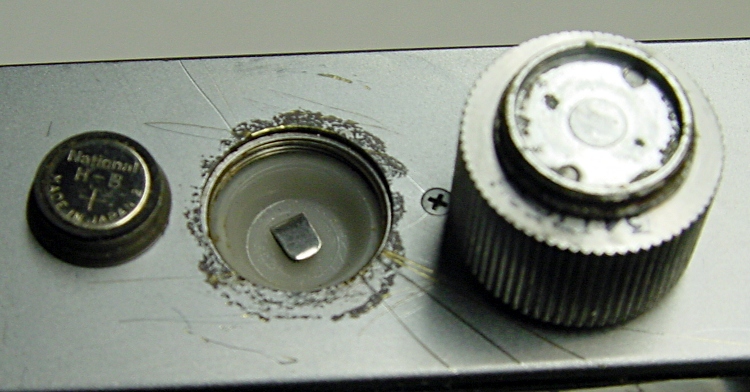
Battery lid removed
When the epoxy cures:
Remove the wrench
Remove the tape
Install the wrench
Twist the lid right off.
Works like a champ!
Much to our surprise, the inside of the battery compartment wasn’t a mass of corrosion and the threads were actually in pretty good shape, all things considered. It’s not clear why the lid was so corroded, but there you have it.
He went home happy… taking the wrench along, although we hope it’ll never be used again.
(I found these pix while I was looking for something else. My close-up technique has improved over the years: a tripod, bright lights, and the smallest possible aperture are my friends.)






 The Smell of Molten Projects in the Morning