The Smell of Molten Projects in the Morning

Ed Nisley's Blog: Shop notes, electronics, firmware, machinery, 3D printing, laser cuttery, and curiosities. Contents: 100% human thinking, 0% AI slop.

Tag: Repairs

If it used to work, it can work again

  • Arduino Mega: Showstopper Workaround

    The discussion following that post gave me enough impetus to figure this out. What I have here is not a complete solution, but it seems to solve the immediate problem.

    Downside: this will not survive the next regular system update that touches the gcc-avr package (yes, it’s the avr-gcc compiler and the gcc-avr package). Hence, I must write down the details so I can do it all over again…

    To review:

    The problem is that the avr-gcc cross-compiler produces incorrect code for Atmega1280-class chips with more than 64 KB of Flash space: a register isn’t saved-and-restored around a runtime routine that alters it. Simple sketches (seem to) run without problems, but sketches that instantiate objects crash unpredictably. Because Arduino sketches depend heavily on various objects (like, oh, the Serial routines), nontrivial sketches don’t work.

    The workaround is to patch the library routine that invokes the constructors, as detailed in that gcc bug report, to push / pop r20 around the offending constructors. The patch tweaks two spots in the libgcc.S source file, which then gets built into an assortment of chip-specific libgcc.a files during the compile.

    I was highly reluctant to do that, simply I’ve already installed the various gcc packages using pacman (the Arch Linux package manager) and really didn’t want to screw anything up by recompiling & reinstalling gcc from source. It’s certainly possible to update just the avr portion, but I don’t know exactly how to do that and doubt that I could get it right the first time… and the consequences of that catastrophe I don’t have time to deal with.

    So I elected to build the avr cross-compiler from source, verify that the as-built libgcc.a file was identical to the failing one, apply the patch, recompile, then manually insert the modified file in the right spot(s) in my existing installation. This is less manly than doing everything automagically, but has a very, very limited downside: I can easily back out the changes.

    Here’s how that went down…

    The instructions there (see the GCC for the AVR target section) give the overview of what to do. The introduction says:

    The default behaviour for most of these tools is to install every thing under the /usr/local directory. In order to keep the AVR tools separate from the base system, it is usually better to install everything into /usr/local/avr.

    Arch Linux has the tools installed directly in /usr, not /usr/local or /usr/local/avr, so $PREFIX=/usr. Currently, they’re at version 4.5.1, which is typical for Arch: you always get the most recent upstream packages, warts and all.

    Download the gcc-g++ (not gcc-c++ as in the directions) and gcc-core tarballs (from there or, better, the gnu mirrors) into, say, /tmp and unpack them. They’ll both unpack into /tmp/gcc-4.5.1, wherein you create and cd into obj-avr per the directions.

    I opted to feed in the same parameters as the Arch Build System used while installing the original package, rather than what’s suggested in the directions. That’s found in this file:

    /var/abs/community/gcc-avr/PKGBUILD
    

    Which contains, among other useful things, this lump of command-line invocation:

    ../configure --disable-libssp \
                   --disable-nls \
                   --enable-languages=c,c++ \
                   --infodir=/usr/share/info \
                   --libdir=/usr/lib \
                   --libexecdir=/usr/lib \
                   --mandir=/usr/share/man \
                   --prefix=/usr \
                   --target=avr \
                   --with-gnu-as \
                   --with-gnu-ld \
                   --with-as=/usr/bin/avr-as \
                   --with-ld=/usr/bin/avr-ld
    

    Yes, indeed, $PREFIX will wind up as /usr

    Feeding that into ./configure produces the usual torrent of output, ending in success after a minute or two. Firing off the make step is good for 15+ minutes of diversion, even on an 11-BogoMIPS dual-core box. I didn’t attempt to fire up threads for both cores, although I believe that’s a simple option.

    The existing compiler installation has several libgcc.a files, each apparently set for a specific avr chip:

    [ed@shiitake tmp]$ find /usr/lib/gcc/avr/4.5.1/ -name libgcc.a
    /usr/lib/gcc/avr/4.5.1/libgcc.a
    /usr/lib/gcc/avr/4.5.1/avr35/libgcc.a
    /usr/lib/gcc/avr/4.5.1/avr3/libgcc.a
    /usr/lib/gcc/avr/4.5.1/avr51/libgcc.a
    /usr/lib/gcc/avr/4.5.1/avr4/libgcc.a
    /usr/lib/gcc/avr/4.5.1/avr6/libgcc.a
    /usr/lib/gcc/avr/4.5.1/avr5/libgcc.a
    /usr/lib/gcc/avr/4.5.1/avr31/libgcc.a
    /usr/lib/gcc/avr/4.5.1/avr25/libgcc.a
    

    The key to figuring out which of those files need tweaking lies there, which says (I think) that the Atmega1280 is an avr5 or avr51. Because I have an Arduino Mega that’s affected by this bug, I planned to tweak only these files:

    /usr/lib/gcc/avr/4.5.1/libgcc.a
    /usr/lib/gcc/avr/4.5.1/avr51/libgcc.a
    /usr/lib/gcc/avr/4.5.1/avr5/libgcc.a
    

    I have no idea what the top-level file is used for, but … it seemed like a good idea.

    Now, I innocently expected that the libgcc.a files for a 4.5.1 installation would match the freshly compiled files for a 4.5.1-from-source build, but that wasn’t the case. I don’t know what the difference might be; perhaps there’s an embedded path or timestamp or whatever that makes a difference?

    The Arch Linux standard installation of gcc 4.5.1 has these files:

    $ find /usr/lib/gcc/avr/4.5.1/ -iname libgcc.a -print0 | xargs -0 ls -l
    -rw-r--r-- 1 root root 2251078 Sep  4 16:26 /usr/lib/gcc/avr/4.5.1/avr25/libgcc.a
    -rw-r--r-- 1 root root 2256618 Sep  4 16:26 /usr/lib/gcc/avr/4.5.1/avr31/libgcc.a
    -rw-r--r-- 1 root root 2252506 Sep  4 16:26 /usr/lib/gcc/avr/4.5.1/avr35/libgcc.a
    -rw-r--r-- 1 root root 2256310 Sep  4 16:26 /usr/lib/gcc/avr/4.5.1/avr3/libgcc.a
    -rw-r--r-- 1 root root 2250930 Sep  4 16:26 /usr/lib/gcc/avr/4.5.1/avr4/libgcc.a
    -rw-r--r-- 1 root root 2251846 Sep 27 12:58 /usr/lib/gcc/avr/4.5.1/avr51/libgcc.a
    -rw-r--r-- 1 root root 2251550 Sep 27 12:58 /usr/lib/gcc/avr/4.5.1/avr5/libgcc.a
    -rw-r--r-- 1 root root 2252458 Sep  4 16:27 /usr/lib/gcc/avr/4.5.1/avr6/libgcc.a
    -rw-r--r-- 1 root root 2251474 Sep 27 12:57 /usr/lib/gcc/avr/4.5.1/libgcc.a
    

    The compilation-from-source using the gcc 4.5.1 tarballs has these files:

    $ pwd
    /tmp/gcc-4.5.1/obj-avr
    $ find -iname libgcc.a -print0 | xargs -0 ls -l
    -rw-r--r-- 1 ed ed 2250258 Sep 27 15:51 ./avr/avr25/libgcc/libgcc.a
    -rw-r--r-- 1 ed ed 2255798 Sep 27 15:51 ./avr/avr31/libgcc/libgcc.a
    -rw-r--r-- 1 ed ed 2251686 Sep 27 15:51 ./avr/avr35/libgcc/libgcc.a
    -rw-r--r-- 1 ed ed 2255490 Sep 27 15:51 ./avr/avr3/libgcc/libgcc.a
    -rw-r--r-- 1 ed ed 2250110 Sep 27 15:51 ./avr/avr4/libgcc/libgcc.a
    -rw-r--r-- 1 ed ed 2251838 Sep 27 15:51 ./avr/avr51/libgcc/libgcc.a
    -rw-r--r-- 1 ed ed 2251550 Sep 27 15:51 ./avr/avr5/libgcc/libgcc.a
    -rw-r--r-- 1 ed ed 2251638 Sep 27 15:52 ./avr/avr6/libgcc/libgcc.a
    -rw-r--r-- 1 ed ed 2251474 Sep 27 15:52 ./avr/libgcc/libgcc.a
    -rw-r--r-- 1 ed ed 2250258 Sep 27 15:51 ./gcc/avr25/libgcc.a
    -rw-r--r-- 1 ed ed 2255798 Sep 27 15:51 ./gcc/avr31/libgcc.a
    -rw-r--r-- 1 ed ed 2251686 Sep 27 15:51 ./gcc/avr35/libgcc.a
    -rw-r--r-- 1 ed ed 2255490 Sep 27 15:51 ./gcc/avr3/libgcc.a
    -rw-r--r-- 1 ed ed 2250110 Sep 27 15:51 ./gcc/avr4/libgcc.a
    -rw-r--r-- 1 ed ed 2251838 Sep 27 15:51 ./gcc/avr51/libgcc.a
    -rw-r--r-- 1 ed ed 2251550 Sep 27 15:51 ./gcc/avr5/libgcc.a
    -rw-r--r-- 1 ed ed 2251638 Sep 27 15:52 ./gcc/avr6/libgcc.a
    -rw-r--r-- 1 ed ed 2251474 Sep 27 15:52 ./gcc/libgcc.a
    

    The top-level files have the same size, but are not identical:

    $ diff ./avr/libgcc/libgcc.a ./gcc/libgcc.a
    Binary files ./avr/libgcc/libgcc.a and ./gcc/libgcc.a differ
    

    Haven’t a clue what’s going on with different files in different spots, but I saved the existing files in the installed tree as *.base and copied the new ones from ./gcc/avr* into place. While there are many ways to crash a program, the AnalogInOutSerial demo program ran correctly on a Duemilanova (presumably with the existing libgcc.a) and failed on the Mega (with the recompiled libgcc.a). Save those files as *.rebuild just in case they come in handy.

    Manually change the libgcc.S source file (it’s only four lines, I can do this), recompile, and the build process recompiles only the affected files; that’s comforting. Copy those into the installed tree and, lo and behold, the demo program now runs on both the Duemilanova and the Mega.

    While it’s too soon to declare victory, the hardware bringup program I’m writing also works, so the initial signs are good.

    Thanks to Mark Stanley for blasting me off dead center on this. I didn’t do a complete install, but he got me thinking how to make the least disruptive change…

    And a tip o’ the cycling helmet to the whole Free Software collective for making a mid-flight patch like this both feasible and possible: Use The Source!

  • Tour Easy: Underseat Pack Repair Finished

    So, after a bit more than a year, I replaced the cracked backing plate in the other ERRC underseat pack on my Tour Easy. The first plate held up much better than I expected: hasn’t cracked or poked through the pack fabric.

    This repair followed the same outline, including cutting off the ripped netting on the outside of the pack and marching the pack into the clothes washer for a spin with a few shop rags. Reassembled everything, put it back on the bike, and … the new aluminum extrusion across top  of the plate smacked firmly into the water bottle holder clamped to the rear of the seat frame for the amateur radio.

    Underseat pack vs radio holder
    Underseat pack vs radio holder

    The extrusion is the lump running horizontally, just under the seat cushion. The corner of the pack extended rearward (left) of the water bottle holder’s black plastic body.

    The original flexy plastic pack plate simply bent out of the way, but that’s not going to work now.

    So I loosened the clamp, moved it a bit more to the right, and tightened it up again. I’d originally located it at the far right end of the straight part of the seat frame, so it’s now edging into the curved part that eventually forms the right side of the frame, but it’s good enough.

    My shop assistant says she wants another water bottle holder for an actual water bottle on her bike. I say she should just go to the shop and make whatever she wants, then install it. Negotiations continue…

  • Bicycle Computer Failure: It’s The Connector

    While walking home with the bike, I noticed that the odometer wasn’t matching up with reality. This generally means the front-wheel magnet sensor got whacked out of line and, given that I’d just laid the bike down on that side, that’s what I expected to fix.

    As it turned out, the failure meant it was time for the more-or-less annual contact cleaning. The three tiny contact balls on the bottom of the Cateye Astrale tend to collect enough dirt over the course of a few thousand miles to become intermittent. The balls lead to the wheel and pedal sensors, with a single common wire.

    Cateye Astrale contacts
    Cateye Astrale contacts

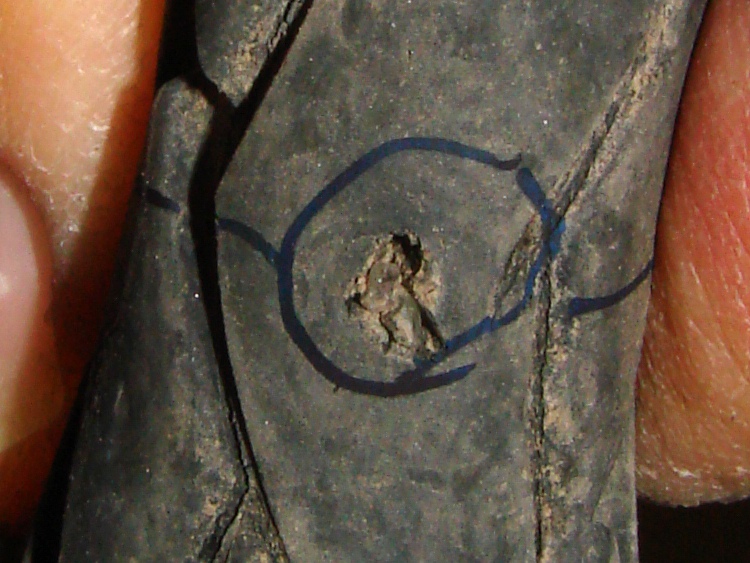
    You can see that they’re not shiny little factory-fresh bumps. Here’s a detail of the upper-right one on the base to the right. Even through the horrors of a tight crop from a hand-held shot, you can see the problem.

    Cateye Astrale - contact detail
    Cateye Astrale – contact detail

    No big deal, just wipe ’em off and apply a bit of DeoxIT to make ’em happy again for another year.

  • Bicycle Tube: Complete Failure

    Glass shard in tire
    Glass shard in tire

    On my way back from a ride around the block the back tire went pfft thump thump thump. I’m 1.5 miles from home: fix or walk?

    The first step: always examine the tire to find the puncture, before you move too far. Finding something sticking out of the tire means you’re well on your way to fixing the flat. Lose the entry point and you’re left to blow up the tire and listen for escaping wind. So I picked up the butt end of the bike, spun the wheel, and this little gem heaved into view…

    That area of the road has seen several collisions in recent months that left the shoulder littered with broken automotive glass. The shard in my tire glistened like a diamond, because one side was flat and mirrored; perhaps it’s from a headlamp reflector or side mirror. The pointy end went into the tire, of course…

    Glass fragment and puncture
    Glass fragment and puncture

    Well, a single-point failure like that is easy to fix, so:

    • remember that the hole is a few inches spinward of the label
    • shift to small chainring / small sprocket
    • get the tool bag out
    • lay the bike down (it’s a recumbent, this is no big deal)
    • release the rear brake
    • release the skewer and whack the hub out of the dropouts
    • apply tire irons to get the tire off
    • pop the tube out and examine the innards

    No pix of any of that, but suffice it to say I was astonished to discover that the glass penetrated the Marathon tire’s Kevlar belt just barely far enough to poke the Slime tire liner, but not enough to leave more than a hint of a mark on the tube. Definitely not a puncture and certainly nothing that would account for a sudden flat.

    That glass shard is not why the tire went flat! Tire liners FTW!

    Examining the rest of the tube revealed this situation a few inches anti-spinward of the glass fragment.

    Failed tube rubber
    Failed tube rubber

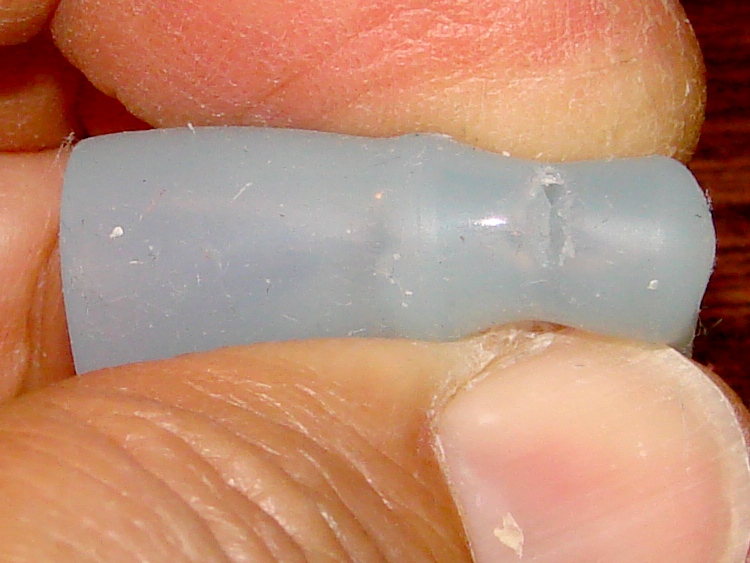
    There’s a row of holes across the tube, with no corresponding tire or liner damage at all. As nearly as I can tell, the tube rubber simply pulled apart across that line, all at once, and the air went pfft just like you’d expect.

    That’s not survivable, but I don’t carry a spare tube (well, two spare tubes: 700x35C rear and 20×1.25 front) on rides around the block. Long bike tours? Yup, spare tires & tubes because I’m that type of guy.

    Anyway, I’ve got the tube in hand, so what’s to lose? Scuff it up with the sandpaper and yipes

    Tube after scuffing
    Tube after scuffing

    What’s not obvious in the picture is that all those little spots around the big holes are pinholes. The whole area of the tube must have gotten just barely enough rubber to cover the mold.

    I know as well as you do this isn’t going to have a happy outcome, but I slobber on the cement, let it dry, squash on a big patch, install the tube & tire, fire a 16-gram CO2 cartridge into it, and … it doesn’t seal.

    The tube is several-many years old, probably from whoever was supplying Nashbar at the time, and it served well, so it gets a pass. I’d rather tubes fail in the garage than on the road and sometimes they do, but that’s not the usual outcome.

    My ladies were out gardening at the time and a long wheelbase ‘bent isn’t the sort of thing you can stuff into a friend’s car. Not to mention that my ladies had the magic phone.

    So I walked home.

    Sometimes a man’s gotta do what a man’s gotta do.

    Memo to Self: Schwalbe tube at 8910. Reversed(*) the Marathon’s direction.

    (*)They’re directional, but when they get about halfway worn I don’t see that it makes much difference. The rear tire on my bikes wears asymmetrically: probably too many tools in the left underseat bag.

  • Soap Dispenser Pump Lube Job

    When I replaced the kitchen counter & installed a new sink, I added a soap dispenser, mostly because the stainless steel sink had three holes that needed filling. After nigh onto a decade, the dispenser pump is now getting sticky: difficult to push down and reluctant to pop up.

    Soap dispenser pump
    Soap dispenser pump

    The problem seemed to be that the O-ring wasn’t sliding nicely along the internal bore.

    The catch is that both ends have ball check valves, so you can’t just squirt lube into the bore. I tried prying the thing apart, but the snap-together cap has a really aggressive closure.

    So I shoved the exit valve ball (on the left of the picture) out of the way with a pin punch, wedged it into the end of the spring, and squirted the least amount of silicone lube I could manage into the pump. A bit of fiddling un-wedged the ball and got it back in position.

    The pump works fine now, but I have my doubts as to how long the lube will last with continuous exposure to soap and constant sliding.

    The thing probably needs a new O-ring and I’m certain of two facts:

    1. Getting the pump apart will wreck it
    2. The O-ring isn’t a standard size
  • Shop Assistant: First Thread

    My shop assistant came home with a five-dollar tag sale find: either a genuine antique car horn or a reasonable facsimile lashed together by an underemployed Pakistani shipbreaker. The original rubber bulb had long since rotted away, but the brass reed worked fine and the horn gave off a mighty honk! when given sufficient wind.

    She bought a replacement bulb with hardware definitely made by the shipbreakers, knowing full well that the internal thread on the end of the new bulb’s brass stem couldn’t possibly match up with the external thread on the old horn. We sketched out some possibilities and decided to make a bushing over the horn’s stem with an internal thread: easier than a very short, perilously thin, double-threaded adapter ring.

    She measured various dimensions of both pieces and we consulted Machinery’s Handbook. The horn has a really crusty 32-tpi thread somewhere between 1/2 and 9/16 inch, which is not standard at all. Heck, it’s not even metric. (#include standard-metric-goodness-rant)

    Horn fitting
    Horn fitting

    The fitting also has an internal pipe thread (!) for the brass reed assembly. We eventually filed a few bits off the reed’s mounting dingus in order to clear the final bushing ID.

    Some poking forced the scrap pile to disgorge an aluminum cylinder of exactly the right size for the bushing, with a nice half-inch hole right down the middle. Using a half-inch bolt with a center-drilled end as a mandrel, we brass-hammered it to line up pretty true, and she cleaned off the OD while learning about the quick-change gearbox; a round-nose bit at 104 tpi puts a nice zeepy (her term) finish on aluminum.

    We left it stout, rather than trying to turn it down to a thin and elegant shell, because that was the easiest way to get things done. She’ll epoxy it to the horn stem and apply some Loctite to the horn bushing.

    A lot of rummaging in the tool cabinet’s recesses produced a taper-shank drill slightly larger than the bulb stem. She drilled out most of the cylinder’s guts, leaving just enough for the threads at the far end, counting 1/10-inch turns on the tailstock all the way.

    Shop Assistant Making Swarf
    Shop Assistant Making Swarf

    That pile of razor-edged swarf is now prized possession…

    She bored out the narrow end to what seemed like the right minor diameter, given that we really didn’t have anything more than a guesstimate of the thread dimensions. I figured we could just continue threading, eating away at the ID, until it fit.

    I don’t do a lot of internal threading, but we found a suitable threading tool, lined things up, and she learned about single-point threading by cutting a thread to match that horn. No measurements worth mentioning; this wasn’t the sort of job requiring a Go-NoGo gage.

    I stayed away while she completed the threading, apart from consoling her when she discovered why you shouldn’t hand-rotate the chuck with the quick-change gearbox disconnected. We picked up the thread again and she completed the mission.

    Here’s the raw thread before beveling the entrance.

    Horn Bushing
    Horn Bushing

    And then it fit! Verily, the horn itself was the Go-NoGo gage.

    Horn in bushing
    Horn in bushing

    This was the second part she’s turned on the lathe; I’d say she’s doing just fine.

    Now, that was some Quality Shop Time…

  • Sears Kenmore Electric Dryer: New Rear Seal

    Our ancient Sears Kenmore electric clothes dryer (which is not matched to the never-sufficiently-to-be-damned HE3 washer) started squeaking again. The last time it did that, I tore it apart and determined that the rear seal between the drum and the back panel needed replacing; I ordered the seal, buttoned up the dryer, and, amazingly, the squeak Went Away.

    The box with the new seal arrived a few days later and has been perched atop the dryer for the last few months. Never borrow trouble, sez I.

    Unlike the HE3 washer, tearing the dryer down isn’t a big deal. Two screws secure the lint trap enclosure to the top panel; be careful about not dropping them down the chute.

    Screws holding lint trap to top
    Screws holding lint trap to top

    Then push the top forward and pry it off the clips holding it in place. You do not need to remove what looks like clips holding the top to the back panel; they’re sort of hinges that let you tilt the top back. With any luck, you can let the top hang; I rested it on the nearby laundry sink.

    Door switch
    Door switch

    Two screws hold the entire front door panel in place. Before you remove those, disconnect wires from the door latch switch so you can remove the front panel. The alert reader will note I didn’t do that…

    The drum has two sliding seals that bear on the front and rear panels. There is nothing else holding the drum in place, so when you remove the front panel, the drum falls out. It’s helpful to have an assistant holding the drum in place, perhaps with a hand through the open door, while you jockey the front panel out of the way.

    Drum belt path through tensioner
    Drum belt path through tensioner

    Have your assistant continue to hold the drum while you memorize the path of the drive belt around the tensioner and motor pulleys. This is not obvious: you don’t have to take the tensioner pulley off the shaft to remove or install the belt.

    There are two sets of slots in the dryer base plate that could hold the tensioner. Only one set will work. Pay attention to the situation in your dryer.

    Hint: the drum rotates counterclockwise as you view the front of the dryer. The motor pulls the belt off the drum and the tensioner acts on the slack side of the belt. If you try rotating the drum clockwise, the tensioner and motor make graunching noises that will convince you something has gone terribly wrong. It hasn’t, you’re just turning the drum the wrong way.

    With the drum out, this is what the old seal looked like:

    Worn seal
    Worn seal

    I cut the threads at the seam holding the ends of the old seal together and peeled it off the drum. That reveals the dried adhesive all around the drum.

    Removing old seal
    Removing old seal

    I applied xylene to soften the adhesive, then used a razor knife and a vast quantity of rags to remove the goo. The key is to get enough xylene on the adhesive to get its attention without slobbering solvent all over the drum; it will soften the paint, which is a Bad Thing. Do this in the garage or outdoors to enhance Family Harmony.

    I did a trial fit of the new seal, which showed it’s a snug fit and requires careful alignment. A dozen small clamps held successive parts in place while I got it settled. The trick is to position the center part of the T-shaped seal against the rim of the drum without wrinkles. You probably can’t get it right without a dozen clamps.

    To apply the adhesive, I removed two clamps, eased that section of the seal off the rim, and ran two beads of adhesive: one along the rim where the previous adhesive had been and a smaller bead just below the folded metal edge. That pretty well smeared out as I eased the section back in place.

    Then remove the next clamp, ease that section off the rim, apply adhesive, and iterate all the way around.

    Clamping new seal to drum
    Clamping new seal to drum

    I dug a patched bicycle tube out of the drawer and eased it under the clamps around the drum, then pulled it mildly taut all the way around to apply uniform pressure to the seal. Two larger clamps held the slack ends in place.

    After supper, we declared the adhesive (which looks & smells a lot like plain old contact cement) to be cured. Off came the clamps and tube and, lo and behold, it’s all good.

    Reassembly is in the obvious reverse order. The instructions packed with the seal remind you to ease the loose end of the seal outside the drum where it can ride on the back panel. Make it so.

    While your assistant holds the drum in place, reinstall the tensioner and route the belt around it. The belt in our dryer has two possible positions on the pulley (it has ridges), so I made sure it was tracking in the same position as before.

    Attach the front panel, rotate the drum a few times to be sure everything is in place and tracking correctly, then slam the top, screw it down, and you’re done!