Ed Nisley's Blog: Shop notes, electronics, firmware, machinery, 3D printing, laser cuttery, and curiosities. Contents: 100% human thinking, 0% AI slop.
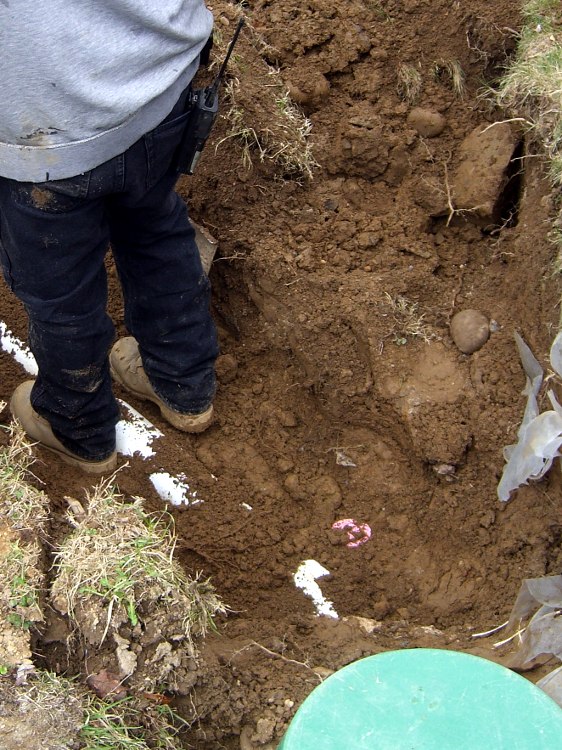
Some day, when all we know has crumbled to dust, somebody will unearth that plug and wonder “WTF was this all about?” Maybe the pipe and tank nearby will be a hint, but for all I know ABS will outlast even concrete.
This was our last sighting before the earth closed over it…
The new drain field works fine and, even better, it’ll be months before I need even think of mowing the front yard for the first time.
The digital caliper on my desk has been getting a lot of use lately and, as expected, that delicate glued repair failed.
Well, I can fix that…
Thumbwheel holder – installed
That’s a somewhat chopped-up Version 1; as always, I must build one prototype to see how everything fits, then make a real part incorporating all the changes. The models and code below have those changes and should print fine.
This picture from the previous repair shows what broke and why:
Broken caliper thumb roller mount
I removed the remainder of the arch, filed the stub square, made a bunch of tedious measurements, and wrote a chunk of OpenSCAD code to create a repair part that looks like this:
Thumbwheel holder – build model
There’s also a layout arrangement to confirm that it’ll fit the stub:
Thumbwheel holder – fit model
And then I printed four so I could pick the best one. The horizontal hole and notch come out surprisingly well, although this thing is right down around the minimum size you’d want to print:
Thumbwheel holders – as built
The 1-72 screw threads itself into the hole without a nut; I simply match-drilled a hole in the stub under the hole in the part. Of course, that means I must fit the next part to that hole…
I really wish I was printing with, say, black filament. Even dark green would be better. Heck, I’d go with yellow, but if I don’t get rid of this pink stuff I’ll have it forever.
The OpenSCAD source code:
// Digital Caliper thumbwheel holder
// Ed Nisley - KE4ZNU - Apr 2011

Build = true;						// set true to generate buildable layout

$fn = 8;							// default for holes

// Extrusion values
// Use 0 extra shells behind the perimeter
//     2 solid shells on the top & bottom

ThreadThickness = 0.33;
ThreadWT = 1.75;
ThreadWidth = ThreadThickness * ThreadWT;

HoleWindage = ThreadWidth;			// enlarge hole dia by extrusion width

Protrusion = 0.1;					// extend holes beyond surfaces for visibility

// Caliper dimensions

WheelDia = 10.0;					// thumbwheel OD
WheelRadius = WheelDia/2;
WheelMargin = 1.0;					// space around wheel
WheelRimThick = 2.5;				// subtract from repair block

ShaftDia = 2.90;					// axle between knurled wheels
ShaftRadius = ShaftDia/2;
ShaftLength = 2.7;
ShaftRetainer = 3.0;				// thickness around shaft

StubThick = 2.45;					// stub of holder on caliper head
StubLength = 5.0;					// toward caliper head
StubHeight = 6.0;					// perpendicular to caliper head
StubClearance = 0.5;				// distance to caliper frame

FrameLength = 50;					// for display only
FrameHeight = 16.0;
FrameThick = 3.0;

// Repart part dimensions

ForkLength = StubLength - StubClearance;	// toward caliper head around stub
ForkHeight = StubHeight;			// perpendicular to caliper head
ForkGap = 0.2;						// clearance to stub on all sides
ForkBladeThick = 2.0;				// on each side of stub

ShaftClearance = 0.0;				// Additional clearance around shaft
ShaftOffset = 8.5;					// Shaft center to stub

BoltHoleDia = 1.8;					// 1-72 machine screw, more or less
BoltHoleRadius = BoltHoleDia/2;

// Convenient sizes and shapes

FrameBlock = [FrameLength,FrameThick,FrameHeight];

StubBlock = [StubLength,StubThick,StubHeight];
StubMargin = [ForkGap,2*ForkGap,ForkGap];

RepairBlockLength = ForkLength + ShaftOffset;
RepairBlockThick = 2*ForkBladeThick + StubThick;
RepairBlockHeight = WheelRadius + ShaftRadius + ShaftRetainer;

RepairBlock = [RepairBlockLength,RepairBlockThick,RepairBlockHeight];

// Caliper parts to show how repair fits in

module CaliperParts() {
  union() {
	translate([0,0,-(StubClearance + FrameHeight/2)])
	  cube(FrameBlock,center=true);
	translate([-(StubLength/2 + ShaftOffset),0,(StubHeight/2)])
	  cube(StubBlock,center=true);
  }
}

// Repair block with origin below wheel shaft

module RepairPart() {

  difference() {

// Body of repair part
	union() {
	  translate([-RepairBlockLength/2,0,RepairBlockHeight/2])
		cube(RepairBlock,center=true);
	  translate([0,0,WheelRadius])
		rotate([90,0,0])
		  cylinder(r=ShaftRadius+ShaftRetainer,h=ShaftLength,center=true,$fn=12);
	}

// wheels
	translate([0,(ShaftLength + WheelRimThick)/2,WheelRadius])
	  rotate([90,0,0])
		cylinder(r=(WheelRadius + WheelMargin),h=WheelRimThick,center=true,$fn=16);
	translate([-(WheelRadius + WheelMargin)/2,
			  (ShaftLength + WheelRimThick)/2,
			  (WheelRadius - Protrusion)/2])
	  cube([(WheelRadius + WheelMargin),WheelRimThick,(WheelRadius + Protrusion)],
			center=true);
	translate([0,-(ShaftLength + WheelRimThick)/2,WheelRadius])
	  rotate([90,0,0])
		cylinder(r=(WheelRadius + WheelMargin),h=WheelRimThick,center=true,$fn=16);
	translate([-(WheelRadius + WheelMargin)/2,
			  -(ShaftLength + WheelRimThick)/2,
			  (WheelRadius - Protrusion)/2])
	  cube([(WheelRadius + WheelMargin),WheelRimThick,(WheelRadius + Protrusion)],
			center=true);

// axle clearance
	translate([0,0,WheelRadius])
	  rotate([90,0,0])
		cylinder(r=ShaftRadius,h=(ShaftLength + 2*Protrusion),center=true);
	translate([0,0,(WheelRadius - Protrusion)/2])
	  cube([ShaftDia,(ShaftLength + 2*Protrusion),(WheelRadius + Protrusion)],
		   center=true);

// stub of previous wheel holder
	translate([-(ShaftOffset + (ForkLength - ForkGap)/2 + Protrusion),
			  0,
			  (StubHeight + ForkGap - Protrusion)/2])
	  cube([(ForkLength + ForkGap + Protrusion),
		   (StubThick + 2*ForkGap),
		   (StubHeight + ForkGap + Protrusion)],
		   center=true);

// mounting screw hole
	translate([-(ShaftOffset + ForkLength/2),0,StubHeight/2])
	  rotate([90,0,0])
		cylinder(r=(BoltHoleDia + HoleWindage)/2,
				 h=(RepairBlockThick + 2*Protrusion),
				 center=true,$fn=6);
  }
}

// Build it!

if (!Build) {
  CaliperParts();
  RepairPart();
}

if (Build) {
  translate([-RepairBlockLength/2,0,RepairBlockHeight])
	rotate([0,180,0])
	  RepairPart();
}
The first aluminum build plates had to fit around the gimcrackery atop my tweaked ABP: two solderless grounding lugs and a lump of Wire Glue. The new HBP setup put the grounding lug below the fixed plate and did away with the lump, so the removable plate could have five holes and a wiper cutout without any fancy trimming.
I’d squared up three plates and machined only two for the ABP, so I had one plate that just needed drilling. Rather than machining two new plates, I filled the cutouts on the old plates with JB Industro Weld epoxy, flycut the excess, and drilled new holes.
Flycut and drilled epoxy fill
This was straightforward manual CNC: get the plate square on the table, touch off the plate edges, and then drill the holes in two steps.
If those thin epoxy webs break off the outside of the holes, it’s not the end of the world: the plates won’t go anywhere because they’re indexed by the holes on the other side.
Memo to Self: Next time, make a fixture to hold the plates relative to a starting hole and eliminate all the tedious alignment steps.
A bit of laparoscopic surgery on the front yard unearthed the drain line from the septic tank to the leach field. Drilling a 1-1/2 inch hole in the top of the pipe revealed that it’s 3/4 full of sludge, which is a Bad Thing: the leach field should get only liquid from the middle of the septic tank.
On the other paw, the house was built a bit over half a century ago and the records that came with it showed the tank was pumped two decades before we arrived. So it goes.
Rather than leave the hole in the pipe open until we get a new drain field, I built a plug that fit the 5 inch OD drain pipe and the 1-1/2 inch drilled hole.
Plug on aluminum plate
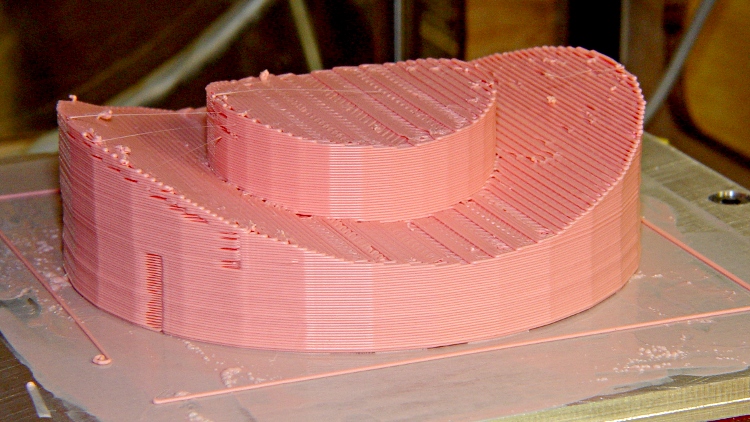
The aluminum build plate produces a smooth surface that’s entirely irrelevant on this part. The ABS film covers the blind hole in the middle that will serve as a drill guide in the unlikely event I must remove the plug.
Pipe plug – bottom view
I’ll admit it looks a bit out of place down there, though. I slobbered urethane adhesive around the central pillar and across the saddle, plugged it in, put a rock on top, and the adhesive foamed into a sludge-tight seal. At least I hope that’s how it worked out; I’m not going to pop it off just to find out.
Pipe plug in position
The solid model looks about like you’d expect:
Leach Pipe Plug Solid model
Never let it be said that a Thing-O-Matic lacks practical applications…
The OpenSCAD source:
// Plug for septic drain field pipe hole
// Ed Nisley - KE4ZNU - Mar 2011

include </home/ed/Thing-O-Matic/lib/MCAD/units.scad>

// Extrusion values

ThreadThickness = 0.33;
ThreadWT = 1.75;
ThreadWidth = ThreadThickness * ThreadWT;

HoleWindage = ThreadWidth;			// enlarge hole dia by extrusion width

// Pipe dimensions

PipeOD = 5 * inch;					// which is *4* inch cast iron pipe
PipeWall = (3/8) * inch;
PipeID = PipeOD - 2*PipeWall;

PipeLength = 2*PipeOD;				// for ease of viewing

HoleDia = (1 + 1/2) * inch;			// from a 1-1/2 inch hole saw

PatchOD = 2*HoleDia;
PatchThick = 10.0;					// a burly patch for a big old pipe

DrillDia = (1/4) * inch;			// pilot hole for removal, just in case

// Convenience settings

Protrusion = 0.1;					// extend holes beyond surfaces for visibility

// The central plug

module PlugBody() {
  difference() {
	cylinder(r=HoleDia/2,h=(PipeOD/2 + PatchThick));
	rotate([90,90,0])
	  cylinder(r=PipeID/2,h=PipeLength,center=true);
  }
}

// The shell on the pipe

module PlugShell() {
  difference() {
	cylinder(r=PatchOD/2,h=(PipeOD/2 + PatchThick));
	rotate([90,90,0])
	  cylinder(r=PipeOD/2,h=PipeLength,center=true);
  }
}

// Build it, with rotate/translate to put it flat on its back

rotate([0,180,0])
  translate([0,0,-(PipeOD/2 + PatchThick)])
	difference() {
	  union() {
		PlugBody();
		PlugShell();
	  }
	  translate([0,0,PipeOD/2])
		cylinder(r=DrillDia/2,h=(PatchThick + Protrusion));
	}
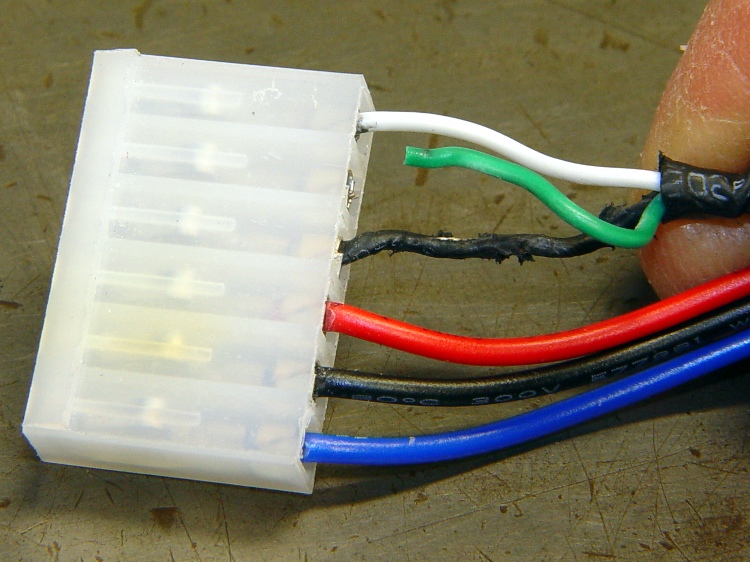
At one point along the way, the Control Panel reported the ABP temperature as 1024 °C, which seemed excessive. A bit of poking around revealed this situation on the ABP connector:
Overheated and chafed ABP connector
The connector just barely clears the top of the X axis homing switch board and the loose wires tended to rub on the top of the cable connector. I’d been meaning to fix that for a while, but now I had a real reason.
A bit of soldering and some self-vulcanizing tape later:
Strain relief on ABP connector
Also: notice the discoloration on the connector shell surrounding the Black wire? That’s the contact leading back to the MOSFET from the platform heater: a single pin carrying far more than its rated current. The shell around the contact on the Red wire (which carries the same current) isn’t discolored, which suggests the Black connector is a bit loose / poorly crimped / whatever. It looked OK to me, so I left it alone.
While I had the cable on the bench, I added a set of those right-angle pins to eliminate the risk of loose wire ends getting into the wrong places.
The hose on our aging Samsung Quiet Jet (used to be a Quiet Storm, but I suspect they lost a trademark fight) vacuum cleaner has been a constant nuisance. Most recently, the end toward the handle began splitting:
Splitting vacuum hose
The fix consisted of a tight duct tape wrap, which has absolutely nothing to recommend it other than expediency.
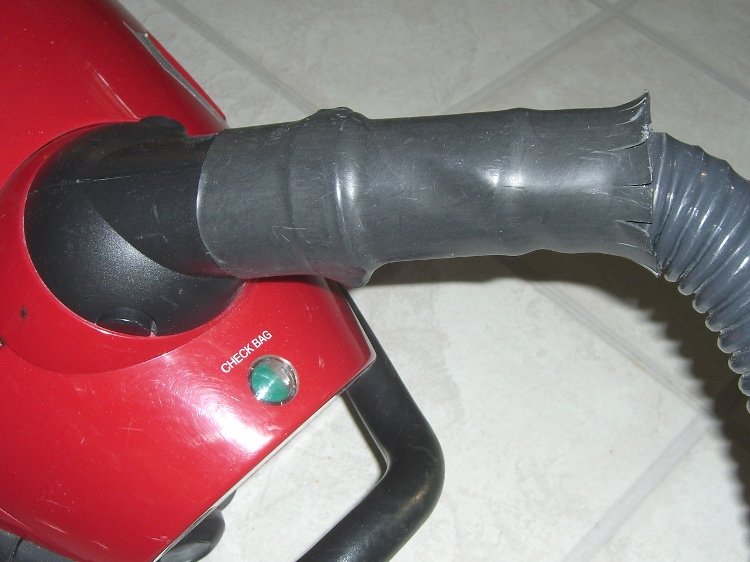
When the same thing happened on the other end, I sealed it up and added a length of husky heatshrink tubing.
Strain relief on vacuum hose
The flared end isn’t particularly decorative, but it serves to reduce the strain on the hose. Alas, there’s no practical way to do the same thing on the handle end.
The replacement cost for the hose roughly equals a new vacuum, so when we run out of bags, this one gets harvested for the shop’s Parts Heap.
You can rub and you can rub, but you can’t shine shit.
Eks tells me that was one of his grandmother’s favorite sayings.
He introduced me to the concept of a “used-car polish”: high shine over deep scratches. Sometimes, that’s exactly what the job requires.
There’s also the notion of making a silk purse from a sow’s ear (attributed variously to Jonathan Swift and Anon), which someone actually did: render the ear down to a gel, extrude thread, loom cloth, and sew up a purse. Yes, it can be done, but there’s a practical limit in there somewhere.
Contrary to what you might think, this has nothing to do with a certain Thing-O-Matic. A bit of laparoscopic surgery on our front yard just revealed that our septic leach field has filled with gunk; it’s 56 years old and hadn’t been pumped for two decades before we bought the place. The next week or two should be interesting: I can do the diagnosis, but I can’t handle this repair.