The Smell of Molten Projects in the Morning

Ed Nisley's Blog: Shop notes, electronics, firmware, machinery, 3D printing, laser cuttery, and curiosities. Contents: 100% human thinking, 0% AI slop.

Tag: Repairs

If it used to work, it can work again

  • Cheap WS2812 LEDs: Another Failure

    A few days after epoxying a replacement WS2812 RGB LED into the base of the 21HB5A and, en passant, soldering a 3.5 mm plug-and-jack into the plate lead for EZ removal, the top LED failed.

    21HB5A - Audio plug cable
    21HB5A – Audio plug cable

    In this case, it also failed the Josh Sharpie test with bad encapsulation sealing:

    WS2812 LED failure - ink test patterns
    WS2812 LED failure – ink test patterns

    Here’s a view from another angle, with a warm-white desk lamp for a bit of color:

    WS2812 LED failure - ink test patterns - 2
    WS2812 LED failure – ink test patterns – 2

    Those patterns took a few days to appear and also showed up in some, but not all, of the previous failing LEDs.

    Although I have no idea what’s going on, it’s certainly distinctive!

    An envelope of RGBW LEDs, allegedly with SK2812 controllers, has arrived from a different eBay supplier, so it’s time for an upgrade.

  • Tour Easy Rear Fender Clip

    One of the clips holding the rear fender on my Tour Easy broke:

    Rear fender clip - broken
    Rear fender clip – broken

    Well, if the truth be told, the fender jammed against the tire when I jackknifed the trailer while backing into a parking spot, dragged counterclockwise with the tire, and wiped that little tab right off the block. After 16 years of service, it doesn’t owe me a thing.

    Although the clip around the fender sits a bit lower than it used to (actually, the entire fender sits a bit lower than it should be), you can see the tab had a distinct bend at the edge of the aluminum block supporting the underseat bag frame: the block isn’t perpendicular to the tire / fender at that point.

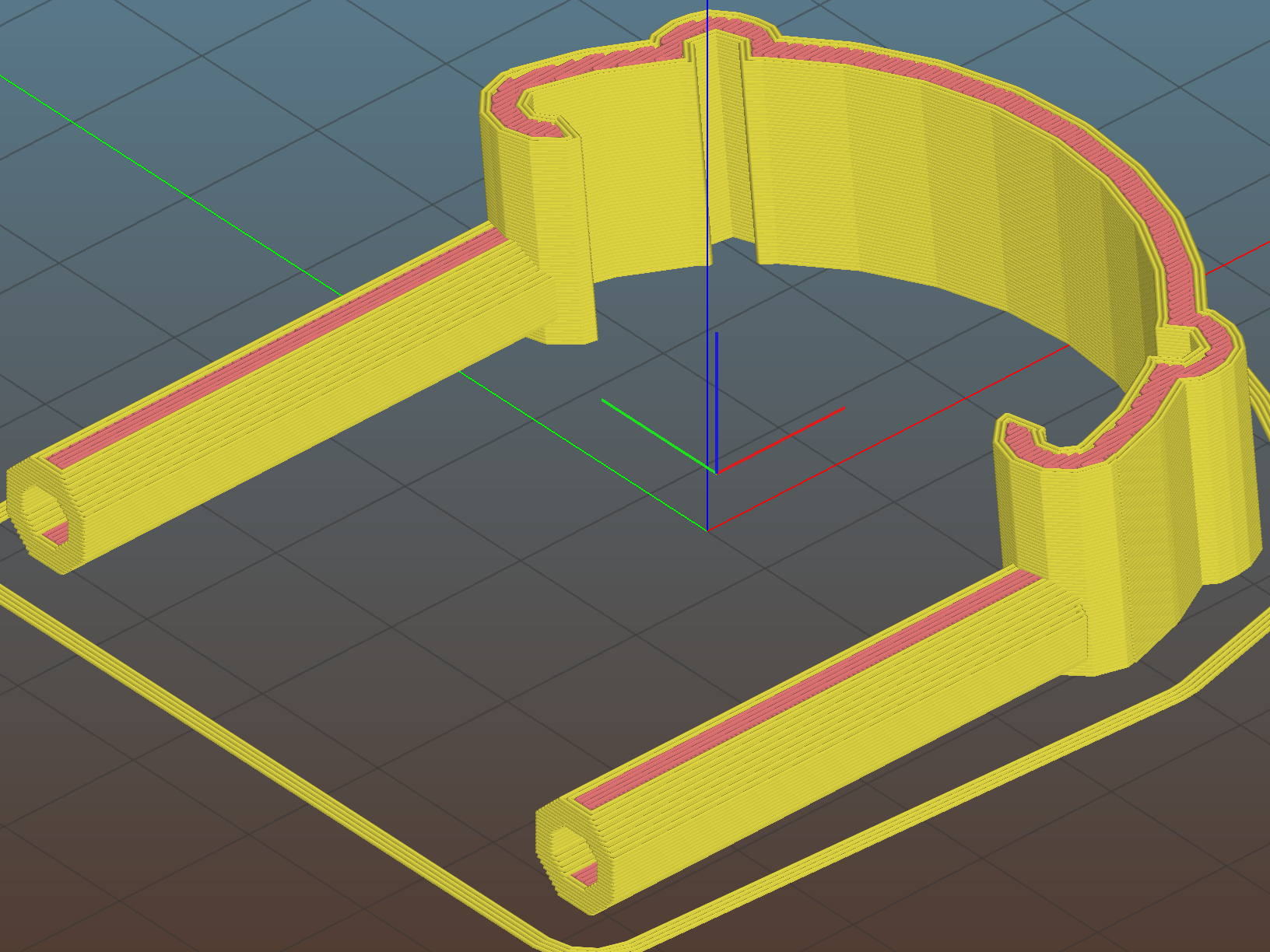
    After devoting far too long to thinking about how to angle the tab relative to the clip, I realized that I live in the future and can just angle the clip relative to the tab. Soooo, the solid model has a rakish tilt:

    Fender Clip - Slic3r preview
    Fender Clip – Slic3r preview

    The original design had a pair of strain relief struts where the tab meets the clip, but I figured I’ll add those after the PETG fractures.

    I mooched the small bumpouts along the arc from the original design; they provide a bit of stretch & bend so to ease the hooks around the fender.

    The hooks meet the clip with very slight discontinuities that, I think, come from slight differences between the 2D offset() operation and the circle() diameter; the usual 1/cos(180/numsides) trick was unavailing, so I tinkered until the answer came out right.

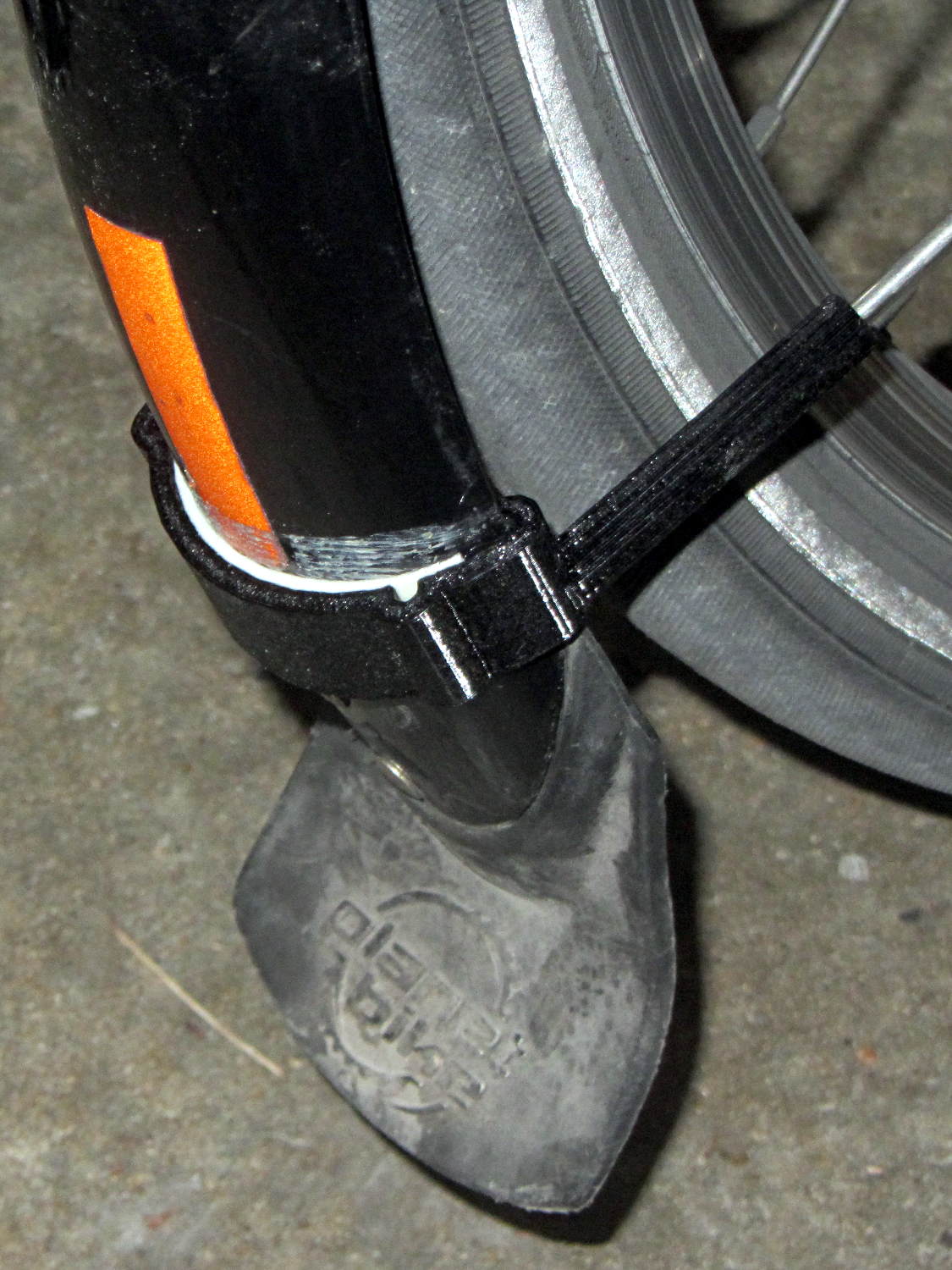
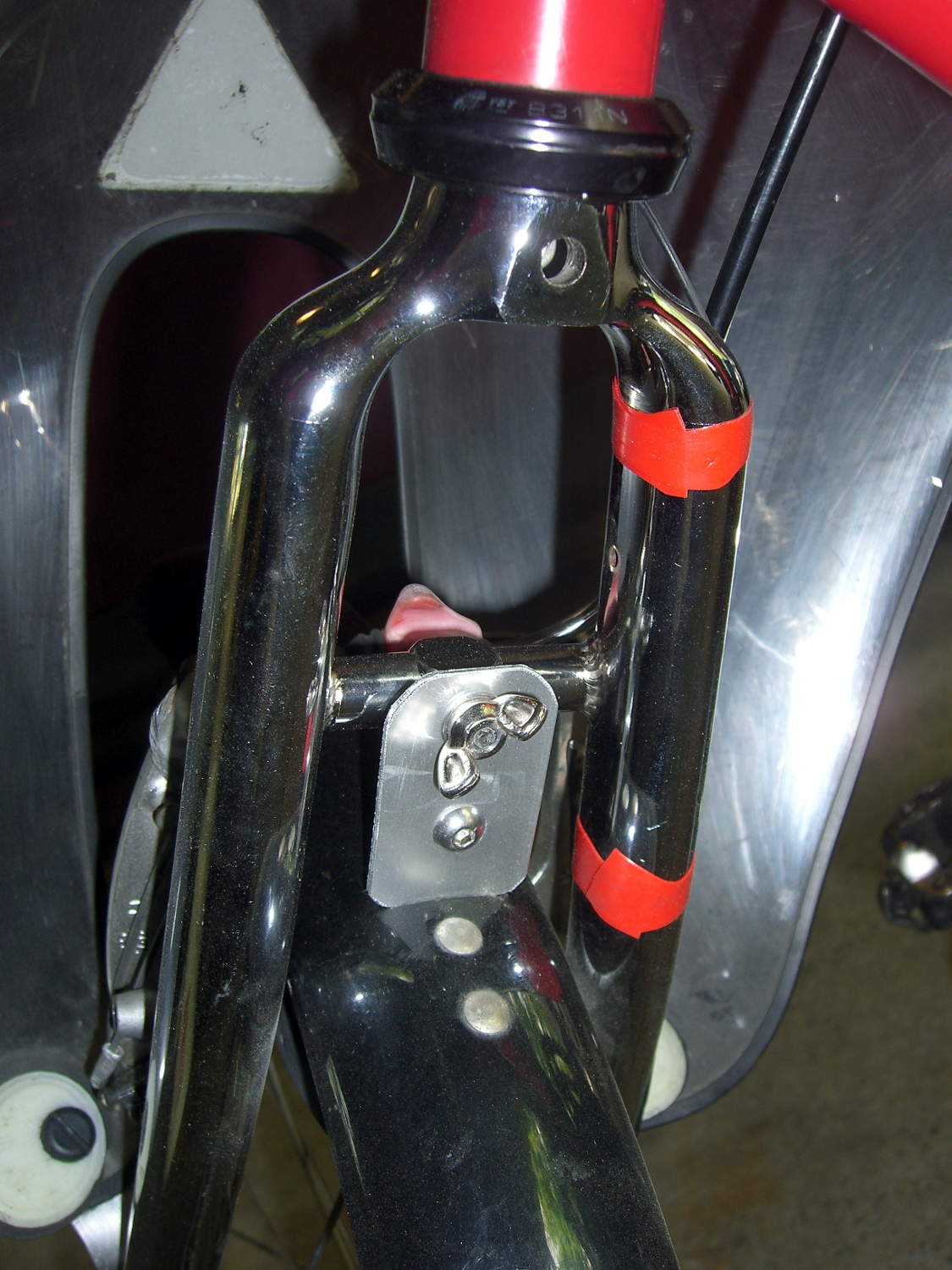
    Despite those stretchy bumps, it took three iterations, varying the chord height by about 1.5 mm, to securely snap those hooks onto the fender:

    Rear fender clip - 3D printed improvement
    Rear fender clip – 3D printed improvement

    Yeah, sorry ’bout the fuzzy focus on the screw head.

    It’s impossible to measure the chord height accurately enough in that position and I was not going to dismount the rear tire just to get a better measurement.

    You can see how the clip’s rakish tilt matches the fender’s slope, so the tab isn’t bent at all. It’ll probably break at the block the next time I jackknife the trailer, of course.

    I heroically resisted the urge to run off a lower fender mount.

    The OpenSCAD source code as a GitHub Gist:

    // Tour Easy rear fender clip
    // Ed Nisley KE4ZNU February 2017
    Layout = "Build"; // Build Profile Tab Clip
    //- Extrusion parameters must match reality!
    ThreadThick = 0.25;
    ThreadWidth = 0.40;
    HoleWindage = 0.2;
    Protrusion = 0.1; // make holes end cleanly
    inch = 25.4;
    function IntegerMultiple(Size,Unit) = Unit * ceil(Size / Unit);
    //———————-
    // Dimensions
    // special case: fender is exactly half a circle!
    FenderC = 47.0; // fender outside width = chord
    FenderM = 18.5; // height of chord
    FenderR = (pow(FenderM,2) + pow(FenderC,2)/4) / (2 * FenderM); // radius
    echo(str("Fender radius: ", FenderR));
    FenderD = 2*FenderR;
    FenderA = 2 * asin(FenderC / (2*FenderR));
    echo(str(" … arc: ",FenderA," deg"));
    FenderThick = 2.5; // fender thickness, assume dia of edge
    ClipHeight = 18.0; // top to bottom, ignoring rakish tilt
    ClipThick = 3.0; // thickness of clip around fender
    ClipD = FenderD; // ID of clip against
    ClipSides = 4 * 8; // polygon sides around clip circle
    BendReliefD = 2.5; // bend arch diameter
    BendReliefA = 2/3 * FenderA/2; // … angle from dead ahead
    BendReliefCut = 1.0; // factor to thin outside of bend
    TabAngle = -20; // angle from perpendicular to fender
    TabThick = 2.0;
    TabWidth = 15.0;
    ScrewOffset = 15.0; // screw center to fender along perpendicular
    ScrewD = 5.0;
    ScrewSlotLength = 2*ScrewD;
    //———————-
    // Useful routines
    module PolyCyl(Dia,Height,ForceSides=0) { // based on nophead's polyholes
    Sides = (ForceSides != 0) ? ForceSides : (ceil(Dia) + 2);
    FixDia = Dia / cos(180/Sides);
    cylinder(r=(FixDia + HoleWindage)/2,
    h=Height,
    $fn=Sides);
    }
    //———————-
    // Clip profile around fender
    // Centered on fender arc
    module Profile(HeightScale = 1) {
    linear_extrude(height=HeightScale*ClipHeight,convexity=5) {
    difference() {
    offset(r=ClipThick) // outside of clip
    union() {
    circle(d=ClipD,$fn=ClipSides);
    for (i=[-1,1])
    rotate(i*BendReliefA) {
    translate([ClipD/2 + BendReliefD/2,0,0])
    circle(d=BendReliefD,$fn=6);
    }
    }
    union() { // inside of clip
    circle(d=ClipD,$fn=ClipSides);
    for (i=[-1,1])
    rotate(i*BendReliefA) {
    translate([ClipD/2 + BendReliefCut*BendReliefD/2,0,0])
    circle(d=BendReliefD/cos(180/6),$fn=6);
    translate([ClipD/2,0,0])
    square([BendReliefCut*BendReliefD,BendReliefD],center=true);
    }
    }
    translate([(FenderR – FenderM – FenderD/2),0]) // trim ends
    square([FenderD,2*FenderD],center=true);
    }
    for (a=[-1,1]) // hooks around fender
    rotate(a*(FenderA/2))
    translate([FenderR – FenderThick/2,0]) {
    difference() {
    rotate(1*180/12)
    circle(d=FenderThick + 2*ClipThick,$fn=12);
    rotate(1*180/8)
    circle(d=FenderThick,$fn=8);
    rotate(a * -90)
    translate([0,-2*FenderThick,0])
    square(4*FenderThick,center=false);
    }
    }
    }
    }
    //———————-
    // Mounting tab
    module Tab() {
    linear_extrude(height=TabThick,convexity=3)
    difference() {
    hull() {
    circle(d=TabWidth,$fn=ClipSides);
    translate([(ScrewSlotLength – ScrewD)/2 + (FenderR + ScrewOffset),0,0])
    circle(d=TabWidth,$fn=ClipSides);
    }
    circle(d=ClipD,$fn=ClipSides); // remove fender arc
    hull() // screw slot
    for (i=[-1,1])
    translate([i*(ScrewSlotLength – ScrewD)/2 + (FenderR + ScrewOffset),0,0])
    rotate(180/8)
    circle(d=ScrewD/cos(180/8),$fn=8);
    }
    }
    //———————-
    // Combine at mounting angle
    module Clip() {
    difference() {
    union() {
    translate([-FenderR,0,0])
    Tab();
    rotate([0,TabAngle,0])
    translate([-FenderR,0,0])
    Profile(2); // scale upward for trimming
    }
    translate([0,0,-ClipHeight]) // trim bottom
    cube(2*[FenderD,FenderD,ClipHeight],center=true);
    translate([0,0,ClipHeight*cos(TabAngle)+ClipHeight]) // trim top
    cube(2*[FenderD,FenderD,ClipHeight],center=true);
    }
    }
    //———————-
    // Build it
    if (Layout == "Profile") {
    Profile();
    }
    if (Layout == "Tab") {
    Tab();
    }
    if (Layout == "Clip") {
    Clip();
    }
    if (Layout == "Build") {
    Clip();
    }

    The original doodle, with some measurements unable to withstand the test of time:

    Rear Fender Clip - measurement doodles
    Rear Fender Clip – measurement doodles
  • Epoxy Mixing Pads

    Quilters hold fabric in place with freezer paper while piecing their blocks; it’s basically plastic-coated paper that gets tacky at ordinary clothes iron temperatures.

    It’s useful in the shop, too. Cut a length of freezer paper into small pages, pad them plastic-side-up atop a sheet of cardboard, and you get a great place to mix small amounts of epoxy:

    Epoxy mixing pad
    Epoxy mixing pad

    Let the pad stay next to whatever you’re epoxying (like, say, the lathe tailstock ways), then test the leftover epoxy for hardness… rather than messing up the joint you so laboriously created by moving the parts an hour too soon.

    Works for me, anyhow. Highly recommended!

  • Raspberry Pi 3: Disabling the Build-In WiFi

    streaming media player in the Basement Laboratory Warehouse Wing has a concrete block wall between it and the WiFi router, so that even high(er)-gain USB antennas can’t grab enough signal for reliable streaming. After some fiddling, I snaked a cable from a hub, along the floor joints, to the Pi and declared victory. It turned out the Pi, an old Pi 1 Model B, had some trouble keeping up with the times, and I eventually swapped it for a Pi 3.

    Forcing a static address for the wired port followed the now-standard recipe, with eth0 instead of wlan0 in /etc/dhcpcd.conf.

    However, plugging a network cable into the Pi 3 then produces two network connections: the wired one I wanted and the aforementioned unreliable WiFi link through the built-in hardware. The only reliable way to turn off the WiFi connection seems to require applying The BFH through a line in /etc/rc.local:

    sudo ifconfig wlan0 down
    

    Removing my WiFi credentials from /etc/wpa_supplicant/wpa_supplicant.conf prevents the hardware from connecting before the hammer comes down.

    And then it streams perfectly…

  • Raspberry Pi Boot vs. Avahi vs. DHCP

    Sometimes, one of our homebrew streaming media players will emerge from reset without starting up properly. The system board LEDs blink more-or-less normally, but the WiFi activity monitor seems … odd. This post documents the results of some exploratory surgery hinting at a possible solution.

    I set the router’s DHCP server to assign a fixed IP address to each of our homebrew streaming media players based on its MAC address. That seemed less horrible than setting a static IP address in each player’s configuration, although I could see advantages to either approach. For streamer1, the player discussed here, the IP address is 192.168.1.101; that’s a non-routable address used only on our network behind the router.

    During the Raspberry Pi’s boot, the default /etc/rc.local script finds and displays its IP address:

    _IP=$(hostname -I) || true
    if [ "$_IP" ]; then
      printf "My IP address is %s\n" "$_IP"
    fi
    

    The /var/log/boot log showed this after one boot:

    --- snippage ---
             Starting LSB: Raise network interfaces....
    ---
    [  OK  ] Started LSB: Raise network interfaces..
             Starting ifup for wlan0...
    [  OK  ] Started ifup for wlan0.
    [  OK  ] Reached target System Initialization.
    [  OK  ] Listening on Avahi mDNS/DNS-SD Stack Activation Socket.
    ---
    [  OK  ] Reached target Sockets.
    ---
    [  OK  ] Reached target Basic System.
             Starting Avahi mDNS/DNS-SD Stack...
             Starting Regular background program processing daemon...
    [  OK  ] Started Regular background program processing daemon.
             Starting dhcpcd on all interfaces...
    ---
    [  OK  ] Started Avahi mDNS/DNS-SD Stack.
    ---
    [  OK  ] Started dhcpcd on all interfaces.
    [  OK  ] Reached target Network.
    ---
             Starting /etc/rc.local Compatibility...
             Starting Permit User Sessions...
    [  OK  ] Reached target Network is Online.
             Starting LSB: Start NTP daemon...
    My IP address is 169.254.14.12
    [  OK  ] Started Permit User Sessions.
    connect: Network is unreachable
    [  OK  ] Started /etc/rc.local Compatibility.
             Starting Terminate Plymouth Boot Screen...
             Starting Hold until boot process finishes up...
    

    That mysterious IP address is a Link-local address, about which Wikipedia says: “If a host on an IEEE 802 (Ethernet) network cannot obtain a network address via DHCP, an address from 169.254.1.0 to 169.254.254.255 may be assigned pseudorandomly.”

    So, having the router hand out IP addresses doesn’t quite work the way I expected. The Pi awards itself a link-local IP address before getting one from the DHCP server, presumably because the vast Linux startup Pachinko machine has a race condition. Alas, the pseudorandom LL address doesn’t fit in the 192.168.0.0/16 network handled by the router: the Pi can’t connect to the network.

    My code in /etc/rc.local starts the streaming player immediately after the default code displaying the IP address, thus joining the race condition: if the player starts up before the DCHP server assigns the proper IP address, it can’t connect to the music server out on the Interwebs. My code includes a retry loop with a five second delay which eventually connects, at least most of the time, but sometimes gets wedged.

    The most reasonable fix seems to involve forcing a static address on each Raspberry Pi, so it can immediately connect to the network, without any negotiation, and get on with the business at hand.

    Rather than configuring that in  /etc/network/interfaces as before, the New Hotness adds a stanza to  /etc/dhcpcd.conf:

    interface wlan0
    static ip_address=192.168.1.101/8
    static routers=192.168.1.1
    static domain_name_servers=192.168.1.1
    

    En passant, I killed off IPV6 with this line in /etc/sysctl.conf:

    net.ipv6.conf.all.disable_ipv6=1
    

    The router doesn’t support IPV6 and there’s no point in using it. Bonus: less log clutter. Double Bonus: startup happens faster!

    All of which may help the NTP client update the system clock sooner, perhaps preventing time jumps like this:

    2017-02-14 08:42:24,183 INFO: Player setup for: BR1
    2017-02-14 08:42:24,184 INFO: Volume control knob: /dev/input/volume
    2017-02-14 08:42:24,225 INFO: Starting mplayer on Ambient -> http://185.32.125.42:7331/maschinengeist.org.mp3
    2017-02-14 08:42:27,175 INFO: Track name: [Arcticology - Nocturnal Sounds]
    2017-02-14 08:42:27,194 INFO: Track unmuted
    2017-02-15 04:25:00,386 INFO: Track name: [Oöphoi - Suspended Matter]
    2017-02-15 04:25:00,413 INFO: Track unmuted
    

    The timestamps in the first five lines date back to the previous shutdown. The Pi remains plugged in and powered while it’s reset, which apparently preserves the system clock variables, albeit without a hardware clock ticking along: time stands still between shutdown and restart.

    In this case, the IP address situation worked itself out before the player started, but the NTP clock reset on the sixth line happened at least three seconds after the log began.

    This chunk of /var/log/syslog has more detail:

     highlight="1,5,6,7,8,15,21"]
    Feb 14 08:42:24 streamer1 dhcpcd[693]: wlan0: leased 192.168.1.101 for 86400 seconds
    Feb 14 08:42:24 streamer1 dhcpcd[693]: wlan0: adding route to 192.168.1.0/24
    Feb 14 08:42:24 streamer1 dhcpcd[693]: wlan0: adding default route via 192.168.1.1
    Feb 14 08:42:24 streamer1 avahi-daemon[387]: Registering new address record for 192.168.1.101 on wlan0.IPv4.
    Feb 14 08:42:24 streamer1 dhcpcd[693]: wlan0: deleting route to 169.254.0.0/16
    Feb 14 08:42:24 streamer1 avahi-daemon[387]: Withdrawing address record for 169.254.14.12 on wlan0.
    Feb 14 08:42:24 streamer1 avahi-daemon[387]: Leaving mDNS multicast group on interface wlan0.IPv4 with address 169.254.14.12.
    Feb 14 08:42:24 streamer1 avahi-daemon[387]: Joining mDNS multicast group on interface wlan0.IPv4 with address 192.168.1.101.
    Feb 14 08:42:25 streamer1 dhcpcd[693]: wlan0: no IPv6 Routers available
    Feb 14 08:42:25 streamer1 ntpd_intres[728]: DNS 0.debian.pool.ntp.org -> 206.71.252.18
    Feb 14 08:42:25 streamer1 ntpd_intres[728]: DNS 1.debian.pool.ntp.org -> 45.33.13.54
    Feb 14 08:42:25 streamer1 ntpd_intres[728]: DNS 2.debian.pool.ntp.org -> 204.9.54.119
    Feb 14 08:42:25 streamer1 ntpd_intres[728]: DNS 3.debian.pool.ntp.org -> 216.229.4.66
    Feb 14 08:42:26 streamer1 ntpd[720]: Listen normally on 6 wlan0 192.168.1.101 UDP 123
    Feb 14 08:42:26 streamer1 ntpd[720]: Deleting interface #3 wlan0, 169.254.14.12#123, interface stats: received=0, sent=0, dropped=4, active_time=3 secs
    Feb 14 08:42:26 streamer1 ntpd[720]: 216.229.4.66 interface 169.254.14.12 -> (none)
    Feb 14 08:42:26 streamer1 ntpd[720]: 204.9.54.119 interface 169.254.14.12 -> (none)
    Feb 14 08:42:26 streamer1 ntpd[720]: 45.33.13.54 interface 169.254.14.12 -> (none)
    Feb 14 08:42:26 streamer1 ntpd[720]: 206.71.252.18 interface 169.254.14.12 -> (none)
    Feb 14 08:42:26 streamer1 ntpd[720]: peers refreshed
    Feb 15 04:20:10 streamer1 systemd[1]: Time has been changed
    [/sourcecode]

    Given the timestamp resolution, NTP (or systemd) apparently resets the clock three seconds after the IP address changes. That may be as good as it gets, if only because the NTP daemon must find its servers, evaluate their status, then whack the local clock.

    After forcing the static address, things look better, but it’s too soon to be sure. Many things can clobber streaming, not all of which happen on this side of our router.

  • Vacuum Tube Lights: Plate Wire Plug

    After replacing the WS2812 LED in the 21HB5A socket, I drilled out the hole in the disk platter for a 3.5 mm stereo jack, wired a nice knurled metal plug onto the plate lead, and it’s all good:

    21HB5A - Audio plug cable
    21HB5A – Audio plug cable

    The plug had a rather large cable entry that cried out for a touch of brass:

    Audio plug - brass trim turning
    Audio plug – brass trim turning

    Fancy plugs have a helical spring strain relief insert about the size & shape of that brass snout; might have to buy me some fancy plugs.

    This time, I got the alignment right by clamping everything in the lathe while the epoxy cured:

    Audio plug - brass trim gluing
    Audio plug – brass trim gluing

    I flipped the drill end-for-end, which was surely unnecessary.

    It’s now sitting on the kitchen table, providing a bit of light during supper while I wait for a WS2812 controller failure. Again.

  • Cheap WS2812 LEDs: Leak Tests vs. Failures

    Applying the Josh Sharpie Test to three defunct WS2812 LEDs produced one failure:

    Failed WS2812 LED - leak view 2
    Failed WS2812 LED – leak view 2

    The other side shows where the ink stopped seeping under the silicone:

    Failed WS2812 LED - leak view 1
    Failed WS2812 LED – leak view 1

    I don’t know if I melted the side of the LED or if it came that way, but, oddly, there’s no leakage on that side.

    This LED matches the layout of Josh’s “crappy” LEDs, as does the entire lot below, although I suspect that’s more coincidence than anything else; there aren’t that many different layouts around.

    Flushed with success, so to speak, I ran the Sharpie around all the unused LEDs from that order:

    WS2812 LEDs - leak test
    WS2812 LEDs – leak test

    I tested the process on the three LEDs in front, then wiped the ink off with denatured alcohol.

    A closer look shows the ink all around the silicone-to-case border, with plenty of opportunity to seep in:

    WS2812 LEDs - leak test - detail
    WS2812 LEDs – leak test – detail

    After wiping the ink off, none of the 31 unused LEDs showed any sign of poor sealing.

    I haven’t been keeping good records of the failures, but right now I have twelve functional WS2812 LEDs attached to various glass doodads. That leaves 7-ish failed LEDs out of the 15-ish with long term use (not counting four recent replacements).

    In round numbers, that’s a 50% failure rate…

    I should wire up the remaining sheet of LEDs as a test fixture, let them cook for a while, and see what happens.