The Smell of Molten Projects in the Morning

Ed Nisley's Blog: Shop notes, electronics, firmware, machinery, 3D printing, laser cuttery, and curiosities. Contents: 100% human thinking, 0% AI slop.

Tag: M2

Using and tweaking a Makergear M2 3D printer

  • MakerGear M2: V4 Nozzle vs. Re-Relocated Z-axis Switch

    Mounting the Z-axis platform switch on the X gantry to sense the actual platform position worked perfectly with the original MakerGear V3 hot end, at least after I relocated the switch a bit further from the balance point. It does require moving the nozzle off the platform before homing the Z axis, for the obvious reason:
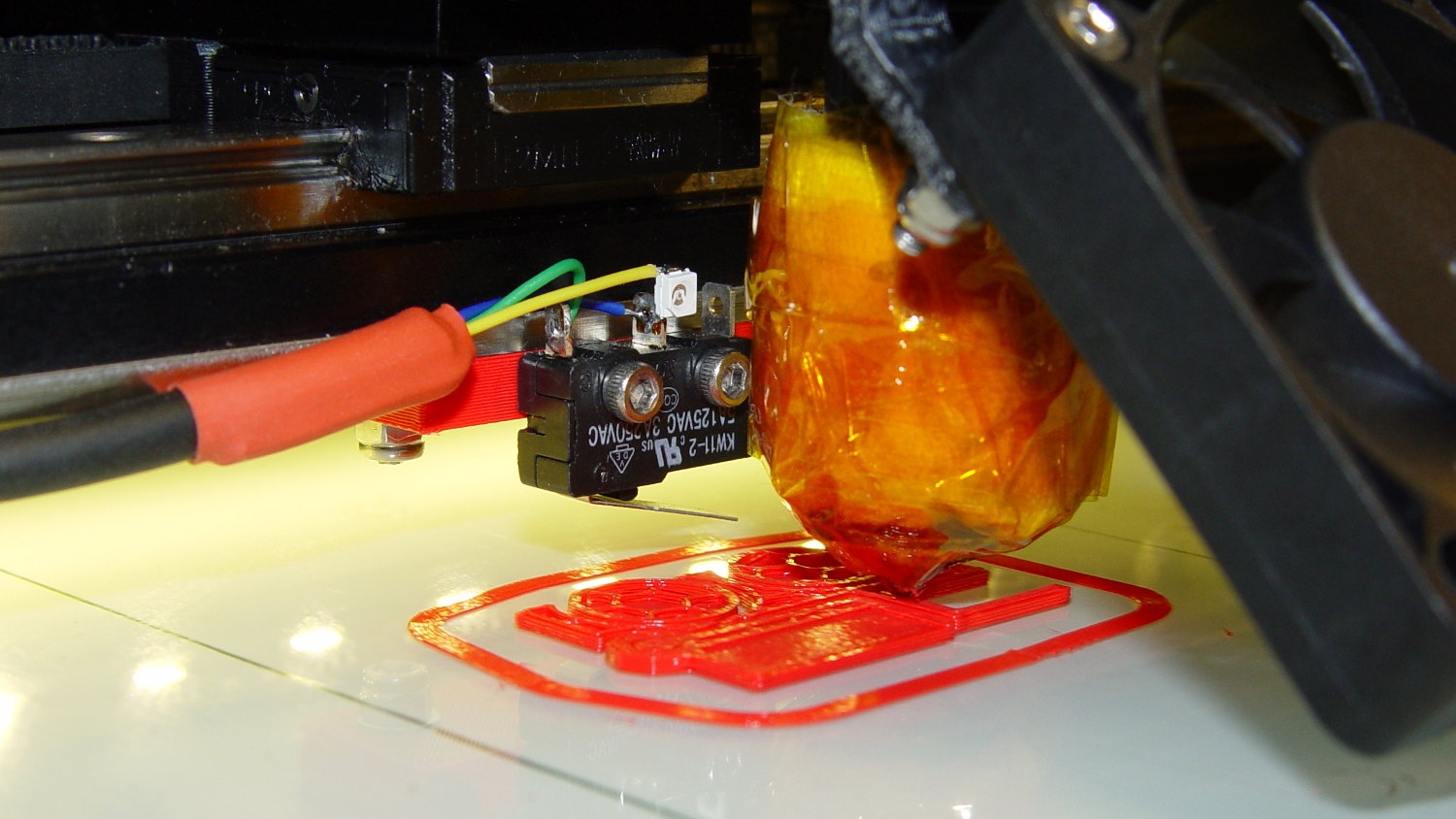
    M2 Z-min switch - center gantry - in action
    M2 Z-min switch – center gantry – in action

    The smaller MakerGear V4 hot end uses a completely different mount that puts the nozzle higher than the switch lever:
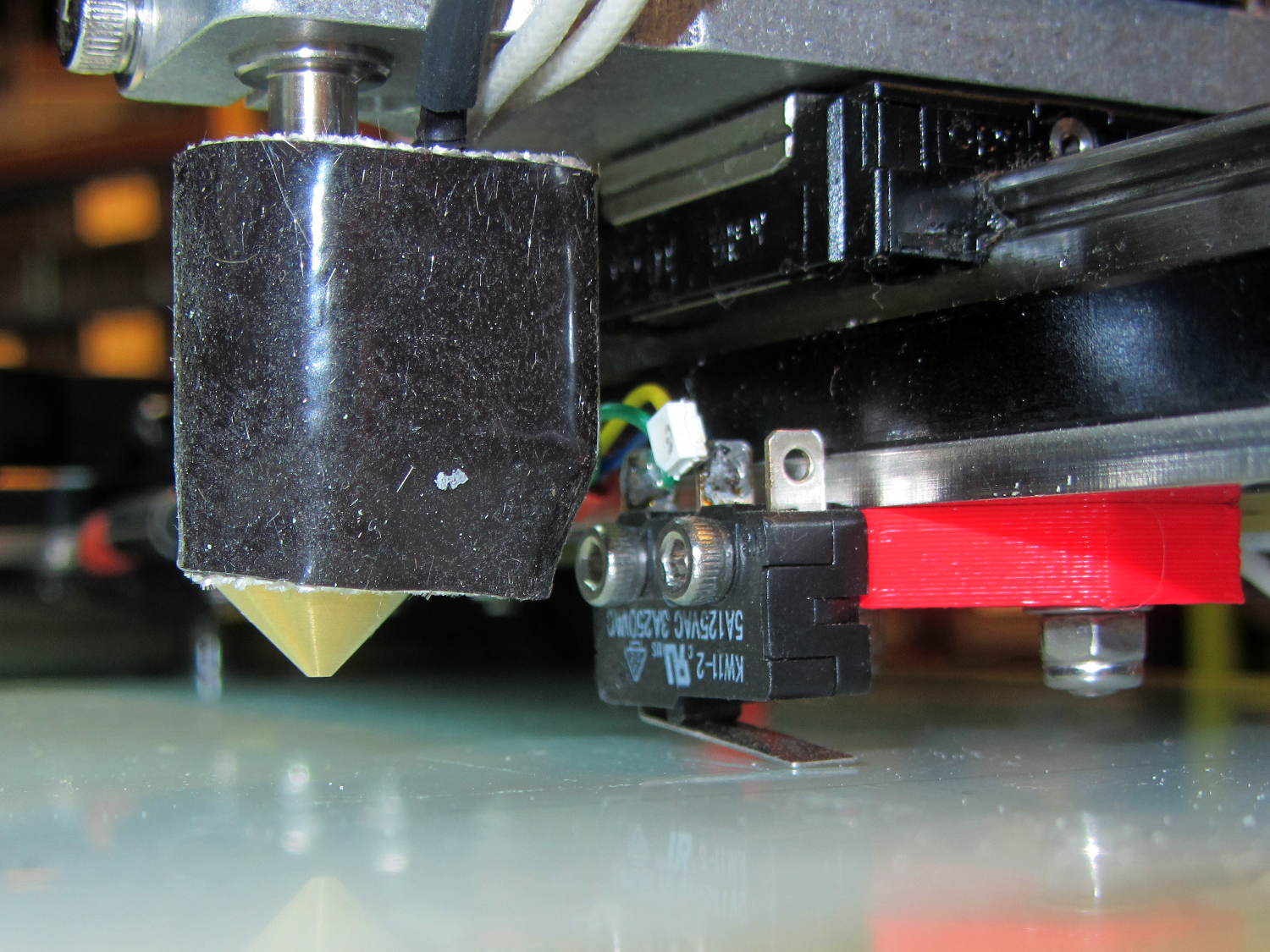
    M2 V4 hot end vs platform Z switch
    M2 V4 hot end vs platform Z switch

    The clearances were close enough to rule out plastic, so I bandsawed some 33 mil (1/32 inch) brass shim stock and drilled holes in the appropriate spots:

    Brass switch bracket - drilling
    Brass switch bracket – drilling

    After discovering the blindingly obvious fact that you can’t heat brass sheets clamped to a steel vise enough to melt silver solder, I padded the brass with cardboard insulation and tried again:
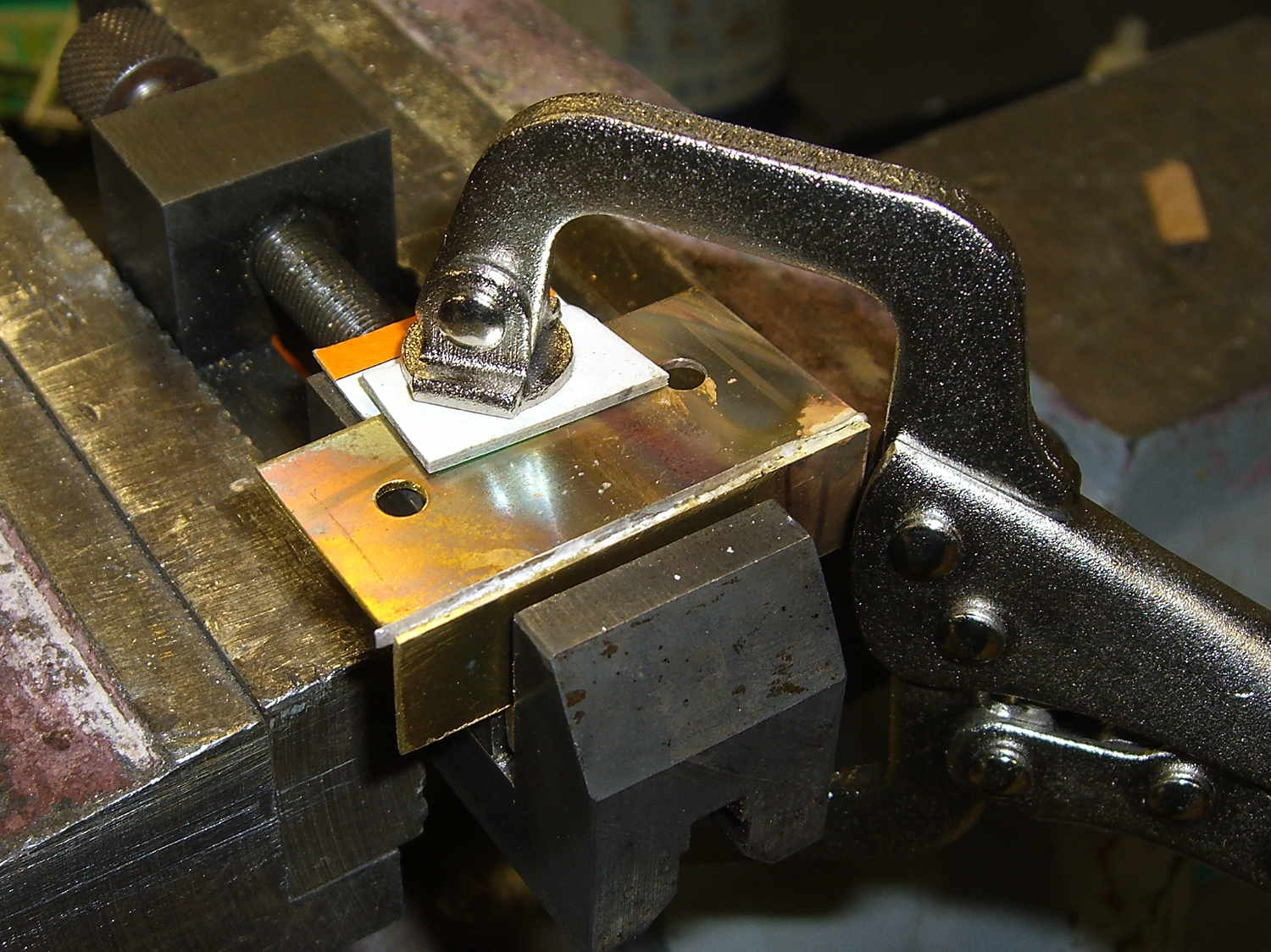
    Brass switch bracket - clamped for soldering
    Brass switch bracket – clamped for soldering

    The cardboard charred and burned and stank up the shop, but held everything in alignment long enough:

    Brass switch bracket - soldered
    Brass switch bracket – soldered

    A bit of file & sandpaper work shined it up just fine, then I slotted the lower mounting holes enough to accommodate 2-56 nuts between the gantry and the bracket:

    Brass switch bracket - mounted - front view
    Brass switch bracket – mounted – front view

    Yeah, I could tap 2-56 holes into the brass sheet, but let’s be reasonable: two turns does not a secure fitting make.

    Here’s why a plastic bracket wouldn’t work:

    Brass switch bracket - side view
    Brass switch bracket – side view

    That’s with the V4 hot end aligned per instructions, although I may rotate it 1/4 turn clockwise at some point. Note that there’s no filament going in the top, as I did all this before firing that devil up for the first time.

    The switch lever had enough free travel that the platform would hit the bottom of the X axis linear slide screws before activating the switch, but lowering the switch would put the lever below the nozzle. I added a 15 mil brass shim to the lever and it’s all good:

    Brass switch bracket - lever shim detail
    Brass switch bracket – lever shim detail

    Admittedly, the lever rests a bit less than 1.000 mm above the nozzle, but we’ll see how much trouble that causes.

    The switch trips 2.0 mm above the nozzle, so the new startup G-Code looks like this:

    ;-- Slic3r Start G-Code for M2 starts --
    ;  Ed Nisley KE4NZU - 2015-03-01
    ;  Makergear V4 hot end
    ; Z-min switch at platform, must move nozzle to X=135 to clear
    M140 S[first_layer_bed_temperature]	; start bed heating
    G90				; absolute coordinates
    G21				; millimeters
    M83				; relative extrusion distance
    G92 Z0			; set Z to zero, wherever it might be now
    G1 Z10 F1000	; move platform downward to clear nozzle; may crash at bottom
    G28 Y0			; home Y to clear plate, origin in middle
    G92 Y-127
    G28 X0			; home X, origin in middle
    G92 X-100
    G1 X130 Y0 F30000	; move off platform to right side, center Y
    G28 Z0			; home Z to platform switch, with measured offset
    G92 Z-2.00
    G0 Z2.0			; get air under switch
    G0 Y-127 F10000	; set up for priming, zig around corner
    G0 X0			;  center X
    G0 Y-125.0		; just over platform edge
    G0 Z0 F500	; exactly at platform
    M109 S[first_layer_temperature]	; set extruder temperature and wait
    M190 S[first_layer_bed_temperature]	; wait for bed to finish heating
    G1 E20 F300		; prime to get pressure, generate blob on edge
    G0 Y-123		; shear off blob
    G1 X15 F20000	; jerk away from blob, move over surface
    G4 P500			; pause to attach
    G1 X45 F500		; slowly smear snot to clear nozzle
    G1 Z1.0 F2000	; clear bed for travel
    ;-- Slic3r Start G-Code ends --
    

    The prime-and-wipe section accommodates gooey PETG, although that will require more attention.

  • Adafruit Touch-screen TFT LCD Rotation

    The alert reader will have noted that the Kenmore 158 UI twisted around to a new orientation atop its fancy holder, with the USB port now poking out from the right side:

    Kenmore 158 UI - PCB holder
    Kenmore 158 UI – PCB holder

    That lets me position the whole affair to the right of the sewing machine, in what seems to be its natural position, without having the cable form a loop that would push it off the platform. It’s not entirely clear how we’ll keep a straight cable from pulling it off, but that’s in the nature of fine tuning.

    Anyhow, rotating the LCD isn’t a big deal, because the Adafruit library does all the heavy lifting:

    // LCD orientation: always landscape, 1=USB upper left / 3=USB lower right
    #define LCDROTATION 3
    
    ... snippage ...
    tft.begin();
    tft.setRotation(LCDROTATION);	// landscape, 1=USB upper left / 3=USB lower right
    

    Flipping the touch screen coordinates required just interchanging the “to” bounds of the map() functions, with a conditional serving as institutional memory in the not-so-unlikely event I must undo this:

    #if LCDROTATION == 1
    	p->x = map(t.y, TS_Min.y, TS_Max.y, 0, tft.width());	// rotate & scale to TFT boundaries
    	p->y = map(t.x, TS_Min.x, TS_Max.x, tft.height(), 0);	//   ... USB port at upper left
    #elif LCDROTATION == 3
    	p->x = map(t.y, TS_Min.y, TS_Max.y, tft.width(), 0);	// rotate & scale to TFT boundaries
    	p->y = map(t.x, TS_Min.x, TS_Max.x, 0, tft.height());	//   ... USB port at lower right
    #endif
    

    And then It Just Worked.

  • Arduino Mega PCB Holder

    Flushed with success from making the boost power supply mount, here’s a holder for the Arduino Mega that’s supporting the Kenmore 158 sewing machine UI:

    Kenmore 158 UI - PCB holder
    Kenmore 158 UI – PCB holder

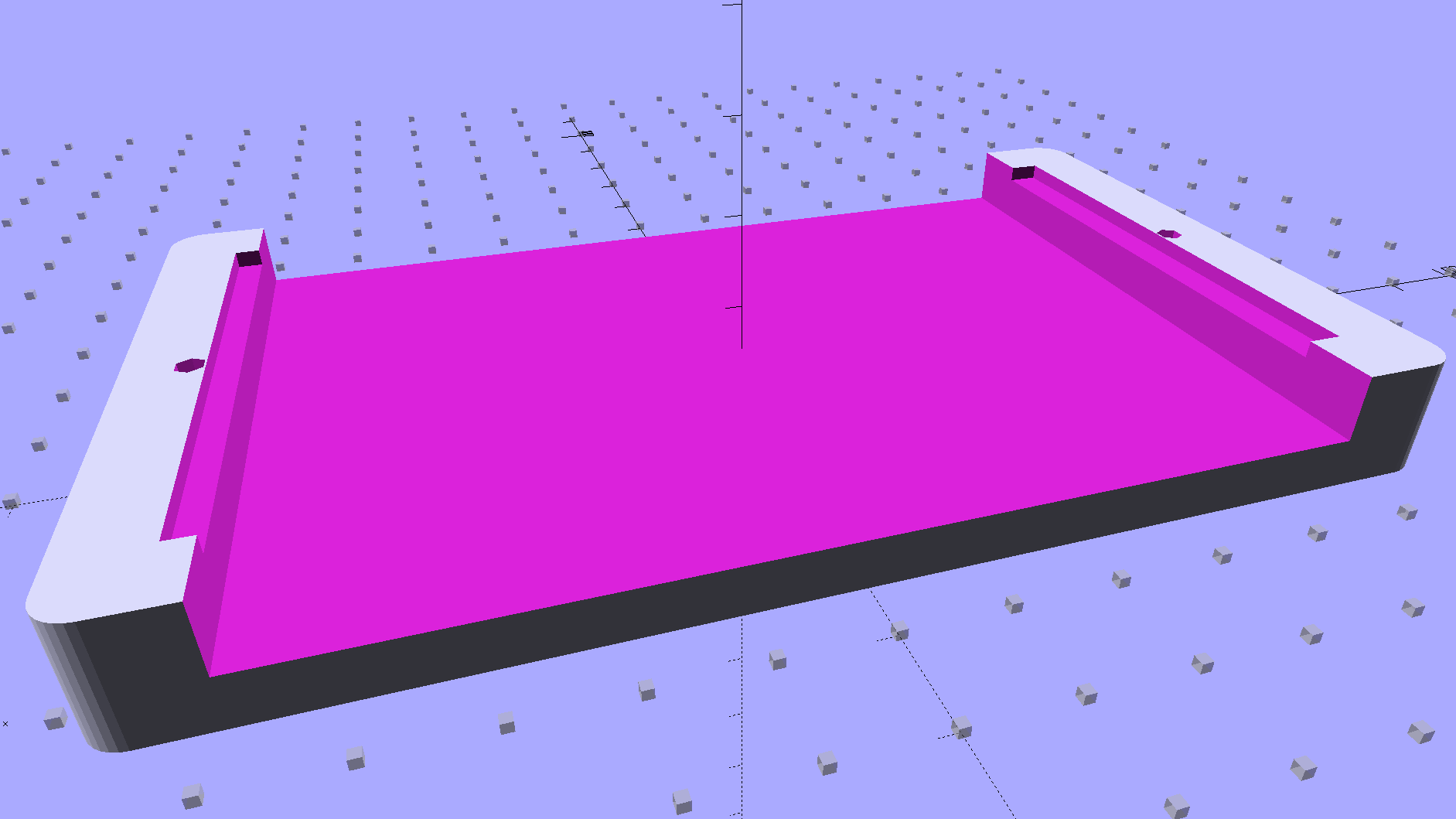
    The solid model shows two screws holding the PCB in place:

    Arduino Mega PCB Mount
    Arduino Mega PCB Mount

    I decided to edge-clamp the board, rather than fuss with the built-in screws, just because 3D printing makes it so easy.

    Of course, the UI needs a real case that will hold it at an angle, so as to make the LCD and touch screen more visible and convenient; this mount just keeps the PCB up off the conductive surface of the insulating board we’re using in lieu of a Real Sewing Platform.

    This sewing machine project involves a lot of parts…

    The OpenSCAD source code:

    // PCB mounting bracket for Arduino Mega
    // Ed Nisley - KE4ZNU - January 2015
    
    Layout = "Build";			// PCB Block Mount Build
    
    //- Extrusion parameters must match reality!
    //  Print with 4 shells and 3 solid layers
    
    ThreadThick = 0.20;
    ThreadWidth = 0.40;
    
    HoleWindage = 0.2;			// extra clearance
    
    Protrusion = 0.1;			// make holes end cleanly
    
    AlignPinOD = 1.70;			// assembly alignment pins: filament dia
    
    function IntegerMultiple(Size,Unit) = Unit * ceil(Size / Unit);
    
    X = 0;						// useful subscripts
    Y = 1;
    Z = 2;
    
    //----------------------
    // Dimensions
    
    inch = 25.4;
    
    Tap4_40 = 0.089 * inch;
    Clear4_40 = 0.110 * inch;
    Head4_40 = 0.211 * inch;
    Head4_40Thick = 0.065 * inch;
    Nut4_40Dia = 0.228 * inch;
    Nut4_40Thick = 0.086 * inch;
    Washer4_40OD = 0.270 * inch;
    Washer4_40ID = 0.123 * inch;
    
    PCBoard = [102,54,IntegerMultiple(1.8,ThreadThick)];
    
    BottomParts = [[2.5,-5.0,0,0],				// xyz offset of part envelope
    				[96,80,IntegerMultiple(5.0,ThreadThick)]];			// xyz envelope size (z should be generous)
    
    Margin = IntegerMultiple(Washer4_40OD,ThreadWidth);
    
    MountBase = [PCBoard[X] + 2*Margin,
    			PCBoard[Y] + 2*Margin,
    			IntegerMultiple(5.0,ThreadThick) + PCBoard[Z] + BottomParts[1][Z]
    			];
    echo("Mount base: ",MountBase);
    
    ScrewOffset = Clear4_40/2;
    
    Holes = [									// PCB mounting screw holes: XY + rotation
    		[Margin - ScrewOffset,MountBase[Y]/2,180/6],
    		[MountBase[X] - Margin + ScrewOffset,MountBase[Y]/2,180/6],
    		];
    
    CornerRadius = Washer4_40OD / 2;
    
    //----------------------
    // Useful routines
    
    module PolyCyl(Dia,Height,ForceSides=0) {			// based on nophead's polyholes
    
      Sides = (ForceSides != 0) ? ForceSides : (ceil(Dia) + 2);
    
      FixDia = Dia / cos(180/Sides);
    
      cylinder(r=(FixDia + HoleWindage)/2,
               h=Height,
               $fn=Sides);
    }
    
    module ShowPegGrid(Space = 10.0,Size = 1.0) {
    
      RangeX = floor(100 / Space);
      RangeY = floor(125 / Space);
    
    	for (x=[-RangeX:RangeX])
    	  for (y=[-RangeY:RangeY])
    		translate([x*Space,y*Space,Size/2])
    		  %cube(Size,center=true);
    
    }
    
    //----------------------
    // Build things
    
    module PCB() {
    
    	union() {
    		cube(PCBoard);
    		translate(BottomParts[X] - [0,0,BottomParts[1][Z]])
    			cube(BottomParts[Y] + [0,0,Protrusion]);
    	}
    
    }
    
    module Block() {
    	translate([MountBase[X]/2,MountBase[Y]/2,0])
    		hull()
    			for (i = [-1,1], j = [-1,1])
    				translate([i*(MountBase[X]/2 - CornerRadius),j*(MountBase[Y]/2 - CornerRadius)],0)
    					cylinder(r=CornerRadius,h=MountBase[Z] - Protrusion,$fn=8*4);
    }
    
    module Mount() {
    
    	difference() {
    		Block();
    
    		translate([MountBase[X]/2 - PCBoard[X]/2 + BottomParts[0][X] - Protrusion,
    					-MountBase[Y]/2,
    					MountBase[Z] - PCBoard[Z] - BottomParts[1][Z]])
    			cube([BottomParts[1][X] + 2*Protrusion,
    					2*MountBase[Y],
    					2*BottomParts[1][Z]]);
    
    		translate([MountBase[X]/2 - PCBoard[X]/2,		// PCB recess
    					MountBase[Y]/2 - PCBoard[Y]/2,
    					MountBase[Z] - PCBoard[Z]])
    			PCB();
    		for (h = Holes) {
    			translate([h[X],h[Y],-Protrusion]) rotate(h[Z])
    				PolyCyl(Tap4_40,MountBase[Z] + 2*Protrusion,6);
    		}
    	}
    
    }
    
    ShowPegGrid();
    
    if (Layout == "PCB")
    	PCB();
    
    if (Layout == "Block")
    	Block();
    
    if (Layout == "Mount")
    	Mount();
    
    if (Layout == "Build")
    	translate([-MountBase[X]/2,-MountBase[Y]/2,0])
    	Mount();
    
  • Generic PCB Holder: Boost Power Supply

    The DC-DC boost power supply for the LED needle lights has four mounting holes, two completely blocked by the heatsink and the others against components with no clearance for screw heads, soooo

    3D printing to the rescue:

    Boost converter - installed
    Boost converter – installed

    Now that the hulking ET227 operates in saturation mode, I removed the blower to make room for the power supply. Two strips of double-stick foam tape fasten the holder to the removable tray inside the Dell GX270’s case.

    It’s basically a rounded slab with recesses for the PCB and clearance for solder-side components:

    Boost converter mount - as printed
    Boost converter mount – as printed

    The solid model shows the screw holes sitting just about tangent to the PCB recess:

    XW029 Booster PCB Mount
    XW029 Booster PCB Mount

    That’s using the new OpenSCAD with length scales along each axis; they won’t quite replace my layout grid over the XY plane, but they certainly don’t require as much computation.

    I knew my lifetime supply of self-tapping hex head 4-40 screws would come in handy for something:

    Boost converter in mount
    Boost converter in mount

    The program needs to know the PCB dimensions and how much clearance you want for the stuff hanging off the bottom:

    PCBoard = [66,35,IntegerMultiple(1.8,ThreadThick)];
    
    BottomParts = [[1.5,-1.0,0,0],	// xyz offset of part envelope
    				[60.0,37.0,IntegerMultiple(3.0,ThreadThick)]];	// xyz envelope size (z should be generous)
    

    That’s good enough for my simple needs.

    The hole locations form a list-of-vectors that the code iterates through:

    Holes = [			// PCB mounting screw holes: XY + rotation
    		[Margin - ScrewOffset,MountBase[Y]/2,180/6],
    		[MountBase[X] - Margin + ScrewOffset/sqrt(2),MountBase[Y] - Margin + ScrewOffset/sqrt(2),15],
    		[MountBase[X] - Margin + ScrewOffset/sqrt(2),Margin - ScrewOffset/sqrt(2),-15],
    		];
    
    ... snippage ...
    
    for (h = Holes) {
    	translate([h[X],h[Y],-Protrusion]) rotate(h[Z])
    		PolyCyl(Tap4_40,MountBase[Z] + 2*Protrusion,6);
    }
    

    That’s the first occasion I’ve had to try iterating a list and It Just Worked; I must break the index habit. The newest OpenSCAD version has Python-ish list comprehensions which ought to come in handy for something.

    The “Z coordinate” of each hole position gives its rotation, so I could snuggle them up a bit closer to the edge by forcing the proper polygon orientation. The square roots in the second two holes make them tangent to the corners of the PCB, rather than the sides, which wasn’t true for the first picture. Fortunately, the washer head of those screws turned out to be just big enough to capture the PCB anyway.

    The OpenSCAD source code:

    // PCB mounting bracket for XW029 DC-DC booster
    // Ed Nisley - KE4ZNU - January 2015
    
    Layout = "Build";			// PCB Block Mount Build
    
    //- Extrusion parameters must match reality!
    //  Print with 4 shells and 3 solid layers
    
    ThreadThick = 0.20;
    ThreadWidth = 0.40;
    
    HoleWindage = 0.2;			// extra clearance
    
    Protrusion = 0.1;			// make holes end cleanly
    
    AlignPinOD = 1.70;			// assembly alignment pins: filament dia
    
    function IntegerMultiple(Size,Unit) = Unit * ceil(Size / Unit);
    
    X = 0;						// useful subscripts
    Y = 1;
    Z = 2;
    
    //----------------------
    // Dimensions
    
    inch = 25.4;
    
    Tap4_40 = 0.089 * inch;
    Clear4_40 = 0.110 * inch;
    Head4_40 = 0.211 * inch;
    Head4_40Thick = 0.065 * inch;
    Nut4_40Dia = 0.228 * inch;
    Nut4_40Thick = 0.086 * inch;
    Washer4_40OD = 0.270 * inch;
    Washer4_40ID = 0.123 * inch;
    
    PCBoard = [66,35,IntegerMultiple(1.8,ThreadThick)];
    
    BottomParts = [[1.5,-1.0,0,0],				// xyz offset of part envelope
    				[60.0,37.0,IntegerMultiple(3.0,ThreadThick)]];			// xyz envelope size (z should be generous)
    
    Margin = IntegerMultiple(Washer4_40OD,ThreadWidth);
    
    MountBase = [PCBoard[X] + 2*Margin,
    			PCBoard[Y] + 2*Margin,
    			IntegerMultiple(5.0,ThreadThick) + PCBoard[Z] + BottomParts[1][Z]
    			];
    echo("Mount base: ",MountBase);
    
    ScrewOffset = Clear4_40/2;
    
    Holes = [									// PCB mounting screw holes: XY + rotation
    		[Margin - ScrewOffset,MountBase[Y]/2,180/6],
    		[MountBase[X] - Margin + ScrewOffset/sqrt(2),MountBase[Y] - Margin + ScrewOffset/sqrt(2),15],
    		[MountBase[X] - Margin + ScrewOffset/sqrt(2),Margin - ScrewOffset/sqrt(2),-15],
    		];
    
    CornerRadius = Washer4_40OD / 2;
    
    //----------------------
    // Useful routines
    
    module PolyCyl(Dia,Height,ForceSides=0) {			// based on nophead's polyholes
    
      Sides = (ForceSides != 0) ? ForceSides : (ceil(Dia) + 2);
    
      FixDia = Dia / cos(180/Sides);
    
      cylinder(r=(FixDia + HoleWindage)/2,
               h=Height,
               $fn=Sides);
    }
    
    module ShowPegGrid(Space = 10.0,Size = 1.0) {
    
      RangeX = floor(100 / Space);
      RangeY = floor(125 / Space);
    
    	for (x=[-RangeX:RangeX])
    	  for (y=[-RangeY:RangeY])
    		translate([x*Space,y*Space,Size/2])
    		  %cube(Size,center=true);
    
    }
    
    //----------------------
    // Build things
    
    module PCB() {
    
    	union() {
    		cube(PCBoard);
    		translate(BottomParts[X] - [0,0,BottomParts[1][Z]])
    			cube(BottomParts[Y] + [0,0,Protrusion]);
    	}
    
    }
    
    module Block() {
    	translate([MountBase[X]/2,MountBase[Y]/2,0])
    		hull()
    			for (i = [-1,1], j = [-1,1])
    				translate([i*(MountBase[X]/2 - CornerRadius),j*(MountBase[Y]/2 - CornerRadius)],0)
    					cylinder(r=CornerRadius,h=MountBase[Z] - Protrusion,$fn=8*4);
    }
    
    module Mount() {
    
    	difference() {
    		Block();
    
    		translate([MountBase[X]/2 - PCBoard[X]/2 + BottomParts[0][X] - Protrusion,
    					-MountBase[Y]/2,
    					MountBase[Z] - PCBoard[Z] - BottomParts[1][Z]])
    			cube([BottomParts[1][X] + 2*Protrusion,
    					2*MountBase[Y],
    					2*BottomParts[1][Z]]);
    
    		translate([MountBase[X]/2 - PCBoard[X]/2,		// PCB recess
    					MountBase[Y]/2 - PCBoard[Y]/2,
    					MountBase[Z] - PCBoard[Z]])
    			PCB();
    		for (h = Holes) {
    			translate([h[X],h[Y],-Protrusion]) rotate(h[Z])
    				PolyCyl(Tap4_40,MountBase[Z] + 2*Protrusion,6);
    		}
    	}
    
    }
    
    //ShowPegGrid();
    
    if (Layout == "PCB")
    	PCB();
    
    if (Layout == "Block")
    	Block();
    
    if (Layout == "Mount")
    	Mount();
    
    if (Layout == "Build")
    	translate([-MountBase[X]/2,-MountBase[Y]/2,0])
    	Mount();
    
  • Monthly Image: Spherometer Measurements

    Our Larval Engineer volunteered to convert the lens from a defunct magnifying desk lamp into a hand-held magnifier; there’s more to that story than is relevant here. I bulldozed her into making a solid model of the lens before starting on the hand-holdable design, thus providing a Thing to contemplate while working out the holder details.

    That justified excavating a spherometer from the heap to determine the radius of curvature for the lens:

    Student Sphereometer on lens
    Student Sphereometer on lens

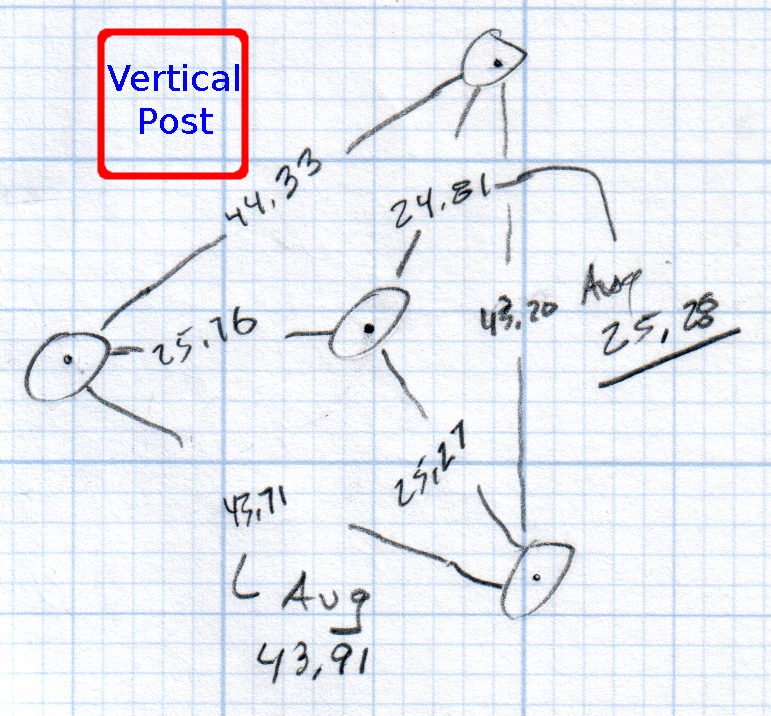
    You must know either the average radius / diameter of the pins or the average pin-to-pin distance. We used a quick-and-dirty measurement for the radius, but after things settled down, I used a slightly more rigorous approach. Spotting the pins on carbon paper (!) produced these numbers:

    Sphereometer Pin Radii
    Sphereometer Pin Radii

    The vertical scale has hard-metric divisions: 1 mm on the post and 0.01 on the dial. You’d therefore expect the pins to be a hard metric distance apart, but the 25.28 mm average radius suggests a crappy hard-inch layout. It was, of course, a long-ago surplus find without provenance.

    The 43.91 mm average pin-to-pin distance works out to a 50.7 mm bolt circle diameter = 25.35 mm radius, which is kinda-sorta close to the 25.28 mm average radius. I suppose averaging the averages would slightly improve things, but …

    The vertical distance for the lens in question was 0.90 mm, at least for our purposes. That’s the sagitta, which sounds cool enough to justify this whole exercise right there. It’s 100 mm in diameter and the ground edge is 2.8 mm thick, although the latter is subject to some debate.

    Using the BCD, the chord equation applies:

    • Height m = 0.90 mm
    • Base c = 50.7 mm
    • Lens radius r = (m2 + c2/4) / 2m = 357.46 mm

    Using the pin-to-pin distance, the spherometer equation applies:

    • Pin-to-pin a = 43.91 mm
    • Sagitta h = 0.90 mm
    • Lens radius R = (h/2) + (a2 / 6h) = 357.50 mm

    Close enough, methinks.

    Solving the chord equation for the total height of each convex side above the edge:

    • Base c = 100 mm
    • Lens radius r = 357.5 mm
    • Height m = r – sqrt(r2 -c2/4) = 3.5 mm

    So the whole lens should be 2 · 3.5 + 2.8 = 9.8 mm thick. It’s actually 10.15 mm, which says they were probably trying for 10.0 mm and I’m measuring the edge thickness wrong.

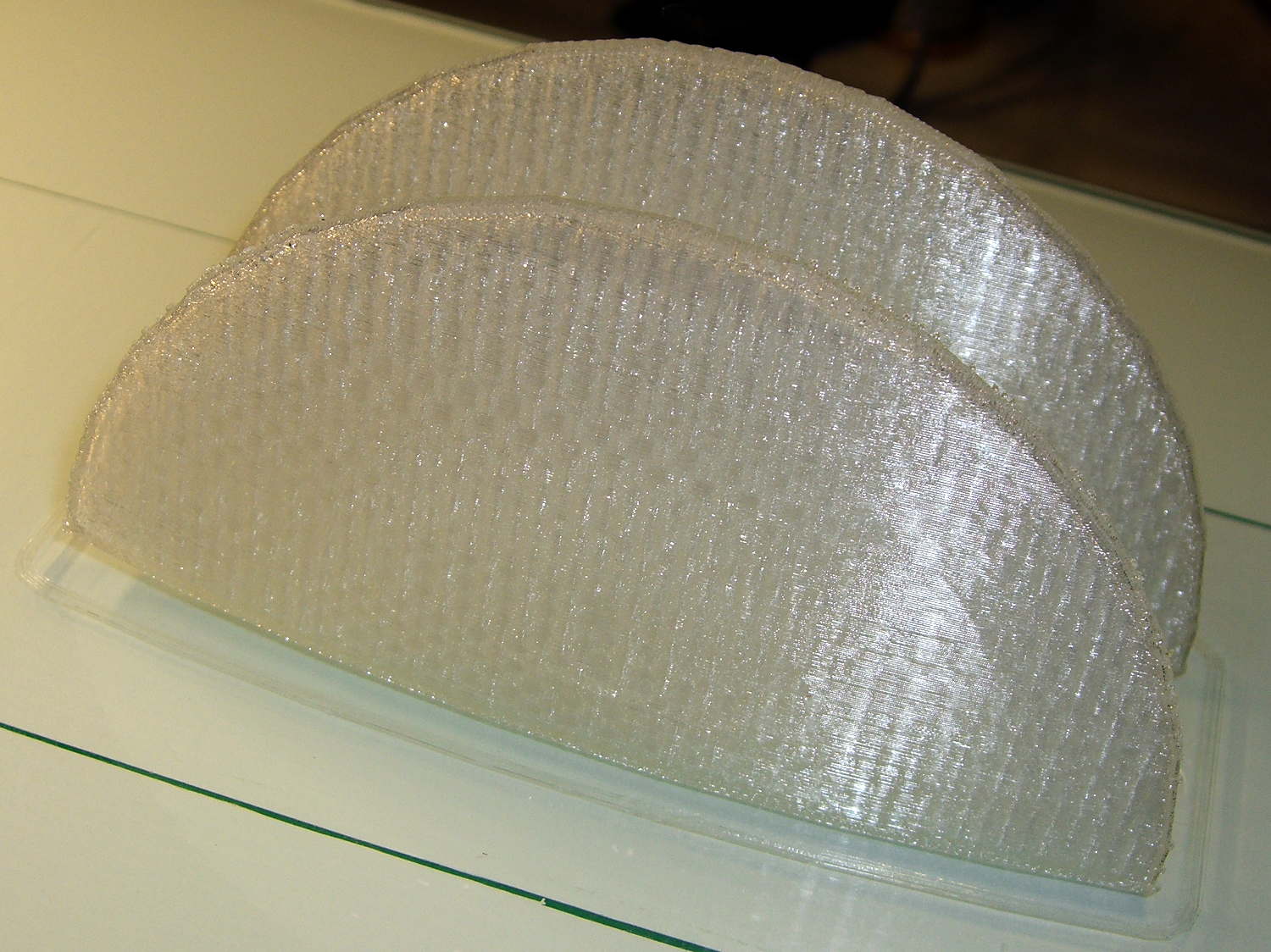
    She submitted to all this nonsense with good grace and cooked up an OpenSCAD model that prints the “lens” in two halves:

    Printed Lens - halves on platform
    Printed Lens – halves on platform

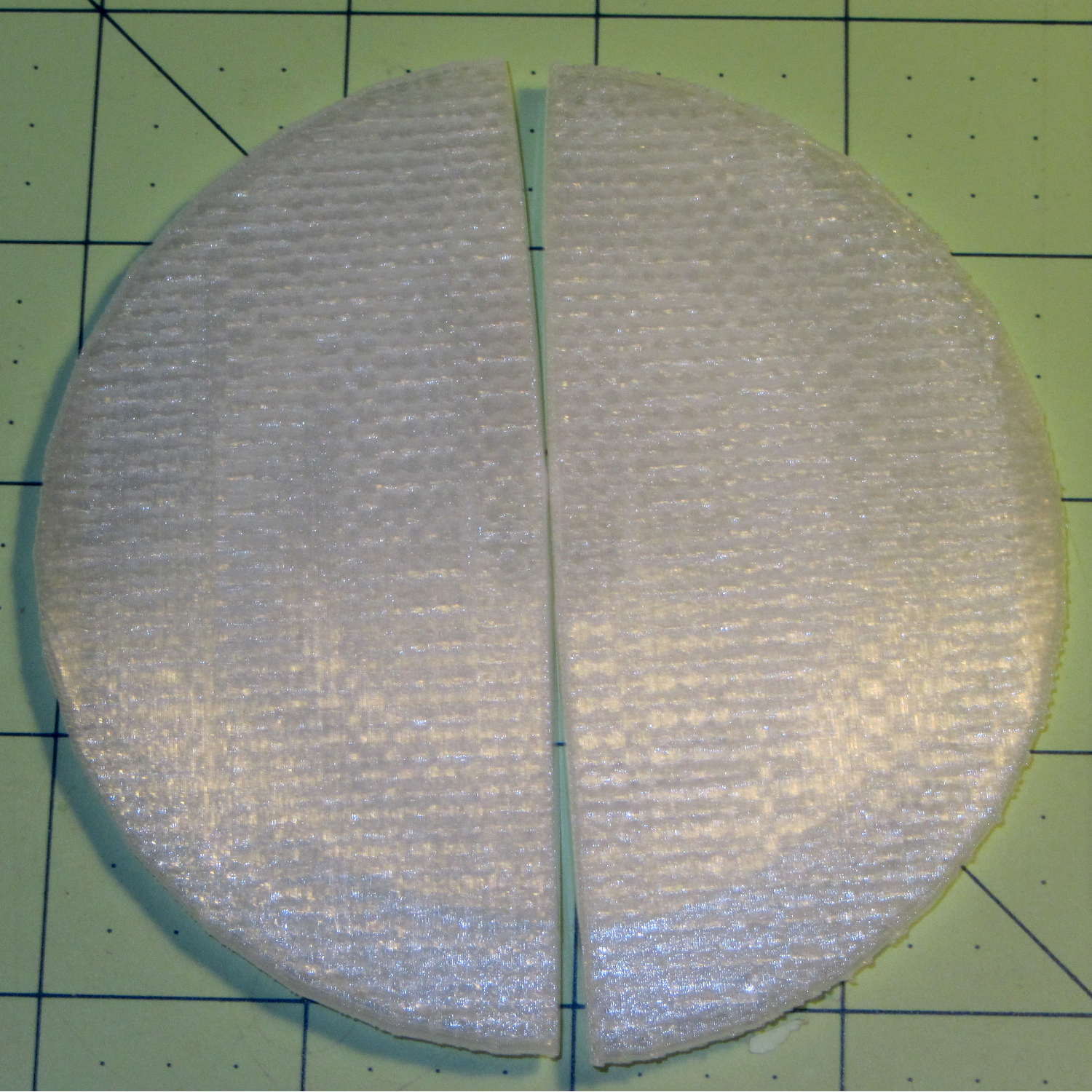
    Alas, those thin flanges have too little area on the platform to resist the contraction of the plastic above, so they didn’t fit together very well at all:

    Printed Lens - base distortion
    Printed Lens – base distortion

    We figured a large brim would solve that problem, but then it was time for her to return to the hot, fast core of college life…

  • 3D Printed Handcuffs

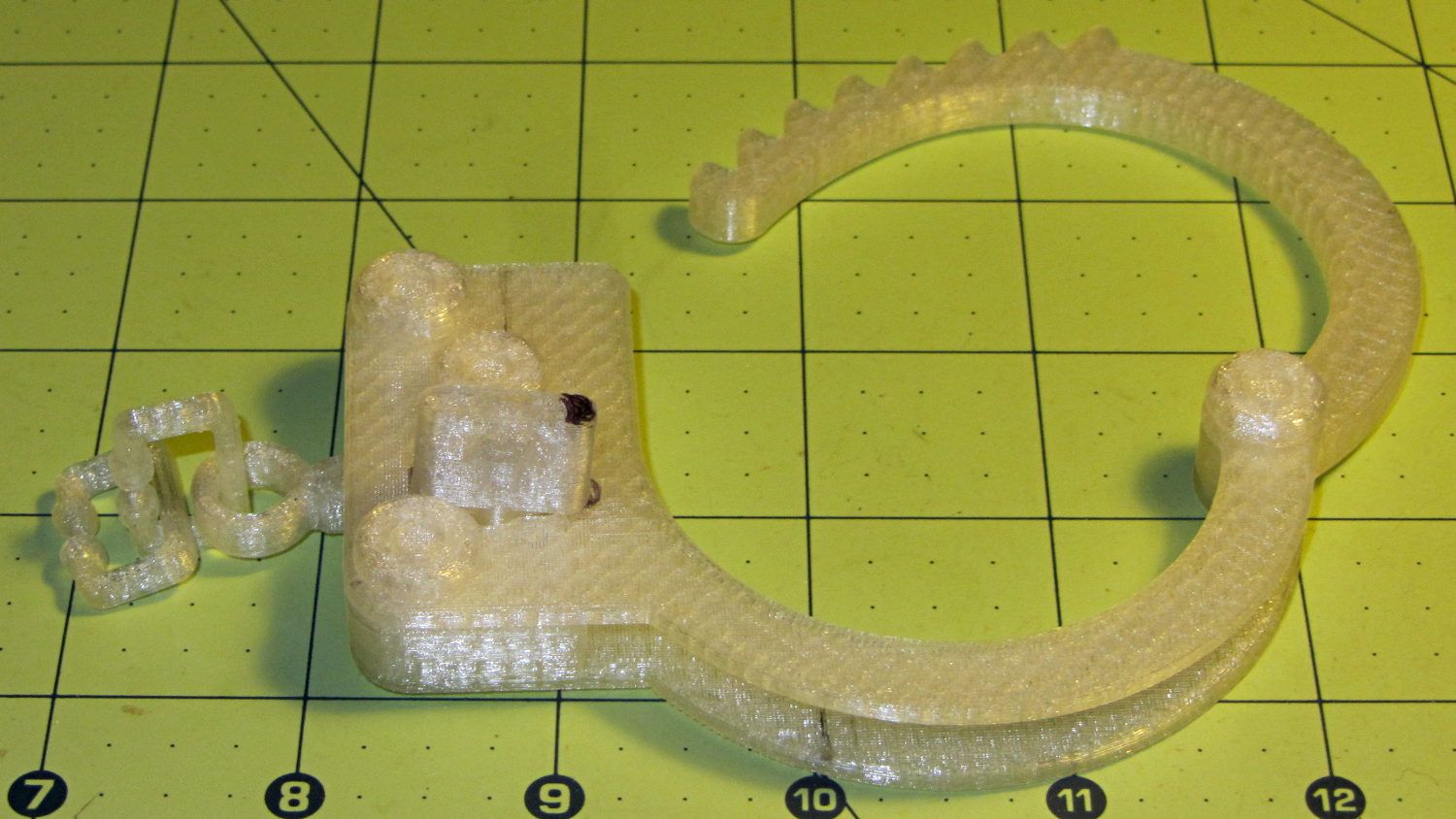
    A friend who read about my chain mail armor asked about handcuffs, so I ran off one of gianteye’s Printable Handcuffs V1.0:

    3D Printed Handcuff
    3D Printed Handcuff

    Alas, that shows the difficulty of using an STL file designed for a different printer, as the interlocking parts didn’t even come close to fitting and required major abrasive adjustment with a Dremel. One of the few successful prints reported on Thingiverse seems involve a commercial printer, so it’s not just the M2’s problem.

    I’m not sufficiently motivated to conjure an OpenSCAD model right now…

  • 3D Printed Chain Mail Armor – Zombie Hunter Edition

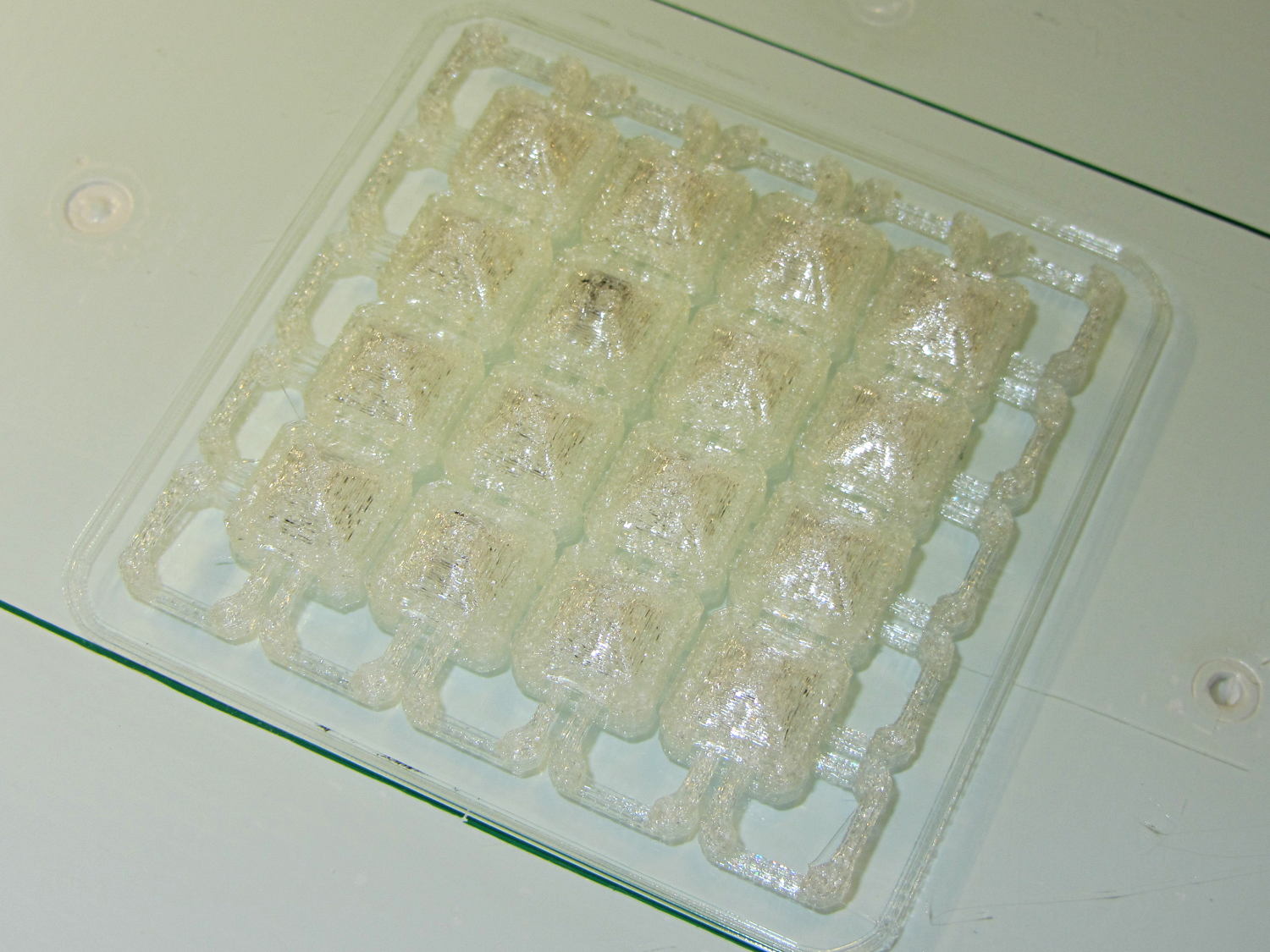
    Reducing the link bars to 4×4 threads produced a diminutive patch:

    Square Armor - small links - platform
    Square Armor – small links – platform

    Most of the dark smudges come from optical effects in the natural PLA filament, but the second-from-upper-left armor button contains a dollop of black PLA left in the nozzle from the end of that spool; running meters and meters of filament through the extruder isn’t enough to clean the interior. I now have some filament intended to clean the extruder, but it arrived after the black ran out.

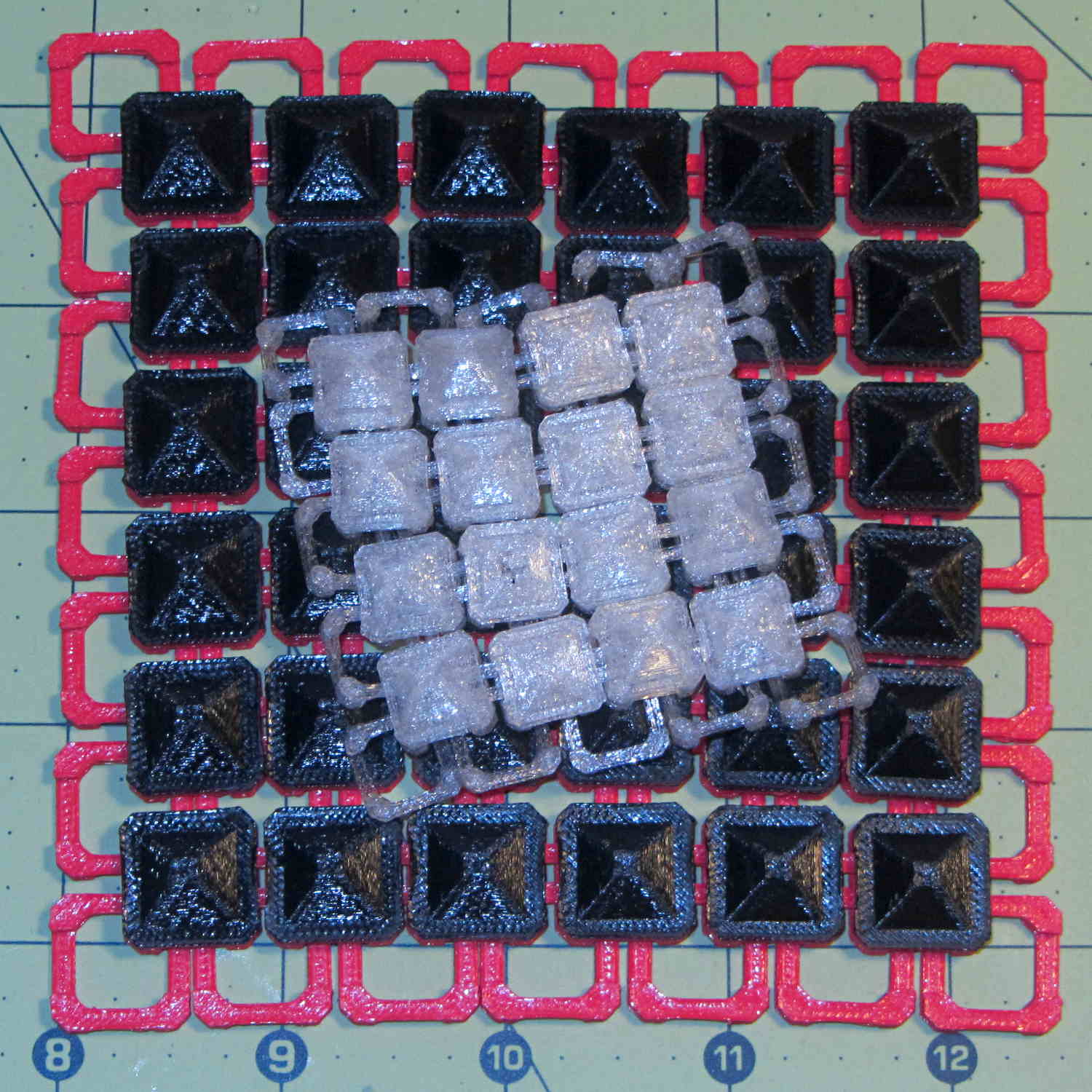
    Comparing the patch with the original buttons shows the size difference:

    Square Armor - large vs small links
    Square Armor – large vs small links

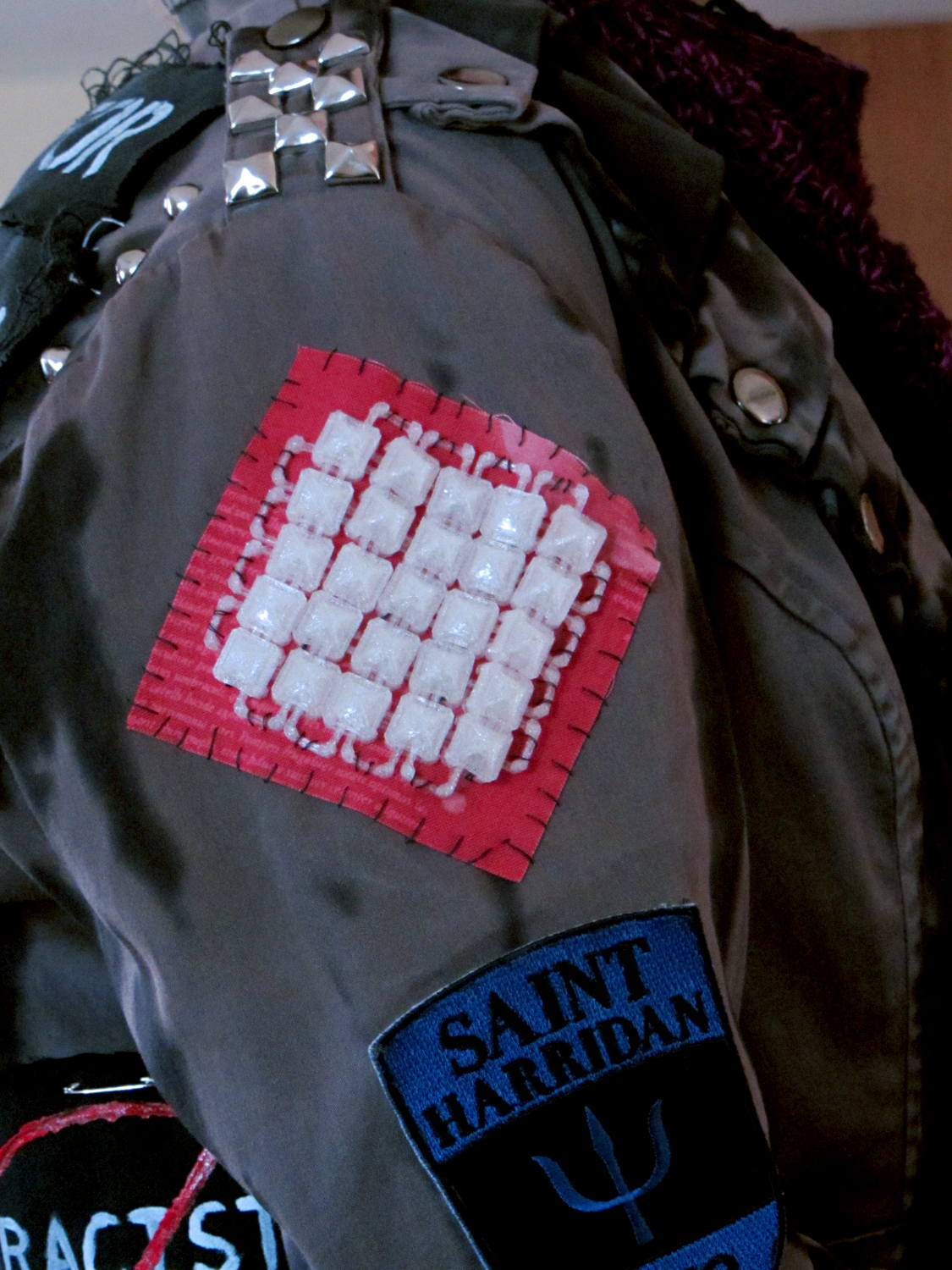
    A trial fit suggested a 5×5 patch would fit better, so …

    Square Armor - small links - mounted
    Square Armor – small links – mounted

    The whip stitching accentuates the jacket’s style.  We I think a glittery piping cord square around the armor links would spiff it up enormously and hide the open links, but that’s in the nature of fine tuning.

    I’ll eventually see what happens with 3×3 thread = 1.2×0.6 mm links, which may be too small for reliable bridging and too delicate for anything other the finest evening wear.