Flushed with success from making the boost power supply mount, here’s a holder for the Arduino Mega that’s supporting the Kenmore 158 sewing machine UI:

The solid model shows two screws holding the PCB in place:
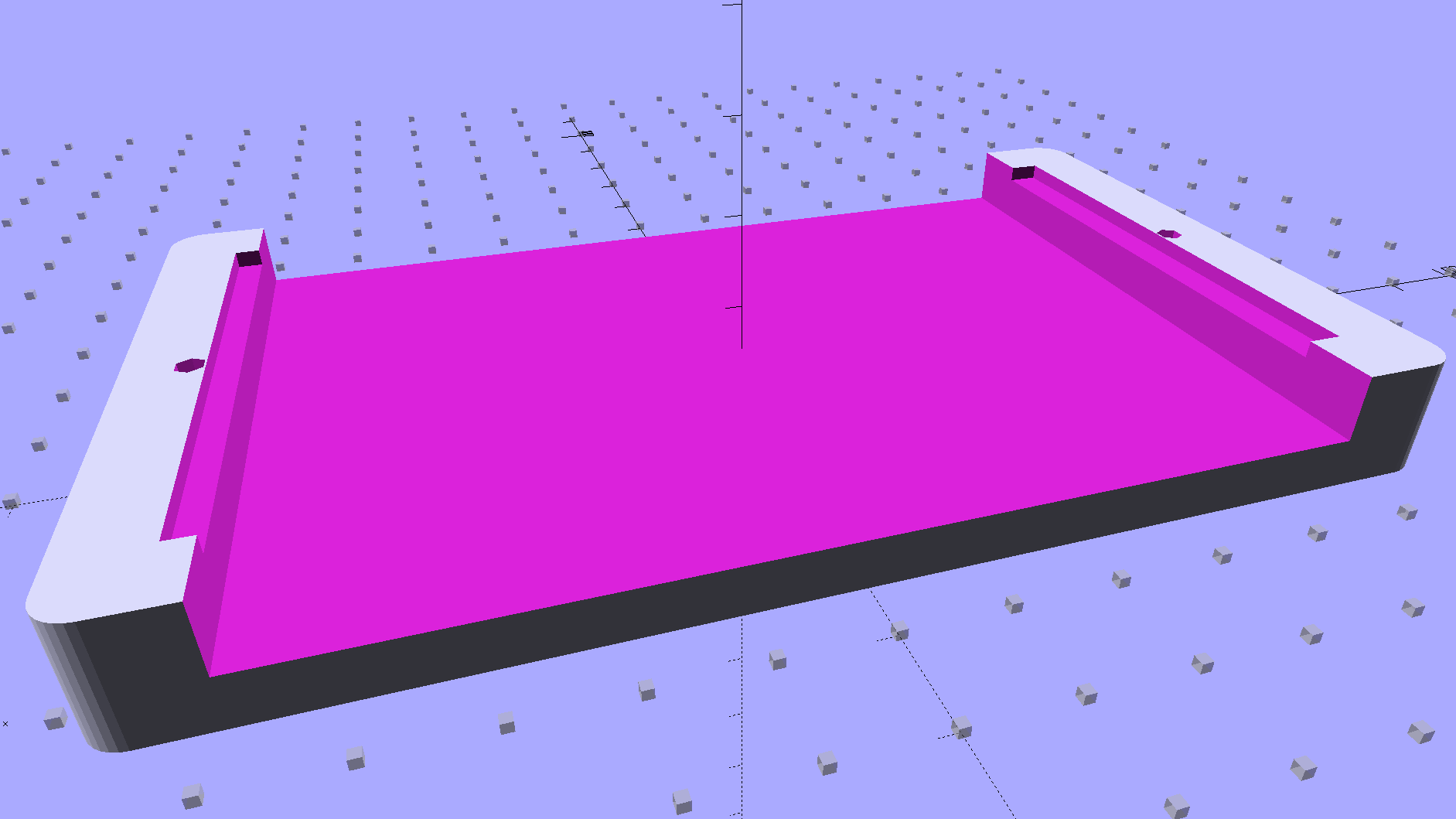
I decided to edge-clamp the board, rather than fuss with the built-in screws, just because 3D printing makes it so easy.
Of course, the UI needs a real case that will hold it at an angle, so as to make the LCD and touch screen more visible and convenient; this mount just keeps the PCB up off the conductive surface of the insulating board we’re using in lieu of a Real Sewing Platform.
This sewing machine project involves a lot of parts…
The OpenSCAD source code:
// PCB mounting bracket for Arduino Mega
// Ed Nisley - KE4ZNU - January 2015

Layout = "Build";			// PCB Block Mount Build

//- Extrusion parameters must match reality!
//  Print with 4 shells and 3 solid layers

ThreadThick = 0.20;
ThreadWidth = 0.40;

HoleWindage = 0.2;			// extra clearance

Protrusion = 0.1;			// make holes end cleanly

AlignPinOD = 1.70;			// assembly alignment pins: filament dia

function IntegerMultiple(Size,Unit) = Unit * ceil(Size / Unit);

X = 0;						// useful subscripts
Y = 1;
Z = 2;

//----------------------
// Dimensions

inch = 25.4;

Tap4_40 = 0.089 * inch;
Clear4_40 = 0.110 * inch;
Head4_40 = 0.211 * inch;
Head4_40Thick = 0.065 * inch;
Nut4_40Dia = 0.228 * inch;
Nut4_40Thick = 0.086 * inch;
Washer4_40OD = 0.270 * inch;
Washer4_40ID = 0.123 * inch;

PCBoard = [102,54,IntegerMultiple(1.8,ThreadThick)];

BottomParts = [[2.5,-5.0,0,0],				// xyz offset of part envelope
				[96,80,IntegerMultiple(5.0,ThreadThick)]];			// xyz envelope size (z should be generous)

Margin = IntegerMultiple(Washer4_40OD,ThreadWidth);

MountBase = [PCBoard[X] + 2*Margin,
			PCBoard[Y] + 2*Margin,
			IntegerMultiple(5.0,ThreadThick) + PCBoard[Z] + BottomParts[1][Z]
			];
echo("Mount base: ",MountBase);

ScrewOffset = Clear4_40/2;

Holes = [									// PCB mounting screw holes: XY + rotation
		[Margin - ScrewOffset,MountBase[Y]/2,180/6],
		[MountBase[X] - Margin + ScrewOffset,MountBase[Y]/2,180/6],
		];

CornerRadius = Washer4_40OD / 2;

//----------------------
// Useful routines

module PolyCyl(Dia,Height,ForceSides=0) {			// based on nophead's polyholes

  Sides = (ForceSides != 0) ? ForceSides : (ceil(Dia) + 2);

  FixDia = Dia / cos(180/Sides);

  cylinder(r=(FixDia + HoleWindage)/2,
           h=Height,
           $fn=Sides);
}

module ShowPegGrid(Space = 10.0,Size = 1.0) {

  RangeX = floor(100 / Space);
  RangeY = floor(125 / Space);

	for (x=[-RangeX:RangeX])
	  for (y=[-RangeY:RangeY])
		translate([x*Space,y*Space,Size/2])
		  %cube(Size,center=true);

}

//----------------------
// Build things

module PCB() {

	union() {
		cube(PCBoard);
		translate(BottomParts[X] - [0,0,BottomParts[1][Z]])
			cube(BottomParts[Y] + [0,0,Protrusion]);
	}

}

module Block() {
	translate([MountBase[X]/2,MountBase[Y]/2,0])
		hull()
			for (i = [-1,1], j = [-1,1])
				translate([i*(MountBase[X]/2 - CornerRadius),j*(MountBase[Y]/2 - CornerRadius)],0)
					cylinder(r=CornerRadius,h=MountBase[Z] - Protrusion,$fn=8*4);
}

module Mount() {

	difference() {
		Block();

		translate([MountBase[X]/2 - PCBoard[X]/2 + BottomParts[0][X] - Protrusion,
					-MountBase[Y]/2,
					MountBase[Z] - PCBoard[Z] - BottomParts[1][Z]])
			cube([BottomParts[1][X] + 2*Protrusion,
					2*MountBase[Y],
					2*BottomParts[1][Z]]);

		translate([MountBase[X]/2 - PCBoard[X]/2,		// PCB recess
					MountBase[Y]/2 - PCBoard[Y]/2,
					MountBase[Z] - PCBoard[Z]])
			PCB();
		for (h = Holes) {
			translate([h[X],h[Y],-Protrusion]) rotate(h[Z])
				PolyCyl(Tap4_40,MountBase[Z] + 2*Protrusion,6);
		}
	}

}

ShowPegGrid();

if (Layout == "PCB")
	PCB();

if (Layout == "Block")
	Block();

if (Layout == "Mount")
	Mount();

if (Layout == "Build")
	translate([-MountBase[X]/2,-MountBase[Y]/2,0])
	Mount();


Comments
4 responses to “Arduino Mega PCB Holder”
Your insulating board is conductive. This amuses me.
Sort of like thermally conductive electrically insulating steel-filled epoxy.
Some years ago, I blew away a powered Arduino by laying it down atop a wire snippet on the workbench. I still drop the boards on the bench, of course, but I’m slightly better about checking for conductive debris.
Sort of like, but actually the opposite! I too have fried things by putting then down on solder blobs, wire cutoffs, nuts, tools, and the like. I’m not proud of it, but I think it happens to all of us.
Yep. I fried a ground trace in my UPS a few years back. The cover could (and did) contact the circuit board during reinstallation, and there wasn’t a way to do it unpowered. Urrk. I’m going to try poster board or some polyethylene when I do the next battery transplant so it isn’t quite so delicate an operation…