The Smell of Molten Projects in the Morning

Ed Nisley's Blog: Shop notes, electronics, firmware, machinery, 3D printing, laser cuttery, and curiosities. Contents: 100% human thinking, 0% AI slop.

Tag: Laser Cutter

  • OMTech Laser Cutter: Honeycomb Rivnut

    OMTech Laser Cutter: Honeycomb Rivnut

    The honeycomb platform in my OMTech laser cutter was secured by a pair of M4 screws passing through the surrounding frame into a pair of nuts requiring considerable contortion to install. As a result, I tended to use the screws as locating pins by just dropping them into the holes, which didn’t prevent me from jostling the honeycomb out of position on a few occasions.

    With everything torn down as part of the move, I drilled out the holes in the frame and installed a pair of M4 rivnuts:

    OMTech laser - Honeycomb screw rivnut
    OMTech laser – Honeycomb screw rivnut

    The scar around the hole in the honeycomb came from the factory; I have no idea what they were doing to cause that much wear.

    Anyhow, installing the screws now requires zero contortionism and they locate the honeycomb much more securely.

    I should conjure knobs for the top of the screws to eliminate the need for a hex key, although that’s definitely low on the task priority list.

  • Laser Water Chiller: Heating

    Laser Water Chiller: Heating

    The previous Basement Laboratory generally stayed above 60 °F = 15 °C, so I set the LightObject water chiller’s low-temperature alarm accordingly.

    Having reached the point where I can set up the laser in its new home, I connected the chiller tubes, filled the reservoir with distilled water (and a squirt of algaecide), connected the alarm wiring, turned it on, and had the cool water trigger an alarm:

    LightObject Laser chiller - low temp alarm
    LightObject Laser chiller – low temp alarm

    Which was relayed to the controller:

    KT332N Diagnostic display - water protect active
    KT332N Diagnostic display – water protect active

    Silencing the chiller’s alarm clears the error indicator in the controller, so it’s possible to Fire The Laser with too-cold water if necessary.

    As with the previous icemaker chiller, plotting the water temperature as a function of time shows the pump adds some energy as it moves the water around the loop:

    LightObject Q600 chiller - water heating
    LightObject Q600 chiller – water heating

    The gap in the data shows where I had a few other things to do, but the exponential rise is obvious. The chiller compressor starts at just over 21 °C and stops at just under 20 °C, so the exponential curve had gone about as far as it could go.

    The numbers in the upper right of the plot give the weight of:

    • An empty water bottle
    • A full gallon bottle
    • The partially empty bottle used to top off the reservoir
    • How much water went into the chiller reservoir

    The figures in the bottom mash the initial slope of that curve together with the weight of the water to find the 21 W required to heat the water at that rate, with a bank shot off British Thermal Units because why not.

    A Kill-a-Watt meter shows the Q600 chiller draws 36 W with the pump running, which includes the controller and a column of blue LEDs behind the water level tube.

    The pump (in the lower right) isn’t exactly water-cooled, but it’s not losing a lot of heat through that foam wrapper and maybe most of the heat really does come from the motor:

    LightObject Laser chiller - right side internal view
    LightObject Laser chiller – right side internal view

    The basement temperature will rise as Spring becomes Summer, so the chiller will start working right away, and it’ll definitely get more exercise when the laser starts cutting again.

  • Sears Sewing Table: Foot Repair

    Sears Sewing Table: Foot Repair

    While arranging the venerable Sears Sewing Table in its new abode, we found the casters underneath didn’t roll nearly as well as they should, which turned out to be due to an accumulation of damage:

    Sears sewing table - torn MDF
    Sears sewing table – torn MDF

    As far as I can tell, all four casters have been displaced upward, probably because they have no support directly above their stems and any force applied to the wheel has plenty of lever arm against those screws.

    The MDF panels on the outside of the table have pictures of wood laminated to their surface, but lack enough structural integrity to keep the screws in place. The plywood, however, survived largely unscathed, although the screws were pulling out.

    I poked as much wood glue into the gaps as possible, then applied as many clamps as possible, with wood strips on both sides of the bulge squashing the MDF into a flat sheet. Over the course of two gluing sessions (I need more clamps!) spanning three days, while Mary really wanted to start sewing, the glue cured. I had plenty of time to unbend the brackets and put a more-or-less right angle between their two screw plates.

    Rummaging in the box of laser scraps (after finding said box) produced disks cut from various projects that fit between the plywood bottom of the cabinet and the stems:

    Sears sewing table - repaired foot - side
    Sears sewing table – repaired foot – side

    The brackets deliberately don’t match their original shape, because their new squareness put the screws into undamaged spots in the MDF and plywood:

    Sears sewing table - repaired foot - bottom
    Sears sewing table – repaired foot – bottom

    The MDF will never be quite the same, but it’s flat on the visible side and the glue (seems to have) consolidated the fragments well enough.

    Although those wheels look terrible, the bracket now holds the stem vertically and all four of them roll easily and pivot smoothly.

    The laser-cut disks are held in place by pure faith and the overwhelming weight of all the MDF in the table, so they’re not going anywhere. Because the table’s weight now rests on the caster stems, as distributed across the plywood cabinet bottom through the disks, the brackets shouldn’t be subject to excessive upward force.

    She started therapy right away:

    Sears sewing table in use
    Sears sewing table in use

    And we continued moving in …

  • Magazines to the Archive

    Magazines to the Archive

    Thanks to tantris aiming me in the right direction, my techie magazines are on their way to the Internet Archive for scanning:

    Archive boxes - A
    Archive boxes – A

    They’re also accepting our 14th Edition of the Encylopædia Britannica (back when folks realized global war was a thing, but before knowing the recently concluded horror was the first), two dozen Tom Swift Jr books (largely responsible for much of the rest of my life), three years of LIFE magazines from the mid-1940s needing no further description, and a few other goodies:

    Archive boxes - B
    Archive boxes – B

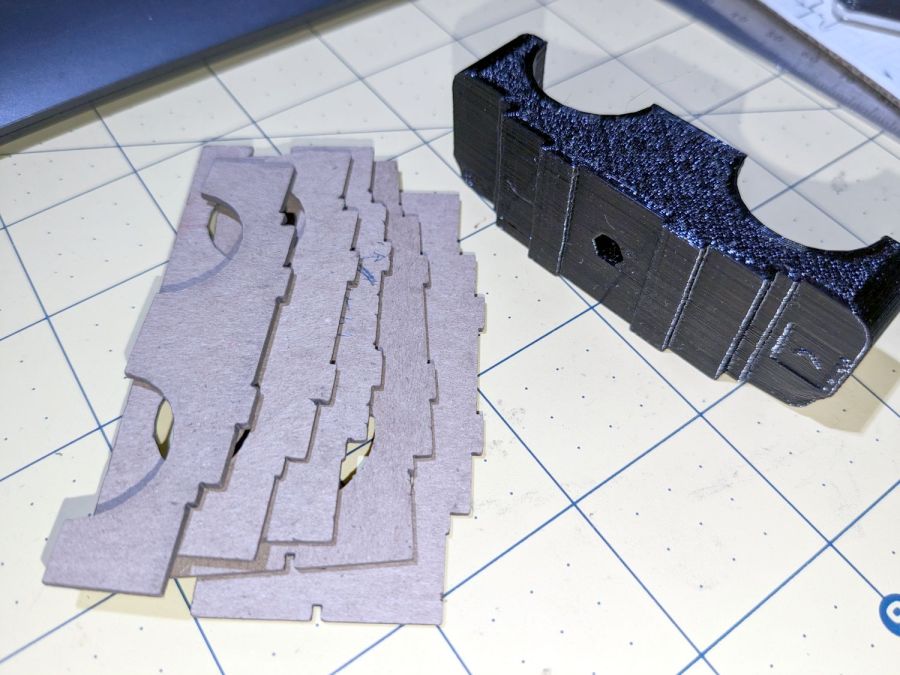
    They want boxes packed as solidly as possible to withstand shipping & warehousing, so I converted nearly all of my scrap cardboard into bracing and padding:

    Archive boxes - cutting gridwork
    Archive boxes – cutting gridwork

    The grids are Tray Inserts generated at festi.info:

    Archive boxes - internal bracing
    Archive boxes – internal bracing

    Here, try one yourself:

    TrayInsert - sample QR code
    TrayInsert – sample QR code

    That will set up a grid filling the gap between two stacks of magazines in the Archive’s standard 12×18×8 inch box. You’ll also want simple rectangles for the sides & tops, but those are easy.

    They preferred the laser cutter’s inevitable campfire smell to smashed boxes full of crumpled magazines. AFAICT, you might be able to crush the box, but if you did the magazines wouldn’t have survived anyway.

    Now, to start packing our books …

  • Skil Cordless Driver Re-batterying

    Skil Cordless Driver Re-batterying

    In anticipation of upcoming disassembly & reassembly tasks, I finally replaced the long-dead NiCd battery in an old Skil cordless driver with an 18650 lithium cell from the Basement Warehouse Wing:

    Skil Cordless Driver - 18650 cell overview
    Skil Cordless Driver – 18650 cell overview

    A USB charge controller sits in a slot carved into the plastic formerly supporting the NiCd battery’s charging jack:

    Skil Cordless Driver - USB charger detail
    Skil Cordless Driver – USB charger detail

    Hot-melt glue holds everything in place.

    The motor draws about 2 A under full load, which is a bit more than the charge controller wants to supply. I simply wired the motor (through its reversing switch) directly to the 18650 cell terminals, which is certainly not good practice, but seems reasonable given the intended use case.

    A red LED shows the charger stuffing energy into the cell:

    Skil Cordless Driver - charge indicator
    Skil Cordless Driver – charge indicator

    You can see the blob of glue holding one of the acrylic cylinders left over from the gelatin capsule filler; only 99 more to go! I had to turn it down by about a millimeter, an operation best left to your imagination.

    After an hour, a green glow shows the cell is fully charged:

    Skil Cordless Driver - full charge
    Skil Cordless Driver – full charge

    The original label proudly touted the NiCd battery’s 2.4 V, so I figured truth in packaging required a new label:

    Skil Cordless Driver - new label cutting
    Skil Cordless Driver – new label cutting

    The process:

    • Scan the original labels
    • Blow out the contrast to make binary masks
    • Trace into vectors with LightBurn, simplify & clean up
    • Add targets for Print-and-Cut
    • Save as SVG, import into GIMP, lay out text, print
    • Cut the outlines

    The labels have laminating film on the top and craft adhesive on the bottom, both of which cut neatly and look pretty good:

    Skil Cordless Driver - lithium in action
    Skil Cordless Driver – lithium in action

    The alert reader will note the 4+ V from a fully charged lithium cell exceeds the 2.4+ V from fully charged NiCd cells, which accounts for the very bright incandescent headlamps. I figure 4 is roughly equal to 2.4, for large values of 2.4: the driver ticks along at 170 RPM instead 140 RPM.

    I measured the torque using a double-ended hex bit in a torque screwdriver, with the torque setting cranked up until the driver just barely clicked it over.

    I took the liberty of filing the raised “2.4 V” off the hinge covers and adding tidy retroreflective disks:

    Skil Cordless Driver - hinge cover
    Skil Cordless Driver – hinge cover

    I briefly considered adding “3.7 V” (because “4.2 V MAX” wouldn’t fit) in laser-cut PSA vinyl, but it was getting late.

    Now I can screw things up in style …

  • Kitchen Sink O-ring Seat Polishers

    Kitchen Sink O-ring Seat Polishers

    My long-running battle with the American Standard kitchen sink O-rings continues, but this time I tried polishing the seats with a strip of 3M 2000 grit sandpaper:

    Sink O-ring seat polisher - overview
    Sink O-ring seat polisher – overview

    Although it’s technically sandpaper, the effect is more like lapping than sanding and the O-rings now ride on a very smooth surface.

    The knurled half-ring is ¼-inch = 6.3 mm acrylic with an ID precisely fitting the pillar + sandpaper:

    Sink O-ring seat polishers
    Sink O-ring seat polishers

    The one on the right has an OD matching the surface inside the spout, but it turned out to be easier using fingertips, even if that isn’t quite how one should do lapping.

    The LightBurn layout shows the “knurls” are half-circles either added or subtracted from the arcs, as LightBurn’s Circular Array tool is my copilot:

    O-ring Polishers - LB layout
    O-ring Polishers – LB layout

    You’ll want to measure the ID and OD of your sink faucet, as well as the thickness of your sandpaper, before making make your own.

    Imagining / laying out / building those took less time than writing this up; I loves me some quick laser cutter action.

  • CD / DVD Coasters: Foam vs. Cork Backing

    CD / DVD Coasters: Foam vs. Cork Backing

    Up to this point, I’d been making coasters with a layer of cork on the bottom, held in place with wood glue (for MDF or plywood tops) or an adhesive sheet (for acrylic or glass). Doing that with a CD produced the bottom coaster:

    Laser cut CDs - Foam vs MDF-cork backing - detail
    Laser cut CDs – Foam vs MDF-cork backing – detail

    Although the Mariner’s Compass pattern looks like it extends over the edge, you’re looking through the transparent polycarbonate at the deep pits burned nearly through the entire disc at the corners of the triangles where the laser head slows.

    Although the MDF layer makes the coaster exceedingly stiff, it also makes it entirely too thick and much too fiddly to assemble.

    The top coaster is a Guilloche-patterned CD stuck to an EVA foam disk with an adhesive sheet. A small foam disk fills the hub hole and, not incidentally, covers the adhesive that would otherwise be exposed:

    Laser cut CDs - Foam coaster backing
    Laser cut CDs – Foam coaster backing

    It’s stiffer than I expected and works well unless the mug / glass / cup has a wet bottom. Alas, the small channels cut into the CD’s surface fill up with the liquid sealing the coaster to the mug, so it sticks firmly and follows the mug upward off the table.

    But they’re kinda pretty, inexpensive, and easy to assemble, which counts for something.