The Smell of Molten Projects in the Morning

Ed Nisley's Blog: Shop notes, electronics, firmware, machinery, 3D printing, laser cuttery, and curiosities. Contents: 100% human thinking, 0% AI slop.

Tag: Laser Cutter

  • COVID Buffer Extraction Tube vs. Acrylic Solvent Adhesive

    COVID Buffer Extraction Tube vs. Acrylic Solvent Adhesive

    This seemed like a good idea for dispensing small drops of acrylic solvent while gluing spiders together:

    COVID test Buffer Extraction Tube - adhesive hack
    COVID test Buffer Extraction Tube – adhesive hack

    It’s the Buffer Extraction Tube from a COVID-19 rapid test kit with a short brass tube jammed in its dropper tip. The longer brass tube let me suck that dose of solvent into the tube without any of the hassle required to pour the liquid from a big can into a little tube.

    Tell me you didn’t save those things because you thought they didn’t look like they might come in handy for something.

    Well, that turned out to be a Bad Idea™, because whatever plastic that tube is made out of cracks when exposed to the hellish mixture in SCIGRIP #3 solvent adhesive. The tube didn’t dissolve or melt, it just cracked when you (well, I) squeezed the sides.

    My Box o’ Test Kits has a few other types of tubes, but I used a syringe from the inkjet refilling era and that worked OK.

  • Slotted Spiders

    Slotted Spiders

    Starting from an SVG file set up for 3 mm material, apply the usual optimizations & tweaks to get a usable LightBurn file, then go nuts:

    Spider Collection
    Spider Collection

    The big one is two cross-laid layers of corrugated cardboard using up the better part of three Home Depot Large moving boxes:

    Spider - LightBurn layout - 2x cardboard
    Spider – LightBurn layout – 2x cardboard

    That little bitty grid is the 700×500 mm laser cutter platform, so I just slap a sheet of cardboard in place, update the workspace from the camera, select the next layout, drag it over the cardboard, and Fire The Laser.

    The smaller cardboard spider over on the left is built with a single cardboard layer and succumbed to the square-cube law: the legs are entirely too bendy for the weight of the body. Although it’s not obvious from the pictures, both cardboard spiders have a keel plate I added under the body to support most of their weight.

    The brightly colored little spiders got a coat of rattlecan paint without any underlying primer and definitely look like that happened:

    Spider Collection - detail 2
    Spider Collection – detail 2

    The edge-lit fluorescent green spider is sized around 2.9 mm material, the clear spider uses 2.3 mm acrylic, and the chipboard one in the background is at 1.8 mm:

    Spider Collection - detail 1
    Spider Collection – detail 1

    The eyes are fluorescent red or green acrylic with concentric circles engraved to catch the light. They’re more effective than I expected, although they won’t look like much after dark.

    We now live in a neighborhood with youngsters and Halloween this year will be so much fun

    The WordPress AI image generator caught the general idea of “cardboard spiders”:

    Spider - WordPress AI image
    Spider – WordPress AI image

    So. Many. Legs.

  • Slotted Beetles

    Slotted Beetles

    Continuing the theme of slot resizing & overall scaling:

    Beetle Collection
    Beetle Collection

    The original model has 3.0 mm slots and arrived in CorelDraw format requiring a bank shot off InkScape to create an SVG file suitable for LightBurn. After the usual cleanup & optimization, I applied global rescaling to match the available material.

    The smallest beetles use 1.9 mm chipboard:

    Beetle - 1.9mm chipboard
    Beetle – 1.9mm chipboard

    Everything is held together by ordinary wood glue, squeezed together for a few moments until the two parts no longer slide around.

    One layer of 3.9 mm corrugated cardboard:

    Beetle - 1x cardboard
    Beetle – 1x cardboard

    The fancy gold & hologram decorations come from what’s surely non-laser-safe PSA vinyl sheets, cut by offsetting the top layer shapes inward a reasonable amount. The eyes come from random colored paper or painted chipboard.

    Two layers of cardboard add up to 8 mm:

    Beetle - 2x cardboard
    Beetle – 2x cardboard

    That’s purple paper left over from the layered paper quilt blocks and, obviously, my glue stick hand is weak.

    Three layers of cardboard makes each part half an inch thick:

    Beetle - 3x cardboard
    Beetle – 3x cardboard

    That bad boy needs black stripes on yellow in the universal “Fear me! I am a seriously dangerous creature!” danger marking.

    The layers are laid out with crossed corrugations to make the part less bendy, which is more necessary for the relatively slender legs.

    It’s two feet long and chewed up the better part of two Home Depot Extra Large moving boxes:

    Beetle - LightBurn layout - 3x cardboard
    Beetle – LightBurn layout – 3x cardboard

    The gridded rectangle represents the 700×500 mm laser platform.

    The little ones are kinda cute and not too threatening:

    Beetle Collection - 1.9mm
    Beetle Collection – 1.9mm

    Yes, that is one of the Goldbug Variations.

  • Slotted Elephants

    Slotted Elephants

    Continuing the theme of slot resizing for various materials:

    Elephants - 3.8 and 1.5 mm
    Elephants – 3.8 and 1.5 mm

    The DXF pattern imports directly into LightBurn and requires the usual joining / closing / optimization before all the slots resize in unison. Doing the resize changed the slots from the original 3.0 mm to the 3.9 mm required to convert a cardboard moving box into a pachyderm.

    The leg sections turned out to be a bit too thin for corrugated cardboard, so the corrugations came loose from the surface sheets, although the tail looked much more realistic. Stipulated: corrugated cardboard is the wrong material, but I really didn’t need a big MDF elephant looming over everything else.

    The smaller elephants, both in 1.5 mm thick materials, come from a global resize applied through the LightBurn Numeric Edit toolbar:

    LightBurn Numeric Edit - percent resize
    LightBurn Numeric Edit – percent resize

    The ratio makes the slots become the new size, with the entire rest of the design scaled around them. This works if you don’t much care about the overall size, but is rare in actual practice where you need a model “that big” with the slots fitting “that material”.

    But the pieces just slid together:

    Elephants - 1.5 mm detail
    Elephants – 1.5 mm detail

    I put dots of cyanoacrylate in the acrylic joints, although the vapors scarred the surface enough to remind me why that’s the wrong adhesive for the job when you care about surface quality. Dots of wood glue hold the chipboard elephant together, with a quick shot of clear rattlecan paint to knock down the smell of the charred edges; I’d say the color came out about right.

    All in all, they worked out rather well.

  • Laser Test Paper Beam Alignment Targets

    Laser Test Paper Beam Alignment Targets

    Having failed at making flexible plant tags, I figured using laser test paper to make laser test targets might work:

    Test paper - target patterns - 2024-07-03
    Test paper – target patterns – 2024-07-03

    They descend from my original dot-mode laser beam targets:

    OMTech 60W laser - beam alignment - 2022-03-22
    OMTech 60W laser – beam alignment – 2022-03-22

    The dots just barely punch through the back side (open in a new tab & zoom for more dots):

    Test paper - target patterns back side- 2024-07-03
    Test paper – target patterns back side- 2024-07-03

    The plastic coating chars and buckles with each pulse, but remains in place:

    Test paper - 2 shot - uncleaned - 2024-07-03
    Test paper – 2 shot – uncleaned – 2024-07-03

    Wiping the surface removes the loose coating / ash / debris to expose the underlying charred paper core:

    Test paper - 2 shot - wiped - 2024-07-03
    Test paper – 2 shot – wiped – 2024-07-03

    Those are two pulses marking the ends of each axis, so the machine remains well aligned after the fourth-quarter tweak.

    A single pulse shows the beam has a nice round shape with well-defined edges:

    Test paper - 1 shot - wiped - 2024-07-03
    Test paper – 1 shot – wiped – 2024-07-03

    In principle, the beam should be more intense toward the middle, but I suspect that’s beyond the paper’s ability to resolve the energy; the beam either burns through the coating or it doesn’t. In all those targets, the back surface of the paper remains undamaged.

    Manila paper targets seem to have better energy resolution and take much less time to produce:

    Beam Alignment - Mirror 2 detail - 2023-09-16
    Beam Alignment – Mirror 2 detail – 2023-09-16

    The black test paper will certainly come in handy for something, though.

  • Clothes Washer Hose Bumpers

    Clothes Washer Hose Bumpers

    For obvious reasons, the water hoses tend to thump against the wall and the sheet-metal back of the clothes washer, so I added foam disks to mute the noise:

    Clothes washer hose bumpers
    Clothes washer hose bumpers

    They’re closed-cell polyethylene foam, laser-cut from a sheet about 15 mm thick. The cut is a yawning 2 mm wide near the top, but it pretty much doesn’t matter in this application.

    The black line in the split is a snippet of the usual outdoor-rated foam tape, which probably won’t stick well to PE foam. If these fall apart, a cable tie around their waist should suffice.

    The nice clip in the foreground is one of two intended to corral the drain hose. It’d be nice if LG included a few clips for the water hoses, but no matter where they were, the hoses would want to go elsewhere.

  • Acrylic Grid Bathtub Soap Tray

    Acrylic Grid Bathtub Soap Tray

    Although the house has a shower stall, I want to fix the cracks in its floor before we use it, so we’ve been taking showers in one of the bathtubs. As is always the case, the soap tray / grab handle is positioned for someone reclining in the tub, making it both too low and too awkward for either of us.

    Normally, I’d just stick a soap tray on the wall and be done with it, but the tub wall is covered with small tiles that defeat sticky cups; more permanent adhesives are not under discussion.

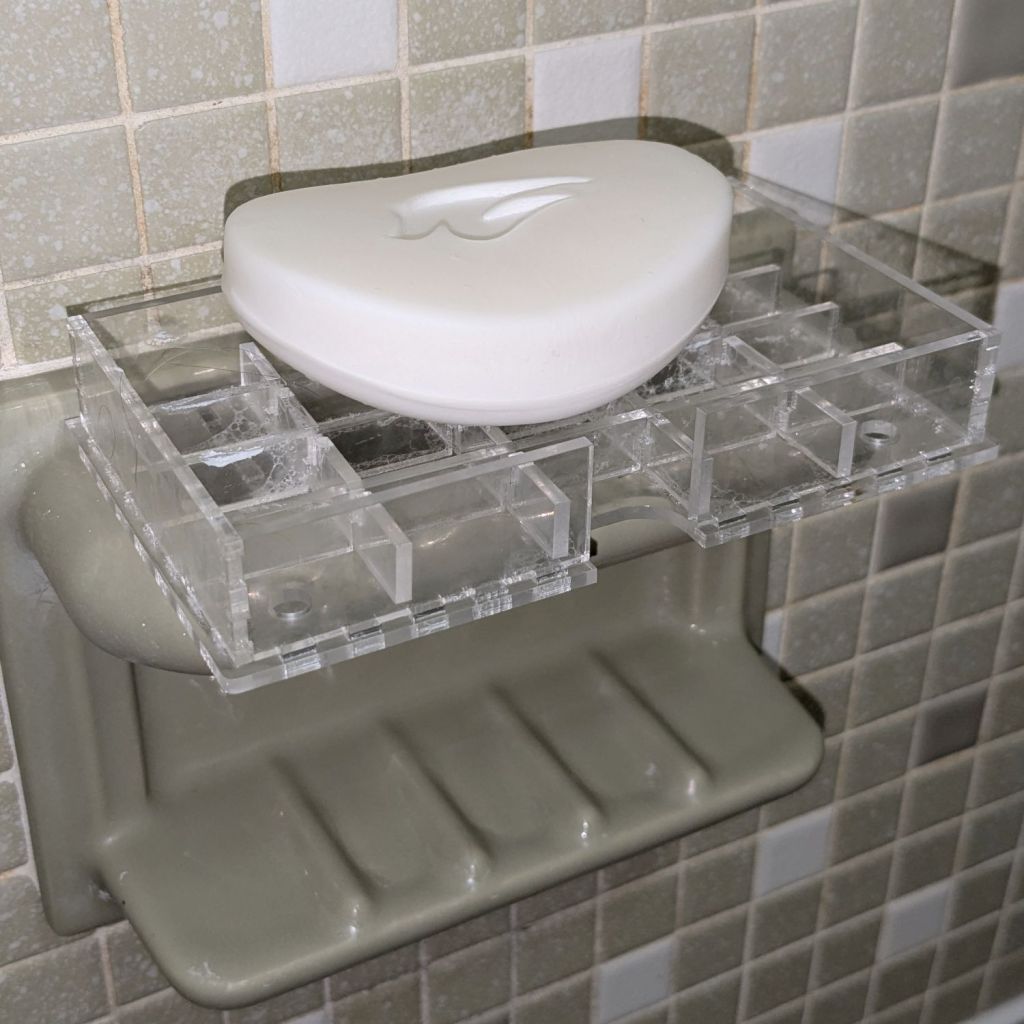
    So I dropped a TrayInsert grid into a NotesHolder box, stuck them to the existing fixture with snippets of (regrettably black) outdoor-rated foam tape, and there it is:

    Acrylic grid bathtub soap tray
    Acrylic grid bathtub soap tray

    You’ll surely not have 3.2 mm acrylic for the grid and 2.5 mm acrylic for the box, but those two linkies have the jawbreaker URLs required to regenerate exactly what I built using the incomparable boxes.py site and you can tweak them as needed.

    The general concept had it stick out a bit from the fixture handle to let soap gunk drip into the tub, not down the wall, and to have an easily removable grid for cleaning. I doodled all manner of clever hooks to engage the ceramic handle before coming to my senses; this is a prototype, it may not solve the problem very well at all, so let’s find out if it works before making it better.

    The WordPress AI urges me to remind you of the safety issues surrounding DIY projects. IMO, should you need such reminders, they won’t do you any good and you must immediately stop reading this blog.

    Fair enough?