The Smell of Molten Projects in the Morning

Ed Nisley's Blog: Shop notes, electronics, firmware, machinery, 3D printing, laser cuttery, and curiosities. Contents: 100% human thinking, 0% AI slop.

Tag: Improvements

Making the world a better place, one piece at a time

  • PiHole with DNS-over-HTTP: Revised

    More than a year later, the PiHole continues to work fine, but the process for installing the Cloudflare DoH machinery has evolved.

    (And, yes, it’s supposed to be DNS-over-HTTPS. So it goes.)

    To forestall link rot, the key points:

    cd /tmp ;  wget https://bin.equinox.io/c/VdrWdbjqyF/cloudflared-stable-linux-arm.tgz
    tar -xvzf cloudflared-stable-linux-arm.tgz 
    sudo cp cloudflared /usr/local/bin
    sudo chmod +x /usr/local/bin/cloudflared
    sudo cloudflared -v
    sudo useradd -s /usr/sbin/nologin -r -M cloudflared
    sudo nano /etc/default/cloudflared
    ----
    CLOUDFLARED_OPTS=--port 5053 --upstream https://1.1.1.1/dns-query --upstream https://1.0.0.1/dns-query 
    ----
    sudo chown cloudflared:cloudflared /etc/default/cloudflared
    sudo chown cloudflared:cloudflared /usr/local/bin/cloudflared
    sudo nano /etc/systemd/system/cloudflared.service
    ----
    [Unit]
    Description=cloudflared DNS over HTTPS proxy
    After=syslog.target network-online.target
    
    [Service]
    Type=simple
    User=cloudflared
    EnvironmentFile=/etc/default/cloudflared
    ExecStart=/usr/local/bin/cloudflared proxy-dns $CLOUDFLARED_OPTS
    Restart=on-failure
    RestartSec=10
    KillMode=process
    
    [Install]
    WantedBy=multi-user.target
    ----
    sudo systemctl enable cloudflared
    sudo systemctl start cloudflared
    sudo systemctl status cloudflared

    Then aim PiHole’s DNS at 127.0.0.1#5053. It used to be on port #54, for whatever that’s worth.

    Verify it at https://1.1.1.1/help, which should tell you DoH is in full effect.

    To update the daemon, which I probably won’t remember:

    wget https://bin.equinox.io/c/VdrWdbjqyF/cloudflared-stable-linux-arm.tgz
    tar -xvzf cloudflared-stable-linux-arm.tgz
    sudo systemctl stop cloudflared
    sudo cp ./cloudflared /usr/local/bin
    sudo chmod +x /usr/local/bin/cloudflared
    sudo systemctl start cloudflared
    cloudflared -v
    sudo systemctl status cloudflared

    And then It Just Works … again!

  • Garden Hose Valve Wrench: Reinforced

    Garden Hose Valve Wrench: Reinforced

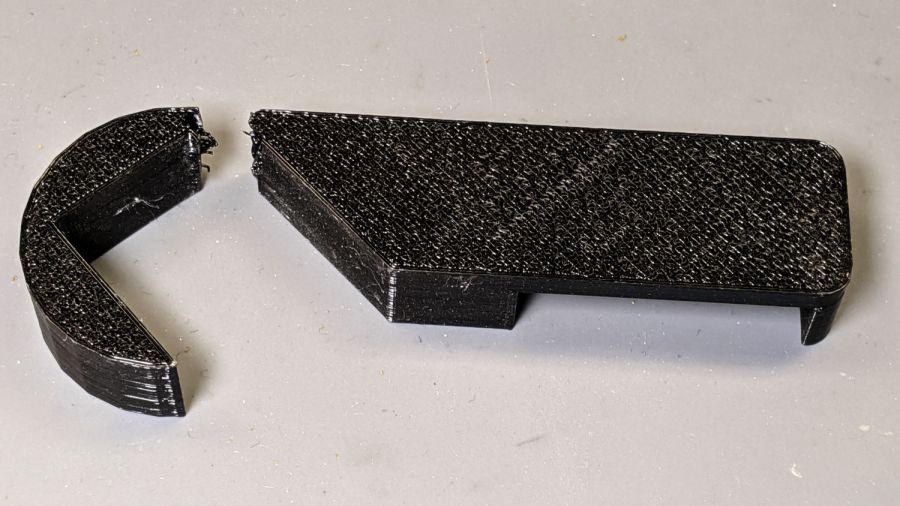
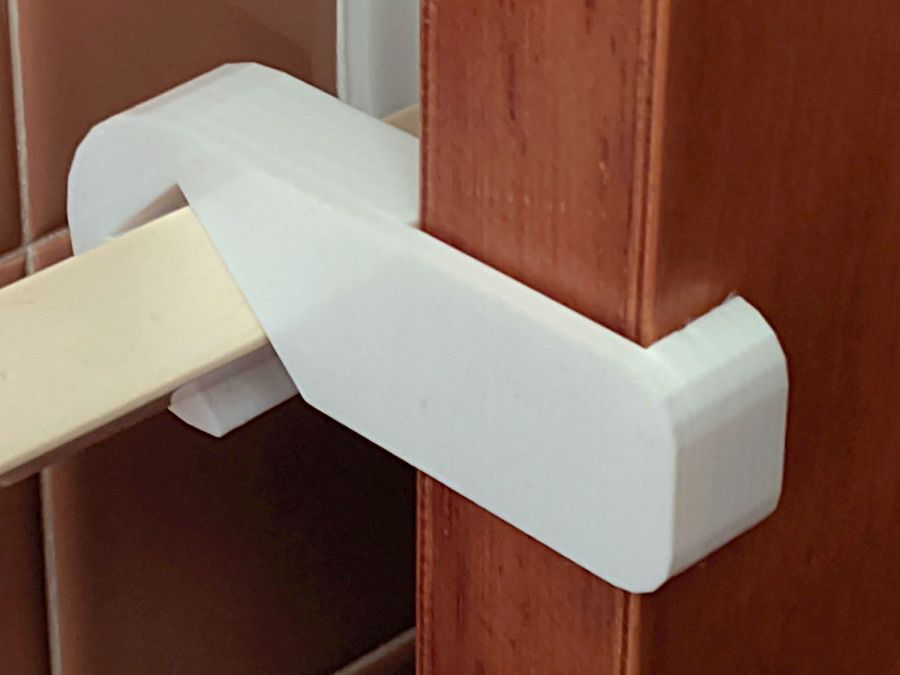
    After five gardening seasons, my simple 3D printed wrench broke:

    Hose Valve Knob - fractured
    Hose Valve Knob – fractured

    Although Jason’s comment suggesting carbon-fiber reinforcing rods didn’t prompt me to lay in a stock, ordinary music wire should serve the same purpose:

    Hose Valve Knob - cut pins
    Hose Valve Knob – cut pins

    The pins are 1.6 mm diameter and 20 mm long, chopped off with hardened diagonal cutters. Next time, I must (remember to) grind the ends flat.

    The solid model needs holes in appropriate spots:

    Hose Valve Knob - Reinforced - Slic3r
    Hose Valve Knob – Reinforced – Slic3r

    Yes, I’m going to put round pins in square holes, without drilling the holes to the proper diameter: no epoxy, no adhesive, just 20 mm of pure friction.

    The drill press aligns the pins:

    Hose Valve Knob - pin ready
    Hose Valve Knob – pin ready

    And rams them about halfway down:

    Hose Valve Knob - pin midway
    Hose Valve Knob – pin midway

    Close the chuck jaws and shove them flush with the surface:

    Hose Valve Knob - pins installed
    Hose Valve Knob – pins installed

    You can see the pins and their solid plastic shells through the wrench stem:

    Hose Valve Knob - assembled
    Hose Valve Knob – assembled

    Early testing shows the reinforced wrench works just as well as the previous version, even on some new valves sporting different handles, with an equally sloppy fit for all. No surprise: I just poked holes in the existing model and left all the other dimensions alone.

    The OpenSCAD source code as a GitHub Gist:

    // Hose connector knob
    // Ed Nisley KE4ZNU – June 2015
    // 2020-05 add reinforcing rods
    Layout = "Build"; // [Knob, Stem, Show, Build]
    RodHoles = true;
    //- Extrusion parameters – must match reality!
    /* [Hidden] */
    ThreadThick = 0.25;
    ThreadWidth = 0.40;
    function IntegerMultiple(Size,Unit) = Unit * ceil(Size / Unit);
    Protrusion = 0.1;
    HoleWindage = 0.2;
    //——
    // Dimensions
    /* [Dimensions] */
    RodOD = 1.6;
    RodAngle = 35;
    /* [Hidden] */
    StemOD = 30.0; // max OD for valve-to-valve clearance
    BossOD = 16.0; // single-ended handle boss
    SlotWidth = 13.0;
    SlotHeight = 10.0;
    StemInset = 10.0;
    StemLength = StemInset + SlotHeight + 25.0;
    StemSides = 2*4;
    Align = 0*180/StemSides; // 1* produces thinner jaw ends
    KnobOD1 = 70; // maximum dia without chamfer
    KnobOD2 = 60; // top dia
    KnobSides = 4*4;
    DomeHeight = 12; // dome shape above lobes
    KnobHeight = DomeHeight + 2*SlotHeight;
    DomeOD = KnobOD2 + (KnobOD1 – KnobOD2)*(DomeHeight/KnobHeight);
    DomeArcRad = (pow(KnobHeight,2) + pow(DomeOD,2)/4) / (2*DomeHeight);
    RodBCD = (StemOD + BossOD)/2;
    //- Adjust hole diameter to make the size come out right
    module PolyCyl(Dia,Height,ForceSides=0) { // based on nophead's polyholes
    Sides = (ForceSides != 0) ? ForceSides : (ceil(Dia) + 2);
    FixDia = Dia / cos(180/Sides);
    cylinder(r=(FixDia + HoleWindage)/2,h=Height,$fn=Sides);
    }
    //– Stem for valve handles
    module Stem() {
    difference() {
    rotate(Align)
    cylinder(d=StemOD,h=StemLength,$fn=StemSides);
    translate([0,0,SlotHeight/2 – Protrusion/2])
    cube([2*StemOD,SlotWidth,(SlotHeight + Protrusion)],center=true);
    translate([0,0,-Protrusion])
    cylinder(d=BossOD,h=SlotHeight,$fn=2*StemSides);
    if (RodHoles)
    for (i=[-1:1])
    rotate(i*RodAngle + 90)
    for (j=[-1,1])
    translate([j*RodBCD/2,0,-Protrusion])
    rotate(180/4)
    PolyCyl(RodOD,2*SlotHeight,4);
    }
    }
    //– Hand-friendly knob
    module KnobCap() {
    difference() {
    scale([1.0,0.75,1.0])
    rotate(180/KnobSides)
    intersection() {
    translate([0,0,(KnobHeight-DomeArcRad)])
    sphere(r=DomeArcRad,$fa=180/KnobSides);
    cylinder(r1=KnobOD1/2,r2=KnobOD2/2,h=KnobHeight,$fn=KnobSides);
    cylinder(r1=KnobOD2/2,r2=KnobOD1/2,h=KnobHeight,$fn=KnobSides);
    }
    translate([0,0,-Protrusion])
    rotate(Align)
    cylinder(d=(StemOD + 2*ThreadWidth),h=(StemInset + Protrusion),$fn=StemSides);
    }
    }
    //- Build it
    if (Layout == "Knob")
    KnobCap();
    if (Layout == "Stem")
    Stem();
    if (Layout == "Build") {
    translate([-KnobOD1/2,0,0])
    KnobCap();
    translate([StemOD/2,0,StemLength])
    rotate([180,0,0])
    Stem();
    }
    if (Layout == "Show") {
    translate([0,0,0])
    Stem();
    translate([0,0,StemLength – StemInset])
    KnobCap();
    }
  • Beaver Dam: More Timber!

    Beaver Dam: More Timber!

    Team Beaver continues to add logs, branches, and mud to their dam beside the Dutchess Rail Trail:

    Beaver Lodge and Dam - DCRT N of Golds Gym - 2020-05-26
    Beaver Lodge and Dam – DCRT N of Golds Gym – 2020-05-26

    Apparently they’re now busy raising a bunch of little beavers inside the lodge. Next year we expect the water will begin rising in other marshes along the rail trail.

    Go, beavers, go!

  • Kenmore 158 Sewing Machine: More Deglaring

    Kenmore 158 Sewing Machine: More Deglaring

    My first pass at deglaring the shiny metal parts on Mary’s brightly lit Kenmore 158 used translucent mailing labels on the “hand hole cover” in front of the needle:

    Kenmore 158 - non-glare cover plate
    Kenmore 158 – non-glare cover plate

    That worked surprisingly well for surprisingly long, but the edges eventually came loose and, after far too long, I deployed the Tiny Sandblaster™:

    Kenmore 158 - matte cover plate - feet
    Kenmore 158 – matte cover plate – feet

    The mottled matte effect isn’t quite what I expected, but it’s better-looking in person and we deemed it Good Enough™ for the purpose.

    You saw the foot on the left in the previous effort:

    Kenmore 158 - matte cover plate - feet - detail
    Kenmore 158 – matte cover plate – feet – detail

    The rounded plate directly under the needle sits far enough back to not reflect any of the LEDs toward her normal operating position, so we decided it didn’t need sandblasting.

    She now has plenty of light where she needs it, with no glare from the metal bits.

  • Floor Lamp: Rattle-Can Black

    Floor Lamp: Rattle-Can Black

    Shooting the modified copper elbow with gloss black atop gray primer definitely improved its disposition:

    Floor Lamp - painted elbow - installed
    Floor Lamp – painted elbow – installed

    I’d have been more inclined to apply several light coats if the wind weren’t blowing up a storm. As it was, I shot enough black to cover the not-quite-dry primer (“top coat at any time”) and called it a day.

    The scuffed tubes aren’t quite that ugly in person, but they have suffered some abuse along the way. Seen from a normal working distance, however, it’s all good:

    Floor Lamp - finished
    Floor Lamp – finished

    The lamp isn’t quite as tippy as I feared, so I’ll try it without the broken truck spring counterweight until something untoward happens.

    I loves me some happy ending …

  • Floor Lamp: Threaded Fittings

    Floor Lamp: Threaded Fittings

    The reshaped copper elbow on the floor lamp now has the right angle, but lacks threaded connections to the tubes. The OEM tube threads are close to M15×1, thus prompting the change gear exercise persuading Tiny Lathe™ to cut metric threads.

    Chuck up a length of 5/8 inch aluminum tube, clean up the end, and poke a thread runout slot into it:

    Floor Lamp - tube fitting - thread runout
    Floor Lamp – tube fitting – thread runout

    Turn the soon-to-be-thread OD to 14.7 mm, well under the minimum 14.794 mm major thread diameter. I figure it’s better to match the existing not-quite-standard tube threads than to get all fussy about tolerances:

    Floor Lamp - tube fitting - thread OD
    Floor Lamp – tube fitting – thread OD

    Drill out the tube to 27/64 inch = 0.422 inch = 10.7 mm, a bit larger than the OEM fittings, to easily pass the JST-SM connector I added so I could take the lamp apart:

    Floor Lamp - tube fitting - drilling bore
    Floor Lamp – tube fitting – drilling bore

    Yeah, you’re not supposed to let the swarf build up like that, but it’s hard to stop when you’re getting good chip.

    Break the sharp edges:

    Floor Lamp - tube fitting - ready for threading
    Floor Lamp – tube fitting – ready for threading

    Set up for threading:

    Floor Lamp - tube fitting - external threading setup
    Floor Lamp – tube fitting – external threading setup

    That’s a really nice Warner laydown threader I won as a Cabin Fever door prize quite some years ago.

    A comprehensive discussion of threading may be handy.

    The compound is at 90° to the cross slide, because the DRO housing doesn’t let the compound swivel to the proper angle for thread cutting. I’m just ramming the threader straight into the tube, taking sissy cuts, and hoping for the best.

    Kiss the OD with the cutter, set the cross slide DRO to zero, position the cutter just off the end of the tube, close the split nuts around the leadscrew, engage the threading dial at a conspicuous mark:

    Mini-Lathe Threading Dial - aligned
    Mini-Lathe Threading Dial – aligned

    The first real pass looked good:

    Floor Lamp - tube fitting - first thread pass
    Floor Lamp – tube fitting – first thread pass

    The runout slot is 1/16 inch = 1.6 mm wide and I’m running the lathe dead slow, so there’s plenty of time to punch the STOP button as the cutter enters the slot and let the spindle coast down. Flip the switch to REVERSE, crank the cross slide out a turn (1 mm with 0.3 mm of crank backlash), run the cutter back to the starting point, crank the cross slide in, and iterate until the fitting screws into one of the OEM lamp tubes:

    Floor Lamp - tube fitting - final thread
    Floor Lamp – tube fitting – final thread

    The 5/8 inch tube is just a smidge too small for the copper fitting, so knurl the fitting to enlarge the OD slightly more than a smidge:

    Floor Lamp - tube fitting - knurled
    Floor Lamp – tube fitting – knurled

    Break the knurl edges, part off the fitting, clean up the new end, and do it all over again:

    Floor Lamp - tube fitting - threaded adapters
    Floor Lamp – tube fitting – threaded adapters

    The knurls got filed down to an exact slip fit in the copper elbow and will eventually be epoxied in place.

    The cut-off tube on the lamp head also needs internal threads, so bore out the interior to flatten the weld seam:

    Floor Lamp - tube fitting - cleaning tube bore
    Floor Lamp – tube fitting – cleaning tube bore

    No pix of the threading, but you have the general idea; the tube wall is a scant 0.6 mm thick, so this isn’t the place for full-spec threads. I stopped when the OEM tube screwed in place.

    Apart from the hideous solder job, it came together pretty well:

    Floor Lamp - tube fitting - unpainted
    Floor Lamp – tube fitting – unpainted

    It’s much more stable than Kapton-wrapped tubes jammed into a bare copper fitting, although that’s not saying much.

    A rattle-can finish seems appropriate …

  • Mini-Lathe: Metric Change Gear Tables

    Mini-Lathe: Metric Change Gear Tables

    Running my assortment of custom 3D printed change gears through the LittleMachineShop calculator and copying the results into a spreadsheet for E-Z formatting produces a useful table:

    The same table in text-ish format, minus the colored highlights marking the custom gears:

    PitchABCDActualErrorIn 10 pitches
    0.10
    208020800.0990.786%0.008
    207920800.1000.468%0.005
    208020790.1000.468%0.005
    0.20
    207940800.2010.473%0.009
    208040790.2010.473%0.009
    407920800.2010.473%0.009
    408020790.2010.473%0.009
    0.25
    205535810.2490.225%0.006
    208135550.2490.225%0.006
    355520810.2490.225%0.006
    0.30
    205735650.3000.023%0.001
    206535570.3000.023%0.001
    0.40
    205545650.4000.088%0.004
    206545550.4000.088%0.004
    0.50
    215045600.5000.012%0.001
    216045500.5000.012%0.001
    218060500.5000.012%0.001
    423521800.5000.012%0.001
    605021800.5000.012%0.001
    0.60
    355740650.6000.022%0.001
    356540570.6000.022%0.001
    405735650.6000.022%0.001
    406535570.6000.022%0.001
    0.70
    355545650.6990.087%0.006
    356545550.6990.087%0.006
    455535650.6990.087%0.006
    456535550.6990.087%0.006
    507755810.7000.006%0.000
    508155770.7000.006%0.000
    557750810.7000.006%0.000
    0.75
    425045800.7500.012%0.001
    428045500.7500.012%0.001
    455042800.7500.012%0.001
    458042500.7500.012%0.001
    0.80
    405545650.7990.088%0.007
    406545550.7990.088%0.007
    455540650.7990.088%0.007
    456540550.7990.088%0.007
    205579570.8000.010%0.001
    205779550.8000.010%0.001
    1.00
    215060401.0000.012%0.001
    425045601.0000.012%0.001
    426045501.0000.012%0.001
    428060501.0000.012%0.001
    455042601.0000.012%0.001
    456042501.0000.012%0.001
    605042801.0000.012%0.001
    1.25
    215060321.2500.013%0.002
    354045501.2500.013%0.002
    424045601.2500.013%0.002
    428060401.2500.013%0.002
    454042601.2500.013%0.002
    602021801.2500.013%0.002
    604042801.2500.013%0.002
    1.50
    424045501.5000.013%0.002
    454042501.5000.013%0.002
    1.75
    654257801.7510.029%0.005
    2.00
    424060502.0000.012%0.003
    425060402.0000.012%0.003
    604042502.0000.012%0.003
    2.50
    423260502.5000.012%0.003
    424060402.5000.012%0.003
    425060322.5000.012%0.003
    602042802.5000.012%0.003
    603242502.5000.012%0.003
    3.00
    655080553.0020.061%0.018
    655580503.0020.061%0.018
    805065553.0020.061%0.018
    3.50
    574065423.5010.029%0.010
    574265403.5010.029%0.010
    652157803.5010.029%0.010
    654057423.5010.029%0.010
    654257403.5010.029%0.010
    4.00
    602042504.0000.012%0.005
    5.00
    552160504.9890.215%0.107
    553580404.9890.215%0.107
    554080354.9890.215%0.107
    602155504.9890.215%0.107
    803555404.9890.215%0.107
    804055354.9890.215%0.107
    354581205.0010.012%0.006
    455577205.0010.012%0.006
    772045555.0010.012%0.006
    Mini-Lathe Metric Change Gear Trains

    The basic formulas:

    TPI = 16 / ((A/B) x (C/D))
    Pitch = 25.4 / TPI = 1.5875 x ((A/B) x (C/D))

    So, for example, a 45-50-42-60 train will produce a 1 mm thread pitch with 120 ppm error adding up to a mere 1 micron in 10 pitches:

    Mini-Lathe change gears - stacked 50-42 - installed
    Mini-Lathe change gears – stacked 50-42 – installed

    Overall, the errors are so low as to not matter, even without using the custom gears, but it’s the principle of the thing …