The Smell of Molten Projects in the Morning

Ed Nisley's Blog: Shop notes, electronics, firmware, machinery, 3D printing, laser cuttery, and curiosities. Contents: 100% human thinking, 0% AI slop.

Tag: Improvements

Making the world a better place, one piece at a time

  • Raspberry Pi Streaming Radio Player: Marginally Viable Product

    The least horrible way to get events from the keypad turned out to be a simple non-blocking poll from Python’s select library, then sucking the event input queue dry; the main loop now does what might be grandiosely overstated as cooperative multitasking. Well, hey, it reads lines from mplayer’s output pipe and processes keypad events and doesn’t stall (for very long) and that’s multi enough for me.

    It extracts the stream title from the ICY Info line, but I still haven’t bothered with a display. It may well turn out that this thing doesn’t need a display. The stream title will be enclosed in single quotes, but it may also contain non-escaped and non-paired single quotes (a.k.a. apostrophes): the obvious parsing strategy doesn’t work. I expect titles can contain non-escaped semicolons, too, which will kill the algorithm I’m using stone cold dead. Some try - except armor may be appropriate.

    This code does not tolerate a crappy WiFi connection very well at all. I eventually replaced a long-antenna WiFi adapter with an actual Ethernet cable and all the mysterious problems at the far end of the house Went Away. Soooo this code won’t tolerate random network stream dropouts very well, either; we’ll see how poorly that plays out in practice.

    The hackery to monitor / kill / restart / clean up after mplayer and its pipes come directly from seeing what failed, then whacking that mole in the least intrusive manner possible. While it would be better to wrap a nice abstract model around what mplayer is (assumed to be) doing, it’s not at all clear to me that I can build a sufficiently durable model to be worth the effort. Basically, trying to automate a program designed to be human-interactive is always a recipe for disaster.

    The option for the Backspace / Del key lets you do remote debugging by editing the code to just bail out of the loop instead of shut down. Unedited, it’s a power switch: the Pi turns off all the peripherals and shuts itself down. The key_hold conditional means you must press-and-hold that button to kill the power, but don’t run this on your desktop PC, OK?

    Autostarting the program requires one line in /etc/rc.local:

    sudo -u pi python /home/pi/Streamer.py &
    

    AFAICT, using cron with an @REBOOT line has timing issues with the network being available, but I can’t point to any solid evidence that hacking rc.local waits until the network is up, either. So far, so good.

    I make no apologies for any of the streams; I needed streams behind all the buttons and picked stuff from Xiph’s listing. The AAC+ streams from the Public Domain Project give mplayer a bad bellyache; I think its codecs can’t handle the “+” part of AAC+.

    All in all, not bad for a bit over a hundred lines of code, methinks…

    More fiddling will happen, but we need some continuous experience for that; let the music roll!

    The Python program as a GitHub Gist:

    from evdev import InputDevice,ecodes,KeyEvent
    import subprocess32
    import select
    import re
    import sys
    Media = {'KEY_KP7' : ['Classical',['mplayer','-playlist','http://stream2137.init7.net/listen.pls'%5D%5D,
    'KEY_KP8' : ['Jazz',['mplayer','-playlist','http://stream2138.init7.net/listen.pls'%5D%5D,
    'KEY_KP9' : ['WMHT',['mplayer','http://live.str3am.com:2070/wmht1'%5D%5D,
    'KEY_KP4' : ['Dub 1',['mplayer','-playlist','http://dir.xiph.org/listen/2645/listen.m3u'%5D%5D,
    'KEY_KP5' : ['Dub 2',['mplayer','http://streaming207.radionomy.com:80/MiamiClubMusiccom'%5D%5D,
    'KEY_KP6' : ['WAMC',['mplayer','http://pubint.ic.llnwd.net/stream/pubint_wamc'%5D%5D,
    'KEY_KP1' : ['Oldies 1',['mplayer','http://streaming304.radionomy.com:80/keepfree60s'%5D%5D,
    'KEY_KP2' : ['Oldies 2',['mplayer','http://streaming207.radionomy.com:80/1000Oldies'%5D%5D,
    'KEY_KP3' : ['Soft Rock',['mplayer','http://streaming201.radionomy.com:80/SoftRockRadio'%5D%5D,
    'KEY_KP0' : ['Smooth',['mplayer','http://streaming202.radionomy.com:80/The-Smooth-Lounge'%5D%5D
    }
    CurrentKC = 'KEY_KP7'
    Controls = {'KEY_KPSLASH' : '/',
    'KEY_KPASTERISK' : '*',
    'KEY_KPENTER' : ' ',
    'KEY_KPMINUS' : '<',
    'KEY_KPPLUS' : '>'
    }
    # set up event input and polling
    k=InputDevice('/dev/input/keypad')
    kp = select.poll()
    kp.register(k.fileno(),select.POLLIN + select.POLLPRI + select.POLLERR)
    # set up files for mplayer pipes
    lw = open('/tmp/mp.log','w') # mplayer piped output
    lr = open('/tmp/mp.log','r') # … reading that output
    # Start the default stream
    print 'Starting mplayer on',Media[CurrentKC][0]," -> ",Media[CurrentKC][-1][-1]
    p = subprocess32.Popen(Media[CurrentKC][-1],stdin=subprocess32.PIPE,stdout=lw,stderr=subprocess32.STDOUT)
    print ' … running'
    #— Play the streams
    while True:
    # pluck next line from mplayer and decode it
    text = lr.readline()
    if 'ICY Info: ' in text:
    trkinfo = text.split(';')
    for ln in trkinfo:
    if 'StreamTitle' in ln:
    trkhit = re.search(r"StreamTitle='(.*)'",ln)
    TrackName = trkhit.group(1)
    print 'Track name: ', TrackName
    break
    elif 'Exiting…' in text:
    print 'Got EOF / stream cutoff'
    print ' … killing dead mplayer'
    p.kill()
    print ' … flushing pipes'
    lw.truncate(0)
    print ' … discarding keys'
    while [] != kp.poll(0):
    kev = k.read
    print ' … restarting mplayer: ',Media[CurrentKC][0]
    p = subprocess32.Popen(Media[CurrentKC][-1],stdin=subprocess32.PIPE,stdout=lw,stderr=subprocess32.STDOUT)
    print ' … running'
    continue
    # accept pending events from keypad
    if [] != kp.poll(0):
    kev = k.read()
    for e in kev:
    if e.type == ecodes.EV_KEY:
    kc = KeyEvent(e).keycode
    if kc == 'KEY_NUMLOCK':
    continue
    # print 'Got: ',kc
    if (kc == 'KEY_BACKSPACE') and (KeyEvent(e).keystate == KeyEvent.key_hold):
    if True:
    print 'Backspace = shutdown!'
    p = subprocess32.call(['sudo','shutdown','-HP',"now"])
    else:
    print 'BS = bail from main, ssh to restart!'
    sys.exit(0)
    if KeyEvent(e).keystate != KeyEvent.key_down:
    continue
    if kc in Controls:
    print 'Control:', kc
    try:
    p.stdin.write(Controls[kc])
    except Exception as e:
    print "Can't send control: ",e
    print ' … restarting player: ',Media[CurrentKC][0]
    p = subprocess32.Popen(Media[CurrentKC][-1],stdin=subprocess32.PIPE,stdout=lw,stderr=subprocess32.STDOUT)
    print ' … running'
    if kc in Media:
    print 'Switching stream to ',Media[kc][0]," -> ",Media[kc][-1][-1]
    CurrentKC = kc
    print ' … halting player'
    try:
    p.communicate(input='q')
    except Exception as e:
    print 'Perhaps mplayer died?',e
    print ' … killing it for sure'
    p.kill()
    print ' … flushing pipes'
    lw.truncate(0)
    print ' … restarting player: ',Media[CurrentKC][0]
    p = subprocess32.Popen(Media[CurrentKC][-1],stdin=subprocess32.PIPE,stdout=lw,stderr=subprocess32.STDOUT)
    print ' … running'
    print 'Out of loop!'
    view raw Streamer.py hosted with ❤ by GitHub
  • Vacuum Tube LEDs: Fire in the Noval

    Replacing the original Noval socket in the string with the platter-friendly version, bracing the wiring with duct tape, balancing it on my desk, and firing it up:

    Noval socket - red phase
    Noval socket – red phase

    The green phase looks nice, too:

    Noval socket - green phase
    Noval socket – green phase

    Those screws are too big.

    The getter flash covers the entire top of the tube; shining an LED down through the evacuation tip won’t work and even a laser doesn’t do much. That saves me the trouble of trying to create a cap that doesn’t wreck the tube’s good looks.

    I originally planned to use white / natural PETG for the socket, but the more I see of those things, the more I think black is the new white. The sockets should vanish into the background, to let the tubes (and their reflections) carry the show.

    The (yet to be designed) base must vanish under the platter edge, too, which puts a real crimp on its overall height. I’m not sure how to fit an Arduino Pro Mini and an FTDI board beside the existing socket; perhaps this calls for a unified socket-base design held on by those screws, rather than a separate socket inside a base enclosure.

    Even though I know the tubes are inert and cool, I still hesitate before removing them from their sockets with the Neopixels running: you simply do not unplug a hot, powered device!

  • Vacuum Tube LEDs: Noval Tube on a Platter

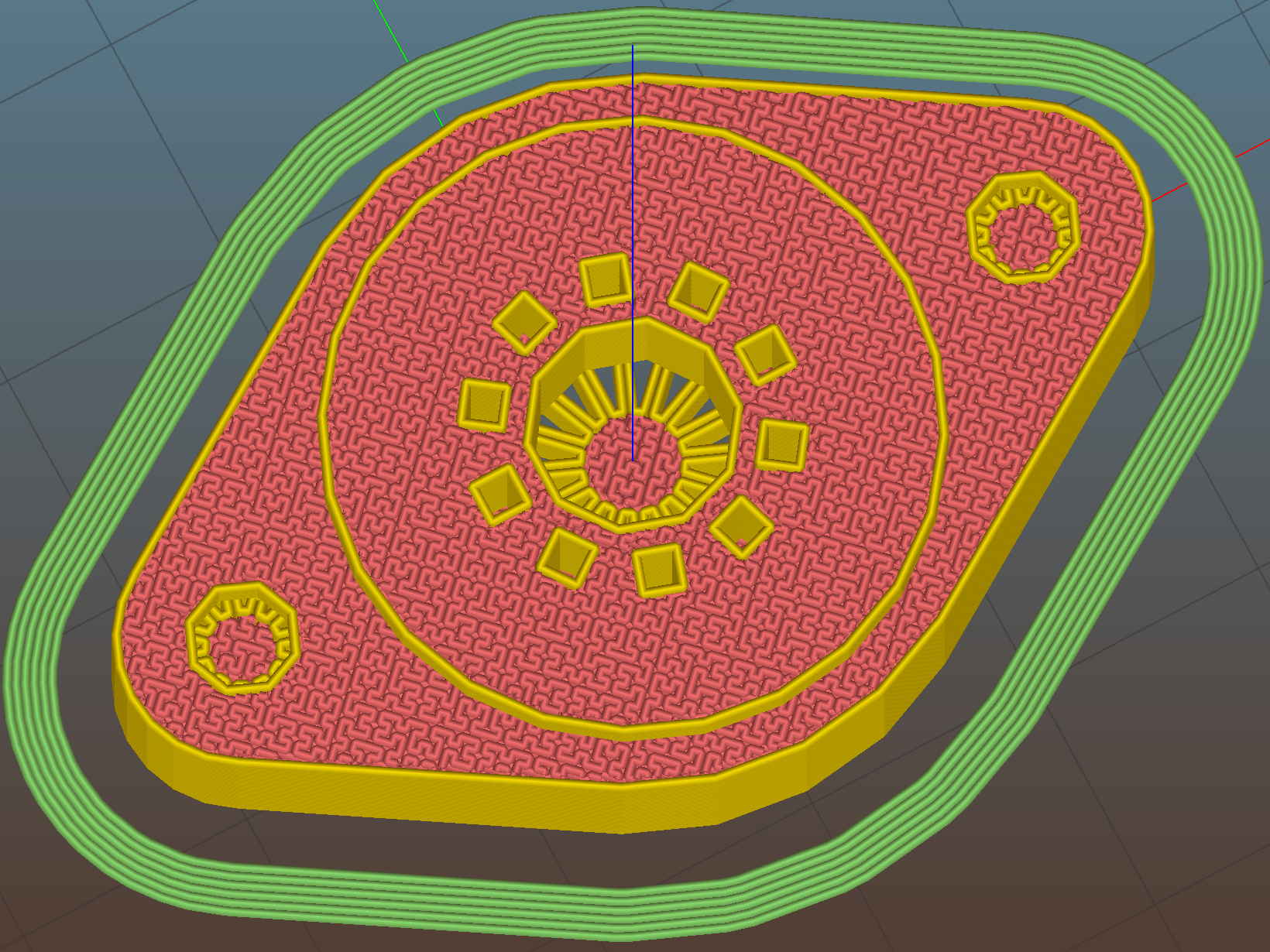
    Replacing the hex nut traps with knurled insert cylinders slims the ends of the socket:

    Noval Socket - knurled inserts - bottom - Slic3r preview
    Noval Socket – knurled inserts – bottom – Slic3r preview

    Making the raised part of the socket fit the 25 mm ID of a hard drive platter swells the midsection of the socket, but the platter won’t need any machining or punching:

    Noval Socket - knurled inserts - top - Slic3r preview
    Noval Socket – knurled inserts – top – Slic3r preview

    The octal and duodecar sockets will require a punch to open up the platter hole and all sockets require two drilled clearance holes for the screws. Given that I’ll eventually do this on the Sherline, maybe milling the hole for the bigger tubes will be faster & easier than manually punching them.

    I moved the screw centers to 35 mm (from the historically accurate 28 mm) to accommodate the larger center, not that anybody will ever notice, and enlarged the central hole to 7.5 mm (from 5.0 mm) to let more light into the tube base.

    The support structures inside the (now much smaller) knurled insert cylinders might not be strictly necessary, but I left them in place to see how well they built. Which was perfectly, as it turns out, and they popped out with a slight push:

    Noval socket - knurled inserts - support structures
    Noval socket – knurled inserts – support structures

    They’re just the cutest little things (those are 0.100 inch grid squares in the background):

    Noval socket - support structures
    Noval socket – support structures

    Anyhow, the knurled inserts pressed into their holes with a slight shove:

    Noval socket - installing knurled insert
    Noval socket – installing knurled insert

    The chuck jaws were loose on the screw cutoff stud and stopped at the surface, putting the knurled inserts perfectly flush with the socket:

    Noval socket - knurled inserts - installed
    Noval socket – knurled inserts – installed

    The surface looks very slightly distorted around the inserts, although it’s still smooth to the touch, and I think the PETG will slowly relax around the knurls. Even without heat or epoxy, they’re now impossible to pull out with any force I’m willing to apply to the screws threaded into them. Given that the platter screws will (be trying to) pull the inserts through the socket, I think a dry install will suffice for my simple needs.

    Match-mark, drill #27 6-32 clearance holes, and the screws drop right in:

    Noval socket - installed
    Noval socket – installed

    Those stainless steel pan-head 6-32 screws seem a bit large in comparison with the socket. Perhaps I should use 4-40 screws, even though they’re not, ahem, historically accurate.

    The tube pin holes get hand-reamed with a #53 drill = 1.5 mm. That’s a bit over the nominal 1.1 mm pin diameter, but seems to provide both easy insertion and firm retention. For permanent installation, an adhesive would be in order.

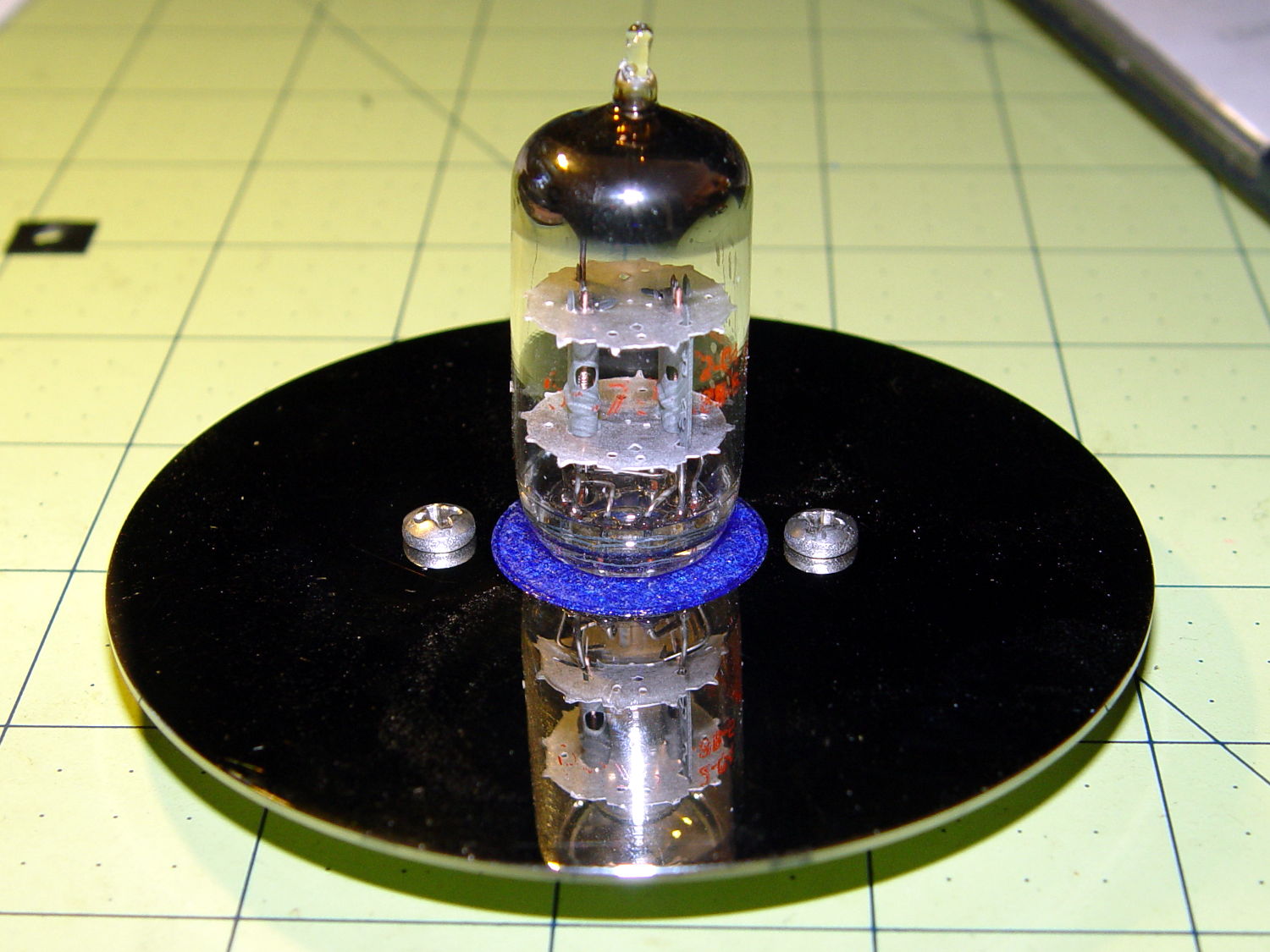
    Buff off the fingerprints, stick the tube in place, and it looks pretty good:

    Noval socket - tube on platter
    Noval socket – tube on platter

    Yeah, those screws are too big. Maybe a brace of black M3 socket head screws would look better, despite a complete lack of historicity.

    Now to wire it up and ponder how to build a base.

    The OpenSCAD source code as a GitHub Gist:

    // Vacuum Tube LED Lights
    // Ed Nisley KE4ZNU February 2016
    Layout = "Socket"; // Cap LampBase USBPort Socket(s) (Build)FinCap
    DefaultSocket = "Noval";
    Section = false; // cross-section the object
    Support = true;
    //- Extrusion parameters must match reality!
    ThreadThick = 0.25;
    ThreadWidth = 0.40;
    HoleWindage = 0.2;
    Protrusion = 0.1; // make holes end cleanly
    inch = 25.4;
    function IntegerMultiple(Size,Unit) = Unit * ceil(Size / Unit);
    //———————-
    // Dimensions
    // https://en.wikipedia.org/wiki/Tube_socket#Summary_of_Base_Details
    // punch & screw OC modified for drive platter chassis plate
    // platter = 25 mm ID
    T_NAME = 0; // common name
    T_NUMPINS = 1; // total, with no allowance for keying
    T_PINBCD = 2; // tube pin circle diameter
    T_PINOD = 3; // … diameter
    T_PINLEN = 4; // … length (overestimate)
    T_HOLEOD = 5; // nominal panel hole from various sources
    T_PUNCHOD = 6; // panel hole optimized for inch-size Greenlee punches
    T_TUBEOD = 7; // envelope or base diameter
    T_PIPEOD = 8; // light pipe from LED to tube base
    T_SCREWOC = 9; // mounting screw holes
    // Name pins BCD dia length hole punch env pipe screw
    TubeData = [
    ["Mini7", 8, 9.53, 1.016, 7.0, 16.0, 25.0, 18.0, 5.0, 35.0], // punch 11/16, screw 22.5 OC
    ["Octal", 8, 17.45, 2.36, 10.0, 36.2, (8 + 1)/8 * inch, 32.0, 11.5, 39.0],
    ["Noval", 10, 11.89, 1.1016, 7.0, 22.0, 25.0 , 21.0, 7.5, 35.0], // punch 7/8, screw 28.0 OC
    ["Duodecar", 13, 19.10, 1.05, 9.0, 32.0, (4 + 1)/4 * inch, 38.0, 12.5, 39.0], // aka Compactron
    ];
    ID = 0;
    OD = 1;
    LENGTH = 2;
    Pixel = [7.0,10.0,3.0]; // ID = contact patch, OD = PCB dia, LENGTH = overall thickness
    Nut = [3.5,5.2,7.2]; // socket mounting nut recess — threaded insert
    NutSides = 8;
    BaseShim = 2*ThreadThick; // between pin holes and pixel top
    SocketFlange = 2.0; // rim around socket below punchout
    PanelThick = 1.5; // socket extension through punchout
    FinCutterOD = 1/8 * inch;
    FinCapSize = [(Pixel[OD] + 2*FinCutterOD),30.0,(10.0 + 2*Pixel[LENGTH])];
    //———————-
    // Useful routines
    module PolyCyl(Dia,Height,ForceSides=0) { // based on nophead's polyholes
    Sides = (ForceSides != 0) ? ForceSides : (ceil(Dia) + 2);
    FixDia = Dia / cos(180/Sides);
    cylinder(r=(FixDia + HoleWindage)/2,h=Height,$fn=Sides);
    }
    //———————-
    // Tube cap
    CapTube = [4.0,3/16 * inch,10.0]; // brass tube for flying lead to cap LED
    CapSize = [Pixel[ID],(Pixel[OD] + 3.0),(CapTube[OD] + 2*Pixel[LENGTH])];
    CapSides = 6*4;
    module Cap() {
    difference() {
    union() {
    cylinder(d=CapSize[OD],h=(CapSize[LENGTH]),$fn=CapSides); // main cap body
    translate([0,0,CapSize[LENGTH]]) // rounded top
    scale([1.0,1.0,0.65])
    sphere(d=CapSize[OD]/cos(180/CapSides),$fn=CapSides); // cos() fixes slight undersize vs cylinder
    cylinder(d1=(CapSize[OD] + 2*3*ThreadWidth),d2=CapSize[OD],h=1.5*Pixel[LENGTH],$fn=CapSides); // skirt
    }
    translate([0,0,-Protrusion]) // bore for wiring to LED
    PolyCyl(CapSize[ID],(CapSize[LENGTH] + 3*ThreadThick + Protrusion),CapSides);
    translate([0,0,-Protrusion]) // PCB recess with clearance for tube dome
    PolyCyl(Pixel[OD],(1.5*Pixel[LENGTH] + Protrusion),CapSides);
    translate([0,0,(1.5*Pixel[LENGTH] – Protrusion)]) // small step + cone to retain PCB
    cylinder(d1=(Pixel[OD]/cos(180/CapSides)),d2=Pixel[ID],h=(Pixel[LENGTH] + Protrusion),$fn=CapSides);
    translate([0,0,(CapSize[LENGTH] – CapTube[OD]/(2*cos(180/8)))]) // hole for brass tube holding wire loom
    rotate([90,0,0]) rotate(180/8)
    PolyCyl(CapTube[OD],CapSize[OD],8);
    }
    }
    //———————-
    // Heatsink tube cap
    module FinCap() {
    CableOD = 3.5; // cable + braid diameter
    BulbOD = 3.75 * inch; // bulb OD; use 10 inches for flat
    echo(str("Fin Cutter: ",FinCutterOD));
    FinSides = 2*4;
    BulbRadius = BulbOD / 2;
    BulbDepth = BulbRadius – sqrt(pow(BulbRadius,2) – pow(FinCapSize[OD],2)/4);
    echo(str("Bulb OD: ",BulbOD," recess: ",BulbDepth));
    NumFins = floor(PI*FinCapSize[ID] / (2*FinCutterOD));
    FinAngle = 360 / NumFins;
    echo(str("NumFins: ",NumFins," angle: ",FinAngle," deg"));
    difference() {
    union() {
    cylinder(d=FinCapSize[ID],h=FinCapSize[LENGTH],$fn=2*NumFins); // main body
    for (i = [0:NumFins – 1]) // fins
    rotate(i * FinAngle)
    hull() {
    translate([FinCapSize[ID]/2,0,0])
    rotate(180/FinSides)
    cylinder(d=FinCutterOD,h=FinCapSize[LENGTH],$fn=FinSides);
    translate([(FinCapSize[OD] – FinCutterOD)/2,0,0])
    rotate(180/FinSides)
    cylinder(d=FinCutterOD,h=FinCapSize[LENGTH],$fn=FinSides);
    }
    rotate(FinAngle/2) // cable entry boss
    translate([FinCapSize[ID]/2,0,FinCapSize[LENGTH]/2])
    cube([FinCapSize[OD]/4,FinCapSize[OD]/4,FinCapSize[LENGTH]],center=true);
    }
    for (i = [1:NumFins – 1]) // fin inner gullets, omit cable entry side
    rotate(i * FinAngle + FinAngle/2) // joint isn't quite perfect, but OK
    translate([FinCapSize[ID]/2,0,-Protrusion])
    rotate(0*180/FinSides)
    cylinder(d=FinCutterOD/cos(180/FinSides),h=(FinCapSize[LENGTH] + 2*Protrusion),$fn=FinSides);
    translate([0,0,-Protrusion]) // PCB recess
    PolyCyl(Pixel[OD],(1.5*Pixel[LENGTH] + Protrusion),FinSides);
    PolyCyl(Pixel[ID],(FinCapSize[LENGTH] – 3*ThreadThick),FinSides); // bore for LED wiring
    translate([0,0,(FinCapSize[LENGTH] – 3*ThreadThick – 2*CableOD/(2*cos(180/8)))]) // cable inlet
    rotate(FinAngle/2) rotate([0,90,0]) rotate(180/8)
    PolyCyl(CableOD,FinCapSize[OD],8);
    if (BulbOD <= 10.0 * inch) // curve for top of bulb
    translate([0,0,-(BulbRadius – BulbDepth + 2*ThreadThick)]) // … slightly flatten tips
    sphere(d=BulbOD,$fn=16*FinSides);
    }
    }
    //———————-
    // Aperture for USB-to-serial adapter snout
    // These are all magic numbers, of course
    module USBPort() {
    translate([0,28.0])
    rotate([90,0,0])
    linear_extrude(height=28.0)
    polygon(points=[
    [0,0],
    [8.0,0],
    [8.0,4.0],
    // [4.0,4.0],
    [4.0,6.5],
    [-4.0,6.5],
    // [-4.0,4.0],
    [-8.0,4.0],
    [-8.0,0],
    ]);
    }
    //———————-
    // Box for Leviton ceramic lamp base
    module LampBase() {
    Bottom = 3.0;
    Base = [4.0*inch,4.5*inch,20.0 + Bottom];
    Sides = 12*4;
    Retainer = [3.5,11.0,1.0]; // flat fiber washer holding lamp base screws in place
    StudSides = 8;
    StudOC = 3.5 * inch;
    Stud = [Nut[OD], // 6-32 tapped brass insert
    min(15.0,1.5*(Base[ID] – StudOC)/cos(180/StudSides)), // OD = big enough to merge with walls
    (Base[LENGTH] – Retainer[LENGTH])]; // leave room for retainer
    union() {
    difference() {
    rotate(180/Sides)
    cylinder(d=Base[OD],h=Base[LENGTH],$fn=Sides);
    rotate(180/Sides)
    translate([0,0,Bottom])
    cylinder(d=Base[ID],h=Base[LENGTH],$fn=Sides);
    translate([0,-Base[OD]/2,Bottom + 1.2]) // mount on double-sided foam tape
    rotate(0)
    USBPort();
    }
    for (i = [-1,1])
    translate([i*StudOC/2,0,0])
    rotate(180/StudSides)
    difference() {
    cylinder(d=Stud[OD],h=Stud[LENGTH],$fn=StudSides);
    translate([0,0,Bottom])
    PolyCyl(Stud[ID],(Stud[LENGTH] – (Bottom – Protrusion)),6);
    }
    }
    }
    //———————-
    // Tube Socket
    module Socket(Name = DefaultSocket) {
    NumSides = 6*4;
    Tube = search([Name],TubeData,1,0)[0];
    echo(str("Building ",TubeData[Tube][0]," socket"));
    echo(str(" Punch: ",TubeData[ID][T_PUNCHOD]," mm = ",TubeData[ID][T_PUNCHOD]/inch," inch"));
    echo(str(" Screws: ",TubeData[ID][T_SCREWOC]," mm =",TubeData[ID][T_SCREWOC]/inch," inch OC"));
    OAH = Pixel[LENGTH] + BaseShim + TubeData[Tube][T_PINLEN];
    BaseHeight = OAH – PanelThick;
    difference() {
    union() {
    linear_extrude(height=BaseHeight)
    hull() {
    circle(d=(TubeData[Tube][T_PUNCHOD] + 2*SocketFlange),$fn=NumSides);
    for (i=[-1,1])
    translate([i*TubeData[Tube][T_SCREWOC]/2,0])
    circle(d=2.0*Nut[OD],$fn=NumSides);
    }
    cylinder(d=TubeData[Tube][T_PUNCHOD],h=OAH,$fn=NumSides); // boss in chassis punch hole
    }
    for (i=[0:(TubeData[Tube][T_NUMPINS] – 1)]) // tube pins
    rotate(i*360/TubeData[Tube][T_NUMPINS])
    translate([TubeData[Tube][T_PINBCD]/2,0,(OAH – TubeData[Tube][T_PINLEN])])
    rotate(180/4)
    PolyCyl(TubeData[Tube][T_PINOD],(TubeData[Tube][T_PINLEN] + Protrusion),4);
    for (i=[-1,1]) // mounting screw holes & nut traps / threaded inserts
    translate([i*TubeData[Tube][T_SCREWOC]/2,0,-Protrusion]) {
    PolyCyl(Nut[OD],(Nut[LENGTH] + Protrusion),NutSides);
    PolyCyl(Nut[ID],(OAH + 2*Protrusion),NutSides);
    }
    translate([0,0,-Protrusion]) { // LED recess
    PolyCyl(Pixel[OD],(Pixel[LENGTH] + Protrusion),8);
    }
    translate([0,0,(Pixel[LENGTH] – Protrusion)]) { // light pipe
    rotate(180/TubeData[Tube][T_NUMPINS])
    PolyCyl(TubeData[Tube][T_PIPEOD],(OAH + 2*Protrusion),TubeData[Tube][T_NUMPINS]);
    }
    }
    // Totally ad-hoc support structures …
    if (Support) {
    color("Yellow") {
    for (i=[-1,1]) // nut traps
    translate([i*TubeData[Tube][T_SCREWOC]/2,0,(Nut[LENGTH] – ThreadThick)/2])
    for (a=[0:5])
    rotate(a*30 + 15)
    cube([2*ThreadWidth,0.9*Nut[OD],(Nut[LENGTH] – ThreadThick)],center=true);
    if (Pixel[OD] > TubeData[Tube][T_PIPEOD]) // support pipe only if needed
    translate([0,0,(Pixel[LENGTH] – ThreadThick)/2])
    for (a=[0:7])
    rotate(a*22.5)
    cube([2*ThreadWidth,0.9*Pixel[OD],(Pixel[LENGTH] – ThreadThick)],center=true);
    }
    }
    }
    //———————-
    // Build it
    if (Layout == "Cap") {
    if (Section)
    difference() {
    Cap();
    translate([-CapSize[OD],0,CapSize[LENGTH]])
    cube([2*CapSize[OD],2*CapSize[OD],3*CapSize[LENGTH]],center=true);
    }
    else
    Cap();
    }
    if (Layout == "FinCap") {
    if (Section) render(convexity=5)
    difference() {
    FinCap();
    // translate([0,-FinCapSize[OD],FinCapSize[LENGTH]])
    // cube([2*FinCapSize[OD],2*FinCapSize[OD],3*FinCapSize[LENGTH]],center=true);
    translate([-FinCapSize[OD],0,FinCapSize[LENGTH]])
    cube([2*FinCapSize[OD],2*FinCapSize[OD],3*FinCapSize[LENGTH]],center=true);
    }
    else
    FinCap();
    }
    if (Layout == "BuildFinCap")
    translate([0,0,FinCapSize[LENGTH]])
    rotate([180,0,0])
    FinCap();
    if (Layout == "LampBase")
    LampBase();
    if (Layout == "USBPort")
    USBPort();
    if (Layout == "Socket")
    if (Section) {
    difference() {
    Socket();
    translate([-100/2,0,-Protrusion])
    cube([100,50,50],center=false);
    }
    }
    else
    Socket();
    if (Layout == "Sockets") {
    translate([0,50,0])
    Socket("Mini7");
    translate([0,20,0])
    Socket("Octal");
    translate([0,-15,0])
    Socket("Duodecar");
    translate([0,-50,0])
    Socket("Noval");
    }
  • Command-Line CD Ripping, Redux

    A slight improvement to my two-step manual CD ripping process, with the intent of avoiding any thoughts about abcde:

    cdparanoia -B -v ; eject cdrom
    

    Ejecting the CD after cdparanoid finishes with it provides a visual cue for the next step.

    Set up the disk number and maximum number of tracks, then unleash lame:

    d=1
    tm=19
    for t in $(seq -w 1 $tm) ; do lame --preset tape --tt "D${d}:T${t}" --ta "Michael Lewis" --tl "The Big Short" --tn "${t}/${tm}" --tg "Audio Book" --add-id3v2 track${t}.cdda.wav D${d}-${t}.mp3 ; done
    rm track*
    

    The $(seq -w 1 $tm) expansion generates a list of zero-filled numbers for the tracks.

    There’s surely a one-liner to extract $tm, the maximum track number, from the track* files, but I’ll leave that for later.

    You can increment the disk number with let "d++" if the ripping goes smoothly. If not, that’s fraught with peril, because you (well, I) will do it once too often.

    Iterate for each CD in the set, washing & primping as needed for good results.

    And that’s that, at least for a while…

  • Streaming Player: Wireless Keypad

    Moving the streaming media player control panel across the Sewing Room for E-Z access:

    Wireless Keypad - colored labels
    Wireless Keypad – colored labels

    Stipulated: garish labels that don’t fit the keys well at all.

    I need more than one stream for testing; the only one that matters is Classical.

    The keypad uses the same 2.4 GHz ISM band as the Raspberry Pi’s Wifi radio, which means holding a key down (which should never happen) puts a dent in mplayer’s cache fill level. Even absent that interference, the WiFi link seems more than a little iffy, probably because it’s at the far end of the house and upstairs from the router.

    Other WiFi devices report that 2.4 GHz RF has trouble punching through the intervening fifty feet of hardwood floor (on the diagonal, the joists amount to a lot of wood) and multiple sets of doubled wallboard sheets; the RPi probably needs a better radio with an actual antenna. I did move the WiFi control channel away from the default used by the (relatively distant) neighbors, which seemed to improve its disposition.

  • Makerspace Starter Kit Available

    For a variety of reasons that aren’t relevant here, I must dramatically reduce the amount of stuff in the Basement Laboratory / Machine Shop / Warehouse.

    If you (or someone you know) has / is starting / will start a makerspace or similar organization, here’s an opportunity to go from zero to hero with a huge infusion of tools / instruments / make-froms / raw material / gadgets / surplus gear.

    Think of it as a Makerspace Starter Kit: everything you need in one acquisition.

    You’ve seen much of the stuff in these blog posts during the past five years, although I tightly crop the photos for reasons that should be obvious when you consider the backgrounds.

    A few glimpses, carefully chosen to make the situation look much tidier than it really is:

    This slideshow requires JavaScript.

    I’m not a hoarder, but I can look right over the fence into that territory…

    I want to donate the whole collection to an organization that can figure out how to value it and let me write it off. Failing that, I’m willing to sell the whole collection to someone who will move it out and enjoy it / put it to good use / part it out / hoard it.

    We can quibble over the value, which surely lies between scrap metal and filet mignon.

    As nearly as I can estimate from our last two moves, I have 6±2 short tons of stuff:

    • Metal shop: old South Bend lathe / vertical mill-drill / bandsaw / hand tools / arbor press
    • Cabinets / shelves loaded with cutters / tools / micrometers / calipers / whatever
    • Gas & electric welding equipment, gas foundry furnace
    • Walls / bins / drawers of fasteners / wire nuts / plumbing fittings / pipe clamps / you-name-its
    • Bookshelves of references / magazines / databooks; I’ll keep at most one set of the magazines with my columns
    • Ham radio equipment / antennas / cables
    • Radial saw, blades, clamps, tooling, and a lumber / plywood stockpile
    • Labeled boxes of make-froms on steel shelving; you get the shelves, the boxes, and their contents.
    • Solvents, chemicals, metals, minerals, elements, etc.
    • Electronic / optical / mechanical surplus & doodads
    • Stockpiles of metal rods / pipes / beams / flanges / sheets / scrap parts
    • Tools & toys & treasures beyond your wildest imagination

    When we left Raleigh, the moving company estimator observed “This will be like moving a Home Depot!”

    You must take everything, which means you must have the ability & equipment to handle 6±2 tons of stuff in relatively small, rather heavy, not easily stackable lumps. You’ll need 1000+ square feet of space with at least a seven-foot ceiling on your end to unload the truck(s) and create a solid block of stuff with skinny aisles between the shelves. This is not a quick afternoon trip for you, your BFF, a pickup truck, and a storage unit.

    I plan to keep the Sherline, the M2 3D printer, various small tools, some hardware / parts / stock, most of the electronic instruments (antique-ish, at best) and components, plus odds and ends. I’ll extract or clearly mark those items, leaving your team to move everything else without (too many) on-the-fly decisions.

    I can provide photos and descriptions, but, realistically, you should evaluate the situation in person.

    Although we’re not planning to move in the near future, if you’re thinking of moving into the Mid Hudson Valley and always wanted a house with a ready-to-run Basement Shop, we can probably work something out. Note: all of the online real estate descriptions, including Zillow, seem confused, as the two houses on our two-acre property contain the total square footage / rooms / baths / whatever. Contact us for the Ground Truth after you’ve contemplated the satellite view.

    As the saying goes, “Serious inquiries only.”

  • Adaptek AVA-2902E/I SCSI Card: Low Profile Bracket Hack

    I picked up an Adaptek AVA-2902 SCSI card from eBay to use with an ancient Epson Perfection 636 SCSI scanner from the heap, but it came with a high-profile bracket wrapped around its DB-25 connector:

    SCSI card bracket fix - before
    SCSI card bracket fix – before

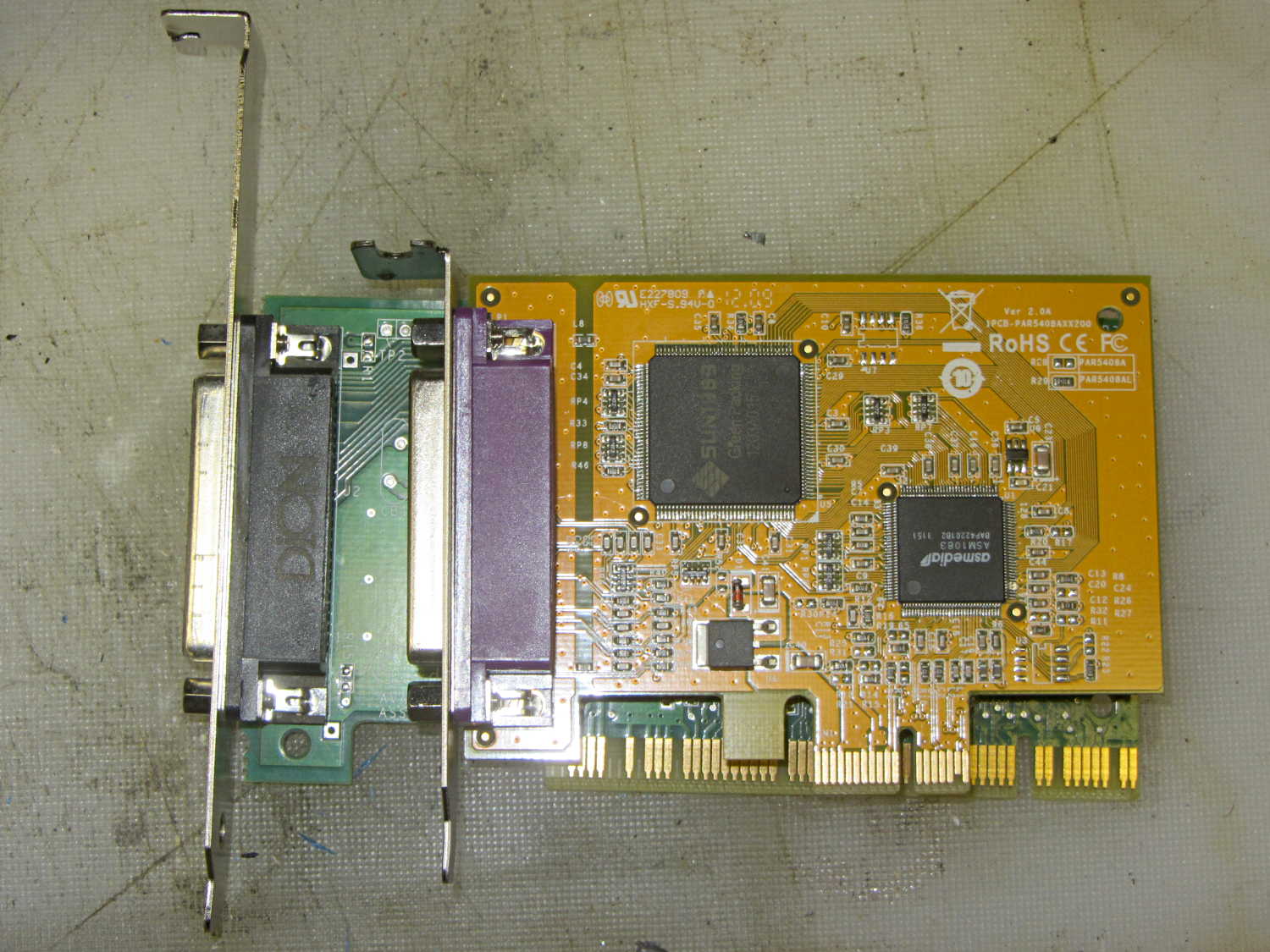
    The old-school serial port card sitting atop it (from one of the off-lease Optiplexes in the stable) has a low-profile bracket that seemed promising, so I swapped the brackets.

    Alas, the SCSI card positioned the DB-25 just a smidge higher than the serial card, putting the right-angle top of the bracket about 2 mm above the ledge, where it prevented the locking cover from engaging. I filed the bracket’s DB-25 mounting holes into ovals, using up all the slop around the connector shell, to no avail.

    So I snipped off most of the bracket’s top, grabbed it in the bench vise, smashed the corner with a drift punch, and bashed the whole affair 2 mm lower. It fit reasonably well, although there’s an air gap near the bottom of the bracket where it tapers down to the guide slot. The SCSI connector barely fit, with some persuasion, under the locking cover:

    SCSI card bracket fix - installed
    SCSI card bracket fix – installed

    Close enough for me; the scanner (looming over the SCSI connector) works fine and delivers much better image quality / color balance than the crappy HP 7400C with an auto-feeder that I’d been using.

    SCSI cables look like gas pipes in this day & age of tiny USB cables and teensy HDMI connectors…