|
// Drag Knife Holder using LM12UU linear bearing |
|
// Ed Nisley KE4ZNU – 2019-04-26 |
|
// 2019-05-09 LM3UU for diamond scribe |
|
// 2019-05-28 taper end, single spring around shaft |
|
|
|
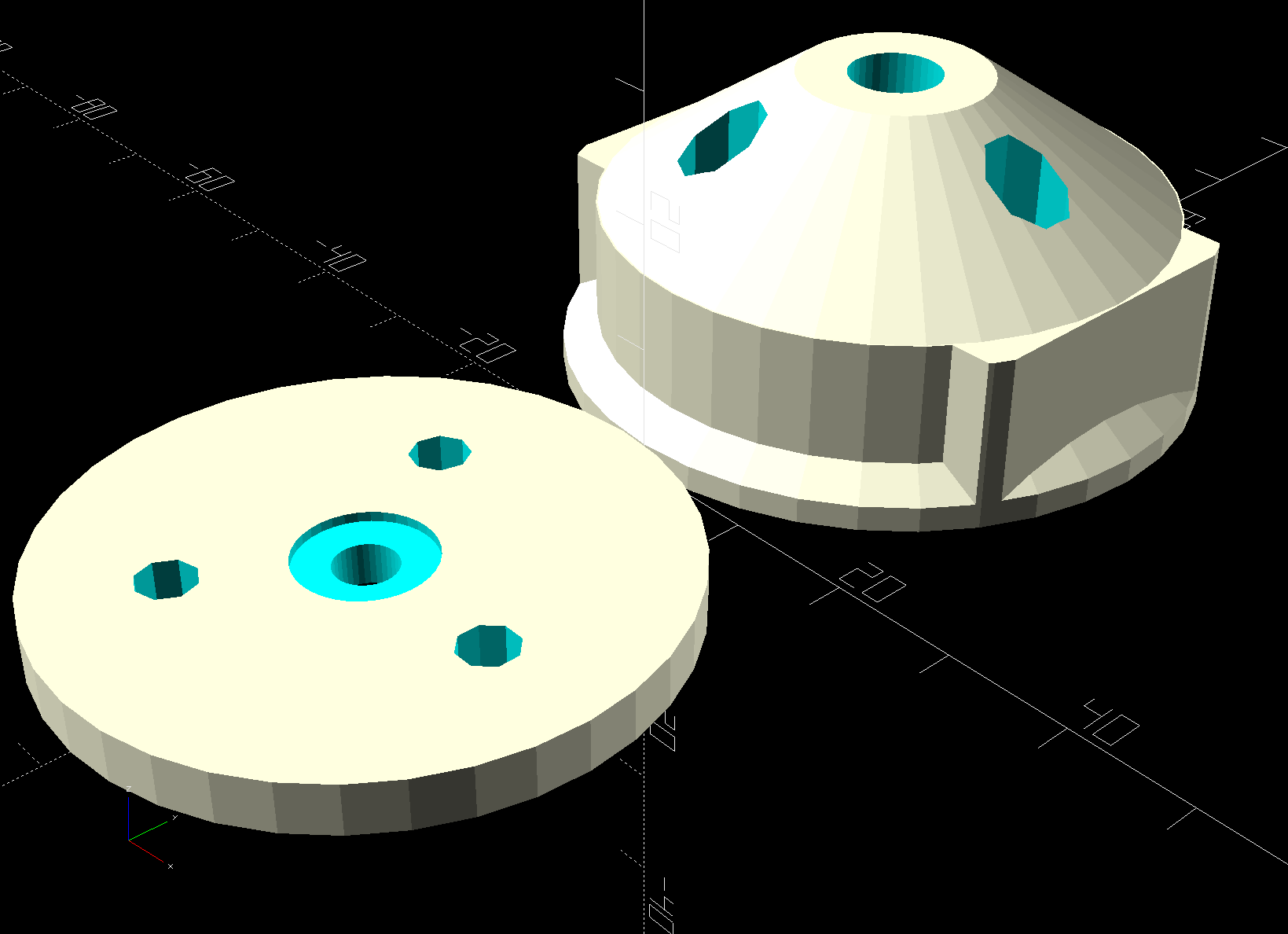
Layout = "Build"; // [Build, Show, Puck, Mount, Plate] |
|
|
|
/* [Extrusion] */ |
|
|
|
ThreadThick = 0.25; // [0.20, 0.25] |
|
ThreadWidth = 0.40; // [0.40, 0.40] |
|
|
|
/* [Hidden] */ |
|
|
|
Protrusion = 0.1; // [0.01, 0.1] |
|
|
|
HoleWindage = 0.2; |
|
|
|
inch = 25.4; |
|
|
|
function IntegerMultiple(Size,Unit) = Unit * ceil(Size / Unit); |
|
|
|
ID = 0; |
|
OD = 1; |
|
LENGTH = 2; |
|
|
|
//- Adjust hole diameter to make the size come out right |
|
|
|
module PolyCyl(Dia,Height,ForceSides=0) { // based on nophead's polyholes |
|
Sides = (ForceSides != 0) ? ForceSides : (ceil(Dia) + 2); |
|
FixDia = Dia / cos(180/Sides); |
|
cylinder(r=(FixDia + HoleWindage)/2,h=Height,$fn=Sides); |
|
} |
|
|
|
//- Dimensions |
|
|
|
// Knife holder & suchlike |
|
|
|
KnifeBody = [3.0,9.0,2.0]; // washer epoxied to diamond shaft, with epoxy fillet |
|
|
|
Spring = [9.5,10.0,3*ThreadThick]; // compression spring around shaft, LENGTH = socket depth |
|
|
|
WallThick = 4.0; // minimum thickness / width |
|
|
|
Screw = [4.0,8.5,8.0]; // holding it all together, OD = washer |
|
|
|
Insert = [4.0,6.0,10.0]; // brass insert |
|
|
|
Bearing = [3.0,7.0,2*10.0 + WallThick]; // linear bearing body (pair + small gap) |
|
|
|
// Basic shape of DW660 snout fitting into the holder |
|
// Lip goes upward to lock into MPCNC mount |
|
|
|
Snout = [44.6,50.0,9.6]; // LENGTH = ID height |
|
Lip = 4.0; // height of lip at end of snout |
|
|
|
Plate = [KnifeBody[ID],Snout[OD] – WallThick,WallThick]; // spring reaction plate |
|
|
|
PuckOAL = max(Bearing[LENGTH],(Snout[LENGTH] + Lip)); // total height of DW660 fitting |
|
echo(str("PuckOAL: ",PuckOAL)); |
|
Key = [Snout[ID],25.7,(Snout[LENGTH] + Lip)]; // rectangular key |
|
|
|
NumScrews = 3; |
|
|
|
ScrewBCD = 2.5*(Bearing[OD]/2 + Insert[OD]/2 + WallThick); |
|
|
|
NumSides = 9*4; // cylinder facets (multiple of 3 for lathe trimming) |
|
|
|
module DW660Puck() { |
|
|
|
translate([0,0,PuckOAL]) |
|
rotate([180,0,0]) { |
|
cylinder(d=Snout[OD],h=Lip/2,$fn=NumSides); |
|
translate([0,0,Lip/2]) |
|
cylinder(d1=Snout[OD],d2=Snout[ID],h=Lip/2,$fn=NumSides); |
|
cylinder(d=Snout[ID],h=(Snout[LENGTH] + Lip),$fn=NumSides); |
|
translate([0,0,(Snout[LENGTH] + Lip) – Protrusion]) |
|
cylinder(d1=Snout[ID],d2=2*WallThick + Bearing[OD],h=PuckOAL – (Snout[LENGTH] + Lip),$fn=NumSides); |
|
intersection() { |
|
translate([0,0,0*Lip + Key.z/2]) |
|
cube(Key,center=true); |
|
cylinder(d=Snout[OD],h=Lip + Key.z,$fn=NumSides); |
|
} |
|
} |
|
} |
|
|
|
module MountBase() { |
|
|
|
difference() { |
|
DW660Puck(); |
|
|
|
translate([0,0,-Protrusion]) // bearing |
|
PolyCyl(Bearing[OD],2*PuckOAL,NumSides); |
|
|
|
for (i=[0:NumScrews – 1]) // clamp screws |
|
rotate(i*360/NumScrews) |
|
translate([ScrewBCD/2,0,-Protrusion]) |
|
rotate(180/8) |
|
PolyCyl(Insert[OD],2*PuckOAL,8); |
|
} |
|
} |
|
|
|
module SpringPlate() { |
|
difference() { |
|
cylinder(d=Plate[OD],h=Plate[LENGTH],$fn=NumSides); |
|
|
|
translate([0,0,-Protrusion]) // ample shaft clearance |
|
PolyCyl(1.5*KnifeBody[ID],2*PuckOAL,NumSides); |
|
|
|
// translate([0,0,Plate[LENGTH] – KnifeBody[LENGTH]]) // flange, snug fit |
|
// PolyCyl(KnifeBody[OD],KnifeBody[LENGTH] + Protrusion,NumSides); |
|
|
|
translate([0,0,Plate[LENGTH] – Spring[LENGTH]]) // spring retainer |
|
PolyCyl(Spring[OD],Spring[LENGTH] + Protrusion,NumSides); |
|
|
|
for (i=[0:NumScrews – 1]) // clamp screws |
|
rotate(i*360/NumScrews) |
|
translate([ScrewBCD/2,0,-Protrusion]) |
|
rotate(180/8) |
|
PolyCyl(Screw[ID],2*PuckOAL,8); |
|
} |
|
} |
|
|
|
//—– |
|
// Build it |
|
|
|
if (Layout == "Puck") |
|
DW660Puck(); |
|
|
|
if (Layout == "Plate") |
|
SpringPlate(); |
|
|
|
if (Layout == "Mount") |
|
MountBase(); |
|
|
|
if (Layout == "Show") { |
|
MountBase(); |
|
translate([0,0,1.5*PuckOAL]) |
|
rotate([180,0,0]) |
|
SpringPlate(); |
|
} |
|
|
|
if (Layout == "Build") { |
|
translate([0,Snout[OD]/2,PuckOAL]) |
|
rotate([180,0,0]) |
|
MountBase(); |
|
translate([0,-Snout[OD]/2,0]) |
|
SpringPlate(); |
|
} |








 The Smell of Molten Projects in the Morning