Ed Nisley's Blog: Shop notes, electronics, firmware, machinery, 3D printing, laser cuttery, and curiosities. Contents: 100% human thinking, 0% AI slop.
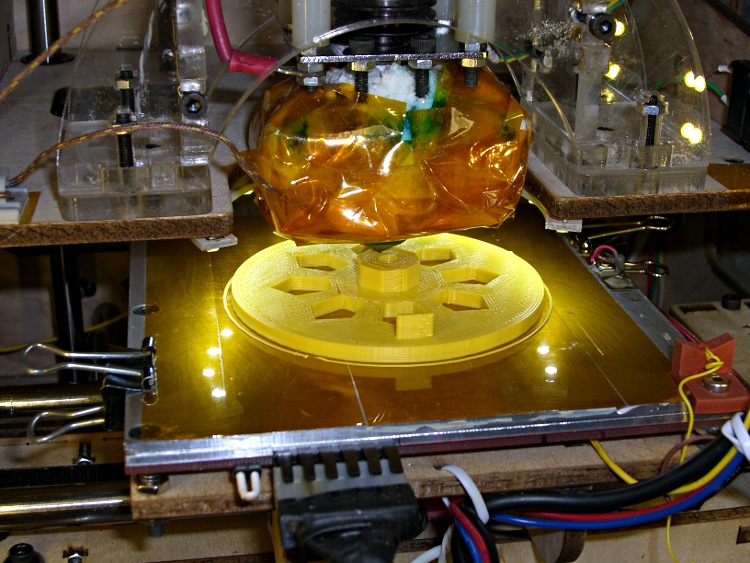
A need for pix of the current waveforms in a stepper motor produced a need to synchronize to the shaft rotation. Rather than cobble something up using random spare parts, I printed a wheel with a tab:
Final rotation sync disk
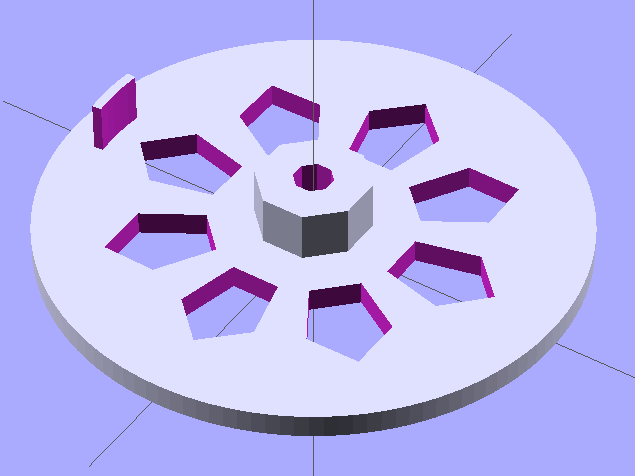
The model looks about like you’d expect:
Synch wheel solid model
Those stretched pentagonal holes give it a vaguely religious aspect, don’t they?
The tab is 2/50 of the circumference, so that the resulting pulse neatly brackets two consecutive groups of four full-step pulses. There’s no way to align the tab with the rotor position, so producing a good scope sync pulse becomes a simple matter of software.
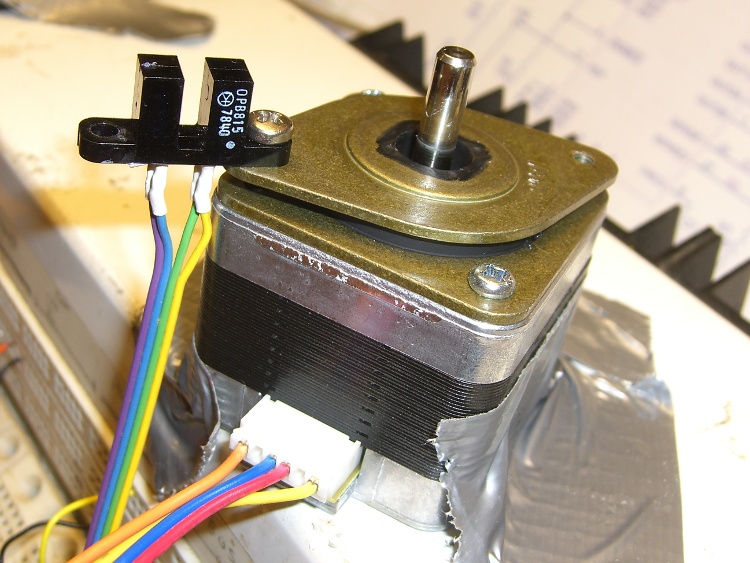
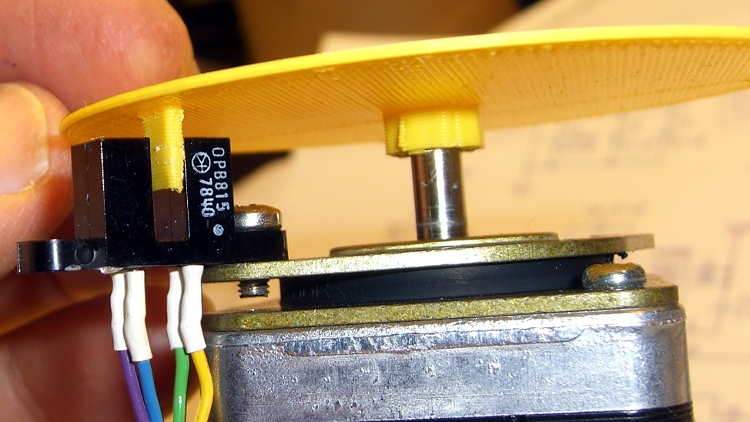
The tab’s length and radial position corresponds to this carefully engineered bit of mayhem:
Optical interrupter on stepper isolator bushing
The shaft hole will be just slightly too small for the motor shaft, which is perfectly fine. Drill the hole to 5 mm using a #9 drill, working your way up from about #12 to keep the hole concentric.
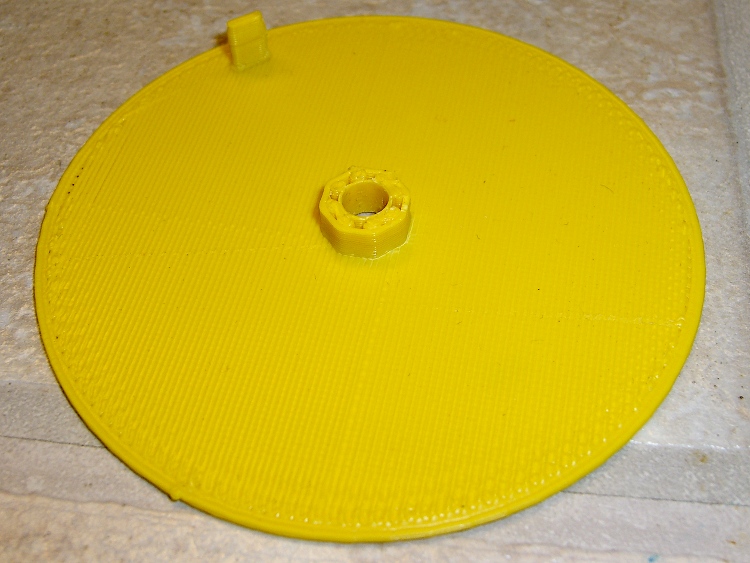
Actually, that was the second version. The first was a quick-and-dirty disk with a tab, but it came out too floppy at only 1 mm thick and utterly boring:
Simple rotation sync disk
But it served as the prototype to settle the tab dimensions and location:
First synch disk with optical interrupter
The OpenSCAD source:
// Optical Interrupter
// Suited for low speed demonstrations!
// Ed Nisley KE4ZNU June 2011

//- Extrusion parameters - must match reality!
//  Print with +2 shells and 3 solid layers

ThreadThick = 0.33;
ThreadWidth = 2.0 * ThreadThick;

//- Plate dimensions

MotorShaftDia = 5.0;
MotorShaftDiaSides = 8;
MotorShaftPolyRadius = (MotorShaftDia/2)/cos(180/MotorShaftDiaSides);

HubDia = MotorShaftDia + 16*ThreadWidth;
HubThick = ceil(10.0/ThreadThick)*ThreadThick;		// total, not added to plate
HubSides = 8;

BladeRadius = 31.5;				// to center of optical switch gap
BladeThick = 2*ThreadWidth;		// measured radially
BladeAngle = (2/50)*360;		// 50 repeats of 4 full step sequences per rev
BladeHeight = 7.0;				// beyond ribs

PlateRadius = BladeRadius + 5.0;
PlateThick = ceil(3.0/ThreadThick) * ThreadThick;

HoleCenterRad = (BladeRadius + HubDia/2)/2;
HoleDia = 0.75 * (3.14159 * 2 * HoleCenterRad)/HubSides;
HoleSides = 5;

//- Convenience items

Protrusion = 0.1;
$fn = 128;						// make large circles very smooth

//- Build it!

difference() {
  union() {
	cylinder(r=PlateRadius,h=PlateThick);			// base plate

	cylinder(r=HubDia/2,h=HubThick,$fn=HubSides);	// hub

	translate([0,0,PlateThick])						// blade
	  difference() {
		cylinder(r=BladeRadius+BladeThick/2,h=BladeHeight);
		cylinder(r=BladeRadius-BladeThick/2,h=BladeHeight + Protrusion);
		rotate([0,0,(180 - BladeAngle/2)])
		  translate([PlateRadius,0,(BladeHeight + Protrusion)/2])
			cube([PlateRadius*2,PlateRadius*2,BladeHeight+Protrusion],center=true);
		rotate([0,0,(BladeAngle/2)])
		  translate([PlateRadius,0,(BladeHeight + Protrusion)/2])
			cube([PlateRadius*2,PlateRadius*2,BladeHeight+Protrusion],center=true);
	  }

  }

  translate([0,0,-Protrusion])						// shaft hole
	cylinder(r=MotorShaftPolyRadius,
			 h=HubThick+2*Protrusion,
			 $fn=MotorShaftDiaSides);

  for (Angle = [0:(HubSides-1)])					// beautification holes
	rotate([0,0,Angle*(360/HubSides)])
	  translate([HoleCenterRad,0,-Protrusion])
		rotate([0,0,180])
		  scale([1.33,1.0,1.0])
			cylinder(r=HoleDia/2,
					 h=(PlateThick + 2*Protrusion),
					 $fn=HoleSides);

}
Yeah, that optical switch really is older than you are…
Most of my machining involves one-off setups and simple cuts, so I usually type G-Code directly into EMC2’s Axis interface: CNC hits precise locations and makes smoother cuts than I ever could. Most of the time, that works really well.
Occasionally, though, I think one thing and type something else.
The reason I didn’t see the yellow low-overheat LED blink on when the Thermal Core ran away was that I’m usually upstairs except when actually printing.
My modus operandi involves sitting at my upstairs desk, fiddling with an OpenSCAD solid model until I like it, then exporting the STL file. This PC has larger screens, better graphics hardware, a fast CPU, a Comfy Chair, and ready access to the kitchen.
The Thing-O-Matic lives in the Basement Laboratory, connected to a dual-core Atom D520 PC running Ubuntu 10.04 LTS with ReplicatorG to control the printer. That PC dual-boots into the RTAI-patched kernel that runs EMC2 for the Sherline mill and is firmly cabled to the Sherline driver box. That PC’s monitor is up on the wall, the chair is a modified lab stool, and the miniature keyboard is barely suited for hunt-and-poke controls. Not a good place to sit and type.
That PC also has a USB webcam showing an interior view of the printer. I run XawTV, a minimal video capture program, to put that view on the PC’s desktop. I could set it up as a webserver camera, but that seems like too much work.
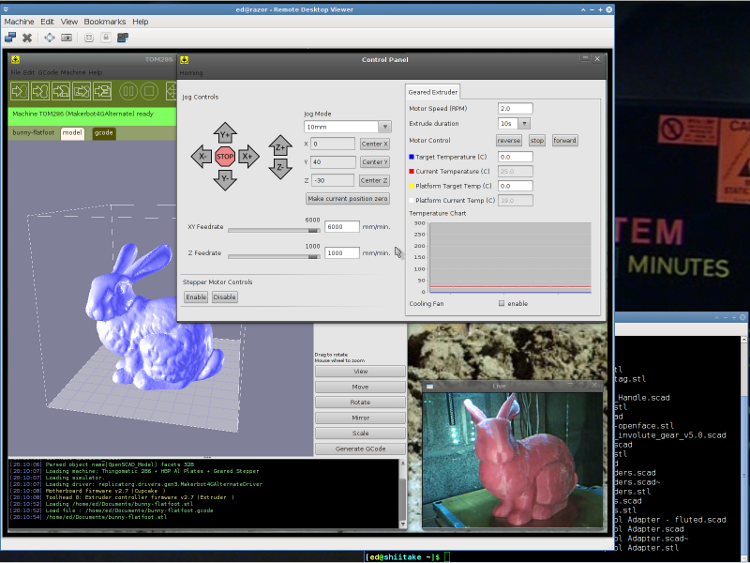
I use the Ubuntu desktop-sharing program to view / control the downstairs programs in a window on my (larger) upstairs monitor, so I can fiddle with RepG from the Comfy Chair. There’s a moderate lag due to stuffing the GUI through the network, but it’s tolerable for small changes & tweaks. The webcam view occupies one corner of the screen.
This is a staged reenactment showing the remote “downstairs” desktop in the left, with the “upstairs” desktop visible to the right:
Remote Desktop Screenshot – lowres
All the files live on our simpleminded server, which sits in the Basement Laboratory’s Computer Wing, and the PCs mount NFS shares from the server. I do all the bulk text editing & file fiddling from the Comfy Chair.
So I save the STL file from the upstairs PC, flip to the window showing the downstairs machine’s desktop, copy the STL to a local drive to avoid lag during operation, run RepG to open the STL and slice it into G-Code, fire the Thing-O-Matic, and trot downstairs to watch the proceedings.
As a rule, I don’t run the printer unattended, but now it looks like it’s a Bad Idea to run the heaters without being nearby. You knew that already, right?
After building a bunch of stuff (about which more later), the Skirt extrusions showed a consistent tilt of about 0.1 mm downward to the right and the Skirt along the that side was consistently around 0.42 mm thick. So I cranked the right side down by 0.10 mm (just over 1/6 turn) and changed the G92 setting to Z1.50 to move the plate up by 0.05 mm.
Three test extrusions in quick succession gave these results (in multiples of 0.01 mm). I used the plates in reverse numerical sequence due to an accident of history:
The G-Code in start.gcode homes all three axes, but now I have two limit switches on the Z axis: the MBI Z-Maximum at the top and a new Z-Minimum on the platform. The Z axis platform can’t miss the switch at the top, but I must position the nozzle directly over the Z-Minimum switch on the platform before probing for it. Homing the stage at the top of the Z axis makes sure the nozzle starts more-or-less at the right height over the switch, which then provides an exact adjustment.
For the home switches on my Sherline CNC milling machine, the EMC2 homing routines proceed in two stages: a fast slew to find the switch, then a slow approach to ensure the axis doesn’t overrun the switch. That seemed like a good way to ensure that the X and Y stages would home repeatably enough to hit a 2 mm button with a 1 mm nozzle every time.
I recycled the default home sequence for coarse homing, albeit with the speeds cranked up a bit:
(- coarse home axes -)
G162 Z F1000	(home Z to get nozzle out of danger zone)
G161 Y F4000	(retract Y to get X out of front opening)
G161 X F4000	(now safe to home X)
G92 X-53.0 Y-59.0 Z117.0	(set XYZ coordinate zeros)
Then the fine homing sequence backs off a few millimeters and bumps the switches very slowly:
(- fine home axes)
G0 X-51 Y-57 Z115 F400	(back off switches)
G161 Y F200
G161 X F200
G162 Z F200
G92 X-53.0 Y-59.0 Z117.0	(re-set XYZ coordinate zeros)
You could set relative motion mode with G91; that might be cleaner all around.
I discovered experimentally that you must set all three axes in the G92 command, because any missing axes get set to 0.0: probably not what you want. It’s not what I expected, either, but this isn’t the EMC2 G-Code dialect I’m more familiar with.
In normal use, the extruder has been heating for quite a while and there’s no pressure inside. There’s most likely a long strand of filament hanging off the end that will interfere with the switch, so a preliminary wipe is in order. I first pause the nozzle over the middle of the platform as a visual indication that everything started up OK, then make a dogleg around the wiper blade to the front of the wipe station:
(- manual nozzle wipe)
G0 X0 Y0 Z10	    (pause at center to build confidence)
G4 P500
G0 X40 Y-57.0 Z10	(move to front, avoid wiper blade)
G0 X56            (to wipe station)
G0 Z6.0           (down to wipe level)
M6 T0			        (wait for temperature settling)
G1 Y-40	F1000		  (slowly wipe nozzle)
With the dry wipe done, move to the Z-Min switch and poke it very very slowly:
(- home Z downward to platform switch)
G0 X55.9 Y8 Z3	      (get over build platform switch)
G161 Z0 F50	          (home downward very slowly)
G92 X55.7 Y8 Z1.45	  (set Z for actual switch trip height)
G0 Z6.0			          (back off switch to wipe level)
I had to determine the actual height of the trip point experimentally, by doing some test extrusions and adjusting that Z1.45 to make the answer come out right. I’m sure that will change as things settle into their final places.
Ditto for the exact XY location of the Z-Min switch, which I found by using a very slow G1 move to Z2.0 in place of the G161 probe.
Note that you increase the Z value in G92 to lower the initial nozzle position and vice versa. It helps to draw some diagrams and work through the whole thing to be sure you understand it; that’s what I had to do, anyway.
Then return the nozzle to the wipe station by running over the blade again to dislodge any gunk on the front side, crank up the extruder to build up pressure, and wipe again to get rid of the snot ball:
(- start extruder and re-wipe)
G0 X56 Y-40     (set up for wipe from rear)
G1 Y-57.0 F1000 (wipe to front)
M108 R2.0	      (set stepper extruder speed)
M101		        (Extruder on, forward)
G4 P4000  	    (take up slack, get pressure)
M103		        (Extruder off)
G4 P4000  	    (Wait for filament to stop oozing)
G1 Y-40	F1000		(slowly wipe nozzle again)
G0 X0           (get away from wiper blade)
Running the extruder here ensures that, no matter what, the molten ABS in the hot end begins the print in a consistent state every time. The extruded length varies from a few millimeters to a real string, so there’s obviously plenty of variation.
Then I put a manual splodge turd at the middle of the front edge of the platform. This is unnecessary now that SF40 shuts off the extruder before zipping off to the first Skirt, so I’ll probably junk it in the near future:
(- manual splodge)
G0 X0 Y-58		  (to front center)
G0 Z0.5 		    (just over surface)
M108 R2.0	      (set stepper extruder speed)
M101            (start extruder)
G4 P2000        (build up a turd)
Putting all that together with some odds & ends gives the complete current version of start.gcode:
(---- start.gcode begins ----)
(MakerBot Thing-O-Matic with aluminum HBP and Z-min platform switch)
(Tweaked for TOM 286 - Ruttmeister MK5 stepper extruder mod)
(Ed Nisley - KE4ZNU - May 2011)
(- set initial conditions -)
G21		(set units to mm)
G90		(set positioning to absolute)
(- begin heating -)
M104 S210 T0	(extruder head)
M109 S120 T0	(HBP)
(- coarse home axes -)
G162 Z F1000	(home Z to get nozzle out of danger zone)
G161 Y F4000	(retract Y to get X out of front opening)
G161 X F4000	(now safe to home X)
G92 X-53.0 Y-59.0 Z117.0	(set XYZ coordinate zeros)
(- fine home axes)
G0 X-51 Y-57 Z115 F400	(back off switches)
G161 Y F200
G161 X F200
G162 Z F200
G92 X-53.0 Y-59.0 Z117.0	(re-set XYZ coordinate zeros)
(- manual nozzle wipe)
G0 X0 Y0 Z10	    (pause at center to build confidence)
G4 P500
G0 X40 Y-57.0 Z10	(move to front, avoid wiper blade)
G0 X56            (to wipe station)
G0 Z6.0           (down to wipe level)
M6 T0			        (wait for temperature settling)
G1 Y-40	F1000		  (slowly wipe nozzle)
(- home Z downward to platform switch)
G0 X55.9 Y8 Z3	      (get over build platform switch)
G161 Z0 F50	          (home downward very slowly)
G92 X55.7 Y8 Z1.45	  (set Z for actual switch trip height)
G0 Z6.0			          (back off switch to wipe level)
(- start extruder and re-wipe)
G0 X56 Y-40     (set up for wipe from rear)
G1 Y-57.0 F1000 (wipe to front)
M108 R2.0	      (set stepper extruder speed)
M101		        (Extruder on, forward)
G4 P4000  	    (take up slack, get pressure)
M103		        (Extruder off)
G4 P4000  	    (Wait for filament to stop oozing)
G1 Y-40	F1000		(slowly wipe nozzle again)
G0 X0           (get away from wiper blade)
(- manual splodge)
G0 X0 Y-58		  (to front center)
G0 Z0.5 		    (just over surface)
M108 R2.0	      (set stepper extruder speed)
M101            (start extruder)
G4 P2000        (build up a turd)
(---- start.gcode ends ----)
Then I did a bunch of measurements to see how it worked…
After pondering the stepper motor data collected there and the driver data there, plus running some experiments with different motors, I’ve concluded that the MBI stepper motors aren’t appropriate for the Thing-O-Matic. This post summarizes my doodles and provides some background and justification for what I’ve been doing…
During the next week or two I’ll continue writing up the results of installing better stepper motors in my TOM, plus some mods required to take advantage of the improved performance. I’ll do a wrapup of the new motors when everything’s settled down and I (think I) understand what’s going on.
The ideal situation
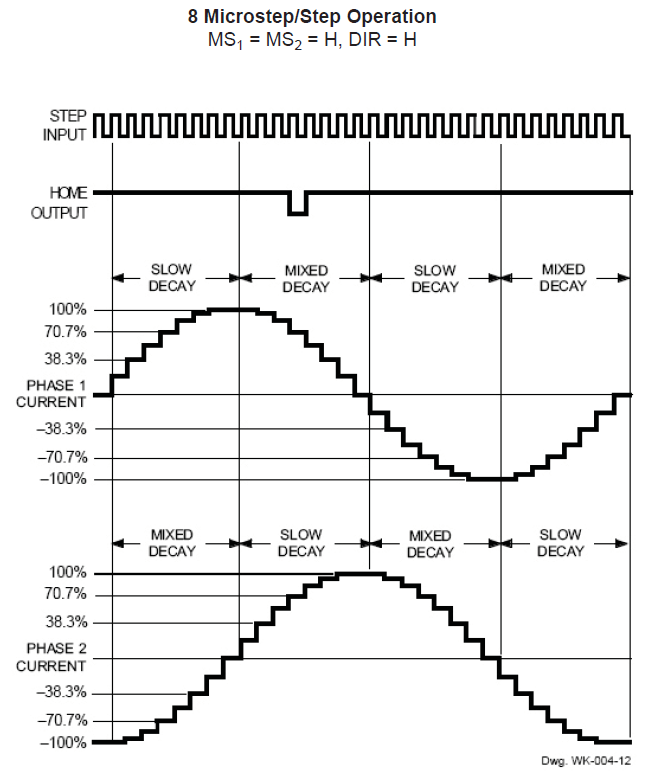
This diagram from page 15 of the Allegro A3977 datasheet shows how the current varies in each winding during the course of 32 microsteps. The motors have 200 full steps/rev and 1600 microsteps/rev, so this diagram repeats 50 times during the course of one complete shaft rotation.
Allegro A3977 microstepping current waveforms
The peak current of each waveform corresponds to the REF pot setting on the MBI driver board:
current in amperes = (REF pot voltage) / 2
That peak current must not exceed the motor’s rated Maximum Current, because the winding resistance dissipates that much power as heat. The maximum temperature occurs deep in the windings, far from the metal part of the armature, so blowing air on the motor helps, but does not cure, an overtemperature problem.
The driver adjusts the current in each winding to generate an approximation of a sinusoid waveform for each microstep. Because the motor torque varies directly with the winding current, the REF pot sets the maximum torque available from the motor.
The A3977 driver controls the current by switching the MOSFETs on and off: on = increasing current, off = decreasing current. You can fiddle with the rates of increase and decrease, but those are all in the nature of fine tuning. What’s important is that the A3977 shuts off the winding current when it exceeds the product of the REF pot setting and the sinusoidal value for the microstep, then turns it back on when it falls below a somewhat lower level.
Therefore, the current isn’t actually constant: the whine you hear when the motors are standing still is an audible harmonic or sub-harmonic of the switching frequency. That’s not a bug, it’s a feature!
At the microsteps corresponding to the peaks of each sinusoidal waveform, one winding carries the maximum current and the other winding carries zero current. There are 200 such positions, each corresponding to one full motor step. At those points, the armature holds the rotor in position with the much-quoted Holding Torque.
For all other microsteps, the A3977 controls the Pythagorean sum of the two currents to equal the maximum current setting. The two currents pull the rotor toward two adjacent full-step positions, with the actual (nominal) rotor position determined by a bit of trig.
The power dissipation in the motor at every microstep is therefore:
(peak current)2 x (winding resistance)
All that applies to the DC situation with the motor halted at a particular microstep. In order to turn the rotor, the drive must change the winding currents to the values for the next microstep.
The motor windings are basically inductors with energy stored in their magnetic field, so the current cannot change instantly. The ratio of the inductance (L) and the total circuit resistance (R) is the time constant, abbreviated with a Greek tau (τ):
τ = L/R
The current change from one microstep to the next requires 3 time constants to settle within 5% of the final value and 5 time constants to settle within 1%. Those are characteristics of the exponential function and have nothing to do with the particular circuit; once you know the time constant, you know what’s going to happen.
The voltage applied to the motor winding determines the final value of the current that you use with the time constant. Microstepping drivers expect to apply a voltage far higher than the winding’s rated voltage, then limit the current to the winding’s rated value: the current never reaches the “final value”, but that’s still what you use in the computation. If the supply voltage equals the winding’s rated voltage, then the final value is simply the winding’s rated current.
The MBI Situation
The MBI motors (all of them, XYZ and Stepstruder) in a Thing-O-Matic do not operate like that. I’ll use the XY motors as examples, but feel free to run the same analysis on the others.
To summarize the datasheet values:
Inductance L = 44 mH
Resistance = 35 Ω
Rated voltage = 14 V
Rated current = 400 mA
The motors operate from a +12 V supply, so the maximum winding current will be at most 12 / 35 = 340 mA. The actual power supply voltage seems to around 11.5 V with the heaters running, the A3977 MOSFETs (inside the chip) have a total on-state resistance of about 800 mΩ, and I’ll assume another ohm of wiring resistance along the way. All that reduces the actual maximum current to around 300 mA; I’ll use that, because it’s within 10% off the actual value.
The MBI-recommended REV voltage setting of 1.5 V sets a 750 mA output current. However, there’s no magic involved: the motors cannot draw more than 300 mA in a Thing-O-Matic, no matter what the REF trimpot may call for.
With the REF trimpot set to 750 mA and the maximum current limited to 300 mA by the circuit, the A3977 cannot produce the correct current for most of the microsteps. Whenever the microstep current exceeds 300 mA, the A3977 cannot make that happen.
This diagram shows the actual winding current in the MBI motors for each of the 32 microsteps in four full motor steps:
Allegro A3977 waveform – current saturation
The 100% level corresponds to the 750 mA set by the REF trimpot and, as above, the nice sinusoids show the target current for each microstep. The red line shows the actual current for each microstep, none of which can exceed the 300 mA limit. That limit corresponds to 300/750 = 40% of the maximum, just slightly over the 38.3% for the second microstep in each sequence.
The pink zones mark the microsteps where both windings become current-limited to 300 mA. During those microsteps, the current in the windings doesn’t change and the motor cannot move. Of the 32 microsteps in each group of four full steps, the motor can move during only 16.
The horrible sounds you hear from an MBI motor happen as the rotor encounters those pink zones: the rotor literally jams to a stop when both windings limit at 300 mA, remains immobile while the currents remain steady, then jerks across the 4 microsteps in the pink zone when the current in one winding drops below 300 mA. This is obviously not conducive to smooth motion or high torque.
Try this: reduce REF to, say, 400 mV to limit the peak current to 200 mA. Run the motor slowly, because it won’t have much torque, and listen. Set REF back to 1.5 V, run it at the same speed, and listen.
The power dissipation for all the microsteps in the pink rectangles is:
2 x (300 mA)2 x 35 = 6.4 W
The factor of 2 comes from the fact that both windings carry 300 mA in that condition.
The motor’s rated maximum power is:
(400 mA)2 x 35 = 5.6 W
There’s no factor of 2 because the rating applies to one winding carrying the rated current.
During the other microsteps the power drops slightly, with the best case when one winding carries zero current:
(300 mA)2 x 35 = 3.2 W
That’s why MBI motors overheat: they operate at the ragged edge of their power limit while tucked inside a thermally insulating plywood box. If the motor stops on a microstep inside those pink zones, it’ll dissipate 6.4/5.6 = 114% of its rated power.
Changing the current between microsteps also poses a problem. The time constant for the MBI XY motors is:
τ = 44 mH / 35 Ω = 1.3 ms
That means the current settles within 5% in 4 ms and 1% in 6 ms.
Stock Thing-O-Matics move at about 30 mm/s. The motor pulley has 17 teeth and the belt has teeth on a 2 mm pitch, so the motor must turn at 1 rev/s to move the stage at 34 mm/s. With 1600 microsteps/rev, each microstep takes 625 µs, which is half the time constant.
I think you can see where this is going…
The microsteps outside the pink zones could have active current limiting, because the A3977 has some voltage headroom. The first microstep has a current limit 20% of the 750 mA maximum (set by the trimpot = what you want) = 150 mA.
The current starts rising toward the actual 300 mA maximum (set by the supply voltage and winding resistance = what you get) and after 625 µs it reaches:
300 mA × (1 - e-0.5) = 120 mA
So the current doesn’t quite reach the target and the A3977 doesn’t get a chance to do active current limiting.
The next microstep has a 38% current limit that sets a target of 285 mA, marginally below the 300 mA limit set by the winding resistance. The A3977 continues to apply the full supply voltage, so the winding doesn’t notice anything’s changed and the current continues to rise. At the end of the second microstep the current has reached:
300 mA × (1 - e-1) = 190 mA
Which is about 2/3 of the target and the A3977 still doesn’t do active current limiting.
The full analysis is messier than that, but what you see is pretty close. I won’t go into what happens when the A3977 is trying to reduce the winding current, but a similar analysis applies.
Also, when the motor rotates slower the microsteps last longer and the current can get closer to the target value. Print at 15 mm/s to get microsteps about 1 time constant long; that’s still short, but it’s better.
If the motor stops on a microstep outside the pink zones, then the two winding currents will eventually exceed the values for that microstep and the A3977 will begin active current limiting: that’s when you hear the chopper whine. However, if the motor stops on a microstep inside the zones, then it’s dead silent: the currents never reach the level where the A3977 can apply active current limiting.
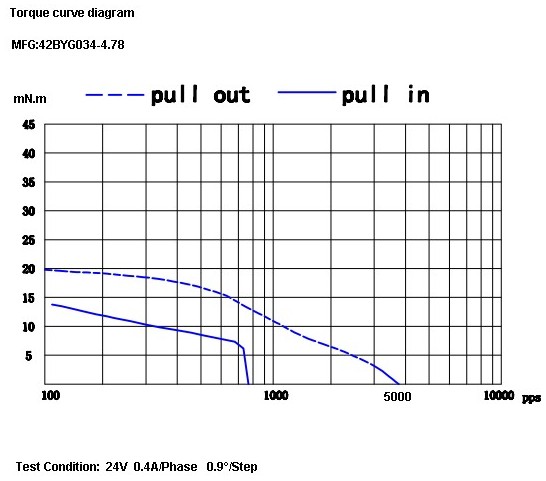
Because torque is proportional to current, the motor never delivers its rated torque in any microstep while it’s turning. The motor datasheet includes this torque-speed curve:
Cupcake TOM Stepper Torque Curve
The much-quoted Holding Torque is irrelevant. That measures the motor’s ability to hold its position with an external torque applied to the shaft. Unlike CNC milling machines, 3D printers do not impose torques on the XY motors due to forces from a cutting tool.
What’s important is the bottom curve showing the pull-in torque: the torque available to accelerate the load from a dead stop to the speed shown along the bottom, given in full-step pulses per second.
At 1 rev/sec the motor sees 200 full steps/sec, at which speed the pull-in torque is about 12 mN·m. However, that’s at the 400 mA full rated current applied from a 24 V source through a current-limiting driver. Because the maximum torque depends on the current and the resistance limits the maximum current to 300 mA, the maximum pull-in torque scales to 9 mN·n.
I’ll grant the possibility that there’s a misprint and Kysan simply dropped a zero. Pull-in torque around 150 mM·m seems more common with short NEMA 17 motors, but the data sheet is what the data sheet is. The motors behave as though they have no mojo, which leads me to believe the printed word.
Anyhow, that torque assumes the driver applies the proper winding current in each microstep, which, as you’ve just seen, doesn’t happen. Oddly, the MBI motors provide the highest torque in the pink zones, where the Pythagorean sum of the resistance-limited winding currents is:
√(2 x 300 mA2) = 420 mA
So the motors run in a crippled full-step mode that produces more-or-less the rated torque only when the motor isn’t moving, while dissipating too much power. When the motor is moving, the current never reaches the proper level.
The measurements I made when I had the printer apart indicate that the X and Y stages require far more torque than the MBI motors can provide, even if they were driven correctly. The fact that they work at all has more to do with good luck and spec tolerances than anything else.
The inadequate torque also answers the question of whether a higher power supply voltage will improve things: no, not much. A 24 V supply (as specified in the datasheet!) will permit operation at the rated current with correct microstepping, but that torque is still far too low.
I don’t have any inside knowledge, but I think what happened is that these motors date back to the Cupcake printer, which used a simple H-bridge without active current limiting. For that type of driver, the rated voltage of the winding must equal the supply voltage, because the winding resistance provides the current limiting.
Using A3977 drivers seemed like a simple upgrade to produce the Thing-O-Matic, but a microstepping driver must apply a voltage much higher than the winding’s rated voltage in order to get fast current changes and apply active current limiting. The old motors simply aren’t suited for the new drivers.
Tomorrow: what better motors can do for a Thing-O-Matic.
I’m certain I’ve made at least one error in what you’ve just read; comments, criticisms, and corrections are welcome. However, before you comment, RTFM for the A3977 driver, the MBI stepper motors, and any other hardware you’re proposing. Run the numbers first, OK?
Update: A reader suggests a rule of thumb relating voltage to inductance …
The NEMA standards for stepper motors don’t specify the shaft dimensions, alas. While most NEMA 17 steppers have 5 mm shafts, the X and Y axis motors in a Thing-O-Matic have 3/16 inch shafts: MBI belt pulleys with 4.76-ish mm ID won’t fit on 5 mm OD shafts.
(Note: the “17” in NEMA 17 means the mounting holes are on a more-or-less 1.7 inch circle. The side of the motor frame will be close, but that’s not the controlled dimension. Some relevant diagrams live there.)
I plan to replace the Y axis stepper with a better motor (I got a set of three, one of which is now driving the stepper extruder), which means either buying a new pulley or having some Quality Shop Time. Plus, a bit more length on the Y axis shaft than what comes standard would be a Good Thing, too.
[Update: From the motor label, not that you’ll ever find one like it…
38 mm case
Minebea-Matsushita 17PM-K150-P1V
No T6824-02
]
So I built an adapter from 5/16 and 3/16 rod with a setscrew to grab a flat on the stepper shaft and a pin for the torque. The larger rod turned out to be La Salle Fatigue-Proof steel, not that it matters, and the smaller rod is plain old W-1 Water Hardening Drill Rod, both from Brownell’s, a long time ago in a universe far away. You could turn and drill the adapter from a single length of 5/16 rod if you prefer, but take some care to maintain the alignment.
A bit of lathe & Sherline CNC work:
Face one end of the 5/16 rod
Drill half an inch with a #9 drill (0.196 + runout = 5 mm)
Drill another quarter inch with a #12 drill (0.189 = 4.8 mm)
Saw off 3/4 inch, face the raw end
Saw & face an inch of 3/16 rod
Epoxy little rod in big rod, set upright, wait overnight
Cross drill #43 and tap 4-40 near big end
Cross drill #56 for 0.045 music wire pin
Chamfer pin hole, clean, epoxy pin in place, wait overnight
File two flats on 3/16 shaft for MBI pulley setscrews
Tapping shaft adapter
I grabbed the small rod in the vise with the large rod resting on the top of the jaws while the epoxy cured, figuring that it’d be pretty much self-aligning. Not that a few mils one way or the other will matter, as it’s driving a timing belt in a flexy machine anyway.
Cross-drilling the pin hole required eyeballing the center of the length of 3/16 rod within the 5/16 rod. It’s not critical, but avoid missing the poor thing entirely. You want to minimize the nested length, so as to keep the adapter as short as possible, but keep at least one diameter (3/16 inch) so as to maintain alignment.
Tapping should involve a bottoming tap, but I used what I had and it worked out OK.
Now, one reason I was willing to do this is that the stock Y axis motor shaft was already too short. As nearly as I can tell, the TOM dimensions were set before MBI started shipping those cork sound-deadening plates, because the shaft is recessed into the pulley by about the thickness of that plate.
The MBI pulleys are an extremely tight fit on a 3/16 inch rod, so, rather than forcing the pulley, I enlarged the hub with a #12 drill (same as in the adapter) to get another 1.5 mil of clearance; it’s now an easy slip fit on the rod.
Drilling MBI motor pulley
Anyhow, the bottom flange of the pulley is 17 mm above the ridge on the motor and this one worked out to a bit over 20. No problem, I can just lower the motor a little bit, flip the pulley over to get the setscrew end of the hub on the top, and it’ll have plenty of room. A bit more shaft is much better than not enough, sez I.
Y axis motor shaft extension
The motors came from the usual eBay seller complete with a squishy silicone sound deadening panel that turned out to be exactly the right thickness, when stacked atop a cork sheet, to put the pulley where it needed to be. I cut a second cork sheet, so as to isolate the bolt heads from that acrylic body panel, and it’s all good.




 The Smell of Molten Projects in the Morning