Ed Nisley's Blog: Shop notes, electronics, firmware, machinery, 3D printing, laser cuttery, and curiosities. Contents: 100% human thinking, 0% AI slop.
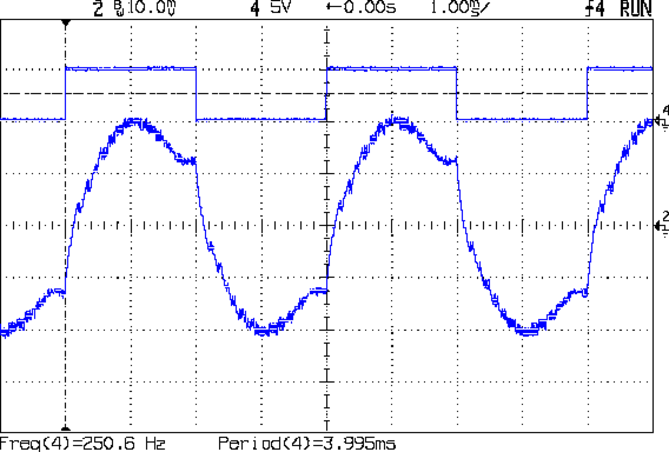
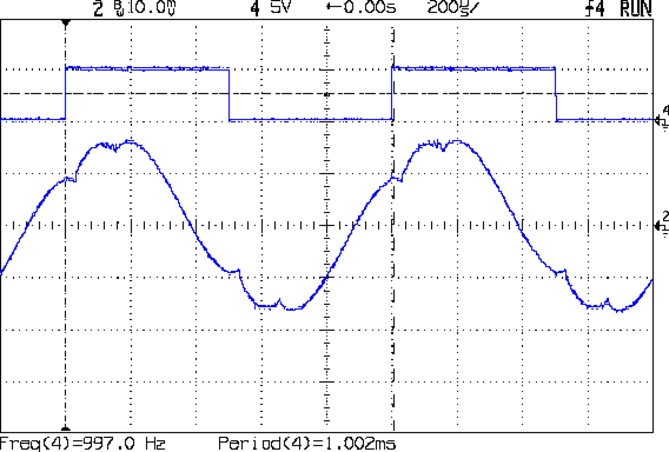
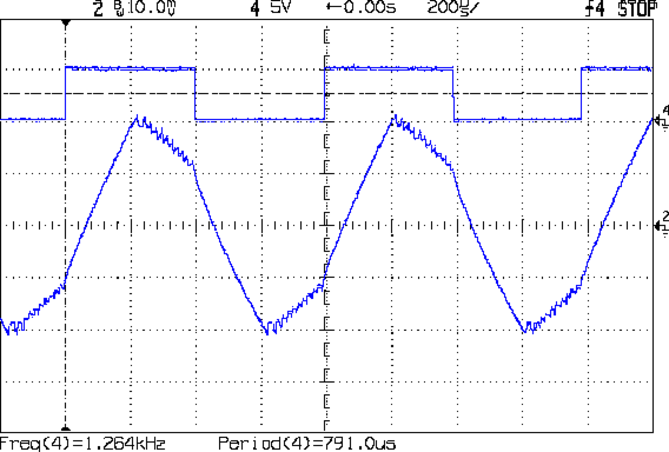
Some simple measurements using that Pololu driver in its default mixed decay mode and that Arduino sync generator. The captions give the operating conditions; basically, I’m varying the rotation speed by cranking the signal generator driving the Pololu board.
At 1 rev/s, it’s about as good as it gets:
Back EMF – 9V 400mA 1 RPS
At 5 rev/s, the driver has trouble getting current out of the winding:
Back EMF – 9V 400mA 5 RPS
At 10 rev/s, things are getting ugly:
Back EMF – 9V 400mA 10 RPS
At 20 rev/s, the back EMF has pretty much taken control of the current and the driver is going along for the ride:
Back EMF – 9V 400mA 20 RPS
At 25 rev/s, the driver produces only occasional dents in the waveform:
Back EMF – 9V 400mA 25 RPS
At 25.3 rev/s, the motor stalled. Even with no back EMF (what with the rotor being stopped and buzzing in frustration), the driver can’t force the current to behave:
Back EMF – 9V 400mA 25.3 RPS
I don’t have any way to measure the motor’s output torque, but at 1500 RPM there won’t be any worth mentioning.
For what it’s worth, 25 rev/s means the driver is handling 40 k steps/sec = 25 µs/step. The motors in a Thing-O-Matic run at 3 rev/s to move the XY stages at 100 mm/s, so scale what you see here accordingly.
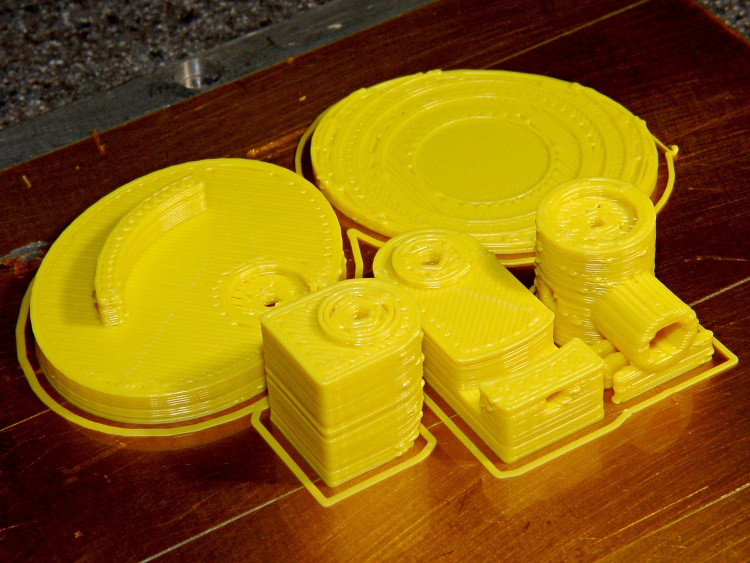
Printing went smoothly after two preliminary passes to work out the sizes and alignments; this is the second pass, which you can tell because the mirror shoulder has three supports instead of the two shown in the solid model:
Mirror mount parts on build plate
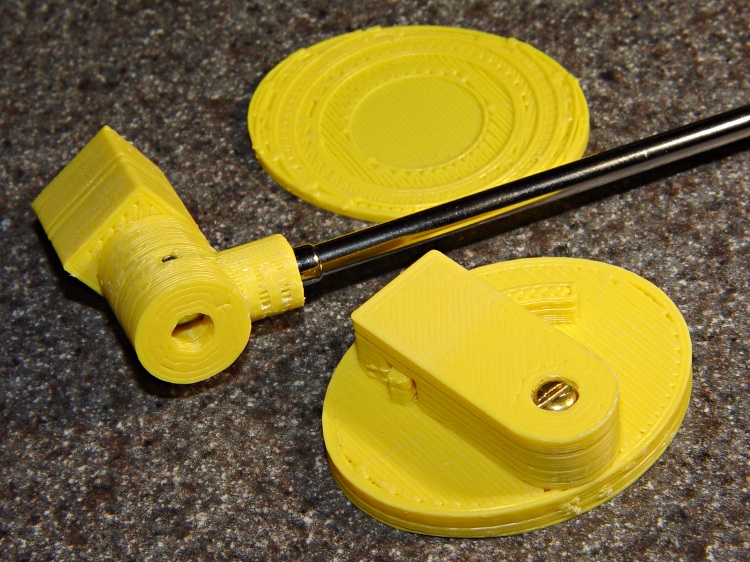
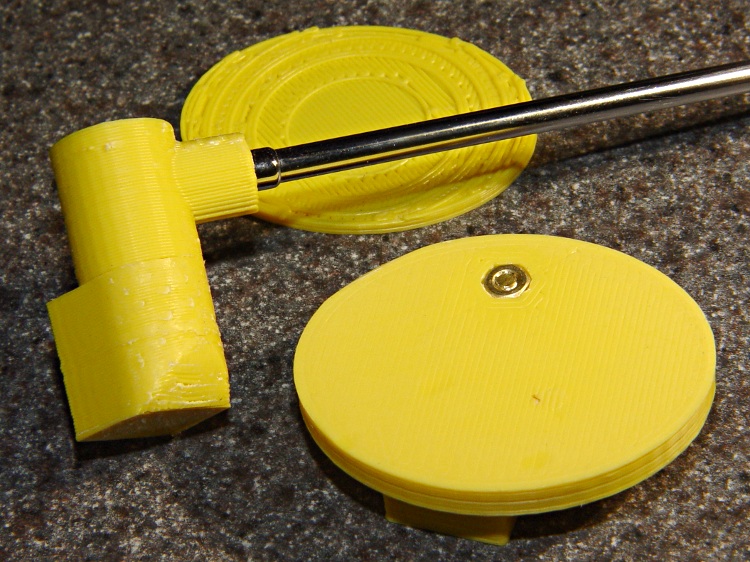
One view of the parts, with the mirror shaft in place:
Mirror mount partial assembly – top
Another view, showing the bottom of the Elevation Plate with the recessed nut:
Mirror mount parts partial assembly – bottom
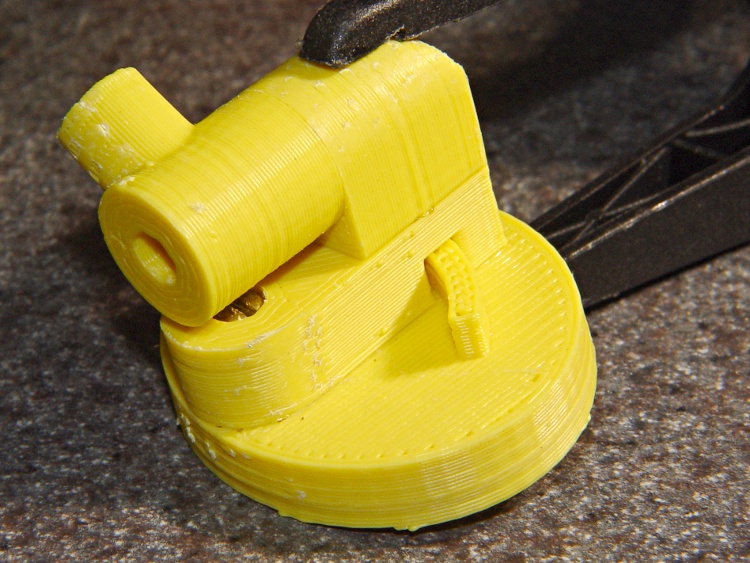
Assembling the two glue joints required an overnight clamping:
Mirror mount – glued and clamped
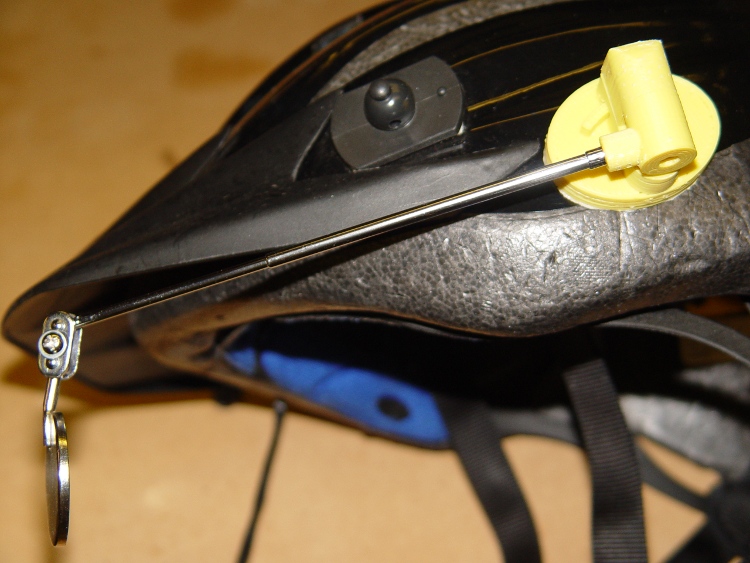
Then a layer of double-stick foam tape affixes it firmly to the helmet:
Mirror mount – on helmet
It’s a bit too big and way ugly, but works pretty much as expected.
Two lengths of heatshrink tubing now lock the mirror shaft sections in place; they tended to rotate slightly under normal vibration.
The OpenSCAD code and model have a few modifications from this object. The next one won’t have the third section of mirror shaft, which makes the shoulder and Az Mount smaller, and the Az Mount is 1 mm closer to the El Body. That shaves a few millimeters off the whole thing.
The mirror clamp out there on the end is much too large and has too many fiddly parts. I think a little printed doodad would work, but that’s in the nature of fine tuning.
After a bit of OpenSCAD twiddling, those doodles turned into a printable model. This view shows what it looks like all neatly assembled:
The tiny hole on the top of the Elevation Body accepts a 2-56 setscrew that grabs the arc protruding from the Elevation Plate and locks the up-and-down setting. The Azimuth Mount pivots on the 3-48 screw holding it to the Elevation Mount.
Both of those pivots must be loose enough to move when you bump the mirror and tight enough to stay put in normal use. It’s a delicate balance and I’m not convinced this will work for the long term, but it’s a brassboard.
The 2-56 stud on the end of the mirror shaft screws into a socket in the rear side of the Az Mount. Another 2-56 setscrew in the Az Mount (facing the El Body), grabs the side of the shaft and prevents it from rotating.
The mirror shaft shoulder on the Az Mount (front center) sticks out in mid air and requires a little bit of support.
The El Mount (left rear) builds surprisingly well with its curved top surface downward. If it’s rotated 90 degrees with the curve facing to the left, Skeinforge grumps about not being able to do something or another and generates totally bogus G-Code.
The Helmet Plate has a 3 mm deep depression that more-or-less corresponds to the helmet’s surface. It’s gouged out by a huge sphere sitting on the plate, with a radius calculated from the measured helmet curvature.
The OpenSCAD source code has two useful parameters near the top:
Layout selects the overall appearance: Fit, Show, or Build
Examine selects a single part for inspection & tweakage
You’ll need the MCAD and Visibone libraries to make this work. It’s the original code, without the tweaks to the grid mentioned in the comments there:
This OpenSCAD module spreads an array of cubes across the otherwise featureless preview window, so I know whether the gizmo I’m building or the parts I’m arranging actually fit on the Thing-O-Matic’s build platform. This doesn’t get out to the very edge, but if it looks close, then I should pay more attention anyway.
module ShowPegGrid(Size) {

 for (x=[-5:5])
  for (y=[-5:5])
   translate([x*10,y*10,Size/2])
    cube(Size,center=true);

}

ShowPegGrid(1.0);
You obviously don’t want to extrude these things, so put the ShowPegGrid() statement inside an if, so you can turn it off for the final build layout.
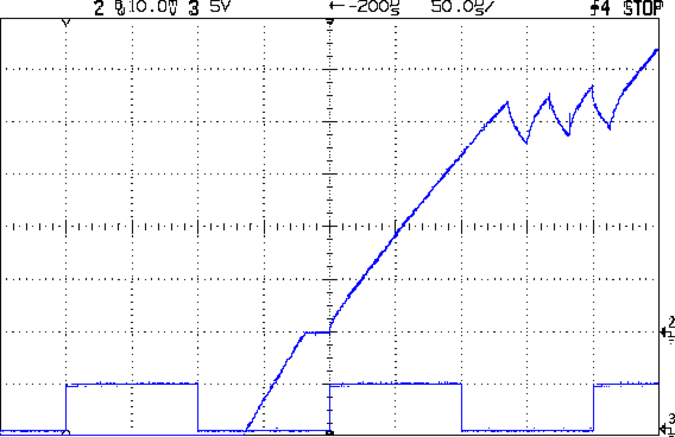
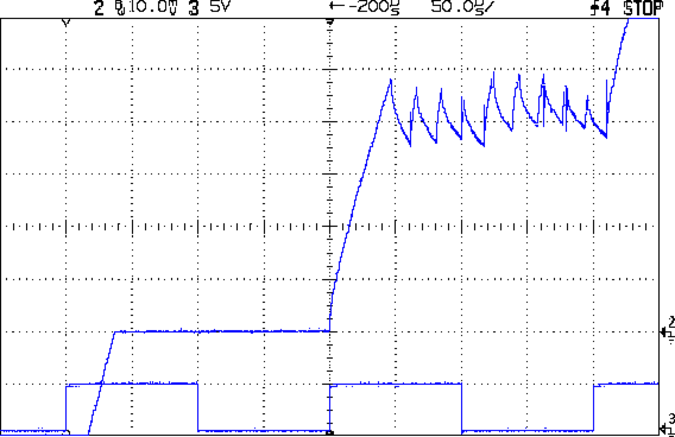
Here’s how the stepper drive voltage affects the current rise, using that kludge to sync the scope on one of those motors with L=2.6 mH and R=2.2 Ω. The peak winding current is 1 A, so the first step current-limits at 200 mA.
At 9 V:
Current Rise – 9 V 1A 3 RPS
At 18 V:
Current Rise – 18 V 1A 3 RPS
Knowing the rise time and current change, you can calculate the actual voltage across the inductor using:
VL = L di/dt
With 9 V drive the motor sees:
4.4 V = 2.6 mH x 220 mA / 130 us
With 18 V drive the motor sees:
14 V = 2.6 mH x 240 mA / 45 us
So, in round numbers, the driver MOSFETs, winding resistance, and all the crappy solderless breadboard connections soak up about 4 V of the available supply voltage. There’s some back EMF in there, too, but I haven’t measured that part of the puzzle yet.
The motor is turning at 3 rev/s in 1/8 microstepping mode, so each microstep is:
Those cute little Pololu stepper driver boards using the Allegro A4988 chip have one conspicuous problem: there’s no good way to heatsink the chip. The doc recommends heatsinking for currents around 1 A and some informal testing shows it will trip out on thermal protect around 800 mA, so heatsinking really isn’t optional.
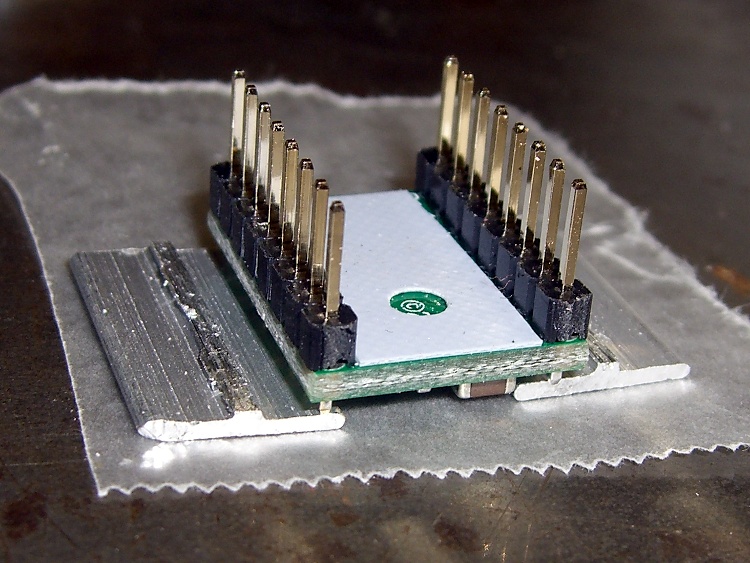
A thermal pad from the chip bonds to vias that conduct heat through the PCB to the bottom surface copper layer: putting a heatsink on the top doesn’t help as much as one on the bottom. What I’m doing here is a first pass at a bulk heatsink that would work with several of the driver chips lined up in a row; this one is ugly and doesn’t work well, but it should let me do some further electrical tests.
The general idea is to clamp the heatsink around the board, with the chip as the top-side pressure point. The catch: no room for an actual heatsink underneath, because that’s where the connector pins live. You could mount the board upside-down, but then there’s no good way to tweak the stepper current trimpot. That may not be a problem after you get things set up, although I’d hate to unplug and replug the board for each adjustment.
So I think a reasonable solution involves a metal strip to conduct the heat out the ends and up to the heatsink. What I’ve done here does not accomplish that; I’m just feeling around the parameter space.
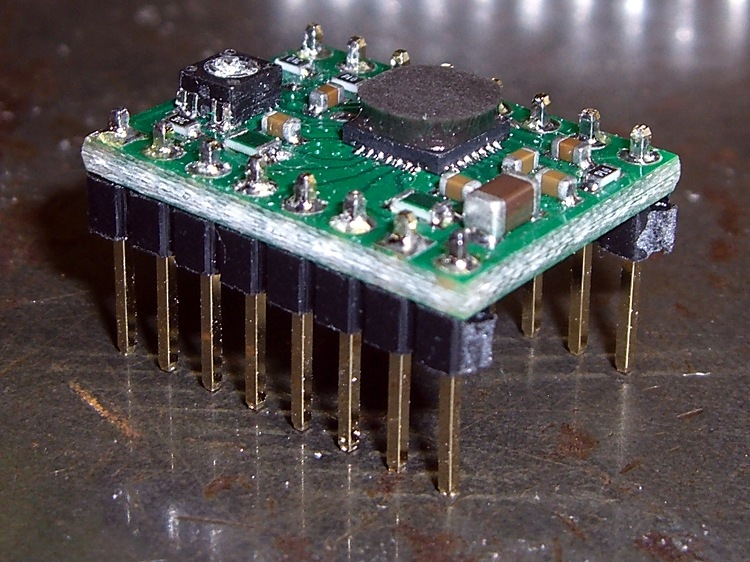
You can’t get too enthusiastic with the clamping force, lest you crush the chip, so moderate pressure is the rule of the day. However, the chip sits low on the board, surrounded by taller components, so I put a drop of epoxy on top and flipped it over to produce a short thermally conductive column that’s higher than everything else:
Pololu stepper board – epoxy curing
The blue sheet comes from a trimmed-down TO-220 transistor heatsink pad; it’s thermally conductive silicone, provides a bit of compliance against the PCB, and insulates the REF trimpot test point from the heatsink.
The result looks OK, but it would be better to embed a small metal block between thinner epoxy layers to get better thermal conductivity:
Pololu stepper board – epoxy blob on driver chip
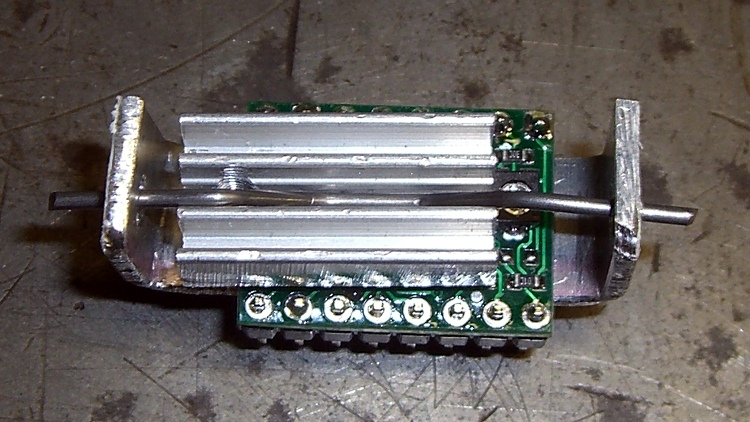
Although most of the heat goes out the bottom, you still need something on the top to take the spring pressure. I trimmed down the TO-220 heatsink that came with that silicone pad; it must mount off-center to permit access to the trimpot but, alas, blocks the voltage monitoring pad and both sense resistors. A length of 45-mil music wire bent into a flat M provides the spring:
Pololu stepper board – heatsink top view
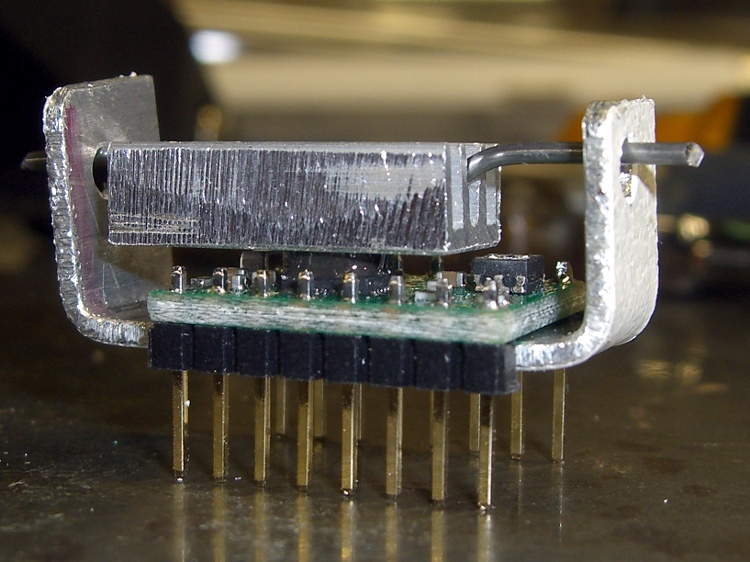
The side view show how the kludge fits together:
Pololu stepper board – crude heatsink
The final result is truly ugly. The epoxy column didn’t turn out nearly as parallel to the PCB as I’d like, so some filing and finishing will be in order.
Now, to find out if it’ll allow the chip to run above 1 A for at least a while.
In order to get good scope pictures of the winding current in a stepper motor, the scope must sync to the step pulses. However, it must also sync to the groups of 32 step pulses that make up a single set of four full steps, because the winding current repeats for each of those groups. Triggering once per revolution and delaying for a fixed amount will get you where you need to be.
The sync wheel provides a once-per-revolution pulse, but there’s some jitter in the edge for all the usual reasons and you’d be better off with a sync based on the stepper driver’s step input. The general idea is to find the leading edge of the optical pulse, find the next step pulse, then produce output pulses based on the step signal. Assuming a regular step pulse stream (from a pulse generator, for example), the output will be both locked to the wheel rotation and to the step pulses.
Normally this calls for a tedious wiring session involving logic gates and counters, but an Arduino has all the requisite machinery built in. The trick is to generate the pulses using the ATmega’s hardware, rather than program instructions, thus eliminating the usual jitter caused by instruction execution time.
I set up Timer 1 in Mode 4 (CTC with OCR1A controlling the matches) to count step pulse inputs on its T1 external clock input pin and produce a once-per-revolution output pulse on the OC1A pin. Because the output changes on the rising edge of the input clock, its rising and falling edges will provide rock-solid stable scope synchronization.
The big picture goes a little something like this:
Tell the counter to set the output on match, load the duration of the output pulse
Wait for the once-per-revolution signal, then enable the external clock input
Wait for the comparison to happen and reset the match flag
Set a one-pulse delay and tell set the counter to clear the output on match
Wait for the compare, clear the flag, turn off the counter
Wait until the once-per-rev signal goes low
And then do it all over again
Which produces this:
Sync Wheel
Top trace = optical signal from interrupter, middle = 1/rev sync from Arduino OC1A pin, bottom = step pulses. The motor is turning 3.5 rev/s = 210 rev/min. The top half of the screen is at 2 ms/div, the bottom half at 200 μs/div.
You could synchronize the counter to the 1/rev input exactly once, then produce the output pulse just by counting stepper pulses. It’d also be nice to have a pulse that repeats for each group of 32 microsteps within each set of four full steps, perhaps settable to a particular microstep within the group. All that’s in the nature of fine tuning.
Of course, devoting an Arduino to this project would be absurd, but for a one-off effort it makes a lot of sense.
The Arduino source code:
// Stepper motor driver synchronization
// Ed Nisley KE4ZNU June 2011

//-- Pin definitions, all of which depend on internal hardware: do *not* change

#define PIN_REV	2					// INT0 = positive 1/rev pulse from optical switch
#define PIN_STEP 5					// T1 = positive 1/step pulse from stepper driver
#define PIN_TRIGGER 9				// OC1A = positive trigger pulse to scope

#define SYNC_OFFSET	15				// steps from 1/rev puse to start of first 4-full-step group

#define PIN_TRACE_A    10
#define PIN_TRACE_B    11
#define PIN_TRACE_C    12

#define PIN_LED		13

//---------------------
// Useful routines

//--- Input & output pins

void TogglePin(char bitpin) {
	digitalWrite(bitpin,!digitalRead(bitpin));    // toggle the bit based on previous output
}

//----------------
// Initializations

void setup() {

  pinMode(PIN_REV,INPUT);		// INT0 1/rev pulse from wheel

  pinMode(PIN_STEP,INPUT);		// T1 step pulse from stepper driver

  pinMode(PIN_LED,OUTPUT);
  digitalWrite(PIN_LED,LOW);

  pinMode(PIN_TRACE_A,OUTPUT);
  pinMode(PIN_TRACE_B,OUTPUT);
  pinMode(PIN_TRACE_C,OUTPUT);

//--- Prepare Timer1 to count external stepper drive pulses

  TCCR1B = B00001000;				// Timer1: Mode 4 = CTC, TOP = OCR1A, clock stopped

  pinMode(PIN_TRIGGER,OUTPUT);		// OC1A to scope trigger

}

//----------------
// The main event

void loop() {

//-- Wait for rising edge of 1/rev pulse from optical switch

  TCCR1A = B11000000;						// COM1A set on compare
  TCNT1 = 0;								// ensure we start from zero
  OCR1A = SYNC_OFFSET;						// set step counter

  while(!digitalRead(PIN_REV)) {			// stall until 1/rev input rises
	TogglePin(PIN_TRACE_A);
  }

//-- Got it, fire up the timer to count stepper driver pulses

  TCCR1B |= B00000111;						// enable clock from T1 pin, rising edge

  digitalWrite(PIN_LED,HIGH);				// show we got here
  digitalWrite(PIN_TRACE_A,LOW);

  while(!(TIFR1 & _BV(OCF1A))) {			// wait for compare
	digitalWrite(PIN_TRACE_B,digitalRead(PIN_STEP));
	continue;
  }
  TIFR1 |= _BV(OCF1A);						// clear match flag

//-- Scope sync pulse now active

  digitalWrite(PIN_LED,LOW);				// show we got here
  digitalWrite(PIN_TRACE_B,LOW);

//-- Wait for another step pulse to clear scope sync

  TCCR1A = B10000000;						// COM1A clear on compare
  OCR1A = 1;								// wait for another pulse

  while(!(TIFR1 & _BV(OCF1A))) {			// wait for compare
	digitalWrite(PIN_TRACE_B,digitalRead(PIN_STEP));
	continue;
  }
  TIFR1 |= _BV(OCF1A);						// clear match flag
  digitalWrite(PIN_TRACE_B,LOW);

//-- Shut down counter and wait for end of 1/rev pulse

  TCCR1B &= ~B00000111;						// turn off timer clock

  while(digitalRead(PIN_REV)) {				// stall until 1/rev pulse goes low again
	TogglePin(PIN_TRACE_C);
  }
  digitalWrite(PIN_TRACE_B,LOW);

}






 The Smell of Molten Projects in the Morning