The Smell of Molten Projects in the Morning

Ed Nisley's Blog: Shop notes, electronics, firmware, machinery, 3D printing, laser cuttery, and curiosities. Contents: 100% human thinking, 0% AI slop.

Category: Software

General-purpose computers doing something specific

  • SATA vs. USB Hard Drive Write Speeds

    The stack of drives-to-be-scrubbed disgorged a pair of SATA drives, so I plugged one of them into an internal SATA port and unleashed dd on it:

    time sudo dd if=/dev/urandom of=/dev/sdb bs=4096 count=10000
    10000+0 records in
    10000+0 records out
    40960000 bytes (41 MB) copied, 4.19793 s, 9.8 MB/s
    
    real	0m4.208s
    user	0m0.004s
    sys	0m2.880s
    
    time sudo dd if=/dev/urandom of=/dev/sdb bs=1024 count=40000
    40000+0 records in
    40000+0 records out
    40960000 bytes (41 MB) copied, 7.38392 s, 5.5 MB/s
    
    real	0m7.394s
    user	0m0.004s
    sys	0m3.505s
    
    time sudo dd if=/dev/urandom of=/dev/sdb bs=16384 count=2500
    2500+0 records in
    2500+0 records out
    40960000 bytes (41 MB) copied, 4.2042 s, 9.7 MB/s
    
    real	0m4.214s
    user	0m0.000s
    sys	0m2.880s
    

    The timing for a few (tens of) thousand blocks comes out somewhat below the long-term average, which was the same 12 to 14 MB/s produced by the USB 2.0 adapter. It just doesn’t get any better than that, mostly due to rotational delays.

    In round numbers, that’s 40 to 50 GB/h, so it’s best to start scrubbing those terabyte drives early in the day…

  • Swept Claw Model

    Our Larval Engineer asked for help with an OpenSCAD model of a 3D printable claw that, she says, has nothing at all to do with the upcoming Night of Little Horrors. Not having had an excuse to fiddle with the new (and lightly documented) sweep() functions, I gnawed on the sweep-drop.scad example until this popped out:

    Swept Claw - solid model
    Swept Claw – solid model

    That might be too aggressively sloped up near the top, but it’s a start.

    The OpenSCAD source code:

    use <sweep.scad>
    use <scad-utils/transformations.scad>
    
    function shape() = [[0,-25],[0,25],[100,0]];
    
    function path(t) = [100*(1+sin(-90-t*90)), 0, (100 * t)];
    
    step = 0.01;
    
    path_transforms = [for (t=[0:step:1-step]) 
        translation(path(t)) * 
        scaling([0.5*(1-t) + 0.1,0.75*(1-t) + 0.1,1])];
        
    sweep(shape(), path_transforms);


    It’s perfectly manifold and slices just as you’d expect; you could affix it to a mounting bracket easily enough.

    Some notes on what’s going on…

    The t index determines all the other values as a function of the layer from the base at t=0 to the top at t=0.99.

    The shape() defines the overall triangular blade cross-section at the base; change the points / size to make it look like you want.

    The path() defines the XYZ translation of each slab that’s extruded from the shape() cross-section. I think the Z value sets the offset & thickness of each slab. The constant 100 in the X value interacts with the overall size of the shape(). The 90 values inside the sin() function set the phase & scale t so the claw bends the right way; that took some fiddling.

    The parameters in scaling() determine how the shape() shrinks along the path() as a function of the t parameter. The 0.1 Finagle Constants prevent the claw from tapering to a non-printable point at the tip. I think the Z value must be 1.000 to avoid weird non-manifold issues: the slabs must remain whatever thickness the sweep functions set them to be.

    It compiles & renders almost instantly: much faster than I expected from the demos.

    The folks who can (and do!) figure that kind of model (and the libraries behind it) from first principles have my undying admiration!

  • Scrubbing Old Hard Drives

    The shelf that collects old hard drives filled up, so I’ve been wiping the data before recycling them. This takes a while, but we know what happens when your hardware falls into unexpected hands. The routine goes a little something like this…

    Set the drive’s jumper to Master, plug the drive into the USB adapter, plug the adapter directly into a USB port on the PC (because outboard hubs tend to be flaky), make sure there’s no valuable data, unmount.

    time sudo dd if=/dev/urandom of=/dev/sdc bs=4096
    [sudo] password for ed: 
    dd: error writing ‘/dev/sdc’: No space left on device
    73259047+0 records in
    73259046+0 records out
    300069052416 bytes (300 GB) copied, 22276.7 s, 13.5 MB/s
    
    real	371m19.003s
    user	0m22.884s
    sys		370m34.906s 

    Good old dd works for me; the only trick is not obliterating the system’s main hard drive with a simple finger fumble. Numbers from /dev/urandom suffice for this purpose; that’s where most of the packaged programs get their data, too. I do hardcore style, just because.

    Ordinary desktop drives, at least those from long ago, can write at a bit over 12 MB/s → 40 GB/h on the average, with the higher peak rates that generally appear in the drive descriptions remaining an occasional sight. They won’t go much faster, even when plugged directly into the system board, but it’s not as if I sit there waiting until it’s done. USB 2.0 “high speed” transfers can hit 60 MB/s, including all the overhead, so that’s not the limiting factor; I’d expect the adapter’s firmware to throttle the data long before the bus strangles.

    Use gparted to write a fresh partition table with a single NTFS (because the next user will probably run Windows) partition labeled Scrubbed spanning the entire drive.

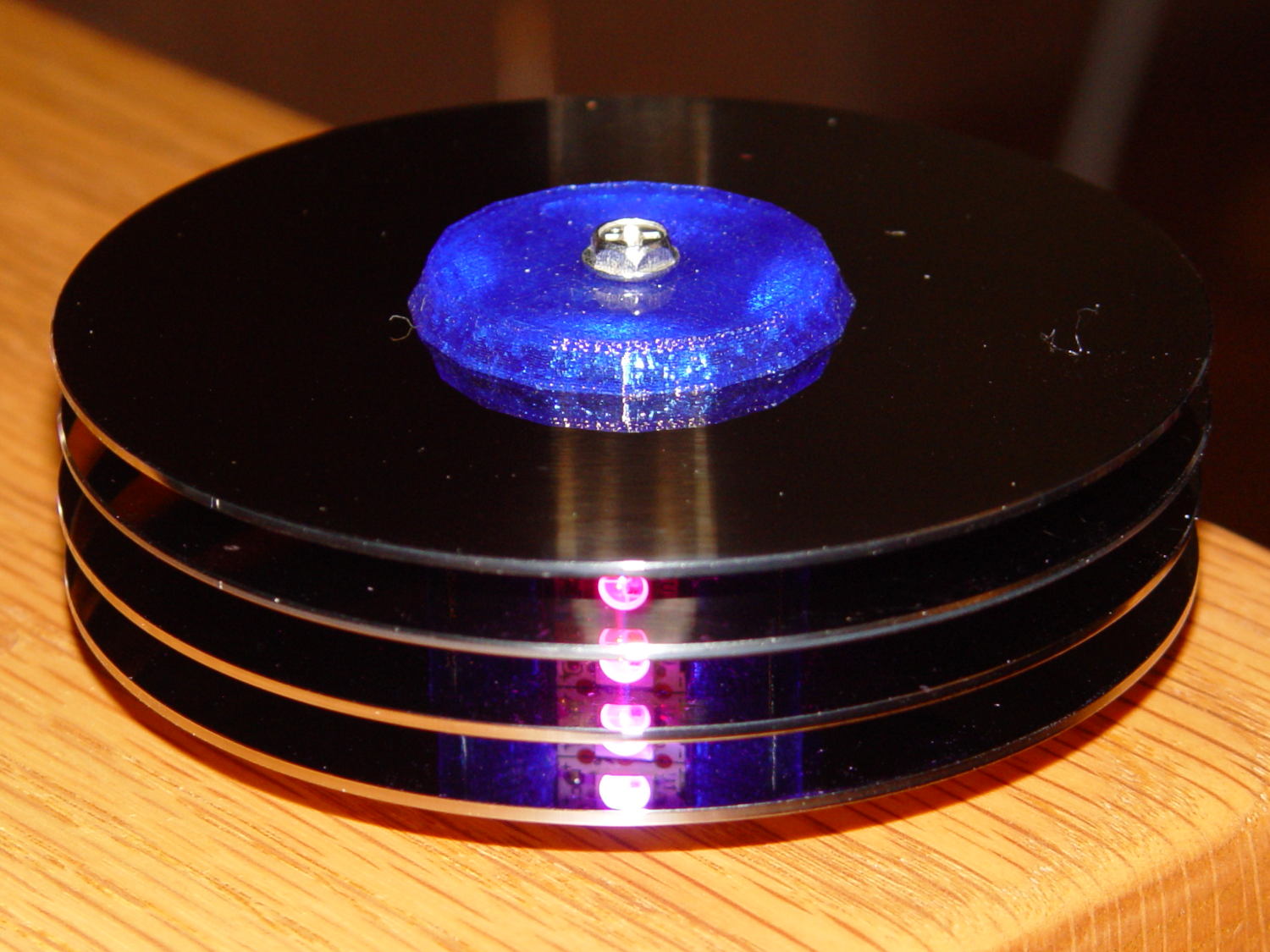
    Then stack the drive neatly on the outbound heap:

    Scrubbed hard drives
    Scrubbed hard drives

    That cardboard box isn’t quite as full of unscrubbed drives as it was a few weeks ago.

    The stack in the back contains all those worthless 30 to 80 GB 5400 RPM drives from old Dells, plus a few 1.5 and 2.0 (!) GB drives from who knows where. I have a plan for those platters…

  • Monthly Image: A Year in the Life of a Maple Twig, Resurrected

    In 1991 we lived in Tolland CT, where I took one picture of a maple twig every week:

    This slideshow requires JavaScript.

    That was with a film camera, of course, with negatives. I assembled the printed images into a poster and eventually (perhaps in 2001) scanned / digitally photographed them four-at-a-time, saved the result as a 330 MB Photoshop file with one 2×2 group in each of 13 layers (there are 50 images, probably because vacations), and burned that to a CD.

    All I can say: it must have made sense at the time.

    Anyhow, here in the future, I found that CD in a pile destined for the shredder, which shouldn’t ought to happen without some attention.

    Here’s how I extracted the separate images from that file into standalone JPEGs, cropped them to a uniform size, and smushed them to suitably low quality:

    convert A\ Year\ in\ the\ Life\ of\ Tolland\ CT\ -\ 1991.psd -quality 95 Tolland-1991-%02d.jpg
    for f in {01..13} ; do convert Tolland-1991-$f.jpg -crop "1212x1775+0+0" img-$f-0.jpg ; done
    for f in {01..13} ; do convert Tolland-1991-$f.jpg -crop "1212x1775+1212+0" img-$f-1.jpg ; done
    for f in {01..13} ; do convert Tolland-1991-$f.jpg -crop "1212x1775+0+1775" img-$f-2.jpg ; done
    for f in {01..13} ; do convert Tolland-1991-$f.jpg -crop "1212x1775+1212+1775" img-$f-3.jpg ; done
    for f in {01..13} ; do for g in {0..3} ; do convert img-$f-$g.jpg -crop "1100x1650+50+50" out-$f-$g.jpg ; done ; done
    sn=1 ; for f in {01..13} ; do for g in {0..3} ; do printf -v dn 'Tolland-1991-Maple-%02d.jpg' "$(( sn++ ))" ; convert img-$f-$g.jpg -crop "1100x1650+50+50" +repage -rotate 90 -define jpeg:extent=200KB $dn ; done ; done
    

    Then WordPress assembles the 50 images into a slide show.

    Of course, it didn’t go quite as smoothly as all that, but it took maybe half an hour of fiddling to get it right by iterating on the commands until I liked the results. One might tweak the exposures and suchlike, but that’s in the nature of fine tuning.

    Now I can shred the CD…

  • Improved Gas Cartridge Fins

    A trio of N2O cartridges / capsules made their way into the Basement Laboratory and cried out to be fitted with fins:

    N2O Capsule Fins - installed
    N2O Capsule Fins – installed

    My original model tinkered up a cartridge from solid object primitives, but I’ve since discovered that cheating produces a much better and faster and easier result for cylindrical objects:

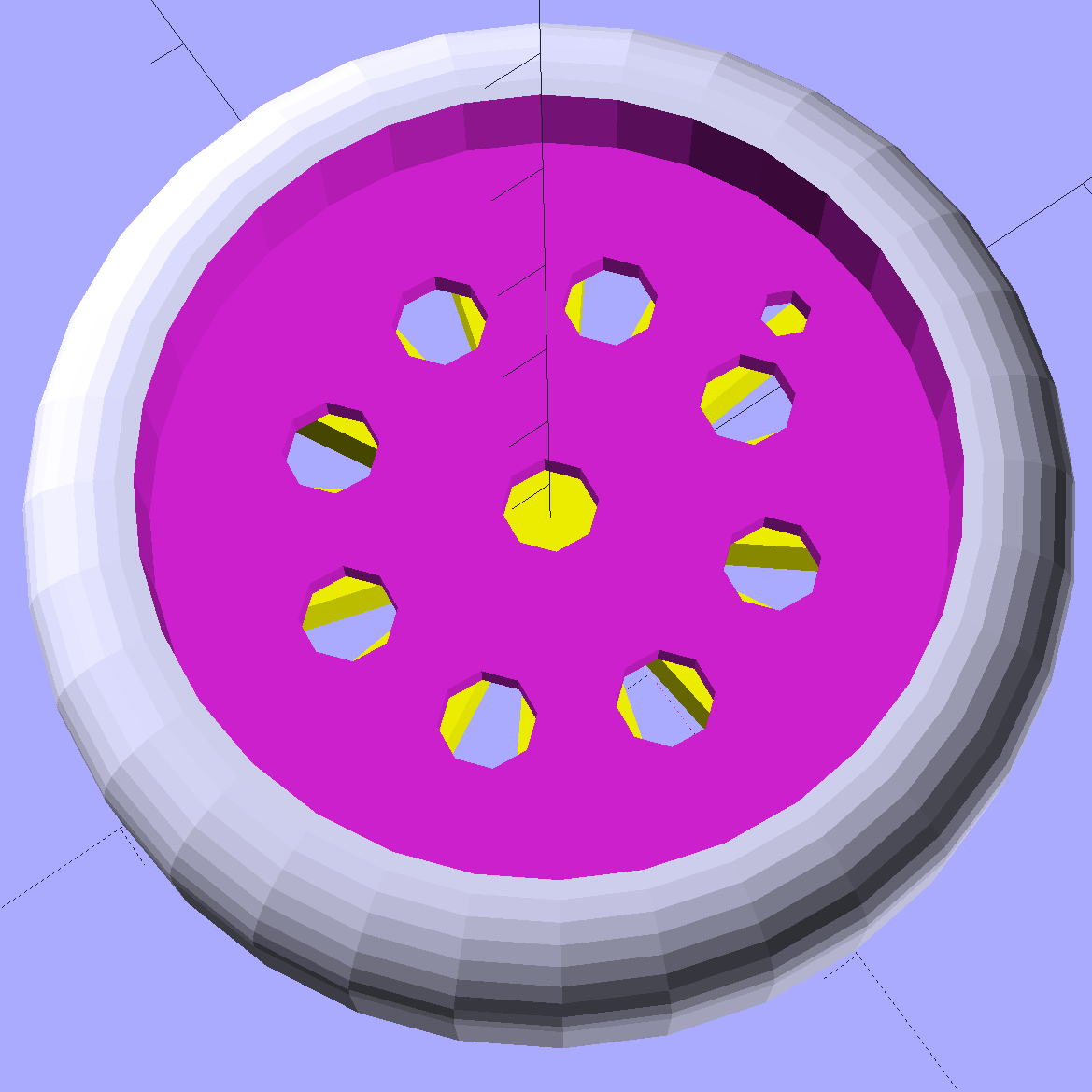
    N2O Capsule - solid model - bottom view
    N2O Capsule – solid model – bottom view

    The trick is getting an image of the original object from the side, taken from far enough away to flatten the perspective:

    N2O capsule - side view
    N2O capsule – side view

    Then overlay and scale a grid to match the actual length:

    N2O capsule - grid overlay
    N2O capsule – grid overlay

    The grid has 1 mm per minor square, centered along the cartridge’s axis, and zeroed at the tip; I rotated the cartridge image by half a degree to line it up with the grid.

    Print it out on actual paper so you can eyeball the measurements and write ’em where you need ’em:

    N2O capsule - grid overlay - printed
    N2O capsule – grid overlay – printed

    Which becomes an OpenSCAD polygon definition:

    RADIUS = 0;				// subscript for radius values
    HEIGHT = 1;				//   ... height above Z=0 at seal flange
    
    //-- N2O 8 g capsule
    
    CartridgeOutline = [			// X values = measured radius, Y as distance from tip
    	[0.0,0.0],					//  0 cartridge seal tip
    	[2.5,0.1],					//  1 seal disk
    	[3.5,0.5],[4.0,1.0],		//  2 tip end
    	[4.2,2.0],[4.3,3.0],		//  4 tip
    	[4.3,6.0],					//  6 chamfer
    	[4.5,8.0],					//  7 taper
    	[4.9,9.0],					//  8
    	[5.5,10.0],					//  9
    	[6.0,11.0],					// 10
    	[6.7,12.0],					// 11
    	[7.1,13.0],					// 12
    	[7.5,14.0],					// 13
    	[8.0,15.0],					// 14
    	[8.4,16.0],					// 15
    	[8.8,17.0],					// 16
    	[9.0,18.0],[9.0,58.0],		// 17 body
    	[0.0,65.0]					// 19 dummy end cone
    	];
    
    TipLength = CartridgeOutline[6][HEIGHT];
    TipOD = 2*CartridgeOutline[5][RADIUS];
    	
    BodyOD = 2*CartridgeOutline[17][RADIUS];
    BodyOAL = CartridgeOutline[19][HEIGHT];
    

    Because the rounded end of the cartridge doesn’t matter, I turned it into a cone.

    Twirl that around the Z axis and It Just Works:

    module Cartridge() {
    
     rotate_extrude($fn=CartridgeSides)
     polygon(points=CartridgeOutline);
    
    }
    

    Which then punches a matching dent in the fin structure:

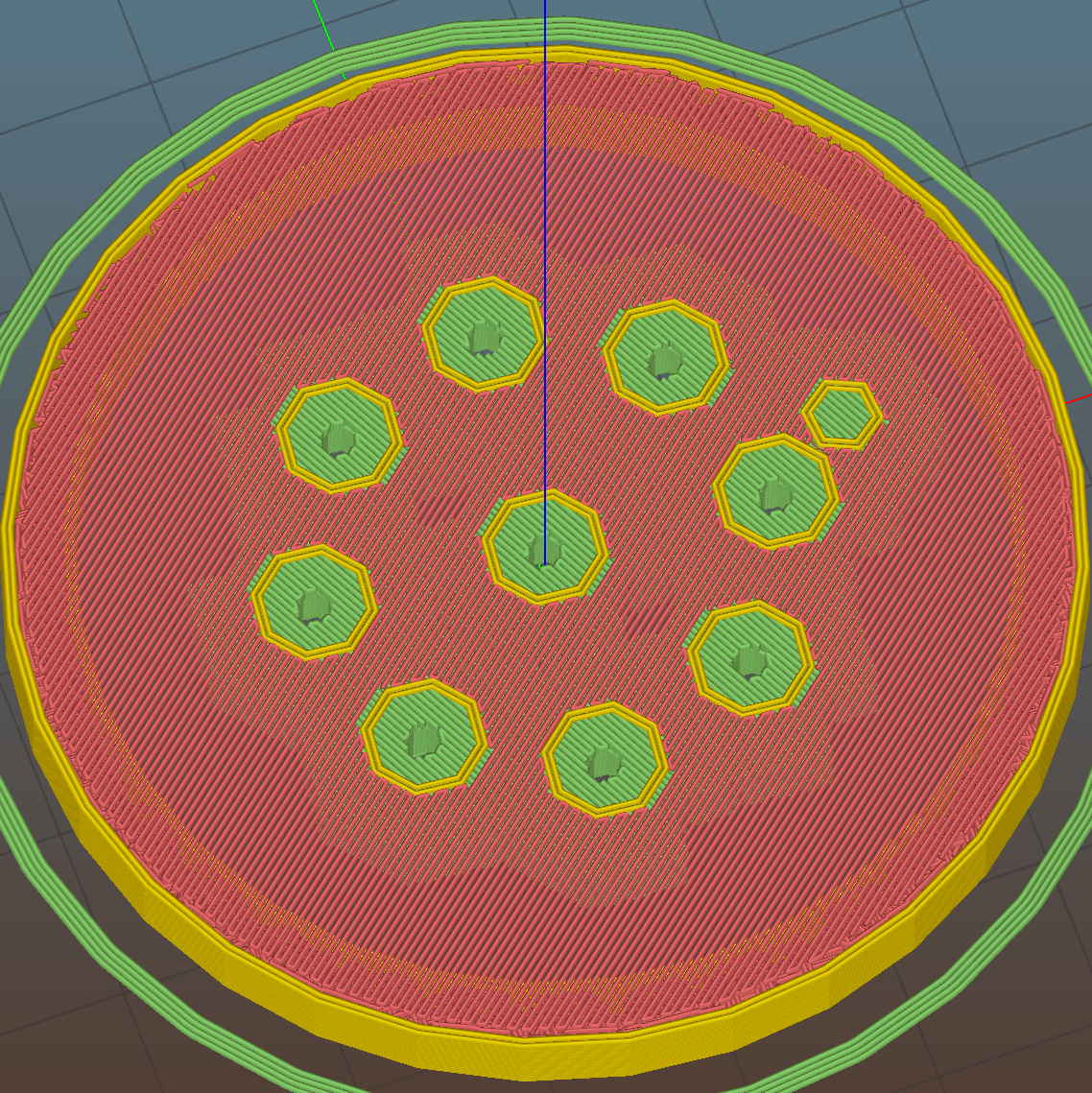
    Gas Capsule Fins - Slic3r preview
    Gas Capsule Fins – Slic3r preview

    The lead picture doesn’t quite match the Slic3r preview, as I found the single-width diagonal fins weren’t strong enough. Making them two (nominal) threads wide lets Slic3r lay down three thinner threads in the same space:

    Gas Capsule Fins - thicker - Slic3r preview
    Gas Capsule Fins – thicker – Slic3r preview

    That’s letting Slic3r automagically determine the infill and perimeter thread width to make the answer come out right. As nearly as I can tell, the slicing algorithms have become smart enough to get the right answer nearly all of the time, so I can-and-should relinquish more control over the details.

    The OpenSCAD source code:

    // CO2 capsule tail fins
    // Ed Nisley KE4ZNU - October 2015
    
    Layout = "Build"; // Show Build FinBlock Cartridge Fit
    
    //-------
    //- Extrusion parameters must match reality!
    // Print with +0 shells and 3 solid layers
    
    ThreadThick = 0.25;
    ThreadWidth = 0.40;
    
    HoleWindage = 0.2;
    
    Protrusion = 0.1; // make holes end cleanly
    
    function IntegerMultiple(Size,Unit) = Unit * ceil(Size / Unit);
    
    //-------
    // Capsule dimensions
    
    CartridgeSides = 12*4; // number of sides
    
    RADIUS = 0; // subscript for radius values
    HEIGHT = 1; // ... height above Z=0 at seal flange
    
    //-- N2O 8 g capsule
    
    RW = HoleWindage/2; // enlarge radius by just enough
    
    CartridgeOutline = [ // X values = measured radius, Y as distance from tip
     [0.0,0.0], // 0 cartridge seal tip
     [2.5 + RW,0.1], // 1 seal disk
     [3.5 + RW,0.5],[4.0 + RW,1.0], // 2 tip end
     [4.2 + RW,2.0],[4.3 + RW,3.0], // 4 tip
     [4.3 + RW,6.0], // 6 chamfer
     [4.5 + RW,8.0], // 7 taper
     [4.9 + RW,9.0], // 8
     [5.5 + RW,10.0], // 9
     [6.0 + RW,11.0], // 10
     [6.7 + RW,12.0], // 11
     [7.1 + RW,13.0], // 12
     [7.5 + RW,14.0], // 13
     [8.0 + RW,15.0], // 14
     [8.4 + RW,16.0], // 15
     [8.8 + RW,17.0], // 16
     [9.0 + RW,18.0],[9.0 + RW,58.0], // 17 body
     [0.0,65.0] // 19 dummy end cone
     ];
    
    TipLength = CartridgeOutline[6][HEIGHT];
    TipOD = 2*CartridgeOutline[5][RADIUS];
    
    CylinderBase = CartridgeOutline[17][HEIGHT];
    
    BodyOD = 2*CartridgeOutline[17][RADIUS];
    BodyOAL = CartridgeOutline[19][HEIGHT];
    
    //-------
    // Fin dimensions
    
    FinThick = 1.5*ThreadWidth; // outer square
    StrutThick = 2.0*ThreadWidth; // diagonal struts
    
    FinSquare = 1.25*BodyOD;
    FinTaperLength = sqrt(2)*FinSquare/2 - sqrt(2)*FinThick - ThreadWidth;
    
    FinBaseLength = 0.7 * CylinderBase;
    FinTop = 0.9*CylinderBase;
    
    //-------
    
    module PolyCyl(Dia,Height,ForceSides=0) { // based on nophead's polyholes
    
     Sides = (ForceSides != 0) ? ForceSides : (ceil(Dia) + 2);
    
     FixDia = Dia / cos(180/Sides);
    
     cylinder(r=(FixDia + HoleWindage)/2,h=Height,$fn=Sides);
    }
    
    module ShowPegGrid(Space = 10.0,Size = 1.0) {
    
     Range = floor(50 / Space);
    
     for (x=[-Range:Range])
     for (y=[-Range:Range])
     translate([x*Space,y*Space,Size/2])
     %cube(Size,center=true);
    
    }
    
    //-------
    // CO2 cartridge outline
    
    module Cartridge() {
    
     rotate_extrude($fn=CartridgeSides)
     polygon(points=CartridgeOutline);
    
    }
    
    //-------
    // Diagonal fin strut
    
    module FinStrut() {
     intersection() {
     rotate([90,0,45])
     translate([0,0,-StrutThick/2])
     linear_extrude(height=StrutThick)
     polygon(points=[
     [0,0],
     [FinTaperLength,0],
     [FinTaperLength,FinBaseLength],
     [0,(FinBaseLength + FinTaperLength)]
     ]);
     translate([0,0,FinTop/2])
     cube([2*FinSquare,2*FinSquare,FinTop], center=true);
     }
    }
    
    //-------
    // Fin outline
    
    module FinBlock() {
     
    $fn=12;
     render(convexity = 4)
     union() {
     translate([0,0,FinBaseLength/2])
     difference() {
     intersection() {
     minkowski() {
     cube([FinSquare - 2*ThreadWidth,
     FinSquare - 2*ThreadWidth,
     FinBaseLength],center=true);
     cylinder(r=FinThick,h=Protrusion,$fn=8);
     }
     cube([2*FinSquare,2*FinSquare,FinBaseLength],center=true);
     }
     difference() {
     cube([(FinSquare - 2*FinThick),
     (FinSquare - 2*FinThick),
     (FinBaseLength + 2*Protrusion)],center=true);
     for (Index = [0:3])
     rotate(Index*90)
     translate([(FinSquare/2 - FinThick),(FinSquare/2 - FinThick),0])
     cylinder(r=2*StrutThick,h=(FinBaseLength + 2*Protrusion),center=true,$fn=16);
     }
     }
     
     for (Index = [0:3])
     rotate(Index*90)
     FinStrut();
     
     rotate(180/12)
     cylinder(d=IntegerMultiple(TipOD + 6*ThreadWidth,ThreadWidth),h=TipLength);
     }
    }
    
    //-------
    // Fins
    
    module FinAssembly() {
    
     difference() {
     FinBlock();
     translate([0,0,2*ThreadThick]) // add two layers to close base cylinder
     Cartridge();
     }
    
    }
    
    module FinFit() {
    
     translate([0,0.75*BodyBaseLength,2*ThreadThick])
     rotate([90,0,0])
     difference() {
     translate([-FinSquare/2,-2*ThreadThick,0])
     cube([IntegerMultiple(FinSquare,ThreadWidth),
     4*ThreadThick,
     1.5*BodyBaseLength]);
     translate([0,0,5*ThreadWidth])
     Cartridge();
     }
    
    
    }
    
    //-------
    // Build it!
    
    ShowPegGrid();
    
    if (Layout == "FinStrut")
     FinStrut();
    
    if (Layout == "FinBlock")
     FinBlock();
    
    if (Layout == "Cartridge")
     Cartridge();
    
    if (Layout == "Show") {
     FinAssembly();
     color("LightYellow") Cartridge();
    }
    
    if (Layout == "Fit")
     FinFit();
    
    if (Layout == "Build")
     FinAssembly();
    
  • Avalanche Noise Amp: Arduino Firmware

    With the hardware in hand:

    Reverse-bias noise amplifier - detail
    Reverse-bias noise amplifier – detail


    Feeding a stream of avalanche noise from a reverse-biased transistor base-emitter junction into the Arduino’s MISO pin without benefit of a shift register, this Arduino source code extracts nine bit chunks of random data to drive the 8×8 RGB LED matrix:

    // Random LED Dots - from noise source
    // Ed Nisley - KE4ANU - September 2015
    
    //----------
    // Pin assignments
    
    const byte PIN_HEARTBEAT = 8;		// DO - heartbeat LED
    const byte PIN_SYNC = A3;			// DO - scope sync
    
    const byte PIN_LATCH  = 4;			// DO - shift register latch clock
    
    const byte PIN_DIMMING = 9;			// AO - LED dimming control
    
    // These are *hardware* SPI pins
    
    const byte PIN_MOSI = 11;			// DO - data to shift reg
    const byte PIN_MISO = 12;			// DI - data from shift reg - sampled noise input
    const byte PIN_SCK  = 13;			// DO - shift clock to shift reg (also Arduino LED)
    const byte PIN_SS = 10;				// DO - -slave select (must be positive for SPI output)
    
    //----------
    // Constants
    
    #define DISPLAY_MS 10000ul
    
    //----------
    // Globals
    
    // Input noise bits can produce one of four possible conditions
    //  Use the von Neumann extractor, discarding 00 and 11 sequences
    // https://en.wikipedia.org/wiki/Randomness_extractor#Von_Neumann_extractor
    // Sampling interval depends on SPI data rate
    // LSB arrives first, so it's the earliest sample
    
    #define VNMASK_A 0x00000001
    #define VNMASK_B 0x01000000
    
    enum sample_t {VN_00,VN_01,VN_10,VN_11};
    
    typedef struct {
    	byte BitCount;					// number of bits accumulated so far
    	unsigned Bits;					// random bits filled from low order upward
    	int Bias;						// tallies 00 and 11 sequences to measure analog offset
       unsigned SampleCount[4];	// number of samples in each bin
    } random_t;
    
    random_t RandomData;
    
    // LED selects are high-active bits and low-active signals: flipped in UpdateLEDs()
    // *exactly* one row select must be active in each element
    
    typedef struct {
    	const byte Row;
    	byte ColR;
    	byte ColG;
    	byte ColB;
    } leds_t;
    
    // altering the number of rows & columns will require substantial code changes...
    #define NUMROWS 8
    #define NUMCOLS 8
    
    leds_t LEDs[NUMROWS] = {
    	{0x80,0,0,0},
    	{0x40,0,0,0},
    	{0x20,0,0,0},
    	{0x10,0,0,0},
    	{0x08,0,0,0},
    	{0x04,0,0,0},
    	{0x02,0,0,0},
    	{0x01,0,0,0},
    };
    
    byte RowIndex;
    
    #define LEDS_ON 0
    #define LEDS_OFF 255
    
    unsigned long MillisNow;
    unsigned long DisplayBase;
    
    //-- Helper routine for printf()
    
    int s_putc(char c, FILE *t) {
      Serial.write(c);
    }
    
    //-- Useful stuff
    
    // Free RAM space monitor
    //  From http://playground.arduino.cc/Code/AvailableMemory
    
    uint8_t * heapptr, * stackptr;
    
    void check_mem() {
      stackptr = (uint8_t *)malloc(4);          // use stackptr temporarily
      heapptr = stackptr;                     // save value of heap pointer
      free(stackptr);      // free up the memory again (sets stackptr to 0)
      stackptr =  (uint8_t *)(SP);           // save value of stack pointer
    }
    
    void TogglePin(char bitpin) {
    	digitalWrite(bitpin,!digitalRead(bitpin));    // toggle the bit based on previous output
    }
    
    void PulsePin(char bitpin) {
    	TogglePin(bitpin);
    	TogglePin(bitpin);
    }
    
    //---------
    //-- SPI utilities
    
    void EnableSPI(void) {
    	digitalWrite(PIN_SS,HIGH);					// make sure this is high!
    	SPCR |= 1 << SPE;
    }
    
    void DisableSPI(void) {
    	SPCR &= ~(1 << SPE);
    }
    
    void WaitSPIF(void) {
    	while (! (SPSR & (1 << SPIF))) {
    //		TogglePin(PIN_HEARTBEAT);
    		continue;
    	}
    }
    
    byte SendRecSPI(byte DataByte) {					// send one byte, get another in exchange
    	SPDR = DataByte;
    	WaitSPIF();
    	return SPDR;									// SPIF will be cleared
    }
    
    //---------------
    // Update LED shift registers with new data
    // Returns noise data shifted in through MISO bit
    
    unsigned long UpdateLEDs(byte i) {
    	
    unsigned long NoiseData = 0ul;
    	
    	NoiseData |= (unsigned long) SendRecSPI(~LEDs[i].ColB);				// correct for low-active outputs
    	NoiseData |= ((unsigned long) SendRecSPI(~LEDs[i].ColG)) << 8;
    	NoiseData |= ((unsigned long) SendRecSPI(~LEDs[i].ColR)) << 16;
    	NoiseData |= ((unsigned long) SendRecSPI(~LEDs[i].Row))  << 24;
    
    	analogWrite(PIN_DIMMING,LEDS_OFF);			// turn off LED to quench current
    	PulsePin(PIN_LATCH);						// make new shift reg contents visible
    	analogWrite(PIN_DIMMING,LEDS_ON);
    
    	return NoiseData;
    }
    
    //---------------
    // Extract random data from sampled noise input
    //  ... tuck it into the global bit structure
    // Returns von Neumann status of the sample
    
    byte ExtractRandomBit(unsigned long RawSample) {
    	
    byte RetVal;
    
    	switch (RawSample & (VNMASK_A | VNMASK_B)) {
    	case 0:							// 00 - discard
    		RetVal = VN_00;
    		RandomData.Bias--;
    		break;
    	case VNMASK_A:					// 10 - true
    		RetVal = VN_10;
    		RandomData.BitCount++;
    		RandomData.Bits = (RandomData.Bits << 1) | 1;
    		break;
    	case VNMASK_B:					// 01 - false
    		RetVal = VN_01;
    		RandomData.BitCount++;
    		RandomData.Bits  = RandomData.Bits << 1;
    		break;
    	case (VNMASK_A | VNMASK_B):		// 11 - discard
    		RetVal = VN_11;
    		RandomData.Bias++;
    		break;
    	}
    	
    	RandomData.Bias = constrain(RandomData.Bias,-9999,9999);
    	RandomData.SampleCount[RetVal]++;
    	RandomData.SampleCount[RetVal] = constrain(RandomData.SampleCount[RetVal],0,63999);
    
    	return RetVal;
    }
    
    //---------------
    // Set LED from random bits
    // Assumes the Value contains at least nine low-order random bits
    // On average, this leaves the LED unchanged for 1/8 of the calls...
    
    void SetLED(unsigned Value) {
    	
    byte Row =   Value        & 0x07;
    byte Col =   (Value >> 3) & 0x07;
    byte Color = (Value >> 6) & 0x07;
    	
    byte BitMask = (0x80 >> Col);
    	
    //	printf("%u %u %u %u\r\n",Row,Col,Color,BitMask);
    
    	LEDs[Row].ColR &= ~BitMask;
    	LEDs[Row].ColR |= (Color & 0x04) ? BitMask : 0;
    	
    	LEDs[Row].ColG &= ~BitMask;
    	LEDs[Row].ColG |= (Color & 0x02) ? BitMask : 0;
    	
    	LEDs[Row].ColB &= ~BitMask;
    	LEDs[Row].ColB |= (Color & 0x01) ? BitMask : 0;
    	
    }
    
    //------------------
    // Set things up
    
    void setup() {
    	
    	pinMode(PIN_HEARTBEAT,OUTPUT);
    	digitalWrite(PIN_HEARTBEAT,HIGH);		// show we arrived
    	
    	pinMode(PIN_SYNC,OUTPUT);
    	digitalWrite(PIN_SYNC,LOW);
    
    	pinMode(PIN_MOSI,OUTPUT);				// SPI-as-output is not strictly necessary
    	digitalWrite(PIN_MOSI,LOW);
    
    	pinMode(PIN_SCK,OUTPUT);
    	digitalWrite(PIN_SCK,LOW);
    
    	pinMode(PIN_SS,OUTPUT);
    	digitalWrite(PIN_SS,HIGH);				// OUTPUT + HIGH is required to make SPI output work
    	
    	pinMode(PIN_LATCH,OUTPUT);
    	digitalWrite(PIN_LATCH,LOW);
    	
    	Serial.begin(57600);
    	fdevopen(&s_putc,0);					// set up serial output for printf()
    
    	printf("Noisy LED Dots\r\nEd Nisley - KE4ZNU - September 2015\r\n");
    	
    //-- Set up SPI hardware
    // LSB of SPCR set bit clock speed:
    //  00 = f/4
    //  01 = f/16
    //  10 = f/64
    //  11 = f/128
    	
    	SPCR = B01110011;						// Auto SPI: no int, enable, LSB first, master, + edge, leading, speed
    	SPSR = B00000000;						// not double data rate
    
    	EnableSPI();							// turn on the SPI hardware
    	
    	SendRecSPI(0);							// set valid data in shift registers: select Row 0, all LEDs off
    	
    //-- Dimming pin must use fast PWM to avoid beat flicker with LED refresh rate
    //   Timer 1: PWM 9 PWM 10
    
    	analogWrite(PIN_DIMMING,LEDS_OFF);		// disable column drive (hardware pulled it low before startup)
    
    	TCCR1A = B10000001; 					// Mode 5 = fast 8-bit PWM with TOP=FF
    	TCCR1B = B00001001; 					// ... WGM, 1:1 clock scale -> 64 kHz
    	
    //-- lamp test: send a white flash through all LEDs
    //	 collects noise data to get some randomness going
    
    	printf("Lamp test begins: white flash each LED...");
    
    	digitalWrite(PIN_HEARTBEAT,LOW);		// turn off while panel blinks
    	
    	analogWrite(PIN_DIMMING,LEDS_ON);		// enable column drive
    
    	for (byte i=0; i<NUMROWS; i++) {
    		for (byte j=0; j<NUMCOLS; j++) {
    			LEDs[i].ColR = LEDs[i].ColG = LEDs[i].ColB = 0x80 >> j;
    			for (byte k=0; k<NUMROWS; k++) {
    				ExtractRandomBit(UpdateLEDs(k));
    				delay(25);
    			}
    		LEDs[i].ColR = LEDs[i].ColG = LEDs[i].ColB = 0;
    		}
    	}
    	UpdateLEDs(NUMROWS-1);					// clear the last LED
    	
    	printf(" done!\r\n");
    
    //-- Preload LEDs with random values
    //   We take whatever number of random bits arrived in RandomData during lamp test
    
    	digitalWrite(PIN_HEARTBEAT,LOW);
    	printf("Preloading LED array\r\nRandom bits %04x\r\n",RandomData.Bits);
    	
    	randomSeed(RandomData.Bits);
    	
    	for (byte Row=0; Row<NUMROWS; Row++) {
    		for (byte Col=0; Col<NUMCOLS; Col++) {		// Col runs backwards, but we don't care
    			LEDs[Row].ColR |= random(2) << Col;
    			LEDs[Row].ColG |= random(2) << Col;
    			LEDs[Row].ColB |= random(2) << Col;
    		}
    		UpdateLEDs(Row);
    	}
    	
    	RandomData.BitCount = 0;
    	RandomData.Bits = 0;
    	RandomData.Bias = 0;
       for (byte i=0; i<4; i++) {
    	   RandomData.SampleCount[i] = 0;
       }
    	
    	check_mem();
    	printf("SP: %u HP: %u Free RAM: %u\r\n",stackptr,heapptr,stackptr - heapptr);
    
    	printf("Running...\r\n");
    	
    	DisplayBase = millis();
    
    }
    
    //------------------
    // Run the test loop
    
    void loop() {
    	
    byte ThisBit;
    	
    	MillisNow = millis();
    	
    	if (RowIndex >= NUMROWS) {							// set up LED row index for this pass
    		RowIndex = 0;
    		PulsePin(PIN_SYNC);
    	}
    	
    	if ((MillisNow - DisplayBase) >= DISPLAY_MS) {
    		analogWrite(PIN_DIMMING,LEDS_OFF);				// turn off LED to prevent bright glitch
    		printf("Bias: %5d of %5u - %5u %5u %5u %5u\r\n",
             RandomData.Bias,
             RandomData.SampleCount[VN_00] + RandomData.SampleCount[VN_11],
             RandomData.SampleCount[0],
             RandomData.SampleCount[1],
             RandomData.SampleCount[2],
             RandomData.SampleCount[3]
             );
    		RandomData.Bias = 0;
          for (byte i=0; i<4; i++) {
             RandomData.SampleCount[i] = 0;
          }
     //		check_mem();
    //		printf("SP: %u HP: %u Free RAM: %u\r\n",stackptr,heapptr,stackptr - heapptr);
    		DisplayBase = MillisNow;
    	}
    		
    // Update one LED row per pass, get at most one random bit
    
    	ThisBit = ExtractRandomBit(UpdateLEDs(RowIndex++));
    	
    // Update the heartbeat LED to show bit validity
    
    	switch (ThisBit) {
    		case VN_00:
    		case VN_11:
    			digitalWrite(PIN_HEARTBEAT,HIGH);
    			break;
    		case VN_01:
    		case VN_10:
    			digitalWrite(PIN_HEARTBEAT,LOW);
    			break;
    	}
    	
    // If we have enough random data, twiddle one LED
    	
    	if (RandomData.BitCount >= 9) {
    //		analogWrite(PIN_DIMMING,LEDS_OFF);				// turn off LED array to prevent bright glitch
    		
    		SetLED(RandomData.Bits);
    		RandomData.BitCount = 0;
    		RandomData.Bits = 0;
    	}
    
    	digitalWrite(PIN_HEARTBEAT,LOW);
    
    }
    

    Now I can point folks at the whole thing…

  • Avalanche Noise Amp: Sampling

    The relatively low bandwidth of the amplified noise means two successive samples (measured in Arduino time) will be highly correlated. Rather than putz around with variable delays between the samples, I stuffed the noise directly into the Arduino’s MISO pin and collected four bytes of data while displaying a single row:

    unsigned long UpdateLEDs(byte i) {
    	
    unsigned long NoiseData = 0ul;
    	
    	NoiseData |= (unsigned long) SendRecSPI(~LEDs[i].ColB);				// correct for low-active outputs
    	NoiseData |= ((unsigned long) SendRecSPI(~LEDs[i].ColG)) << 8;
    	NoiseData |= ((unsigned long) SendRecSPI(~LEDs[i].ColR)) << 16;
    	NoiseData |= ((unsigned long) SendRecSPI(~LEDs[i].Row))  << 24;
    
    	analogWrite(PIN_DIMMING,LEDS_OFF);			// turn off LED to quench current
    	PulsePin(PIN_LATCH);						// make new shift reg contents visible
    	analogWrite(PIN_DIMMING,LEDS_ON);
    
    	return NoiseData;
    }
    

    The bit timing looks like this:

    SPI Sample - noise data - 01
    SPI Sample – noise data – 01

    The vertical cursors mark the LSB position in the first and last bytes of the SPI clock. The horizontal cursors mark the minimum VIH and maximum VIL, so the sampled noise should produce 0 and 1 bits at the vertical cursors. Note that there’s no shift register on the input: MISO just samples the noise signal at each rising clock edge.

    I picked those two bit positions because they produce more-or-less equally spaced samples during successive rows; you can obviously tune the second bit position for best picture as you see fit.

    Given a pair of sequential samples, a von Neumann extractor whitens the noise and returns at most one random bit:

    #define VNMASK_A 0x00000001
    #define VNMASK_B 0x01000000
    
    enum sample_t {VN_00,VN_01,VN_10,VN_11};
    
    typedef struct {
    	byte BitCount;					// number of bits accumulated so far
    	unsigned Bits;					// random bits filled from low order upward
    	int Bias;						// tallies 00 and 11 sequences to measure analog offset
       unsigned SampleCount[4];	// number of samples in each bin
    } random_t;
    
    random_t RandomData;
    
    ... snippage ...
    
    byte ExtractRandomBit(unsigned long RawSample) {
    	
    byte RetVal;
    
    	switch (RawSample & (VNMASK_A | VNMASK_B)) {
    	case 0:							// 00 - discard
    		RetVal = VN_00;
    		RandomData.Bias--;
    		break;
    	case VNMASK_A:					// 10 - true
    		RetVal = VN_10;
    		RandomData.BitCount++;
    		RandomData.Bits = (RandomData.Bits << 1) | 1;
    		break;
    	case VNMASK_B:					// 01 - false
    		RetVal = VN_01;
    		RandomData.BitCount++;
    		RandomData.Bits  = RandomData.Bits << 1;
    		break;
    	case (VNMASK_A | VNMASK_B):		// 11 - discard
    		RetVal = VN_11;
    		RandomData.Bias++;
    		break;
    	}
    	
    	RandomData.Bias = constrain(RandomData.Bias,-9999,9999);
    	RandomData.SampleCount[RetVal]++;
    	RandomData.SampleCount[RetVal] = constrain(RandomData.SampleCount[RetVal],0,63999);
    
    	return RetVal;
    }
    

    The counters at the bottom track some useful statistics.

    You could certainly use something more complex, along the lines of a hash function or CRC equation, to whiten the noise, although that would eat more bits every time.

    The main loop blips a pin to show when the extractor discards a pair of identical bits, as in this 11 sequence:

    SPI Sample - noise flag - 11
    SPI Sample – noise flag – 11

    That should happen about half the time, which it pretty much does:

    SPI Sample - noise flag - 1 refresh
    SPI Sample – noise flag – 1 refresh

    The cursors mark the same voltages and times; note the slower sweep. The middle trace blips at the start of the Row 0 refresh.

    On the average, the main loop collects half a random bit during each row refresh and four random bits during each complete array refresh. Eventually, RandomData.Bits will contain nine random bits, whereupon the main loop updates the color of a single LED, which, as before, won’t change 1/8 of the time.

    The Arduino trundles around the main loop every 330 µs and refreshes the entire display every 2.6 ms = 375 Hz. Collecting nine random bits requires 9 x 330 µs = 3 ms, so the array changes slightly less often than every refresh. It won’t completely change every 64 x 8/7 x 3 ms = 220 ms, because dupes, but it’s way sparkly.

    In the spirit of “Video or it didn’t happen!”, there’s a low-budget Youtube video about that…