Ed Nisley's Blog: Shop notes, electronics, firmware, machinery, 3D printing, laser cuttery, and curiosities. Contents: 100% human thinking, 0% AI slop.
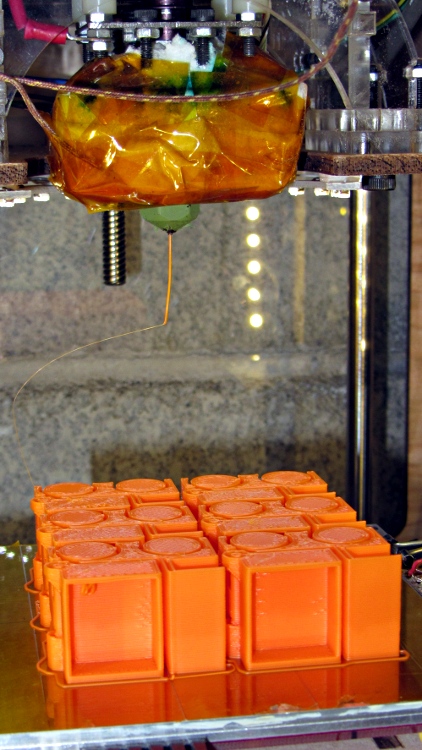
The Tiny Toy Dump Truck by madscifi makes a fine tchotchke for a presentation, serving to illustrate the risks and rewards of printing flat overhangs without support. A fleet of six printed well, after repairing some failures as those tall, tall rings and posts near the dump bed pivot fell over. I pasted them down in mid-print using ABS slurry, which is not a technique to emulate.
A closer look shows the overhang problem in the dump bed and the broken pillars behind the wheels.
Truck overhang failure – grayscale
It’s in monochrome because the camera choked on that much Safety Orange filament in the image, to the extent that no amount of color correction produced a usable result.
A first cut at a holder for Canon NB-5L batteries with those dimensions, with the intent of connecting them to a battery tester.
NB-5L Battery Holder Doodle
The cloud in the middle of the bottom holds pin dimensions, which I measured after I’d been doodling for a bit. They come from my heap; they’re nice heavy-gold plated male pins (yeah, I have the other gender, too) intended for a multi-pin connector. They have a convenient hole that’s normally used to verify you’ve actually soldered the wire properly. I plan to stick a music-wire spring in the hole and secure it through the bottom of the holder with a rectangular pocket below the pin that limits the travel in both directions. Drilling the hole completely through the pin to let the spring wire stick out would prevent having it fall out at the end of travel.
The spring pocket dimensions are right down around the very limit of the feature sizes my TOM can achieve. I’m not sure those blind holes will actually open up far enough.
I’m also not sure the Powerpoles will actually fit in there like that. There’s nothing wrong with pigtail leads.
It’s obviously styled after the Official Canon NB-5L charger, although they use nice bent-steel spring contacts that are trivially easy to make in mass production:
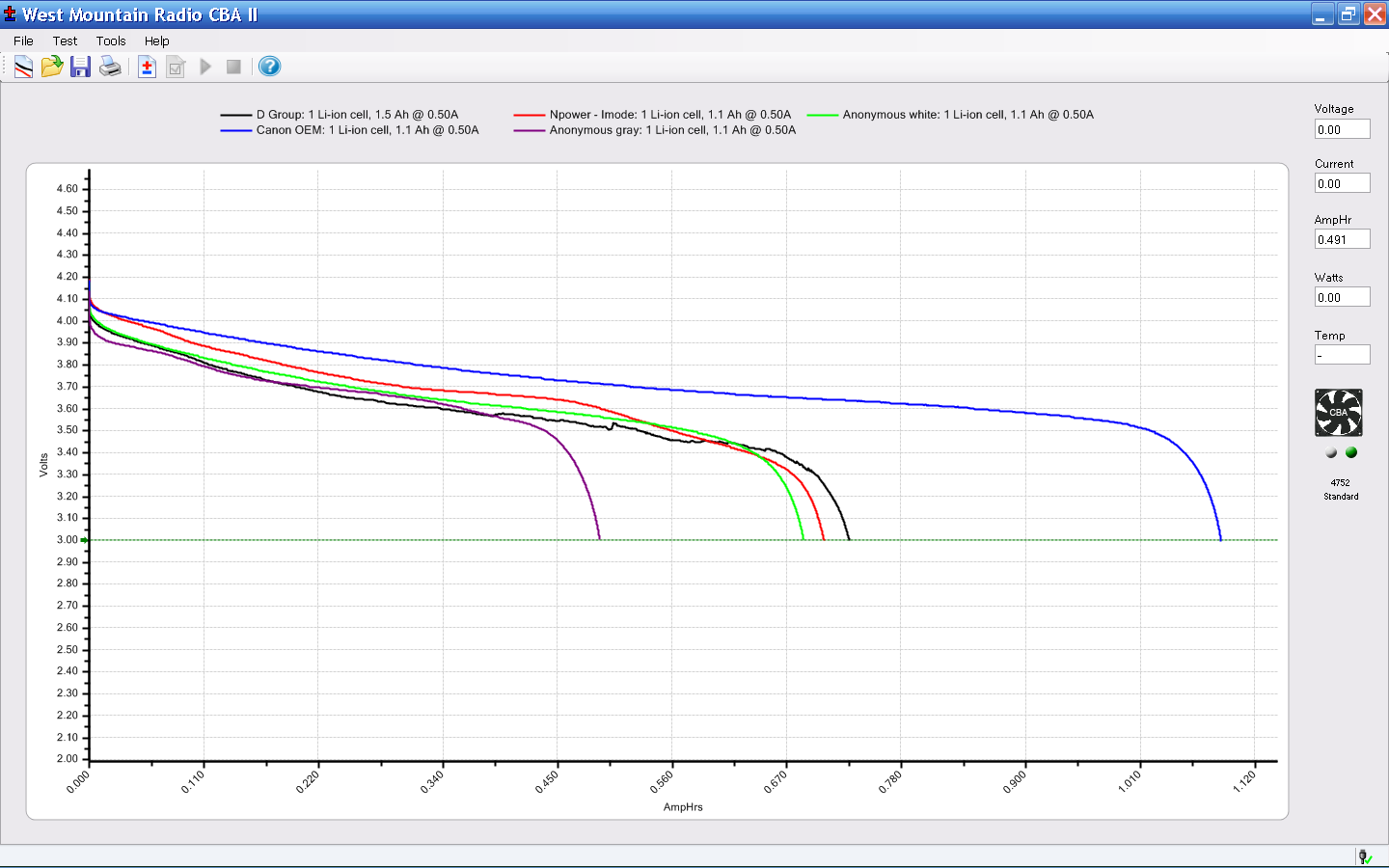
Having acquired a bunch of cheap batteries from the usual eBay suppliers for my new Canon SX230HS pocket camera, it’d be nice to measure their actual (and undoubtedly pathetic) capacity, which implies the need for a holder to make firm contact with the terminals. Sounds like a 3D printer might come in handy for that, doesn’t it?
The first step: measure the dimensions of actual batteries:
NB-5L Battery Dimensions
The terminals lie on what looks to be hard 1/8 inch centers, which must be pure coincidence. They’re recessed anywhere from 0.75 mm to 1.0 mm, depending on who made the thing, into the battery’s endplate.
The Canon charger has three spring-loaded bent-wire contacts, arranged so the (-) terminal touches first as the battery slides into the holder, then (+), and finally the thermistor (T), with about 0.5 mm between each pair. That spring loading provides enough force to hold the battery in the charger.
FWIW, the thermistor is 7.5 kΩ w.r.t. (-) at room temperature.
The plan so far: use three big old gold-plated terminal pins as contacts, with flexible wires to a PowerPole connector that matches the battery tester. Cross-drill the pins to fit music wire lever springs, because the contact spacing is smaller than the smallest coil springs in the Big Box o’ Little Springs. I only need two terminals, so maybe I can force-fit a pair of small coil springs in there, which would be nice.
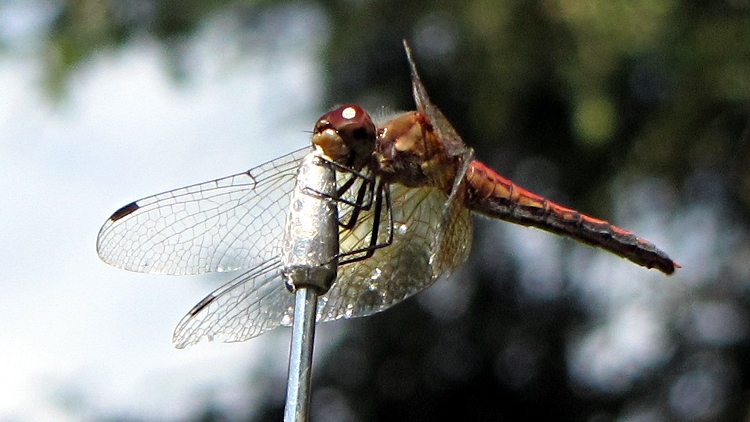
This dragonfly decided that the tip of the 2 m / 70 cm antenna on Mary’s bike was the best place around to survey the area; it periodically zipped off to snag a meal, then returned to stand watch again.
Those wraparound compound eyes don’t miss much!
Dragonfly on antenna – detail
A few weeks ago, a much larger dragonfly bounced off my helmet and snagged itself in the delay line coil near the middle of the antenna: the dragonfly’s head slid 1/4 turn around the coil and latched firmly in place. Amid much buzzing of wings and thrashing of legs, I managed to unscrew the poor critter, whereupon it flew off undamaged.
Just got a new pocket camera (a Canon SX230HS) to replace that one, read the manual (I can’t help it), and discovered that they recommend turning image stabilization off for tripod shots. A bit of rummaging turns up conflicting advice, so I figured a quick test was in order.
[Edit: it’s really the Canon SX230HS, not the 320 as I originally mistyped. I’m not changing the post’s permalink, for obvious reasons, and I’m stuck with bogus filenames. Grumble, etc.]
This is a dot-for-dot crop from two images of the torso of the Pink Panther Woman in black ABS, showing the rather nasty seam produced with Clip = 0.1. The pix are seconds apart at f/8 with manual focus and flash illumination, so they’re as alike as I can make them. Clicky for more dots.
Pop quiz: which side has stabilization turned on?
Canon SX320HS Image Stabilization
Answer: left = ON, right = OFF. Yeah, I was surprised, too; even the dust specks look the same.
So, as nearly as I can tell, image stabilization doesn’t add any jitter to a tripod shot. At least not on the scale I’m using, which is a Good Thing: turning it on & off requires a trip through the menus.
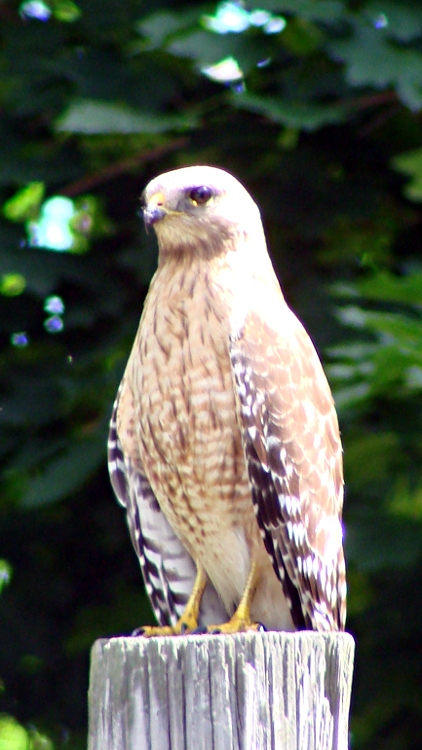
The hawk who’s been keeping the chipmunks and squirrels under control paused for a moment atop the utility pole out by the garden. He left instantly after I appeared around the edge of the roof, leaving me no time to fight the camera automation into a better exposure, but it’s good to know he’s on patrol.
A few months ago he had a squirrel in a Mexican standoff inside a pine tree, circling the trunk amid all the branches. Eventually the squirrel made a break for it, got about five feet out from the trunk, and wham that was the end of the story: once those claws go in, they don’t come back out.
Notice the noonday sun refracted through his cornea onto his upper cheek (or whatever it is that birds have there). This was with the 1.7X tele-extender on the Sony DSC-H5 zoomed in pretty nearly all the way; if it weren’t for all fringing and blown highlights, it’d be a neat picture.
Some upcoming presentations on 3D printing need a way to show what’s going on inside the box. I’ve had various webcams affixed to various parts of the Thing-O-Matic, but nothing worked quite right: the camera was either in the wrong spot, at the wrong angle, or just flat-out in the way.
The helmet mirror project produced a trio of three-draw telescoping shafts that looked promising, so I drilled suitable holes in two chunks of scrap make-from plastic and produced a pole mount for a Logitech camera without doing a bit of machining. The camera wants to clamp onto a notebook and works fine atop a block of acrylic, with the cable secured to the base of the pole to prevent the whole thing from falling over at the slightest tug.
I briefly considered printing a nice clip to hold the cable to the pole, then came to my senses and used a cable tie. After all, that’s what they’re for, right?
A dot of clear epoxy in each hole prevents the blocks from rotating on the shafts; they’re sufficiently un-round to give it a decent grip. I clamped the pole in a V-block to keep it perpendicular to the base while the epoxy cured:
Webcam pole – clamping
The white LEDs under the Z-stage produce far too much glare and reflect in the Kapton tape; a switch to knock ’em off for video viewing seems in order.
(If anybody else is keeping track, this is Post 1000. Although we humans love numbers with plenty of zeroes, Post 10000 will pose a challenge…)