These guys just weren’t having a good day:

They’re members of the flock of six toms that marches through the neighborhood every day, clearing bugs out of the lawn.
We like ’em!
The Smell of Molten Projects in the Morning
Ed Nisley's Blog: Shop notes, electronics, firmware, machinery, 3D printing, laser cuttery, and curiosities. Contents: 100% human thinking, 0% AI slop.
Taking & making images.
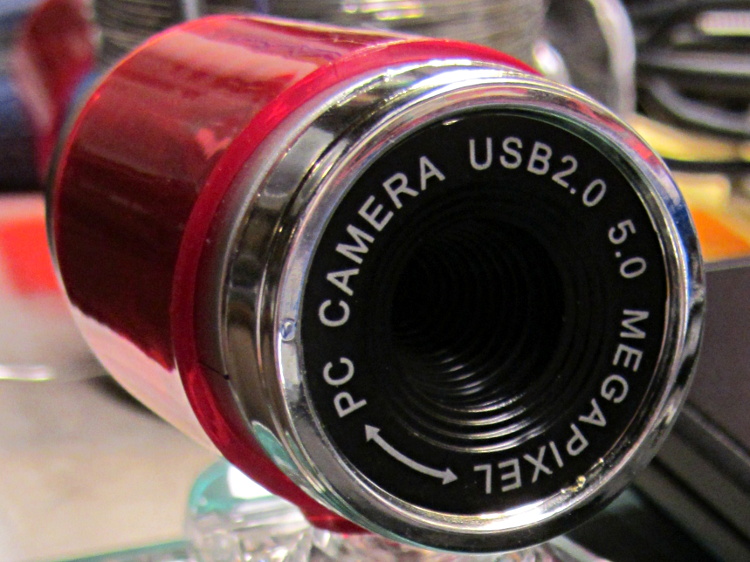
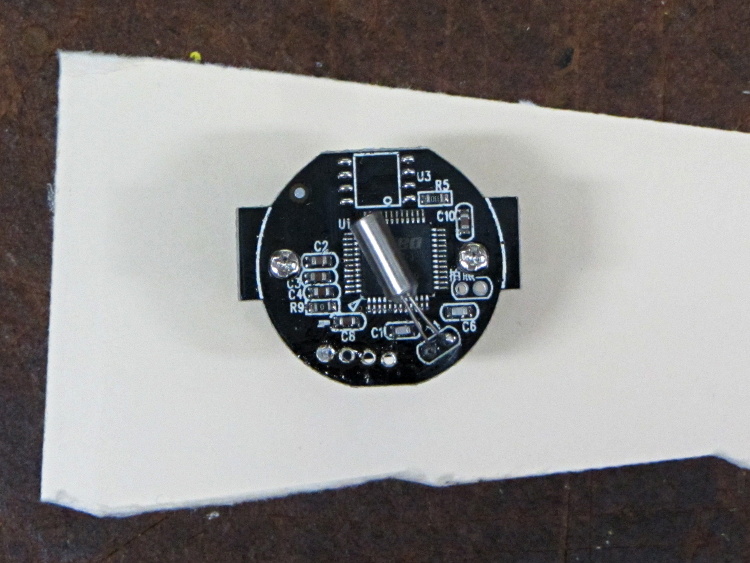
It should be possible to sense the filament diameter with a cheap webcam and some optics:

The general idea:
Given that LinuxCNC runs on a bone-stock PC, you can plug in a stock USB webcam and capture pictures (I have done this already). Because LinuxCNC isolates the motion control in a hard real time process, you can run heavy metal image manipulation code in userland (think ImageMagick) without affecting the motors.
So you can put a macro lens in front of a webcam (like that macro lens holder) and mount it just above the extruder with suitable lighting to give a high-contrast view of the filament. Set it so the filament diameter maps to about 1/4 of the width of the image, for reasons explained below.
For a crappy camera with 640×480 resolution, this gives you 160 pixel / 1.75 mm filament = 91 pixel/mm → about 0.01 mm resolution = 0.6%. Use a better camera, get better resolution: 1280 pixel = 0.3% resolution.
That gives you roughly 1% or 0.5% resolution in area. This is pretty close to the holy grail for DIY filament diameter measurement.
Add two first-surface mirrors / prisms aligned at right angles, so that the camera sees three views of the filament: straight on, plus two views at right angles, adjacent to the main view. Set the optics so they’re all about 1/4 of the image width, to produce an image with three parts filament and one part high-contrast background separating them. This is the ideal, reality will be messier.
Figure 1 shows an obvious arrangement, the mirrors in Figure 2 give more equal distances.
You could align the mirrors to provide three views at mutual 120° angles, which would equalize the distances and give you three identical angles for roundness computation, should that matter.
Diameter measurement process:
Adding binary pixels is easy: it’s just the histogram, which ImageMagick does in one step. Dump data to a file / pipe, process it with Python. It all feeds into a LinuxCNC HAL component, which may constrain the language to C / Python / something else.
(*) You can get vertical averaging over a known filament length, essentially for free. Extract three (or more) scan lines, process as above, divide by 3 (or more), and you get a nicely averaged average.
Win: the image is insensitive to position / motion / vibration within reasonable limits, because you’re doing the counting on pixel values, not filament position. The camera can mount near, but not on, the extruder, so you can measure the filament just above the drive motor without cooking the optics or vibrating the camera to death.
Win: it’s non-contacting, so there’s not much to get dirty
Win: you get multiple simultaneous diameter measurements around one slice of the filament
You could mount the camera + optics at one end of the printer’s axis (on the M2, the X axis). Drive the extruder to a known X position, take a picture of the straight-on view, drive to another position, take a picture of the mirrored views, and you have two pictures in perfect focus. Combine & process as above.
You can do that every now and again, because any reasonable filament won’t vary that much over a few tens of millimeters. Maybe you do it once per layer, as part of the Z step process?
You could generalize this to a filament QC instrument that isn’t on the printer itself: stream the filament from spool to spool while measuring it every 10 mm, report the statistics. That measurement could run without stopping, because you don’t reposition the filament between measurements: it’s all fixed-focus against a known background. You could have decent roller guides for the filament to ensure it’s in a known position.
Heck, that instrument could produce a huge calibration file that gives diameter / roundness vs. position along the entire length of the filament. Use it to accept/reject incoming plastic supplies or, even better, feed the data into the printer along with the spool to calibrate the extrusion on the fly without fancy optics or measurements.
Dan wonders if this might be patented. I’m sure it is: I’m nowhere near as bright as the average engineering bear at a company that’s been spending Real Money for three decades. My working assumption: all the knowledge is out there, behind a barrier I can’t see through or reach around: there’s no point in looking for it beyond a casual Google search on the obvious terms that, so far, hasn’t produced anything similar.
Memo to Self: Might even be marketable, right up until they crush me like a bug…
These Eastern Painted Turtles have hauled themselves out for a contemplative basking session nearly every time I ride by the pond at the entrance to the Vassar Farm and Ecological Preserve:

What do turtles think about while they’re basking?
Those turtles are probably relatives, even if they’re in a different pond farther downstream along the Casperkill.
Mary’s folks enjoy the daily crossword, but they wanted a slightly larger edition… and, after a bit of procrastination, I conjured up an automated way to make it happen, so her father need not do this manually with The GIMP and Xsane.
The scanner, an old HP Scanjet 3970, dropped off the Windows driver list after Vista, so it now runs only with Linux.
Doing the scan is straightforward, as it’s the default scanner:
scanimage --mode Gray --opt_emulategray=yes --resolution 300 -x 115 -y 210 --format=pnm & scan.pnm
The X and Y coordinates set the scan dimensions in millimeters, which should be as small as possible consistent with scanning the whole crossword.
The driver produces output image files in PNM format, which isn’t particularly common these days, or TIFF. ImageMagick knows what to do with both of them; I picked PNM.
Unfortunately, for some unknown reason, the SANE driver produces a severely low-contrast image:

ImageMagick can produce a histogram:
convert scan.pnm histogram:hist.png
Which shows the problem:

That’s using the grayscale emulation mode: the driver does a Color scan and converts to Gray mode for the output image. It seems having the driver do the conversion produces better results than scanning directly in Color and then applying ImageMagick, but it’s not my scanner and I don’t have a lot of experience with it.
Given the PNM image:
convert scan.pnm -level 45%,60% -resize 2400x3000 +repage -unsharp 0 trim.png
Which looks like this:

This being Linux, the best way to print something is with either Postscript or PDF. I used PDF, because then we can look at the results with Reader, a more familiar program than, say, Evince:
convert -density 300 -size 2550x3300 canvas:white trim.png -gravity center -composite page.pdf
Which centers the crossword on the page over a white background with enough margin to keep the printer happy:

That PDF goes to the default printer queue, where it’s turned into Postscript and comes out exactly like it should:
lp page.pdf
I gimmicked the default printer instance to use only black ink by creating a separate CUPS printer with the appropriate defaults. Other programs pay no attention to that setting and the printer uses colored inks. There is no explanation I can find for any of this; Linux / CUPS printing is basically a black box operation.
In theory, you could print the composited image file as a PNG or some such, but I cannot make it come out the right size in the right place.
You could do all of that in one line, with one huge ImageMagick invocation kicking off the scan and firing the result to the printer, but leaving some intermediate results lying along the trail isn’t necessarily a Bad Thing. I should probably use random temporary file names, though, in the interest of not polluting the namespace.
All this happened remotely, with me signed on through SSH: hooray for the command line. Had to use SCP a few times to fetch those intermediate files to puzzle over the results, too.
The complete Bash script:
#!/bin/bash scanimage --mode Gray --opt_emulategray=yes --resolution 300 -x 115 -y 210 --format=pnm > /tmp/scan.pnm convert /tmp/scan.pnm -level 45%,60% -resize 2400x3000 +repage -unsharp 0 /tmp/trim.png convert -density 300 -size 2550x3300 canvas:white /tmp/trim.png -gravity center -composite /tmp/page.pdf lp /tmp/page.pdf
A slightly closer scan crop with left and top margins may also work, at the cost of more precise positioning on the scanner:
#!/bin/bash scanimage --mode Gray --opt_emulategray=yes --resolution 300 -l 5 -t 6 -x 105 -y 190 --format=pnm > /tmp/scan.pnm
Given that test fixture, the obvious question is whether the PIN-10AP photodiode’s output current varies linearly with light intensity, just like the specs would lead you to believe. I excavated the sheet of 2-stop neutral density filter gel from the Parts Warehouse Wing and cut some 30 mm disks:

A single filter layer should reduce the light intensity by 2 f/stops = a factor of 4. Each successive layer reduces the intensity by another factor of 4. They’re all at least reasonably clean and free of defects, but they’re definitely not optical lens quality.
Running the LED with a 100 mA pulse at 20% duty cycle and stacking the disks in the fixture, one by one, between the LED and photodiode, produces this data:
| Layers | Attenuation | Scale | V | I – uA | Ratio |
| 0 | 1 | 1.0000 | 8.7 | 87 | |
| 1 | 4 | 0.2500 | 1.9 | 19 | 4.58 |
| 2 | 16 | 0.0625 | 0.43 | 4.3 | 4.42 |
| 3 | 64 | 0.0156 | 0.097 | 0.97 | 4.43 |
| 4 | 256 | 0.0039 | 0.022 | 0.22 | 4.41 |
The Ratio column divides successive pairs of current values. The first step, from “no filter” to “one filter”, came out a bit larger than the rest, probably because the gel sheet isn’t anti-reflective and some light bounces off the top.
After that, though, it looks just like I’m cheating, doesn’t it?
The ratios should be 4.0, but the actual 4.4 means it’s a 2.1 stop filter. Close enough, methinks.
This looked like a wad of chewing gum stuck on the grocery store wall where I leaned my bike:

But it’s actually a moth with subtle decorations:

The poor thing would be much less conspicuous snuggled into a tree, but I suppose it’s doing the best it can with what’s available.
A quick riffle through the RTP Moth Book didn’t reveal any likely candidates, but there are a gazillion little brown moths in there, so I probably missed it.
We often see Turkey Vultures circling high overhead in thermals rising from, in these parts, sun-heated asphalt parking lots and roads, always on the alert for roadkill. A trio paused for a rest in the trees out front and I managed to get one mediocre portrait against an overcast sky:

They’re staggeringly ugly up close and awkward on the ground, but graceful in their natural element…