The Smell of Molten Projects in the Morning

Ed Nisley's Blog: Shop notes, electronics, firmware, machinery, 3D printing, laser cuttery, and curiosities. Contents: 100% human thinking, 0% AI slop.

Category: Photography & Images

Taking & making images.

  • SJCAM M50 Trail Camera: Power Supply FAIL

    SJCAM M50 Trail Camera: Power Supply FAIL

    The power supply converting the battery’s raw 6 V into whatever voltage is required by my troublesome SJCAM M50 trail camera failed, despite the replaced wire between the battery and the camera remaining intact. The camera continued to work with 5 V power supplied through its USB-C jack, so I think it can accomplish most of its goals with a USB battery pack nearby.

    Unfortunately, the USB-C jack isn’t accessible with the case closed, so I decided to repurpose the battery compartment’s external 6 V input jack.

    I removed the 000 (0 Ω) SMD “resistor” connecting the battery + terminal to the power supply circuitry and soldered one end of a wire to that pad:

    SJCAM M50 - battery input pad
    SJCAM M50 – battery input pad

    The adjacent 000 “resistor” connects the battery - input terminal to the circuit, so it remains in place.

    The other end of the wire goes to the high side of the +5 V filter caps for the USB-C input:

    SJCAM M50 - USB power input pad
    SJCAM M50 – USB power input pad

    The battery pack produced 6 V from two parallel-ish banks of four AA cells or an external source arriving through a 3.5 / 1.35 mm coaxial power plug, with a Schottky diode dropping 250 mV before reaching the BAT connector in the first picture. The camera seems happy to run from slightly under 5 V.

    Unfortunately, “happy to run” means the camera remains in Setup mode, ready to dump its stored images through the USB port, and won’t take pictures regardless of the switch normally controlling such things. It seems I must either troubleshoot the switching regulator generating the internal power supply voltage(s)or junk the camera.

    I’m not red-hot pleased with the several SJCAM cameras I’ve used, as they seem to feature under-designed durability for their intended use. The fact that SJCAM cameras seem to be on the better side of a bad lot is not comforting.

    I did the probing & doodling during a Squidwrench remote meeting and was assured I would not regret directly applying five volts to the circuit, said with the intonation of this meme:

    You will certainly not regret 67 amps
    You will certainly not regret 67 amps

    Nah, I’ve never done anything like that …

  • Sandisk 64 GB High Endurance MicroSD Card: End of Life

    Sandisk 64 GB High Endurance MicroSD Card: End of Life

    After about 7.5 years (!) the 64 GB card in my Sony HDR-AS30V helmet camera breathed its last:

    SanDisk 64 GB MicroSD card - end of life
    SanDisk 64 GB MicroSD card – end of life

    Over the course of several rides I noticed many video files ended prematurely or would not play. I gave up attempting to reformat the card in overwrite mode using the Official SD Card formatter after four hours, which says the wear leveler in the card has no spare capacity.

    In round numbers, I ride 1700 miles a year at 12 mph, so the card recorded 1000 hours of 1920×1080 video at 60 frame/s, storing one 4.3 GB file every 22.75 minutes for a grand total of 12 TB of data.

    Although that’s 188 times the capacity of the card, it rarely held more than an hour or two of data at any one time, because I copy the camera video files to a 3 TB USB hard drive after each ride. I don’t know how the exFAT file system interacts with the card’s wear leveling, but overall it’s much better than the non-high-endurance cards I’d been using way back when.

    A new Sandisk 128 GB High Endurance card cost a third of what the 64 GB card did and, after setting the partition label to AS30V, it’s off to a good start:

    Street Lamp Pole - Rombout House Ln - 2025-05-07
    Street Lamp Pole – Rombout House Ln – 2025-05-07

    That’s the street lamp pole installed on the replaced base at the corner of Rt 376 and Rombout House Lane, with the barrels gradually being pushed closer and closer to the pole by turning traffic on the newly paved lane.

    That pole is not going to see the end of this year.

    Update: The barrels vanished this morning:

    Street Lamp Pole - Rombout House Ln - 2025-05-08
    Street Lamp Pole – Rombout House Ln – 2025-05-08

    Definitely the triumph of hope over experience.

  • Improved Sony AS30V Helmet Mount Adapter Plate

    Improved Sony AS30V Helmet Mount Adapter Plate

    Last week a wind gust blew my Tour Easy over while resting on its kickstand at Mary’s garden; I rarely depend on the kickstand for that very reason, but some days are like that. Anyhow, the mount for the Sony AS30V helmet camera did exactly what it should by releasing the camera, rather than grinding it into the ground.

    Calling it a “mount” may be overstating the case:

    Sony HDR-AS30V camera on bike helmet - inverted
    Sony HDR-AS30V camera on bike helmet – inverted

    I was still using that helmet, albeit with a better mirror mount, but it was getting rather crusty and the hook-n-loop straps were definitely sun-faded, so I built a better mount with an adapter plate matching a new-old-stock helmet from the stash:

    Sony AS30V Helmet mount - side view
    Sony AS30V Helmet mount – side view

    The white slab atop the helmet curves to match the helmet contour, with the ridge fitting into the vent slot:

    AS30 helmet mount - solid model - show view
    AS30 helmet mount – solid model – show view

    OK, the helmet isn’t orange, but you get the idea. The sphere has a 153 mm radius, calculated from the Official Sony helmet mount’s bottom curve, minus a ring shaping the central groove:

    AS30 helmet mount - solid model - tab ring
    AS30 helmet mount – solid model – tab ring

    This upside-down view shows the interesting parts:

    AS30 helmet mount - solid model
    AS30 helmet mount – solid model

    The flat side sticks to the camera’s holder with a custom-cut sheet of craft adhesive shaped like this:

    AS30 helmet mount - glue
    AS30 helmet mount – glue

    The overall outline of those things comes from a scan of the bottom of the Sony camera holder, passed through Inkscape and LightBurn to generate the curves:

    AS30 Baseplate scan
    AS30 Baseplate scan

    The large notches in the sides pass hook-n-loop straps intended to break away when the helmet hits the ground again. The front tunnel (of two, because symmetry) passes a cable tie preventing the camera from parting company with the mount during normal riding and holding the yellow latch in the Locked position:

    Sony AS30V Helmet mount - rear view
    Sony AS30V Helmet mount – rear view

    It is just barely possible to slide the cable tie over the front of the camera to release the latch.

    The camera rides upside-down to protect the lens from scuffs and scrapes. Fortunately, there’s a setting to invert the picture.

    For completeness, the front view:

    Sony AS30V Helmet mount - front view
    Sony AS30V Helmet mount – front view

    The furry patch covers the microphone pores to kill (most of) the wind noise.

    The sharp ventral angle matches the helmet’s midline ridge in the back, but obviously isn’t needed over the vent hole in the front. I decided to not bother making a comprehensive model of the hole, not least because I didn’t really know the camera’s exact front-to-back location.

    Works fine where it sits, though:

    Burnett Signal Timing - 2025-04-23
    Burnett Signal Timing – 2025-04-23

    NYSDOT’s signal timing at Burnett Blvd and Rt 55 remains bicycle-hostile, same as it ever was.

    The OpenSCAD source code and baseplate shape as a GitHub Gist:

    // Sony AS30 helmet mount
    // Ed Nisley – KE4ZNU
    // 2025-04-20
    include <BOSL2/std.scad>
    Layout = "Show"; // [Show,Build,Ball,Tab,Glue]
    Gap = 5; // [0:5:20]
    /* [Hidden] */
    HoleWindage = 0.2;
    Protrusion = 0.1;
    WallThick = 1.0; // enough stiffness against flat pad
    HelmetRadius = 153.0; // from chord equation on curved pad = magic number
    Groove = [30.0,100,3.0,]; // roughly the groove along helmet midline
    Pad = [38,53,10]; // baseplate size, thick enough without fancy trig
    Strap = [3.0,15.0,10*Pad.z]; // hook-n-loop strap holes, double-thick
    Tie = [100,6.0,2.0 + Protrusion]; // cable tie around camera
    TieOffset = 14.0; // … from end of pad
    $fn=96;
    //———-
    // Define shapes
    module Ball() {
    difference() {
    sphere(r=HelmetRadius);
    Tab();
    }
    }
    // Rough approximation of the helmet groove
    module Tab() {
    m = 2.0; // roughly the chord height beyond the tab
    rotate_extrude(convexity=10) {
    right(HelmetRadius)
    zrot(180)
    polygon([
    [0,0],
    [0,Groove.x/2],[Groove.z + m,Groove.x/2],[m,0],
    [Groove.z + m,-Groove.x/2],[0,-Groove.x/2],
    [0,0]
    ],convexity=10);
    }
    }
    // Baseplate with all the cutouts
    module BasePlate() {
    difference() {
    linear_extrude(height=Pad.z,convexity=10)
    import("AS30 Baseplate layout.svg",layer="Baseplate");
    up(WallThick + HelmetRadius)
    yrot(90)
    Ball();
    for (i = [-1,1]) // strap clearance at edge of helmet hole
    right(i*Groove.x/2)
    cube([(Pad.x – Groove.x)/2,Strap.y,Strap.z],center=true);
    for (i = [-1,1]) // cut through edge of pad
    right(i*Pad.x/2)
    cube([(Pad.x – Groove.x),Strap.y,Strap.z],center=true);
    for (j = [-1,1])
    fwd(j*(Pad.y/2 – TieOffset)) up(WallThick)
    cuboid(Tie,anchor=BOTTOM);
    }
    }
    //———-
    // Build things
    if (Layout == "Glue")
    projection(cut=true)
    BasePlate();
    if (Layout == "Tab")
    Tab();
    if (Layout == "Show") {
    xrot(180)
    BasePlate();
    down(WallThick + HelmetRadius + Gap)
    yrot(90)
    color("Orange",0.75) Ball();
    }
    if (Layout == "Build")
    BasePlate();
    if (Layout == "Ball")
    Ball();
    <?xml version="1.0" encoding="UTF-8" standalone="no"?>
    <!– Created with Inkscape (http://www.inkscape.org/) –>
    <svg
    width="11in"
    height="8.5in"
    viewBox="0 0 279.40056 215.90043"
    version="1.1"
    id="SVGRoot"
    inkscape:version="1.4.1 (93de688d07, 2025-03-30)"
    sodipodi:docname="AS30 Baseplate layout.svg"
    xml:space="preserve"
    xmlns:inkscape="http://www.inkscape.org/namespaces/inkscape&quot;
    xmlns:sodipodi="http://sodipodi.sourceforge.net/DTD/sodipodi-0.dtd&quot;
    xmlns:xlink="http://www.w3.org/1999/xlink&quot;
    xmlns="http://www.w3.org/2000/svg&quot;
    xmlns:svg="http://www.w3.org/2000/svg&quot;
    xmlns:rdf="http://www.w3.org/1999/02/22-rdf-syntax-ns#&quot;
    xmlns:cc="http://creativecommons.org/ns#"><sodipodi:namedview
    id="namedview7"
    pagecolor="#ffffff"
    bordercolor="#0000ff"
    borderopacity="1"
    inkscape:pageshadow="0"
    inkscape:pageopacity="0"
    inkscape:pagecheckerboard="1"
    inkscape:document-units="mm"
    showgrid="true"
    units="mm"
    gridtolerance="9.9"
    guidetolerance="10.4"
    inkscape:snap-perpendicular="true"
    inkscape:snap-tangential="true"
    width="700mm"
    borderlayer="false"
    inkscape:showpageshadow="true"
    viewbox-width="700"
    guidecolor="#ff00e3"
    guideopacity="0.49803922"
    inkscape:zoom="1.6945884"
    inkscape:cx="86.451671"
    inkscape:cy="111.82656"
    inkscape:window-width="1780"
    inkscape:window-height="1091"
    inkscape:window-x="0"
    inkscape:window-y="0"
    inkscape:window-maximized="0"
    inkscape:current-layer="layer1"
    objecttolerance="31"
    inkscape:deskcolor="#d1d1d1"
    showguides="true"><inkscape:grid
    type="xygrid"
    id="grid9"
    units="mm"
    spacingx="5"
    spacingy="5"
    dotted="false"
    empspacing="2"
    originx="148.5"
    originy="127.29919"
    color="#ff0000"
    opacity="0.18431373"
    empcolor="#4040ff"
    empopacity="0.49411765"
    visible="true" /><sodipodi:guide
    position="157.7549,120.64599"
    orientation="1,0"
    id="guide1"
    inkscape:locked="false" /></sodipodi:namedview><defs
    id="defs2" /><g
    inkscape:label="Baseplate"
    inkscape:groupmode="layer"
    id="layer1"
    transform="translate(0,5.4354331)"><path
    id="path1"
    style="fill:none;fill-rule:evenodd;stroke:#0c96d9;stroke-width:0.0998686;stroke-linejoin:round"
    d="m -18.99969,190.42075 3.09576,-6.45581 h 32.08112 l 2.82285,6.45581 -10e-6,40.00473 -3.02778,6.53957 -31.33905,-0.14658 -3.63324,-6.39299 z"
    sodipodi:nodetypes="ccccccccc"
    inkscape:label="Aligned path" /></g><g
    inkscape:groupmode="layer"
    id="layer2"
    inkscape:label="Original"><image
    width="57.658115"
    height="65.193459"
    preserveAspectRatio="none"
    xlink:href="AS30%20Baseplate%20scan.jpg"
    id="image1"
    x="112.42073"
    y="67.772316"
    transform="rotate(0.87516737,-355.84202,2.7177945)"
    style="display:inline" /><path
    id="rect1"
    style="fill:none;fill-rule:evenodd;stroke:#0c96d9;stroke-width:0.0998686;stroke-linejoin:round"
    d="m 120.39572,83.160307 3.09576,-6.45581 h 32.08112 l 2.82285,6.45581 -1e-5,40.004733 -3.02778,6.53957 -31.33905,-0.14658 -3.63324,-6.39299 z"
    sodipodi:nodetypes="ccccccccc"
    transform="translate(0,5.4354331)" /></g><metadata
    id="metadata11"><rdf:RDF><cc:Work
    rdf:about=""><cc:license
    rdf:resource="http://creativecommons.org/licenses/by-nc-sa/4.0/&quot; /></cc:Work><cc:License
    rdf:about="http://creativecommons.org/licenses/by-nc-sa/4.0/"><cc:permits
    rdf:resource="http://creativecommons.org/ns#Reproduction&quot; /><cc:permits
    rdf:resource="http://creativecommons.org/ns#Distribution&quot; /><cc:requires
    rdf:resource="http://creativecommons.org/ns#Notice&quot; /><cc:requires
    rdf:resource="http://creativecommons.org/ns#Attribution&quot; /><cc:prohibits
    rdf:resource="http://creativecommons.org/ns#CommercialUse&quot; /><cc:permits
    rdf:resource="http://creativecommons.org/ns#DerivativeWorks&quot; /><cc:requires
    rdf:resource="http://creativecommons.org/ns#ShareAlike&quot; /></cc:License></rdf:RDF></metadata></svg>
    view raw gistfile1.txt hosted with ❤ by GitHub
  • Subpixel Zoo: Capturing the Specimens

    Subpixel Zoo: Capturing the Specimens

    A Hacker News discussion led to the Subpixel Zoo, which led to thinking the patterns might make interesting layered “art”. After fetching the *.webp images and figuring out how to persuade Thunar to display them, the next step was converting them into paths suitable for laser cutting.

    Although the images are algorithmically generated in a common layout, figuring out how to get the outlines as paths seemed to require a journey into the depths of the Pygame library and that would turn into a major digression.

    Instead, start with one of the webp images:

    sq_RGBY
    sq_RGBY

    The deliberate blurring apparently simulates what you see in real life.

    Import the image into LightBurn, which converts it to grayscale under the plausible assumption you’re going to engrave the image on something. Then:

    • Create a rounded rectangle overlaying the lower-left-most subpixel to good eyeballometric accuracy
    • Turn it into a four-element rectangular array, twiddling the center-to-center spacing to match the subpixel layout
    • Duplicate those four upward in another array to create a subpixel block, as marked in the upper-left corner of the original image
    • Slam another array across the bottom row and upward, twiddling the spacing to match the subpixel block spacing along both axes

    Which eventually looks like this:

    SubPixels - LightBurn vector overlay
    SubPixels – LightBurn vector overlay

    I made the final array absurdly large, cropped it with a square to match the template I used for the layered paper patterns, resized the result to be 170 mm on a side, then dropped the square into the middle of the template:

    Subpixel Zoo - Quattron RGBY - LightBurn black mask layer
    Subpixel Zoo – Quattron RGBY – LightBurn black mask layer

    One gotcha: crop the subpixels on a Fill layer so LightBurn will close the truncated edges, then put them on a Line layer for cutting. The doc explains why, although it’s not obvious at first, as is the fact that you must delete the group of shapes outside the square before it looks like anything happened during the cut operation.

    The resulting layout contains all the subpixel rectangles, so it’s what you want for the top black mask layer. Duplicate the pattern and delete the subpixels corresponding to each color, until you have one template for each of the Red / Green / Blue layers:

    Subpixel Zoo - Quattron RGBY - LightBurn layers
    Subpixel Zoo – Quattron RGBY – LightBurn layers

    The blank over on the right is the Yellow layer, which does get a quartet of layer ID holes cut in the lower right corner.

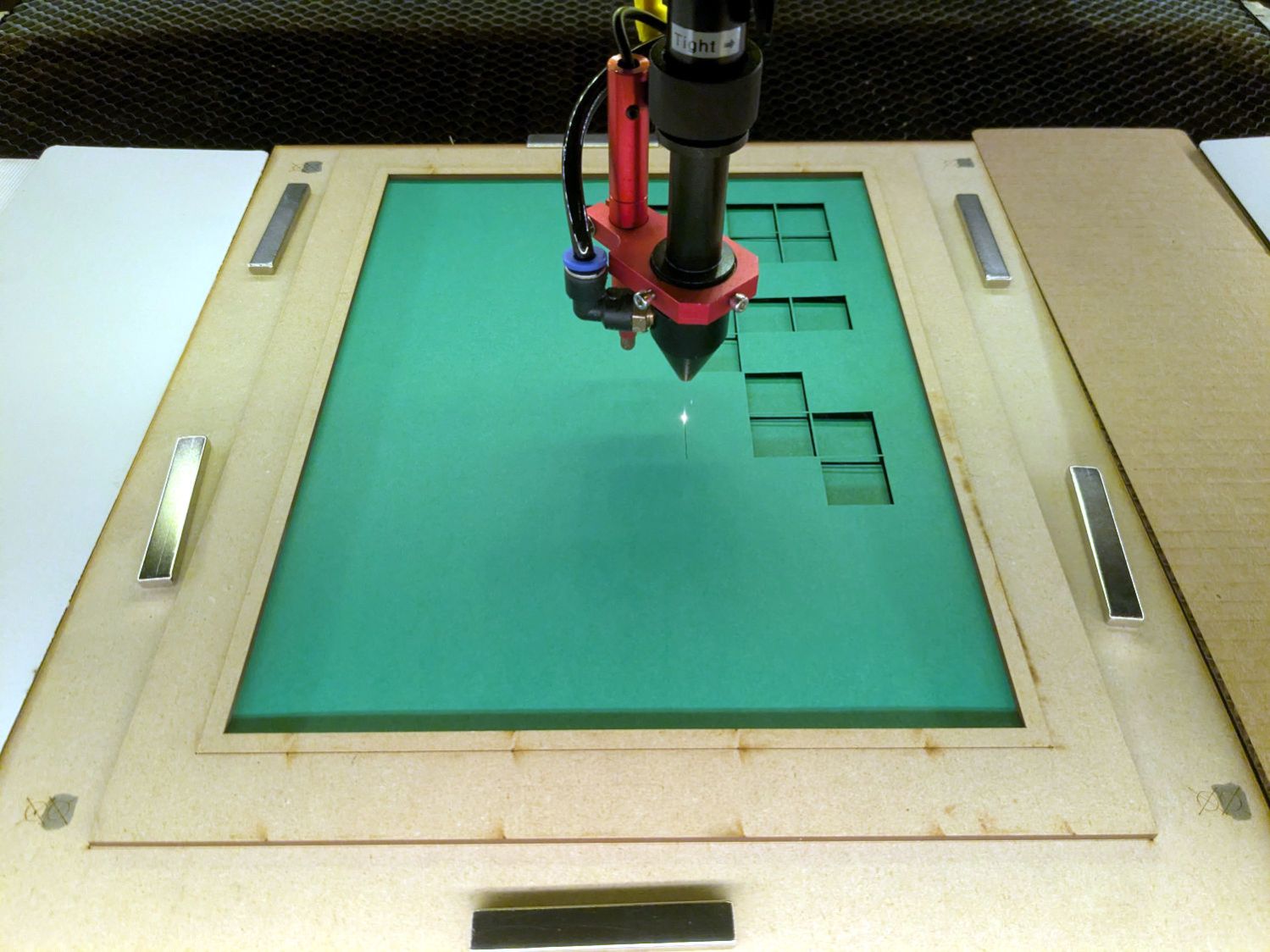
    Then it’s just a matter of cutting the blanks, locating the fixture on the platform, dropping the appropriate color sheet in place, cutting it, then assembling the stack in the gluing fixture:

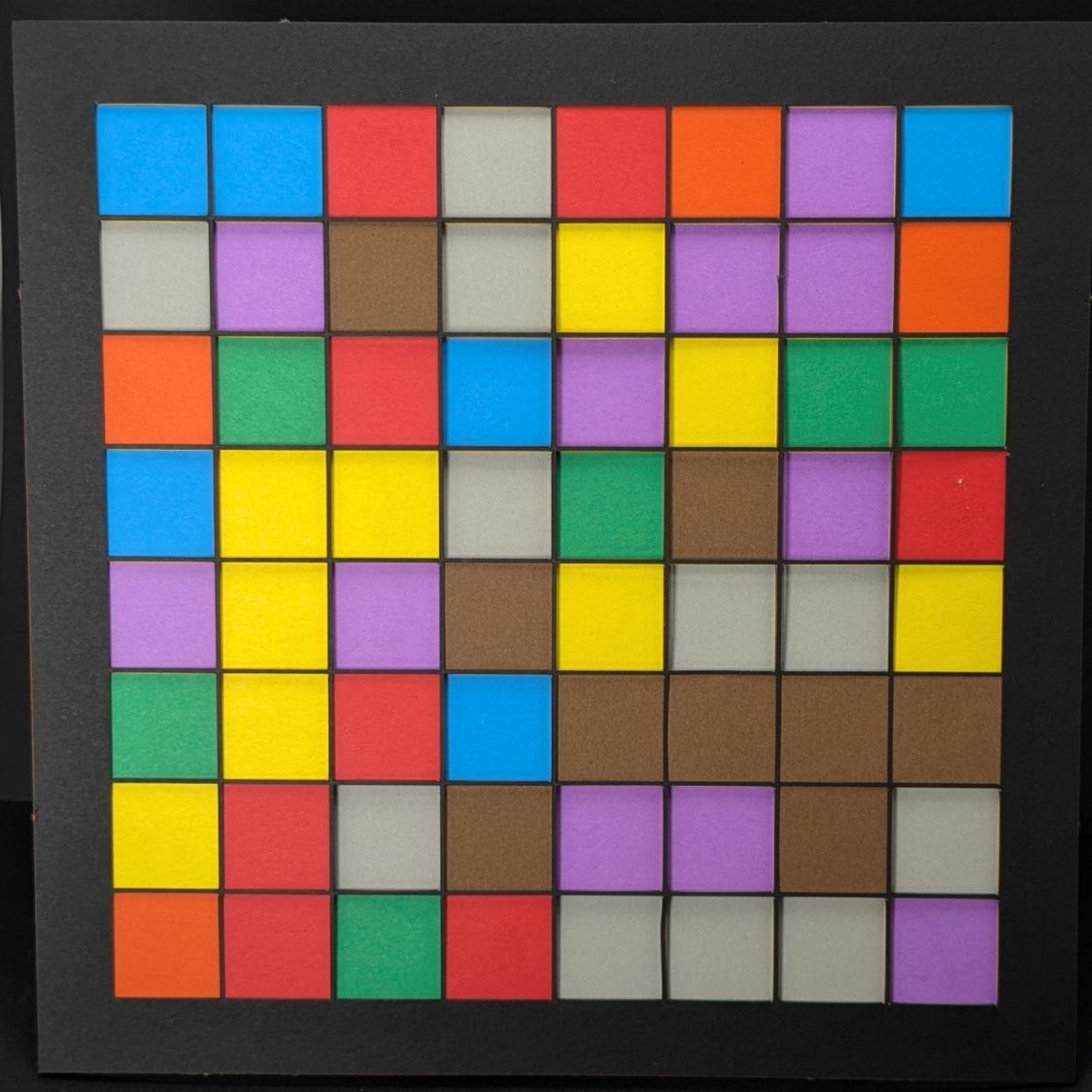
    Subpixel Zoo - Quattron RGBY
    Subpixel Zoo – Quattron RGBY

    It’s kinda cute, in a techie way.

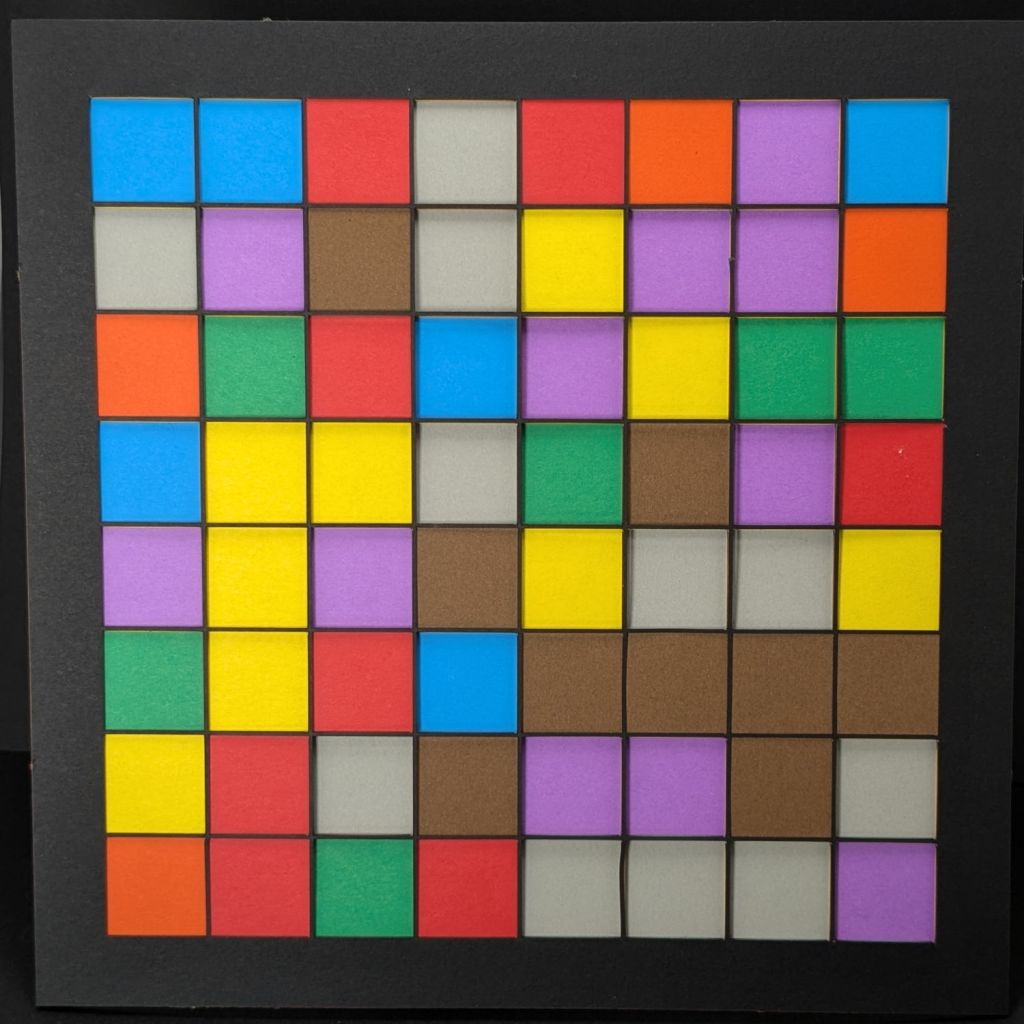
    I did a bunch of layouts, just to see what they looked like:

    Subpixel Zoo - 8x8 layouts
    Subpixel Zoo – 8×8 layouts

    In person, the RGBY patterns look bright and the RGB patterns seem dull by comparison. I’m using cardstock paper, rather than fancy art paper, which surely makes all the difference.

  • Thunar WEBP Thumbnails

    Thunar WEBP Thumbnails

    For whatever reason, the Thunar file browser in XFCE does not automagically show thumbnails for webp images. Some searching produced a recipe, although the displayed webp.xml file needs the last two lines to close the tags:

    <?xml version="1.0" encoding="UTF-8"?>
    <mime-info xmlns="http://www.freedesktop.org/standards/shared-mime-info">
        <mime-type type="image/webp">
            <comment>WebP file</comment>
            <icon name="image"/>
            <glob-deleteall/>
            <glob pattern="*.webp"/>
        </mime-type>
    </mime-info>
    

    The magic copy-to-clipboard button includes those tags, so I suppose it’s another case of being careful what you believe on the Intertubes.

    Going through the steps displayed images of the Subpixel Zoo:

    Thunar - webp previews
    Thunar – webp previews

    They’ll turn into layered paper patterns:

    Subpixel Zoo - Quattron RGBY Shifted - detail
    Subpixel Zoo – Quattron RGBY Shifted – detail
  • Sinking Rocks

    Sinking Rocks

    Trigger warning: trypophobia fuel.

    Spotted on the walking path near the Vassar College golf course:

    Sinking Stones - A
    Sinking Stones – A

    They’re everywhere:

    Sinking Stones - B
    Sinking Stones – B

    I think the path surface rises as it freezes, then the stones sink into the loosened soil as they warm up. Other parts of the path, generally having more loam / mulch / organic material than mud & pebbles, have an obviously raised / porous / crunchy texture on bitterly cold (by my standards) days.

    Surely, someone can pull a PhD thesis from similar observations …

  • EBL Bucked Lithium AA and AAA Cells

    EBL Bucked Lithium AA and AAA Cells

    A new kitchen scale eats a quartet of AAA alkaline cells every month, so a set of bucked lithium AAA cells make sense:

    EBL AAA first charge - 2024-09-11
    EBL AAA first charge – 2024-09-11

    The cells claim 1200 mA·hr capacity, because it looks much more impressive than 1.2 A·hr, and deliver 900 mA·hr at 500 mA, likely higher than the scale’s actual load current.

    The old Sony DSC-H5 works well with the light box and gets a pair of bucked lithium AA cells to replace the tired Eneloops:

    EBL AA first charge - 2024-10-17
    EBL AA first charge – 2024-10-17

    They claim 3000 mA·hr and deliver 2.5 A·hr at 500 mA: nearly perfect, considering some of the junk I’ve gotten over the years.

    Now, to see how they behave in real life …