The Smell of Molten Projects in the Morning

Ed Nisley's Blog: Shop notes, electronics, firmware, machinery, 3D printing, laser cuttery, and curiosities. Contents: 100% human thinking, 0% AI slop.

Category: PC Tweakage

Remembering which tweaks worked

  • Streaming Radio Player: RPi and OLED Updates

    Because the OLED driver came from the pip package manager, not the Raspberry Pi’s system-level apt package manager, it (or they, there’s plenty of code under the hood) don’t get updated whenever I do system maintenance. The doc says this should do the trick:

    sudo -H pip install --upgrade luma.oled
    

    However, it turns out the new version has a slightly longer list of pre-requisite packages, causing the update to go toes-up at a missing package:

    Could not import setuptools which is required to install from a source distribution.
    Please install setuptools.
    

    So update (or install, for the new ones) the missing pieces:

    sudo apt-get install python-dev python-pip libfreetype6-dev libjpeg-dev build-essential
    

    Doing so produced a backwards-compatibility error in my Python code:

    ... change ...
    from luma.core.serial import spi
    ... into ...
    from luma.core.interface.serial import spi
    

    The motivation for all this fuffing and fawing came from watching some OLEDs wake up completely blank or become garbled in one way or another. Evidently, my slower-speed SPI tweak didn’t quite solve the problem, although it did reduce the frequency of failures. I have decided, as a matter of principle, to not embrace the garble.

    Soooo, let’s see how shaking all the dice affects the situation.

    It’s entirely possible the OLED controllers don’t quite meet their specs, of course, or have begun deteriorating for all the usual reasons.

  • Kinesis Freestyle2 Keyboard: Linux Fix

    Someone who found my original post about the Freestyle2’s dysfunctional media keys came up with a fix: https://github.com/whereswaldon/kfreestyle2d.

    Kinesis Freestyle2 Media Keys
    Kinesis Freestyle2 Media Keys

    Some notes for the next time this comes up:

    After doing sudo modprobe uinput, lsmod | grep uinp returns nothing at all (Xubuntu 16.04), but evtest seems perfectly happy:

    sudo evtest /dev/input/event17
    Input driver version is 1.0.1
    Input device ID: bus 0x3 vendor 0x58f product 0x9410 version 0x0
    Input device name: "KB800 Kinesis Freestyle"
    Supported events:
      Event type 0 (EV_SYN)
      Event type 1 (EV_KEY)
        Event code 113 (KEY_MUTE)
        Event code 114 (KEY_VOLUMEDOWN)
        Event code 115 (KEY_VOLUMEUP)
        Event code 140 (KEY_CALC)
    Properties:
    Testing ... (interrupt to exit)
    Event: time 1518199358.454619, type 1 (EV_KEY), code 113 (KEY_MUTE), value 1
    Event: time 1518199358.454619, -------------- SYN_REPORT ------------
    Event: time 1518199358.454638, type 1 (EV_KEY), code 113 (KEY_MUTE), value 0
    Event: time 1518199358.454638, -------------- SYN_REPORT ------------
    Event: time 1518199361.014681, type 1 (EV_KEY), code 114 (KEY_VOLUMEDOWN), value 1
    Event: time 1518199361.014681, -------------- SYN_REPORT ------------
    Event: time 1518199361.014699, type 1 (EV_KEY), code 114 (KEY_VOLUMEDOWN), value 0
    Event: time 1518199361.014699, -------------- SYN_REPORT ------------
    Event: time 1518199361.654701, type 1 (EV_KEY), code 115 (KEY_VOLUMEUP), value 1
    Event: time 1518199361.654701, -------------- SYN_REPORT ------------
    Event: time 1518199361.654721, type 1 (EV_KEY), code 115 (KEY_VOLUMEUP), value 0
    Event: time 1518199361.654721, -------------- SYN_REPORT ------------
    Event: time 1518199362.294715, type 1 (EV_KEY), code 140 (KEY_CALC), value 1
    Event: time 1518199362.294715, -------------- SYN_REPORT ------------
    Event: time 1518199362.294733, type 1 (EV_KEY), code 140 (KEY_CALC), value 0
    Event: time 1518199362.294733, -------------- SYN_REPORT ------------
    

    And the keys work without any special configuration on my part. Apparently they’re already built into XFCE, despite the sound keys not showing up in the Keyboard Shortcuts control panel where you assign programs to keys.

    This is wonderful work!

    I’ve never seen so many calculators before! Oops.

    There should be some udev-rule-ish way to automagically figure out which /dev/hidraw? device to use and symlink to a suitable alias, so the program could use it without knowing the actual device. A casual search turns up:

    https://unix.stackexchange.com/questions/105144/udev-rule-for-assigning-known-symlinks-for-identical-usb-serial-devices#105218

    With which I’d produce /dev/input/kinesis0 and kinesis1, then use:

    /home/ed/bin/kinesis/kfreestyle2d /dev/input/kinesis1
    

    If only the Kinesis Fn key was momentary, rather than a push-on / push-off toggle. Le sigh. I can cope.

  • Epson R380: Re-re-routed CISS Tubing

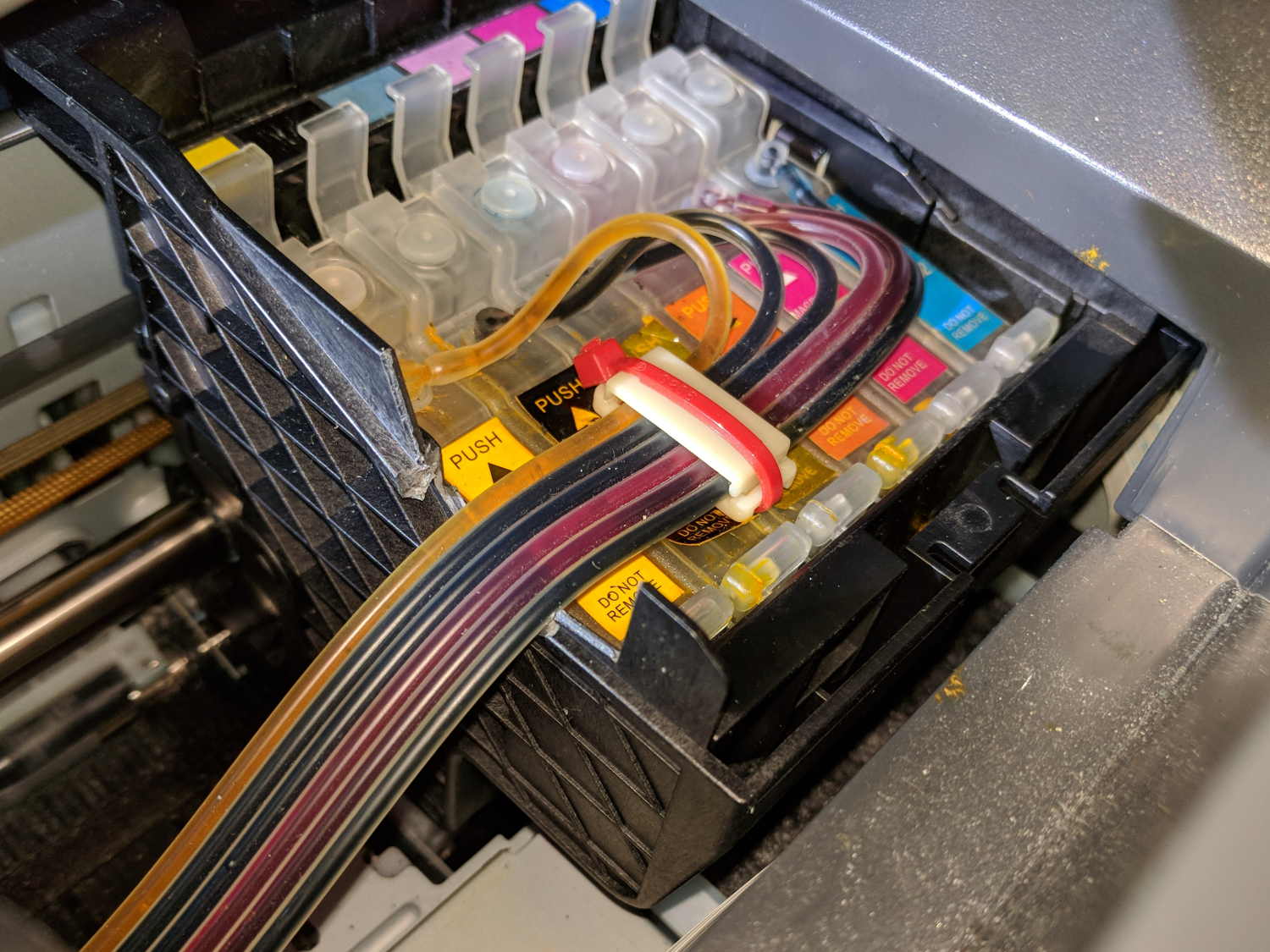
    Alas, what seemed like a better tube route didn’t work any better and, in fact, the generous loop snagged crosswise between the print head box and the R380’s frame. So I deployed the big diagonal cutters and a nasty end cutter to chop a channel through the side of the box:

    Epson R380 - modified print head box
    Epson R380 – modified print head box

    As far as I can tell, the thin section above the reinforcing gridwork exists specifically to get in the way of routing CISS tubes, but I suppose it could be just for pretty.

    With the tubes coming directly off the top of the tanks and folding neatly as the print head moves under the frame, I could rearrange the supports to hold the tubes in a nearly straight line throughout their motion:

    Epson R380 - straight CISS tube route
    Epson R380 – straight CISS tube route

    So far, so good.

    Although the yellow ink now feeds properly and all the nozzles appear up on the test page, the printer output has an overall cyan tinge that gave the Annual Christmas Letter a gloomy aspect. Maybe the latest bottle of cheap Light Cyan ink isn’t quite as light as it should be?

  • MPCNC: GCMC Configuration

    The default GCMC prolog(ue) spits out some G-Codes that GRBL doesn’t accept, requiring tweaks to the incantation.

    A first pass at a useful prolog, minus the offending codes:

    cat ~/.config/gcmc/prolog.gcmc 
    (prolog begins)
    G17 (XY plane)
    G21 (mm)
    G40 (no cutter comp)
    G49 (no tool length comp)
    G80 (no motion mode)
    G90 (abs distance)
    G94 (units per minute)
    (prolog ends)
    

    Including any of the usual “end of program” M-Codes in the epilog(ue) causes GRBL to pause before exiting the program, so leave only a placeholder:

    cat ~/.config/gcmc/epilog.gcmc 
    (epilog begins)
    (M2) (allow program to continue)
    (epilog ends)
    

    Having done a git clone into /opt/gcmc before building the program, the GCMC library routines live in:
    /opt/gcmc/library

    Limiting numeric values to two decimal places makes sense:
    -P 2

    With all that in hand, unleashing the compiler on an unsuspecting source file requires this jawbreaker:

    gcmc -P 2 -I /opt/gcmc/library \
    -G ~/.config/gcmc/prolog.gcmc \
    -g ~/.config/gcmc/epilog.gcmc \
    -o cycloids.ngc \
    cycloids.gcmc
    

    One might, of course, tuck all that into a little script, rather than depend on extracting it from the bash history as needed.

    The resulting G-Code file looks about right:

    head cycloids.ngc
    (prolog begins)
    G17 (XY plane)
    G21 (mm)
    G40 (no cutter comp)
    G49 (no tool length comp)
    G80 (no motion mode)
    G90 (abs distance)
    G94 (units per minute)
    (prolog ends)
    F2500.00
    [pi@MPCNC tmp]$ head -25 cycloids.ngc
    (prolog begins)
    G17 (XY plane)
    G21 (mm)
    G40 (no cutter comp)
    G49 (no tool length comp)
    G80 (no motion mode)
    G90 (abs distance)
    G94 (units per minute)
    (prolog ends)
    F2500.00
    G0 Z1.00
    (-- tracepath at Z=-1.00mm --)
    G0 X-145.50 Y-30.00
    G1 Z-1.00
    G1 X-145.51 Y-29.93
    
    ... vast snippage ...
    
    G1 X175.50 Y30.00
    G1 Z1.00
    G0 Z25.00
    (epilog begins)
    (M2)
    (epilog ends)
    

    Then it’s just a matter of tweaking cycloids.gcmc to make interesting things happen:

    GGMC Cycloids test patterns
    GGMC Cycloids test patterns
  • Model M Keyboard Surprise

    A friend gave me a New Old Stock IBM Model M keyboard, built by Lexmark on 1/30/96. Although I intended to try it out, I first showed it to Mary and it immediately ended up at her desk:

    IBM Model M 1996 - media keys
    IBM Model M 1996 – media keys

    I favor off-lease Dell boxes intended for office use, so the PS/2 plug on the end of the (permanently attached) cable slid right into the PS/2 jack on the back panel. Gotta love it.

    She’d been hammering out testcases and doc on Model M keyboards basically forever, so her fingers snapped into position and the room sounds like her old IBM office.

    The “101 key” layout predates frippery along the lines of multimedia keys, so I gimmicked the top row of the numeric pad to control the mixer volume and muting toggle:

    • /amixer sset 'Master' 10%-
    • *amixer sset 'Master' 10%+
    • amixer sset 'Master' toggle

    While doing that, I found the semicolon key fired at the slightest touch, so I popped the keycap to see if I could frighten it into compliance:

    IBM Model M 1996 - dome switch
    IBM Model M 1996 – dome switch

    Huh.

    It seems Lexmark replaced the classic buckling spring mechanism with less clicky rubber dome switches, even back in 1996, perhaps for use in libraries & suchlike. Come to think of it, this place is more like a library than an office, so muted clickiness seems appropriate.

    For completeness:

    IBM Model M 1996 - label
    IBM Model M 1996 – label
  • Google Pixel vs. USB Mounting

    For reasons undoubtedly making sense at the time, the Google Pixel (and, most likely, current Android devices) don’t support the USB Mass Storage protocol. A bit of poking around suggests the jmtpfs utility supplies the other end of the Pixel’s Media Transfer Protocol and the process goes a little something like this:

    • Once upon a time, create a mountpoint: mkdir /mnt/pixel
    • Unlock the phone
    • Plug in the USB cable
    • Pull down the top menu, tap USB charging this device
    • Select Transfer Files
    • sudo jmtpfs /mnt/pixel -o allow_other,fsname="Pixel"

    The allow_other parameter sets the directory / file permissions so ordinary users can access the files. The fsname is just for pretty.

    The Pixel’s storage then appears as the awkwardly named /mnt/pixel/Internal\ shared\ storage/ directory.

    Despite being somewhat Linuxy under the hood, the mapped storage doesn’t support the usual filesystem attributes, so don’t try to transfer them with, say, rsync -a:

    rsync -rhu --progress /mnt/music/Music\ for\ Programming /mnt/pixel/Internal\ shared\ storage/Music/
    

    When you’re done: sudo umount /mnt/pixel

    This may not be a win over bankshotting off Dropbox or Google Drive, except for sensitive bits like private keys and suchlike.

    Thunar apparently knows how to detect and mount mtp devices automagically and I suppose GUI-fied drag-n-drop works as you’d expect.

  • Epson R380 Continuous Ink Supply: Tubing Failure

    After 4.5 years, one of the silicone tubes on the Epson R380’s continuous ink supply system broke:

    Epson R380 - broken CISS tube
    Epson R380 – broken CISS tube

    The yellow smudges in front of the tubing clamp and across the top suggest the total mess lying in wait between the cartridges. Donning my shop apron and wielding damp paper towels cleaned things up well enough.

    I cut through all the tubes a few inches back from the clamp, pulled the stubs off the elbow connectors, reinstalled the fresh ends, and re-repaired the clamp with a new cable tie:

    Epson R38 - CISS tubes
    Epson R38 – CISS tubes

    Although the failing yellow supply surely contributed to the problem, the printhead seems to be on its last legs after nearly nine years. IIRC, I got the printer for $15 after rebate, spent maybe four times that on CISS tanks, and perhaps $200 on good-quality ink in pint bottles, it doesn’t owe me much.

    Maybe I shouldn’t buy ink in pint bottles any more.