Ed Nisley's Blog: Shop notes, electronics, firmware, machinery, 3D printing, laser cuttery, and curiosities. Contents: 100% human thinking, 0% AI slop.
This appeared while we uprooted a row of forsythia along the north border:
Brass hose fitting vs lawnmower
Although FOD has killed a good share of my lawn mowers and blades over the decades, this happened long before my administration and I can’t take credit for the precision targeting.
One of the moles aerating the ground around here ran out of steam beside the garden:
Mole – dorsal
It has wonderfully soft velvety fur!
Flipping it over:
Mole – ventral
A closeup of its digging paws and gnawing teeth:
Mole – ventral paws – teeth
Those choppers seem overqualified for a diet of earthworms, but I suppose they know what they’re doing.
We left it in as-found condition, ready for recycling …
[Update: The consensus seems to be it’s a vole or shrew, not a mole. It’d be the biggest vole I’ve ever seen and “large shrew” seems oxymoronic, but the teeth are diagnostic. ]
Our CVS blood pressure meter (a relabeled Microlife unit) ran its pump for a few seconds this morning, gave up, and spat out Err 3, which translates into “Inflation of the cuff takes too long”. Not surprising, as the motor wasn’t running.
The AA alkaline cell quartet has plenty of mojo and no corrosion, but the motor doesn’t even turn over. The display is fine and the pressure release valve clicks, so it’s not completely dead.
This unit is sufficiently old to have the compelling advantage of transferring data through a USB (mini-B) connection, rather than a Bluetooth link through some sketchy Internet cloudy Android app, so it’s worth at least a look inside. Four screws and some internal snaps along the sides hold the case together; it’s a surprisingly easy teardown.
The business side of the PCB looks good:
CVS Blood Pressure Monitor – PCB
The various wires and solder joints for the “high current” parts look OK, although the wires likely don’t go all the way through the PCB:
CVS Blood Pressure Monitor – PCB detail
Q4 and Q5 look like they switch the compressor pump motor and pressure-release valve. D3 and D4 should tamp down the inductive energy, but they look like they’re in series with the outputs. Yes, the Valve wires are both black.
The motor has a foam vibration isolation wrap, which is a nice touch. Although you can’t see them well, all its wires & solder joints look like they’re in good shape:
CVS Blood Pressure Monitor – pump
The hose sticking out toward you plugs into the black right-angle fitting in the lower right corner of the picture. It’d help to have smaller fingers than mine, but I managed to get the hose off and on the fitting with only minor muttering.
Seeing nothing obviously wrong, I installed the same batteries, poked the switch to start a measurement, and the motor ran fine. Of course, the measurement failed because the cuff & pressure sensor weren’t connected.
Connect the hose, plug in the cuff & wrap it around my arm, poke the button, and everything works fine.
Reassemble everything and it still works fine.
I still think there’s a bad wire or solder joint in there somewhere, so this delightful “repair” can’t possibly last very long …
Beaver Lodge – DCRT N of Golds Gym – 2016 CIR image
We went back the next day and stopped at the culvert. Their dam spans the entire near side of the pond, upstream of the ditch (just above my hand) leading to the culvert:
Beaver Lodge and Dam – DCRT N of Golds Gym – 2020-02-25
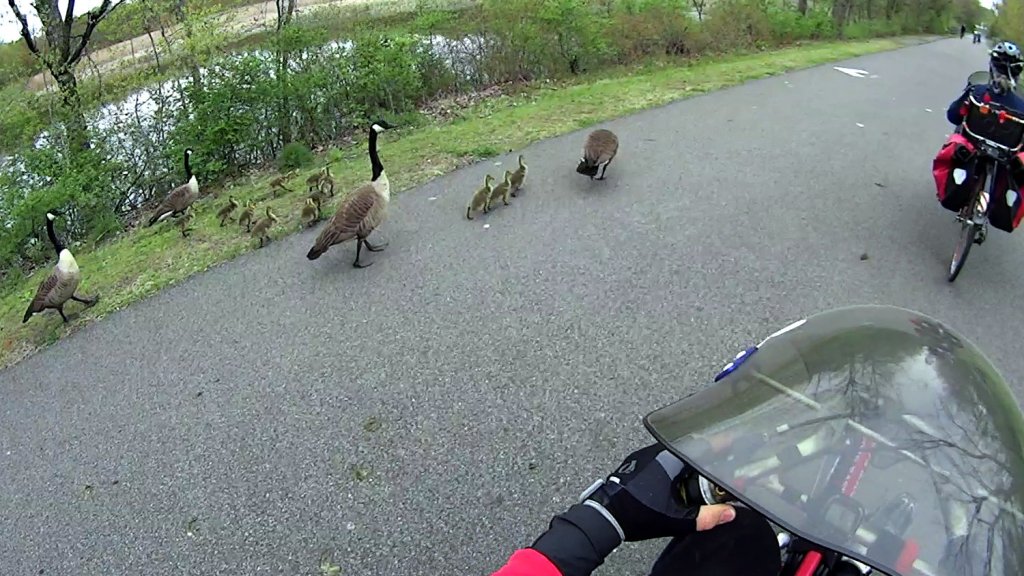
The helmet camera pictures look west from the rail trail, with the lodge in the northernmost open area. The wide-angle camera lens exaggerates the distance, but the lodge is only about 35 feet from the fence.
A stand of birch trees near the lodge now looks like a combination buffet and construction yard. When beaversdiscoverferrocement, their structures will become much more obvious.
We didn’t have any fires in the neighborhood where it might have been a problem, but I’ll try the water department this year …
Oddly, the water department repainted most of the fire hydrants along most of the roads last year. This one apparently didn’t qualify, for whatever reason, despite being only slightly off Rt 376 on Sheldon:
Frozen hydrant – Sheldon at Rt 376 – Google Streetview
We spotted this near our usual parking spot during a recent grocery trip:
Adams crash – stone wall
The bush was pretty well uprooted, suggesting the vehicle stopped atop the bush after demolishing the wall.
Wondering how it got there, I looked across the parking lot:
Adams crash – reverse view
Yes, that’s a dead lamp post. The impact dislodged its concrete base by about four inches:
Adams crash – lamp pole detail
The greenery came from another eviscerated bush:
Adams crash – bush debris
I expected to see tire gouges in the grass, but … nope.
The bush got a haircut, although the right half seems undamaged:
Adams crash – bush detail
The boulder won its disagreement with the vehicle, although there’s surprisingly little shattered plastic and other debris along the trail:
Adams crash – boulder detail
The impact dislodged the boulder, which came to rest about four feet from its origin:
Adams crash – overview
The damage lies along a straight line from the middle of the Adams entrance intersection to the wall impact:
Adams crash – trajectory
There are no obvious skid marks, undercarriage scrapes, or gouges in the grass anywhere along the trajectory, suggesting the vehicle remained mostly airborne and ballistic during the whole event, and even the three (!) curbs involved have no marks.
The nice lady at the Adams Customer Service counter didn’t know what happened and, as usual, the Poughkeepsie Journal (newspaper) has nothing to say.
I did not check for a high-clearance pickup truck with tall tires and severe front-end damage in the body shop across the street, although one seems a likely suspect. Whatever the vehicle may have been, it was definitely traveling at the usual (tautological) “high rate of speed” …