The first pass at a holder for a Canon NB-5L battery didn’t quite work, but the failure was instructive. The overall layout was fine; the battery fit well, it’s just that the pins and springs didn’t function properly.

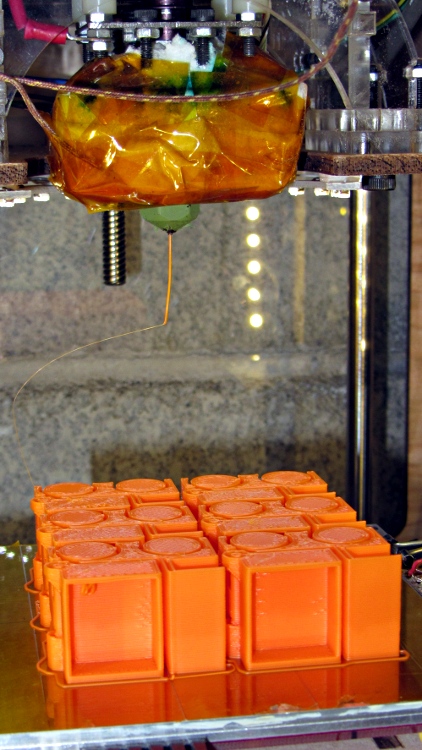
I thought a simple straight music wire spring pushed into a hole with a pocket to limit the pin travel would suffice. Watching it build showed that the pocket came out too small and the spring hole was almost completely closed, despite a bit of HoleWindage.
Here’s a closer look at the spring arrangement, with a pocket at the bottom for an epoxy blob after it became obvious the ABS couldn’t properly anchor the pin.

Drilling out the holes to allow free pin movement ended up with #52 for the tip, #40 for the shaft, and #31 for the ferrule at the end; choose for an easy slip fit.
I used 0.024 inch (0.6 mm) music wire, which fit neatly into the pin’s inspection hole. Drilling that (#73 drill) into the nearly closed hole through the bottom showed that things weren’t working well: far too much resistance along what should be a half-open channel.
With the pin in place and a stub of wire pushed upward into the pin, the pins moved very stiffly and tended to not return to their rest position. Minus the spring wire, they slid freely.
After a bit of this and that, I tried 0.020 music wire, which didn’t have enough return force at all.
The end of the spring wire moved around a lot more than I think it should have, gradually turning the hole into an oval. I drilled two pockets in the bottom (and changed the solid model to match what you see above) and cast a dab of epoxy into each hole; that solved the moving-around problem, but the pins were still too stiff.

The weird orange color comes from a few layers of Safety Orange filament that melded into white in mid-flight. No reason to use fancy filament on a prototype, methinks; that’s what was in place when I started.
But I glued the cap on anyway to see if the pins would work well enough to run some early battery tests. This is what it looked like before gluing the cap:
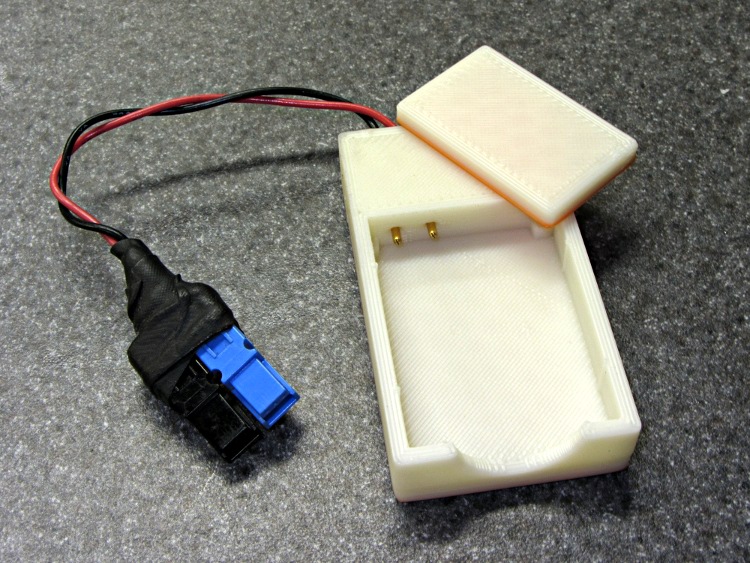
The Powerpole connectors came from one of those packs, with the wires soldered into the ends of the pins so as to not block the inspection holes that I’m using for the music wire springs.
The OpenSCAD source code:
// Holder for Canon NB-5L Li-Ion battery
// Ed Nisley KE4ZNU August 2011

include </home/ed/Thing-O-Matic/lib/MCAD/units.scad>
include </home/ed/Thing-O-Matic/lib/MCAD/boxes.scad>
include </home/ed/Thing-O-Matic/Useful Sizes.scad>

// Layout options

Layout = "Show";					// Case Lid Show Build Fit

//- Extrusion parameters - must match reality!
//  Print with +2 shells and 3 solid layers

ThreadThick = 0.33;
ThreadWidth = 2.0 * ThreadThick;

HoleWindage = 0.2;

function IntegerMultiple(Size,Unit) = Unit * ceil(Size / Unit);

Protrusion = 0.1;			// make holes end cleanly

BuildOffset = 3.0;			// clearance for build layout

//- Battery dimensions - rationalized from several samples
//  Coordinate origin at battery corner by contact plates on bottom surface

BatteryLength = 45.25;
BatteryWidth = 32.17;
BatteryThick =  7.85;

ContactWidth = 2.10;
ContactLength = 4.10;
ContactRecess = 0.85;

ContactOC = 3.18;			// center-to-center across contact face
ContactOffset = 4.45;		// offset from battery edge
ContactHeight = 3.05;		// offset from battery bottom plane

AlignThick = 2.2;			// alignment recesses on contact face
AlignDepth = 2.0;			// into face
AlignWidth1 = 0.7;			// across face at contacts
AlignWidth2 = 2.8;			//  ... other edge

//- Pin dimensions

PinTipDia = 1.6;
PinTipLength = 10.0;

PinTaperLength = 2.3;

PinShaftDia = 2.4;
PinShaftLength = 6.8;

PinFerruleDia = 3.0;
PinFerruleLength = 2.0;

PinLength = PinTipLength + PinTaperLength + PinShaftLength + PinFerruleLength;

PinHoleOffset = 13.9;			// tip to spring hole

//- Spring dimensions

ExtendRelax = 1.5 + ContactRecess;		// pin extension when no battery is present
ExtendOvertravel = 1.0;					//  ... beyond engaged position

SpringDia = 0.024 * inch;	// music wire spring
SpringTravel = ExtendRelax + ExtendOvertravel;
SpringLength = 4.0 + PinShaftDia/2;			// free length below pin centerline

//- Holder dimensions

GuideRadius = ThreadWidth;						// friction fit ridges
GuideOffset = 10;
WallThick = 4*ThreadWidth;						// holder sidewalls

BaseThick = IntegerMultiple(6.0,ThreadThick);	// bottom of holder to bottom of battery
TopThick = 6*ThreadThick;	// top of battery to top of holder

ThumbRadius = 10.0;			// thumb opening at end of battery

CornerRadius = 3*ThreadThick;			// nice corner rounding

CaseLength = 2*WallThick + PinLength - ExtendRelax + ExtendOvertravel + BatteryLength + GuideRadius;
CaseWidth = 2*WallThick + 2*GuideRadius + BatteryWidth;
CaseThick = BaseThick + BatteryThick + TopThick;

//- XY origin at front left battery corner, Z on platform below that

CaseLengthOffset = -(WallThick + PinLength - ExtendRelax + ExtendOvertravel);
CaseWidthOffset = -(WallThick + GuideRadius);
CaseThickOffset = BaseThick;

LidLength = ExtendRelax - CaseLengthOffset;

SpringPlugDia = 3.0;			// filament snippet holding spring wire
SpringPlugLength = IntegerMultiple(1.0,ThreadThick);

echo(str("Spring wire from end: ",WallThick + PinLength - PinHoleOffset));
echo(str("            from side: ",WallThick + GuideRadius + ContactOffset));
echo(str("Pin spacing on centers: ",ContactOC));

//----------------------
// Useful routines

module PolyCyl(Dia,Height,ForceSides=0) {			// based on nophead's polyholes

  Sides = (ForceSides != 0) ? ForceSides : (ceil(Dia) + 2);

  FixDia = Dia / cos(180/Sides);

  cylinder(r=(FixDia + HoleWindage)/2,
           h=Height,
	   $fn=Sides);
}

module ShowPegGrid(Space = 10.0,Size = 1.0) {

  Range = floor(50 / Space);

	for (x=[-Range:Range])
	  for (y=[-Range:Range])
		translate([x*Space,y*Space,Size/2])
		  %cube(Size,center=true);

}

//-------------------

//-- Guides for tighter friction fit

module Guides() {
  	  translate([GuideOffset,-GuideRadius,CaseThickOffset])
		PolyCyl(2*GuideRadius,(BatteryThick - Protrusion),4);
	  translate([GuideOffset,(BatteryWidth + GuideRadius),CaseThickOffset])
		PolyCyl(2*GuideRadius,(BatteryThick - Protrusion),4);
	  translate([(BatteryLength - GuideOffset),-GuideRadius,CaseThickOffset])
		PolyCyl(2*GuideRadius,(BatteryThick - Protrusion),4);
	  translate([(BatteryLength - GuideOffset),(BatteryWidth + GuideRadius),CaseThickOffset])
		PolyCyl(2*GuideRadius,(BatteryThick - Protrusion),4);
	  translate([(BatteryLength + GuideRadius),GuideOffset/2,CaseThickOffset])
		PolyCyl(2*GuideRadius,(BatteryThick - Protrusion),4);
	  translate([(BatteryLength + GuideRadius),(BatteryWidth - GuideOffset/2),CaseThickOffset])
		PolyCyl(2*GuideRadius,(BatteryThick - Protrusion),4);

}

//-- Contact pins (holes therefore)

module PinShape() {

PolyPin = false;

  union() {
	if (PolyPin)
	  PolyCyl(PinTipDia,(PinTipLength + Protrusion));
	else
	  cylinder(r=(PinTipDia + HoleWindage)/2,h=(PinTipLength + Protrusion),$fn=6);

	translate([0,0,PinTipLength])
	  if (PolyPin)
		PolyCyl(PinShaftDia,(PinTaperLength + PinShaftLength + Protrusion));
	  else
		cylinder(r=(PinShaftDia + HoleWindage)/2,
				 h=(PinTaperLength + PinShaftLength + Protrusion),$fn=6);

	translate([0,0,(PinLength - PinFerruleLength)])
	  if (PolyPin)
		PolyCyl(PinFerruleDia,(PinFerruleLength + Protrusion));
	  else
		cylinder(r=(PinFerruleDia + HoleWindage)/2,
				 h=(PinFerruleLength + Protrusion),$fn=6);

	translate([0,0,PinLength])
	  if (PolyPin)
		PolyCyl(PinFerruleDia,PinLength);			// very long holes to punch case
	  else
		cylinder(r=(PinFerruleDia + HoleWindage)/2,h=PinLength,$fn=6);
  }

}

module PinAssembly() {

  translate([ExtendRelax,ContactOffset,CaseThickOffset + ContactHeight]) {	// pins
	rotate([0,270,0]) {
	  PinShape();
	  translate([0,(2*ContactOC),0])
		PinShape();
	}
  }

  translate([-(PinHoleOffset - ExtendRelax + SpringTravel/2),
			 ContactOffset,
			 (CaseThickOffset + ContactHeight - SpringLength/2 + Protrusion/2)]) {
	  cube([SpringTravel,
		    (2*SpringDia),
			(SpringLength + Protrusion)],
		   center=true);										// spring deflection pocket
	  translate([0,(2*ContactOC),0])
		cube([SpringTravel,
			 (2*SpringDia),
			 (SpringLength + Protrusion)],
			 center=true);
  }

  translate([-(PinHoleOffset - ExtendRelax),
			 ContactOffset,
			 (-Protrusion/2)]) {
	PolyCyl(SpringDia,(BaseThick + ContactHeight + Protrusion));		// spring wire
	PolyCyl(SpringPlugDia,(SpringPlugLength + Protrusion));				// wire holder
	translate([0,(2*ContactOC),0]) {
	  PolyCyl(SpringDia,(BaseThick + ContactHeight + Protrusion));
	  PolyCyl(SpringPlugDia,(SpringPlugLength + Protrusion));
	}
  }

}

//-- Case with origin at battery corner

module Case() {

  difference() {

	union() {

	  difference() {
		translate([(CaseLength/2 + CaseLengthOffset),
				  (CaseWidth/2 + CaseWidthOffset),
				  (CaseThick/2)])
		  roundedBox([CaseLength,CaseWidth,CaseThick],CornerRadius); 	// basic case shape

		translate([-ExtendOvertravel,-GuideRadius,CaseThickOffset])
		  cube([(BatteryLength + GuideRadius + ExtendOvertravel),
				(BatteryWidth + 2* GuideRadius),
				(BatteryThick + Protrusion)]);						// battery space

	  }

	  Guides();

	  translate([-ExtendOvertravel,-GuideRadius,BaseThick])
		cube([(AlignDepth + ExtendOvertravel),
			  (AlignWidth1 + GuideRadius),
			  AlignThick]);											// alignment blocks
	  translate([-ExtendOvertravel,
				 (BatteryWidth - AlignWidth2),
				 BaseThick])
		cube([(AlignDepth + ExtendOvertravel),
			  (AlignWidth2 + GuideRadius),
			  AlignThick]);

	}

	translate([(-ExtendOvertravel),
			   (CaseWidthOffset - Protrusion),
			   (CaseThickOffset + BatteryThick)])
	  cube([CaseLength,
		    (CaseWidth + 2*Protrusion),
		    (TopThick + Protrusion)]);								// battery access

	translate([(CaseLengthOffset - Protrusion),
			   (CaseWidthOffset - Protrusion),
			   (CaseThickOffset + BatteryThick)])
	  cube([(CaseLength + 2*Protrusion),
		    (CaseWidth + 2*Protrusion),
		    (TopThick + Protrusion)]);								// battery insertion allowance

	translate([(BatteryLength - Protrusion),
			    (CaseWidth/2 + CaseWidthOffset),
			    (CaseThickOffset + ThumbRadius)])
	  rotate([90,0,0])
		rotate([0,90,0])
		  cylinder(r=ThumbRadius,
				   h=(WallThick + GuideRadius + 2*Protrusion),
				   $fn=22);											// remove thumb notch

	PinAssembly();

  }

}

module Lid() {

  difference() {
	translate([0,0,(CaseThick/2 - BaseThick - BatteryThick)])
	  roundedBox([LidLength,
				 CaseWidth,CaseThick],CornerRadius);

	translate([0,0,-(CaseThick/2)])
	  cube([(LidLength + 2*Protrusion),
		    (CaseWidth + 2*Protrusion),
		    (CaseThick)],center=true);
  }

}

//-------------------
// Build it!

ShowPegGrid();

if (Layout == "Case")
  Case();

if (Layout == "Lid")
  Lid();

if (Layout == "Show") {								// reveal pin assembly
  difference() {
	Case();

	translate([(CaseLengthOffset - Protrusion),
			   (CaseWidthOffset - Protrusion + WallThick + ContactOffset + ContactOC),
			   (BaseThick + ContactHeight)])
	  cube([(-CaseLengthOffset + Protrusion),
			 (CaseWidth + 2*Protrusion),
			 CaseThick + BaseThick - ContactHeight + Protrusion]);

	translate([(CaseLengthOffset - Protrusion),
			   (CaseWidthOffset - Protrusion),
			   -Protrusion])
	  cube([(-CaseLengthOffset + Protrusion),
			 (WallThick + GuideRadius + ContactOffset + Protrusion),
			 CaseThick]);
  }

  translate([ExtendRelax,ContactOffset,CaseThickOffset + ContactHeight]) {	// pins
	rotate([0,270,0]) {
	  %PinShape();
//	  translate([0,(2*ContactOC),0])
//		%PinShape();
	}
  }

}

if (Layout == "Build") {
  translate([-(CaseLength/2 + CaseLengthOffset),-(CaseWidthOffset - BuildOffset),0])
	Case();
  translate([0,(CaseLengthOffset/2 - BuildOffset),0])
	rotate([0,0,90])
	  Lid();

}

if (Layout == "Fit") {
  Case();
  translate([(-LidLength/2 + ExtendRelax),
			(CaseWidth/2 + CaseWidthOffset),
			(BaseThick + BatteryThick)])
	  Lid();
  translate([ExtendRelax,ContactOffset,CaseThickOffset + ContactHeight]) {	// pins
	rotate([0,270,0]) {
	  %PinShape();
	  translate([0,(2*ContactOC),0])
		%PinShape();
	}
  }

}



 The Smell of Molten Projects in the Morning