Ed Nisley's Blog: Shop notes, electronics, firmware, machinery, 3D printing, laser cuttery, and curiosities. Contents: 100% human thinking, 0% AI slop.
The macro lens adapter took shape around a nice 25 mm doublet lens from the Box o’ Lenses. The Canon SX230HS has a lens opening that’s just about 25 mm in diameter and a larger lens would be better, but at maximum zoom the image pretty much fills the camera’s entrance pupil. I ordered a pair of 50 mm LED ring lights from halfway around the planet and built the snout to hold the ring around the lens:
Macro lens snout with LED ring light
That’s the first pass to get the sizes right and work out some details. In particular, that small white ring inside the aperture below the lens didn’t work at all, so I made the main tube opening a bit smaller.
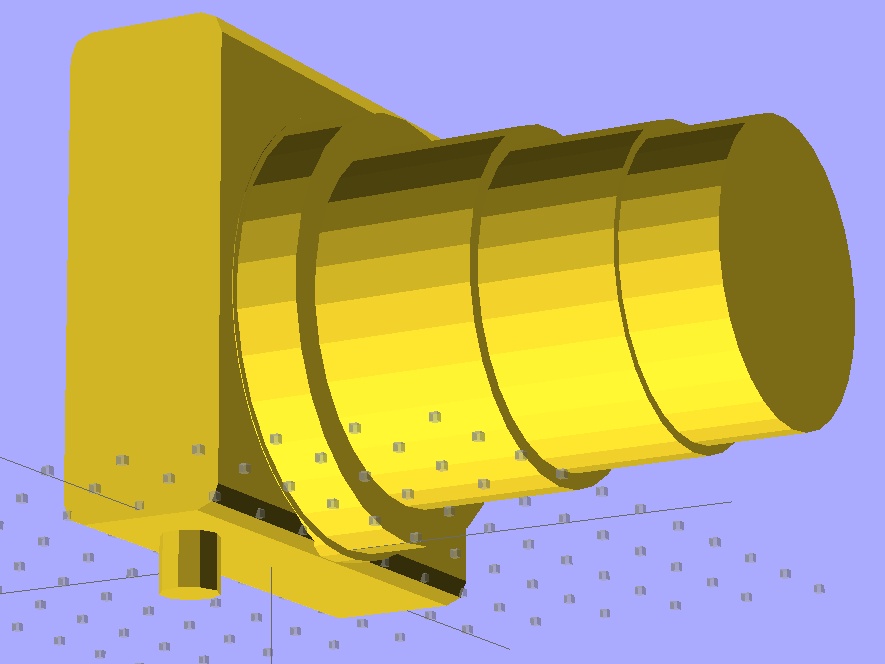
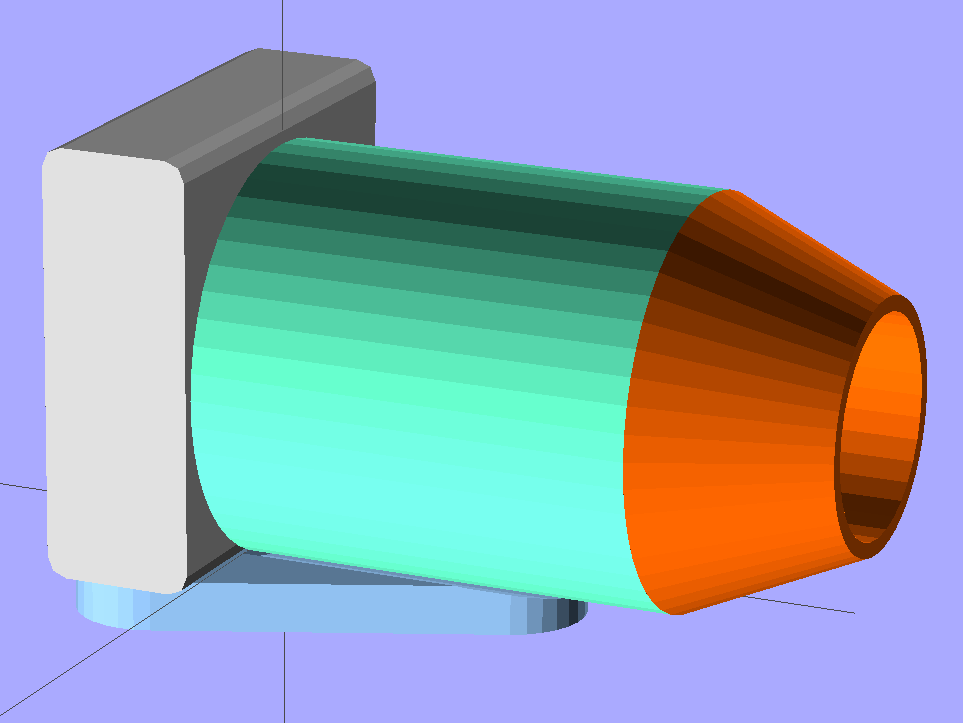
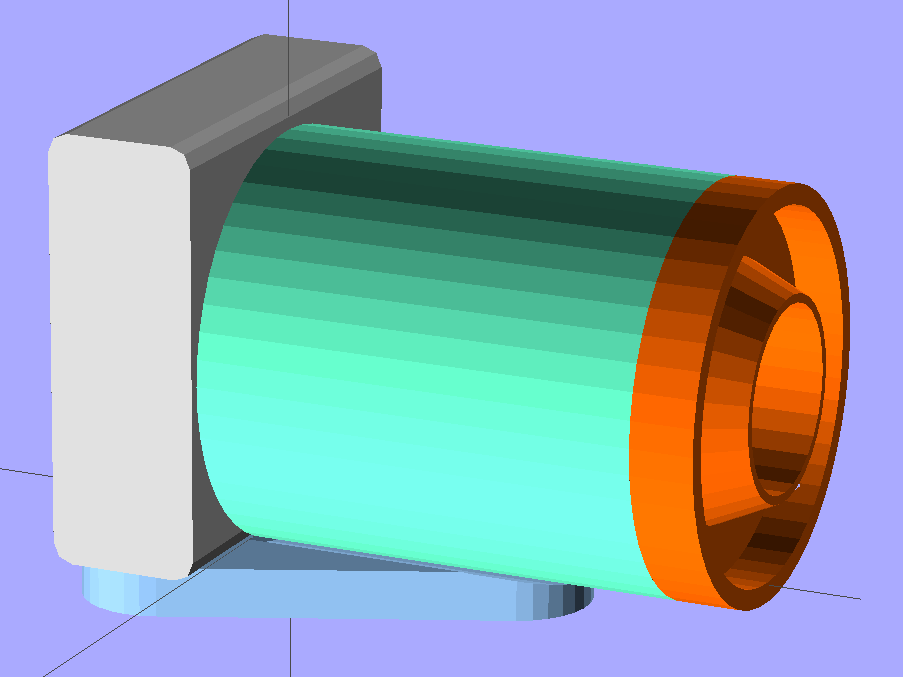
The solid model shows the details a bit better:
Macro adapter snout – solid model – front view
The inner cone shields the lens edges from (most of the) scattered LED light. I considered angling the side walls to concentrate the ring light, but wasn’t convinced it’d be worth the effort because the LEDs have such a broad beamwidth anyway. The little hole is for the LED power cable, which goes to a 12 V switching wall wart. The 5 strings of 3 LEDs draw about 70 mA, which suggests I should hack the ballast resistors down a bit to boost the current up to 20 mA per string. FWIW, the resistors give 25 mA per string at 13.8 V, so I could probably goose the current a lot higher.
The bottom has four shallow holes for the alignment pegs cut from ABS filament:
Macro adapter snout – solid model – bottom view
The hole in the front end of the main tube is marginally smaller than the lens diameter, as I used the OpenSCAD cylinder primitive instead of the PolyCyl module that slightly enlarges holes to make the answer come out right. The difference is just enough to form a solid stop that aligns the lens and prevents it from sliding into the body before the glue cures.
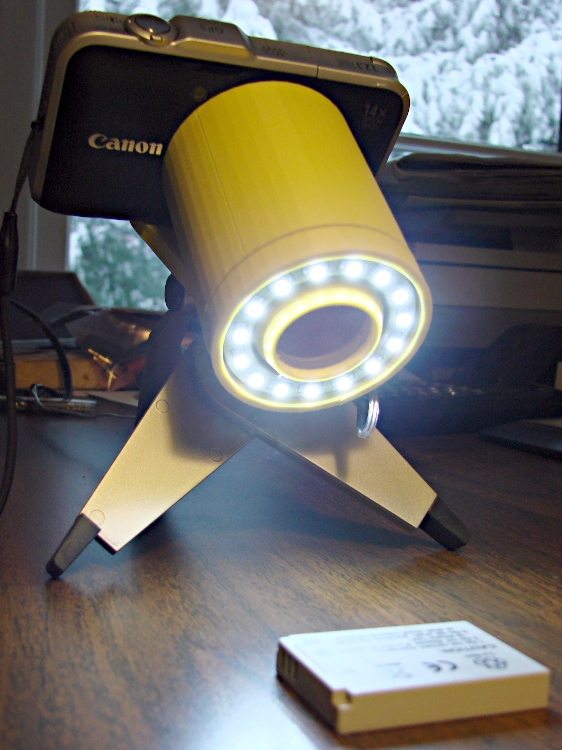
The whole affair looks pretty scary from the victim’s point of view:
SX230HS macro adapter LED ring light – front view
But the camera’s view seems OK, albeit with some vignetting:
Canon NB-5L battery through macro lens adapter
Limited by vignetting & entrance pupil filling, zooming controls the horizontal subject size from 25 mm to about 10 mm. Depth of field is a few mm, at best; the printing on the far end of that battery is fuzzier than it seems.
Best results so far come from:
Manual aperture at f/8
Manual focus at infinity (move the subject to focus)
Shutter delay = 2 seconds to let the camera stop shaking
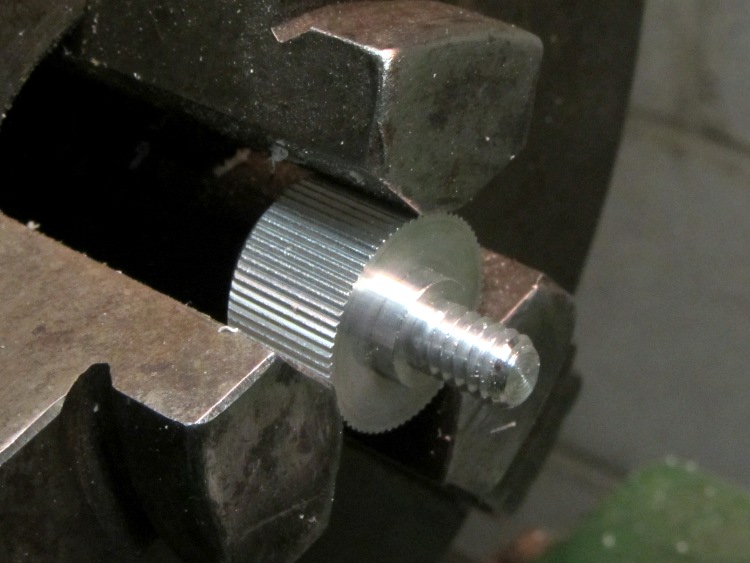
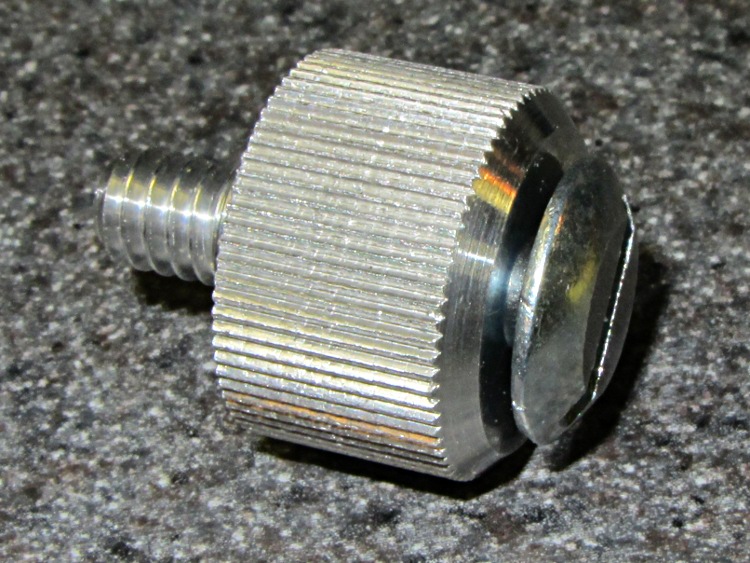
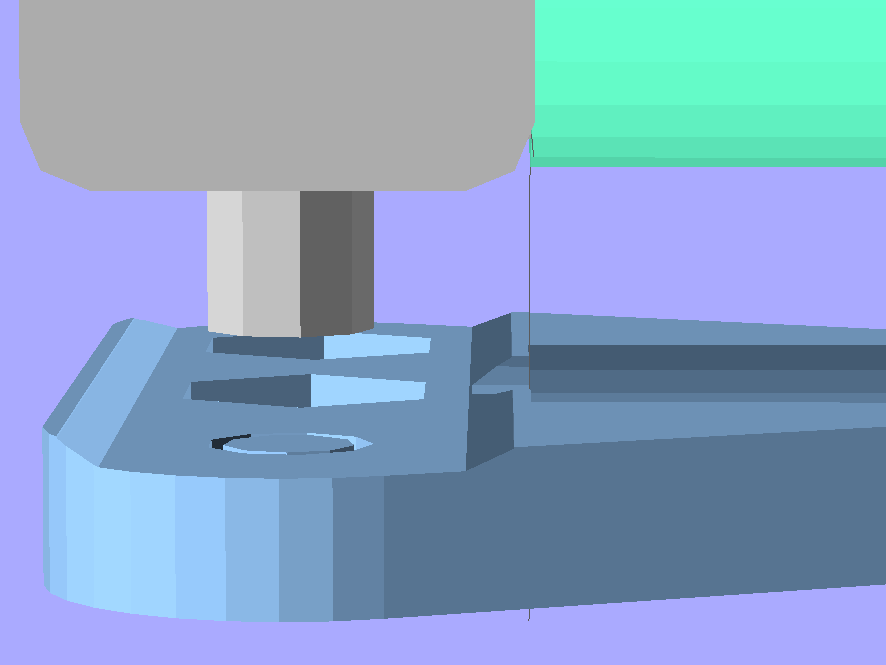
The microscope adapter needs a single screw to hold the camera to the mount. I used the same aluminum knob as on the adapter for my previous camera, shortening the screw so it didn’t bottom out in the camera socket:
Shortened camera mount knob screw
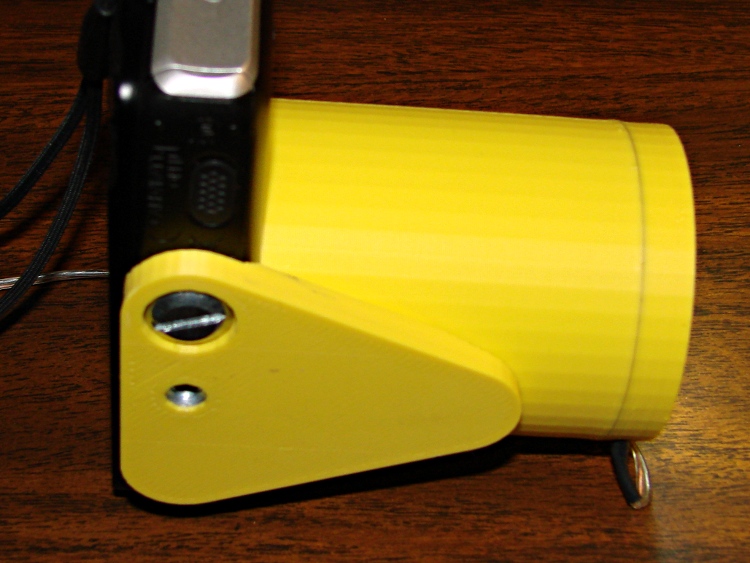
The boss is slightly shorter than the recess, so the knob body seats on the plate and works like this:
SX230HS microscope adapter – side view
When the camera isn’t on the adapter, the screw stores neatly in the 1/4-20 nut sunk in the middle of the mounting plate.
Although I can hand-hold the macro lens adapter, it’s much more stable on a real tripod. That requires a flat camera-mount screw that sits within the recess so the mounting plate can sit flush atop the tripod head:
Camera mount plate with screw – bottom view
However, it’ll be much easier to use the knob screw when I’m hand-holding the thing, so I drilled-and-tapped a hole in the knob for a place to store the flat screw when it’s not in use:
Camera mounting screws – end view
The threads in the knob don’t go quite far enough to seat the screw head against the knob, but that crude hack wouldn’t work in aluminum. Fortunately, it doesn’t matter:
Camera mounting screws – joined
This being a low-torque application, I filed the top off the already-pretty-flat truss head so the mounting plate recess didn’t have to be all that deep.
The knob+screw stores in the 1/4-20 nut between uses, too:
Knob and screw stored in macro adapter
Yeah, yellow probably isn’t appropriate for an optical structure; I’ll shoot a black rattle-can coat inside there after the weather warms up…
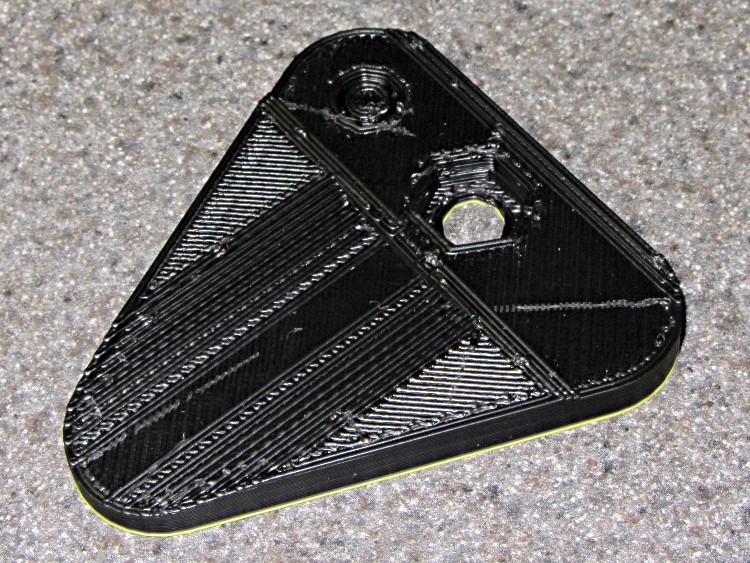
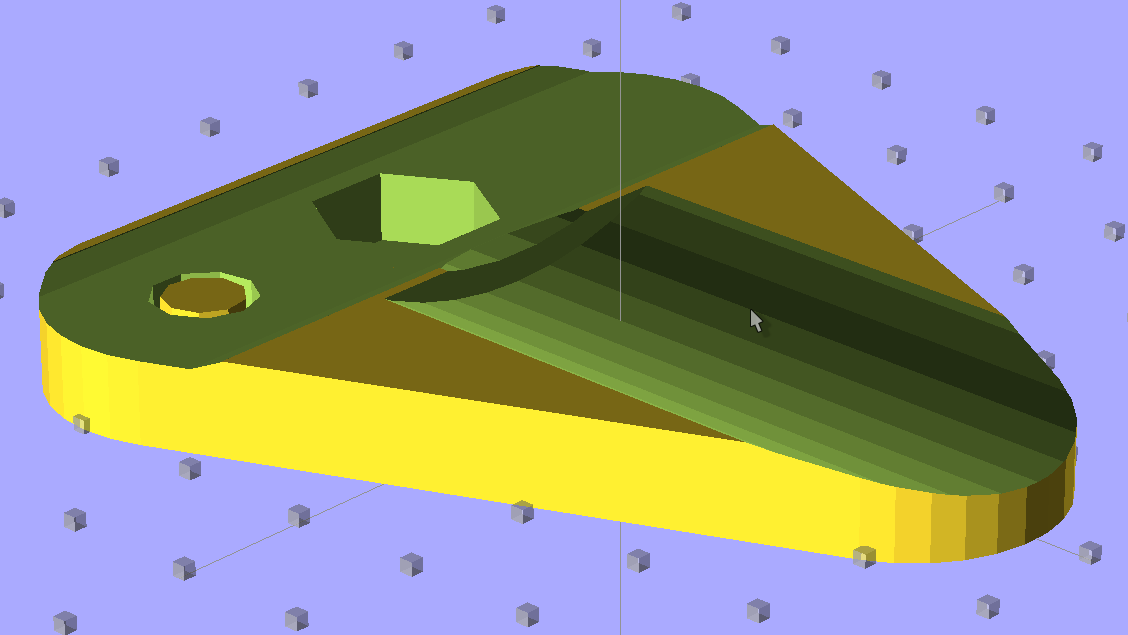
The Canon SX230HS tripod mounting screw sits offset from the lens axis, presumably because there’s no way to jam the screw socket under all the machinery that retracts the lens turret. I laid out the mounting plate as a round-cornered triangle with a 1/4-20 clearance hole for the screw that holds the camera to the plate and a 1/4-20 nut sunk under the lens axis for a tripod screw. The main adapter tube supporting the microscope mount or macro lens holder glues into the shallow trench:
Camera mount baseplate – top view
The barely visible trench along the back edge matches the bottom of the camera closely enough to align it against the main tube. This exploded view shows how that works:
Mounting plate camera interface – solid model
In fact, that trench and the hole under the camera’s tripod socket come from subtracting the whole camera model from the mounting plate. I added the fully extended lens turret just for completeness; the body is no wider then necessary to carve that trench:
Canon SX230HS Camera – solid model
The Z=0 plane cuts through the top of the curved bottom shell to simplify the subtraction. The post diameter clears the 1/4-20 tripod screw and is long enough to punch through the mounting plate.
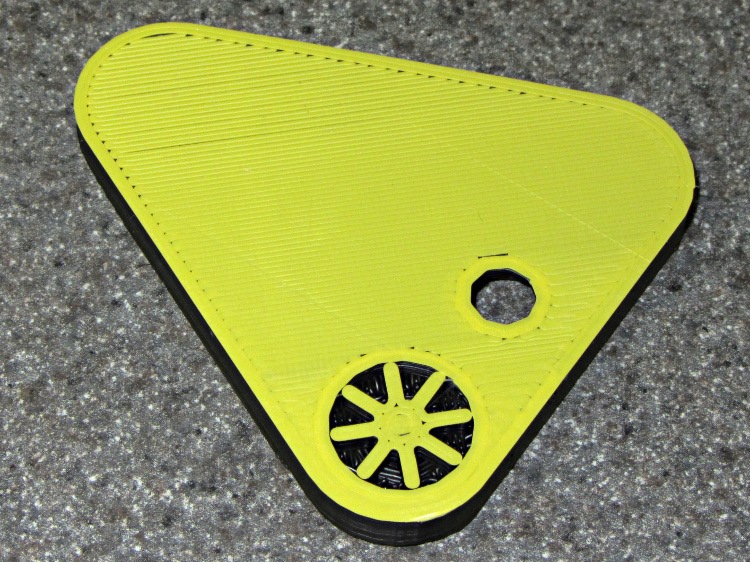
The bottom view shows the recess for the camera tripod screw head, with the support material (which blocks the hole in the picture above) removed:
Camera mount baseplate – support removed
It looks like this with the support plug in place:
Camera mount baseplate – bottom view – with support
Removing the support plug involves twisting the legs with a needle-nose pliers.
The yellow layer comes from switching colors in mid-print, but it certainly adds some much-needed contrast to the image.
The OpenSCAD code there sinks a second 1/4-20 nut that might be useful for an offset tripod mount if you need such a thing.
The deal was, if my Shop Assistant repaired my pocket camera, she could have it. She did, which meant I lost the ability to take pix through the microscope. While I was conjuring up a replacement, it occurred to me that I should also build a gadget to hold a close-up lens in front of the camera for tighter macro shots that don’t quite require a microscope’s magnification.
The solid model of the microscope adapter:
Microscope mount – solid model
The close-up macro adapter, with an LED ring light around the snout:
LED Ring mount – solid model
They have a common camera mounting plate, with a hex recess for a 1/4-20 nut that mates with a standard tripod screw and some support material sticking up through the hole for the screw that holds the camera to the plate:
Mounting plate – solid model – top view
The main tube glues into the plate’s cutout and is long enough to accommodate the fully extended lens turret, with four shallow holes for filament snippet locating pins to align the snout:
Main tube – solid model – bottom view
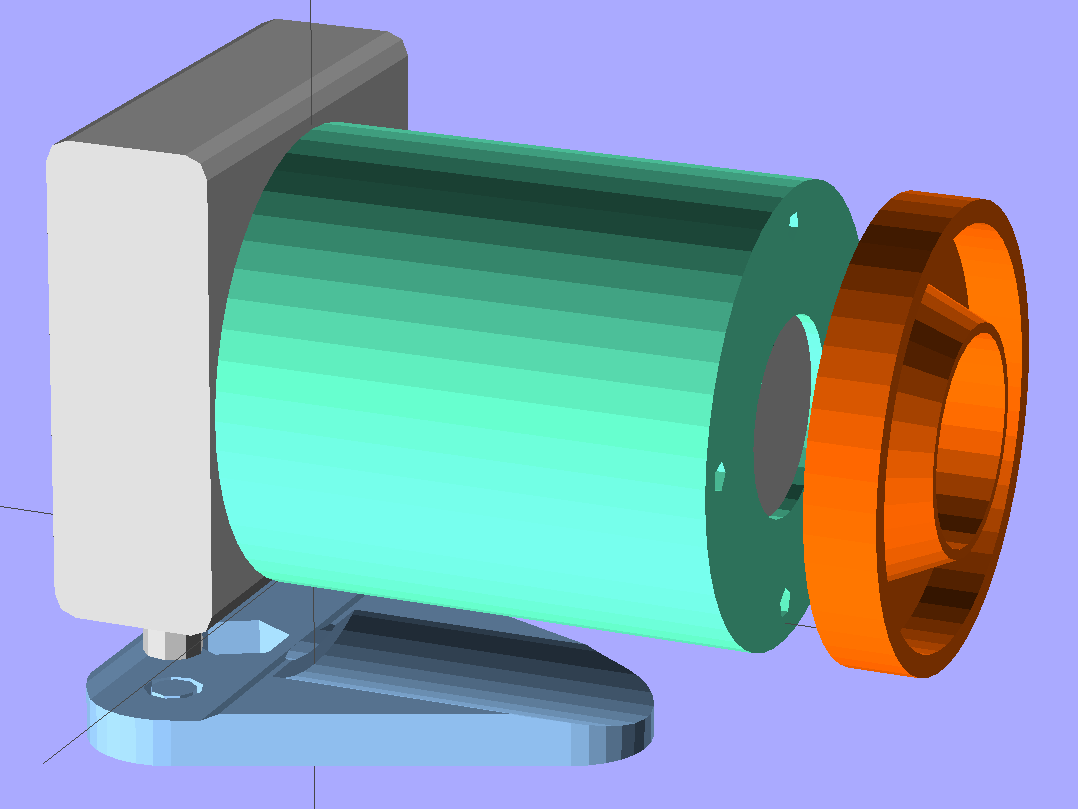
An exploded view shows how everything fits together, with the stud below the camera representing its tripod mounting screw:
LED Ring mount – solid model – exploded view
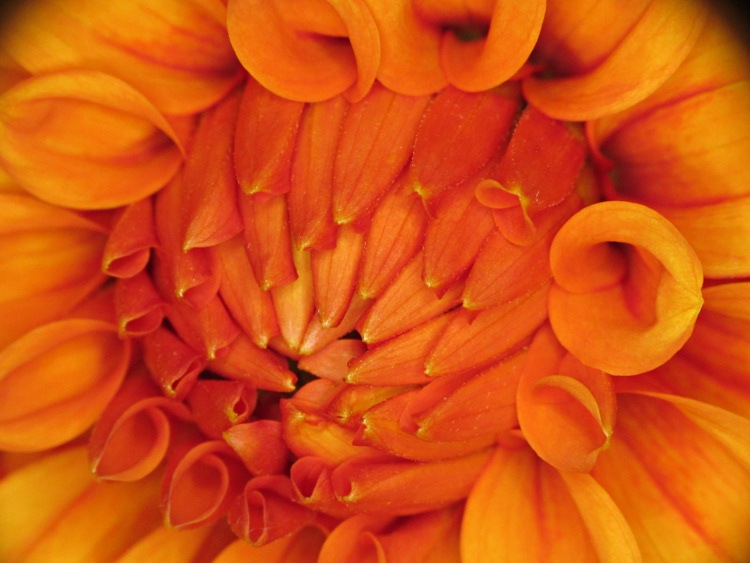
More details on the parts will appear over the next few days, but here’s the view through the macro adapter:
Dahlia through macro adapter
Yeah, some slight vignetting, but overall it’s pretty good.
The OpenSCAD source code that builds both adapters:
// Close-up lens mount & Microscope adapter for Canon SX230HS camera
// Ed Nisley KE4ZNU - Nov 2011

Mount = "Eyepiece";			// End result: LEDRing Eyepiece

Layout = "Show";			// Assembly: Show
							// Parts: Plate Tube LEDRing Camera Eyepiece
							// Build Plates: Build1..4

Gap = 12;					// between "Show" objects

include </home/ed/Thing-O-Matic/lib/MCAD/units.scad>
include </home/ed/Thing-O-Matic/Useful Sizes.scad>
include </home/ed/Thing-O-Matic/lib/visibone_colors.scad>

//-------
//- Extrusion parameters must match reality!
//  Print with +1 shells, 3 solid layers, 0.2 infill

ThreadThick = 0.33;
ThreadWidth = 2.0 * ThreadThick;

HoleFinagle = 0.2;
HoleFudge = 1.02;

function HoleAdjust(Diameter) = HoleFudge*Diameter + HoleFinagle;

Protrusion = 0.1;			// make holes end cleanly

function IntegerMultiple(Size,Unit) = Unit * ceil(Size / Unit);

//-------
// Dimensions

// doublet lens

LensDia = 25.0;
LensRad = LensDia/2;
LensClearance = 0.2;

LensEdge = 6.7;
LensThick = 8.6;
LensRimThick = IntegerMultiple((2.0 + LensThick),ThreadThick);

// LED ring light

LEDRingOD = 50.0;
LEDRingID = 36.0;
LEDBoardThick = 1.5;
LEDThick = 4.0;
LEDRingClearance = 0.5;
LEDWireHoleDia = 3.0;

// microscope eyepiece

EyepieceOD = 30.0;
EyepieceID = 24.0;
EyepieceLength = 25.0;

// camera
// Origin at base of [0] ring, Z+ along lens axis, X+ toward bottom, Y+ toward left

CameraBodyWidth = 2*10.6;							// 2 x center-to-curve edge
CameraBaseWidth = 15.5;								// flat part of bottom front to back
CameraBaseRadius = (CameraBodyWidth - CameraBaseWidth)/2;	// edge rounding
CameraBaseLength = 60.0;							// centered on lens axis
CameraBaseHeight = 55.0;							// main body height
CameraBaseThick = 0.9;								// downward from lens ring

echo(str("Camera base radius: ",CameraBaseRadius));

TripodHoleOffset = -19.0;							// mount screw wrt lens centerline
TripodHoleDia = Clear025_20;						// clearance hole

TripodScrewHeadDia = 14.5;							// recess for screw mounting camera
TripodScrewHeadRad = TripodScrewHeadDia/2;
TripodScrewHeadThick = 3.0;

// main lens tube

TubeDia = 		[53.0,	44.0,	40.0,	37.6];		// lens rings, [0] is fixed to body
TubeLength = 	[8.1,	20.6,	17.6,	12.7];

TubeEndClearance = 2.0;								// camera lens end to tube end
TubeEndThickness = IntegerMultiple(1.5,ThreadThick);
TubeInnerClearance = 0.5;

TubeInnerLength = TubeLength[0] + TubeLength[1] + TubeLength[2] + TubeLength[3] +
				  TubeEndClearance;
TubeOuterLength = TubeInnerLength + TubeEndThickness;

TubeID = TubeDia[0] + TubeInnerClearance;
TubeOD = TubeID + 6*ThreadWidth;
TubeWall = (TubeOD - TubeID)/2;
TubeSides = 48;

echo(str("Main tube outer length: ",TubeOuterLength));
echo(str("          ID: ",TubeID," OD: ",TubeOD," wall: ",TubeWall));

// camera mounting base

BaseWidth = IntegerMultiple((CameraBaseWidth + 2*CameraBaseRadius),ThreadThick);
BaseLength = 60.0;
BaseThick = IntegerMultiple((1.0 + Nut025_20Thick + CameraBaseThick),ThreadThick);

// LED ring mount

LEDBaseThick = IntegerMultiple(2.0,ThreadThick);	// base under lens + LED ring
LEDBaseRimWidth = IntegerMultiple(6.0,ThreadWidth);
LEDBaseRimThick = IntegerMultiple(LensThick,ThreadThick);

LEDBaseOD = max((LEDRingOD + LEDRingClearance + LEDBaseRimWidth),TubeOD);

echo(str("LED Ring OD: ",LEDBaseOD));

// alignment pins between tube and LED ring / microscope eyepiece

AlignPins = 4;
AlignPinOD = 2.9;
AlignPinCircleDia = TubeOD - 2*TubeWall - 2*AlignPinOD;		// 2*PinOD -> more clearance

//-------

module PolyCyl(Dia,Height,ForceSides=0) {			// based on nophead's polyholes

  Sides = (ForceSides != 0) ? ForceSides : (ceil(Dia) + 2);

  FixDia = Dia / cos(180/Sides);

  cylinder(r=HoleAdjust(FixDia)/2,h=Height,$fn=Sides);
}

module ShowPegGrid(Space = 10.0,Size = 1.0) {

  Range = floor(50 / Space);

	for (x=[-Range:Range])
	  for (y=[-Range:Range])
		translate([x*Space,y*Space,Size/2])
		  %cube(Size,center=true);

}

//-------

//- Camera body segment
//	Including lens base and peg for tripod hole access
//	Z=0 at edge of lens base ring, X=0 along lens axis

module CameraBody() {

  translate([0,0,-CameraBaseThick])
	rotate(90)
	  union() {
		translate([0,0,(CameraBaseHeight/2 + CameraBaseRadius)])
		  minkowski() {
			cube([CameraBaseWidth,
				  (CameraBaseLength + 2*Protrusion),
				  CameraBaseHeight],center=true);
			rotate([90,0,0])
			  cylinder(r=CameraBaseRadius,h=Protrusion,$fn=8);
		  }

		translate([0,0,(TubeDia[0]/2 + CameraBaseThick)])
		  rotate([0,90,0])
			rotate(180/TubeSides)
			  cylinder(r=(TubeDia[0]/2 + CameraBaseThick),
					  h=(CameraBodyWidth/2 + Protrusion),
					  $fn=TubeSides);

		translate([CameraBodyWidth/2,0,(TubeDia[0]/2 + CameraBaseThick)])
		  rotate([0,90,0])
			cylinder(r=TubeDia[0]/2,h=TubeLength[0]);

		translate([(TubeLength[0] + CameraBodyWidth/2),
				  0,(TubeDia[0]/2 + CameraBaseThick)])
		  rotate([0,90,0])
			cylinder(r=TubeDia[1]/2,h=TubeLength[1]);

		translate([(TubeLength[0] + TubeLength[1] + CameraBodyWidth/2),
				  0,(TubeDia[0]/2 + CameraBaseThick)])
		  rotate([0,90,0])
			cylinder(r=TubeDia[2]/2,h=TubeLength[2]);

		translate([(TubeLength[0] + TubeLength[1] + TubeLength[2] + CameraBodyWidth/2),
				  0,(TubeDia[0]/2 + CameraBaseThick)])
		  rotate([0,90,0])
			cylinder(r=TubeDia[3]/2,h=TubeLength[3]);

		translate([0,TripodHoleOffset,-BaseThick])
		  PolyCyl(TripodHoleDia,(BaseThick + 2*Protrusion));

	  }
}

//- Main tube

module Tube() {

  difference() {
	cylinder(r=TubeOD/2,h=TubeOuterLength,$fn=TubeSides);

	translate([0,0,TubeEndThickness])
	  PolyCyl(TubeID,(TubeInnerLength + Protrusion),TubeSides);

	translate([0,0,-Protrusion]) {
	  if (Mount == "LEDRing")
		cylinder(r=LensRad,h=(TubeEndThickness + 2*Protrusion));
	  if (Mount == "Eyepiece")
		cylinder(r=EyepieceID/2,h=(TubeEndThickness + 2*Protrusion));
	}

	for (Index = [0:AlignPins-1])
	  rotate(Index*90)
		translate([(AlignPinCircleDia/2),0,-ThreadThick])
		  rotate(180)			// flat sides outward
			PolyCyl(AlignPinOD,TubeEndThickness);
  }

}

//- Base plate

module BasePlate() {

  union() {
	difference() {
		linear_extrude(height=BaseThick)
		  hull() {
			translate([-(BaseLength/2 - BaseWidth/2),0,0])
			  circle(BaseWidth/2);
			translate([ (BaseLength/2 - BaseWidth/2),0,0])
			  circle(BaseWidth/2);
			translate([0,(0.75*BaseLength),0])
			  circle(BaseWidth/2);
		  }

		translate([0,0,BaseThick])
		  CameraBody();

		translate([0,(TubeOuterLength + CameraBodyWidth/2),
				  (BaseThick + TubeDia[0]/2)])
		  rotate([90,0,0])
			PolyCyl(TubeOD,TubeOuterLength,$fn=TubeSides);

		translate([0,0,3*ThreadThick])
		  PolyCyl((Nut025_20Dia*sqrt(3)/2),2*Nut025_20Thick,6);	// dia across hex flats

		translate([0,0,-Protrusion])
		  PolyCyl(Clear025_20,(BaseThick + 2*Protrusion));

		translate([TripodHoleOffset,0,3*ThreadThick])
		  PolyCyl((Nut025_20Dia*sqrt(3)/2),2*Nut025_20Thick,6);	// dia across hex flats

		translate([TripodHoleOffset,0,-Protrusion])
		  PolyCyl(Clear025_20,(BaseThick + 2*Protrusion));

		translate([-TripodHoleOffset,0,-Protrusion])
		  PolyCyl(TripodScrewHeadDia,(TripodScrewHeadThick + Protrusion));

	}

	translate([-TripodHoleOffset,0,0]) {				// support for tripod screw hole
	  for (Index=[0:3])
		rotate(Index*45)
		  translate([-ThreadWidth,-TripodScrewHeadRad,0])
			cube([2*ThreadWidth,TripodScrewHeadDia,TripodScrewHeadThick]);

	  cylinder(r=0.4*TripodScrewHeadRad,h=(BaseThick - CameraBaseThick),$fn=9);
	}
  }
}

//- LED mounting ring

module LEDRing() {

  difference() {
	cylinder(r=LEDBaseOD/2,h=LensRimThick,$fn=48);

	translate([0,0,-Protrusion])
	  PolyCyl((LensDia + LensClearance),
			  (LensRimThick + 2*Protrusion));

	translate([0,0,LEDBaseRimThick])
	  difference() {
		PolyCyl(LEDBaseOD,LensThick);
		PolyCyl(LEDRingID,LensThick);
	  }

	translate([0,0,LEDBaseThick])
	  difference() {
		PolyCyl((LEDRingOD + LEDRingClearance),LensThick);
		cylinder(r1=HoleAdjust(LEDRingID - LEDRingClearance)/2,
				 r2=HoleAdjust(LensDia + LensClearance)/2 + 2*ThreadWidth,
				 h=LensThick);
	  }

	for (Index = [0:AlignPins-1])
	  rotate(Index*90)
		translate([(AlignPinCircleDia/2),0,-ThreadThick])
		  rotate(180)			// flat sides outward
			PolyCyl(AlignPinOD,LEDBaseThick);

	rotate(45)
	  translate([0,LEDRingID/2,(LEDBaseThick + 1.2*LEDWireHoleDia/2)])
		rotate([0,-90,0])			// flat side down
		  rotate([-90,0,0])
			PolyCyl(LEDWireHoleDia,2*LEDBaseRimWidth);
  }

}

//- Microscope eyepiece adapter

module EyepieceMount() {

  difference() {
	cylinder(r1=TubeOD/2,
			 r2=(EyepieceOD + 8*ThreadWidth)/2,
			 h=EyepieceLength,
			 $fn=TubeSides);

	translate([0,0,-Protrusion])
	  PolyCyl(EyepieceOD,(EyepieceLength + 2*Protrusion));

	for (Index = [0:AlignPins-1])
	  rotate(Index*90)
		translate([(AlignPinCircleDia/2),0,-ThreadThick])
		  rotate(180)			// flat sides outward
			PolyCyl(AlignPinOD,6*ThreadThick);
  }

}

//-------
// Build it!

if (Layout != "Show")
  ShowPegGrid();

if (Layout == "Tube")
  Tube();

if (Layout == "LEDRing")
  LEDRing();

if (Layout == "Plate")
  BasePlate();

if (Layout == "Camera")
  CameraBody();

if (Layout == "Eyepiece")
  EyepieceMount();

if (Layout == "Build1")
  translate([0,-BaseLength/3,0])
	BasePlate();

if (Layout == "Build2")
  Tube();

if (Layout == "Build3")
  LEDRing();

if (Layout == "Build4")
  EyepieceMount();

if (Layout == "Show") {
  translate([0,TubeOuterLength,TubeDia[0]/2]) {
	rotate([90,0,0])
	  color(LTC) Tube();
	translate([0,Gap,0])
	  rotate([-90,0,0]) {
		if (Mount == "LEDRing")
		  color(OOR) LEDRing();
		if (Mount == "Eyepiece")
		  color(OOR) EyepieceMount();
	  }
  }

  translate([0,-CameraBodyWidth/2,0])
	color(PG) CameraBody();

  color(PDA)
	render()
	translate([0,-CameraBodyWidth/2,-(BaseThick + Gap)])
	  BasePlate();
}
I just updated EMC2 on the Sherline CNC mill from 2.4.6 to 2.4.7 (which mis-identifies itself as 2.4.6 on the splash screen) and the Axis UI failed to start. A bit of digging shows that the name of Button 1 (the left button in the right-hand quad, clearly labeled 1) has inexplicably changed from btn-trigger to btn-joystick.
Logitech Gamepad Pendant
Most likely the change has nothing to do with EMC2, because (I think) those names bubble up from the HID driver that actually talks to the hardware and that stuff has also been updated; this is all on Ubuntu 10.04 LTS. But in any event, the name is now different.
That requires a tweak to the Eagle schematics, which will regenerate Logitech_Gamepad.hal, but you can just edit the latter file and change btn-trigger to btn-joystick.
As nearly as I can tell, changing the pin name in the Logitech library component, saving the library, then updating the library in the schematic doesn’t do squat. Evidently, Eagle keeps track of which components you’ve used and won’t update them unless you do some manual gymnatistics, which makes a certain amount of sense.
That means one must:
Delete both “gates” of the old component (INPUT.0.BUTTONS first, then INPUT.0)
Make sure you’re on Page 2 where the basic gate will go
Add the revised LOGITECH_DUAL_ACTION_GAMEPAD to get the INPUT.1 “gate”
Rename it to INPUT.0
Use Move to jiggle it around a bit to ensure its pins get hitched up to the existing nets
Switch to Page 1 where the button nets lie in wait
Type invoke input.0 into the Eagle command line
Pick -BUTTONS from the list to select that “gate”
Position that gate appropriately
Use Move to jiggle the gate
Save everything
Run the Eagle2Hal ULP to get a new HAL output file
Put that file where it’ll do the most good
There, now, wasn’t that obvious?
The modified Logitech_Gamepad.hal file:
# HAL config file automatically generated by Eagle-CAD ULP:
# [/mnt/bulkdata/Project Files/eagle/ulp/hal-write-2.4.ulp]
# (C) Martin Schoeneck.de 2008
# Mods Ed Nisley 2010
# Path        [/mnt/bulkdata/Project Files/eagle/projects/EMC2 HAL Configuration/]
# ProjectName [Logitech Gamepad - 2.4.7]
# File name   [/mnt/bulkdata/Project Files/eagle/projects/EMC2 HAL Configuration/Logitech Gamepad - 2.4.7.hal]
# Created     [10:40:31 11-Nov-2011]

####################################################
# Load realtime and userspace modules
loadrt constant		count=16
loadrt and2		count=17
loadrt flipflop		count=4
loadrt mux2		count=5
loadrt mux4		count=1
loadrt not		count=8
loadrt or2		count=10
loadrt scale		count=7
loadrt timedelay		count=1
loadrt toggle		count=1
loadrt wcomp		count=6

####################################################
# Hook functions into threads
addf toggle.0		servo-thread
addf wcomp.1		servo-thread
addf wcomp.2		servo-thread
addf wcomp.3		servo-thread
addf and2.0		servo-thread
addf and2.4		servo-thread
addf and2.3		servo-thread
addf and2.2		servo-thread
addf and2.1		servo-thread
addf constant.6		servo-thread
addf constant.5		servo-thread
addf constant.4		servo-thread
addf constant.3		servo-thread
addf constant.2		servo-thread
addf constant.1		servo-thread
addf constant.0		servo-thread
addf constant.7		servo-thread
addf constant.8		servo-thread
addf scale.1		servo-thread
addf scale.2		servo-thread
addf scale.3		servo-thread
addf mux4.0		servo-thread
addf mux2.0		servo-thread
addf scale.4		servo-thread
addf scale.0		servo-thread
addf wcomp.5		servo-thread
addf wcomp.4		servo-thread
addf wcomp.0		servo-thread
addf flipflop.1		servo-thread
addf flipflop.0		servo-thread
addf and2.5		servo-thread
addf and2.6		servo-thread
addf and2.7		servo-thread
addf and2.8		servo-thread
addf flipflop.2		servo-thread
addf flipflop.3		servo-thread
addf or2.4		servo-thread
addf or2.8		servo-thread
addf or2.7		servo-thread
addf or2.6		servo-thread
addf or2.5		servo-thread
addf or2.3		servo-thread
addf or2.2		servo-thread
addf or2.1		servo-thread
addf or2.0		servo-thread
addf not.1		servo-thread
addf not.2		servo-thread
addf not.3		servo-thread
addf not.4		servo-thread
addf not.5		servo-thread
addf not.6		servo-thread
addf not.7		servo-thread
addf not.0		servo-thread
addf constant.9		servo-thread
addf mux2.1		servo-thread
addf mux2.2		servo-thread
addf mux2.3		servo-thread
addf mux2.4		servo-thread
addf constant.10		servo-thread
addf constant.11		servo-thread
addf scale.5		servo-thread
addf scale.6		servo-thread
addf constant.12		servo-thread
addf constant.13		servo-thread
addf timedelay.0		servo-thread
addf constant.14		servo-thread
addf constant.15		servo-thread
addf and2.16		servo-thread
addf and2.15		servo-thread
addf and2.14		servo-thread
addf and2.13		servo-thread
addf and2.12		servo-thread
addf and2.11		servo-thread
addf and2.10		servo-thread
addf and2.9		servo-thread
addf or2.9		servo-thread

####################################################
# Set parameters

####################################################
# Set constants
setp constant.0.value	+0.02
setp constant.1.value	-0.02
setp constant.2.value	60
setp constant.3.value	1.00
setp constant.4.value	0.10
setp constant.5.value	0.50
setp constant.6.value	0.10
setp constant.7.value	+0.5
setp constant.8.value	-0.5
setp constant.9.value	0.0
setp constant.10.value	[TRAJ]MAX_LINEAR_VELOCITY
setp constant.11.value	[TRAJ]MAX_ANGULAR_VELOCITY
setp constant.12.value	-1.0
setp constant.13.value	0.1
setp constant.14.value	0.020
setp constant.15.value	0.000

####################################################
# Connect Modules with nets
net a-button-minus or2.2.in0 input.0.btn-joystick and2.15.in0
net a-button-plus or2.2.in1 input.0.btn-thumb2 and2.16.in0
net a-buttons-active or2.2.out or2.3.in0 or2.4.in1
net a-disable not.7.out and2.5.in1
net a-enable or2.4.in0 flipflop.3.out not.7.in mux2.4.sel
net a-jog wcomp.2.in input.0.abs-z-position mux2.4.in1
net a-knob-active not.2.out and2.7.in1
net a-knob-inactive wcomp.2.out not.2.in and2.6.in1
net a-select and2.8.in0 and2.7.out
net a-set flipflop.3.set and2.8.out
net angular_motion or2.4.out mux2.0.sel
net any-buttons-active mux4.0.sel0 or2.8.out
net az-buttons-active or2.3.out or2.8.in1 or2.9.in0
net az-reset flipflop.2.reset and2.6.out flipflop.3.reset
net button-crawl scale.4.out mux4.0.in3
net button-fast scale.2.out mux4.0.in1 scale.4.in
net jog-crawl toggle.0.out mux4.0.sel1
net jog-speed halui.jog-speed mux4.0.out
net knob-crawl mux4.0.in2 scale.3.out
net knob-fast mux4.0.in0 scale.1.out scale.3.in
net n_1 constant.10.out mux2.0.in0
net n_2 and2.0.in0 input.0.btn-top2
net n_3 and2.0.in1 input.0.btn-base
net n_4 and2.0.out halui.abort
net n_5 halui.mode.manual input.0.btn-base3
net n_6 wcomp.0.max wcomp.1.max wcomp.2.max wcomp.3.max constant.0.out
net n_7 halui.program.resume input.0.btn-base4
net n_8 wcomp.0.min wcomp.1.min wcomp.2.min wcomp.3.min constant.1.out
net n_9 mux2.0.in1 constant.11.out
net n_10 constant.12.out scale.5.gain scale.6.gain
net n_11 or2.0.in0 input.0.btn-base5
net n_12 or2.0.in1 input.0.btn-base6
net n_13 constant.9.out mux2.1.in0 mux2.2.in0 mux2.3.in0 mux2.4.in0
net n_14 mux2.1.out halui.jog.0.analog
net n_15 toggle.0.in or2.0.out
net n_16 constant.2.out scale.0.gain
net n_17 constant.5.out scale.1.gain
net n_18 constant.3.out scale.2.gain
net n_19 constant.4.out scale.3.gain
net n_20 scale.4.gain constant.6.out
net n_21 halui.jog.1.analog mux2.2.out
net n_22 mux2.2.in1 scale.5.out
net n_23 scale.6.out mux2.3.in1
net n_24 constant.13.out halui.jog-deadband
net n_25 wcomp.4.max constant.7.out wcomp.5.max
net n_26 constant.8.out wcomp.4.min wcomp.5.min
net n_27 mux2.3.out halui.jog.2.analog
net n_28 halui.jog.3.analog mux2.4.out
net n_29 timedelay.0.out and2.9.in1 and2.10.in1 and2.12.in1 and2.11.in1 and2.13.in1 and2.14.in1 and2.16.in1 and2.15.in1
net n_30 and2.9.out halui.jog.0.minus
net n_31 or2.9.out timedelay.0.in
net n_32 constant.14.out timedelay.0.on-delay
net n_33 constant.15.out timedelay.0.off-delay
net n_34 and2.10.out halui.jog.0.plus
net n_35 and2.11.out halui.jog.1.minus
net n_36 halui.jog.1.plus and2.12.out
net n_37 and2.13.out halui.jog.2.minus
net n_38 and2.14.out halui.jog.2.plus
net n_39 and2.15.out halui.jog.3.minus
net n_40 and2.16.out halui.jog.3.plus
net vel-per-minute scale.0.out scale.1.in scale.2.in
net vel-per-second mux2.0.out scale.0.in
net x-buttons-active or2.7.in0 or2.5.out
net x-disable not.4.out and2.4.in1
net x-enable not.4.in flipflop.0.out mux2.1.sel
net x-hat-jog wcomp.4.in input.0.abs-hat0x-position
net x-hat-minus wcomp.4.under or2.5.in1 and2.9.in0
net x-hat-plus or2.5.in0 wcomp.4.over and2.10.in0
net x-jog wcomp.0.in input.0.abs-x-position mux2.1.in1
net x-knob-active not.0.out and2.1.in0
net x-knob-inactive wcomp.0.out not.0.in and2.2.in0 and2.3.in0
net x-set and2.1.out flipflop.0.set
net xy-buttons-active or2.7.out or2.8.in0 or2.9.in1
net xy-reset flipflop.0.reset and2.2.out flipflop.1.reset
net y-buttons-active or2.6.out or2.7.in1
net y-disable not.5.out and2.1.in1
net y-enable flipflop.1.out not.5.in mux2.2.sel
net y-hat-jog wcomp.5.in input.0.abs-hat0y-position
net y-hat-minus wcomp.5.under or2.6.in1 and2.12.in0
net y-hat-plus or2.6.in0 wcomp.5.over and2.11.in0
net y-jog wcomp.1.in input.0.abs-y-position scale.5.in
net y-knob-active not.1.out and2.3.in1
net y-knob-inactive not.1.in wcomp.1.out and2.2.in1
net y-select and2.4.in0 and2.3.out
net y-set flipflop.1.set and2.4.out
net z-button-minus or2.1.in0 input.0.btn-thumb and2.13.in0
net z-button-plus or2.1.in1 input.0.btn-top and2.14.in0
net z-buttons-active or2.1.out or2.3.in1
net z-disable not.6.out and2.8.in1
net z-enable not.6.in flipflop.2.out mux2.3.sel
net z-jog wcomp.3.in input.0.abs-rz-position scale.6.in
net z-knob-active not.3.out and2.5.in0
net z-knob-inactive not.3.in wcomp.3.out and2.7.in0 and2.6.in0
net z-set and2.5.out flipflop.2.set
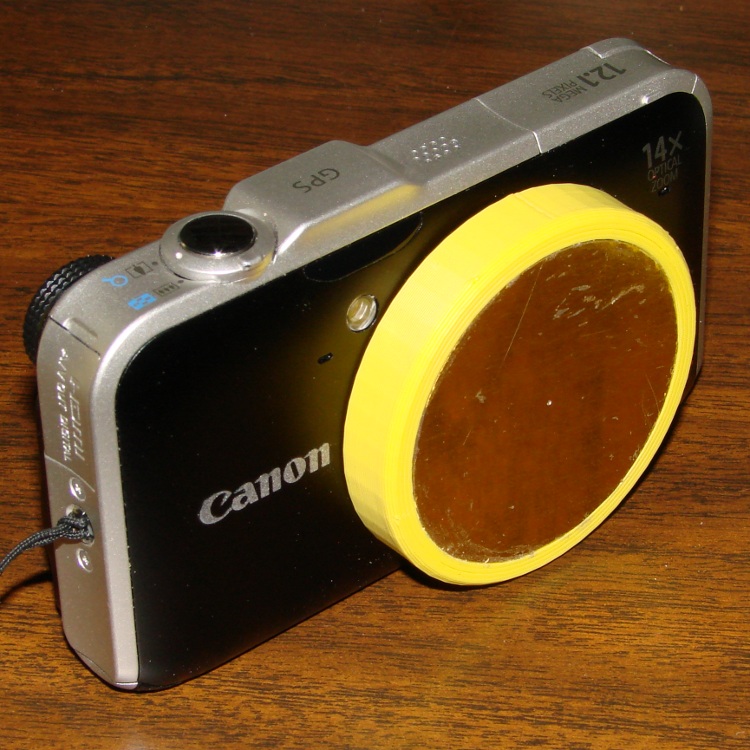
The SX230HS camera lives in my pants pocket, where it gets pressed between my leg and anything I lean against. Turns out that the lens turret end cap isn’t quite thick enough to not bend inward against the leaves that cover the lens, which causes them to hang up. The solution boils down to a hideous external lens cap:
Canon SX230HS with lens cap
It’s built from forget-me-not yellow filament for an obvious reason…
The sheet-metal plate bears against the non-moving rim around the turret. I marked the plate’s diameter with a compass, extracted it from the sheet with left-cutting tin snips, filed off the slivers, rounded the edge, and it snapped right into the recess where a touch of acrylic caulk holds it firmly in place.
A thin plastic cover would be too flexible and a thicker plastic cover would be too thick; this must fit into an already-snug cloth pouch where a few additional millimeters of girth actually matter. My previous camera taught me that pocket fuzz gets into everything, so a pouch isn’t optional.
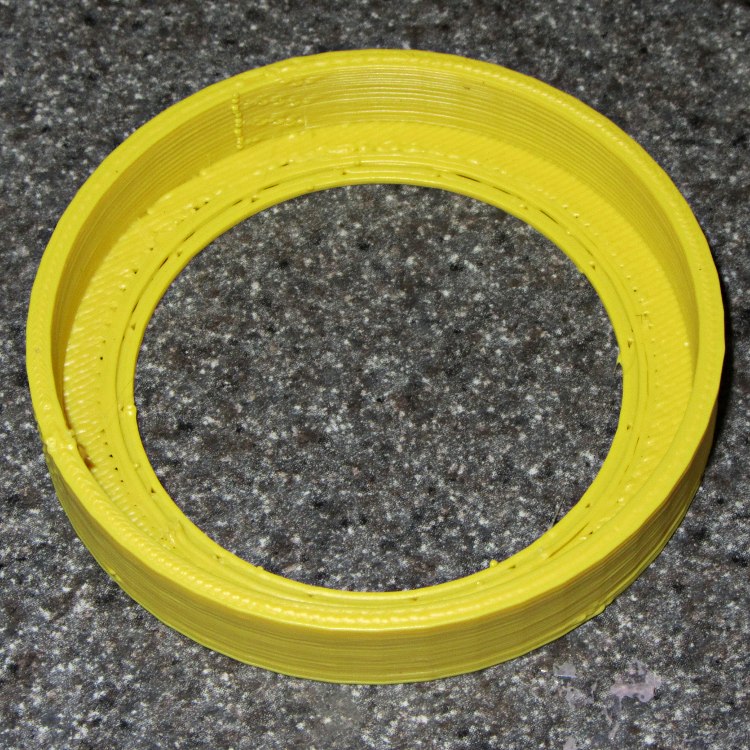
The interior isn’t too inspiring, but you can see what two layers of plastic look like across the bottom:
SX230HS lens cap – interior
The front has the shallow recess that captures the metal plate. Because the front builds against the aluminum build platform, I added a support structure inside the recess:
SX230HS lens cap – support in place
The solid model gives a better view:
Lens cap – solid model – bottom view
It’s basically a ring with tabs under the recess. The ring OD matches the lens caps’s ID, with a height equal to the recess depth, so only the tabs contact the cap. I removed them by twisting each tab with a needle-nose pliers until the whole thing popped loose:
SX230HS lens cap – support structure
A bit of scraper and scalpel cleanup and it’s all good. The detail pix show the first trial of the lens cap, which lacks the nice bevel around the front rim.
The camera is smart enough to notice when something blocks the lens: it immediately shuts down and displays a lens failure error message. That’s probably not a Good Thing on a regular basis, but it doesn’t seem to do any harm.
FWIW, my previous pocket camera, a Casio EX-Z850 , sported a recessed and somewhat thicker turret end cap that didn’t have this problem. Mary says she’ll make a case for this camera, too, but until then I’m using a pouch from a dinky VOIP phone that just barely holds the camera.
The OpenSCAD source code:
// Lens cap for Canon SX230HS
// Ed Nisley KE4ZNU - Nov 2011

//-------
//- Extrusion parameters must match reality!
//  Print with +1 shells, 3 solid layers, 0.2 infill

ThreadThick = 0.33;
ThreadWidth = 2.0 * ThreadThick;

HoleFinagle = 0.20;
HoleFudge = 1.00;

function HoleAdjust(Diameter) = HoleFudge*Diameter + HoleFinagle;

Protrusion = 0.1;			// make holes end cleanly

function IntegerMultiple(Size,Unit) = Unit * ceil(Size / Unit);

//-------
// Dimensions

LensDia = 53.0;
LensRad = LensDia/2;
LensLength = 8.0;

PlateThick = IntegerMultiple(0.75,ThreadThick);
PlateDia = 48.0;

Shell = 2*ThreadWidth;
Spacer = 2*ThreadThick;

CapOD = LensDia + 2*Shell;
CapLength = LensLength + Spacer + PlateThick;
CapSides = 48;

CenterHoleDia = 44.0;

BevelWidth = PlateThick;

NumStruts = 16;
SupportStrutLen = (PlateDia - ThreadWidth)/2;		// small gap to cap

//-------

module PolyCyl(Dia,Height,ForceSides=0) {			// based on nophead's polyholes

  Sides = (ForceSides != 0) ? ForceSides : (ceil(Dia) + 2);

  FixDia = Dia / cos(180/Sides);

  cylinder(r=HoleAdjust(FixDia)/2,h=Height,$fn=Sides);
}

module ShowPegGrid(Space = 10.0,Size = 1.0) {

  Range = floor(50 / Space);

	for (x=[-Range:Range])
	  for (y=[-Range:Range])
		translate([x*Space,y*Space,Size/2])
		  %cube(Size,center=true);

}

//-------

ShowPegGrid();

difference() {
  PolyCyl(CapOD,CapLength,CapSides);

  translate([0,0,(Spacer + PlateThick)])					// lens shell
	PolyCyl(LensDia,(LensLength + Protrusion),CapSides);

  translate([0,0,-Protrusion])								// center hole
	PolyCyl(CenterHoleDia,(CapLength + Protrusion));

  translate([0,0,-Protrusion])								// bevel
	difference() {
	  cylinder(r=(CapOD/2 + 2*(BevelWidth + Protrusion)),
			   h=(2*BevelWidth + Protrusion),
			   $fn=CapSides);
	  cylinder(r1=(CapOD/2 - BevelWidth - Protrusion),
			   r2=(CapOD/2 + BevelWidth),
			   h=(2*BevelWidth + Protrusion),
			   $fn=CapSides);
	}

  difference() {
	translate([0,0,-Protrusion])							// cover plate recess
	  PolyCyl(PlateDia,(PlateThick + Protrusion));
	for (Index=[0:(NumStruts - 1)])							// support struts
	  rotate(Index*360/NumStruts)
		translate([-ThreadWidth,-SupportStrutLen,0])
		  cube([2*ThreadWidth,SupportStrutLen,PlateThick]);
  }
}

difference() {									// support ring
  PolyCyl(CenterHoleDia,PlateThick);
  translate([0,0,-Protrusion])
	PolyCyl((CenterHoleDia - 4*ThreadWidth),(PlateThick + 2*Protrusion));
}
If this is true, I can scrap out my roll of mu metal shielding:
Magnetic card protection sleeve
I think they mean the sleeve protects the magnetic stripe from mechanical damage, but wedging those two sentences together certainly suggests the envelope has serious anti-magnetic mojo…













 The Smell of Molten Projects in the Morning