The Smell of Molten Projects in the Morning

Ed Nisley's Blog: Shop notes, electronics, firmware, machinery, 3D printing, laser cuttery, and curiosities. Contents: 100% human thinking, 0% AI slop.

Category: Machine Shop

Mechanical widgetry

  • Kensington Expert Mouse Cable Replacement

    My posts about troubles with the Kensington Expert Mouse scroll ring remain disturbingly popular. My most recent warranty replacement has been running fine for several years, so I suspect they had a bad lot of IR detectors go their production line and into the field.

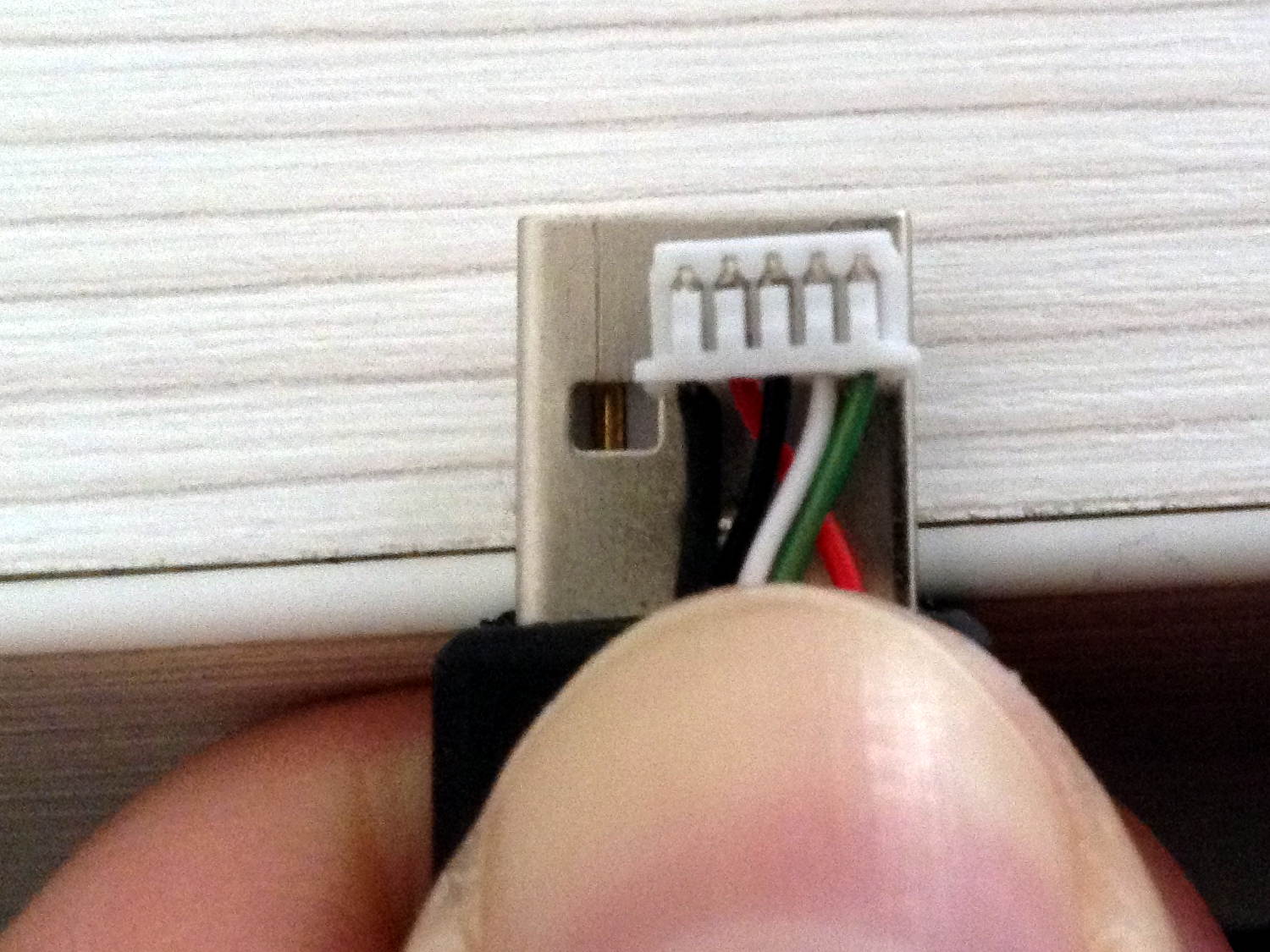
    In any event, a recent email asked about where to get the little connector inside the mouse to replace a worn-out USB cable:

    Kensington Expert Mouse - internal USB connector
    Kensington Expert Mouse – internal USB connector

    Maybe you’d be lucky enough to find an identical connector inside an old mouse in a junk box, but that’s not the way to bet.

    Given that you need not only the proper plastic shell, but also the pins and the crimper for a proper repair, I suggested just chopping the wires an inch from the connector and splicing the new cable onto the wires.

    Not an elegant solution, but it works for me …

  • AADE LC Meter: AT26 Crystal Capacitance Fixture

    Crystals (or resonators) in AT26 packages have vanishingly small capacitances, so I conjured a little fixture for my AADE L/C Meter IIB (*) that holds them securely under little fingers snipped from an EMI shield:

    AT26 crystal capacitance fixture - Cpar detail
    AT26 crystal capacitance fixture – Cpar detail

    The finger on the right sits atop a snippet of rectangular brass tube so it need not bend so far.

    The base is a snippet of double-sided PCB with copper tape soldered around the edges. I drilled the holes slightly oversize and soldered copper tape there, giving the top foil a direct connection to the terminals. The raggedy slot looks like it came from a hacksaw; no false advertising there.

    The meter reports 6.5 pF of stray capacitance and nulls it to zero as usual. Without the fixture, it shows 2.5 pF.

    With the crystal in that position, the meter measures Cpar, the parasitic capacitance from both terminals to the can, which should be (roughly) twice the capacitance from either terminal to the can.

    Two more clips measure C0, the plate-to-plate capacitance:

    AT26 crystal capacitance fixture - C0 detail
    AT26 crystal capacitance fixture – C0 detail

    The meter drive is about 200 mV at 700 kHz, far away from resonance. Assuming the resonator’s effective series resistance is 25 kΩ (tuning forks aren’t crystals!), it’s dissipating 1.5 µW (and less as the ESR goes up). That may be slightly hot for some resonators, but it’s surely survivable.

    Some preliminary data on five 32.768 kHz crystals shows Cpar = 0.4 pF and C0 = 0.9 pF. I don’t trust those numbers very much, but they’re reproducible within 0.1-ish pF.

    (*) Almost All Digital Electronics and its website vanished after the owner died; the meter continues to work fine. The cheap knockoffs flooding eBay and Amazon may get you close to the goal.

  • Quartz Tuning Fork Resonator Teardown

    Thinking of a 60 kHz crystal filter front end for the WWVB receiver brought a little bag of 32.768 kHz crystals to the surface; I figured I could use them as crash test dummies while a bag of 60 kHz crystals travels around the planet. Come to find out they don’t behave quite like crystals and a bit of investigation shows the little cans contain tuning fork resonators, not crystal slabs.

    I had to see that, so I grabbed the base of one in a pin vise:

    Quartz resonator - pin vise
    Quartz resonator – pin vise

    I don’t know the part number for those resonators, but it’s something like AT26, where the “26” means a cylindrical can 2 mm OD and 6 mm long, more or less.

    Notching the can at the chuck with a triangular file, then wiggling the can with needle-nose pliers, eventually broke it off:

    Quartz resonator - A side
    Quartz resonator – A side

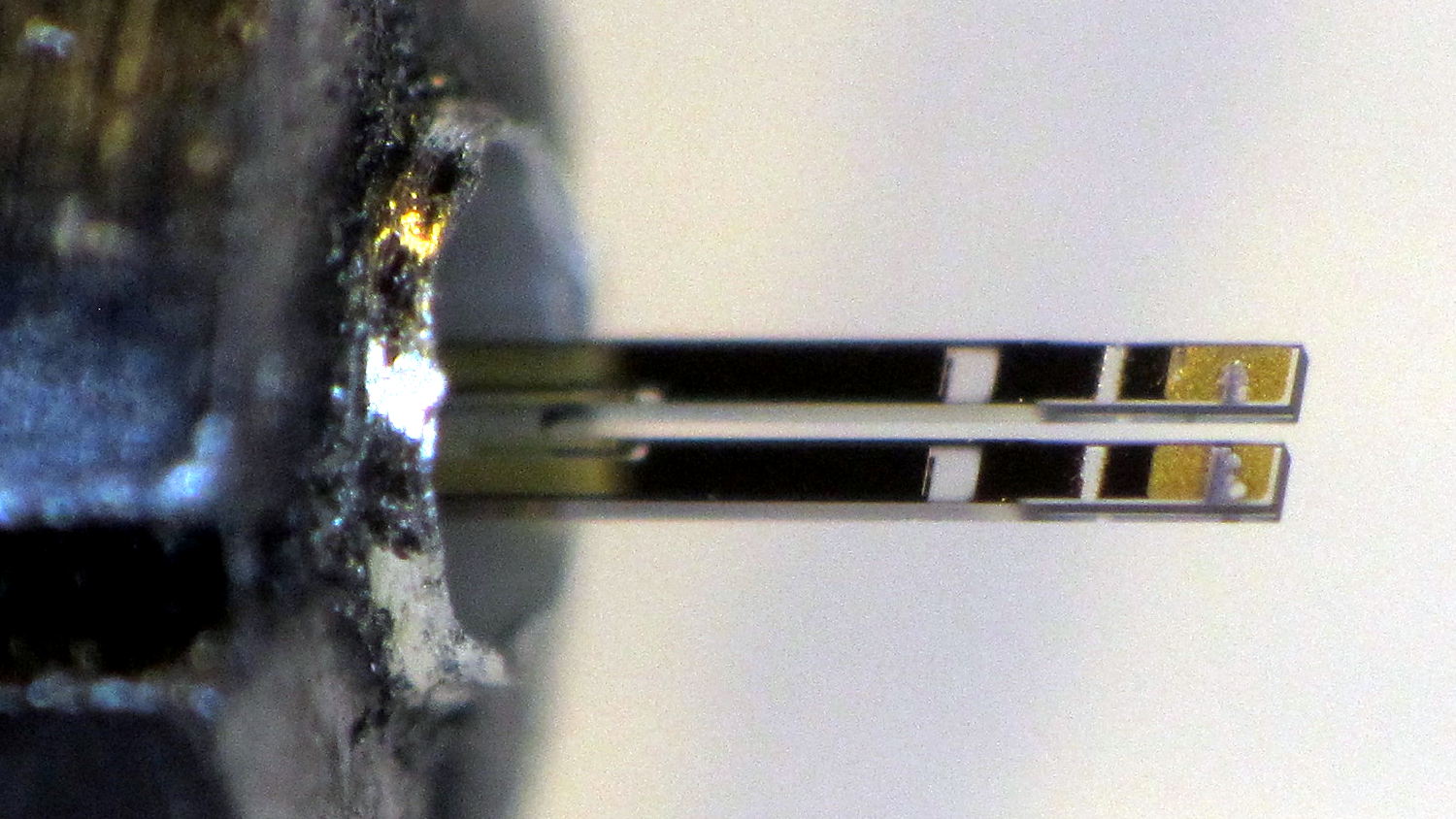
    The other side:

    Quartz resonator - B side
    Quartz resonator – B side

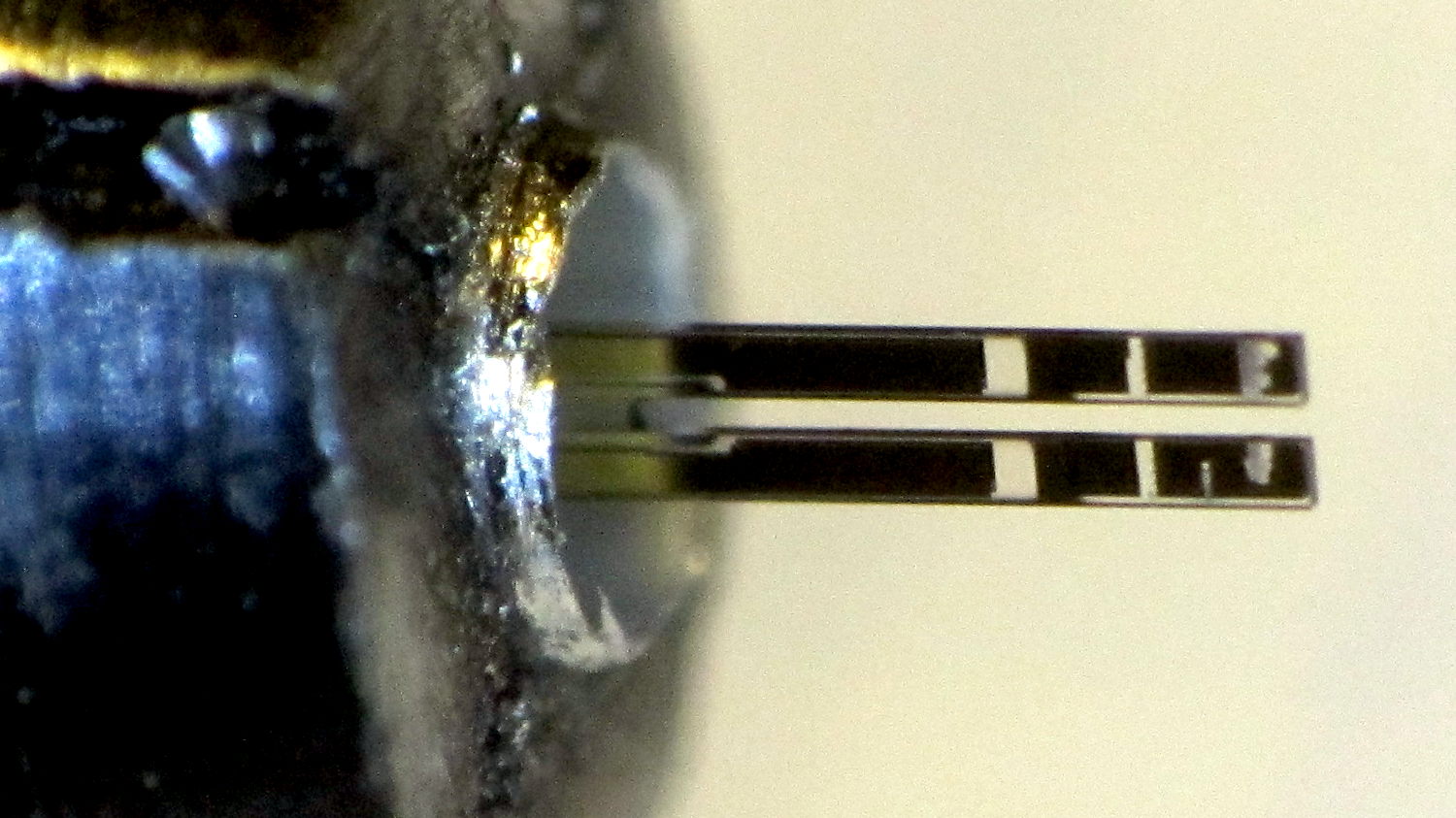
    A look through the microscope show they’re transparent, with laser trim scars on the ends:

    Quartz resonator - detail
    Quartz resonator – detail

    The “holes” are unplated quartz areas, clear as the finest glass.

    Not what I was expecting to see, at all!

  • Vacuum Tube Lights: Duodecar Rebuild

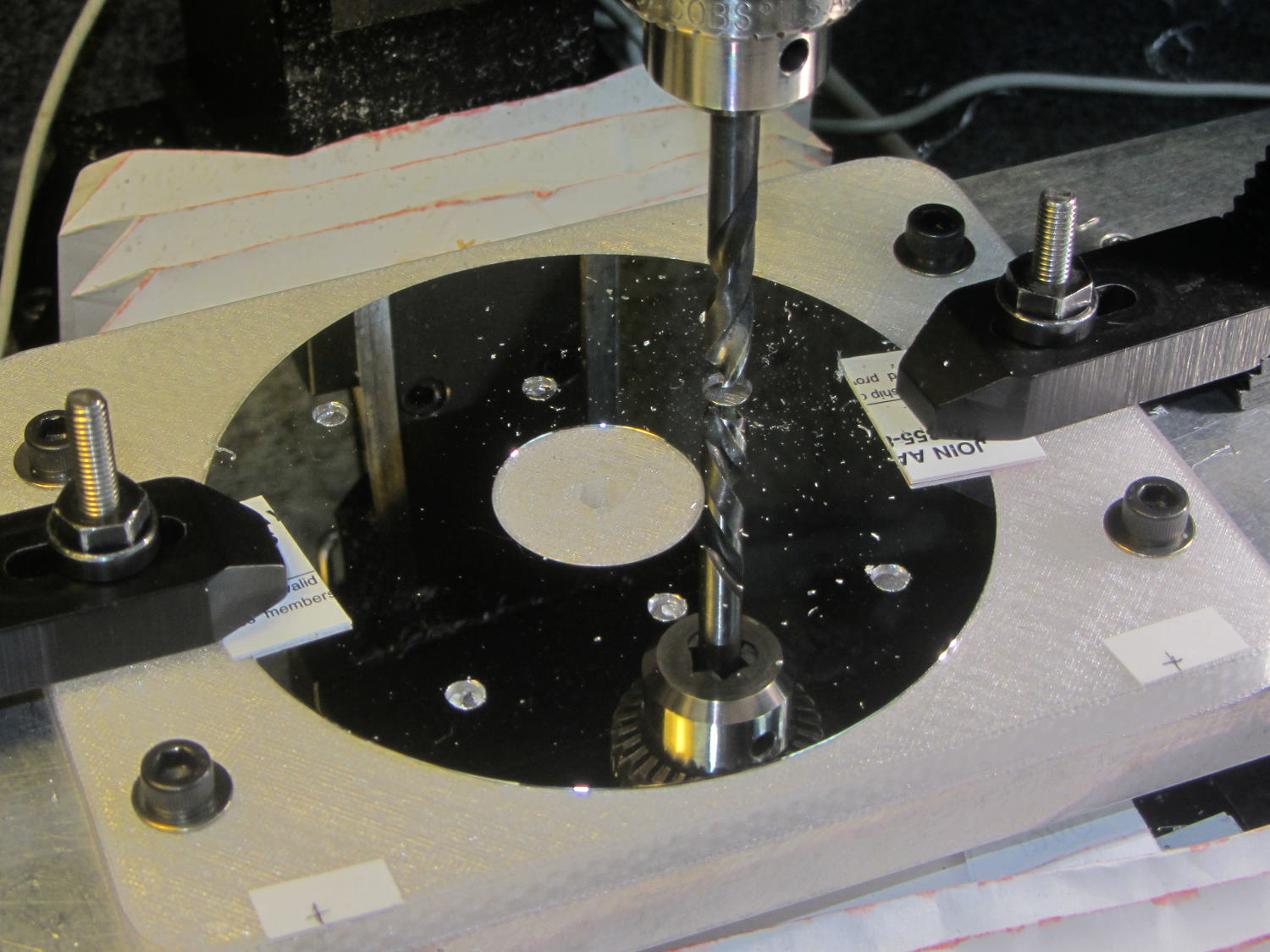
    You’ll recall the LED atop the 21HB5A tube failed, shortly after replacing the bottom LED and rewiring the ersatz plate lead, which led me to rebuild the whole thing with SK6812 RGBW LEDs. So I printed all the plastic parts again, because the duodecar tube socket’s pin circle can fit into a hard drive platter’s unmodified 25 mm hole, then drilled another platter to suit:

    Duodecar disk drilling
    Duodecar disk drilling

    The hole under the drill fits the 3.5 mm stereo socket for the ersatz plate lead, so it’s bigger than before.

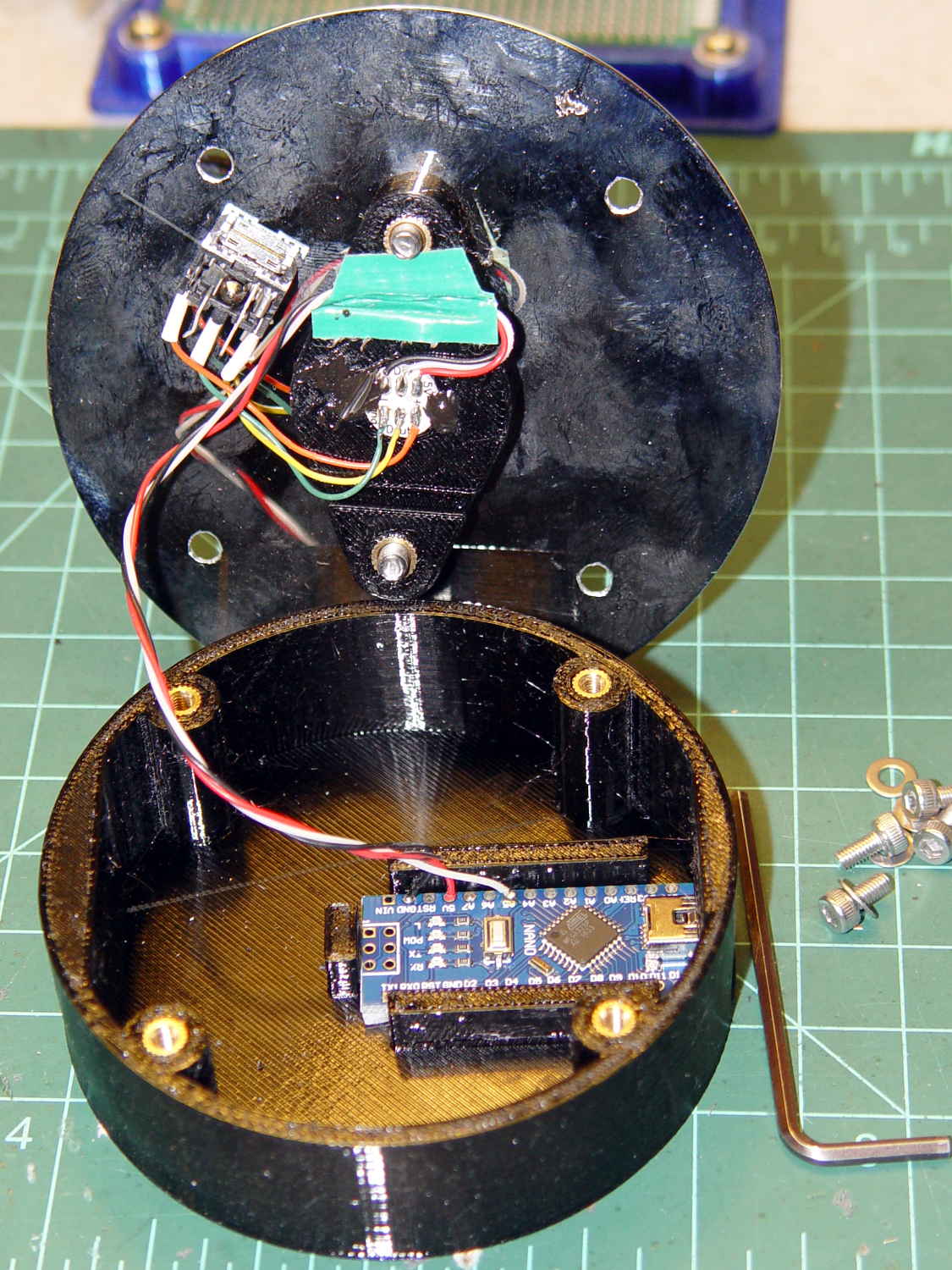
    I’ve switched from Arduino Pro Minis with a separate USB converter to Arduino Nanos with an on-board CH340 USB chip, because the fake FTDI chips on the converters are a continuing aggravation:

    21HB5A base - interior
    21HB5A base – interior

    Adding those wire slots to the sockets definitely helps tidy things up; the wires no longer need a crude cable tie anchoring them to the socket mounting screws.

    I wanted to drive the LEDs from the A7 pin, rather than the A3 pin I’d been using on the Pro Minis, to keep the wires closer together, but it turns out that A6 and A7 can’t become digital output pins. So I used A5, although I may come to regret the backward incompatibility.

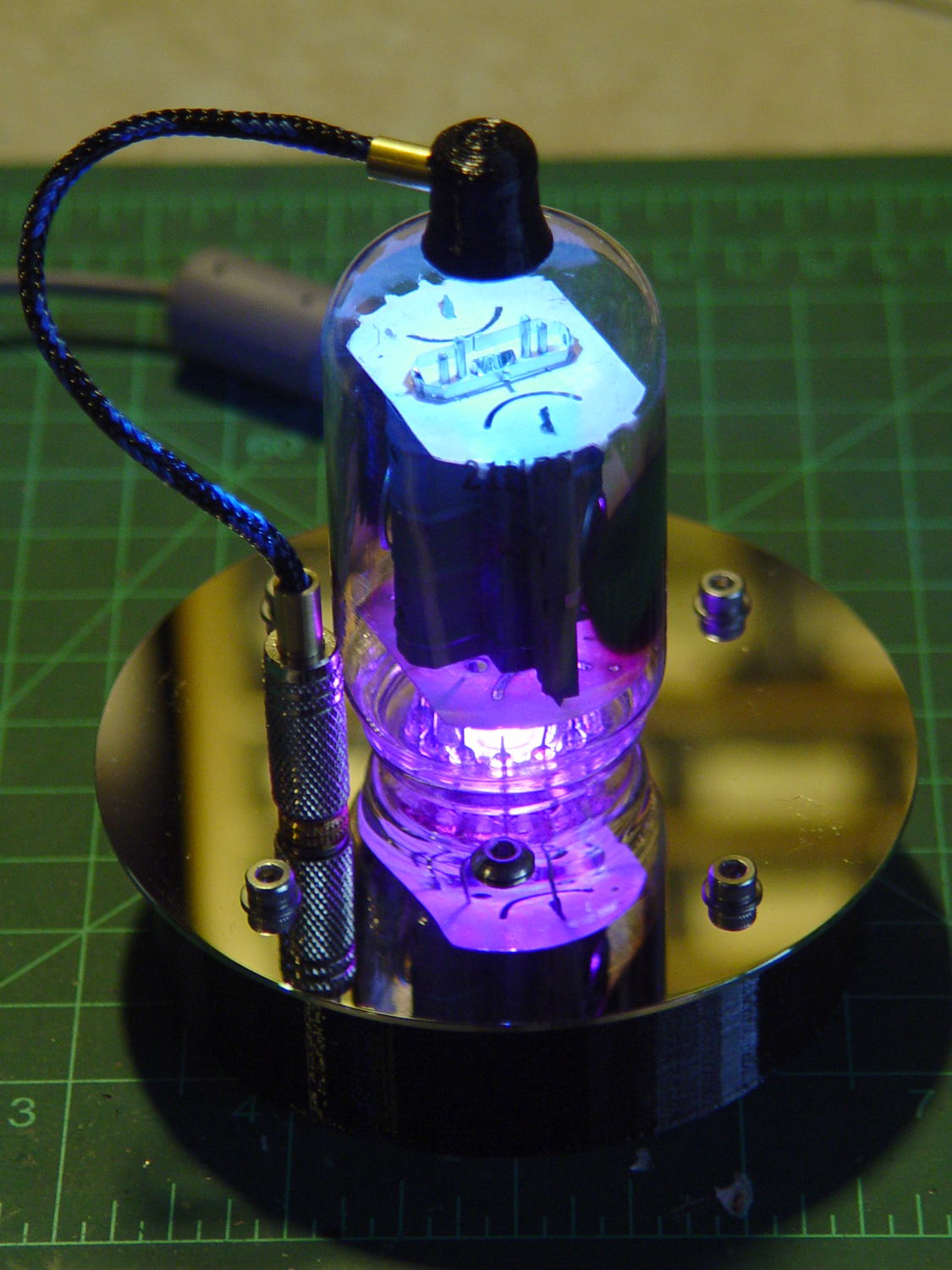
    In any event, the 21HB5A tube looks spiffy with its new LEDs in full effect:

    21HB5A with RBGBW LEDs - cyan violet phase
    21HB5A with RBGBW LEDs – cyan violet phase

    I dialed the white LED PWM down to 32, making the colors somewhat pastel, rather than washed-out.

    The Arduino source code as a GitHub Gist:

    // Neopixel mood lighting for vacuum tubes
    // Ed Nisley – KE4ANU – June 2016
    // September 2016 – Add Morse library and blinkiness
    // October 2016 – Set random colors at cycle end
    // March 2017 – RGBW SK6812 LEDs
    #include <Adafruit_NeoPixel.h>
    #include <morse.h>
    #include <Entropy.h>
    //———-
    // Pin assignments
    const byte PIN_NEO = A5; // DO – data out to first Neopixel
    const byte PIN_HEARTBEAT = 13; // DO – Arduino LED
    #define PIN_MORSE 12
    //———-
    // Constants
    // number of pixels
    #define PIXELS 2
    // index of the Morse output pixel and how fast it sends
    boolean Send_Morse = false;
    #define PIXEL_MORSE (PIXELS – 1)
    #define MORSE_WPM 10
    // lag between adjacent pixel, degrees of slowest period
    #define PIXELPHASE 45
    // update LEDs only this many ms apart (minus loop() overhead)
    #define UPDATEINTERVAL 50ul
    #define UPDATEMS (UPDATEINTERVAL – 1ul)
    // number of steps per cycle, before applying prime factors
    #define RESOLUTION 500
    //———-
    // Globals
    // instantiate the Neopixel buffer array
    Adafruit_NeoPixel strip = Adafruit_NeoPixel(PIXELS, PIN_NEO, NEO_GRBW + NEO_KHZ800);
    uint32_t FullWhite = strip.Color(255,255,255,255);
    uint32_t FullOff = strip.Color(0,0,0,0);
    uint32_t MorseColor;
    struct pixcolor_t {
    unsigned int Prime;
    unsigned int NumSteps;
    unsigned int Step;
    float StepSize;
    float Phase;
    byte MaxPWM;
    };
    unsigned int PlatterSteps;
    byte PrimeList[] = {3,5,7,13,19,29};
    // colors in each LED
    enum pixcolors {RED, GREEN, BLUE, WHITE, PIXELSIZE};
    struct pixcolor_t Pixels[PIXELSIZE]; // all the data for each pixel color intensity
    uint32_t UniColor;
    unsigned long MillisNow;
    unsigned long MillisThen;
    // Morse code
    char * MorseText = " cq cq cq de ke4znu";
    LEDMorseSender Morse(PIN_MORSE, (float)MORSE_WPM);
    uint8_t PrevMorse, ThisMorse;
    //– Figure PWM based on current state
    byte StepColor(byte Color, float Phi) {
    byte Value;
    Value = (Pixels[Color].MaxPWM / 2.0) * (1.0 + sin(Pixels[Color].Step * Pixels[Color].StepSize + Phi));
    // Value = (Value) ? Value : Pixels[Color].MaxPWM; // flash at dimmest points for debug
    return Value;
    }
    //– Select three unique primes for the color generator function
    // Then compute all the step parameters based on those values
    void SetColorGenerators(void) {
    Pixels[RED].Prime = PrimeList[random(sizeof(PrimeList))];
    do {
    Pixels[GREEN].Prime = PrimeList[random(sizeof(PrimeList))];
    } while (Pixels[RED].Prime == Pixels[GREEN].Prime);
    do {
    Pixels[BLUE].Prime = PrimeList[random(sizeof(PrimeList))];
    } while (Pixels[BLUE].Prime == Pixels[RED].Prime ||
    Pixels[BLUE].Prime == Pixels[GREEN].Prime);
    do {
    Pixels[WHITE].Prime = PrimeList[random(sizeof(PrimeList))];
    } while (Pixels[WHITE].Prime == Pixels[RED].Prime ||
    Pixels[WHITE].Prime == Pixels[GREEN].Prime ||
    Pixels[WHITE].Prime == Pixels[BLUE].Prime);
    printf("Primes: %d %d %d %d\r\n",Pixels[RED].Prime,Pixels[GREEN].Prime,Pixels[BLUE].Prime,Pixels[WHITE].Prime);
    Pixels[RED].MaxPWM = 255;
    Pixels[GREEN].MaxPWM = 255;
    Pixels[BLUE].MaxPWM = 255;
    Pixels[WHITE].MaxPWM = 32;
    unsigned int PhaseSteps = (unsigned int) ((PIXELPHASE / 360.0) *
    RESOLUTION * (unsigned int) max(max(max(Pixels[RED].Prime,Pixels[GREEN].Prime),Pixels[BLUE].Prime),Pixels[WHITE].Prime));
    printf("Pixel phase offset: %d deg = %d steps\r\n",(int)PIXELPHASE,PhaseSteps);
    for (byte c=0; c < PIXELSIZE; c++) {
    Pixels[c].NumSteps = RESOLUTION * Pixels[c].Prime; // steps per cycle
    Pixels[c].StepSize = TWO_PI / Pixels[c].NumSteps; // radians per step
    Pixels[c].Step = random(Pixels[c].NumSteps); // current step
    Pixels[c].Phase = PhaseSteps * Pixels[c].StepSize;; // phase in radians for this color
    printf(" c: %d Steps: %d Init: %d Phase: %d deg",c,Pixels[c].NumSteps,Pixels[c].Step,(int)(Pixels[c].Phase * 360.0 / TWO_PI));
    printf(" PWM: %d\r\n",Pixels[c].MaxPWM);
    }
    }
    //– Helper routine for printf()
    int s_putc(char c, FILE *t) {
    Serial.write(c);
    }
    //——————
    // Set the mood
    void setup() {
    pinMode(PIN_HEARTBEAT,OUTPUT);
    digitalWrite(PIN_HEARTBEAT,LOW); // show we arrived
    Serial.begin(57600);
    fdevopen(&s_putc,0); // set up serial output for printf()
    printf("Vacuum Tube Mood Light – RGBW\r\nEd Nisley – KE4ZNU – March 2017\r\n");
    Entropy.initialize(); // start up entropy collector
    // set up pixels
    strip.begin();
    strip.show();
    // lamp test: a brilliant white flash
    printf("Lamp test: flash white\r\n");
    for (byte i=0; i<5 ; i++) {
    for (int j=0; j < strip.numPixels(); j++) { // fill LEDs with white
    strip.setPixelColor(j,FullWhite);
    }
    strip.show();
    delay(500);
    for (int j=0; j < strip.numPixels(); j++) { // fill LEDs with black
    strip.setPixelColor(j,FullOff);
    }
    strip.show();
    delay(500);
    }
    // get an actual random number
    uint32_t rn = Entropy.random();
    printf("Random seed: %08lx\r\n",rn);
    randomSeed(rn);
    // set up the color generators
    SetColorGenerators();
    // set up Morse generator
    Morse.setup();
    Morse.setMessage(String(MorseText));
    MorseColor = strip.Color(255,random(32,64),random(16),0);
    PrevMorse = ThisMorse = digitalRead(PIN_MORSE);
    printf("Morse enabled: %d at %d wpm color: %08lx\n [%s]\r\n",Send_Morse,MORSE_WPM,MorseColor,MorseText);
    MillisNow = MillisThen = millis();
    }
    //——————
    // Run the mood
    void loop() {
    if (!Morse.continueSending()) {
    printf("Restarting Morse message\r\n");
    Morse.startSending();
    }
    ThisMorse = digitalRead(PIN_MORSE);
    MillisNow = millis();
    if (((MillisNow – MillisThen) >= UPDATEMS) || // time for color change?
    (PrevMorse != ThisMorse)) { // Morse output bit changed?
    digitalWrite(PIN_HEARTBEAT,HIGH);
    if (Send_Morse && ThisMorse) { // if Morse output high, overlay flash
    strip.setPixelColor(PIXEL_MORSE,MorseColor);
    }
    PrevMorse = ThisMorse;
    strip.show(); // send out precomputed colors
    boolean CycleRun = false; // check to see if all cycles have ended
    for (byte c=0; c < PIXELSIZE; c++) { // compute next increment for each color
    if (++Pixels[c].Step >= Pixels[c].NumSteps) {
    Pixels[c].Step = 0;
    printf("Cycle %d steps %d at %8ld delta %ld ms\r\n",c,Pixels[c].NumSteps,MillisNow,(MillisNow – MillisThen));
    }
    else {
    CycleRun = true; // this color is still cycling
    }
    }
    // If all cycles have completed, reset the color generators
    if (!CycleRun) {
    printf("All cycles ended: setting new color generator values\r\n");
    SetColorGenerators();
    }
    for (int i=0; i < strip.numPixels(); i++) { // for each pixel
    byte Value[PIXELSIZE];
    for (byte c=0; c < PIXELSIZE; c++) { // … for each color
    Value[c] = (Pixels[c].MaxPWM / 2.0) * (1.0 + sin(Pixels[c].Step * Pixels[c].StepSize – i*Pixels[c].Phase));
    }
    UniColor = strip.Color(Value[RED],Value[GREEN],Value[BLUE],Value[WHITE]);
    strip.setPixelColor(i,UniColor);
    }
    MillisThen = MillisNow;
    digitalWrite(PIN_HEARTBEAT,LOW);
    }
    }
    view raw TubeMorse.ino hosted with ❤ by GitHub
  • Kitchen Sink Faucet Deck Sealing

    I had to replace the faucet on a kitchen sink (not our own, for reasons not relevant here) after the steel nuts & washers holding the base to the sink deck rotted completely away. Why faucet manufacturers used plain steel in that location remains a mystery; I’m sure it has something to do with cost reduction and damn the consequences after a few years.

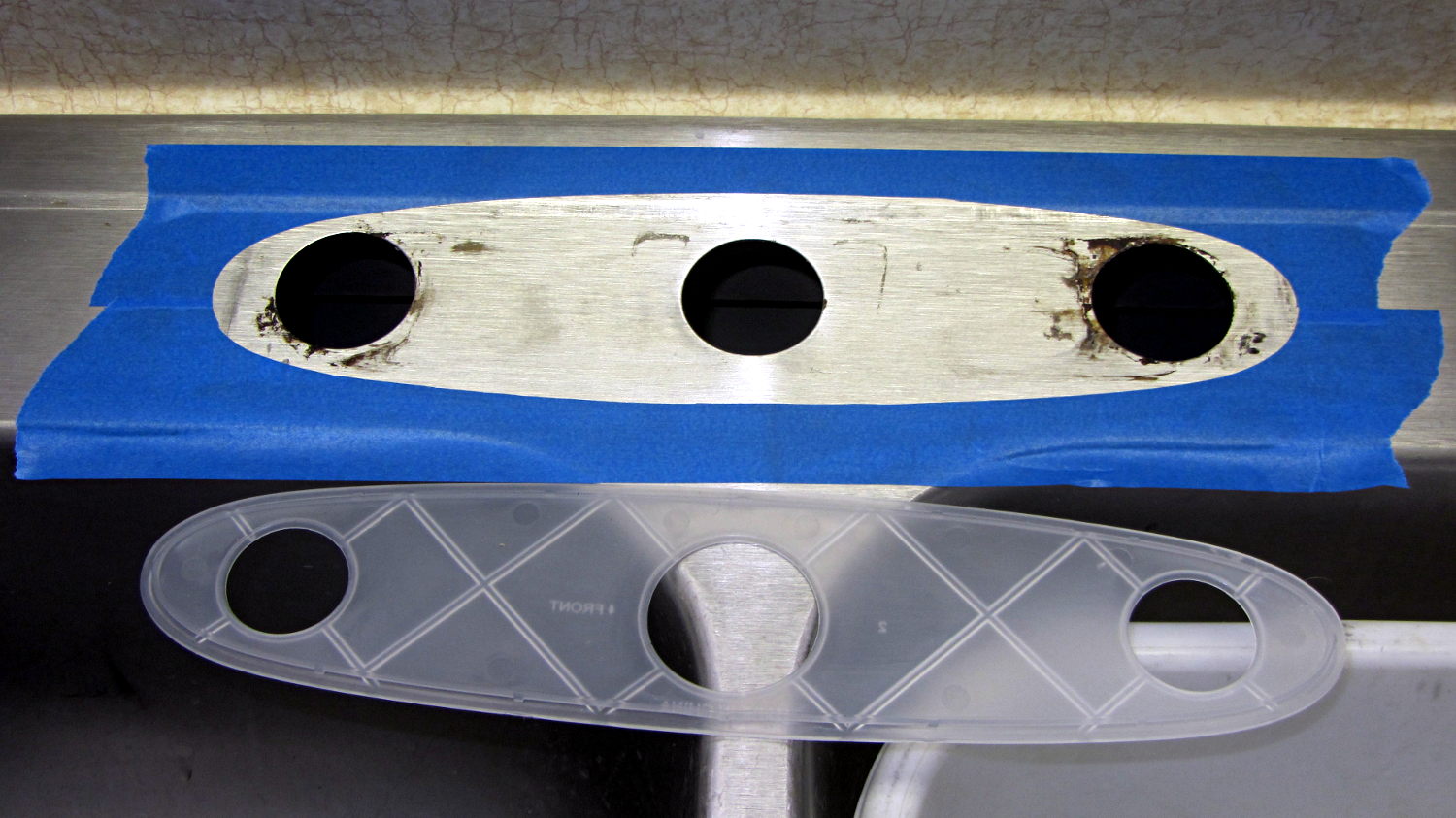
    Of course, the new faucet didn’t sit quite flat on the sink deck, due to the raised rim around the perimeter. Installing it like that would prevent the (hard plastic) gasket from sealing against the deck, with the inevitable water leak below the sink; we started this project by scrapping a water-soaked shelf under the sink due to the previous faucet’s wrecked seal. Sliding the oval base forward enough to clear the rim would expose the two holes on each side, with similar results.

    You can see the problem if you squint hard enough:

    Kitchen Sink Faucet - gasket mask
    Kitchen Sink Faucet – gasket mask

    I decided raising the back of the base by maybe two millimeters wouldn’t be particularly visible, particularly if I filled the space with silicone snot (almost) matching the gasket to provide a solid foundation.

    The blue tape masks the sink surface around the gasket to prevent silicone mishaps and simplify cleanup. I held the gasket in place, traced around it with new Xacto knife blade, and peeled the inside out just like I knew what I was doing.

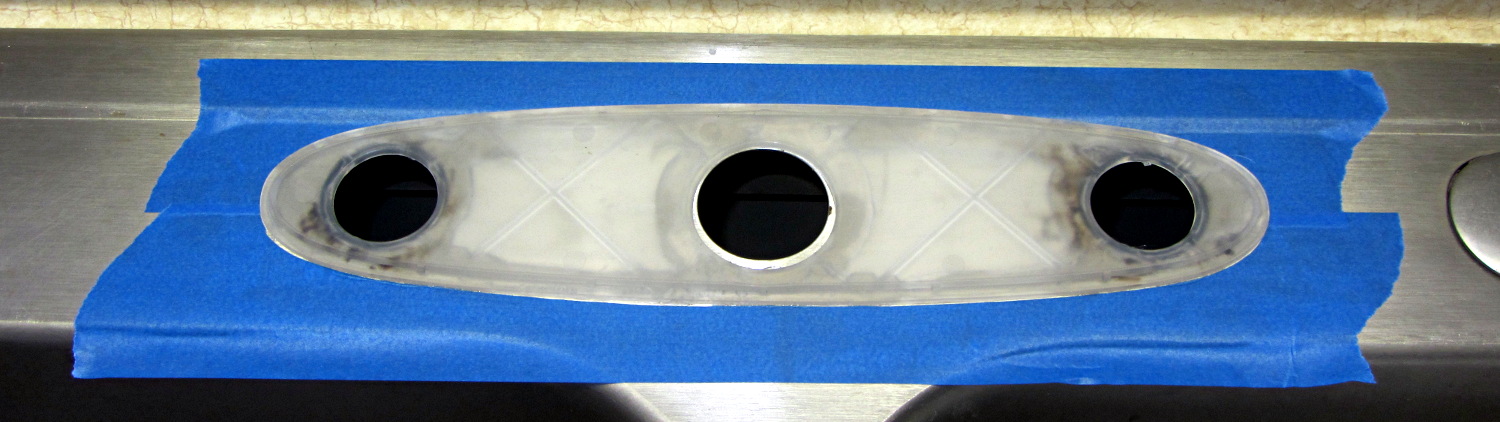
    Generous beads of snot around all the holes and across the back will provide a firm base and a good seal:

    Kitchen Sink Faucet - gasket in place
    Kitchen Sink Faucet – gasket in place

    With that in place, I aligned the faucet over the gasket, gently tightened the nuts holding the base to the deck, and waited a day for the silicone to start curing before completing the plumbing. It’ll take a while to finish, due to the limited area exposed around the edges.

    The water lines now have shutoff ball valves, which the next person to work on it will surely appreciate.

  • Check Your Zero

    A recent OpenSCAD mailing list discussion started with an observation that the dimensions of printed parts were wildly different from the numeric values used in the OpenSCAD program that created the STL. Various folks suggested possible errors, examined the source and STL files to no avail, and were generally baffled.

    Finally, a photo conclusively demonstrating the problem arrived:

    Caliper - digital vs. analog scale
    Caliper – digital vs. analog scale

    Note the difference between the digital readout and the analog scale printed on the body.

    Turns out it’s his first digital caliper: he simply didn’t realize you must close the jaws and press the ZERO button before making any measurements.

    We’ve all been that guy. Right?

    FWIW, our Larval Engineer can probably still hear me intoning “Check your zero” every time she picks up a caliper or turns on a multimeter. Perhaps she’ll think fondly of me, some day. [grin]

  • Kenmore Electric Clothes Dryer Rebuild

    Our ancient Kenmore clothes dryer (Model 110.96282100 for maximal SEO goodness) developed symptoms suggesting the heater and overtemperature cutouts were in fine shape: it continued to turn and heat, but didn’t completely dry the clothes. In addition, it emitted a horrible whine that sounded like a bad bearing.

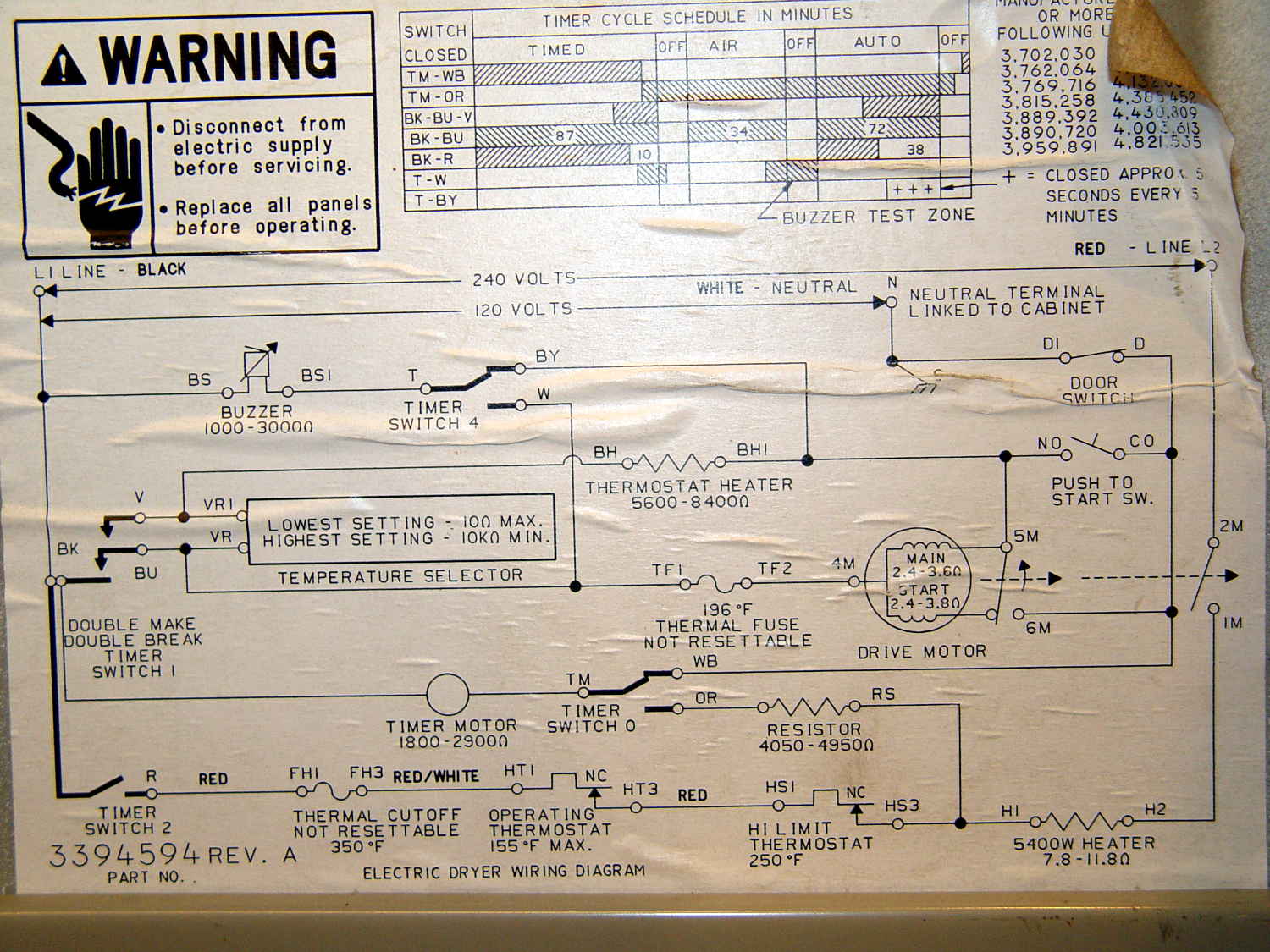
    The wiring diagram pasted on the back panel shows how it works (clicky for more dots):

    Kenmore clothes dryer 110.96282100 - wiring diagram
    Kenmore clothes dryer 110.96282100 – wiring diagram

    Obviously, it’s not a firmware problem…

    The motor ran just fine, so Thermal Fuse 2 had never blown at 196 °F.

    The Operating Thermostat (along the bottom edge of the diagram) switches the 240 VAC heater off when the clothes temperature (actually, the drum exhaust temperature) exceeds 155 °F. It’s in series with the non-resettable 350 °F thermal cutoff and the resettable 250 °F high limit thermostat, both of which were intact, as shown by the fact that the heater still worked.

    We generally run the dryer in Auto mode, with the Temperature Selector in the middle position. The Selector varies the resistance in series with the Operating Thermostat heater (near the middle of the diagram), controlled by Timer Switch 1: increasing resistance reduces the heater current and requires hotter clothes before the Thermostat trips. For the first part of the cycle, the BK-BU contact closes to allow the Selector to affect the current. The BK-V contact also closes during the last part of the cycle, cutting out the Selector and letting the Thermostat hold the clothes at 155 °F by cycling the drum heater.

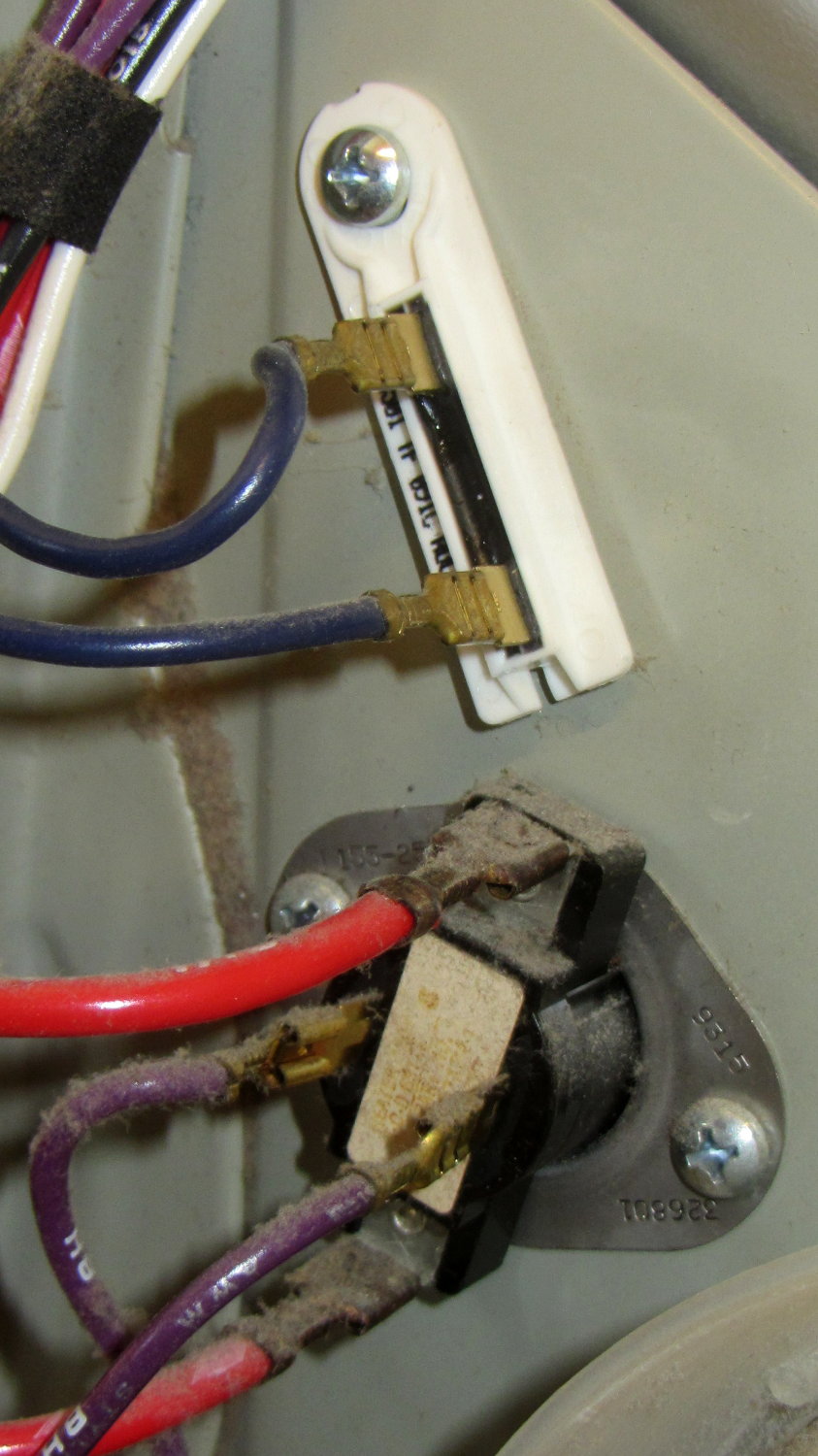
    So I installed a new Operating Thermostat (plus the accompanying thermal fuse I didn’t need):

    Kenmore clothes dryer - operating thermostat
    Kenmore clothes dryer – operating thermostat

    You can do that from the back of the dryer without dismantling it, by removing the rear cover.

    For whatever it’s worth, the replacement Operating Thermostat heater has a 74 kΩ resistance, not the 5.6 to 8.4 kΩ range shown on the wiring diagram. Preliminary testing suggests it does what it’s supposed to, so maybe they’ve improved (and, surely, cheapnified) its guts to work with 1% of the original power. More likely, the Temperature Selector now doesn’t do anything, as its (minimum) 10 kΩ resistance on the High setting doesn’t amount to squat compared with the new thermostat heater, but we don’t have enough experience to say anything definite.

    In an attempt to fix the whine, I took the whole thing apart to replace the idler wheels supporting the drum, the drum drive belt, and the belt tensioner pulley. The interior of the dryer is filled with sharp edges and hatred, so expect some bloodshed.

    Removing and installing the triangular wheel retainers requires a small flat-blade screwdriver and considerable muttering. Here’s the old wheel to the left of the motor, before replacement:

    Kenmore clothes dryer - tub support wheel
    Kenmore clothes dryer – tub support wheel

    After reassembling the dryer, the heater worked fine.

    The whine also worked fine, much to my dismay.

    So I took it all apart again, removed the plate covering the duct from the drum exhaust port to the blower wheel on the motor, removed a generous handful of lint from the middle of the blower wheel, extracted a pile of debris from the bottom of the duct below the wheel, vacuumed everything in sight, reassembled the dryer, and it now sounds great.

    Along the way, a small square brass (?) rod fell out of the debris, sporting one shiny end, well-worn to a diagonal slope. I think the rod got trapped between the duct and the back of the blower wheel, where it would produce the whine only when the motor got up to speed (thus, sounding OK while hand-turning the motor). The accumulated debris & lint held it in place, so flipping the dryer on its face and rotating the motor in both directions had no effect: turning the dryer upright simply let it fall back into the same position.

    No pictures, alas. We did the second teardown in a white-hot frenzy to Get It Done and swept the brass rod away with all the other debris.

    Whew!