The Smell of Molten Projects in the Morning

Ed Nisley's Blog: Shop notes, electronics, firmware, machinery, 3D printing, laser cuttery, and curiosities. Contents: 100% human thinking, 0% AI slop.

Category: Machine Shop

Mechanical widgetry

  • Garden Step2 Seat: Axle Repair

    Garden Step2 Seat: Axle Repair

    The cart in Mary’s Vassar Farm plot returned in need of repair:

    Garden Seat - fractured body
    Garden Seat – fractured body

    Those fractures near the end of the axle let the axle erode the side wall:

    Garden Seat - eroded body
    Garden Seat – eroded body

    This will obviously require some sort of reinforcement on the body holding the axle, but the first challenge involved getting the wheels off the axle:

    Garden Seat - axle cover
    Garden Seat – axle cover

    Some brute force revealed the hub covers snapped over an install-only locking fastener:

    Garden Seat - axle retaining clip
    Garden Seat – axle retaining clip

    More brute force cut those fasteners (a.k.a. star-lock washers) to get the wheels off the axles.

    While contemplating the situation, a box of 606 bearings (as used in the PolyDryer auto-rewind spindles) failed to scamper out of the way and produced a victim fitting perfectly on the 8 mm axle:

    Garden Seat - bearing idea
    Garden Seat – bearing idea

    I regard such happenstance as a message from the Universe showing I’m on the right track. The alert reader will note the axle should not rotate, but does sport scars showing it’s done some turning in the recent past, so the bearing may not be a completely Bad Idea™.

    Finding a Lexan snippet exactly as thick as the bearing suggested bolting a plate across the side of the body to support the bearing, like this:

    Garden Seat - reinforcing plate installed
    Garden Seat – reinforcing plate installed

    Some layout work in LightBurn produced a template to mark the body for hand-drilling the holes:

    Garden Seat - drill marking template
    Garden Seat – drill marking template

    In retrospect, that was a mistake. I should have:

    • Laser-cut an MDF sheet to make a drill jig
    • Drilled one hole and inserted a screw
    • Drilled the rest of the holes in exactly the right places

    Instead, three of the holes in that nice Lexan sheet ended up slightly egg-shaped to adjust for mis-drilled holes in the body.

    Lexan does not laser-cut well at all, so that sheet was drilled to suit after using the template to mark the holes:

    Garden Seat - plate drilling
    Garden Seat – plate drilling

    Then it got bandsawed / belt-sanded into shape.

    I squeezed 5 mm rivnuts into whatever fiber-reinforced plastic they used for the body, which worked better than I expected. They’re intended for sheet metal, so I set the tool for 5 mm compression and they seem secure. I hope using plenty of screws across a large plate will diffuse the stress on each screw.

    Then I threaded the axles and used acorn nuts:

    Garden Seat - repaired axle installed
    Garden Seat – repaired axle installed

    In this situation, I regard JB KwikWeld epoxy as “removable with some effort”, as opposed to the destruction required with those star-lock washers. High-strength Locktite might also be suitable, but I do not anticipate ever having to remove these again for any reason and do not want the nuts to fall off in the garden.

    The re-replaced seat conjured from a cafeteria tray continues to work fine, as do its 3D printed hinges.

    It’ll reside in the shed until Spring rolls around …

  • Mini-lathe Change Gear Generator: Redux

    Mini-lathe Change Gear Generator: Redux

    Because the BOSL2 library includes a gear generator, I can now avoid creating a gear outline in Inkscape and importing it into my stacked change gear generator.

    The labels now snuggle closer to the shaft and (barely) fit on smaller gears:

    Mini-lathe stacked change gears - 28T - solid model
    Mini-lathe stacked change gears – 28T – solid model

    The stacked B-C gears for the jack shaft work as before, with both labels on the top gear:

    Mini-lathe stacked change gears - 28-50T - solid model
    Mini-lathe stacked change gears – 28-50T – solid model

    The admittedly flimsy motivation for all this was to make a 28 tooth gear to cut a 0.9 mm pitch, thus filling an obvious hole in the gear table.

    My collection of gears could do 21-60-81-50, but the 81 T gear collides with the screw holding the 21 T gear. Rearranging it to 21-50-81-60 showed the B-C gears exceeded the space available.

    Because it’s all ratios and a 28 T gear is 4/3 bigger than 21 T, reducing the rest of the train by 3/4 should work. In fact, it produced a reasonable 28-80-81-50 chain:

    Mini-lathe change gears - 28T installed
    Mini-lathe change gears – 28T installed

    The fact that I do not anticipate ever needing to cut a 0.9 mm pitch has nothing whatsoever to do with it; that gear will surely come in handy for something.

    While I was at it, I made a 27 T gear, because 27 = 21 × 9/7:

    Mini-lathe stacked change gears - 27T - PrusaSlicer preview
    Mini-lathe stacked change gears – 27T – PrusaSlicer preview

    You can never have enough change gears. Right?

    The OpenSCAD source code as a GitHub Gist:

    // LMS Mini-Lathe
    // Change gears with stacking
    // Ed Nisley – KE4ZNU
    // 2020-05 use Inkscape SVG gears
    // 2025-12 use BOSL2 gear generator
    include <BOSL2/std.scad>
    include <BOSL2/gears.scad>
    /* [Gears] */
    TopGear = 0; // zero for single gear
    BottomGear = 28;
    /* [Hidden] */
    ThreadThick = 0.20;
    HoleWindage = 0.2;
    Protrusion = 0.1; // make holes end cleanly
    /* [Dimensions] */
    ShaftOD = 12.0;
    GearThick = 7.75;
    Keyway = [3.5,3.0,3*GearThick]; // x on radius, y on perim
    LegendEnable = (TopGear == 0 && BottomGear > 27) || (TopGear > 27);
    LegendThick = 2*ThreadThick;
    LegendZ = (TopGear ? 2*GearThick : GearThick) – LegendThick;
    LegendSize = 5;
    LegendRecess = [8,6,LegendThick];
    LegendOffset = [0,LegendRecess.y/2 + ShaftOD/2 + HoleWindage,LegendZ + LegendRecess.z/2];
    //———————–
    // Build it!
    union() {
    difference() {
    union() {
    spur_gear(mod=1,teeth=BottomGear,thickness=GearThick,shaft_diam=ShaftOD + HoleWindage,anchor=BOTTOM);
    if (TopGear)
    spur_gear(mod=1,teeth=TopGear,thickness=2*GearThick,shaft_diam=ShaftOD + HoleWindage,anchor=BOTTOM);
    }
    right(ShaftOD/2)
    down(Protrusion)
    cube(Keyway,anchor=CENTER+BOTTOM);
    if (LegendEnable) {
    translate(LegendOffset)
    cube(LegendRecess + [0,0,Protrusion],anchor=CENTER);
    if (TopGear)
    zrot(180)
    translate(LegendOffset)
    cube(LegendRecess + [0,0,Protrusion],anchor=CENTER);
    }
    }
    if (LegendEnable)
    translate([0,0,LegendZ – Protrusion])
    linear_extrude(height=LegendThick + Protrusion,convexity=10) {
    translate([LegendOffset.x,LegendOffset.y])
    text(text=str(BottomGear),size=LegendSize,font="Arial:style:Bold",halign="center",valign="center");
    if (TopGear)
    zrot(180)
    translate([LegendOffset.x,LegendOffset.y])
    text(text=str(TopGear),size=LegendSize,font="Arial:style:Bold",halign="center",valign="center");
    }
    }
  • Mini-lathe Change Gear Banjo Shim

    Mini-lathe Change Gear Banjo Shim

    I intended to single-point a few turns on an 8 mm axle to ease running an M8-1.25 die over it, thus making a thread for a nut securing a wheel (about which, more later). This required selecting the change gears for a 1.25 mm thread pitch, the installation of which proved sufficiently awkward to give me the opportunity to discover a washer spacing the banjo just a little farther outward would improve the gear alignment:

    Mini-lathe change gear banjo - shim detail
    Mini-lathe change gear banjo – shim detail

    The overview shows how moving the whole banjo just a bit leftward better aligned black Gear B with respect to orange Gear A:

    Mini-lathe change gear banjo - shim overview
    Mini-lathe change gear banjo – shim overview

    From A to D, a 1.25 mm pitch uses 42 40 45 60 tooth gears. The 42 tooth gear supplies the magic required to convince a hard-inch 16 TPI leadscrew to produce good-enough metric pitches.

    In addition to the usual hassle, the main reason the process took so long is doing having to do it twice. After I swapped Gear C and Gear B on the jockey shaft in the middle, the leadscrew produced the correct 1.25 mm motion for one turn of the chuck:

    Mini-lathe change gear banjo - thread pitch check
    Mini-lathe change gear banjo – thread pitch check

    Measure twice, cut once …

  • Hens and Chicks Coasters

    Hens and Chicks Coasters

    Mary’s Hens and Chicks gardening group is having a White Elephant gift swap, where one can get rid of anything vaguely garden-related without repercussions, so I ran off a set of eponymous coasters for practice:

    Hens and Chicks Coasters - overview
    Hens and Chicks Coasters – overview

    They’re 3 mm laser plywood with English Chestnut stain and satin polyurethane sealant, with PSA cork on the underside. Even if (IMO) the stain came out too dark on some of them, they’re perfectly suited for the occasion.

    Coasters need a storage case:

    Hens and Chicks Coasters - case
    Hens and Chicks Coasters – case

    That’s 1.5 mm Trocraft Eco, which is AFAICT really nice chipboard, with a box layout from boxes.py.

    The image comes from The New Garden Encyclopedia, a fine source of classic images and outdated advice.

  • Marquetry Test Piece

    Marquetry Test Piece

    Based on several examples from the LightBurn forum which I cannot find, this emerged:

    Marquetry test - finished
    Marquetry test – finished

    It’s ordinary laser-grade 3 mm plywood with another wood inlay, sanded flat and covered with polyurethane sealer.

    The key attraction: not fiddling with tiny veneer bits.

    Cut the recesses in one pass with enough energy to make them at least as deep as the veneer thickness:

    Marquetry test - plywood cutting
    Marquetry test – plywood cutting

    Press the veneer onto aluminum tape, taking care to avoid wrinkles and folds, and cut away everything that doesn’t go into those recesses:

    Marquetry test - veneer cutting
    Marquetry test – veneer cutting

    Which looks gnarly when you’re done:

    Marquetry test - veneer on tape
    Marquetry test – veneer on tape

    I cut the aluminum tape to fit within the corner targets around the plywood layout, thus simplifying making possible aligning the positive veneer shapes with the negative plywood shapes while being unable to see either of them.

    Slather wood glue over the plywood, make sure even the tiniest recesses are filled, align the aluminum, clamp the two firmly together, wait for a few days while the glue cures in that airless space, then peel off the aluminum:

    Marquetry test - peeled
    Marquetry test – peeled

    Which looked so awful I thought that was a disaster, not least because the veneer stood proud of the plywood, so it remained on the back of the bench for far too long.

    Eventually, having deployed the sander for another project, I sanded the veneer flush with the plywood to reveal the nearly perfect results in the lead picture. There’s a bit of smoke stain left in the grain, but the tiniest recesses have at least some veneer fill and the surface is entirely smooth.

    The overlaid circles worked out:

    Marquetry test - detail 1
    Marquetry test – detail 1

    The darkest block and the smaller lines are badly smoke-stained veneer, as they have wood grain visible under magnification. I think those may not have fully entered their recesses and we’re seeing a very thin veneer layer soaked with soot-filled wood glue.

    Another view:

    Marquetry test - detail 2
    Marquetry test – detail 2

    The checkerboard squares worked well;

    Marquetry test - squares 1
    Marquetry test – squares 1

    To my astonishment, even the 0.5 mm squares have some veneer inside, as do the 0.5×1.0 mm rectangles on the left:

    Marquetry test - squares 2
    Marquetry test – squares 2

    Not knowing any better, there’s no kerf offset on any of the figures and they’re separated by about the 0.2 mm width of the focused spot.

    Aligning the veneer to the recesses was tricky and I was not at all sure it had happened. I think larger shapes would be much easier and might give off a confirming squish as they meet their sockets.

    Gotta try that again without the benefit of beginner’s luck.

  • Large Smashed Glass Coaster

    Large Smashed Glass Coaster

    Those of long memory will recall our vermiculture setup in the basement that turns kitchen scraps into plant food. We accumulate scraps in plastic milk jugs, which jugs get recycled after they become grody.

    I finally made a decorative coaster to keep the sometimes-wet jug off the counter:

    Printed Fragment Coaster 165mm - in use
    Printed Fragment Coaster 165mm – in use

    This used several of the larger smashed glass fragments from the collection:

    Fragments 165mm square - scan sample
    Fragments 165mm square – scan sample

    They all fit inside a 165 mm square, with the conformal perimeter disguising the outline:

    Printed Fragment Coaster 165mm - overview
    Printed Fragment Coaster 165mm – overview

    I printed the frame with the same blue PETG-CF that leaked epoxy the last time around. Using the correct filament setting (Extrusion Multiplier = 1.0) produced an epoxy-tight frame:

    Printed Fragment Coaster 165mm - epoxy filling
    Printed Fragment Coaster 165mm – epoxy filling

    The overall process:

    • Run a bead of epoxy around the edge of each recess
    • Fill in the center with a thin layer
    • Squish the metallized paper reflector in place starting from one end to ease the bubbles out
    • Cover the reflector with another layer of epoxy
    • Lay the glass fragment down starting at one end
    • Press gently down to get all the bubbles out
    • Cover the glass with more epoxy

    I dripped enough epoxy on each fragment to form a meniscus without having it go over the rim:

    Printed Fragment Coaster 165mm - epoxy meniscus
    Printed Fragment Coaster 165mm – epoxy meniscus

    The Basement Shop temperature is just over 60 °F, so I put a heating pad in a huge ziplock bag, laid an aluminum sheet atop it as a heat spreader, put some waxed paper on the aluminum just in case, then did the filling described above:

    Printed Fragment Coaster 165mm - warming setup
    Printed Fragment Coaster 165mm – warming setup

    A cardboard box on top helped the heating pad keep the coaster at a uniform 85 °F, slightly warmer than the epoxy instructions recommend, but it cured overnight with a wonderfully shiny surface.

    Now that I have the process down, making glittery coasters is surprisingly easy.

  • PolyDryer Humidity: White PETG

    PolyDryer Humidity: White PETG

    The white PETG filament started out at 39 %RH and 50 g of silica gel dragged it down to 23 %RH after a three days: still unusually high.

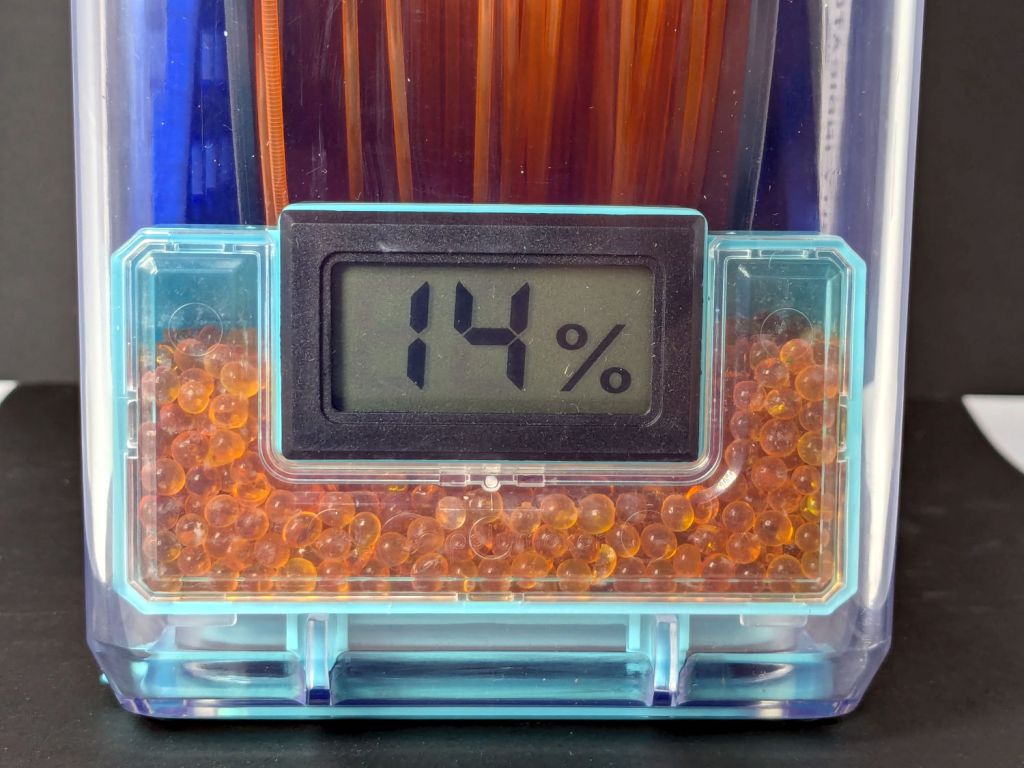
    The beads weighed 54.6 g, a weight gain of 9 %, which is about as much as they’ll take. I replaced them with 50 g of new-from-the-bottle beads and the meter dropped to 14 %RH overnight.

    Running the tiny fan for another day made no difference:

    Polydryer Box desiccant tray - fan
    Polydryer Box desiccant tray – fan

    Thereby confirming my suspicion that air circulation inside the box isn’t nearly as much of a problem as I expected.

    So filament need not arrive bone-dry and, with enough surface area exposed to the air, silica gel beads can adsorb their limit of water vapor in a day or two.